GoSlowPoke168/Argus
GitHub: GoSlowPoke168/Argus
一款聚合全球 126 个国家八万余个公开摄像头源的高性能监控仪表盘,提供实时地图可视化与插件化数据采集能力。
Stars: 5 | Forks: 0
# ARGUS — 全球摄像头智能系统
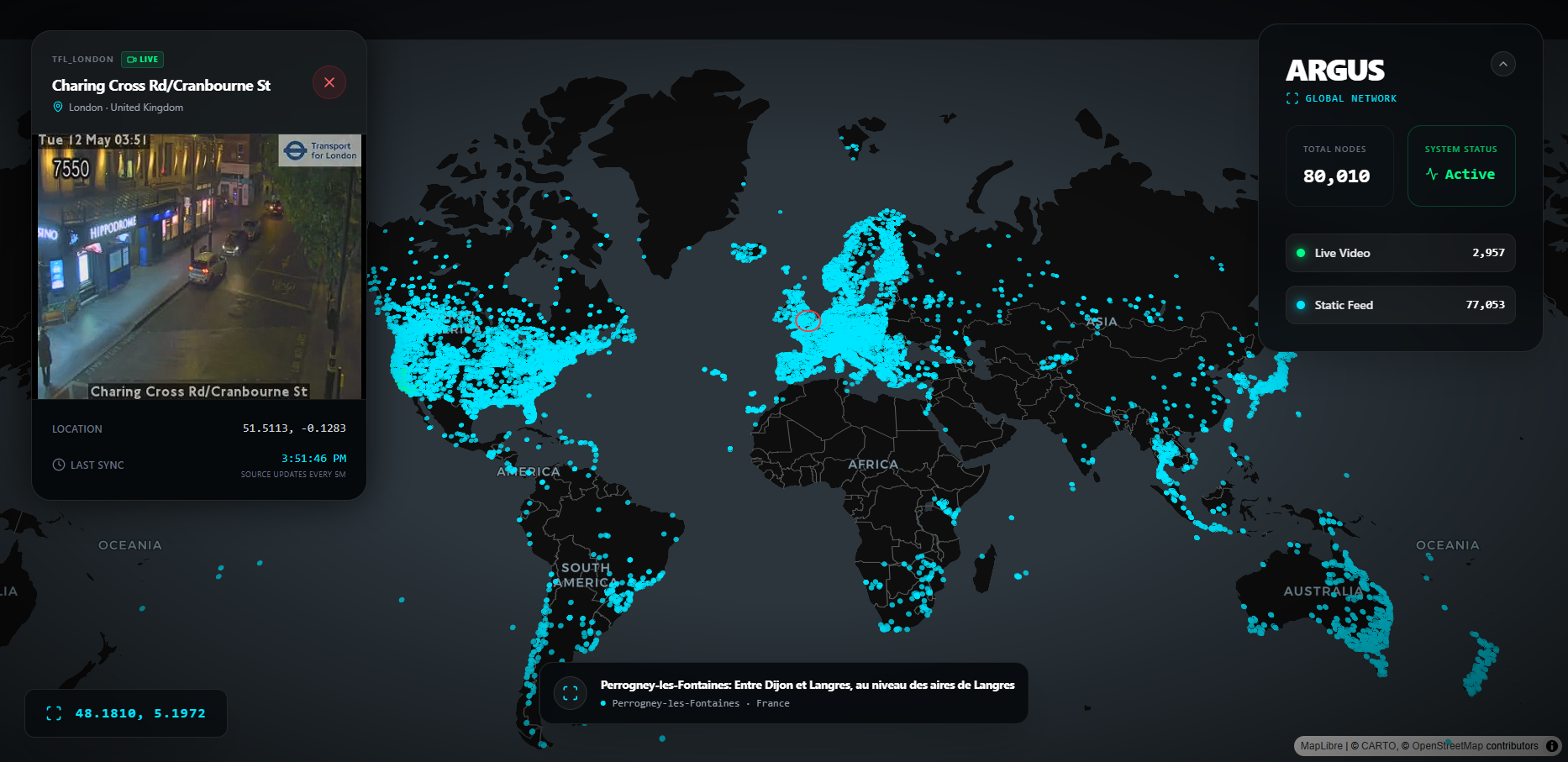
Argus 是一款高性能、战术级的监控仪表盘,旨在聚合和可视化全球开放数据摄像头源。它提供了对全球高速公路、地标和城市中心超过 80,000 多个摄像头节点的实时监控。
## 核心特性
- **海量全球规模**:接入来自全球 126+ 个国家的 80,000+ 个摄像头。
- **实时可视化**:通过 Deck.GL 和 MapLibre 实现高性能地图渲染。
- **混合源支持**:在实时 HLS 视频流(.m3u8)和高频静态 JPEG 之间自动切换。
- **智能引擎**:基于插件的架构,用于添加新的区域数据源(Caltrans、DriveBC、LTA、Windy 等)。
## 项目结构
```
Argus/
├── public/
│ └── cameras.geojson # The main camera dataset (auto-generated)
├── scripts/ # Python Data Pipeline
│ ├── engine.py # Unified CLI runner — the only script you need
│ ├── scrapers/
│ │ ├── utils.py # Shared helpers
│ │ ├── global/
│ │ │ └── windy.py # Windy
│ │ ├── usa/
│ │ │ ├── california/
│ │ │ │ └── caltrans.py # Caltrans
│ │ │ ├── new_york/
│ │ │ │ └── nyc_dot.py # NYC DOT
│ │ │ ├── iowa/
│ │ │ │ └── iowa511.py # Iowa DOT (ArcGIS)
│ │ ├── canada/
│ │ │ └── bc/
│ │ │ └── drivebc.py # DriveBC
│ │ ├── asia/
│ │ │ └── singapore/
│ │ │ └── lta.py # Singapore LTA
│ │ ├── europe/
│ │ │ └── uk/
│ │ │ └── tfl_london.py # TfL London
│ │ └── oceania/
│ │ └── nz/
│ │ └── nzta.py # NZTA
│ └── legacy/ # Retired scripts
├── src/ # React Frontend
└── .env # API Keys
```
## 设置与安装
### 1. 前端
```
npm install
npm run dev
```
### 2. Python 流水线
**要求:**
- Python 3.9+
- `pip install requests`
**API 密钥** — 在项目根目录创建一个 `.env` 文件:
```
WINDY_API_KEY=your_key_here
VITE_WINDY_API_KEY=your_key_here
```
## 运行数据流水线
所有的抓取工作都是通过一个统一的引擎完成的。请在 `scripts/` 目录下运行命令:
```
cd scripts
```
### 查看所有可用的插件
```
python engine.py --list
```
### 常见工作流
| 目标 | 命令 |
|---|---|
| 完整的全球运行(所有内容) | `python engine.py --all` |
| 仅运行 Windy(10 万级别的大型运行) | `python engine.py --plugins windy` |
| 所有快速数据源,跳过 Windy | `python engine.py --all --exclude windy` |
| 特定数据源 | `python engine.py --plugins drivebc tfl_london nyc_dot` |
| 移除过期摄像头并刷新 | `python engine.py --all --replace-source` |
| 清空并从头开始重建 | `python engine.py --all --fresh` |
| 自定义输出路径 | `python engine.py --all --output ../public/cameras.geojson` |
| 并行运行插件 | `python engine.py --all --exclude windy --parallel` |
### 更新模式
| 模式 | 作用 |
|---|---|
| *(默认 — upsert)* | 加载现有数据,按 ID 刷新已知摄像头,并追加新摄像头。随时可安全重新运行,不会丢失数据。 |
| `--replace-source` | 删除正在运行的源中的所有摄像头,然后插入最新结果。**使用此选项可移除过期/离线的摄像头。** 来自其他源的摄像头将保持不变。 |
| `--fresh` | 完全忽略现有文件。仅写入刚刚获取的数据。用于从零开始完全重建。 |
### Windy 完整全球运行(推荐用于 8 万以上节点)
Windy 插件会在单个命令中自动分两个阶段运行——无需手动操作:
1. **阶段 1** — 使用 20°×20° 网格(162 个方格)扫描全球
2. **阶段 2** — 任何返回 ≥999 个摄像头的方格将自动递归细分为四个象限,直到完全穷尽
```
# 一条命令 — 自动执行两个阶段
python engine.py --plugins windy
```
## 数据源
| 插件别名 | 来源 | 区域 | 摄像头类型 | API 密钥 |
|:---|:---|:---|:---|:---|
| `windy` | [Windy Webcams](https://api.windy.com/) | 🌍 全球 | 地标、天气、风景 | ✅ 必填(免费) |
| `caltrans` | [Caltrans CCTV](https://cwwp2.dot.ca.gov/) | 美国,加利福尼亚州 | 高速公路/交通 | ❌ 无 |
| `nyc_dot` | [NYC TMC](https://webcams.nyctmc.org/) | 美国,纽约市 | 城市/交通 | ❌ 无 |
| `drivebc` | [DriveBC](https://www.drivebc.ca/) | 加拿大,不列颠哥伦比亚省 | 高速公路/山区 | ❌ 无 |
| `singapore_lta` | [新加坡 LTA](https://data.gov.sg/) | 新加坡 | 城市/交通 | ❌ 无 |
| `tfl_london` | [伦敦交通局](https://api.tfl.gov.uk/) | 英国,伦敦 | 交通拥堵摄像头/交通 | ❌ 无 |
| `nzta` | [NZTA Journeys](https://www.journeys.nzta.govt.nz/) | 新西兰 | 高速公路 | ❌ 无 |
| `iowa_dot` | [Iowa DOT](https://services.arcgis.com/8lRhdTsQyJpO52F1/ArcGIS/rest/services/Traffic_Cameras_View/FeatureServer/0) | 美国,爱荷华州 | 交通/高速公路 | ❌ 无 |
## 添加新的抓取插件
引擎会自动加载在 `engine.py` 中 `PLUGIN_REGISTRY` 内注册的任何插件。以下是添加插件的方法:
### 步骤 1 — 创建抓取文件
在 `scripts/scrapers/` 下相应的区域文件夹中创建一个新的 `.py` 文件。该文件**必须**导出一个 `fetch(config)` 函数,该函数返回一个 GeoJSON Feature 字典列表。
```
# scripts/scrapers/usa/my_new_source.py
from scrapers.utils import log, build_feature, HEADERS
import requests
PLUGIN_META = {
"name": "My New Source",
"key_required": False,
"description": "Short description of what this scrapes",
}
def fetch(config: dict) -> list[dict]:
log("Fetching My New Source...")
features = []
try:
resp = requests.get("https://example.gov/api/cameras", headers=HEADERS,
timeout=config.get("TIMEOUT", 15))
resp.raise_for_status()
cams = resp.json()
except Exception as e:
log(f"Fetch failed: {e}", "ERROR")
return []
for cam in cams:
try:
lat = float(cam["lat"])
lon = float(cam["lon"])
if lat == 0 and lon == 0:
continue
features.append(build_feature(
cam_id = str(cam["id"]),
name = cam.get("name", "Unknown Camera"),
lat = lat,
lon = lon,
feed_url = cam.get("imageUrl", ""),
cam_type = "traffic", # "traffic", "landmark", etc.
city = cam.get("city", ""),
country = "US",
source = "my_new_source", # unique snake_case identifier
))
except Exception:
continue
log(f"My New Source: {len(features)} cameras loaded", "OK")
return features
```
### 步骤 2 — 在 `engine.py` 中注册
打开 `scripts/engine.py` 并向 `PLUGIN_REGISTRY` 添加一个条目:
```
PLUGIN_REGISTRY = {
# ... existing entries ...
"my_new_source": {
"module": "scrapers.usa.my_new_source", # Python module path
"name": "My New Source",
"key": None, # or "MY_API_KEY_ENV_VAR"
"description": "Short description shown in --list",
},
}
```
### 步骤 3 — 如果需要 API 密钥
将密钥添加到 `.env`:
```
MY_API_KEY=your_key_here
```
然后在 `engine.py` 的 `CONFIG` 字典中引用它:
```
CONFIG = {
# ... existing ...
"MY_API_KEY": os.getenv("MY_API_KEY"),
}
```
并在你的插件中通过 `config.get("MY_API_KEY")` 读取它。
### 步骤 4 — 运行
```
cd scripts
python engine.py --plugins my_new_source
```
## 环境配置
在**项目根目录**(`Argus/.env`)创建一个 `.env` 文件:
```
# Windy plugin 必需(10万+ 全球摄像头)
WINDY_API_KEY=your_windy_key_here
# React 前端 Windy JIT token 获取必需
VITE_WINDY_API_KEY=your_windy_key_here
```
## 许可证
本项目仅用于教育和开放数据可视化目的。所有摄像头源均来自公开、非敏感的政府或商业 API。
标签:ArcGIS, Deck.GL, ESC4, GeoJSON, HLS视频流, m3u8, MapLibre, OSINT, Python, URL抓取, 交通数据, 全球监控, 公共安全, 前端可视化, 可视化大屏, 地理信息系统, 城市监控, 实时处理, 摄像头聚合, 数据仪表盘, 数据抓取, 无后门, 智能交通, 监控摄像头, 网络地图, 视频流处理, 逆向工具, 高速公路监控