alfredang/cryptography-toolkit
GitHub: alfredang/cryptography-toolkit
一个纯浏览器端的密码学演练场,涵盖 AES、DES、3DES、RC4 对称加密、RSA 非对称加密以及 ECDSA 数字签名,所有操作本地完成、无需后端。
Stars: 1 | Forks: 0
# 密码学工具箱
[](https://developer.mozilla.org/docs/Web/HTML)
[](https://developer.mozilla.org/docs/Web/CSS)
[](https://developer.mozilla.org/docs/Web/JavaScript)
[](https://github.com/brix/crypto-js)
[](https://github.com/travist/jsencrypt)
[](https://alfredang.github.io/cryptography-toolkit/)
[](https://opensource.org/licenses/MIT)
**一个现代化、用户友好的经典与现代密码学操作 Web 工具。**
[在线演示](https://alfredang.github.io/cryptography-toolkit/) · [报告 Bug](https://github.com/alfredang/cryptography-toolkit/issues) · [请求功能](https://github.com/alfredang/cryptography-toolkit/issues)
## 截图
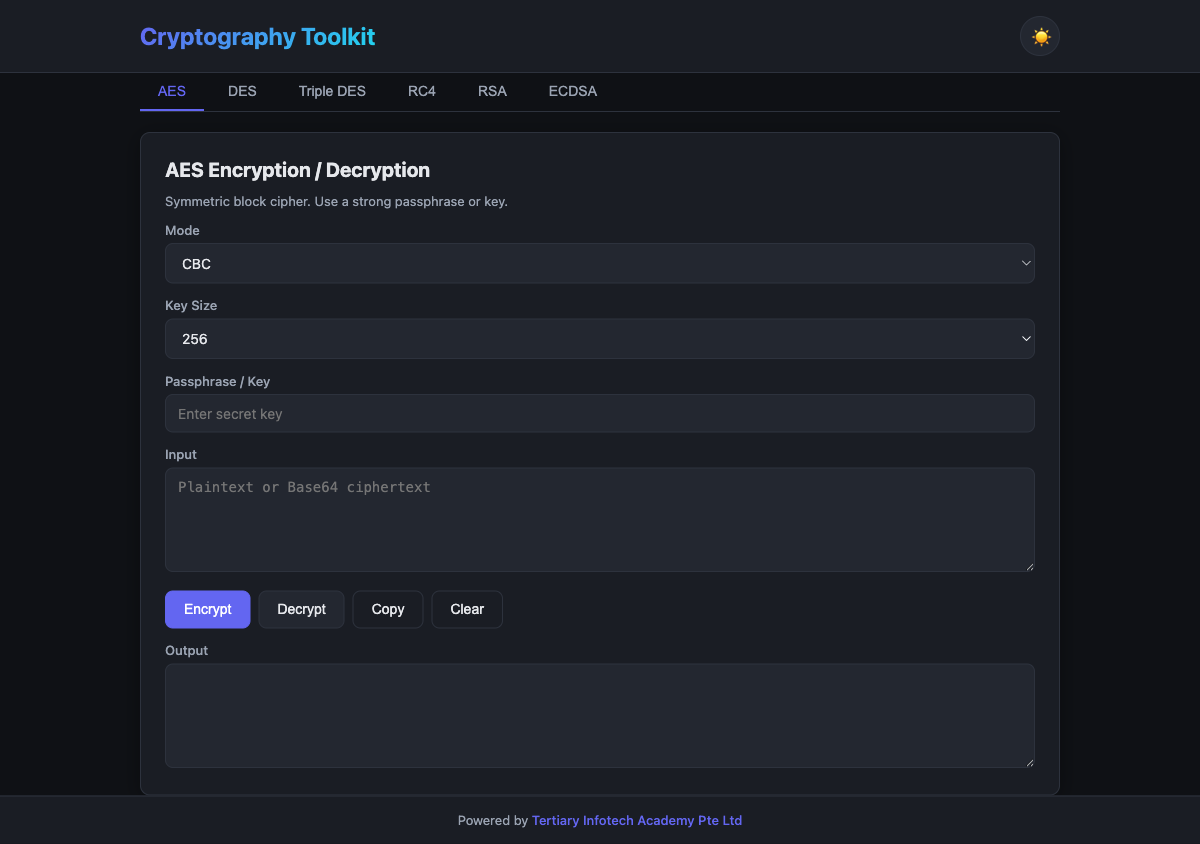
## 关于
一个简洁的、基于浏览器的密码学演练场,让你可以体验对称加密、非对称加密和数字签名——所有操作都在你的浏览器中本地运行。任何数据都不会离开你的设备。
### 核心功能
| 功能 | 描述 |
|---------|-------------|
| **AES** | 支持 128/192/256 位密钥,包含 CBC、ECB、CFB、OFB、CTR 模式以及 PBKDF2 密钥派生 |
| **DES** | 经典 64 位 DES(CBC、ECB、CFB、OFB)— 仅供教学使用 |
| **Triple DES** | 支持多种分组模式的 3DES |
| **RC4** | 流加密实现 |
| **RSA** | 1024/2048/4096 位密钥生成,支持使用 PEM 密钥进行加密/解密 |
| **ECDSA** | 通过 Web Crypto API 在 P-256、P-384、P-521 曲线上对消息进行签名和验证 |
| **深色 / 浅色主题** | 可切换主题,偏好设置保存至 localStorage(默认为深色) |
| **零后端** | 100% 客户端运行——你的机密信息永远不会离开浏览器 |
## 技术栈
| 层级 | 技术 |
|-------|------------|
| **前端** | HTML5, CSS3, Vanilla JavaScript |
| **对称加密** | [CryptoJS](https://github.com/brix/crypto-js) 4.2.0 |
| **RSA** | [JSEncrypt](https://github.com/travist/jsencrypt) 3.3.2 |
| **ECDSA** | 原生 [Web Crypto API](https://developer.mozilla.org/docs/Web/API/Web_Crypto_API) |
| **托管** | GitHub Pages(通过 GitHub Actions) |
## 系统架构
```
┌──────────────────────────────────────────────────────┐
│ Browser (Client) │
│ │
│ ┌────────────────────────────────────────────────┐ │
│ │ UI Layer (HTML + CSS) │ │
│ │ Tabs · Forms · Theme toggle · Responsive │ │
│ └────────────────────┬───────────────────────────┘ │
│ │ │
│ ┌────────────────────┴───────────────────────────┐ │
│ │ Crypto Controller (script.js) │ │
│ └──┬───────────────┬───────────────┬─────────────┘ │
│ │ │ │ │
│ ┌──▼────────┐ ┌────▼───────┐ ┌─────▼────────────┐ │
│ │ CryptoJS │ │ JSEncrypt │ │ Web Crypto API │ │
│ │ AES · DES │ │ RSA │ │ ECDSA │ │
│ │ 3DES · RC4│ │ │ │ │ │
│ └───────────┘ └────────────┘ └──────────────────┘ │
└──────────────────────────────────────────────────────┘
No network · No backend
```
## 项目结构
```
cryptography-toolkit/
├── index.html # UI with tabs for each cipher
├── style.css # Dark/light theme + responsive layout
├── script.js # Crypto operations and theme/tab logic
├── screenshot.png # README screenshot
├── .github/
│ └── workflows/
│ └── deploy.yml # GitHub Pages deploy workflow
└── README.md
```
## 快速开始
### 前置条件
任何现代浏览器(Chrome、Firefox、Safari、Edge)。
### 本地运行
选项 A —— 直接打开:
```
git clone https://github.com/alfredang/cryptography-toolkit.git
cd cryptography-toolkit
open index.html
```
选项 B —— 使用本地 Web 服务器提供服务(推荐):
```
python3 -m http.server 8000
# 然后打开 http://localhost:8000
```
## 部署
本项目在每次推送到 `main` 分支时,会通过 `.github/workflows/deploy.yml` 中的工作流自动部署到 **GitHub Pages**。
要部署你自己的 Fork:
1. Fork 本仓库
2. 前往 **Settings → Pages**,将来源设置为 **GitHub Actions**
3. 推送到 `main` 分支——你的网站将在 `https://
⭐ **如果你觉得这个项目有用,请给它点个 Star!**
标签:3DES, AES, CMS安全, CryptoJS, CSS3, CVE, DES, DNS 反向解析, ECDSA, GitHub Pages, HTML5, JavaScript, JSEncrypt, meg, PBKDF2, PEM格式, RC4, RSA, Web Crypto API, Web端加密, 云配置检测, 信息安全, 加密解密, 块加密, 密码学工具, 密钥生成, 对称加密, 数字签名, 数据可视化, 流密码, 浏览器加密, 签名验证, 网络安全, 网络安全, 自动化审计, 自定义脚本, 隐私保护, 隐私保护, 零部署, 非对称加密