Songbird0x77/netcrawler
GitHub: Songbird0x77/netcrawler
基于本地 Ollama LLM 驱动的 AI 渗透测试 Agent,自动编排多种侦察与扫描工具并生成结构化报告。
Stars: 20 | Forks: 5
# NetCrawler — AI 渗透测试 Agent
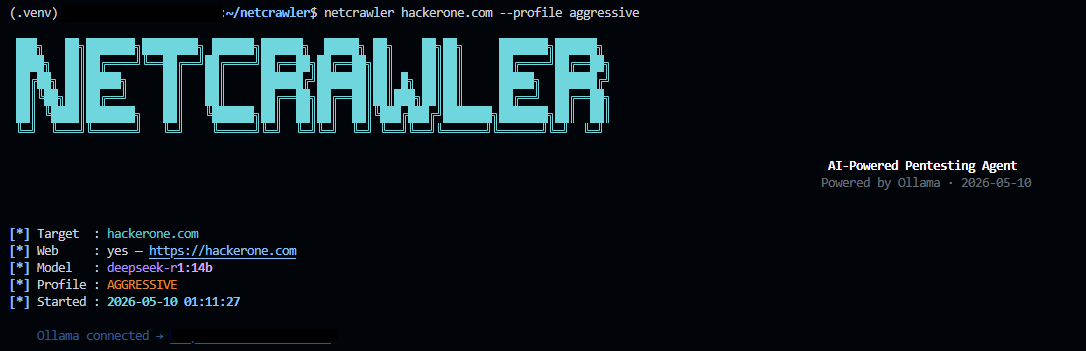
一个由本地 Ollama LLM 驱动的 AI 侦察和漏洞扫描 Agent。该 Agent 会对你的目标进行推理,决定运行哪些工具,解释其输出,并生成结构化的报告。
 ## 架构
```
main.py
├── tui/app.py — Rich terminal interface
├── agent/
│ ├── loop.py — Observe → think → act cycle
│ └── ollama.py — Local LLM reasoning via Ollama
├── core/
│ └── context.py — Shared scan state
├── modules/
│ ├── passive_recon.py — Subfinder + theHarvester
│ ├── web_fingerprint.py — WhatWeb + wafw00f
│ ├── port_scan.py — Nmap
│ ├── vuln_scan.py — Nuclei
│ └── dir_fuzz.py — ffuf
└── output/
└── reporter.py — Markdown + JSON reports
```
## 设置
### 1. Python 依赖
```
pip install -r requirements.txt
```
### 2. Ollama (本地 LLM)
```
# 安装 Ollama: https://ollama.com
ollama pull llama3 # recommended — good reasoning, fast
# 替代方案:
ollama pull mistral
ollama pull deepseek-r1:7b
ollama serve # start the server (runs on :11434)
```
### 3. 侦察工具 (按需安装)
```
# Subfinder
go install -v github.com/projectdiscovery/subfinder/v2/cmd/subfinder@latest
# theHarvester
pip install theHarvester
# WhatWeb
sudo apt install whatweb # or: gem install whatweb
# wafw00f
pip install wafw00f
# Nmap
sudo apt install nmap
# Nuclei
go install -v github.com/projectdiscovery/nuclei/v3/cmd/nuclei@latest
nuclei -update-templates
# ffuf
go install github.com/ffuf/ffuf/v2@latest
```
## 使用方法
```
# Domain / 网站
netcrawler example.com
netcrawler https://example.com
# IP 地址
netcrawler 192.168.1.1
# CIDR 范围
netcrawler 192.168.1.0/24
# 选择模型
netcrawler example.com --model mistral
# Verbose(显示原始 tool 输出)
netcrawler example.com --verbose
```
## Agent 工作原理
1. **目标摄入** — 将 IP / 域名 / URL 标准化为 `ScanContext`
2. **Ollama 推理** — LLM 接收当前状态,决定下一步使用的工具
3. **工具调度** — 运行选定的模块,输出结果存储到上下文中
4. **结果解读** — LLM 将原始输出解读为易于理解的结果
5. **循环** — 重复上述步骤,直到 LLM 判断扫描完成(最多 12 次迭代)
6. **报告** — Markdown + JSON 保存至 `~/netcrawler_reports/`
## 添加新模块
1. 创建 `modules/your_module.py`,包含以下签名:
def run_your_module(ctx: ScanContext, status: Callable[[str], None]) -> str:
...
2. 在 `agent/loop.py` 中注册它:
TOOL_MAP["your_module"] = run_your_module
3. 在 `agent/ollama.py` 的系统提示中添加相关描述
LLM 将自动通过描述学习如何使用它。
## 报告
报告保存至 `~/netcrawler_reports/
## 架构
```
main.py
├── tui/app.py — Rich terminal interface
├── agent/
│ ├── loop.py — Observe → think → act cycle
│ └── ollama.py — Local LLM reasoning via Ollama
├── core/
│ └── context.py — Shared scan state
├── modules/
│ ├── passive_recon.py — Subfinder + theHarvester
│ ├── web_fingerprint.py — WhatWeb + wafw00f
│ ├── port_scan.py — Nmap
│ ├── vuln_scan.py — Nuclei
│ └── dir_fuzz.py — ffuf
└── output/
└── reporter.py — Markdown + JSON reports
```
## 设置
### 1. Python 依赖
```
pip install -r requirements.txt
```
### 2. Ollama (本地 LLM)
```
# 安装 Ollama: https://ollama.com
ollama pull llama3 # recommended — good reasoning, fast
# 替代方案:
ollama pull mistral
ollama pull deepseek-r1:7b
ollama serve # start the server (runs on :11434)
```
### 3. 侦察工具 (按需安装)
```
# Subfinder
go install -v github.com/projectdiscovery/subfinder/v2/cmd/subfinder@latest
# theHarvester
pip install theHarvester
# WhatWeb
sudo apt install whatweb # or: gem install whatweb
# wafw00f
pip install wafw00f
# Nmap
sudo apt install nmap
# Nuclei
go install -v github.com/projectdiscovery/nuclei/v3/cmd/nuclei@latest
nuclei -update-templates
# ffuf
go install github.com/ffuf/ffuf/v2@latest
```
## 使用方法
```
# Domain / 网站
netcrawler example.com
netcrawler https://example.com
# IP 地址
netcrawler 192.168.1.1
# CIDR 范围
netcrawler 192.168.1.0/24
# 选择模型
netcrawler example.com --model mistral
# Verbose(显示原始 tool 输出)
netcrawler example.com --verbose
```
## Agent 工作原理
1. **目标摄入** — 将 IP / 域名 / URL 标准化为 `ScanContext`
2. **Ollama 推理** — LLM 接收当前状态,决定下一步使用的工具
3. **工具调度** — 运行选定的模块,输出结果存储到上下文中
4. **结果解读** — LLM 将原始输出解读为易于理解的结果
5. **循环** — 重复上述步骤,直到 LLM 判断扫描完成(最多 12 次迭代)
6. **报告** — Markdown + JSON 保存至 `~/netcrawler_reports/`
## 添加新模块
1. 创建 `modules/your_module.py`,包含以下签名:
def run_your_module(ctx: ScanContext, status: Callable[[str], None]) -> str:
...
2. 在 `agent/loop.py` 中注册它:
TOOL_MAP["your_module"] = run_your_module
3. 在 `agent/ollama.py` 的系统提示中添加相关描述
LLM 将自动通过描述学习如何使用它。
## 报告
报告保存至 `~/netcrawler_reports/_/`:
- `report.md` — 易于阅读的 Markdown 文件
- `report.json` — 机器可读,可导入至其他工具
## 法律声明
本工具仅供授权的渗透测试使用。在扫描任何非您所有的目标之前,请务必获取书面许可。
如果你觉得这个工具有用,欢迎在 GitHub 上点个 ⭐ —— 感谢!
## 架构
```
main.py
├── tui/app.py — Rich terminal interface
├── agent/
│ ├── loop.py — Observe → think → act cycle
│ └── ollama.py — Local LLM reasoning via Ollama
├── core/
│ └── context.py — Shared scan state
├── modules/
│ ├── passive_recon.py — Subfinder + theHarvester
│ ├── web_fingerprint.py — WhatWeb + wafw00f
│ ├── port_scan.py — Nmap
│ ├── vuln_scan.py — Nuclei
│ └── dir_fuzz.py — ffuf
└── output/
└── reporter.py — Markdown + JSON reports
```
## 设置
### 1. Python 依赖
```
pip install -r requirements.txt
```
### 2. Ollama (本地 LLM)
```
# 安装 Ollama: https://ollama.com
ollama pull llama3 # recommended — good reasoning, fast
# 替代方案:
ollama pull mistral
ollama pull deepseek-r1:7b
ollama serve # start the server (runs on :11434)
```
### 3. 侦察工具 (按需安装)
```
# Subfinder
go install -v github.com/projectdiscovery/subfinder/v2/cmd/subfinder@latest
# theHarvester
pip install theHarvester
# WhatWeb
sudo apt install whatweb # or: gem install whatweb
# wafw00f
pip install wafw00f
# Nmap
sudo apt install nmap
# Nuclei
go install -v github.com/projectdiscovery/nuclei/v3/cmd/nuclei@latest
nuclei -update-templates
# ffuf
go install github.com/ffuf/ffuf/v2@latest
```
## 使用方法
```
# Domain / 网站
netcrawler example.com
netcrawler https://example.com
# IP 地址
netcrawler 192.168.1.1
# CIDR 范围
netcrawler 192.168.1.0/24
# 选择模型
netcrawler example.com --model mistral
# Verbose(显示原始 tool 输出)
netcrawler example.com --verbose
```
## Agent 工作原理
1. **目标摄入** — 将 IP / 域名 / URL 标准化为 `ScanContext`
2. **Ollama 推理** — LLM 接收当前状态,决定下一步使用的工具
3. **工具调度** — 运行选定的模块,输出结果存储到上下文中
4. **结果解读** — LLM 将原始输出解读为易于理解的结果
5. **循环** — 重复上述步骤,直到 LLM 判断扫描完成(最多 12 次迭代)
6. **报告** — Markdown + JSON 保存至 `~/netcrawler_reports/`
## 添加新模块
1. 创建 `modules/your_module.py`,包含以下签名:
def run_your_module(ctx: ScanContext, status: Callable[[str], None]) -> str:
...
2. 在 `agent/loop.py` 中注册它:
TOOL_MAP["your_module"] = run_your_module
3. 在 `agent/ollama.py` 的系统提示中添加相关描述
LLM 将自动通过描述学习如何使用它。
## 报告
报告保存至 `~/netcrawler_reports/标签:AI渗透测试, AI风险缓解, CTI, DNS枚举, ffuf, GitHub, Google, LLM智能体, LLM评估, Nmap, Nuclei, Ollama, Python安全工具, 人工智能安全, 侦察扫描, 合规性, 大语言模型安全, 子域名枚举, 安全报告生成, 实时处理, 密码管理, 插件系统, 数据统计, 本地大模型, 机密管理, 目录爆破, 端口扫描, 系统安全, 网络安全工具, 自动化渗透测试, 自动化红队, 虚拟驱动器, 资产收集, 逆向工具, 靶机打点