alibaba/skill-up
GitHub: alibaba/skill-up
skill-up 是一款用于 AI Agent Skills 的评估与迭代进化工具,通过声明式用例和自动化闭环流程帮助开发者持续提升技能质量。
Stars: 226 | Forks: 14
## 概述
**skill-up** 是一款用于 Agent Skills 的评估与进化工具。
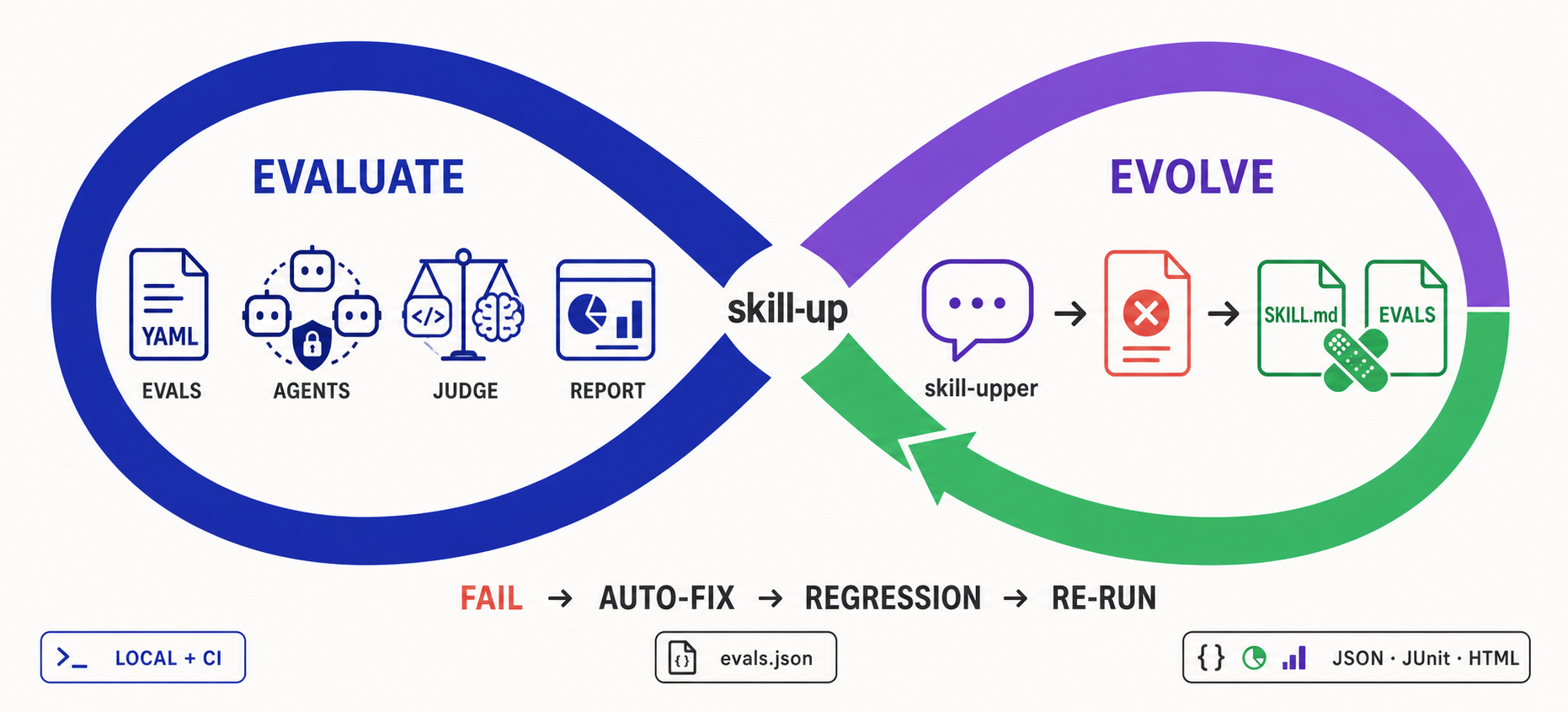
- **评估** 使 Skill 的质量变得可衡量和可重复:声明式 YAML 用例可在多个 Agent Engine 上运行,使用规则、脚本或 Agent 评判,并在本地或 CI 中生成结构化报告。
- **进化** 将这些结果转化为下一步的改进:通过对话,**skill-upper** 读取失败信息,自动修复或扩展评估套件,重新运行 skill-up,并与您持续迭代。
## 功能
- **基于 skill-upper 的评估到进化循环**:通过自然对话创建评估、诊断失败、自动修复或扩展用例,并重新运行 skill-up,直到评估套件完成进化。
- **声明式评估配置**:通过 YAML (`eval.yaml` + `cases/*.yaml`) 定义评估环境、engine、模型和用例。
- **多 Engine 支持**:与 Qoder CLI、Claude Code 和 Codex 作为内置 Agent Engine 协同工作,并支持通过 `engine.custom` 使用用户自定义 agent(本地传输 — 参见 [docs/design/custom-engine.md](docs/design/custom-engine.md))。
- **灵活的评判**:支持 `rule_based`、`script` 和 `agent_judge` 评估策略。
- **结构化报告**:输出兼容 Anthropic 的 `grading.json`、`benchmark.json`、`benchmark.md`,以及 `result.json`、JUnit XML 和 HTML 报告。
- **兼容 Anthropic**:通过 `skill-up import` 导入 `evals.json`,或使用 `--auto` 自动检测。
- **适配 CI**:专为本地开发和持续集成流水线设计。
## 为什么选择 skill-up
官方的 [Agent Skills 评估指南](https://agentskills.io/skill-creation/evaluating-skills) 描述了正确的评估循环:编写真实的用例,分别在有和没有 Skill 的情况下运行,对输出进行评分,汇总结果并进行迭代。`skill-up` 将该工作流转化为可复用的 CLI:
- 使用声明式的 `eval.yaml` + `cases/*.yaml` 格式替代临时的运行文件夹。
- 闭环改进流程:skill-upper 可以解读失败的报告、修复或添加评估用例,并通过对话驱动下一次 skill-up 运行。
- 自动化 workspace 设置、Skill 安装、Agent Engine 调用、评判和报告生成。
- 支持多个 engine(`claude_code`、`codex`、`qodercli`、`qwen_code`),而不是将工作流绑定到单一客户端。
- 保持与 Anthropic 风格的 `evals.json` 兼容,同时增加了更丰富的评判器、对 CI 友好的命令以及结构化报告。
## 快速开始:使用 skill-upper 进化 Skill
使用 skill-up 的推荐方式是通过 **skill-upper**,即本仓库中内置的 Agent Skill。它能让您的 AI agent 创建评估、运行 skill-up、理解失败原因、修复 Skill 或其评估、增加回归测试覆盖,并通过对话不断重复此循环。
### 1. 安装 skill-upper
```
# Codex, 全局安装
npx skills add https://github.com/alibaba/skill-up/tree/main/skills/skill-upper -g -a codex -y
# Claude Code, 全局安装
npx skills add https://github.com/alibaba/skill-up/tree/main/skills/skill-upper -g -a claude-code -y
```
通常您不需要先安装 skill-up。skill-upper 在运行时会检查 CLI,并在需要时指导 agent 进行安装。
### 2. 创建并运行首次评估
在 Codex、Claude Code 或其他兼容的 Agent 中打开包含您 Skill 的 `SKILL.md` 的项目,然后提问:
```
Use skill-upper to evaluate this Skill.
Read SKILL.md, identify its most important behaviors, create realistic eval
cases with appropriate judges, validate the configuration, and run skill-up.
Summarize the results and the highest-impact failures.
```
skill-upper 会创建声明式评估套件,并为您驱动 CLI:
```
my-skill/
SKILL.md
evals/
eval.yaml
cases/
.yaml
my-skill-workspace/
iteration-1/
result.json
```
### 3. 修复、回归并迭代
在同一对话中继续:
```
Review the latest skill-up results. For each failure, determine whether the
Skill or the eval is wrong. Fix SKILL.md and supporting files, or repair the
eval case and judge as appropriate. Add regression cases for the bugs you
found, rerun skill-up, and continue until the important behaviors pass.
```
这就是进化循环:报告转化为修复,修复转化为回归用例,每一次迭代都会让 Skill 及其评估套件变得更强大。
### 更倾向于手动设置?
您仍然可以直接安装 CLI 并手动编写 `eval.yaml` 和用例文件:
```
curl -fsSL https://raw.githubusercontent.com/alibaba/skill-up/main/install.sh | bash
```
请查阅官方文档以获取
[入门指南](https://alibaba.github.io/skill-up/guide/getting-started)、
[编写评估](https://alibaba.github.io/skill-up/guide/writing-evals)、
[CLI 参考](https://alibaba.github.io/skill-up/guide/cli-reference) 以及
[用户配置](https://alibaba.github.io/skill-up/guide/user-config)。
Windows 特定的设置和限制详见
[Windows 指南](https://alibaba.github.io/skill-up/guide/windows)。
## 用户配置
skill-up 会自动加载一个可选的用户级配置,该配置提供默认的 OpenTelemetry 环境变量和针对特定环境的 runtime kwargs。内置的默认值为空;下游消费者需维护各自的配置文件。
### 发现链(从低到高优先级)
```
embed (empty) < user (~/.config/skill-up/config.yaml) < project ($PWD/.skill-up.yaml) < explicit (--config)
```
| 来源 | 路径 |
| --------- | ------------------------------------------------------------------------------------------------------- |
| `embed` | 空的 `Config{}` — 没有内置任何供应商的默认值 |
| `user` | `$SKILL_UP_CONFIG`,否则为 `$XDG_CONFIG_HOME/skill-up/config.yaml`,否则为 `~/.config/skill-up/config.yaml` |
| `project` | `$PWD/.skill-up.yaml` |
| `explicit`| `--config `(必须存在) |
在 `user` 和 `project` 层级缺失的文件会被静默跳过;但缺失 `--config` 路径是一个严重错误。任何层级的配置损坏也会导致运行失败。
### 快速入门
```
skill-up init # writes a template to ~/.config/skill-up/config.yaml (XDG-aware)
skill-up init --local # writes a template to $PWD/.skill-up.yaml
skill-up init --print # prints the template to stdout
skill-up init --force # overwrite an existing file
skill-up init --config foo.yaml # reads foo.yaml, writes it to ~/.config/skill-up/config.yaml
skill-up init --config foo.yaml --local # reads foo.yaml, writes it to $PWD/.skill-up.yaml
```
使用 `--config ` 时,`init` 会读取该文件(将其验证为 skill-up 配置)并将其原始字节写入目标位置 — 注释和格式会被保留。如果不使用 `--config`,`init` 会写入一个带有注释的 YAML 模板。
### Schema
```
schema_version: v1alpha1
kind: SkillUpConfig
telemetry:
service_name: skill-up # OTEL_SERVICE_NAME
traces_exporter: otlp # OTEL_TRACES_EXPORTER
traces:
endpoint: http://localhost:4317 # OTEL_EXPORTER_OTLP_TRACES_ENDPOINT (4317 for grpc, 4318/v1/traces for http/protobuf)
protocol: grpc # OTEL_EXPORTER_OTLP_TRACES_PROTOCOL (grpc | http/protobuf); skill-up defaults to grpc
resource_attributes: # serialized into OTEL_RESOURCE_ATTRIBUTES
deployment.environment: local
verbose: false # if true, also enables OTEL_LOG_* payload capture
env: # arbitrary defaults, applied only-if-unset
OTEL_EXPORTER_OTLP_HEADERS: authorization=${OTLP_TOKEN}
runtime_kwargs: # keyed by environment.type
opensandbox:
base_url: http://localhost:8080
# extensions: '{}'
```
### 优先级
对于环境变量:进程环境中已设置的任何值优先;配置仅用于填充缺失的键。
对于 `runtime_kwargs`:`run` 命令上显式指定的 `--runtime-kwarg` > `eval.yaml` 中的 `environment.kwargs` > 用户配置中的 `runtime_kwargs[environment.type]`。
### 敏感信息
推荐在配置文件内使用 `${ENV_VAR}` 引用,而不是直接硬编码 secret 明文。脱敏机制(`userconfig.Redact`)会在打印时掩盖标记为 `secret:"true"` 的字段;目前没有任何 Config 字段带有此标记,但该机制已为未来的字段预留。
## 导入 `evals.json`
使用 `skill-up import` 可将兼容 Anthropic 的 `evals.json` 迁移至本仓库使用的 YAML 布局:
```
skill-up import ./evals/evals.json --output ./evals
```
## CLI 概览
| 命令 | 描述 |
| ------------------------------------ | -------------------------------------------- |
| `skill-up run [path]` | 运行评估用例并生成报告 |
| `skill-up validate [path]` | 验证 `eval.yaml` 和用例文件 |
| `skill-up list-cases [path]` | 列出配置中引用的所有用例 |
| `skill-up report ` | 从之前的运行结果中生成报告 |
| `skill-up import ` | 将 Anthropic 的 `evals.json` 导入为 YAML 用例|
| `skill-up debug judge ` | 使用 JSON 输入调试 judge 模块 |
| `skill-up debug report ` | 使用 JSON 输入调试 report 模块 |
## GitHub Action
在每次 pull request 时于 CI 中运行您的 Agent Skill 评估 — 并在一个步骤中**跨多个 engine**(`claude_code` / `codex` / `qodercli` / `qwen_code`)检查同一个 skill。本仓库在其根目录提供了一个 action([`action.yml`](action.yml)):
```
# .github/workflows/skill-eval.yml
name: Skill Eval
on:
pull_request:
paths: ['skills/**', 'evals/**', '**/SKILL.md']
jobs:
eval:
runs-on: ubuntu-latest # Docker container action — Linux only
steps:
- uses: actions/checkout@v4
- uses: alibaba/skill-up@main # see "Versioning" below
with:
engine: claude_code # or codex / qodercli / qwen_code; empty = let eval.yaml decide
api-key: ${{ secrets.ANTHROPIC_API_KEY }}
base-url: https://api.anthropic.com # your model endpoint
skill-target: evals/eval.yaml
```
调用方的要求:需要一个 **Linux** runner(这是一个 Docker container action),并且您的模型凭证需作为 repo secret 存储。runner 镜像是公开的,因此无需额外的 registry 身份验证。
关键输入项:`engine`、`model`、`provider`、`api-key`、`base-url`、`skill-target`、`parallelism`。该 action 会将 skill-up 和三个 engine CLI 预构建到其 runner 镜像中,因此运行过程仅仅是“拉取镜像,执行评估”。完整的输入/输出参考请参见 [`action.yml`](action.yml)。
### 内置的 skill-up 版本
容器镜像包含一个特意锁定的 skill-up CLI 版本。当 workflow 启动时,该版本不会从 `latest` 解析,因此给定的镜像 digest 始终运行相同的 CLI。
`skill-up-version` 输入仅作为自定义镜像的回退选项,适用于镜像中尚未包含 `skill-up` 二进制文件的情况。官方镜像已包含该二进制文件,因此此输入无法覆盖其内置版本。要查看实际生效的版本,请检查 Action 日志中的 `skill-up --version` 行。
发布新的 skill-up CLI 版本不会自动更新 GitHub Action 镜像。维护者必须同步锁定的版本,发布并测试新的 runner 镜像,并更新 `action.yml` 中的镜像 digest。完整的维护者操作流程记录在
[CI 维护手册](docs/guide/ci-maintenance.md#manual-skill-up-version-synchronization) 中。
生产环境的 Action 必须使用不可变的 `sha256:` 镜像 digest。请勿将其替换为 `skill-up-runner:latest`;可变标签将导致现有的 Action 引用在未经仓库提交的情况下发生行为改变。
### 版本控制
`uses:` 指向任何包含 `action.yml` 的 git ref。请锁定一个 **release tag**(即包含该 action 的首次或之后的发布)或 commit SHA 以保证稳定性;`@main` 会始终追踪最新版本。在添加 action 之前发布的 release tag 不包含 `action.yml`,因此不能作为 ref 使用。
CLI 的 release tag 捕获了创建该 tag 时存在的 `action.yml` 和 runner 镜像 digest。由于当前的 runner 镜像是在 CLI 发布资产可用后手动刷新的,因此请勿假设 CLI tag 会自动包含具有相同 CLI 版本的 Action 镜像。在引入独立的 Action release tag 流程之前,若需不可变引用请使用刷新后的 commit SHA;若有意追踪 Action 更新,请使用 `@main`。
## 许可证
Apache License 2.0 — 详见 [LICENSE](LICENSE)。







标签:Agent技能评估, AI, EVTX分析, Go, Ruby工具, YAML配置, 日志审计, 用户代理, 自动化代码审查, 评估框架