bl4d3rvnner7/calltree-pro
GitHub: bl4d3rvnner7/calltree-pro
专为逆向工程混淆 JavaScript/TypeScript 代码而设计的函数级静态调用树分析器,一条命令生成 HTML 反汇编视图、审计报告、图谱等多种格式的安全分析产物。
Stars: 0 | Forks: 0














# 🧬 Calltree Pro
**JavaScript / TypeScript 静态调用图分析器 —— 专为逆向工程混淆代码而构建。**
一条命令即可生成交互式 HTML 反汇编视图、markdown 审计报告、DOT/Mermaid 图谱、JSON 以及自动渲染的 SVG —— 全部输出到同一个目录中。
专为分析 `obfuscator.io` 输出、可疑 npm 包和压缩恶意软件包的分析师而设计。
## 📑 目录
- [🧬 Calltree Pro](#-calltree-pro)
- [📑 目录](#-table-of-contents)
- [🚀 功能特性](#-features)
- [📦 环境要求](#-requirements)
- [⚙️ 安装](#%EF%B8%8F-installation)
- [🚀 使用方法](#-usage)
* [基本用法](#basic-usage)
* [单一格式模式](#single-format-mode)
* [自定义输出目录](#custom-output-directory)
* [锚定到特定函数](#anchor-on-a-specific-function)
- [📁 输出概览](#-output-overview)
* [每个文件包含的内容](#what-each-file-contains)
* [控制台输出示例](#console-output-example)
* [Box-drawing 树形图示例](#box-drawing-tree-example)
- [🖥️ HTML 反汇编视图](#%EF%B8%8F-the-html-disassembler-view)
* [前进 / 后退导航](#forward--back-navigation)
* [IDA 风格浏览器](#ida-style-explorer)
* [源码行标注](#source-line-annotations)
- [⚙️ 配置](#%EF%B8%8F-configuration)
* [默认值](#defaults)
* [配置文件](#configuration-file)
- [⚠️ Sinks 与严重性分类](#%EF%B8%8F-sinks--severity-categories)
- [🧩 填充函数(obfuscator.io 案例分析)](#-filler-functions-the-obfuscatorio-case)
- [📊 图形渲染(DOT & Mermaid)](#-graph-rendering-dot--mermaid)
- [🧠 内部机制与工作原理](#-internals--how-it-works)
- [🔌 编程 API](#-programmatic-api)
- [🔍 与 `madge` / `dependency-cruiser` 的区别](#-how-it-differs-from-madge--dependency-cruiser)
- [📂 项目结构](#-project-layout)
- [🤝 参与贡献](#-contributing)
- [⚠️ 免责声明](#%EF%B8%8F-disclaimer)
- [📄 许可证](#-license)
- [🙏 致谢](#-credits)
- [⭐ 支持](#-support)
- [🔗 链接](#-links)
## 🚀 功能特性
- **一条命令,所有报告** — `node src/cli.js file.js` 将生成一个 `_report/` 目录,其中包含 HTML、markdown、JSON、DOT、Mermaid 和自动渲染的 SVG
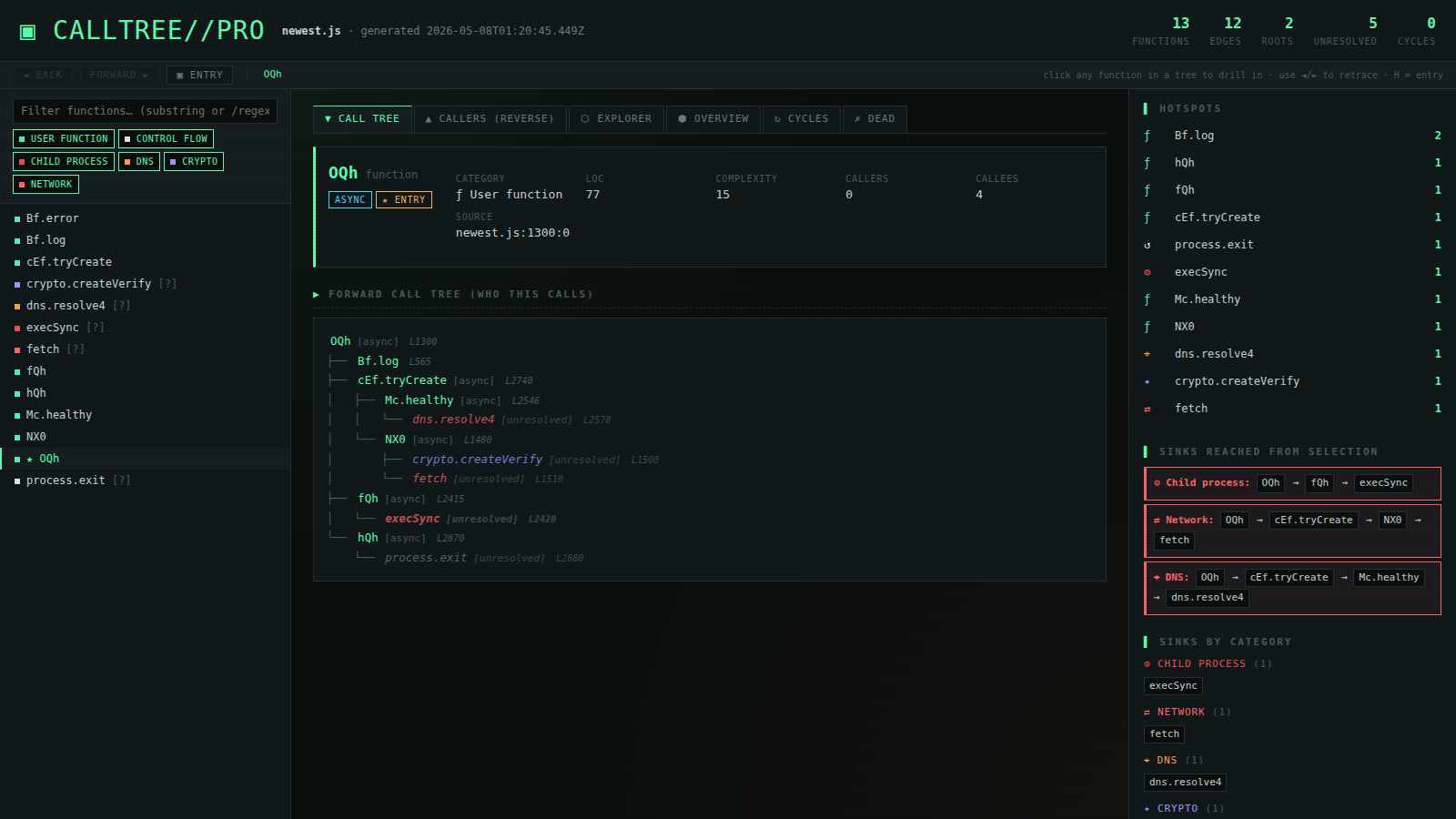
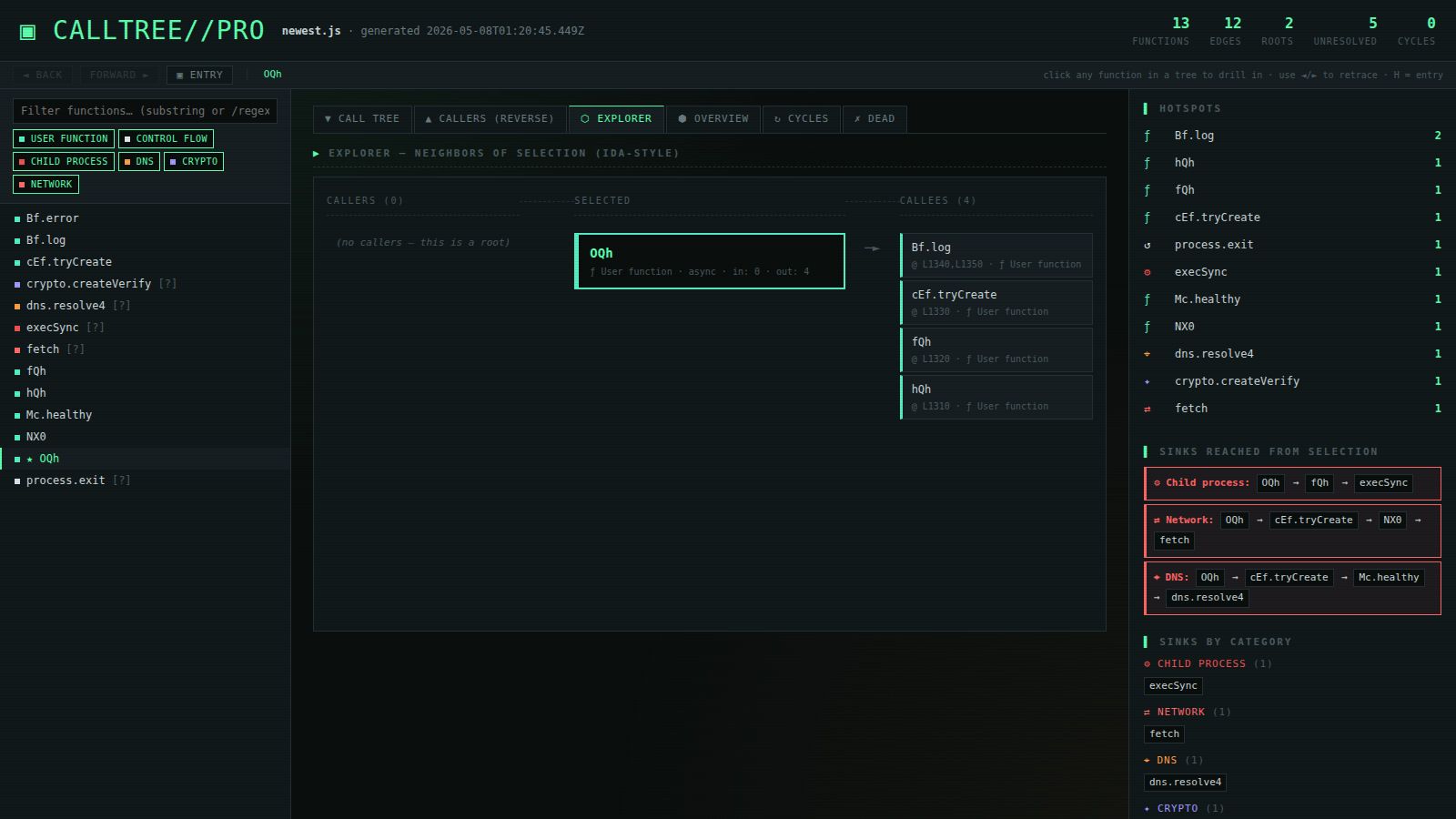
- **交互式 HTML 反汇编器** — IDA 风格的交叉引用 (xrefs) 浏览器,前进/后退导航,面包屑,按严重性颜色标记的 sinks,可搜索的侧边栏,键盘快捷键
- **自动检测入口点** — 通过对根节点按可达子图大小进行评分,自动挑选编排函数(例如混淆包中的 `OQh`)
- **Sink 分类** — 每个被调用者 (callee) 都会被标记上一个类别(`network`、`dns`、`child_process`、`crypto`、`dynamic_exec`、`fs`、`env`、…)和严重性级别
- **到危险操作的最短路径** — 对每个入口点,使用 BFS 计算到达每个危险 sink 的最短调用链
- **用于未解析调用的填充函数** — 当某个名称没有定义时(常见于 `obfuscator.io` 的字符串数组间接寻址),它会作为一个带有**调用点行号**的存根被注册,从而保持树的连接性
- **随处可见的源码行标注** — `dns.resolve4 [unresolved] L2570` 准确告诉你应该在源码的哪个位置查找
- **Box-drawing ASCII 树形图** — 在终端和 markdown 中均使用规范的 `├──`、`└──`、`│`、`↩`、`↻`、`█` 连接符
- **循环检测**(Tarjan SCC)、死代码检测、带有条形图的热点分析、扇入/扇出、复杂度、LOC(代码行数)
- **有界的图形输出** — DOT 和 Mermaid 使用 BFS 锚定在主入口上,并设有限额(200 / 80 / 120 个节点),以避免生成 2 万像素的超大图谱
- **自动渲染为 SVG** — 如果已安装,会自动调用 `dot` (graphviz) 和 `mmdc` (mermaid-cli)
- **过滤与搜索** — 在 HTML 侧边栏支持子字符串或 `/regex/` 过滤、类别标签切换、`Alt+←`/`Alt+→` 导航、按 `H` 回到入口、按 `/` 聚焦搜索
## 📦 环境要求
```
node >= 14
npm
```
可选(自动检测,用于 SVG 渲染):
```
graphviz # provides `dot` — apt install graphviz
@mermaid-js/mermaid-cli # provides `mmdc` — npm i -g @mermaid-js/mermaid-cli
```
## ⚙️ 安装
```
# Clone the repository
git clone https://github.com/bl4d3rvnner7/calltree-pro.git
cd calltree-pro
# 安装 dependencies
npm install
# 在 bundled example 上运行
node src/cli.js examples/sample.js
```
这会生成一个 `sample_report/` 目录。在任意浏览器中打开 `sample_report/html.html` 即可。
## 🚀 使用方法
### 基本用法
```
node src/cli.js path/to/suspicious.js
```
生成包含所有报告的 `suspicious_report/` 目录。带颜色的树形图会在运行时流式输出到您的终端。
### 单一格式模式
```
node src/cli.js suspicious.js --format html -o report.html
node src/cli.js suspicious.js --format report -o audit.md
node src/cli.js suspicious.js --format dot -o graph.dot
node src/cli.js suspicious.js --format json -o graph.json
```
当提供 `--format` 时,仅写入请求的文件 —— 不会创建输出目录。
### 自定义输出目录
```
node src/cli.js suspicious.js -o /tmp/my-analysis
```
### 锚定到特定函数
```
# 强制用于 graph layout 和默认选择的 entry point
node src/cli.js suspicious.js -r OQh
```
### 多文件 / Glob 匹配
```
node src/cli.js src/**/*.js
node src/cli.js dir1/ dir2/file.js
```
## 📁 输出概览
### 每个文件包含的内容
| 文件 | 描述 |
| --- | --- |
| `html.html` | **交互式反汇编视图。** 请先打开这个文件。包含可搜索的侧边栏、IDA 风格的浏览器、前进/后退导航、面包屑导航以及按严重性颜色标记的 sinks。 |
| `report.md` | 完整的 markdown 审计报告。包含 Box-drawing 调用树、sinks 表、危险路径、函数指标以及带有行号的未解析被调用者。 |
| `tree.txt` | 纯文本调用树(无 ANSI 颜色代码,方便 diff 对比)。 |
| `json.json` | 机器可读的结构化转储,用于导入到其他工具。 |
| `graph.dot` | Graphviz DOT 格式 —— 自上而下,上限为 200 个节点,锚定在自动检测到的主入口。 |
| `graph..dot` | 聚焦于主入口周围 80 个节点、3 跳邻域的局部图。 |
| `graph.svg` | 自动渲染的 DOT → SVG(仅当 `dot` 位于 PATH 中时存在)。 |
| `graph.mermaid.md` | 用于 GitHub markdown 的 Mermaid 流程图。 |
| `graph.mmd` | 原始 Mermaid 源码,可直接通过 `mmdc -i graph.mmd -o graph.svg` 使用。 |
| `graph.mermaid.svg` | 自动渲染的 Mermaid → SVG(仅当 `mmdc` 位于 PATH 中时存在)。 |
| `INDEX.md` | 自动生成的索引,将所有内容链接在一起。 |
### 控制台输出示例
```
calltree: analyzing 1 input(s)...
calltree: parsed 1 files, 182 functions, 745 calls (0 parse errors)
┌─────────────────────────────────────────
│ ROOT FUNCTIONS
└─────────────────────────────────────────
OQh [async]
★ Primary entry: OQh
✓ generated 11 files in newest_report/
→ newest_report/tree.txt
→ newest_report/json.json
→ newest_report/report.md
→ newest_report/html.html
→ newest_report/graph.dot
→ newest_report/graph.OQh.dot
→ newest_report/graph.svg
→ newest_report/graph.mermaid.md
→ newest_report/graph.mmd
→ newest_report/graph.mermaid.svg
→ newest_report/INDEX.md
Open the HTML report:
xdg-open newest_report/html.html
```
### Box-drawing 树形图示例
```
OQh [async]
├── cEf.tryCreate [async]
│ ├── Mc.healthy [async]
│ │ └── dns.resolve4 [unresolved] L2570
│ └── NX0 [async]
│ ├── Buffer.from [unresolved] L1500
│ └── crypto.createVerify [unresolved] L1510
├── fQh [async]
│ ├── K0f.execute [async]
│ │ └── execSync [unresolved] L2420
│ └── vEf.execute [async]
│ ├── exec [unresolved] L2680
│ └── fetch [unresolved] L2700
└── hQh [async]
└── process.exit [unresolved] L2880
```
## 🖥️ HTML 反汇编视图
单文件,无外部依赖(仅使用 Google Fonts CDN)。将 `html.html` 放在任何位置双击即可打开。具有近乎黑色背景上的深色荧光绿 / 琥珀色 CRT 美学风格,全面采用等宽字体和棱角分明的卡片设计。
### 前进 / 后退导航
顶部的导航栏为您提供 `◄ back`、`forward ►` 和 `▣ entry` 按钮以及面包屑导航。在任意树中点击函数都会推入一个 100 条记录的历史堆栈 —— 后退/前进可原路返回。点击任意面包屑步骤可直接跳转。
| 快捷键 | 操作 |
| --- | --- |
| `Alt+←` | 后退 |
| `Alt+→` | 前进 |
| `H` | 跳转到主入口 |
| `/` | 聚焦搜索框 |
### IDA 风格浏览器
浏览器 (Explorer) 选项卡显示 3 列交叉引用视图:**调用者 │ 选中项 │ 被调用者**。每张卡片显示调用点行号(例如 `@ L1340,L1350`),危险类别的左侧边框为红色。点击任意卡片即可深入查看。
### 源码行标注
每个树中的每个节点都会显示其在源码中的行号:
- 对于**已定义**函数:函数体开始的位置
- 对于**未解析的填充函数**(obfuscator.io 的情况):从边捕获的**调用点**行号
因此,`dns.resolve4 L2570` 准确地告诉了您应该在源码的何处查看。函数头部最多列出填充函数的 4 个调用点(`called from: file.js:2570:8; file.js:2890:12; ...`)。
## ⚙️ 配置
### 默认值
“一键全开”的运行使用对分析师友好的默认值 —— 开启所有功能,不过滤:
| 默认设置 | 原因 |
| --- | --- |
| `--include-builtins` 开启 | 您希望看到对 `fetch`、`execSync`、`Buffer.from` 的调用 —— 这些才是危险的 |
| `--include-anonymous` 开启 | 混淆代码中充满了匿名函数 —— 隐藏它们就会隐藏图谱 |
| `--detect-cycles` 开启 | 零损耗且有用 |
| `--detect-dead` 开启 | 有助于发现残留的脚手架代码 |
| `--hotspots 15` | 被调用次数最多的前 15 个函数 |
| `--color` 开启 | 终端输出按 sink 类别进行着色 |
| 不使用 `-r` / `-d` / `-i` | 完全枚举;无根过滤器,无深度限制,无额外忽略 glob |
可使用 `--no-builtins`、`--no-color`、-r OQh`、`-d 5`、`-i '**/test/**'` 等覆盖任何设置。
### 配置文件
在项目根目录中放置一个 `.calltreerc.json` 以设置默认值:
```
{
"includeBuiltins": true,
"includeAnonymous": true,
"detectCycles": true,
"detectDead": true,
"hotspots": 25,
"ignore": ["**/node_modules/**", "**/dist/**", "**/.next/**"]
}
```
CLI 标志会覆盖 rc 文件中的设置。
## ⚠️ Sinks 与严重性分类
每个被调用者都会被归入一个类别。类别将在 HTML/markdown 报告中呈现,让您可以一目了然地看到哪些函数接触了网络、文件系统、子进程等。
| 类别 | 严重性 | 捕获内容 |
| --- | --- | --- |
| `dynamic_exec` | 🔴 high | `eval`、`new Function`、`vm.*` |
| `child_process` | 🔴 high | `exec`、`execSync`、`spawn`、`fork`、`child_process.*` |
| `network` | 🔴 high | `fetch`、`axios.*`、`http.get/request/post`、`.send`、`WebSocket` |
| `dns` | 🟠 high | `dns.*`、`new Resolver` |
| `fs` | 🟡 medium | `fs.read*`、`fs.write*`、`createWriteStream`、… |
| `env` | 🔵 medium | `process.env`、`os.homedir`、`os.userInfo`、`os.networkInterfaces`、`process.argv` |
| `crypto` | 🟣 medium | `crypto.create*`、`randomBytes`、`sign`、`verify` |
| `encoding` | 🔵 low | `Buffer.from`、`atob`、`btoa` |
| `fingerprint` | 🩷 medium | `navigator.*` |
| `dom` / `scheduling` / `error` / `control` | low | (较低优先级的类别) |
每个类别都有对应的颜色和图标。HTML 会按类别为函数名着色;markdown 报告会为每个条目添加标签。**可以通过编辑 `src/utils/sinks.js` 来添加或覆盖规则。**
## 🧩 填充函数(obfuscator.io 案例分析)
当一个函数被调用但在源码中没有定义时 —— 这在 `obfuscator.io` 输出中极其常见,因为其名称来自于解析器无法跟踪的运行时字符串数组查找 —— `calltree-pro` 会自动注册一个**填充**存根:
```
└── dns.resolve4 [unresolved,dns] L2570
```
填充存根:
- ✅ 出现在调用树、侧边栏和 sinks 表中
- ✅ 会根据相同的 regex 规则进行分类(因此 `fetch`、`execSync` 等依然会被捕获)
- ✅ 在所有出现的地方都被标记为 `unresolved`
- ✅ 带有引用它们的每个调用点的**行号**
- ✅ 在 HTML 侧边栏中获得一个 `[?]` 标记
- ✅ 在 `report.md` 中获得一个专用的**“未解析的被调用者”**表格,按调用者数量排序
即使面对高度混淆的代码,您的调用图也绝不会出现悬空的边。
## 📊 图形渲染(DOT & Mermaid)
简单粗暴地转储每个节点和边会生成一个 20,000 像素且无法阅读的 SVG。`calltree-pro` 通过两种方式解决这个问题:
1. **锚定在主入口。** 所有图形输出都在自动检测到的入口函数周围进行 BFS 限制。默认上限是 `graph.dot` 为 200 个节点,聚焦的 `graph..dot` 为 80 个节点,mermaid 为 120 个节点。传递 `--focus ` 可锚定到其他目标。
2. **自动渲染。** 如果 `dot` (graphviz) 和/或 `mmdc` (`@mermaid-js/mermaid-cli`) 位于 PATH 中,该工具将运行它们并直接生成 `graph.svg` 和 `graph.mermaid.svg`:
```
apt install graphviz # debian / kali / ubuntu
brew install graphviz # macOS
npm i -g @mermaid-js/mermaid-cli # mermaid renderer
```
DOT 输出是自上而下的(`rankdir="TB"`),主入口以荧光绿高亮显示(`penwidth=3`),未解析的填充函数显示为虚线框,指向危险 sinks 的边按类别着色。
## 🧠 内部机制与工作原理
处理流程如下:
1. 使用 `@babel/parser` **解析**每个输入文件(支持 JS、JSX、TS、TSX、类、装饰器、私有字段和 proposal pipeline)
2. 使用 `@babel/traverse` **遍历**每棵 AST,注册每个函数声明、表达式、箭头函数、方法、getter、setter 和构造函数,并赋予它们全限定名(`MyClass.method`、`MyClass#privateMethod`、``)
3. **记录每个调用表达式**为一条边,捕获调用点 `(file, line, column)`
4. 通过 `MemberExpression` 链(`a.b.c.d()` → `a.b.c.d`)、`super`、`this` 和 `new` 表达式**解析被调用者**
5. 为每个函数**计算圈复杂度**(粗略计算 —— 统计决策点数量)
6. **运行 `fillUnresolved()`** 为每个没有匹配定义的被调用者注册填充存根,从传入边传播调用点行号
7. 通过 regex 规则将每个函数(已定义或填充的)**分类**到一个 sink 类别中
8. 使用 Tarjan 的 SCC 算法**检测循环**
9. 通过对非匿名根节点按可达子图大小进行评分来**识别主入口**
10. 按调用计数排名**计算热点**
11. **生成所有格式** —— HTML、markdown、JSON、DOT、Mermaid、纯文本树
12. 如果可用,通过 `dot` 和 `mmdc` **自动渲染** SVG
所有代码都位于 `src/` 下 —— 无需构建步骤,无需转译,在纯 Node 上运行。
## 🔌 编程 API
```
const { analyzeProject } = require("calltree-pro");
const { formatReport } = require("calltree-pro/src/formatters/report");
const result = await analyzeProject(["./src/**/*.js"], {
includeBuiltins: true,
detectCycles: true,
});
console.log(formatReport(result, { hotspots: 15 }));
console.log(result.graph.shortestPathToCategory("OQh", ["network", "child_process"]));
console.log(result.graph.byCategory().child_process);
```
`result.graph` 是一个带有以下分析方法的 `CallGraph`:
| 方法 | 返回值 |
| --- | --- |
| `roots()` | 没有调用者的函数(入口点) |
| `primaryEntry()` | 最“重要”的入口点(可达子图最大) |
| `cycles()` | Tarjan SCC 循环检测 |
| `deadFunctions()` | 已定义但从未被调用的函数 |
| `hotspots(n)` | 被调用次数最多的前 N 个函数及其计数 |
| `byCategory()` | `{ [category]: FunctionInfo[] }` |
| `shortestPathToCategory(from, cats)` | 到最近的危险 sink 的 BFS 路径 |
| `reachable(from)` | 所有传递可达的函数名称集合 |
| `fanInOut()` | `Map` |
## 🔍 与 `madge` / `dependency-cruiser` 的区别
[`madge`](https://github.com/pahen/madge) 和 [`dependency-cruiser`](https://github.com/sverweij/dependency-cruiser) 运行在**模块级别** —— 它们显示的是哪些文件导入了哪些文件。它们对于代码库架构非常有用,但对于所有代码都位于单个 `.js` 文件中的单文件混淆包来说则毫无用处。
`calltree-pro` 运行在文件内部的**函数级别**。它跨越类方法、原型、IIFE 和箭头函数跟踪谁调用了谁。恶意软件分析功能(sink 分类、危险路径、针对未解析名称的填充函数)专为以下情况而设计:您有**一个可疑文件**并想知道它到底做了什么。
| | `madge` | `dependency-cruiser` | **calltree-pro** |
| --- | :-: | :-: | :-: |
| 模块级别导入 | ✅ | ✅ | — |
| 函数级别调用 | — | — | ✅ |
| 单文件分析 | — | — | ✅ |
| Sink 分类 | — | — | ✅ |
| 未解析的填充函数 | — | — | ✅ |
| 交互式 HTML | — | partial | ✅ |
| IDA 风格浏览器 | — | — | ✅ |
## 📂 项目结构
```
src/
cli.js # commander entry point + all-formats orchestration
index.js # analyzeProject (file walking + Babel parsing)
analyzers/
file.js # Babel traversal — qualified names, locations, complexity
graph.js # CallGraph + cycles, dead, hotspots, fillers, sinks
formatters/
tree.js # Box-drawing terminal output
report.js # Markdown report
html.js # Single-file interactive disassembler HTML
json.js / dot.js / mermaid.js
utils/
sinks.js # Sink classification rules + category metadata
constants.js
parser-config.js
examples/
test/
```
## 🤝 参与贡献
欢迎提交 Pull request。以下是一些可能有用的想法:
- 额外的 sink 类别规则(更多库,更多 API)
- TypeScript 类型感知解析(通过 TS 信息解析 `this` 和类层次结构)
- Source-map 支持(将调用点映射回原始源码)
- 跨文件分析改进(当前每个文件独立解析)
- 集成 [unicorn-engine](https://github.com/unicorn-engine/unicorn) 或 [Frida](https://frida.re/) 进行动态确认
- 更多渲染器输出(PlantUML、Cytoscape JSON 等)
提交前请运行 `npm test`。
## ⚠️ 免责声明
本工具仅用于**合法的静态分析目的** —— 安全研究、代码审查、对您有授权调查的恶意软件样本进行分析,以及对您拥有或获准分析的代码进行逆向工程。作者不对任何误用负责。请尊重版权、服务条款和适用法律。
## 📄 许可证
[MIT License](./LICENSE) —— 详见 `LICENSE` 文件。
## 🙏 致谢
在 [Claude](https://claude.ai) (Anthropic) 的协助下构建。其架构、IDA 风格的 HTML 浏览器、sink 分类系统、用于混淆代码的填充函数方法以及大部分实现,都源于一次长时间的结对编程会议 —— 功劳归于应得之人。
技术支持:
- [`@babel/parser`](https://babeljs.io/docs/babel-parser) — JavaScript/TypeScript 解析
- [`@babel/traverse`](https://babeljs.io/docs/babel-traverse) — AST 遍历
- [`commander`](https://github.com/tj/commander.js) — CLI 参数解析
- [`fast-glob`](https://github.com/mrmlnc/fast-glob) — 文件 glob 匹配
- [`picocolors`](https://github.com/alexeyraspopov/picocolors) — 终端着色
- [`@mermaid-js/mermaid-cli`](https://github.com/mermaid-js/mermaid-cli) — 可选的 mermaid SVG 渲染
- [graphviz](https://graphviz.org/) — 可选的 DOT SVG 渲染
## ⭐ 支持
如果您觉得这个工具有用,请在 GitHub 上留下一个 **star** ⭐ —— 这有助于其他人发现该工具,并激励进一步的开发。
## 🔗 链接
- [报告 Bug](https://github.com/bl4d3rvnner7/calltree-pro/issues)
- [请求新功能](https://github.com/bl4d3rvnner7/calltree-pro/issues)
- [obfuscator.io](https://obfuscator.io/)(正是本工具旨在剖析的那类目标)
标签:Babel Parser, CMS安全, Commander, DAST, DOT, GNU通用公共许可证, HTML, JavaScript, JSON, Markdown, Mermaid, MITM代理, Mutation, Node.js, npm安全, SVG, TypeScript, WebSocket, Web安全, 云资产清单, 代码反混淆, 依赖分析, 反编译器, 可视化, 安全插件, 恶意脚本检测, 恶意软件分析, 混淆代码还原, 自定义脚本, 蓝队分析, 调用图分析, 逆向工程, 错误基检测, 静态代码分析