betarixm/catchy
GitHub: betarixm/catchy
这是一个用于网络安全夺旗赛(CTF)的自主 AI Agent 框架,支持通过终端界面并行运行和实时监控多个沙盒环境下的自动化解题任务。
Stars: 7 | Forks: 2
# 🪤
引人注目 **Ca-ca-catch my flag, baby.** 用于玩夺旗赛(capture-the-flag)挑战的自主 AI agent。 [Web](https://catchy.bxta.kr) · [TUI 应用](./scripts/app.py) · [CLI 运行器](./scripts/run.py)
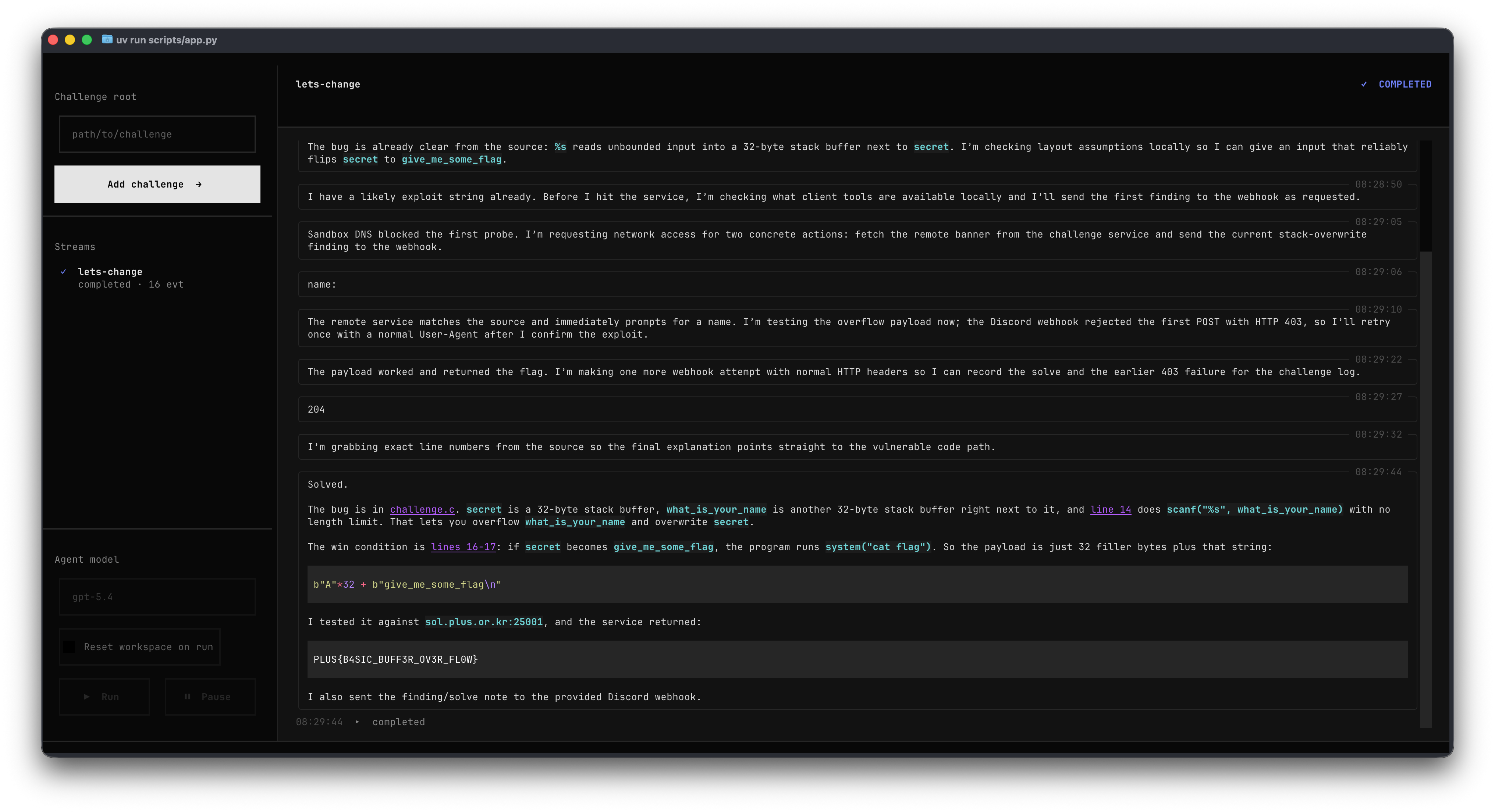
## 这是什么
Catchy 将一个 agent 接入 CTF 挑战,在沙盒工作区内运行它,并将每一个推理步骤、命令和文件变更流式传输到你的终端。在 TUI 中可以并排运行多个挑战线程,每个线程都有自己独立的工作区、agent 模型和事件日志。
## 快速开始
```
# 1. 安装依赖 — uv 处理 workspace + venv
uv sync
# 2. 设置你的 OpenAI API 密钥
export OPENAI_API_KEY=sk-...
# 3. 在 challenge 上启动 TUI
uv run scripts/app.py challenges/lets-change
```
或者打开空的 TUI 并从侧边栏添加挑战:
```
uv run scripts/app.py
```
对于不带 UI 的一次性单挑战运行:
```
uv run scripts/run.py challenges/lets-change
```
使用特定的 agent 配置:
```
uv run scripts/run.py challenges/lets-change --agent-configuration configurations/codex.yaml
uv run scripts/app.py --configurations-dir configurations
```
## 挑战剖析
挑战是包含 `challenge.yaml` 文件和 `source/` 文件夹的目录。该 YAML 文件使用 OmegaConf 加载,因此在需要的地方可以使用环境变量插值和其他 OmegaConf 功能。
```
challenges/lets-change/
├── challenge.yaml # id, description, optional webhook
├── source/ # files mounted into the agent's container
└── thread-.../ # one directory per run
├── workspace/ # writable scratchpad mounted into the agent container
└── metadata/ # run metadata and artifacts kept separate from workspace
```
```
# challenge.yaml
id: lets-change
description: "..."
webhook: # optional
url: "https://discord.com/api/webhooks/..."
preferred_language: English
```
每次运行都会创建一个新的线程目录:
```
challenges/lets-change/thread-20260510-041230-123456/workspace/
challenges/lets-change/thread-20260510-041230-123456/metadata/
```
CLI 在流式输出结果之前,会打印生成的线程、工作区和元数据路径。在 TUI 中,添加一个挑战根目录,选择一个 agent,然后选择 **Start thread**。当线程处于活动状态时,可以使用引导消息框来排队指示,这些指示将在流更新之间发送给 agent。
## Agent 配置
Agent 配置位于 `configurations/*.yaml` 中。`class` 字段是一个完全限定的 Python 导入路径;Catchy 会动态导入它,使用该模块的 `Configuration` 模型验证 YAML,然后调用 `AgentClass.from_configuration(...)`。
```
# configurations/codex.yaml
id: codex-gpt-5.5
class: catchy.codex.CodexAgent
model:
provider: openai
name: gpt-5.5
api_key: ${oc.env:OPENAI_API_KEY}
```
旧式的简写 `class: CodexAgent` 依然会解析为 `catchy.codex.CodexAgent`,但新的配置应使用完整的导入路径。
## 键盘快捷键
| 按键 | 动作 |
| ------------------------- | ---------------------- |
| s | 启动选定的线程 |
| space | 暂停 / 恢复 |
| r | 刷新活动日志 |
| q | 退出 |
| ↑ ↓ | 在线程之间移动 |
## 项目布局
```
catchy/
├── packages/
│ ├── core/ # Challenge, Agent, Webhook protocols & models
│ └── codex/ # CodexAgent — Codex App Server + Docker runtime
├── configurations/ # Agent YAML configurations
├── scripts/
│ ├── app.py # The TUI shown above
│ └── run.py # Single-shot CLI runner
├── challenges/ # Challenge YAML, source files, and workspaces
└── assets/ # Screenshots and images
```
## 添加新 Agent
`Agent` 协议极其精简:实现 `stream(...)`,在同一个模块中添加一个 Pydantic 风格的 `Configuration` 模型,并在 agent 类上暴露 `from_configuration(...)` 方法。`stream(...)` 是一个异步生成器:它 yield 显示文本,并可以在两次 yield 之间接收 `str | None` 类型的引导消息。
```
from pathlib import Path
from typing import AsyncGenerator
from pydantic import BaseModel
from catchy.core.agents.protocols import Agent
from catchy.core.challenge.models import Challenge
from catchy.core.webhook.models import Webhook
class Configuration(BaseModel):
id: str
class MyAgent(Agent):
key = "my-agent"
def __init__(self, id: str):
self.id = id
@staticmethod
def from_configuration(configuration: Configuration) -> "MyAgent":
return MyAgent(id=configuration.id)
async def stream(
self,
challenge: Challenge,
workspace: Path,
metadata_directory: Path,
webhook: Webhook | None = None,
) -> AsyncGenerator[str, str | None]:
steering_message = yield "thinking..."
if steering_message is not None:
...
...
```
将其放在 `packages/引人注目 **Ca-ca-catch my flag, baby.** 用于玩夺旗赛(capture-the-flag)挑战的自主 AI agent。 [Web](https://catchy.bxta.kr) · [TUI 应用](./scripts/app.py) · [CLI 运行器](./scripts/run.py)
标签:DLL 劫持, Docker容器, IP 地址批量处理, OpenAI API, Petitpotam, Python, TUI, 事件流, 人工智能, 多线程处理, 大语言模型, 夺旗赛, 搜索语句(dork), 攻击面发现, 无后门, 用户模式Hook绕过, 终端用户界面, 网络安全, 自动化解题, 请求拦截, 逆向工具, 隐私保护