aws-samples/sample-schedule-securityagent-pentest
GitHub: aws-samples/sample-schedule-securityagent-pentest
通过 CloudFormation 模板和事件驱动架构实现 AWS Security Agent 渗透测试任务的周期性自动调度与状态追踪。
Stars: 4 | Forks: 0
# 计划 AWS Security Agent 渗透测试
用于计划周期性 [AWS Security Agent](https://aws.amazon.com/security-agent/) 渗透测试的 AWS CloudFormation 模板。
## 部署内容
- **EventBridge Scheduler 计划** — 按照您选择的频率触发状态机。
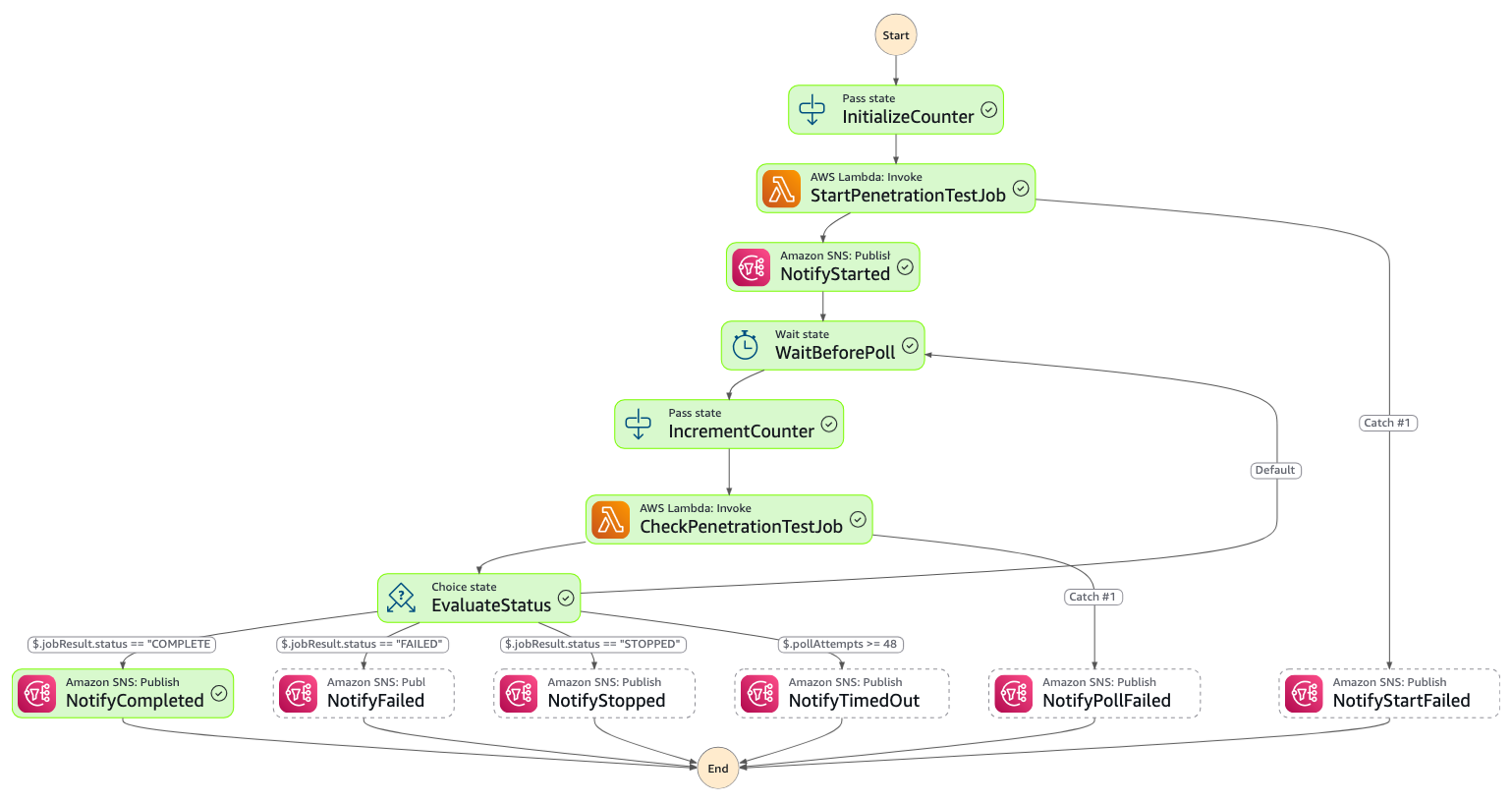
- **Step Functions 状态机** — 启动渗透测试任务,按设定间隔轮询其状态,并在完成时发送摘要。
- **Lambda 代理函数** — 状态机调用的小型 Python 函数,用于调用 `securityagent:StartPentestJob` 和 `securityagent:BatchGetPentestJobs`。AWS Security Agent 尚未加入 Step Functions AWS SDK 集成列表,因此此解决方案使用了 Lambda。
- **SNS 主题** — 接收生命周期通知:已启动、已完成、已失败、已停止和超时。
- **CloudWatch 日志组** — 一个用于状态机,一个用于 Lambda。
- **IAM 角色** — 权限范围仅限于上述操作。
架构图:
## 前置条件
在您部署堆栈的同一个账户和区域中,您必须已经具备:
1. 一个 AWS Security Agent **Agent Space** (`AgentSpaceId`)。
2. 该 Agent Space 内的一个**渗透测试配置** (`PenetrationTestId`)。
要获取您的 AgentSpaceID,请使用以下 AWS CLI 命令:
```
aws securityagent list-agent-spaces
```
要获取您的 PenetrationTestId,请使用以下 AWS CLI 命令:
```
aws securityagent list-pentests \
--agent-space-id
```
有关使用 AWS Security Agent CLI 的更多信息,请查看[将 AWS Security Agent 发现结果导出为 CSV](https://builder.aws.com/content/3DHUEfM5oAXCFwjnUvgRUIwiKLZ/export-aws-security-agent-findings-to-csv)。
## 部署
```
aws cloudformation deploy \
--region us-east-1 \
--stack-name \
--template-file template.yaml \
--capabilities CAPABILITY_IAM \
--parameter-overrides \
AgentSpaceId= \
PenetrationTestId= \
ScheduleExpression="rate(7 days)" \
NotificationEmail=security-team@example.com
```
- 对于 ``,输入 CloudFormation 堆栈的名称。
- 对于 ``,输入您的 AgentSpaceId。
- 对于 ``,输入您的 PenetrationTestId。
您还可以选择指定计划表达式和通知电子邮件。
### 计划表达式
`ScheduleExpression` 接受三种原生的 [EventBridge Scheduler](https://docs.aws.amazon.com/scheduler/latest/UserGuide/schedule-types.html) 表达式类型中的任何一种:
| 类型 | 示例 | 含义 |
| -------------- | ------------------------- | ------------------------------------------ |
| Rate | `rate(7 days)` | 每 7 天,立即开始。 |
| Cron | `cron(0 8 ? * MON *)` | 每周一 08:00。 |
| Cron (按月) | `cron(0 2 1 * ? *)` | 每月 1 号 02:00。 |
| 一次性 | `at(2026-07-01T09:30:00)` | 在指定的本地时间精确运行一次。 |
Cron 和一次性表达式会根据您通过 `ScheduleTimezone` 提供的时区进行评估(默认为 `America/Los_Angeles`)。选择 Rate 表达式将在 CloudFormation 模板部署后立即开始渗透测试。
### 参数
| 参数 | 描述 | 默认值 |
| --------------------- | ------------------------------------------------------------- | ----------------------------- |
| `AgentSpaceId` | 现有的 AWS Security Agent agent space ID。 | _必填_ |
| `PenetrationTestId` | 要运行的现有渗透测试配置 ID。 | _必填_ |
| `ScheduleExpression` | Rate、cron 或一次性 `at(...)` 表达式。请参见上面的示例。 | `rate(7 days)` |
| `ScheduleTimezone` | 用于 cron / at 表达式的 IANA 时区(对于 rate 将被忽略)。 | `America/Los_Angeles` |
| `PollIntervalSeconds` | 状态检查之间的秒数。 | `3600`(1 小时) |
| `MaxPollAttempts` | 状态机结束前的最大轮询次数。 | `48`(按 1 小时间隔为 2 天) |
| `NotificationEmail` | 用于自动订阅 SNS 主题的可选电子邮件地址。 | _空_ |
如果您提供了 `NotificationEmail`,AWS 将向该地址发送一封确认电子邮件。只有在您确认后,订阅才会开始接收消息。
### 输出
- `StateMachineArn` - 运行渗透测试的 Step Functions 状态机。
- `NotificationTopicArn` - 将任何额外的端点(Lambda、通过 Chatbot 的 Slack、更多电子邮件)订阅到此主题。
- `ScheduleName` - 如果您想在控制台中禁用或编辑它时的 EventBridge 计划名称。
- `LogGroupName` - 包含状态机执行日志的 CloudWatch 日志组。
- `ProxyFunctionName` - 代理 AWS Security Agent API 调用的 Lambda 函数。
## 无需等待计划进行测试
要手动启动状态机:
```
aws stepfunctions start-execution \
--state-machine-arn "" \
--input '{"agentSpaceId": "", "penetrationTestId": ""}'
```
- 对于 ``,输入 CloudFormation 模板输出中的 `StateMachineArn`。
- 对于 ``,输入您的 Agent Space ID。
- 对于 ``,输入您的渗透测试 ID。
## 自定义通知电子邮件
默认情况下,`STARTED`、`COMPLETED`、`FAILED` 和 `STOPPED` 通知会发布一份简短摘要,包含标题、ID、状态和时间戳。
STARTED 通知示例
```
Subject: [AWS Security Agent] Penetration test STARTED: JuiceShop
Body: AWS Security Agent penetration test job has started.
Title: JuiceShop
Penetration Test ID: pt-47fba927-b35b-4e10-8020-EXAMPLE1
Penetration Test Job ID: pj-4c9f3631-a1fb-4c5f-9788-EXAMPLE1
Agent Space ID: as-c1fdb673-2010-4059-b7b0-EXAMPLE1
Status: IN_PROGRESS
Created At: 2026-05-06T03:53:02.201007+00:00
The workflow will poll every 3600 seconds and send another notification when the job finishes.
```
COMPLETED 通知示例
```
Subject: [AWS Security Agent] Penetration test COMPLETED: JuiceShop
Body: AWS Security Agent penetration test job completed.
Title: JuiceShop
Penetration Test ID: pt-47fba927-b35b-4e10-8020-EXAMPLE1
Penetration Test Job ID: pj-4c9f3631-a1fb-4c5f-9788-EXAMPLE1
Agent Space ID: as-c1fdb673-2010-4059-b7b0-EXAMPLE1
Status: COMPLETED
Created At: 2026-05-06T03:53:02.201007+00:00
Updated At: 2026-05-06T06:29:39.232199+00:00
```
代理 Lambda 还会返回渗透测试的 `overview` 字段(服务生成的高级摘要)。默认情况下,它不包含在电子邮件中。要将其重新添加到一个或多个通知中,请编辑 `template.yaml` 中该状态的 `Message.$` 表达式并重新部署。
在 `PenetrationTestStateMachine` 的 `DefinitionString` 块中找到您要更新的状态(`NotifyCompleted`、`NotifyFailed` 或 `NotifyStopped`),并扩展 `States.Format(...)` 调用:
1. 将 `\n\nSummary:\n{}\n` 附加到格式化字符串中。
2. 将 `$.jobResult.overview` 作为最后一个参数附加。
例如,不带摘要的 `NotifyCompleted`(默认):
```
"Message.$": "States.Format('AWS Security Agent penetration test job completed.\n\nTitle: {}\nPenetration Test ID: {}\nPenetration Test Job ID: {}\nAgent Space ID: {}\nStatus: {}\nCreated At: {}\nUpdated At: {}\n', $.jobResult.title, $.jobResult.pentestId, $.jobResult.pentestJobId, $.agentSpaceId, $.jobResult.status, $.jobResult.createdAt, $.jobResult.updatedAt)"
```
带摘要的 `NotifyCompleted`:
```
"Message.$": "States.Format('AWS Security Agent penetration test job completed.\n\nTitle: {}\nPenetration Test ID: {}\nPenetration Test Job ID: {}\nAgent Space ID: {}\nStatus: {}\nCreated At: {}\nUpdated At: {}\n\nSummary:\n{}\n', $.jobResult.title, $.jobResult.pentestId, $.jobResult.pentestJobId, $.agentSpaceId, $.jobResult.status, $.jobResult.createdAt, $.jobResult.updatedAt, $.jobResult.overview)"
```
格式化字符串中 `{}` 占位符的数量必须与随后的参数数量相匹配,否则状态机将在通知步骤失败。不需要更改 Lambda 或 IAM — Lambda 已经在其响应中返回了 `overview`。
## 清理
要删除此堆栈创建的所有资源:
```
aws cloudformation delete-stack \
--stack-name
```
- 对于 ``,输入您在部署模板时使用的堆栈名称。
这不会影响您的 Agent Space 或渗透测试配置。删除模板仅移除调度基础设施。
## 成本
渗透测试调度器使用无服务器资源。对于大多数客户而言,此解决方案的成本低于 1 美元。这不包括 AWS Security Agent 资源。有关定价的更多信息,请查看 [Security Agent 定价](https://aws.amazon.com/security-agent/pricing/)、[EventBridge 定价](https://aws.amazon.com/eventbridge/pricing/)、[Lambda 定价](https://aws.amazon.com/lambda/pricing/)和 [SNS 定价](https://aws.amazon.com/sns/pricing/)。
标签:AWS, CloudFormation, DPI, Lambda, Step Functions, 定时任务, 自动化编排, 逆向工具