ogtamimi/linscope
GitHub: ogtamimi/linscope
基于 eBPF 的 Linux 实时行为可观测性平台,将内核事件转化为动态安全图谱,支持攻击回放和 AI 辅助分析。
Stars: 1 | Forks: 0
# 🔭 LINSCOPE
**Linux 实时行为可观测性平台**
*将您的 Linux 系统内部状态以活生生的安全图谱呈现*
[](LICENSE)
[]()
[]()
[]()
[]()
[]()
[]()
## ✨ 什么是 linscope?
linscope 将 Linux 内核活动转化为**实时可视化行为系统**。
您无需在海量日志中挣扎,而是可以直接看到:
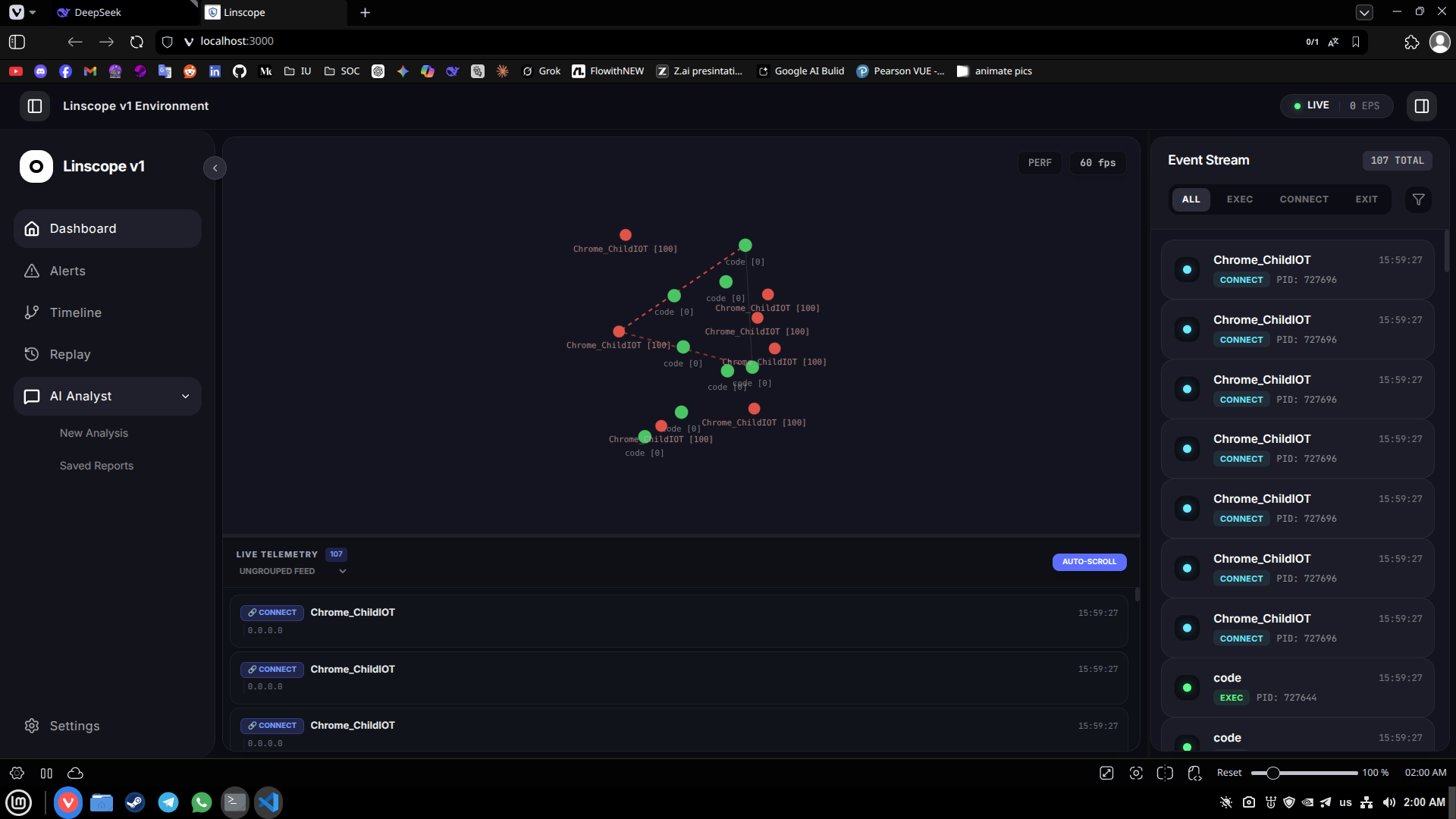
- 🔴 **实时进程图谱** — 谁在何时生成了什么,以及为什么
- 🌐 **网络流图** — 实时连接可视化
- ⚡ **行为异常检测** — 非基于特征码
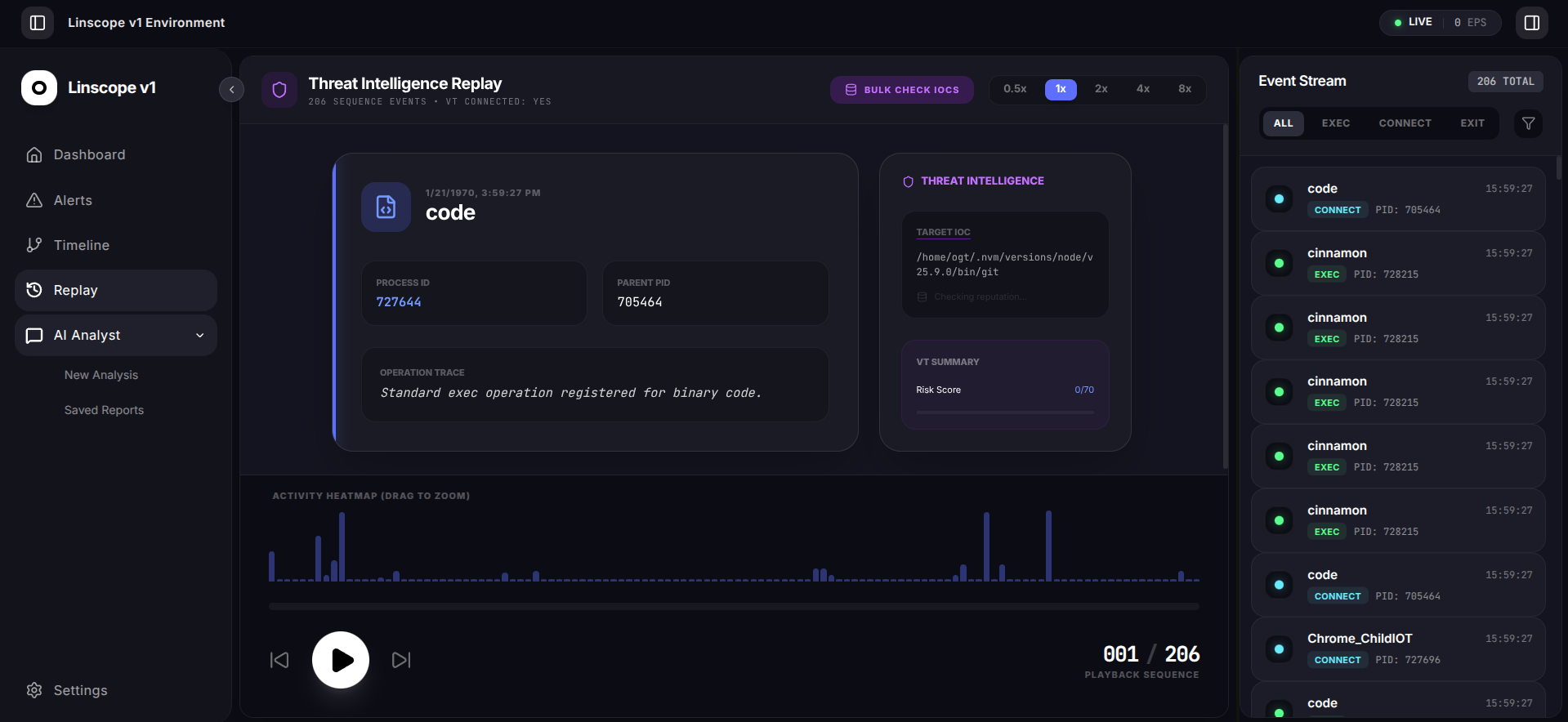
- 🎬 **攻击回放** — 逐步重建安全事件
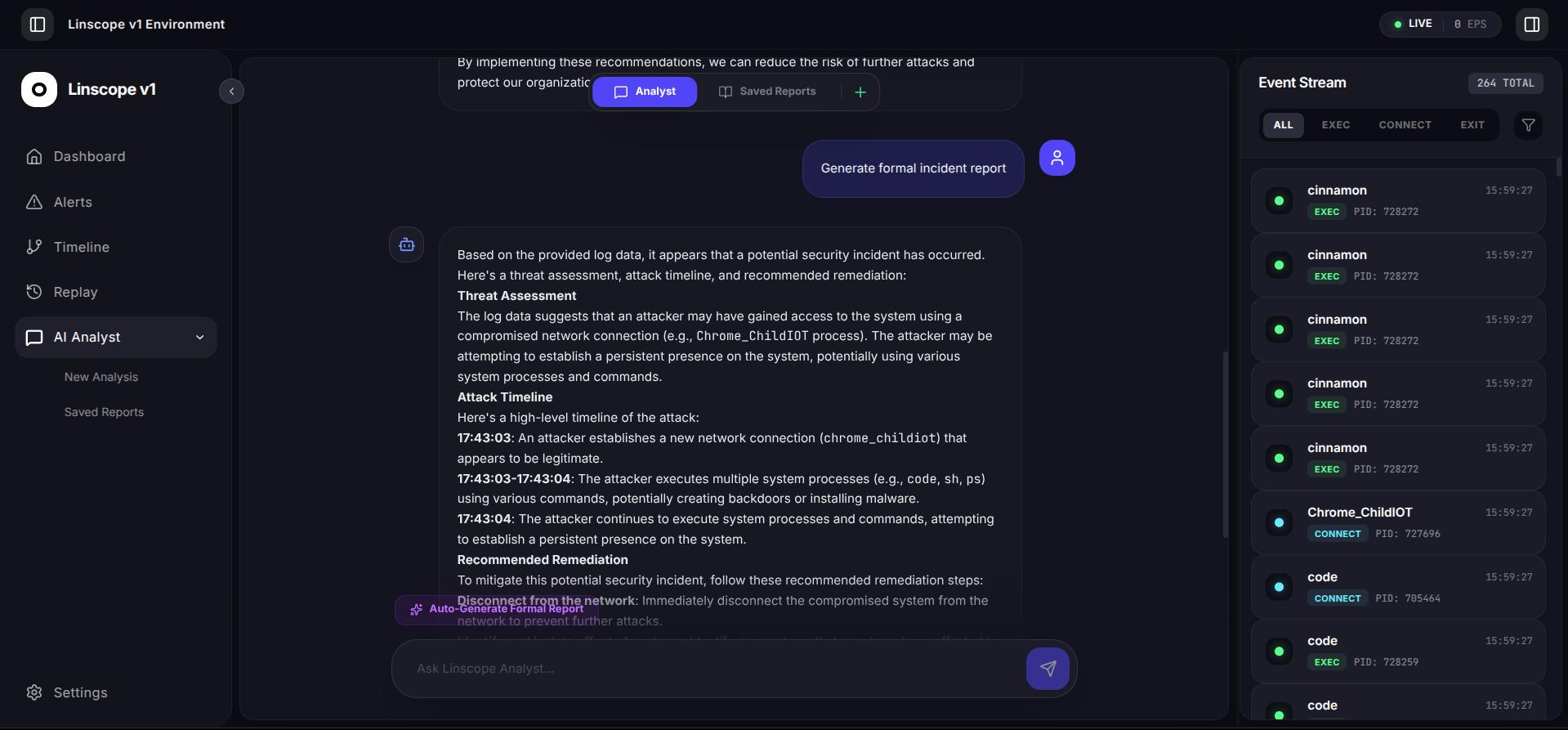
- 🤖 **AI 驱动分析** — 使用本地 LLM 进行安全事件解释
## 🏗️ 架构
```
eBPF Collector → FastAPI Backend → WebSocket → React Frontend
↓ ↓ ↓ ↓
Kernel Event Real-time Live Graph Visualization
Stream Processing Updates
↓
Detection Engine → Replay Engine → AI Assistant
```
## 📦 从 Debian 软件包安装
如果您有打包好的安装程序 `linscope_v1_amd64.deb`,请使用以下命令进行安装:
```
sudo dpkg -i linscope_v1_amd64.deb
sudo apt-get install -f
```
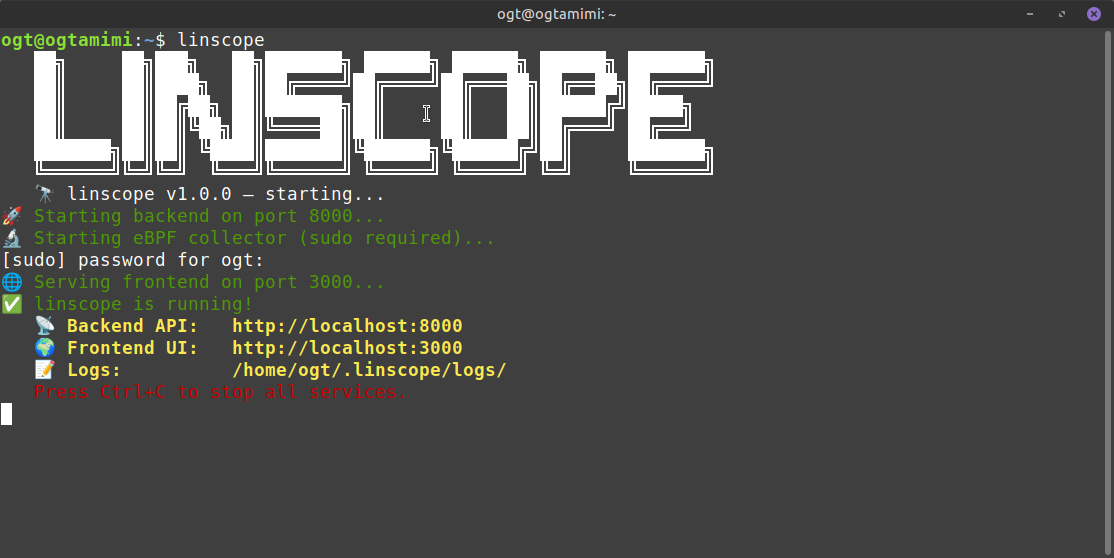
软件包安装完成后,请使用已安装的二进制文件或服务来运行应用程序。例如:
```
linscope
```
如果该命令不可用,请按照下方“快速开始”部分中基于源码的常规启动说明进行操作。
## 🚀 快速开始
### 前置条件
- Linux (Ubuntu 22.04+, Mint 21+)
- Python 3.10+
- Node.js 18+
- Collector 需要 Root 权限
- eBPF 依赖项:`bpfcc-tools`、`python3-bpfcc`、`linux-headers-$(uname -r)`、`bpftrace`
- 可选:用于本地 AI 分析的 Ollama
### 安装所需的软件包
```
cd linscope
sudo apt update
sudo apt install -y bpfcc-tools python3-bpfcc linux-headers-$(uname -r) bpftrace
python3 -m venv venv
source venv/bin/activate
pip install -r requirements.txt
```
```
cd linscope/frontend
npm install
```
### 可选:安装 Ollama 用于本地 AI
如果您希望 AI 分析师和安全事件分析功能在本地运行,请安装 Ollama 并启动其本地服务器。
```
# 按照 https://ollama.com/docs/installation 中的 Ollama 安装说明进行操作
curl -fsSL https://ollama.com/install.sh | sudo bash
```
然后启动 Ollama API 服务器:
```
ollama serve --port 11434
```
默认情况下,linscope 将使用 `http://localhost:11434` 连接 Ollama。
您可以通过在环境中设置 `OLLAMA_URL=http://localhost:11434` 来覆盖此配置。
### 可选:VirusTotal 集成
如果您需要 VirusTotal IOC 查询功能,请运行:
```
bash setup-virustotal.sh
```
然后在 `.env.example` 或本地 `.env` 文件中设置您的 `VIRUSTOTAL_API_KEY`。
### 运行 linscope
**终端 1 — Backend**
```
cd linscope/backend
python3 -m uvicorn main:app --reload --port 8000
```
**终端 2 — Collector**
```
cd linscope/collector
sudo PYTHONPATH=/usr/lib/python3/dist-packages python3 main.py
```
**终端 3 — Frontend**
```
cd linscope/frontend
npm run dev
```
打开 http://localhost:3000 🔭
## 🎯 功能特性
| 功能 | 状态 | 描述 |
| :--- | :--- | :--- |
| 进程监控 | ✅ | eBPF 进程 exec/fork/exit 事件 |
| 网络监控 | ✅ | 带有 `/proc/net/tcp` 回退机制的 `NetworkMonitorV2` |
| 文件系统调用监控 | ✅ | 实验性的 open/unlink 跟踪 |
| 实时图谱 | ✅ | 实时行为图谱渲染 |
| 时间轴视图 | ✅ | 缩放、搜索、PID 过滤 |
| 回放引擎 | ✅ | 速度控制和进度拖拽 |
| 检测引擎 | ✅ | 基于 MITRE 风格规则的检测 |
| 告警面板 | ✅ | 实时告警流 |
| AI 分析师 | ✅ | 支持本地 Ollama + Groq |
| 虚拟滚动 | ✅ | O(1) DOM 渲染 |
## 📊 性能 (v1.0.0)
| 指标 | 优化前 | 优化后 | 提升 |
| :--- | :--- | :--- | :--- |
| 最大事件数/秒 | 500 | 2000+ | 4 倍 |
| FPS | 15-20 | 45-100 | 3 倍 |
| 内存使用 | 250-300MB | 45-100MB | 3 倍 |
| DOM 节点数 | 1000+ | 50-150 | 10 倍 |
## 🔌 API 端点
| 方法 | 端点 | 描述 |
| :--- | :--- | :--- |
| GET | / | 健康检查 |
| POST | /api/events/batch | 接收来自 collector 的事件批次 |
| GET | /api/events | 获取存储的事件 |
| GET | /api/alerts | 获取告警历史 |
| POST | /api/alerts/feedback | 提交告警反馈 |
| POST | /api/ai/chat | AI 聊天流 |
| POST | /api/ai/analyze-incident | 安全事件分析 |
| WebSocket | /ws | 实时事件流 |
| WebSocket | /ws/alerts | 告警流 |
## 📁 项目结构
```
linscope/
|
├── README.md # Project overview, installation, usage, and features
├── LICENSE # Apache 2.0 license file
├── .gitignore # Files/folders ignored by Git
├── .env.example # Example environment variables for local config
├── setup-virustotal.sh # Helper script to configure VirusTotal integration
├── requirements.txt
|
├── backend/ # FastAPI backend and AI integration
| |
│ ├── main.py # Backend application entrypoint
│ ├── detection_engine.py # Detection rules and alert generation
│ ├── ai_service.py # Ollama/Groq AI service integration
│ ├── virustotal.py # VirusTotal IOC lookup router
│ ├── backend.log # Backend runtime log file
│ ├── linscope.db # Local SQLite event store
│ ├── api/ # Backend API package
│ │ └── __init__.py # API package initializer
| |
| |
│ └── src/ # Backend utilities and shared helpers
│ └── __init__.py
|
|
|
├── collector/ # eBPF collector and event emitter
| |
│ ├── main.py # Collector entrypoint, starts process/network monitors
│ ├── mock_collector.py # Synthetic event generator for testing
│ ├── __pycache__/ # Compiled Python bytecode cache
| |
| |
│ └── src/
│ ├── event_emitter.py # Sends event batches to backend
│ ├── network_monitor_v2.py # Network monitor with fallback logic
│ ├── process_monitor.py # Process tracking via eBPF
│ └── file_monitor.py # Experimental file syscall tracking
|
|
├── frontend/ # React frontend app
| |
│ ├── package.json # Frontend npm package manifest
│ ├── package-lock.json # Locked frontend dependency versions
│ ├── tsconfig.json # TypeScript compiler config
│ ├── vite.config.ts # Frontend build and dev server config
│ ├── index.html # Browser app shell
│ ├── metadata.json # App metadata and settings
│ ├── README.md # Frontend-specific README
│ ├── .gitignore # Frontend ignored files
│ ├── dist/ # Built frontend assets
│ ├── frontend.log # Frontend runtime log file
│ ├── icons/ # UI icon assets
│ ├── node_modules/ # Installed npm packages
| |
│ └── src/
│ ├── App.tsx # Main React app component
│ ├── main.tsx # React entrypoint rendering App
│ ├── index.css # Global frontend styles
│ ├── types.ts # Shared TypeScript types
│ ├── vite-env.d.ts # Vite environment type defs
│ ├── lib/ # Utility modules and helpers
│ │ └── utils.ts
| |
| |
│ ├── workers/ # Web Workers for performance offload
│ │ └── anomalyDetection.ts
| |
| |
│ ├── components/ # UI components and panels
│ │ ├── AIChat.tsx
│ │ ├── AlertsPanel.tsx
│ │ ├── AppLayout.tsx
│ │ ├── LiveGraph.tsx
│ │ ├── ReplayView.tsx
│ │ ├── RightPanel.tsx
│ │ ├── SettingsPanel.tsx
│ │ ├── Sidebar.tsx
│ │ ├── TimelineView.tsx
│ │ └── VirtualEventFeed.tsx
| |
│ └── hooks/ # React hooks for state and data
│ ├── useAlerts.ts
│ ├── usePanelState.ts
│ ├── useVirusTotal.ts
│ └── useWebSocketAdaptive.ts
|
├── docs/ # Documentation and contribution guides
└── venv/ # Python virtual environment
```
## 🖼️ 截图
用 ❤️ 为蓝队构建
标签:AI风险缓解, AV绕过, Debian, Docker镜像, EDR, FastAPI, Hpfeeds, React, SQLite数据库, Syscalls, WebSocket, 人工智能安全, 依赖分析, 内核监控, 可视化平台, 合规性, 子域名枚举, 安全图谱, 实时系统, 开源, 异常检测, 攻击重演, 时间线生成, 本地大模型, 系统安全, 系统调用, 网络安全, 网络流, 脆弱性评估, 自动化攻击, 行为观测, 进程可视化, 逆向工具, 隐私保护, 零日攻击检测