iksnerd/hopper-recon
GitHub: iksnerd/hopper-recon
一款自托管的攻击面侦察平台,将多种 OSINT 侦察工具整合到统一引擎中,通过仪表盘和 MCP 协议为安全研究人员提供自动化的资产映射能力。
Stars: 2 | Forks: 1
# hopper-recon
将其指向一个您已授权测试的域名,即可在一个仪表盘中获取其外部攻击面 —— 包括子域名、DNS 记录、TLS 证书、HTTP 指纹、CDN/WAF 归属、历史 URL 以及地理位置分布。相同的侦察工具通过 **MCP** 暴露,因此 AI 代理(Claude Code、Cline、Claude Desktop)可以直接针对同一引擎运行它们。
自托管 —— `docker compose up` 启动,使用 SQLite 进行存储,无需外部服务。滥用防护(gov/mil 黑名单、单目标冷却期、范围过滤器、审计日志)默认开启。
[](https://github.com/iksnerd/hopper-recon/releases/latest)





## 功能
- **仪表盘** —— 并行针对目标运行所有 OSINT 工具,实时耗时计时器、发现结果分类条、技术栈检测
- **历史记录** —— 按域名划分的时间轴,包含多次扫描图表、基于 IP 数据的地理地球仪、带有可滚动子域名列表的整页详情视图、证书 SAN 展开、重定向链
- **MCP 原生引擎** —— 在 `/mcp` 暴露相同工具,以便 AI 代理直接驱动侦察;仪表盘只是一个消费者
- **发现结果条** —— 自动分类已过期的证书、缺失的 SPF/DMARC、HTTPS→HTTP 降级、敏感子域名
- **地理地球仪** —— 通过内置的 MaxMind GeoLite2(离线)实现 IP → 国家/地区的映射,使用 [cobe](https://cobe.vercel.app) 渲染
- **自托管** —— 运行 `docker compose up` 即可完成安装。使用 SQLite 进行存储,无需外部服务
- **通过 Litestream 进行持续备份** —— 默认通过 WAL 流式传输到本地文件卷;翻转配置块即可复制到 S3 / R2 / Azure Blob / GCS
- **Web 端无 Docker socket** —— Web 容器通过 HTTP 与引擎通信,因此它可以在禁止特权容器的平台上运行(Cloud Run、Fly Machines、k8s rootless 等)
## 截图
### 仪表盘 —— `/dashboard`
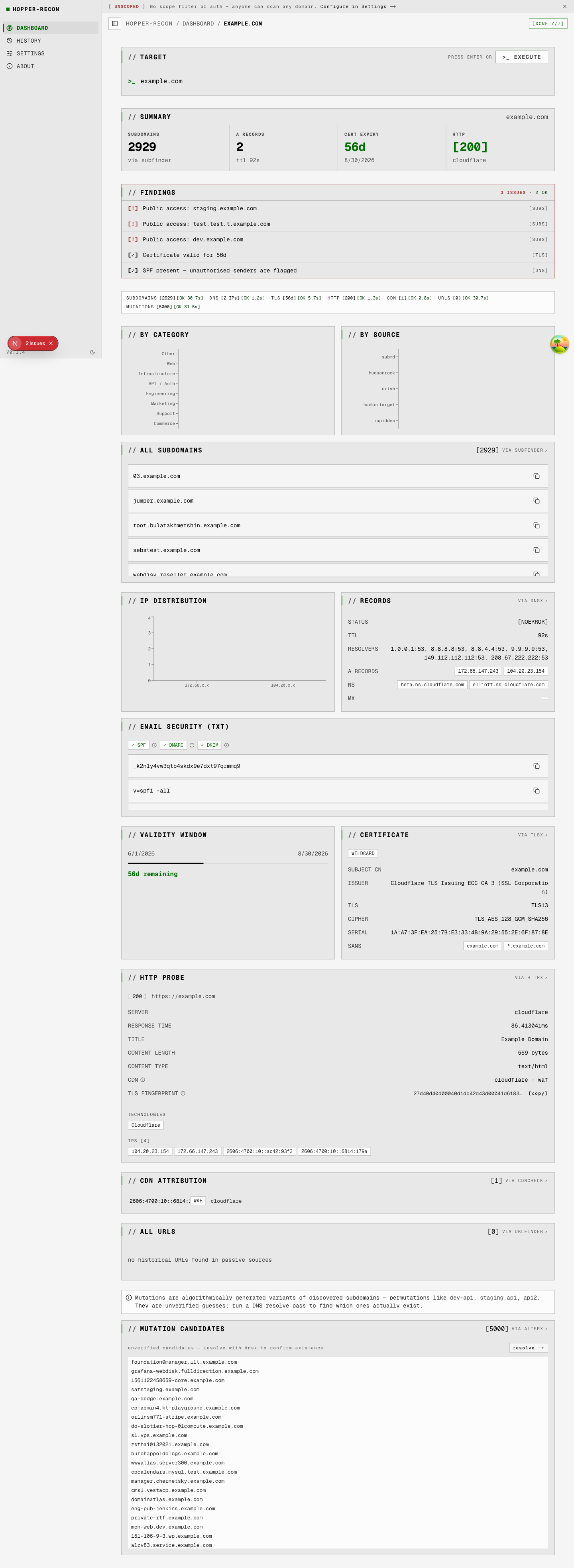
并行针对目标运行全部 7 种 OSINT 工具,并带有实时耗时计时器。每个选项卡随着结果到达而填充 —— 子域名、DNS 记录、TLS 证书、HTTP 栈、CDN 归属、历史 URL 以及子域名突变。当未配置 `HOPPER_ALLOWED_DOMAINS` 和身份验证时,会显示公告横幅。
### 历史记录 —— `/history`
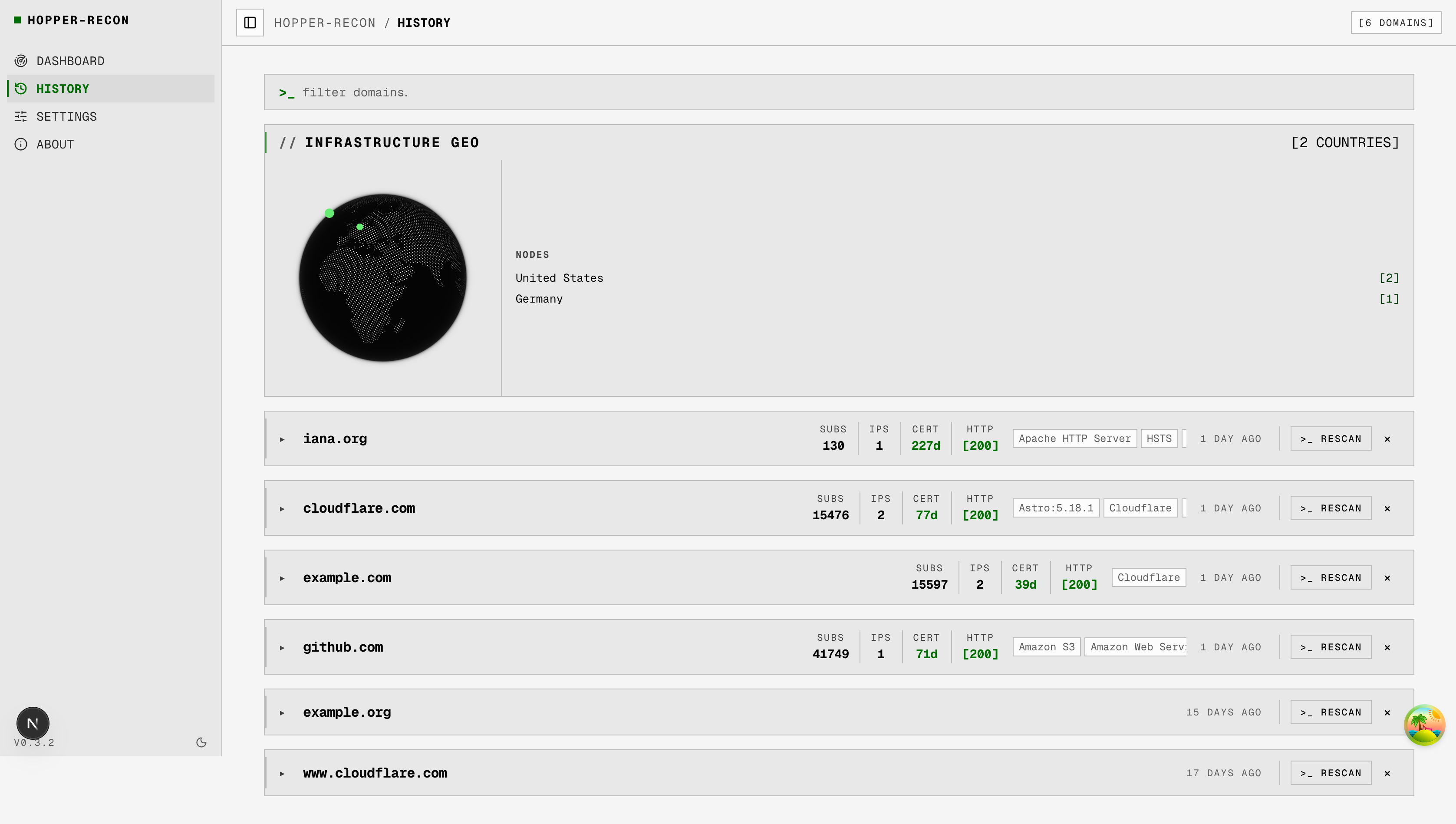
包含证书 / HTTP / 技术元数据、地理分布、扫描新近度的所有已扫描域名。内联 `>_ 重新扫描` 和删除操作。点击某一行进入详情视图。
### 域名详情 —— `/history/`
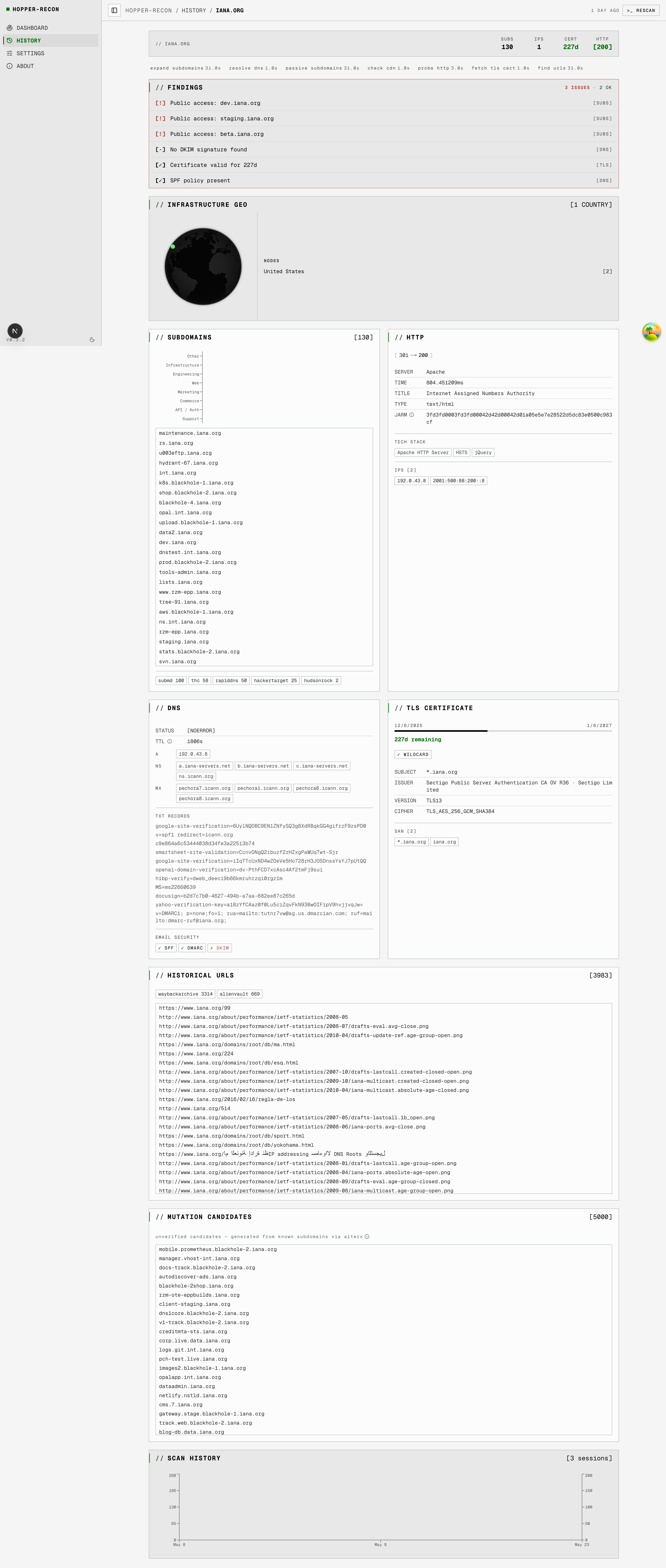
单个域名的完整视图:发现结果条(自动分类的安全信号 —— 过期证书、缺失的 SPF/DMARC、敏感子域名)、地理地球仪、带有类别直方图的子域名细分、带有重定向链和 SAN 展开的完整 HTTP / DNS / TLS 面板,以及底部的扫描历史时间轴。
### 首页 —— `/`
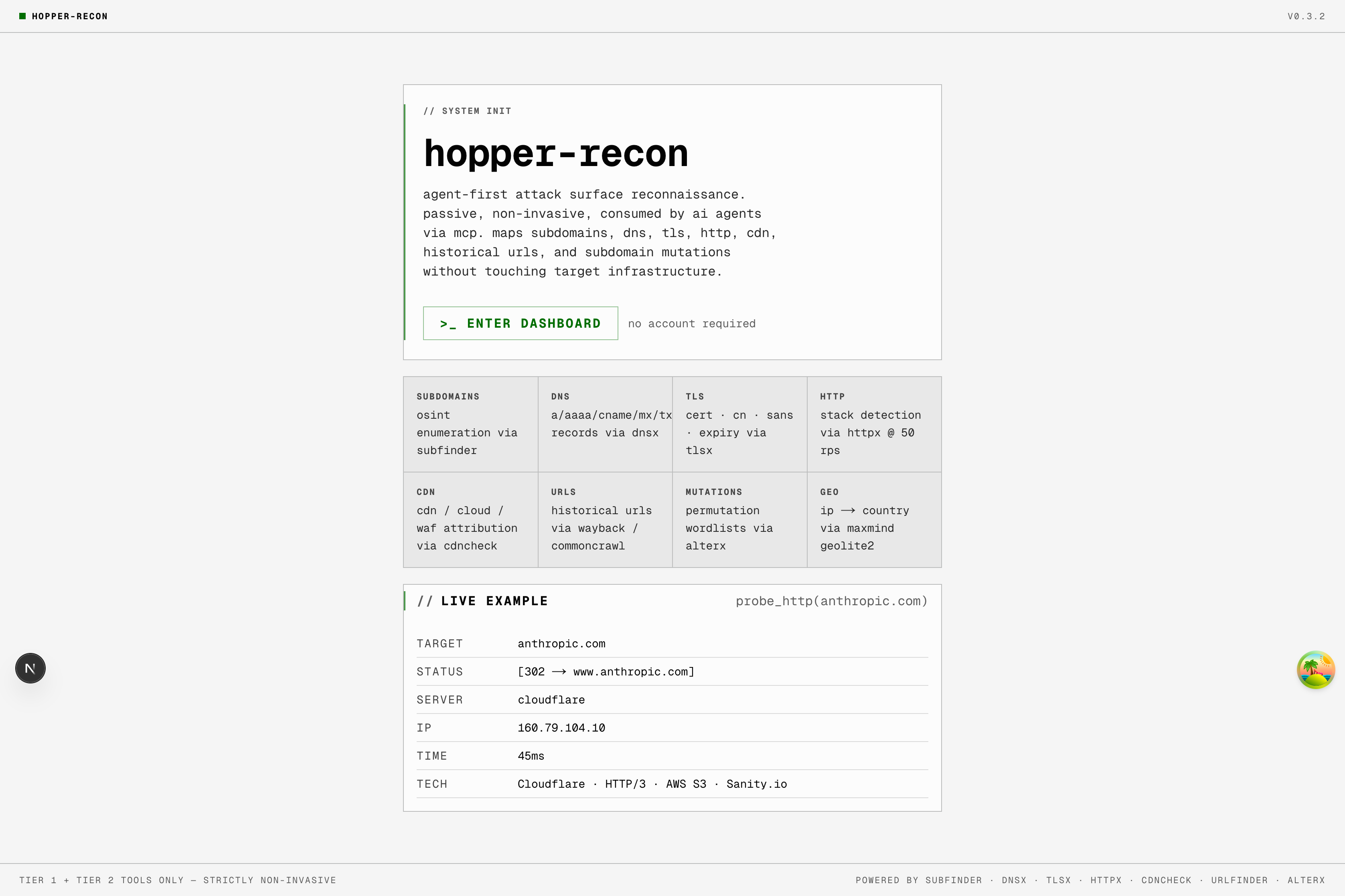
该工具的功能介绍,内置了一个静态的 `probe_http(anthropic.com)` 示例。页面加载时不运行实时侦察。
## 快速开始
**前提条件:** Docker + Docker Compose。(对于没有容器的开发环境:Node.js 22+,Go 1.26+。)
```
git clone https://github.com/iksnerd/hopper-recon
cd hopper-recon
# 可选:放入 GeoLite2 mmdb 以便渲染 geo-globe
mkdir -p ~/.config/hopper-recon
curl -L https://github.com/P3TERX/GeoLite.mmdb/raw/download/GeoLite2-Country.mmdb \
-o ~/.config/hopper-recon/GeoLite2-Country.mmdb
# 启动 stack(engine + web + Litestream sidecars)
docker compose up -d --build
# 打开 dashboard
open http://localhost:9120 # macOS
# xdg-open http://localhost:9120 # Linux
```
引擎也会监听 `http://127.0.0.1:9119`(仅限回环地址)以进行直接的 MCP 和 REST 访问 —— 避开广为人知的 `:8080` 端口,以免与占用该端口的其他十几个开发工具发生冲突。在 compose 网络内部,Web 端通过 DNS 访问位于 `engine:8080` 的引擎。
GeoLite2 是可选的(如果没有它,地球仪就不会渲染)。包括官方 MaxMind 路径在内的完整设置,以及用于更广泛来源覆盖的 subfinder API 密钥,请参见 [DEPLOY.md](./DEPLOY.md#optional-data-sources-geolite2-subfinder-keys)。
### 添加到您的 MCP 客户端
对于 Claude Code(项目 `.mcp.json`):
```
{
"mcpServers": {
"hopper-recon": {
"type": "http",
"url": "http://127.0.0.1:9119/mcp"
}
}
}
```
对于一次性 stdio 代理(Claude Desktop):
```
{
"mcpServers": {
"hopper-recon": {
"command": "docker",
"args": ["run", "--rm", "-i", "hopper-recon:latest", "mcp"]
}
}
}
```
HTTP 变体连接到您长期运行的引擎并共享仪表盘的数据库 —— 代理扫描的任何内容都会显示在历史记录中。stdio 变体会生成一个新的临时容器,且不进行持久化。
## 工具
| MCP 名称 | 二进制文件 | 功能描述 |
|---|---|---|
| `passive_subdomains` | subfinder | 跨 40 多个来源的 OSINT 子域名枚举(无密钥免费,有密钥更多) |
| `resolve_dns` | dnsx | A / **AAAA** / CNAME / NS / MX / TXT 记录,CDN 检测,从 `_dmarc.` 合并 DMARC |
| `fetch_tls_cert` | tlsx | TLS 证书详情 —— CN、SAN、过期时间、密码、通配符/过期/自签名标志 |
| `probe_http` | httpx | HTTP 探测 —— 标题、技术栈、JARM、CPE、重定向链。自定义 UA,50 rps 上限 |
| `check_cdn` | cdncheck | 基于内置 CIDR 列表(Cloudflare、Akamai、Fastly、AWS、GCP、Imperva 等)进行单 IP CDN / 云 / WAF 归属。纯离线。 |
| `find_urls` | urlfinder | 来自被动来源(waybackarchive、commoncrawl、alienvault)的历史 URL。不向目标发送请求。 |
| `expand_subdomains` | alterx | 从现有子域名生成基于排列的子域名字典。纯本地转换 —— 无网络请求。 |
| `resolve_mutations` | alterx + dnsx | 生成排列候选(subfinder → alterx)然后通过 DNS 解析它们,仅返回具有活动 A 记录的候选。在 `expand_subdomains` 之后从仪表盘运行。 |
| `lookup_geoip` | geoip2-golang | 基于本地 MaxMind GeoLite2 mmdb 将 IP 转换为 ISO 国家代码。根据设计,Anycast IP(Cloudflare / AWS / Google)没有国家归属 —— 仪表盘会显示内联说明,而不是显示空的地球仪。 |
**我们未提供的工具**:`asnmap`(需要 PDCP API 密钥),`search_hosts` / uncover(需要 Shodan/Censys/FOFA 密钥)。Hopper 的策略是,每个提供的工具都必须在不进行身份验证设置的情况下,为首次使用的用户提供有用的输出。
## 内置防护
这些防护默认开启。它们位于**引擎**层(而非 Web 层),因此直接的 MCP 调用者 —— Claude Code、Cline、一次性 stdio 代理 —— 会遇到与仪表盘相同的关卡。完整姿态请见 [SECURITY.md](./SECURITY.md);环境变量配置请见 [`.env.example`](./.env.example)。
| 防护 | 功能描述 | 覆盖方式 |
|---|---|---|
| **限制后缀黑名单** | 拒绝针对 `.gov`、`.mil`、`.gouv.fr`、`.gov.uk`、`.go.jp`、`.gc.ca`、`.gov.au` 的主动探测(`probe_http`、`fetch_tls_cert`)。返回 HTTP 451。 | `HOPPER_OVERRIDE_BLOCKLIST=true` + 非空的 `HOPPER_BLOCKLIST_OVERRIDE_REASON`(记录在审计日志中) |
| **单目标冷却期** | 每个 `(target, tool)` 对有 60 秒的窗口期。重复请求返回带有 `Retry-After` 的 HTTP 429。防止胡乱狂按按钮造成的事故。 | 无 —— 只能等待 |
| **审计日志** | 每次 `/scan` 都会在 `audit_log` 中写入一行,包含时间戳、源 IP、User-Agent、工具、目标、决定(允许 / 阻止)以及原因。 | 使用 `sqlite3 /data/scans.db 'SELECT * FROM audit_log'` 读取 |
| **范围过滤器** | 当设置了 `HOPPER_ALLOWED_DOMAINS` 时,所有工具都会拒绝列表中顶点之外的任何目标。返回 HTTP 403。 | 取消设置或扩展列表 |
| **自定义 User-Agent** | `httpx` 探测带有 `hopper-recon/ (+repo URL)`,以便目标运维人员可以据此进行归属并请求排除。 | 无 —— 根据设计在每次请求时设置 |
| **操作员公告横幅** | 首次启动时,如果未配置范围或身份验证,则显示 UI 横幅。可针对单个浏览器关闭。 | 配置范围或忍受警告 |
| **回环引擎绑定** | Compose 将引擎仅绑定到 `127.0.0.1:9119`。局域网/广域网暴露需要刻意的配置更改。 | 编辑 `docker-compose.yml` 端口 + 优先在前面加上身份验证 |
`/api/scan` 和引擎响应包含 `X-Hopper-Recon: authorized-use-only`,因此任何反向代理或 CDN 日志都可以识别该工具。`/config` 端点以布尔值形式报告范围/身份验证状态(不会泄露环境变量的值) —— 供仪表盘横幅使用,并可用于监控。
## 架构
**Go 引擎**包装了 [projectdiscovery](https://github.com/projectdiscovery) OSINT 工具,并在 `/data/scans.db` 处拥有自己的 SQLite 数据库。**Next.js 16 仪表盘**是位于其之上的一个轻量级 HTTP 客户端 —— 它从不会为了每次扫描而启动 Docker,也从不挂载 Docker socket。仪表盘的 `/api/scan` 验证输入,然后将其转发给引擎的 `POST /scan`,后者以原子方式运行工具、写入行并返回结果。读取操作通过引擎的 REST 端点进行。还有一个并行的 `D1Adapter` 用于 Cloudflare Workers 部署,在这些部署中,Web 直接拥有数据库。
```
hopper-recon/
├── engine/ # Go server — HTTP REST + stdio MCP, owns SQLite
│ ├── main.go # Entrypoint, mode dispatch, MCP tool registration
│ ├── tools.go # Recon-binary runners (subfinder/dnsx/tlsx/httpx/cdncheck/urlfinder/alterx/geoip)
│ ├── policy.go # Scope filter, gov/mil blocklist, per-target cooldown
│ ├── db.go # SQLite schema + queries (WAL mode, load-bearing for Litestream)
│ ├── server.go # REST handlers + /mcp mount
│ ├── *_test.go # Unit tests — policy, db, tools, server (no external deps)
│ └── Dockerfile
├── web/ # Next.js 16 thin client
│ ├── src/app/ # App Router pages + API routes (proxies to engine)
│ ├── src/lib/ # engine-client.ts · db.ts (EngineDB + D1 adapters) · scan-parser.ts
│ ├── src/components/recon/ # Shared UI primitives — Panel, ReconCard, PageHeader, GeoGlobe
│ ├── schema.sql # Cloudflare D1 mirror of engine/db.go schema
│ └── Dockerfile
├── docker-compose.yml # Engine + web + Litestream sidecars + named volumes
├── litestream.yml # Replica config — local file (default) or S3 / R2 / Azure / GCS
└── .env.example # All env vars documented with defaults + secret column
```
## 配置
完整的参考文档以及带有注释的 Litestream 云副本配置块位于 [`.env.example`](./.env.example) 中。将其复制到 `docker-compose.yml` 旁边的 `.env` 文件中;引擎和 Litestream 边车都会自动获取它。
| 环境变量 / 文件 | 默认值 | 用途 |
|---|---|---|
| `ENGINE_URL` | `http://127.0.0.1:9119` (开发环境) / `http://engine:8080` (compose 环境) | Web 端查找引擎的位置 |
| `HOPPER_DB_PATH` | `/data/scans.db` | 引擎容器内的 SQLite 路径 |
| `HOPPER_ADDR` | `:8080` | 引擎 HTTP 监听地址 |
| `HOPPER_ALLOWED_DOMAINS` | _(未设置)_ | 以逗号分隔的顶点列表;超出范围的目标返回 403。未设置 = 扫描任何内容(仪表盘随后会发出警告) |
| `HOPPER_OVERRIDE_BLOCKLIST` | _(未设置)_ | 设置为 `true`(连同 `HOPPER_BLOCKLIST_OVERRIDE_REASON`)以允许针对 `.gov` / `.mil` / 等效项的探测。会被审计记录。 |
| `HOPPER_BLOCKLIST_OVERRIDE_REASON` | _(未设置)_ | 触发覆盖时记录在 `audit_log` 中的自由文本原因。两个变量都必须非空。 |
| `~/.config/subfinder/` | — | subfinder 配置 + 可选 API 密钥(rw 挂载) |
| `~/.config/hopper-recon/GeoLite2-Country.mmdb` | — | MaxMind GeoLite2ro 挂载,可选) |
可选数据源(GeoLite2 设置、subfinder 密钥)和持续备份(Litestream —— 默认为本地文件,通过 S3 / R2 / Azure / GCS 进行云灾备)在 [DEPLOY.md](./DEPLOY.md) 中有介绍。
## 文档
- **[DEPLOY.md](./DEPLOY.md)** —— 生产环境部署:环境变量、端口、卷、单虚拟机拓扑、Litestream 备份与恢复、Kubernetes、强化检查清单
- **[CONTRIBUTING.md](./CONTRIBUTING.md)** —— 开发环境设置、预提交检查、PR 规范、添加侦察工具
- **[SECURITY.md](./SECURITY.md)** —— 授权使用姿态、威胁模型、披露联系方式
- **[CLAUDE.md](./CLAUDE.md)** —— 架构深入解析和代理/开发者指南
- **[CHANGELOG.md](./CHANGELOG.md)** —— 发布历史
- **[TODO.md](./TODO.md)** —— 路线图和待完成工作
## 路线图
请参见 [TODO.md](./TODO.md)。
- **v0.1.0** ✓ —— MIT 许可证、CI、SECURITY.md、滥用缓解措施(gov/mil 黑名单、冷却期、审计日志、范围过滤器、公告横幅)
- **v0.2.0** ✓ —— 引擎接管 SQLite + 所有侦察工具,Web 作为轻量级 HTTP 客户端,通过 `/mcp` 为 AI 代理提供 MCP 支持
- **v0.3.0** ✓ —— alterx(`expand_subdomains` / `resolve_mutations`)突变工具、开源优化、Litestream 备份
- **下一步** —— 自托管身份验证(Auth.js —— OIDC + 电子邮件魔法链接)、`/admin` 路由、审计日志查看器
## 许可证
MIT —— 请参见 [LICENSE](./LICENSE)。
标签:Docker, ESC4, GitHub, Go, MCP, OSINT, Ruby工具, 安全防御评估, 实时处理, 密码管理, 攻击面测绘, 日志审计, 版权保护, 自动化攻击, 自托管, 资产侦察