tkl-enteprises/ghas-demos
GitHub: tkl-enteprises/ghas-demos
一套以 Python 代码库为基础的 GitHub Advanced Security 实操工作坊,包含 11 节独立课程,帮助团队理解和上手 GitHub 全套安全功能。
Stars: 0 | Forks: 0
# ghas-demos




[](https://codespaces.new/tkl-enteprises/ghas-demos?quickstart=1)
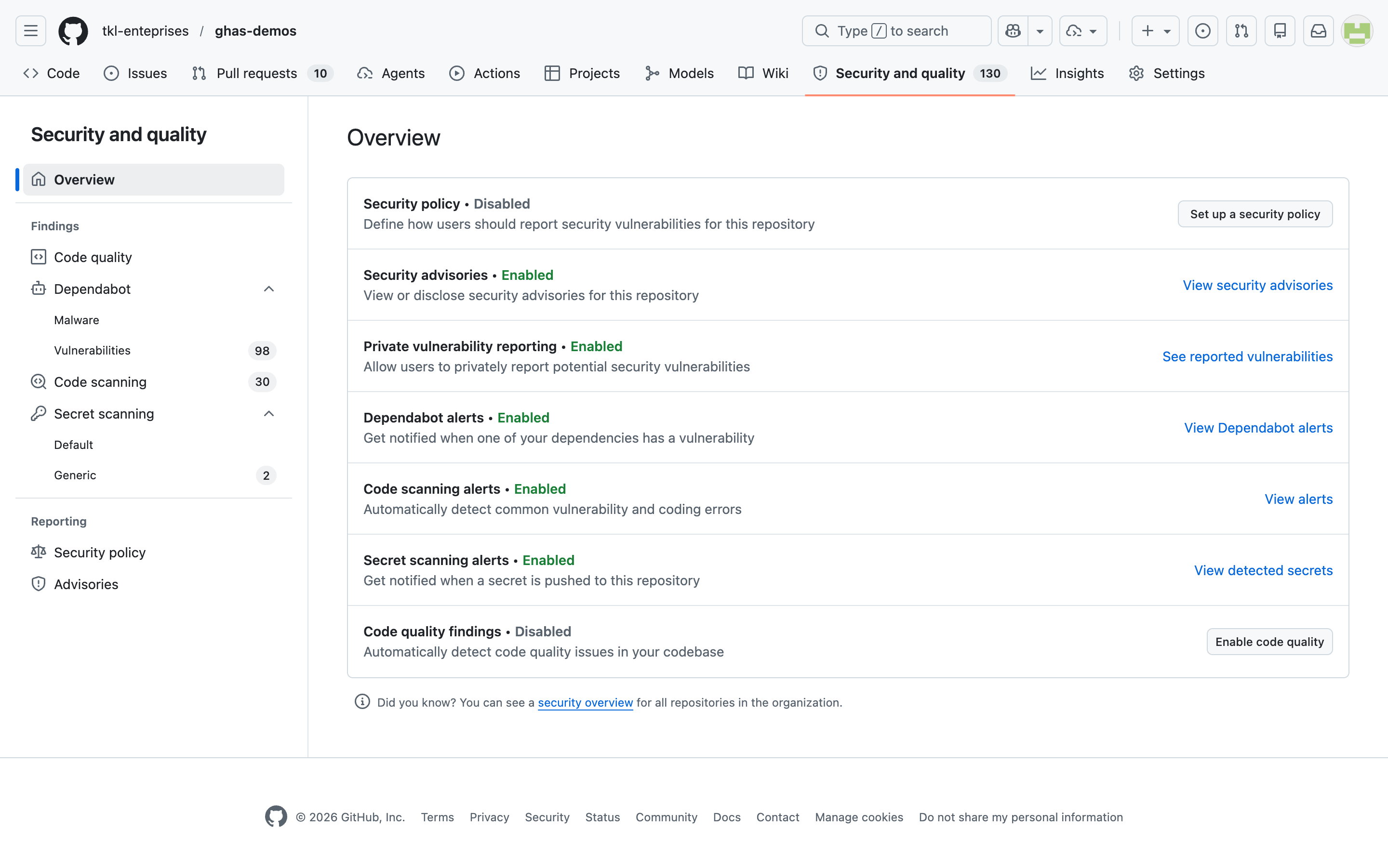
*该仓库的 `安全与质量` 标签页 —— 以下每节课程都旨在提升本页面上的具体指标。*
## 目录
- [什么是 GitHub Code Security 和 GitHub Secret Protection?](#what-are-github-code-security-and-github-secret-protection)
- [工作坊形式](#workshop-format)
- [工作坊核心支柱一览](#workshop-pillars-at-a-glance)
- [课程](#lessons)
- [前置条件](#prerequisites)
- [快速开始](#quick-start)
- [在 GitHub UI 中查看结果](#where-to-look-in-github-ui)
- [许可证](#license)
- [免责声明](#disclaimer)
## 快速开始
**选项 A — Codespaces(推荐工作坊参与者使用):**
[在 Codespace 中打开此仓库](https://codespaces.new/tkl-enteprises/ghas-demos?quickstart=1) —— 开发容器已预装 Python、`gh` CLI 以及课程依赖项。您可以在 60 秒内开始运行第 01 课。
**选项 B — 本地克隆:**
```
git clone https://github.com/tkl-enteprises/ghas-demos.git && cd ghas-demos
```
对于源码审查和 UI 课程,到这里就结束了:无需在本地安装任何包。第 09 课 故意将一系列过时的易受攻击依赖版本写在了 `lessons/09-supply-chain-dependabot/requirements.txt` 中 —— 这些包在 Python 3.11 上会故意安装失败,这就是演示的核心(您无需在本地安装它们;Dependabot 会直接从 GitHub 扫描清单文件)。第 04 课的 workflow 会为了 SARIF 练习安装 Bandit;第 05 和 06 课使用了绝对不可执行或部署的静态文本/源码示例。
## 什么是 GitHub Code Security 和 GitHub Secret Protection?
[GitHub Advanced Security 功能作为两款产品出售](https://docs.github.com/en/code-security/getting-started/github-security-features):**GitHub Code Security** 通过 code scanning、Copilot Autofix、dependency review 和高级版 Dependabot 功能,帮助查找和修复漏洞;**GitHub Secret Protection** 通过 secret scanning 检测暴露的凭证,并通过 push protection 阻止新的泄露。此外,GitHub 还在各版本中提供核心的供应链功能,包括 Dependabot 告警和安全更新。本工作坊的目标是让这些功能在一个小型且易于理解的 Python 代码库中触发,以便参与者亲眼看到,哪些问题会在哪里出现。
## 工作坊形式
- **9 节核心课程 + 2 节可选预览课程**,每节课都位于 [`lessons/`](lessons/) 目录下的独立文件夹中。
- **完全独立** —— 每节课都有自己的 `README.md`,包含目标、步骤以及在 GitHub UI 中查看结果的位置。
- **可按任意顺序运行** —— 课程之间没有交叉依赖。选择您的受众最关心的核心支柱,并从那里开始。
- **以 Python 优先且对源码审查安全** —— 核心应用示例基于 Python 3;第 05 和 06 课添加了静态的 workflow 和多语言示例。无需 Docker 构建、Terraform apply 或云端部署。
## 工作坊核心支柱一览
以下五个支柱定义了工作坊的顺序。课程文件夹使用精确的两位数 `[编号]-[支柱]-[课程]` 命名规范;例如,`04-code-security-sarif-integration` 是 `code-security` 支柱下的第 04 课。
```
flowchart LR
P1["Code Security"] --> L1["01: CodeQL scanning"]
P1 --> L2["02: Copilot Autofix"]
P1 --> L3["03: Custom CodeQL queries"]
P1 --> L4["04: SARIF integration"]
P1 --> L5["05: Actions scanning"]
P1 -.-> L6["06: AI security detections"]
P2["Secret Protection"] --> L7["07: Secret scanning"]
P2 --> L8["08: Custom patterns"]
P3["Supply Chain"] --> L9["09: Dependabot"]
P4["Governance"] --> L10["10: Security Overview"]
P5["Code Quality"] -.-> L11["11: Code Quality"]
```
## 课程
课程按支柱顺序分组:Code Security (01–06)、Secret Protection (07–08)、Supply Chain (09)、Governance (10) 和 Code Quality (11)。SARIF 集成和 AI 驱动的安全检测属于 Code Security 课程;而 Code Quality 则不然。
| # | 核心支柱 | 课程 | 文件夹 |
| - | ------ | ------ | ------ |
| 01 | Code Security | CodeQL Code Scanning | [`lessons/01-code-security-codeql-scanning/`](lessons/01-code-security-codeql-scanning/) |
| 02 | Code Security | Copilot Autofix | [`lessons/02-code-security-copilot-autofix/`](lessons/02-code-security-copilot-autofix/) |
| 03 | Code Security | 自定义 CodeQL 查询 | [`lessons/03-code-security-custom-codeql-queries/`](lessons/03-code-security-custom-codeql-queries/) |
| 04 | Code Security | SARIF / 第三方工具集成 | [`lessons/04-code-security-sarif-integration/`](lessons/04-code-security-sarif-integration/) |
| 05 | Code Security | 用于 GitHub Actions 的 CodeQL | [`lessons/05-code-security-actions/`](lessons/05-code-security-actions/) |
| 06 | Code Security | AI 驱动的安全检测(可选 / 公开预览) | [`lessons/06-code-security-ai-detections/`](lessons/06-code-security-ai-detections/) |
| 07 | Secret Protection | Secret Scanning + Push Protection | [`lessons/07-secret-protection-secret-scanning/`](lessons/07-secret-protection-secret-scanning/) |
| 08 | Secret Protection | 自定义 Secret 模式 | [`lessons/08-secret-protection-custom-patterns/`](lessons/08-secret-protection-custom-patterns/) |
| 09 | Supply Chain | Dependabot / 供应链(+ 恶意软件奖励) | [`lessons/09-supply-chain-dependabot/`](lessons/09-supply-chain-dependabot/) |
| 10 | Governance | 安全概览(组织级治理) | [`lessons/10-governance-security-overview/`](lessons/10-governance-security-overview/) |
| 11 | Code Quality | Code Quality — 相同引擎,不同查询(奖励 / 公开预览) | [`lessons/11-code-quality-analysis/`](lessons/11-code-quality-analysis/) |
## 前置条件
- 一个 **GitHub Team 或 GitHub Enterprise Cloud 组织**。私有或内部工作坊仓库需要访问 **GitHub Code Security** 和 **GitHub Secret Protection**;许多演示功能对公开仓库免费提供。此仓库位于 [`tkl-enteprises`](https://github.com/tkl-enteprises) 下。
- 进行操作的机器上需安装 **Python 3.11+**。
- 可选:第 03 课(自定义查询)所需的 [**CodeQL CLI**](https://docs.github.com/en/code-security/codeql-cli),方便您在本地进行迭代。
- 可选:用于从终端克隆仓库和触发 workflow 的 [**`gh` CLI**](https://cli.github.com/)。
## 在 GitHub UI 中查看结果
大部分演示价值体现在 GitHub UI 中,而不是在源代码里。建议收藏以下链接:
- **`安全与质量 → Code scanning`** → [https://github.com/tkl-enteprises/ghas-demos/security/code-scanning](https://github.com/tkl-enteprises/ghas-demos/security/code-scanning)
- **`安全与质量 → Secret scanning`** → [https://github.com/tkl-enteprises/ghas-demos/security/secret-scanning](https://github.com/tkl-enteprises/ghas-demos/security/secret-scanning)
- **`安全与质量 → Dependabot`** → [https://github.com/tkl-enteprises/ghas-demos/security/dependabot](https://github.com/tkl-enteprises/ghas-demos/security/dependabot)
- **`组织 → 安全概览`** → [https://github.com/orgs/tkl-enteprises/security/overview](https://github.com/orgs/tkl-enteprises/security/overview)
## 许可证
[MIT](LICENSE) —— 您可以随意使用这些工作坊材料,但请勿将带有漏洞的代码用于发布生产环境。
## 免责声明
本仓库**与 Microsoft 或 GitHub 无关**。所有观点仅代表作者个人立场。本仓库中的代码、配置和凭证是**故意设置为易受攻击的**,仅用于演示 [GitHub Code Security、GitHub Secret Protection 及相关 GitHub 安全功能](https://docs.github.com/en/code-security/getting-started/github-security-features)。**请勿将其中任何内容用于生产环境。** 如果扫描工具标记了它,说明该功能正在发挥作用——而不是 Bug。
标签:DevSecOps, Python, 上游代理, 开发安全, 教学示例, 无后门, 逆向工具