mansour-wade/Linux-Enterprise-Gateway
GitHub: mansour-wade/Linux-Enterprise-Gateway
基于 Ubuntu 构建的 Linux 企业网关与防火墙,为多发行版混合实验室提供 NAT 路由和状态包检测,并附带详尽的故障排查实践记录。
Stars: 0 | Forks: 0
# Linux 企业网关
基于 Ubuntu 的网络网关和防火墙,专为多发行版混合实验室设计。使用 Netplan 和 iptables 为 Rocky Linux 和 Fedora 客户端处理 NAT、路由和状态包检测。
## 目录
- [我构建了什么](#what-i-built)
- [技术栈与环境](#tech-stack-and-environment)
- [项目文件](#project-files)
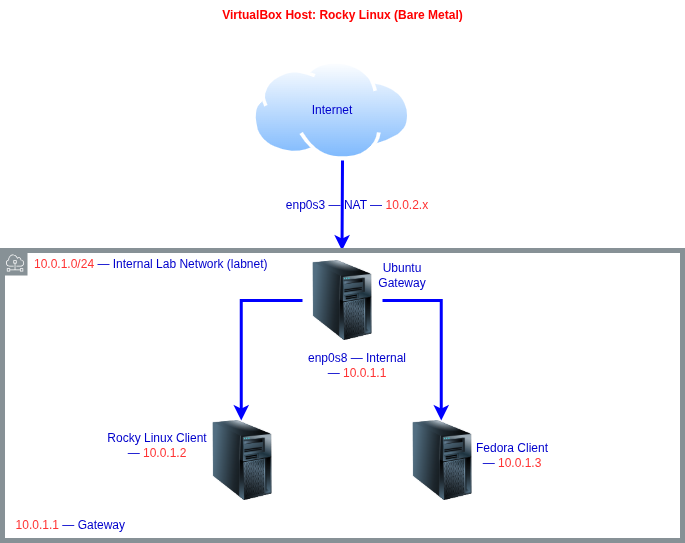
- [网络拓扑](#network-topology)
- [构建过程](#the-build)
- [1. VirtualBox 网络适配器](#1-virtualbox-network-adapters)
- [2. Netplan 双接口配置](#2-netplan-dual-interface-configuration)
- [3. IP 转发](#3-ip-forwarding)
- [4. iptables 防火墙规则](#4-iptables-firewall-rules)
- [5. 防火墙持久化](#5-firewall-persistence)
- [6. 客户端虚拟机配置](#6-client-vm-configuration)
- [故障排除与实际问题](#troubleshooting-and-real-issues)
- [问题 1:VirtualBox 与 KVM 冲突](#issue-1-virtualbox-vs-kvm-conflict)
- [问题 2:静态 IP 阻止了 DHCP](#issue-2-static-ip-blocking-dhcp)
- [问题 3:快照恢复后接口消失](#issue-3-interface-vanished-after-snapshot-restore)
- [问题 4:apt 在所有仓库上返回 404](#issue-4-apt-returning-404-on-all-repos)
- [问题 5:nmtui 授权错误](#issue-5-nmtui-authorization-error)
- [问题 6:Rocky 虚拟机位于错误的网络](#issue-6-rocky-vm-on-the-wrong-network)
- [最终验证](#final-verification)
- [我的收获](#what-i-learned)
## 我构建了什么
我从零开始将一台纯 Ubuntu Server 虚拟机变成了一台正常运行的路由器和防火墙。它有两个网络接口:一个通过 VirtualBox NAT 面向互联网,另一个面向我的内部实验室网络。我实验室中的所有其他虚拟机都通过它来路由流量,就像你家里的设备通过家庭路由器上网一样。不同之处在于我亲手构建了这个路由器,配置了两个接口、NAT 伪装、内核中的 IP 转发、状态防火墙规则以及重启后的持久化。
这不是一篇跟着教程做的记录。我遇到了真实的问题:一个仓库已失效的停止支持的 Ubuntu,一个导致虚拟机无法启动的 KVM 冲突,一个阻止了 DHCP 的 Netplan 配置,以及一个完全连接到错误虚拟网络上的 Rocky 虚拟机。每一个问题及其原因和解决方法都在下面进行了记录。
## 技术栈与环境
| 组件 | 规格 |
| :--- | :--- |
| 宿主机操作系统 | Rocky Linux 9.7 (Blue Onyx) |
| Hypervisor | Oracle VirtualBox |
| 网关操作系统 | Ubuntu Server 24.10 (Oracular - EOL) |
| 网络 | Netplan |
| 防火墙/NAT | iptables v1.8.10 (nf_tables) |
| 客户端 1 | Rocky Linux 9.5 |
| 客户端 2 | Fedora 35 (GUI) |
## 项目文件
`configs/` 文件夹包含我在此项目期间编写的实际配置文件。README 解释了相关决策,configs 文件夹展示了具体操作。
| 文件 | 源路径 | 说明 |
| :--- | :--- | :--- |
| [50-cloud-init.yaml](configs/50-cloud-init.yaml) | `/etc/netplan/50-cloud-init.yaml` | 双接口配置:WAN 使用 DHCP,LAN 使用静态 IP |
| [rules.v4](configs/rules.v4) | `/etc/iptables/rules.v4` | NAT 伪装、出站转发、状态返回规则 |
| [sysctl.conf](configs/sysctl.conf) | `/etc/sysctl.conf` | 通过 net.ipv4.ip_forward=1 启用内核 IP 转发 |
| [blacklist-kvm.conf](configs/blacklist-kvm.conf) | `/etc/modprobe.d/blacklist-kvm.conf` | KVM 黑名单,防止启动时发生 hypervisor 冲突 |
## 网络拓扑
## 构建过程
### 1. VirtualBox 网络适配器
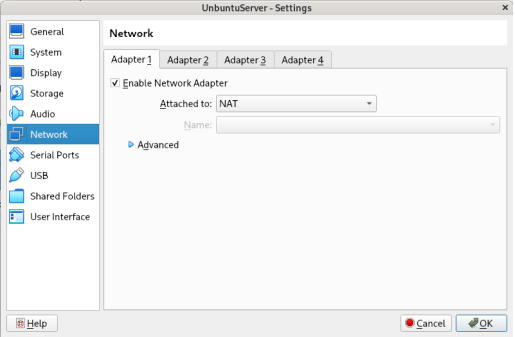
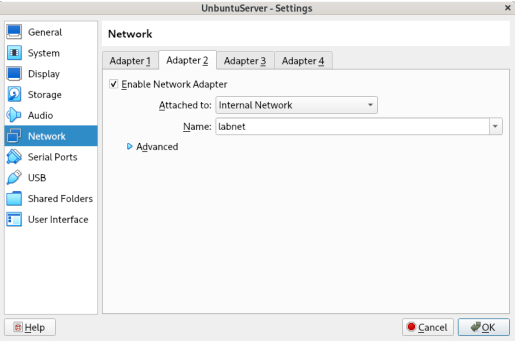
在接触 Ubuntu 之前,我在 VirtualBox 中配置了两个适配器。适配器 1 设置为 NAT,通过宿主机为 Ubuntu 提供 WAN 连接。适配器 2 设置为名为 `labnet` 的内部网络,创建了一个只有实验室虚拟机才能看到的隔离虚拟交换机。
### 2. Netplan 双接口配置
我在 `/etc/netplan/50-cloud-init.yaml` 中配置了这两个接口:
```
network:
version: 2
ethernets:
enp0s3:
dhcp4: true
enp0s8:
addresses:
- 10.0.1.1/24
nameservers:
addresses:
- 8.8.8.8
```
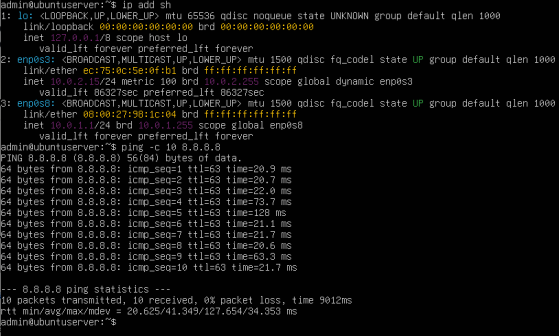
`enp0s3` 通过 DHCP 自动从 VirtualBox NAT 获取其 IP。`enp0s8` 获取静态 IP `10.0.1.1`,这将成为每个实验室虚拟机指向的网关地址。在这里静态地址是不可妥协的:如果网关地址发生偏移,整个实验室就会瘫痪。
### 3. IP 转发
默认情况下,Linux 会丢弃任何不是发往自身的包。`/etc/sysctl.conf` 中的一行代码改变了这种行为,并指示内核在接口之间转发数据包:
```
net.ipv4.ip_forward=1
```
无需重启立即应用:
```
sudo sysctl -p
```

### 4. iptables 防火墙规则
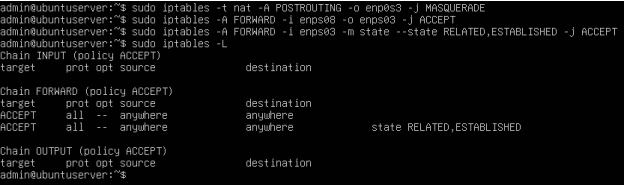
三条规则处理所有的路由逻辑:
```
# NAT masquerade: 在所有出站流量上加盖 Ubuntu 的 IP
sudo iptables -t nat -A POSTROUTING -o enp0s3 -j MASQUERADE
# 出站转发: 允许 LAN 流量到达 WAN
sudo iptables -A FORWARD -i enp0s8 -o enp0s3 -j ACCEPT
# Stateful return: 仅允许对已建立连接的回复返回
sudo iptables -A FORWARD -i enp0s3 -m state --state RELATED,ESTABLISHED -j ACCEPT
```
第三条规则使这成为了一个状态防火墙。未经请求的入站流量会被自动丢弃,只有源自实验室内部的连接的合法返回流量才被允许通过。
### 5. 防火墙持久化
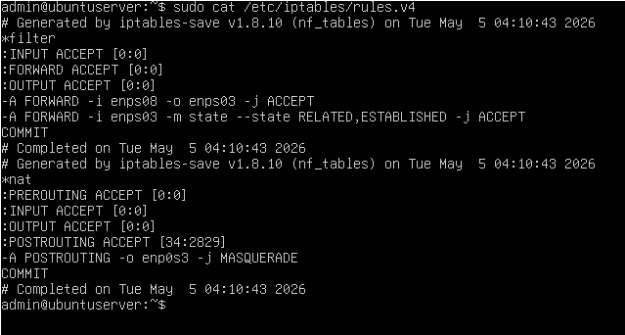
iptables 规则仅存在于内存中,因此重启会将其完全清除。我安装了 `netfilter-persistent` 将规则保存到磁盘,并在开机时自动重新加载:
```
sudo apt install netfilter-persistent iptables-persistent -y
```
规则被保存到 `/etc/iptables/rules.v4` 中,并在每次重启后依然保留。
### 6. 客户端虚拟机配置
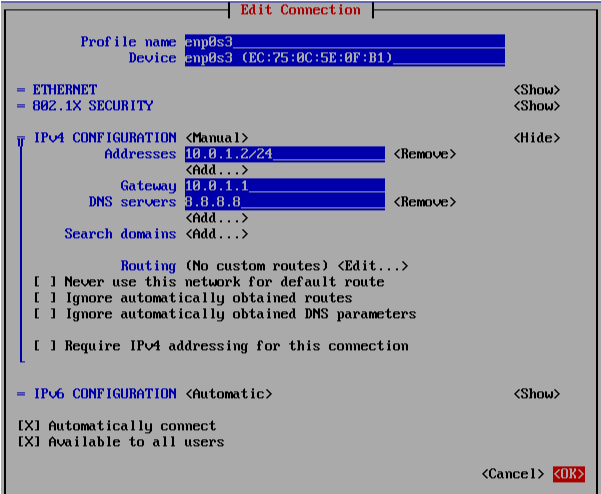
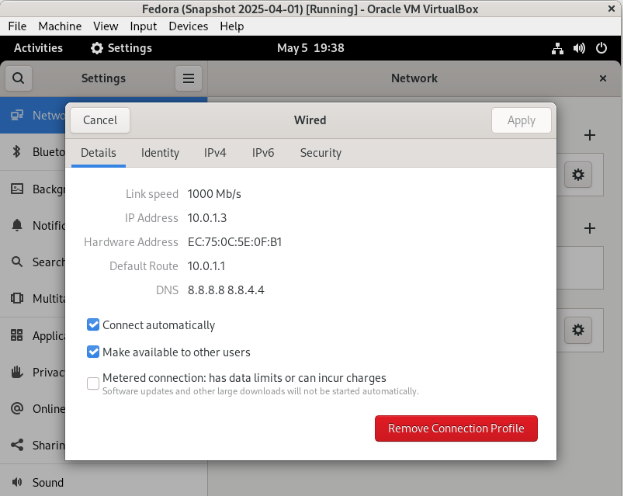
我在 VirtualBox 中将 Rocky Linux 和 Fedora 都连接到了 `labnet`,并为它们分配了指向 Ubuntu 作为网关的静态 IP。
**Rocky Linux(通过 nmtui 配置):**
```
IP: 10.0.1.2/24 Gateway: 10.0.1.1 DNS: 8.8.8.8
```
**Fedora(通过 GUI 网络设置配置):**
```
IP: 10.0.1.3/24 Gateway: 10.0.1.1 DNS: 8.8.8.8
```
## 故障排除与实际问题
### 问题 1:VirtualBox 与 KVM 冲突
**问题:** VirtualBox 拒绝启动任何虚拟机,抛出 `VERR_VMX_IN_VMX_ROOT_MODE` 错误。
**原因:** KVM 内核模块在 Rocky Linux 宿主机上自动加载,并在 VirtualBox 占用之前锁定了 CPU 虚拟化。KVM 是内置于 Linux 内核的 Type 1 hypervisor。VirtualBox 是 Type 2。它们不能同时共享硬件虚拟化。
**解决方法:** 我卸载了 KVM Intel 模块,并将它们永久列入黑名单,这样它们就不会在重启时重新加载:
```
sudo modprobe -r kvm_intel
sudo modprobe -r kvm
echo "blacklist kvm_intel" | sudo tee /etc/modprobe.d/blacklist-kvm.conf
```

### 问题 2:静态 IP 阻止了 DHCP
**问题:** `enp0s3` 没有互联网连接,并且每次 ping 都返回 "Destination Host Unreachable"。
**原因:** 以前遗留的 Netplan 配置在之前的设置中将 `enp0s3` 硬编码为 `192.168.1.141`,网关为 `192.168.1.254`。VirtualBox NAT 通过 DHCP 分配 `10.0.2.x` 地址,因此静态配置与之发生了冲突,导致数据包无处可去。
**解决方法:** 我重写了 Netplan 配置,在 `enp0s3` 上设置了 `dhcp4: true`,并应用了它:
```
sudo netplan apply
```
应用后立即确认互联网正常工作。
### 问题 3:快照恢复后接口消失
**问题:** 恢复旧快照后,`enp0s8` 完全从虚拟机中消失了。
**原因:** 恢复快照连同操作系统状态一起还原了 VirtualBox 适配器 2 的设置,从虚拟机配置中移除了 `labnet` 接口。
**解决方法:** 我在 VirtualBox 设置中重新将适配器 2 启用为名为 `labnet` 的内部网络,然后重新应用了 Netplan。两个接口都正确恢复了。
### 问题 4:apt 在所有仓库上返回 404
**问题:** `sudo apt update` 在每一个软件仓库上都返回了 404 错误。
**原因:** Ubuntu 24.10 Oracular 已达到停止支持阶段,官方镜像已被下架。除此之外,Ubuntu 24.10 将包源从 `/etc/apt/sources.list` 移动到了 `/etc/apt/sources.list.d/ubuntu.sources`,因此修复必须针对新的文件位置。
**解决方法:**
```
sudo sed -i 's|ca.archive.ubuntu.com|old-releases.ubuntu.com|g' /etc/apt/sources.list.d/ubuntu.sources
sudo sed -i 's|security.ubuntu.com|old-releases.ubuntu.com|g' /etc/apt/sources.list.d/ubuntu.sources
sudo apt update
```
重定向后成功获取了 32.5MB 的数据。

### 问题 5:nmtui 授权错误
**问题:** 在 Rocky Linux 上尝试保存网络连接时,nmtui 抛出了 `GDBus.Error: The name is not activatable` 错误。
**原因:** 我在没有使用 sudo 的情况下启动了 nmtui。如果没有提升的权限,它无法访问处理写入网络配置的 DBus 服务。
**解决方法:**
```
sudo nmtui
```
### 问题 6:Rocky 虚拟机位于错误的网络
**问题:** 尽管 Rocky 的 IP 设置和路由表看起来正确,但它无法 ping 通位于 `10.0.1.1` 的 Ubuntu。
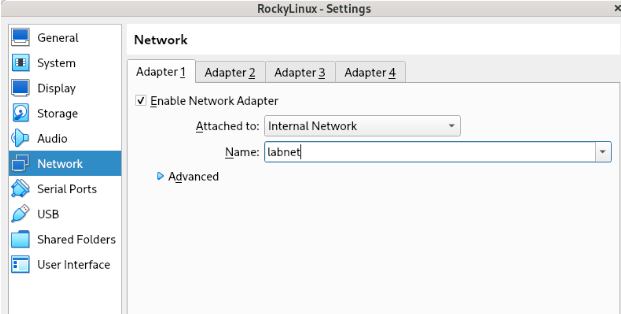
**原因:** Rocky 的 VirtualBox 适配器被设置为 Bridged Adapter 而不是 Internal Network。Rocky 位于我的家庭网络中,而不是在 `labnet` 上。这两个虚拟机位于完全不同的虚拟交换机上,彼此之间没有路径。
**解决方法:** 我将 VirtualBox 适配器从 Bridged 更改为 Internal Network,并将名称设置为 `labnet`。重启后,所有的 ping 立即通过。
IP 设置不是问题。Rocky 配置正确,但它插在了错误的虚拟交换机上。这是一个第二层(Layer 2)错误,而我最初将其误读为第三层(Layer 3)问题。
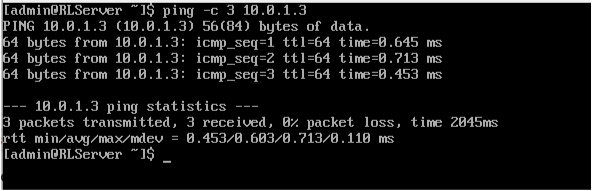
## 最终验证
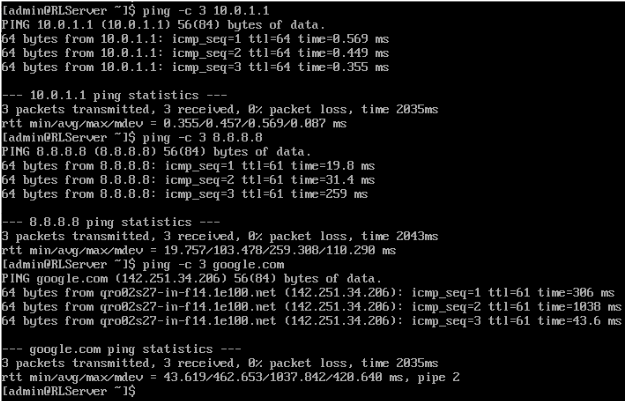
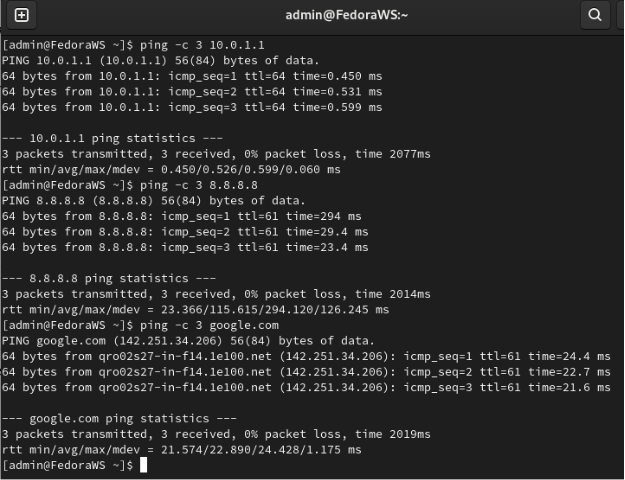
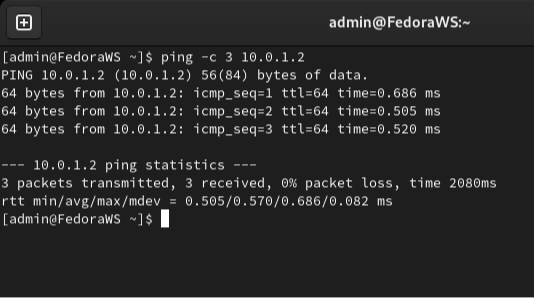
在网关完全重启后运行了所有八项测试,以确认 iptables 规则和路由配置在重启后得以保留。
| 测试 | 源 | 目标 | 备注 |
| :--- | :--- | :--- | :--- |
| ping 10.0.1.1 | Rocky | Ubuntu LAN | 网关可达,LAN 路由已确认 |
| ping 8.8.8.8 | Rocky | 互联网 | NAT 伪装正常工作 |
| ping google.com | Rocky | DNS + 互联网 | 已确认 DNS 解析和出站互联网 |
| ping 10.0.1.1 | Fedora | Ubuntu LAN | 从 Fedora 可达网关 |
| ping 8.8.8.8 | Fedora | 互联网 | Fedora 路径上的 NAT 正常工作 |
| ping google.com | Fedora | DNS + 互联网 | 已确认 Fedora 上的 DNS 解析 |
| ping 10.0.1.2 | Fedora | Rocky | Fedora 可以直接访问 Rocky |
| ping 10.0.1.3 | Rocky | Fedora | Rocky 可以直接访问 Fedora |
## 我的收获
如果不能在重启后保留,一个可用的配置就毫无意义。持久化必须从第一天起就作为计划的一部分,而不是事后才想起来的补救措施。
第二层(Layer 2)问题会伪装成第三层(Layer 3)问题。我花时间质疑 IP 配置,后来才意识到 Rocky 插入了错误的虚拟交换机。在接触第三层之前,务必先确认第二层。
Ubuntu 的停止支持是一个真正的运营难题。了解存档仓库位于何处,以及如何在不破坏包管理器的情况下重定向源,是在生产环境中出现的实用系统管理员知识。
自己动手构建路由器让理论变得豁然开朗,这是单纯阅读所永远无法达到的。我现在理解了 NAT 伪装和状态检测,因为我在它们无法正常工作时对它们进行了调试。
标签:iptables, Netplan, 网络地址转换(NAT), 网络网关, 网络路由, 防火墙