reminirestore-arch/G6Lighting

GitHub: reminirestore-arch/G6Lighting

这是一款原生 macOS 菜单栏应用,通过逆向工程 USB HID 协议来控制 Creative Sound BlasterX G6 声卡的 RGB 灯效。

Stars: 0 | Forks: 0

# G6 Lighting [![测试](https://static.pigsec.cn/wp-content/uploads/repos/cas/09/097271ca091990be630ef6043309cc48240faa054413384202036fa2efedb2d2.svg)](https://github.com/reminirestore-arch/G6Lighting/actions/workflows/tests.yml) [![codecov](https://codecov.io/gh/reminirestore-arch/G6Lighting/branch/main/graph/badge.svg)](https://codecov.io/gh/reminirestore-arch/G6Lighting) [![发布](https://img.shields.io/github/v/release/reminirestore-arch/G6Lighting?display_name=tag&sort=semver)](https://github.com/reminirestore-arch/G6Lighting/releases/latest) ![平台](https://img.shields.io/badge/platform-macOS%2014%2B-blue) ![Swift](https://img.shields.io/badge/swift-6.0-orange) [![许可证: MIT](https://img.shields.io/badge/license-MIT-green.svg)](LICENSE) 原生的 macOS 菜单栏应用,用于控制 **Creative Sound BlasterX G6** USB 声卡的 RGB X-logo 和音量旋钮 LED 环。Creative 没有为该设备提供 macOS 软件——本应用填补了这一空白,直接与 G6 特定供应商的 HID 接口进行通信。


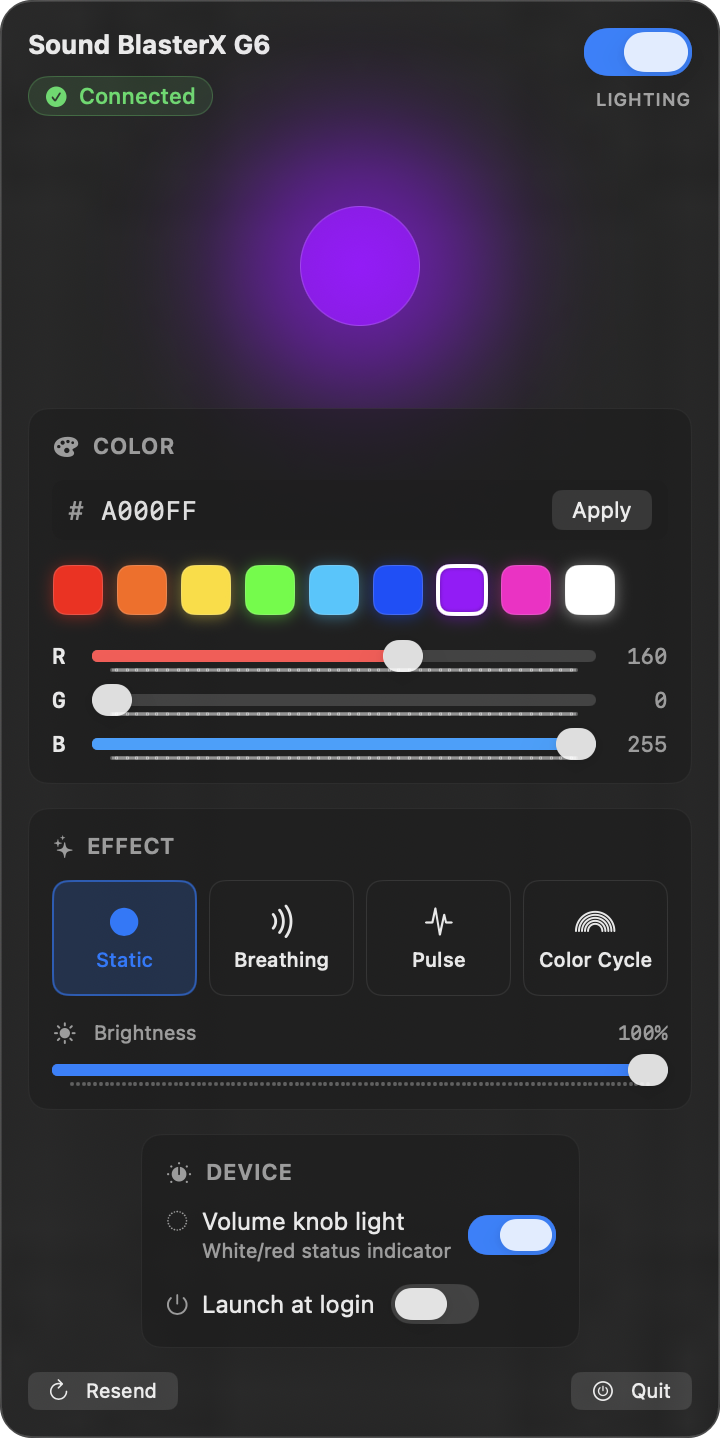
G6 Lighting menu-bar popover

| | | |---|---| | 平台 | macOS 14+ (Apple Silicon) | | 构建 | Swift Package Manager (无需 Xcode) | | 权限 | 无需权限——用户态 HID,无 kext,无 DriverKit,无需签名 | | 硬件测试 | G6 固件 `bcdDevice 0x2014` (VID `0x041E` / PID `0x3256`) | ## 功能 - X-logo 全 RGB 色彩、亮度、四种灯效(静态 / 呼吸 / 脉冲 / 色彩循环) - 实时预览,镜像发送到设备的精确帧流 - 音量旋钮环 LED 开/关(全新逆向工程协议;发布于 2026 年 4 月) - 主开/关切换(保留色彩和灯效) - 十六进制 / 预设 / RGB 滑块颜色编辑 - 登录时自动启动 (`SMAppService`) - USB 重新连接和系统从睡眠中唤醒后自动重新发送 - 在多次启动之间持久化所有设置 ## 构建与安装 本仓库提供了一个 `build.sh` 脚本来处理所有操作。无需 Xcode——只需 Command Line Tools (`xcode-select --install`)。 ``` git clone git@github.com:reminirestore-arch/G6Lighting.git cd G6Lighting ./build.sh install # build + copy to /Applications ``` 安装后,该应用程序可以在任何普通 Mac 应用程序所在的位置找到: - **Spotlight**: ⌘-Space,输入 "G6" - **Launchpad** - **Finder → 应用程序** - 终端: `open -a G6Lighting` 该应用程序位于**菜单栏**(右上角的灯泡图标)。它特意没有 Dock 图标 (`LSUIElement = true`)。退出方式:点击灯泡 → **退出** (⌘Q)。 要在登录时自动启动,打开菜单并切换 **登录时启动**——应用程序通过 `SMAppService` 注册自身,你可以在 **系统设置 → 通用 → 登录项** 中查看/撤销该权限。 ### 所有 `build.sh` 命令 | 命令 | 效果 | |---|---| | `./build.sh` (或 `build`) | 仅在项目目录中编译并生成 `G6Lighting.app`。 | | `./build.sh install` | 构建,然后复制到 `/Applications` 并清除隔离属性。 | | `./build.sh uninstall` | 移除 `/Applications/G6Lighting.app`。(需要在系统设置中单独禁用登录项。) | | `./build.sh dmg` | 构建,然后打包 `G6Lighting.dmg` 以便分享。 | | `./build.sh clean` | 删除 `.build/`、本地 `.app` 以及任何 `.dmg`。 | | `./build.sh help` | 显示相同的列表。 | ### 代码签名与 Gatekeeper 脚本对 bundle 进行临时签名 (`codesign --sign -`),这对于本地机器来说已经足够了。`install` 还会移除 `com.apple.quarantine` xattr 属性,因此首次启动时不会触发 Gatekeeper 提示。 如果你将 `.dmg` 分享给其他人,接收者在启动前需要运行一次此命令: ``` xattr -dr com.apple.quarantine /Applications/G6Lighting.app ``` 为了实现对大量用户的无缝分发,请使用 **Developer ID Application** 证书(99 美元/年的 Apple Developer 账户)进行签名,并通过 `notarytool` 进行公证。参见 Apple 的[签名文档](https://developer.apple.com/documentation/security/notarizing_macos_software_before_distribution)——`build.sh` 中的临时 `codesign` 行就是替换点。 ## 架构 分层设计,每层仅依赖于其下方的层: ``` App — @main entry point + composition root └─ G6LightingApp.swift ├─ AppEnvironment (DI for the whole app) ├─ ContentView (composition of UI sections) └─ LightingViewModel │ State — observable presentation state, persistence ├─ SettingsStore (backed by KeyValueStore protocol) ├─ LightingViewModel (effect runner + system-monitor wiring) └─ EffectPlayer (single source of truth for "current frame") │ Domain — pure, side-effect-free models and algorithms (no AppKit/IOKit) ├─ Models (RGBColor, LightingFrame, LightingMode) └─ Effects (LightingEffect protocol + Static/Breathing/Pulse/Cycle) │ Hardware — wire protocol + HID transport (mockable) ├─ G6Protocol (byte-exact packet builders) ├─ HIDTransport (protocol) ├─ IOKitHIDTransport (real macOS implementation) ├─ MockHIDTransport (in-memory recorder for tests) └─ G6Device (high-level API: setColor, setRingLed, disableLogo) │ System — OS integration ├─ DeviceMonitor (USB connect/disconnect via IOHIDManager) ├─ WakeMonitor (NSWorkspace.didWakeNotification) └─ AutoLaunch (SMAppService) ``` 源码布局遵循层级结构——每一层都位于 `Sources/G6LightingCore//` 中。 ## 测试 ``` swift run G6LightingTestRunner --testing-library swift-testing ``` 跨越 7 个测试套件的 46 个测试涵盖: - 通信协议字节的精确性(每个数据包字段、BGR 顺序、RGB 帧合成) - 作为纯函数的灯效(在选定时间的峰值帧、周期正确性) - 使用内存中 `KeyValueStore` 的设置持久化 - ViewModel 集成:启动、开/关、环 LED、错误展示、颜色重发 为什么使用自定义运行器:在仅安装了 Command Line Tools(无 Xcode)的设置上,标准的 `swift test` 构建的是一个无法直接执行的 Mach-O bundle,因此 swift-testing 的入口点永远不会被调用。专用的 `G6LightingTestRunner` 可执行目标包装了 `Testing.__swiftPMEntryPoint()` 并产生实际输出。 ## 通信协议 所有命令都通过 `IOHIDDeviceSetReport` 作为 64 字节的 HID OUTPUT 报告发送到 **HID 接口 4**(供应商使用页 `0xFF00`)。接口 4 没有 OUT endpoint,因此写入操作通过 SET_REPORT 控制传输透明地进行路由。 ### X-logo 色彩(3 个数据包) | | bytes | |---|---| | init | `5A 3A 02 06 01 …` | | mode | `5A 3A 06 04 . 03 01 . 01 …` | | color | `5A 3A 09 0A . 03 01 01 {bri} {B} {G} {R} …` | ### 音量旋钮环 LED 切换(DATA + COMMIT) | | bytes | |---|---| | DATA | `5A 39 03 00 0E {00=on, 01=off} …` | | COMMIT | `5A 39 01 01 …` | 音量旋钮 LED 在硬件上是**双色(白/红)**的,而不是 RGB——只能暴露开/关状态。白色 = 播放音量,红色 = 侧音。 ## 范围与相关项目 **G6 Lighting** 有意设计为一个专注的小型应用——仅限 RGB 和环 LED。它将保持这种定位。 如果你想要**完整的 G6 管理**(照明 + 音频 DSP:输出切换、SBX 效果、麦克风增益等): - 计划为 macOS 推出一款更大的配套应用程序 **G6 Control**——独立的仓库,将与本应用共存。两者都可以并排安装,并使用互不相交的 G6 HID 命令族。参见 [issue #1](https://github.com/reminirestore-arch/G6Lighting/issues/1) 和 [`docs/G6Control-roadmap.md`](docs/G6Control-roadmap.md)。尚未开始。 - 在如今的 Linux / Windows 上:[`jackbrumley/rusty-g6`](https://github.com/jackbrumley/rusty-g6)——功能齐全的音频 GUI,MIT 许可证,完全相同的通信协议。 请选择适合你使用场景的工具——两者互不替代。 ## 贡献 欢迎提交 PR——参见 [CONTRIBUTING.md](CONTRIBUTING.md)。对于错误和功能请求,请使用 [issue 跟踪器](https://github.com/reminirestore-arch/G6Lighting/issues)。 ## 许可证 [MIT](LICENSE)——随心所欲使用,只需保留版权声明。 不隶属于 Creative Technology Ltd,也未经其认可。Sound Blaster 名称及产品名称均为 Creative Technology Ltd. 的商标。
标签:HID, RGB灯效, Swift, 声卡, 硬件控制, 菜单栏应用