aws-samples/sample-transit-gateway-attached-nfw-migration-guidance
GitHub: aws-samples/sample-transit-gateway-attached-nfw-migration-guidance
AWS 官方的分步迁移指南,帮助用户将 Network Firewall 从自管检测 VPC 架构迁移至 Transit Gateway 原生挂载模式。
Stars: 1 | Forks: 0
# 迁移至挂载到 Transit Gateway 的 AWS Network Firewall
本仓库提供了分步迁移指南,用于从部署在客户管理的检测 VPC 中的 AWS Network Firewall 迁移到[挂载到 Transit Gateway 的 Network Firewall](https://aws.amazon.com/about-aws/whats-new/2025/06/aws-network-firewall-native-attachment-transit-gateway/)。它涵盖了两种最常见的集中式检测架构,并为每种架构提供了三种迁移方法:手动控制台步骤、CloudFormation 和 Terraform。
## 支持的架构
本仓库涵盖了两种常见的集中式 Network Firewall 部署模式的迁移指南:
| 架构 | 描述 | 目录 |
|---|---|---|
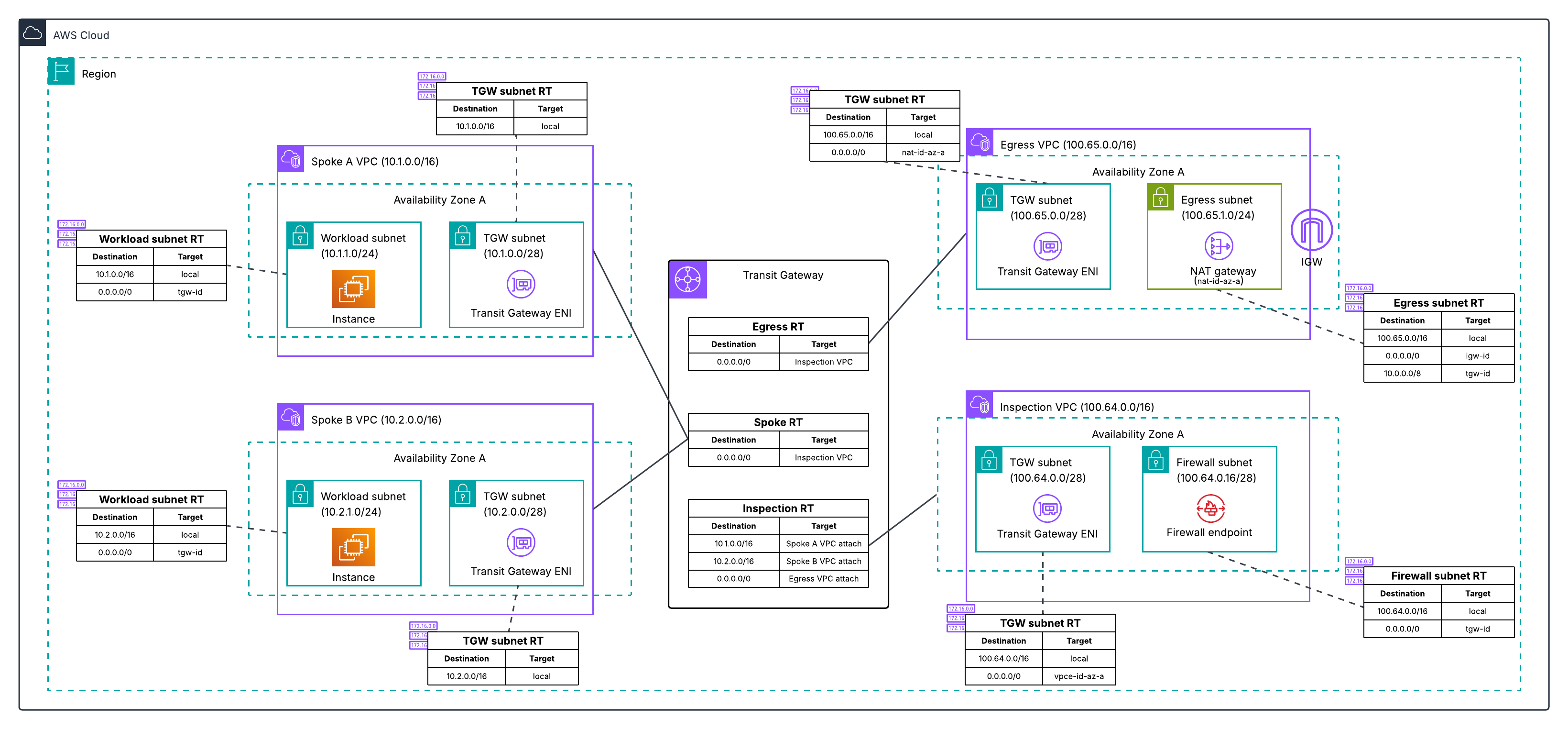
| **架构 1** | Network Firewall 部署在专用的检测 VPC 中,并使用单独的出口 VPC 来集中部署 NAT Gateway | [architecture-1-separate-inspection-egress/](architecture-1-separate-inspection-egress/) |
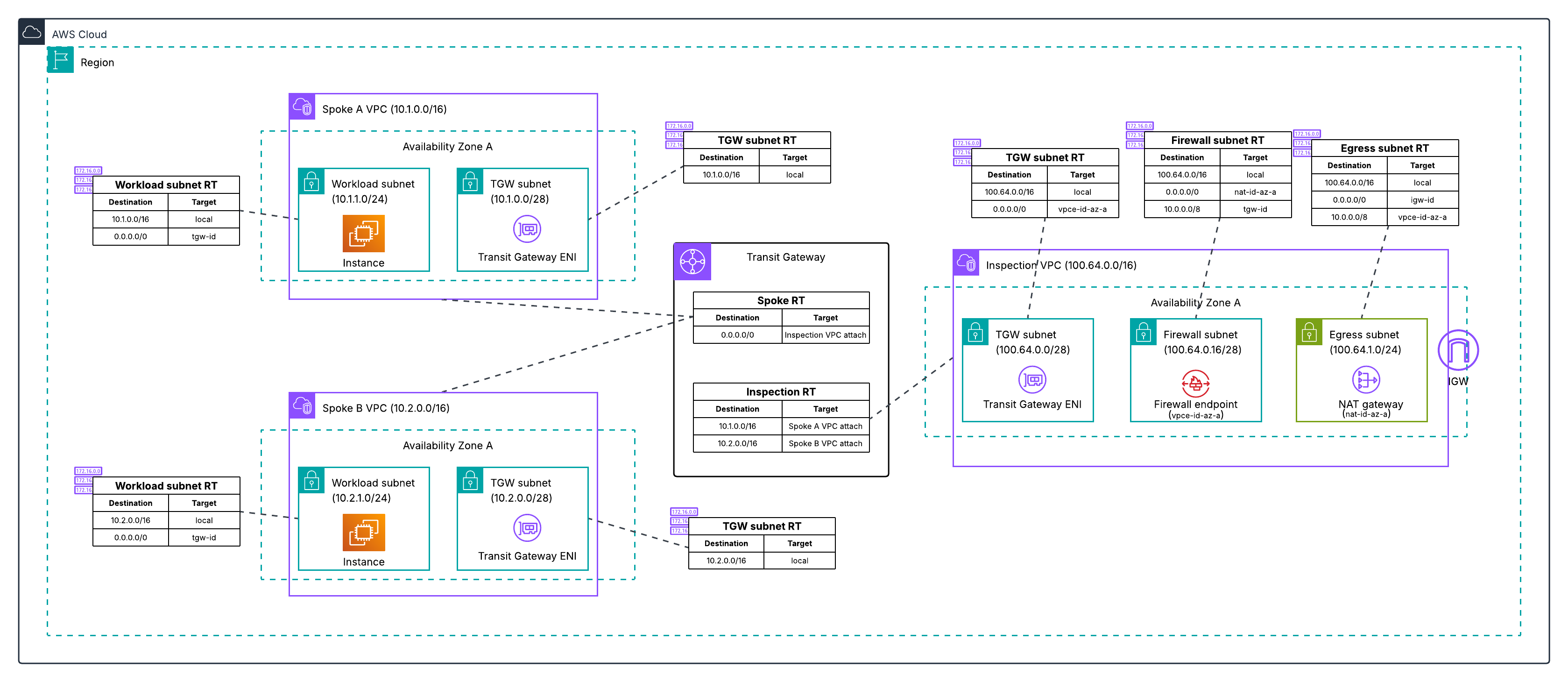
| **架构 2** | Network Firewall 部署在检测和出口合一的 VPC 中(防火墙终端节点和 NAT Gateway 在同一个 VPC 中) | [architecture-2-combined-inspection-egress/](architecture-2-combined-inspection-egress/) |
### 架构 1:独立的检测和出口 VPC
### 架构 2:检测和出口合一的 VPC
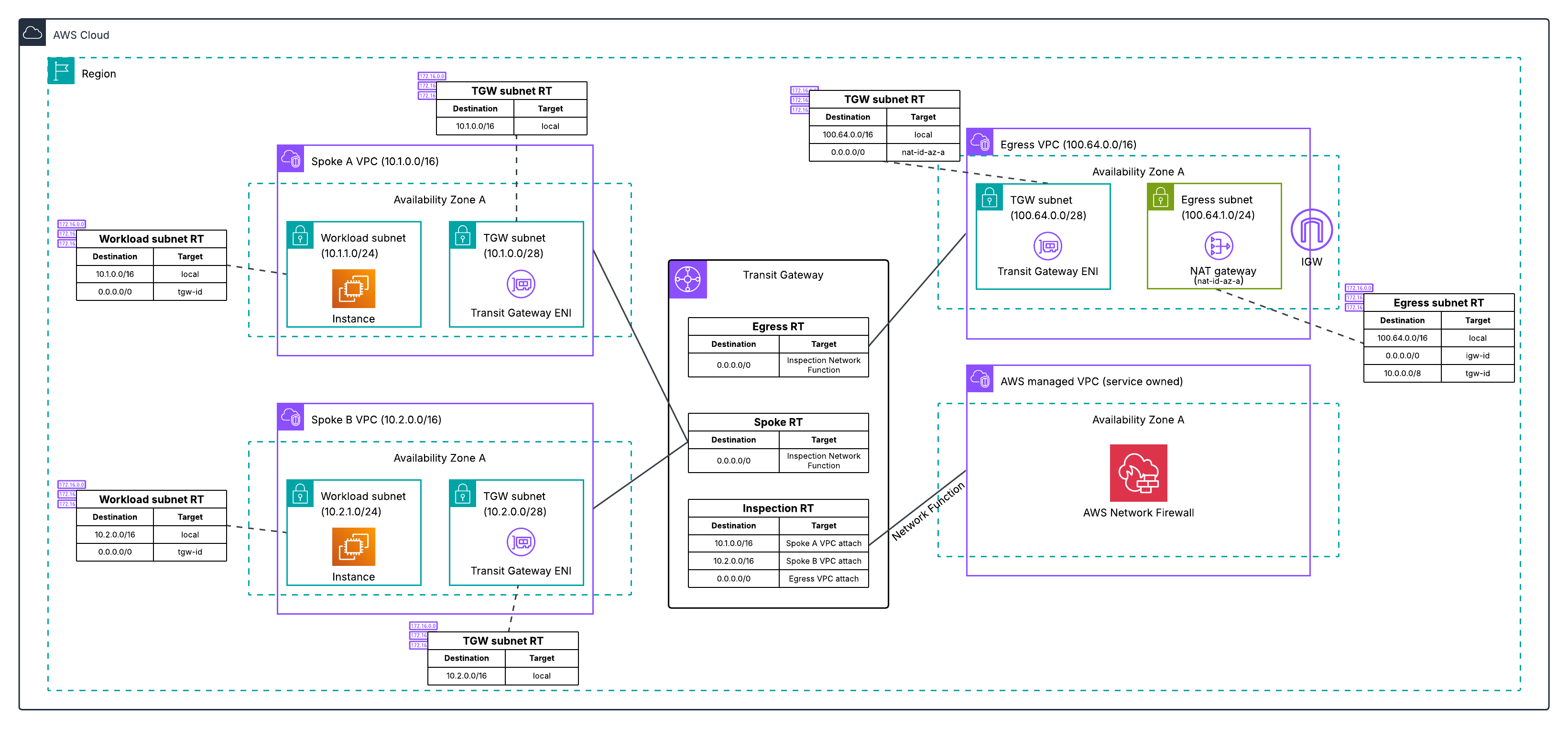
### 迁移后的最终状态(两种架构)
这两种架构最终都会收敛到相同的状态:辐射 VPC 通过挂载到 Transit Gateway 的 Network Firewall 路由到专用的出口 VPC。
### 两种迁移方式之间的差异
这两种架构都会部署相同的新资源(一个新的出口 VPC、一个挂载到 Transit Gateway 的防火墙,以及三个新的 Transit Gateway 路由表),并使用相同的分阶段切换方法。不同之处在于起始状态以及最后需要清理的内容:
- **迁移前的 Transit Gateway 路由:** 架构 1 使用三个 Transit Gateway 路由表(辐射、防火墙和出口),因为流量会穿越两个 VPC。架构 2 使用两个 Transit Gateway 路由表(辐射和检测),因为防火墙和 NAT Gateway 位于同一个 VPC 中。
- **辐射路由表默认路由目标:** 在架构 1 中,辐射路由表的默认路由指向旧的检测 VPC 挂载。在架构 2 中,它指向旧的合一 VPC 挂载。
- **Appliance mode:** 架构 2 的合一 VPC Transit Gateway 挂载使用 appliance mode 来维持 VPC 内的对称路由。架构 1 不需要此模式,因为防火墙位于其专用的 VPC 中。
- **清理:** 对于架构 1,您需要移除旧的检测 VPC 和旧的出口 VPC(两个 VPC)。对于架构 2,您需要移除旧的合一 VPC(一个 VPC)。
这两种架构最终都会收敛到相同的状态:辐射 VPC 通过挂载到 Transit Gateway 的 Network Firewall 路由到专用的出口 VPC。
## 迁移方法
每种架构都包含三种迁移方法。请选择最适合您基础设施管理方式的方法:
| 方法 | 描述 | 架构 1 | 架构 2 |
|---|---|---|---|
| **手动控制台步骤** | 使用 AWS Management Console 的分步说明 | [指南](architecture-1-separate-inspection-egress/manual-console-steps/) | [指南](architecture-2-combined-inspection-egress/manual-console-steps/) |
| **CloudFormation** | 使用两个协调的 CloudFormation 堆栈并通过分阶段参数更新进行自动化迁移 | [指南](architecture-1-separate-inspection-egress/cloudformation-migration/) | [指南](architecture-2-combined-inspection-egress/cloudformation-migration/) |
| **Terraform** | 使用 Terraform 和三个分阶段的根配置进行自动化迁移 | [指南](architecture-1-separate-inspection-egress/terraform-migration/) | [指南](architecture-2-combined-inspection-egress/terraform-migration/) |
### 在现有基础设施中使用迁移指南
每份迁移指南都假定了一个特定的初始架构。本仓库包含的 CloudFormation 模板可以部署每种模式的确切初始架构,因此您可以在迁移生产环境之前,先在开发或测试账户中练习完整的迁移过程。
如果您最初是使用 CloudFormation 部署基础设施的,那么 CloudFormation 迁移指南可以使用跨堆栈引用,直接从现有堆栈中导入资源 ID。如果您是使用 ClickOps、Terraform 或其他方法部署基础设施的,您仍然可以使用任何一种迁移方法。您将需要提供一些资源 ID(例如您的 Transit Gateway ID 和辐射 VPC 挂载 ID)作为手动参数输入,而不是使用跨堆栈导入。每份指南都说明了需要哪些值以及在哪里可以找到它们。
## 初始架构模板
这些模板会部署初始架构,以便您可以在测试账户中端到端地运行整个迁移过程:
| 架构 | 模板 | 描述 |
|---|---|---|
| 架构 1 | [starting-architecture.yaml](architecture-1-separate-inspection-egress/cfn/starting-architecture.yaml) | 部署两个辐射 VPC、一个包含 Network Firewall 的专用检测 VPC、一个包含 NAT Gateway 的单独出口 VPC,以及一个用于连接它们的 Transit Gateway |
| 架构 2 | [starting-architecture.yaml](architecture-2-combined-inspection-egress/cfn/starting-architecture.yaml) | 部署两个辐射 VPC、一个包含 Network Firewall 和 NAT Gateway 的检测和出口合一 VPC,以及一个用于连接它们的 Transit Gateway |
这两个模板都在辐射 VPC 中包含了 EC2 实例,并提供 AWS Systems Manager Session Manager 访问权限,以便在迁移期间进行连接测试。
## 连接到辐射实例进行验证
每个迁移步骤都包括从辐射实例中使用 `curl checkip.amazonaws.com` 进行的验证,以确认当前处于活动状态的出口路径。这些实例没有公有 IP — 请通过 AWS Systems Manager Session Manager 进行连接:
```
aws ssm start-session --target --region us-east-1
# Once connected:
curl checkip.amazonaws.com
```
或者,通过 EC2 控制台连接,选择该实例并选择 **连接 (Connect)** → **Session Manager**。如果 Session Manager 显示该实例不可用,请在启动后等待 1-2 分钟,以便 SSM agent 完成注册。
## VPC 配额警告
每个区域的默认 VPC 配额为 5。当旧的和新的出口路径并行运行时,本仓库中的每次迁移都会临时创建第 5 个 VPC(即新的出口 VPC)。如果该区域仍然存在默认 VPC,迁移将失败并提示 `VpcLimitExceeded`。在开始之前,请删除目标区域中的默认 VPC 或申请提高配额。
```
# Check whether the default VPC exists in your target region
aws ec2 describe-vpcs --region us-east-1 \
--filters "Name=is-default,Values=true" \
--query 'Vpcs[*].VpcId' --output text
# Option A: request a quota increase (recommended for production accounts)
aws service-quotas request-service-quota-increase \
--service-code vpc --quota-code L-F678F1CE \
--desired-value 10 --region us-east-1
# Option B: delete the default VPC (lab/POC accounts only -- make sure
# nothing is running in it first)
```
## 安全
有关更多信息,请参阅 [CONTRIBUTING](CONTRIBUTING.md#security-issue-notifications)。
## 许可证
本库根据 MIT-0 许可证授权。请参阅 [LICENSE](LICENSE) 文件。
## 作者
- [Lawton Pittenger](https://github.com/lawtonpittenger) - WW Security Solutions Architect
- [Pal-Magnus Slatto](https://github.com/dev-slatto) - Senior Solutions Architect
- [Frank Phillis](https://github.com/phillisf) - Senior Security Solutions Architect
标签:AWS, CloudFormation, DPI, ECS, Terraform, 网络架构, 网络防火墙, 运维指南