gupta29470/codewalk
GitHub: gupta29470/codewalk
一款 AI 驱动的代码库快速理解工具,通过依赖图分析、RAG 语义检索和本地 LLM 对话,帮助开发者在数小时内掌握任意代码仓库的架构与逻辑。
Stars: 4 | Forks: 0
CODEWALK
AI 驱动的代码库上手工具
指向任意代码仓库 → 在几小时内理解整个代码库,而不是几周
功能 •
演示 •
设置 •
用法 •
MCP •
API •
架构 •
贡献
## 什么是 Codewalk?
Codewalk 可以分析任何代码库并为您提供:
- **模块检测** — 自动将文件分组为逻辑模块
- **依赖关系图** — 提取所有 import/require → 构建完整的依赖关系图
- **影响范围** — “如果我更改此文件,会破坏什么?”
- **阅读顺序** — 最佳的文件阅读顺序(依赖优先)
- **执行流** — 入口点、模块到模块以及文件到文件的依赖流
- **AI 聊天** — 询问关于代码的任何问题,由 RAG + 工具调用代理提供支持
- **代码审查** — 审查 git 差异以查找 bug、安全问题和代码风格(LLM + 预检查)
- **增量重新索引** — 使用内容哈希比较,仅重新嵌入更改的文件
三种使用方式:
| 接口 | 最适合 |
|-----------|----------|
| **Web UI** (Next.js) | 可视化探索 — 图表、模块浏览器、影响范围查看器 |
| **MCP Server** | VS Code Copilot、Claude Code、Cursor、Codex — AI 代理直接使用工具 |
| **REST API** | 脚本、CI/CD、自定义集成 |
## 为什么选择 Codewalk?
| 场景 | Codewalk 如何提供帮助 |
|----------|-------------------|
| **新开发者加入团队** | 将 Codewalk 指向代码仓库 → 获取概述、模块地图和阅读顺序。在几小时内自行上手,而不是花几周时间问“嘿,你能解释一下这个吗?” |
| **LLM token 成本高昂** | 没有 RAG,LLM 需要将你的整个代码库放入上下文中——既慢又昂贵。Codewalk 将代码嵌入到向量数据库中,每次查询只检索相关的块。更快的答案,只需极少比例的 token。 |
| **高级开发者切换模块** | 你了解 auth 模块,但现在需要处理 payments 模块。获取模块信息、影响范围和执行流,无需打扰 payments 团队。 |
| **重构前** | 在接触共享代码之前检查影响范围。“如果我更改了 `base_model.py`,会破坏什么?” —— 在你破坏生产环境之前获得答案。 |
| **PR 审查** | 运行 `codewalk_review_diff` 或 `POST /review` —— 自动化多阶段审查,包含 OWASP 安全检查、测试覆盖率检测、影响范围警告、团队规范匹配和 LLM 深度扫描。 |
| **文档过时** | Codewalk 分析的是*实际代码*,而不是过时的 wiki 页面。始终保持最新。 |
## ✨ 功能
| 功能 | 描述 |
|---------|-------------|
| 🔍 **模块检测** | 根据目录结构自动将文件分组到包/模块中 |
| 🕸️ **依赖关系图** | 通过 tree-sitter 解析 15 种以上语言的导入 |
| 💥 **影响范围** | 在反向依赖关系图上进行 BFS(广度优先搜索) → 显示任何更改的传递影响 |
| 📖 **阅读顺序** | 拓扑排序 → “先读 config.py 再读 embedder.py,因为 embedder 导入了 config” |
| 🔄 **执行流** | 入口点、模块/文件依赖链、Mermaid 图表 |
| 🤖 **AI 聊天** | 带有 7 个工具的 LangGraph 代理,支持带记忆的多轮对话 |
| 🔎 **语义搜索** | 对嵌入的代码块进行 ChromaDB 向量搜索 (RAG) |
| 🔬 **代码审查** | 多阶段审查流水线:测试覆盖率、影响范围、规范 RAG、LLM 深度扫描 |
| 🔄 **增量重新索引** | 内容哈希比较 —— 仅重新嵌入更改的文件,跳过未更改的文件 |
| 🧩 **MCP Server** | 为 VS Code Copilot / Claude Code / Cursor / Codex 提供 16 种工具 |
| ⚡ **并行嵌入** | 生产者-消费者流水线 —— CPU 分块与 GPU 嵌入重叠进行 |
| 🏗️ **多提供商 LLM** | Ollama (本地)、OpenAI、Anthropic、Groq、Gemini、OpenRouter |
| 🌐 **15+ 种语言** | Python、JS、TS、Java、Go、Rust、Ruby、PHP、C#、C++、C、Dart、Kotlin、Swift、YAML |
### 支持的语言
| 语言 | 扩展名 | Tree-sitter 解析 | 导入提取 |
|----------|-----------|---------------------|-------------------|
| Python | `.py` | ✅ | ✅ |
| JavaScript | `.js`, `.jsx` | ✅ | ✅ |
| TypeScript | `.ts`, `.tsx` | ✅ | ✅ |
| Java | `.java` | ✅ | ✅ |
| Go | `.go` | ✅ | ✅ |
| Rust | `.rs` | ✅ | ✅ |
| Ruby | `.rb` | ✅ | ✅ |
| PHP | `.php` | ✅ | ✅ |
| C# | `.cs` | ✅ | ✅ |
| C++ | `.cpp` | ✅ | ✅ |
| C | `.c` | ✅ | ✅ |
| Kotlin | `.kt` | ✅ | ✅ |
| Swift | `.swift` | ✅ | ✅ |
| Dart | `.dart` | ✅ *(可选安装)* | ✅ |
| YAML | `.yaml`, `.yml` | — | — |
| JSON | `.json` | — | — |
| TOML | `.toml` | — | — |
| Markdown | `.md` | — | — |
## 🎬 演示
### Web UI
https://github.com/user-attachments/assets/1bc99516-b3f6-4059-b463-de3c72bc850e
### MCP 与 VS Code Copilot
https://github.com/user-attachments/assets/a1dfd347-1135-47d2-b01d-3d995d86208e
### REST API
## ⚙️ 设置
### 前置条件
| 工具 | 版本 | 检查 |
|------|---------|-------|
| Python | 3.10+ | `python3 --version` |
| Node.js | 18+ | `node --version` |
| Git | 任意 | `git --version` |
| Ollama *(可选)* | 最新版 | `ollama --version` |
### 1. 克隆 codewalk 仓库
```
git clone https://github.com/gupta29470/codewalk.git
cd codewalk
```
### 2. 在 codewalk 中进行后端设置
```
# 创建虚拟环境
python3 -m venv .codewalk-env
source .codewalk-env/bin/activate # macOS / Linux
# .codewalk-env\Scripts\activate # Windows
# 安装 Python 依赖
pip install -r requirements.txt
```
⚠️ VPN / 企业网络 / 专用网络问题
如果你在 **VPN、企业代理或专用网络**后面,包安装和模型下载可能会因连接被阻止或 SSL 证书错误而失败。
**建议:首次设置时使用普通(非 VPN)网络。**
Codewalk 的设置会从 PyPI、npm 和 HuggingFace 下载包。这些是一次性下载 —— 一旦安装完成,所有内容都在本地运行。如果可能的话:
1. **暂时断开 VPN**
2. 运行设置步骤(`pip install`、`npm install`,启动一次后端以下载嵌入模型)
3. **重新连接 VPN** —— 所有内容都已缓存在本地,无需再下载
可选:Dart/Flutter 支持 (tree-sitter-dart)
```
# 如果遇到 SSH 错误,请先运行此命令:
git config --global url."https://github.com/".insteadOf "git@github.com:"
# 然后安装:
pip install "tree-sitter-dart @ git+https://github.com/UserNobody14/tree-sitter-dart.git"
```
没有此步骤,Codewalk 仍然可以工作 —— 只是 Dart 文件不会进行 tree-sitter 解析(将回退到文本拆分)。
### 3. 在 codewalk 中进行前端设置
```
cd frontend
npm install
cd ..
```
### 4. 在 codewalk 中配置环境
在项目根目录创建一个 `.env` 文件:
```
# ─── LLM 配置 ──────────────────────────────────────
# Provider: ollama | openai | anthropic | gemini | groq | openrouter
LLM_PROVIDER=ollama
LLM_MODEL=qwen2.5-coder:7b
# ─── Embeddings ──────────────────────────────────────
EMBEDDING_MODEL=jinaai/jina-code-embeddings-1.5b
# ─── 要分析的代码库 ──────────────────────────────────
# 相对路径 (自身分析): src/codewalk
# 绝对路径 (任何代码库): /Users/you/projects/my-app/src
REPO_PATH=src/codewalk
# ─── API Keys (仅需填写您正在使用的) ──────────────
# GROQ_API_KEY=gsk_...
# OPENAI_API_KEY=sk-...
# ANTHROPIC_API_KEY=sk-ant-...
# GOOGLE_API_KEY=AI...
# OPENROUTER_API_KEY=sk-or-...
```
### 5. 拉取 Ollama 模型(如果使用本地 LLM)
```
ollama pull qwen2.5-coder:7b
```
按大小推荐模型
| 模型 | 大小 | 工具调用 | 最适合 |
|-------|------|-------------|----------|
| `qwen2.5-coder:7b` | 4.7 GB | ✅ | 专注代码,速度快 |
| `qwen3.5:latest` (8B) | 6.6 GB | ✅ | 通用 + 代码 |
| `qwen3.5:27b` | 17 GB | ✅ | 最佳准确性 |
## 🚀 用法
### 方式 1:Web UI
在 **codewalk** 目录下打开**两个终端**:
**终端 1 — 后端 API**
```
source .codewalk-env/bin/activate
uvicorn src.codewalk.api.main:app --reload --port 8000
```
**终端 2 — 前端**
```
cd frontend
npm run dev
```
打开 **http://localhost:3000** → 输入代码仓库路径 → 点击 **Analyze Codebase**。
然后进行探索:
- **Overview** — 技术栈、模块、依赖关系图、风险最高的文件
- **Modules** — 浏览所有模块,点击模块查看文件列表 + 依赖项
- **Blast Radius** — 如果你更改每个文件,哪些文件会损坏
- **Reading Order** — 带有风险级别的最佳文件阅读顺序
- **Execution Flow** — 模块/文件依赖关系的 Mermaid 图表
- **Chat** — 提出任何问题(“解释一下身份验证流程”,“scanner.py 是做什么的?”)
- **Code Review** — 审查 git 差异,审查单个文件,加载团队规范
- **Smart Reindex** — 带有统计信息(跳过、更改、删除)的增量重新嵌入
### 方式 2:MCP Server (VS Code Copilot / Claude Code / Cursor)
请参阅下文的 [MCP 集成](#-mcp-integration)。
### 方式 3:REST API
```
# 启动后端
source .codewalk-env/bin/activate
uvicorn src.codewalk.api.main:app --reload --port 8000
```
**步骤 1 — 分析代码库:**
```
curl -X POST http://localhost:8000/analyze \
-H "Content-Type: application/json" \
-d '{"repo_path": "/path/to/your/repo", "index_mode": "auto"}'
```
**步骤 2 — 探索结果:**
```
# 项目概览 (tech stack、模块、风险最高的文件)
curl http://localhost:8000/overview | python3 -m json.tool
# 列出所有模块
curl http://localhost:8000/modules | python3 -m json.tool
# 深入分析特定模块
curl http://localhost:8000/modules/auth | python3 -m json.tool
# 如果我更改了 auth 模块中的文件,会产生什么影响?
curl http://localhost:8000/blast-radius/auth | python3 -m json.tool
# 最佳阅读顺序
curl http://localhost:8000/reading-order | python3 -m json.tool
# 执行流程 (入口点、依赖链)
curl http://localhost:8000/execution-flow | python3 -m json.tool
```
**步骤 3 — 与代理聊天:**
```
# 提问
curl -X POST http://localhost:8000/chat \
-H "Content-Type: application/json" \
-d '{"message": "Explain this project", "thread_id": "thread-1"}'
# 后续提问 (相同 thread_id = 对话记忆)
curl -X POST http://localhost:8000/chat \
-H "Content-Type: application/json" \
-d '{"message": "What does the auth module do?", "thread_id": "thread-1"}'
# 代码更改后 — 刷新分析而无需重新 embedding
curl -X POST http://localhost:8000/refresh
# 增量重新索引 — 仅重新 embedding 已更改的文件
curl -X POST http://localhost:8000/incremental-reindex
# 审查当前的 git diff,查找 bug、安全问题和代码风格
curl -X POST http://localhost:8000/review \
-H "Content-Type: application/json" \
-d '{"staged": false, "target_branch": "main"}'
```
有关每个端点的完整请求/响应详细信息,请参阅 [API 参考](#-api-reference)。
## 🔌 MCP 集成
Codewalk 作为 MCP (Model Context Protocol) 服务器运行,因此任何支持 MCP 的 AI 代理都可以使用它。
### 在 VS Code 中启动 MCP Server
1. 在 codewalk 项目中打开 VS Code
2. 按下 **`Cmd+Shift+P`** (macOS) 或 **`Ctrl+Shift+P`** (Windows/Linux)
3. 输入 **`MCP: List Servers`** 并选择它

4. 你会在列表中看到 **`codewalk`**
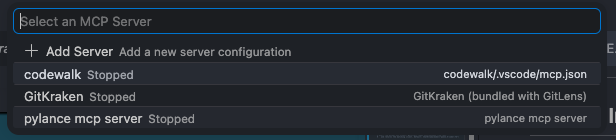
5. 点击 codewalk 旁边的 **Start Server**
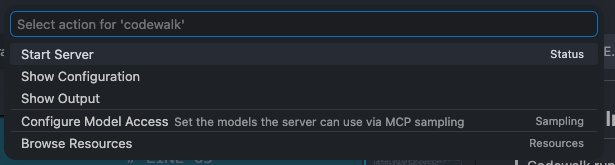
6. 服务器在后台启动 (stdio transport)
7. 打开 Copilot Chat → 输入 **`@codewalk`** → 所有 16 个工具都已可用
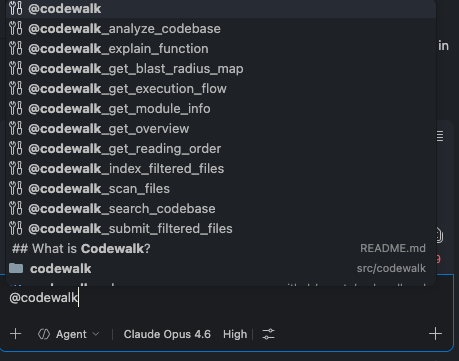
### VS Code Copilot
将以下内容添加到你所需项目的 `.vscode/mcp.json` 中:
```
{
"servers": {
"codewalk": {
"command": "/path/to/codewalk/.codewalk-env/bin/python",
"args": ["-m", "src.codewalk.mcp.server"],
"cwd": "/path/to/codewalk",
"env": {
"REPO_PATH": "${workspaceFolder}",
"EXCLUDE_PATHS": ""
}
}
}
}
```
然后在 Copilot Chat 中:**`@codewalk`** → 遵循扫描 → 过滤 → 索引的工作流。
### Claude Code
添加到 `~/.claude/mcp.json`:
```
{
"mcpServers": {
"codewalk": {
"command": "python",
"args": ["-m", "src.codewalk.mcp.server"],
"cwd": "/path/to/codewalk",
"env": {
"REPO_PATH": "/path/to/target/repo",
"EXCLUDE_PATHS": ""
}
}
}
}
```
### Cursor
设置 → MCP 服务器 → 添加:
```
{
"codewalk": {
"command": "python",
"args": ["-m", "src.codewalk.mcp.server"],
"cwd": "/path/to/codewalk",
"env": {
"REPO_PATH": "/path/to/target/repo",
"EXCLUDE_PATHS": ""
}
}
}
```
### OpenAI Codex CLI
添加到 `~/.codex/mcp.json`:
```
{
"mcpServers": {
"codewalk": {
"command": "python",
"args": ["-m", "src.codewalk.mcp.server"],
"cwd": "/path/to/codewalk",
"env": {
"REPO_PATH": "/path/to/target/repo",
"EXCLUDE_PATHS": ""
}
}
}
}
```
### 工作原理(首次设置)
**第一次**在新代码库上使用 Codewalk 时,它需要为文件建立索引。
你只需告诉 AI 进行分析 —— **AI 会自动处理剩下的事情**。
### 工具调用顺序
```
┌─────────────────────────────────────────────────────────────────────┐
│ SETUP WORKFLOW (run once) │
│ │
│ Step 1 │
│ codewalk_analyze_codebase │
│ │ scans files, builds dependency graph, detects modules │
│ ▼ │
│ Step 2 │
│ codewalk_scan_files(batch=1) │
│ │ returns ~100 file paths for review │
│ ▼ │
│ Step 3 │
│ codewalk_submit_filtered_files(paths=[...]) │
│ │ submit relevant source files from this batch │
│ ▼ │
│ ┌─── More batches? ───┐ │
│ │ YES │ NO │
│ │ Go to Step 2 │ │
│ │ (batch=2, 3, ...) ▼ │
│ └─────────────┐ Step 4 │
│ │ codewalk_index_filtered_files │
│ │ │ chunks + embeds all submitted files │
│ │ ▼ │
│ │ ✅ READY — all query tools unlocked │
│ └──────────────────────────────────────── │
└─────────────────────────────────────────────────────────────────────┘
┌─────────────────────────────────────────────────────────────────────┐
│ QUERY TOOLS (use after setup) │
│ │
│ codewalk_get_overview → project summary + diagrams │
│ codewalk_search_codebase → semantic code search │
│ codewalk_get_module_info → inspect a specific module │
│ codewalk_explain_function → AI-powered function explanation │
│ codewalk_get_blast_radius_map → change risk analysis │
│ codewalk_get_reading_order → optimal file reading sequence │
│ codewalk_get_execution_flow → dependency flow diagram │
└─────────────────────────────────────────────────────────────────────┘
┌─────────────────────────────────────────────────────────────────────┐
│ MAINTENANCE (after code changes) │
│ │
│ codewalk_incremental_reindex → re-embed only changed files │
│ codewalk_refresh_analysis → re-scan without re-embedding │
│ codewalk_review_diff → review git diff (LLM + checks) │
│ codewalk_review_file → review file vs codebase patterns │
│ codewalk_load_guidelines → load team coding standards │
└─────────────────────────────────────────────────────────────────────┘
```
**在 Copilot Chat 中输入以下内容:**
```
@codewalk analyze this codebase [auto(default) | reindex(update index) | full(delete existing index and generate new index)]
or
@codewalk_analyze_codebase [auto(default) | reindex(update index) | full(delete existing index and generate new index)]
```
**后台发生的事情(你不需要做任何事情):**
1. AI 调用 `codewalk_analyze_codebase` → 扫描所有文件检测模块,构建依赖关系图
2. AI 调用 `codewalk_scan_files(batch=1)` → 获取一批文件路径
3. AI 审查路径 —— 保留源代码(`.py`、`.ts`、`.js`),跳过垃圾文件(`node_modules/`、`__pycache__/`、测试文件、图像)
4. AI 调用 `codewalk_submit_filtered_files(file_paths=[...])` → 提交优质文件
5. 对每批文件重复步骤 2-4,直到处理完所有文件
6. AI 调用 `codewalk_index_filtered_files` → 将所有内容嵌入到向量数据库中
**你会看到如下进度:**
```
✓ Codebase analyzed — 142 files, 5 modules detected
✓ Scanning batch 1 of 2... submitted 87 source files
✓ Scanning batch 2 of 2... submitted 34 source files (LAST BATCH)
✓ Indexed 121 files → 380 chunks embedded
Ready! You can now use these tools:
- codewalk_get_overview (if LLM didn't call — run manually for project summary)
- codewalk_search_codebase (if LLM didn't call — search code by concept)
- codewalk_get_module_info (if LLM didn't call — inspect a specific module)
- codewalk_explain_function (if LLM didn't call — explain any function/class)
- codewalk_get_blast_radius_map (if LLM didn't call — check change risk)
- codewalk_get_reading_order (if LLM didn't call — optimal file reading order)
- codewalk_get_execution_flow (if LLM didn't call — dependency flow diagram)
```
### ⚠️ 如果 AI 在工作流中途停止
某些 LLM 在一次工具调用后停止,而不是继续整个工作流。**每个工具的输出都会准确告诉你下一步该调用什么。**如果 AI 停止了,只需自己调用下一个工具:
| AI 停止在... | 你下一步调用 |
|---|---|
| `codewalk_analyze_codebase` 之后 | `codewalk_scan_files(batch=1)` |
| `codewalk_scan_files` 之后 | `codewalk_submit_filtered_files` 以及列出的路径 |
| `codewalk_submit_filtered_files` 之后 | `codewalk_scan_files(batch=
)` 或者如果是最后一批则调用 `codewalk_index_filtered_files` |
| `codewalk_index_filtered_files` 之后 | 任何查询工具 —— `codewalk_get_overview`、`codewalk_search_codebase` 等 |
### MCP 工具 —— 你可以问什么
索引完成后,你可以使用这里的每一个工具。
你不需要记住工具名称 —— 只需自然地提问,AI 会选择合适的工具。
#### “给我看大局”
**工具:** `codewalk_get_overview` — 不需要参数
你刚加入一个新团队。你不知道这个项目是做什么的。从这里开始。
```
@codewalk give me an overview of this project
or
@codewalk_get_overview
```
**何时使用:** 在新项目的第一天。你想知道你要处理的是什么。
#### “这个模块里有什么?”
**工具:** `codewalk_get_module_info(module_name)` — 传入模块名称
你在概览中看到了 "auth" 并想深入研究它。
```
@codewalk tell me about the auth module
or
@codewalk_get_module_info auth
```
**何时使用:** 你需要在一个特定的模块上工作,并想一目了然地查看其所有文件、类和函数。
#### “给我解释一下这个函数”
**工具:** `codewalk_explain_function(function_name)` — 传入函数或类名
你的技术主管在 PR 审查中提到了 `verify_request`。你不知道它是做什么的。
```
@codewalk explain the verify_request function
or
@codewalk_explain_function verify_request function
```
**何时使用:** 你在代码/PR/文档中看到一个函数名,想要确切了解它的作用,而无需自己阅读整个文件。
#### “在代码库中搜索内容”
**工具:** `codewalk_search_codebase(query)` — 传入任何自然语言问题
你需要找到处理数据库连接的位置,但不知道是哪个文件。
```
@codewalk how does this project handle database connections?
or
@codewalk_search_codebase how does this project handle database connections?
```
**何时使用:** 你对一个概念(“错误处理”、“文件上传”、“缓存”)有疑问,并且不知道应该查看哪些文件。
#### “如果我更改了这个,会破坏什么?”
**工具:** `codewalk_get_blast_radius_map(target)` — 传入模块名称、文件名或留空
你准备重构 `models/base.py`。在接触它之前,你想知道破坏范围。
```
@codewalk what's the blast radius of base.py / auth?
or
@codewalk_get_blast_radius_map base.py / auth?
```
**何时使用:** 在重构或进行更改之前。“更改这个安全吗,还是会破坏一半的项目?”
#### “我应该从哪里开始阅读?”
**工具:** `codewalk_get_reading_order(module_name)` — 传入模块名称或留空以查看整个代码仓库
你想了解 `agent` 模块,但不知道首先该读哪个文件。
```
@codewalk what order should I read the agent module?
or
@codewalk_get_reading_order
```
**何时使用:** 当你想了解代码,而不想不断在文件之间跳转并疑惑“等等,这个导入是什么?”时。
#### “代码是如何流转的?”
**工具:** `codewalk_get_execution_flow(module_name)` — 传入模块名称或留空以获取模块级视图
你想了解模块之间是如何相互连接的。
```
@codewalk show me the execution flow
or
@codewalk_get_execution_flow
```
**何时使用:** 当你想了解“什么调用了什么”—— 代码如何连接的大局观时。
#### “我更改了一些代码,刷新分析”
**工具:** `codewalk_refresh_analysis` — 不需要参数
你添加了 3 个新文件并重构了一个模块。分析结果现在已经过时了。
```
@codewalk refresh the analysis
or
@codewalk_refresh_analysis
```
**何时使用:** 在你提交代码更改并希望获得更新的影响范围 / 阅读顺序 / 执行流结果之后。
#### “一些文件更改了,更新嵌入”
**工具:** `codewalk_incremental_reindex` — 不需要参数
你更改了几个文件,但不想重新嵌入整个代码库。
```
@codewalk reindex changed files
or
@codewalk_incremental_reindex
```
**何时使用:** 在代码更改后,当你希望向量搜索反映最新代码而无需完全重新索引时。使用内容哈希 —— 仅重新嵌入实际更改的内容。
#### “审查我的更改是否有 bug”
**工具:** `codewalk_review_diff` — 可选:`staged=true`、`target_branch="main"`
你准备推送一个 PR,想要进行自动代码审查。
```
@codewalk review my changes
or
@codewalk_review_diff
@codewalk_review_diff staged=true target_branch="main"
```
**何时使用:** 在推送 PR 之前。捕获安全漏洞 (OWASP)、bug、缺失的测试覆盖率和风格问题。
#### “审查这个特定文件”
**工具:** `codewalk_review_file(file_path)` — 传入文件路径
你想检查文件是否遵循项目的约定。
```
@codewalk review src/codewalk/pipeline.py
or
@codewalk_review_file src/codewalk/pipeline.py
```
**何时使用:** 当你想将特定文件与代码库中其他地方发现的模式进行比较时。
#### “加载我们团队的编码规范”
**工具:** `codewalk_load_guidelines(docs_path)` — 传入规范目录的路径
你的团队有 Markdown 格式的编码标准。
```
@codewalk load guidelines from docs/standards
or
@codewalk_load_guidelines docs/standards
```
**何时使用:** 每个项目一次。加载后,`codewalk_review_diff` 将自动根据你们团队的标准检查代码。
### 快速参考 —— 问什么
| 你想要... | 只需说... |
|---|---|
| 首次设置 | `@codewalk 分析这个代码库` 或 `@codewalk_analyze_codebase` |
| 大局概览 | `@codewalk 给我一个概览` 或 `@codewalk_get_overview` |
| 了解一个模块 | `@codewalk 告诉我关于 auth 模块的信息` 或 `@codewalk_get_module_info auth` |
| 了解一个函数 | `@codewalk 解释一下 verify_request 函数` 或 `@codewalk_explain_function verify_request` |
| 按概念查找代码 | `@codewalk 错误处理是如何工作的?` 或 `@codewalk_search_codebase 错误处理是如何工作的?` |
| 检查更改风险 | `@codewalk config.py 的影响范围是什么?` 或 `@codewalk_get_blast_radius_map config.py?` |
| 查找风险最高的文件 | `@codewalk 显示风险最高的文件` |
| 最佳阅读顺序 | `@codewalk 我应该按什么顺序阅读 agent 模块?` 或 `@codewalk_get_reading_order agent module` |
| 查看依赖流 | `@codewalk 显示执行流` 或 `@codewalk_get_execution_flow` |
| 代码更改后 | `@codewalk 刷新分析` 或 `@codewalk_refresh_analysis` |
| 更新嵌入 | `@codewalk 重新索引更改的文件` 或 `@codewalk_incremental_reindex` |
| 审查 git 差异 | `@codewalk 审查我的更改` 或 `@codewalk_review_diff` |
| 审查文件 | `@codewalk 审查 src/auth.py` 或 `@codewalk_review_file src/auth.py` |
| 加载规范 | `@codewalk 从 docs/ 加载规范` 或 `@codewalk_load_guidelines docs/` |
## 📡 API 参考
**Base URL**:`http://localhost:8000`
启动服务器:
```
source .codewalk-env/bin/activate
uvicorn src.codewalk.api.main:app --reload --port 8000
```
### 分析端点
#### `POST /analyze` — 索引代码库
```
curl -X POST http://localhost:8000/analyze \
-H "Content-Type: application/json" \
-d '{
"repo_path": "/Users/you/projects/my-app",
"collection_name": "",
"index_mode": "auto"
}'
```
**响应:**
```
{
"status": "success",
"repo_path": "/Users/you/projects/my-app",
"files_scanned": 142,
"chunks_created": 380,
"modules": ["api", "auth", "models", "utils", "frontend"]
}
```
- `index_mode`:`"auto"` (如果已索引则跳过)、`"reindex"` (智能更新)、`"full"` (擦除并重建)
- `collection_name`:留空 —— 从代码仓库路径自动派生(例如 `my-app`)
#### `POST /analyze/stream` — 带实时进度的索引 (SSE)
```
curl -N -X POST http://localhost:8000/analyze/stream \
-H "Content-Type: application/json" \
-d '{"repo_path": "/Users/you/projects/my-app", "index_mode": "auto"}'
```
**响应 (Server-Sent Events):**
```
data: {"step": "scan", "message": "Scanning files..."}
data: {"step": "scan", "message": "Found 142 files"}
data: {"step": "deps", "message": "Building dependency graph..."}
data: {"step": "modules", "message": "Detected 5 modules"}
data: {"step": "embed", "message": "Embedding 142 files → 380 chunks"}
data: {"step": "done", "message": "Analysis complete!"}
```
#### `POST /refresh` — 重新扫描而不重新嵌入
```
curl -X POST http://localhost:8000/refresh
```
**响应:**
```
{
"status": "refreshed",
"files": 142,
"modules": ["api", "auth", "models", "utils", "frontend"]
}
```
### 聊天端点
#### `POST /chat` — 向 AI 代理提问
```
curl -X POST http://localhost:8000/chat \
-H "Content-Type: application/json" \
-d '{"message": "Explain how authentication works in this project", "thread_id": "thread-1"}'
```
**响应:**
```
{
"answer": "The authentication flow starts in auth/middleware.py which checks JWT tokens on every request. The token validation logic is in auth/jwt.py which uses the python-jose library...",
"thread_id": "thread-1"
}
```
多轮对话 —— 使用相同的 `thread_id`:
```
# 后续问题
curl -X POST http://localhost:8000/chat \
-H "Content-Type: application/json" \
-d '{"message": "What happens if the token expires?", "thread_id": "thread-1"}'
```
### 视图端点
#### `GET /overview` — 项目概览
```
curl http://localhost:8000/overview
```
**响应:**
```
{
"tech_stack": ["Python", "FastAPI", "React"],
"total_files": 142,
"total_modules": 5,
"modules": [
{"name": "api", "file_count": 12, "depends_on": ["auth", "models"]},
{"name": "auth", "file_count": 5, "depends_on": ["models"]}
],
"diagram": "graph TD\n api --> auth\n api --> models\n auth --> models",
"overview_text": "## Project Overview\nTech stack: Python, FastAPI...",
"riskiest_files": [
{"file": "models/base.py", "risk_level": "high", "affected_files": 23}
]
}
```
#### `GET /modules` — 列出所有模块
```
curl http://localhost:8000/modules
```
**响应:**
```
{
"modules": [
{"name": "api", "file_count": 12, "languages": ["python"]},
{"name": "auth", "file_count": 5, "languages": ["python"]},
{"name": "frontend", "file_count": 34, "languages": ["typescript", "css"]}
],
"total": 5
}
```
#### `GET /modules/{name}` — 模块详情
```
curl http://localhost:8000/modules/auth
```
**响应:**
```
{
"name": "auth",
"file_count": 5,
"files": ["auth/middleware.py", "auth/jwt.py", "auth/permissions.py", "auth/models.py", "auth/__init__.py"],
"languages": {"python": 5},
"depends_on": ["models"],
"depended_by": ["api"],
"blast_radius": [
{"file": "auth/middleware.py", "risk_level": "moderate", "affected_files": 8}
],
"module_risk": "moderate"
}
```
#### `GET /blast-radius` — 风险最高的 15 个文件
```
curl http://localhost:8000/blast-radius
```
**响应:**
```
{
"module": null,
"module_risk": "high",
"total_files": 15,
"files": [
{
"file": "models/base.py",
"risk_level": "high",
"affected_files": 23,
"direct": ["api/routes.py", "auth/models.py"],
"transitive": ["api/views.py", "auth/middleware.py"]
}
]
}
```
#### `GET /blast-radius/{module}` — 模块的影响范围
```
curl http://localhost:8000/blast-radius/auth
```
#### `GET /reading-order` — 推荐的阅读顺序
```
curl http://localhost:8000/reading-order
```
**响应:**
```
{
"order": [
{
"file": "config.py",
"position": 1,
"why": "No internal dependencies",
"risk_level": "moderate",
"affected_files": 12,
"direct": ["embedder.py", "chain.py"],
"transitive": ["pipeline.py"]
},
{
"file": "models/base.py",
"position": 2,
"why": "No internal dependencies | Used by: routes.py, views.py",
"risk_level": "high",
"affected_files": 23
}
]
}
```
#### `GET /execution-flow` — 执行流图
```
curl http://localhost:8000/execution-flow
```
**响应:**
```
{
"flow": "## Execution Flow — Module Level\nEntry modules: api, cli\nTotal modules: 5\n\n### Module Dependencies\n api (12 files) → depends on: auth, models\n auth (5 files) → depends on: models\n models (8 files) → (standalone)\n utils (6 files) → (standalone)\n frontend (34 files) → (standalone)"
}
```
### 维护端点
#### `POST /incremental-reindex` — 仅重新嵌入更改的文件
```
curl -X POST http://localhost:8000/incremental-reindex
```
**响应:**
```
{
"repo_path": "/Users/you/projects/my-app",
"files_on_disk": 142,
"files_skipped": 138,
"files_reindexed": 3,
"files_deleted": 1,
"chunks_embedded": 12,
"total_time": "2.3s"
}
```
### 审查端点
#### `POST /review` — 审查 git diff
```
curl -X POST http://localhost:8000/review \
-H "Content-Type: application/json" \
-d '{"staged": false, "target_branch": "main"}'
```
**响应:**
```
{
"issues": [
{
"severity": "critical",
"category": "security",
"file_path": "src/auth/jwt.py",
"line_number": 42,
"title": "JWT secret hardcoded",
"explanation": "The JWT signing secret is hardcoded in the source file.",
"suggestion": "Move the secret to an environment variable.",
"code_snippet": "SECRET = 'my-secret-key'"
}
],
"summary": "Found 1 critical issue in 3 files (+45 / -12 lines)",
"files_reviewed": 3,
"lines_added": 45,
"lines_removed": 12
}
```
- `staged`:如果为 `true`,则仅审查暂存的更改 (`--staged`)。默认值:`false`。
- `target_branch`:与某个分支进行差异比较(例如 `"main"` 用于完整的 PR 审查)。默认值:`null` (未暂存的更改)。
#### `POST /review/file` — 审查单个文件
```
curl -X POST http://localhost:8000/review/file \
-H "Content-Type: application/json" \
-d '{"file_path": "src/codewalk/pipeline.py"}'
```
**响应:**
```
{
"review": "## File Review: pipeline.py\n\n### Consistency...\n",
"file_path": "src/codewalk/pipeline.py"
}
```
#### `POST /review/guidelines` — 加载编码规范
```
curl -X POST http://localhost:8000/review/guidelines \
-H "Content-Type: application/json" \
-d '{"docs_path": "/path/to/guidelines"}'
```
**响应:**
```
{
"status": "loaded",
"chunks": 24,
"path": "/path/to/guidelines"
}
```
#### `GET /health` — 健康检查
```
curl http://localhost:8000/health
```
**响应:**
```
{
"status": "ok"
}
```
## 🏗️ 架构
```
┌─────────────────────────────────────────────────────────┐
│ INTERFACES │
│ │
│ Next.js Web UI (:3000) MCP Server REST API │
│ ├── Overview (stdio) (:8000) │
│ ├── Modules │ │ │
│ ├── Blast Radius │ │ │
│ ├── Reading Order │ │ │
│ ├── Execution Flow │ │ │
│ ├── Code Review │ │ │
│ ├── Smart Reindex │ │ │
│ └── Chat ──────────────────┐ │ │ │
│ ▼ ▼ ▼ │
├──────────────────────────────────────────────────────────┤
│ AGENT LAYER │
│ │
│ LangGraph StateGraph ─── LLM (bind_tools) ───┐ │
│ │ │ │
│ ▼ ▼ │
│ ┌─ 7 Agent Tools ──────────────────────────────┐ │
│ │ search_codebase get_overview │ │
│ │ get_module_info get_blast_radius_map │ │
│ │ explain_function get_reading_order │ │
│ │ get_execution_flow │ │
│ └──────────────────────────────────────────────┘ │
├──────────────────────────────────────────────────────────┤
│ ANALYSIS LAYER │
│ │
│ scanner.py ──► dependency_graph.py ──► module_detector │
│ │ │
│ ▼ │
│ blast_radius.py reading_order.py code_parser.py │
│ (BFS reverse (topological (tree-sitter │
│ graph) sort) 15+ langs) │
├──────────────────────────────────────────────────────────┤
│ REVIEW LAYER │
│ │
│ diff_parser.py → test_coverage.py → reviewer.py │
│ (git diff (11-lang test (8-step │
│ parsing) detection) pipeline) │
│ │
│ guidelines_loader.py → review_prompts.py │
│ (team standards (OWASP security │
│ RAG search) checklist) │
├──────────────────────────────────────────────────────────┤
│ EMBEDDING LAYER │
│ │
│ chunker.py ──► embedder.py ──► vector_store.py │
│ (smart code (Jina 1.5B (ChromaDB │
│ chunks) MPS/CUDA) persistent) │
├──────────────────────────────────────────────────────────┤
│ LLM LAYER │
│ │
│ config.py ──► get_llm() factory │
│ Ollama │ OpenAI │ Anthropic │ Gemini │ Groq │ ... │
└──────────────────────────────────────────────────────────┘
```
### 目录结构
```
codewalk/
├── src/codewalk/
│ ├── config.py # Settings + LLM provider factory
│ ├── pipeline.py # Orchestration (parallel embed)
│ ├── ingestion/ # File scanning & tech detection
│ │ ├── scanner.py # File enumeration
│ │ ├── file_filter.py # Skip rules (node_modules, etc.)
│ │ └── tech_detect.py # Language/framework detection
│ ├── analysis/ # Code parsing & dependency analysis
│ │ ├── code_parser.py # Tree-sitter (15+ languages)
│ │ ├── dependency_graph.py # Import extraction → graph
│ │ ├── module_detector.py # Auto-grouping into modules
│ │ ├── blast_radius.py # Change impact (BFS)
│ │ └── reading_order.py # Topological sort
│ ├── embeddings/ # Vectorization
│ │ ├── chunker.py # Code → chunks
│ │ ├── embedder.py # Chunks → vectors
│ │ └── vector_store.py # ChromaDB storage
│ ├── agent/ # LangGraph chat agent
│ │ ├── graph.py # StateGraph + fallback parser
│ │ ├── tools.py # 7 tool functions
│ │ └── prompts.py # System prompt
│ ├── review/ # Code review pipeline
│ │ ├── models.py # Issue, ReviewResult, Severity, Category
│ │ ├── diff_parser.py # git diff → parsed DiffFile objects
│ │ ├── test_coverage.py # Missing test detection (11 languages)
│ │ ├── guidelines_loader.py # Load team coding standards (RAG)
│ │ ├── review_prompts.py # System + user prompts (OWASP checklist)
│ │ └── reviewer.py # 8-step review pipeline orchestrator
│ ├── api/ # FastAPI REST
│ │ ├── main.py # 16 endpoints
│ │ ├── models.py # Pydantic schemas
│ │ └── state.py # Singleton app state
│ └── mcp/ # Model Context Protocol
│ └── server.py # 16 MCP tools (stdio)
│
├── frontend/ # Next.js 14 web UI
│ └── src/app/
│ ├── page.tsx # Home (analyze form)
│ ├── chat/page.tsx # AI chat interface
│ ├── overview/page.tsx # Project overview
│ ├── modules/page.tsx # Module browser
│ ├── module/page.tsx # Single module detail
│ ├── blast-radius/page.tsx # Change impact viewer
│ ├── reading-order/page.tsx # Reading order viewer
│ ├── execution-flow/page.tsx# Flow diagram viewer
│ ├── review/page.tsx # Code review (diff/file/guidelines)
│ └── incremental-reindex/ # Smart reindex page
│ └── page.tsx
│
├── data/
│ └── chroma/ # ChromaDB persistent storage
│
├── requirements.txt # Python dependencies
├── .env # Configuration (gitignored)
└── .vscode/mcp.json # MCP server config
```
## 🔧 环境变量
| 变量 | 默认值 | 描述 |
|----------|---------|-------------|
| `LLM_PROVIDER` | `ollama` | LLM 后端:`ollama`、`openai`、`anthropic`、`gemini`、`groq`、`openrouter` |
| `LLM_MODEL` | `qwen3.5:27b` | 模型名称(必须与提供商匹配) |
| `EMBEDDING_MODEL` | `jinaai/jina-code-embeddings-1.5b` | 用于代码嵌入的 Sentence-transformer 模型 |
| `REPO_PATH` | `src/codewalk` | 要分析的默认代码仓库路径 |
| `EXCLUDE_PATHS` | — | 从扫描中排除的逗号分隔路径(例如 `tests,docs,*.generated.*`) |
| `GROQ_API_KEY` | — | Groq API 密钥 |
| `OPENAI_API_KEY` | — | OpenAI API 密钥 |
| `ANTHROPIC_API_KEY` | — | Anthropic API 密钥 |
| `GOOGLE_API_KEY` | — | Google Gemini API 密钥 |
| `OPENROUTER_API_KEY` | — | OpenRouter API 密钥 |
| `REVIEW_GUIDELINES_PATH` | — | 包含团队编码规范的目录路径 (.md、.txt、.rst) |
## 🤖 支持的 LLM 提供商
| 提供商 | 设置 `LLM_PROVIDER=` | API 密钥 | 备注 |
|----------|---------------------|---------|-------|
| **Ollama** | `ollama` | 无 | 完全本地,不需要互联网。首先运行 `ollama serve` |
| **OpenAI** | `openai` | `OPENAI_API_KEY` | GPT 模型等 |
| **Anthropic** | `anthropic` | `ANTHROPIC_API_KEY` | Claude 模型 |
| **Google Gemini** | `gemini` | `GOOGLE_API_KEY` | Gemini 模型 |
| **q** | `groq` | `GROQ_API_KEY` | Groq 模型 |
| **OpenRouter** | `openrouter` | `OPENROUTER_API_KEY` | 访问 100 多种模型 |
## 🧹 清除索引(重置 ChromaDB)
要擦除所有索引数据并重新开始,请删除 `data/chroma/` 目录:
```
# 从 codewalk 项目根目录:
rm -rf data/chroma/
```
这会删除所有嵌入块和集合。下次运行 `codewalk_analyze_codebase` (MCP) 或 `POST /analyze` (API) 时,它将从头开始重新索引。
## 🛠️ 技术栈
| 层 | 技术 |
|-------|-----------|
| **后端** | Python 3.10+、FastAPI、Uvicorn |
| **代理** | LangGraph、LangChain |
| **向量数据库** | ChromaDB (持久化,本地) |
| **嵌入** | Jina Code Embeddings 1.5B (1536 维,MPS/CUDA) |
| **代码解析** | Tree-sitter (15 种以上语言语法) |
| **前端** | Next.js 14、React 18、TypeScript 5 |
| **样式** | Tailwind CSS、shadcn/ui |
| **图表** | Mermaid.js |
| **MCP** | Model Context Protocol (stdio transport) |
## 🤝 贡献
1. **派生** 本仓库
2. **克隆** 你的派生仓库:`git clone https://github.com//codewalk.git`
3. **创建分支**:`git checkout -b feat/my-feature`
4. **进行更改** 并测试它们
5. **提交**:`git commit -m "feat: add my feature"`
6. **推送**:`git push origin feat/my-feature`
7. 向 `master` **发起 Pull Request**
## 📜 许可证
[MIT](LICENSE)
⭐ 如果你觉得 Codewalk 有用,请给它加个星标 —— 这有助于其他人发现它!
由 gupta29470 构建
LinkedIn · Twitter/X
标签:AI代码分析, AI风险缓解, AST解析, DNS解析, Git Diff分析, MCP Server, RAG, REST API, TCP SYN 扫描, Tree-sitter, VS Code, Web UI, 云安全监控, 代码助手, 代码安全, 代码审查, 代码导航, 代码库入职, 代码探索, 代码模块化, 代码理解, 代码索引, 代码阅读顺序, 依赖关系图, 威胁情报, 开发者工具, 开源项目, 影响分析, 本地大语言模型, 漏洞枚举, 自然语言代码问答, 软件架构分析, 逆向工具, 静态分析