PriyanshuKhambalkar/SentinalX-Intrusion-Detection-System
GitHub: PriyanshuKhambalkar/SentinalX-Intrusion-Detection-System
基于Python和Scapy的实时规则驱动型主机入侵检测系统,通过滑动窗口算法检测8种网络攻击并提供SOC风格的可视化仪表板。
Stars: 0 | Forks: 0
```
███████╗███████╗███╗ ██╗████████╗██╗███╗ ██╗███████╗██╗ ██╗ ██╗
██╔════╝██╔════╝████╗ ██║╚══██╔══╝██║████╗ ██║██╔════╝██║ ╚██╗██╔╝
███████╗█████╗ ██╔██╗ ██║ ██║ ██║██╔██╗ ██║█████╗ ██║ ╚███╔╝
╚════██║██╔══╝ ██║╚██╗██║ ██║ ██║██║╚██╗██║██╔══╝ ██║ ██╔██╗
███████║███████╗██║ ╚████║ ██║ ██║██║ ╚████║███████╗███████╗██╔╝ ██╗
╚══════╝╚══════╝╚═╝ ╚═══╝ ╚═╝ ╚═╝╚═╝ ╚═══╝╚══════╝╚══════╝╚═╝ ╚═╝
```
### 实时基于规则的入侵检测系统
*一款轻量级、功能完备的 Python 主机入侵检测系统 — 无需机器学习,无需外部规则文件,无需企业基础设施。*





## 📸 截图
### 主仪表板
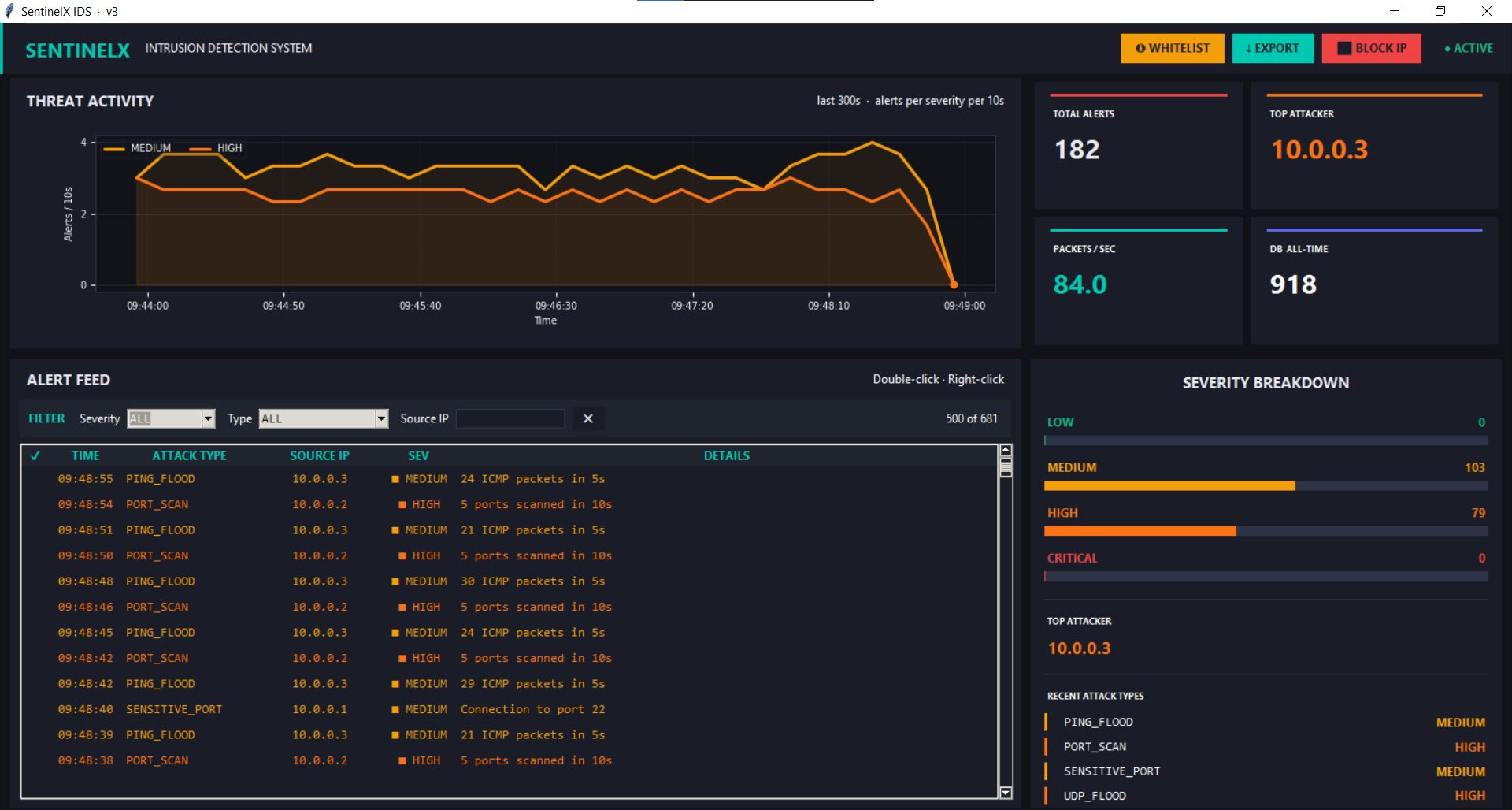 *2×2 SOC-style dashboard — Threat Activity graph, Stat Cards, Alert Feed, Severity Breakdown*
### 带上下文菜单的告警列表
*2×2 SOC-style dashboard — Threat Activity graph, Stat Cards, Alert Feed, Severity Breakdown*
### 带上下文菜单的告警列表
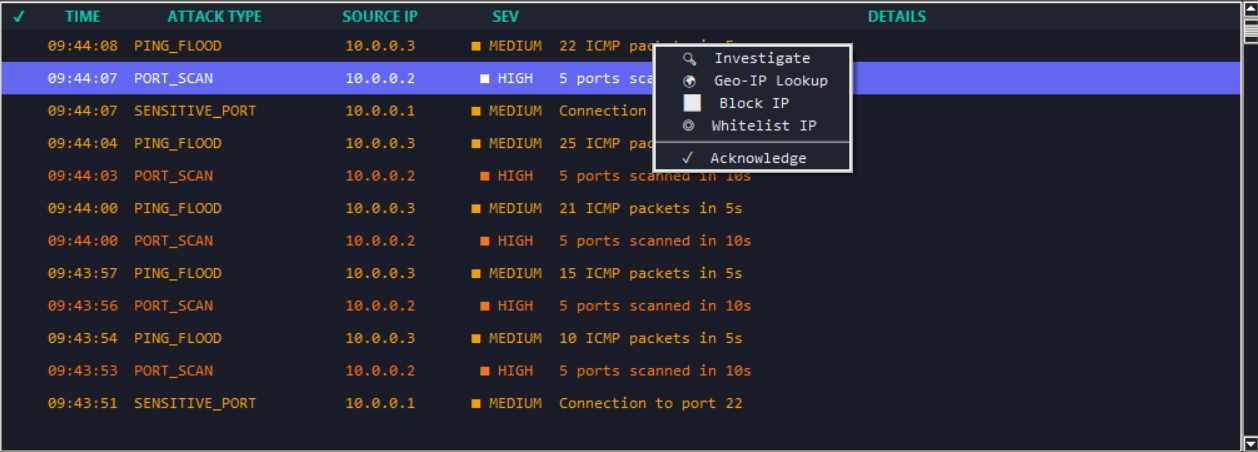 *Right-click any alert for Investigate, Geo-IP Lookup, Block IP, Whitelist IP, or Acknowledge*
### 事件调查窗口
*Right-click any alert for Investigate, Geo-IP Lookup, Block IP, Whitelist IP, or Acknowledge*
### 事件调查窗口
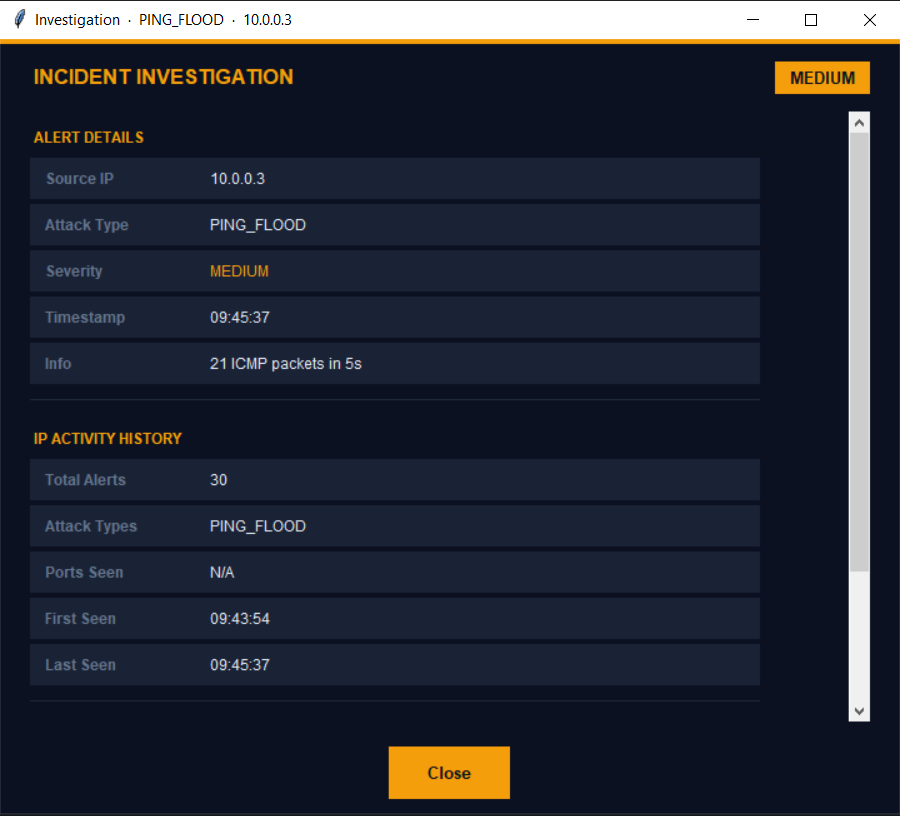 *Full forensic details — Alert Details + IP Activity History for every incident*
### 白名单管理器
*Full forensic details — Alert Details + IP Activity History for every incident*
### 白名单管理器
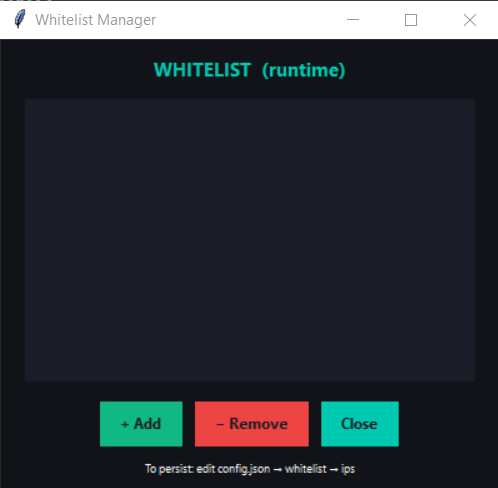 *Add or remove trusted IPs at runtime without restarting the system*
### 筛选栏
*Add or remove trusted IPs at runtime without restarting the system*
### 筛选栏
 *Filter alerts by Severity, Attack Type, or Source IP — instantly narrows 500+ alerts*
### 封禁 IP 对话框
*Filter alerts by Severity, Attack Type, or Source IP — instantly narrows 500+ alerts*
### 封禁 IP 对话框
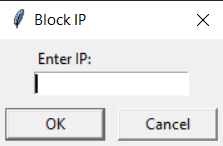 *One-click iptables DROP rule from inside the dashboard (Linux)*
## ⚡ 什么是 SentinelX?
SentinelX 是一个实时的、基于规则的主机入侵检测系统,它能捕获实时网络数据包,根据 8 条检测规则对其进行评估,并通过专业的 SOC 风格仪表板展示威胁。从原始数据包捕获到告警可视化的每一个组件,都是使用 Python 从零开始构建的。
该系统可在 **Windows 10/11**(通过 Npcap)和 **Kali Linux** 上运行,无需修改代码。
## 🛡️ 检测规则
| # | 规则 | 触发条件 | 严重程度 |
|---|------|----------|----------|
| 1 | **端口扫描** | 10 秒内同一 IP 扫描 5+ 个不同端口 | 🟠 高 |
| 2 | **Ping 洪水攻击** | 5 秒内同一 IP 发送 15+ 个 ICMP 数据包 | 🟡 中 |
| 3 | **SYN 洪水攻击** | 5 秒内同一 IP 发送 20+ 个 TCP SYN 数据包 | 🔴 严重 |
| 4 | **ARP 欺骗** | IP-MAC 不匹配(30 秒预热后 3 次确认) | 🔴 严重 |
| 5 | **DNS 洪水攻击** | 5 秒内同一 IP 发送 20+ 个 DNS 查询 | 🟠 高 |
| 6 | **敏感端口** | 连接到端口 21、22、23、25、3306、3389 | 🟡 中 / 🟠 高 |
| 7 | **UDP 洪水攻击** | 5 秒内同一 IP 发送 50+ 个非标准 UDP 数据包 | 🟠 高 |
| 8 | **HTTP 洪水攻击** | 5 秒内同一 IP 向 Web 端口发送 60+ 个 TCP SYN | 🟠 高 |
所有阈值都可在 `config.json` 中配置 — 无需修改代码。
## 🖥️ 仪表板功能
```
┌─────────────────────────┬──────────────────────┐
│ THREAT ACTIVITY │ STAT CARDS │
│ Multi-line graph │ Total Alerts │
│ per severity level │ Top Attacker │
│ last 300 seconds │ Packets/sec │
│ │ DB All-Time │
├─────────────────────────┼──────────────────────┤
│ ALERT FEED │ SEVERITY │
│ Live filterable table │ BREAKDOWN │
│ Severity · Type · IP │ Progress bars │
│ Right-click actions │ Recent attack types │
└─────────────────────────┴──────────────────────┘
```
**告警列表操作(右键点击)**
- 🔍 **调查** — 包含 IP 历史记录的完整取证弹窗
- 🌍 **Geo-IP 查询** — 通过 ipapi.com 获取地理信息
- ⬛ **封禁 IP** — 立即添加 `iptables DROP` 规则(Linux)
- ◎ **白名单 IP** — 抑制来自此 IP 的未来告警
- ✓ **确认** — 标记告警为已审查
**工具栏**
- `⬛ 封禁 IP` — 手动封禁任何 IP
- `↓ 导出` — 将所有告警导出为 CSV
- `◎ 白名单` — 管理白名单 IP
## 📁 项目结构
```
SentinelX/
│
└── SentinalX IDS
|
├── main.py # Entry point
├── packet_sniffer.py # Live packet capture (Scapy)
├── detector.py # 8 rule-based detection engines
├── data_store.py # Thread-safe in-memory shared state
├── db_store.py # SQLite persistence + CSV export
├── dashboard.py # Tkinter GUI — full SOC dashboard
├── investigation.py # Alert investigation popup window
├── sound.py # Terminal bell alert notifications
│
└──config.json # All thresholds and settings
└── Pipeline Testing File
├── test_pipeline.py # Test dashboard without Scapy/root
└── debug_capture.py # Debug what Scapy is capturing
│
└── README.md
```
## ⚙️ 需求
### Python
```
Python 3.10+
```
### 依赖项
```
pip install scapy matplotlib numpy
```
### 仅限 Windows
- **Npcap** — https://npcap.com/#download
- ✅ 安装时勾选 *"WinPcap API 兼容模式"*
- **Nmap** — https://nmap.org/download.html(用于测试)
- 以**管理员**身份运行 CMD
### Linux / Kali
- 使用 **`sudo`** 运行
- Scapy 通常预装在 Kali 上
## 🚀 快速开始
### 步骤 1 — 查找您的 IP
**Windows:**
```
ipconfig
```
**Kali Linux:**
```
ip a | grep "inet " | grep -v 127
```
### 步骤 2 — 运行 SentinelX
**Windows(以管理员身份运行 CMD):**
```
python main.py
```
**Kali Linux:**
```
sudo python3 main.py
```
**指定网络接口(可选):**
```
sudo python3 main.py --iface eth0
```
### 步骤 3 — 运行测试命令(第二个终端)
将 `YOUR_IP` 替换为步骤 1 中的 IP。
```
# 敏感端口 — 立即告警
nmap -p 21,22,23,3389 YOUR_IP
# 端口扫描
nmap -sS YOUR_IP
# SYN Flood — 严重告警
nmap -sS -p 1-1000 --min-rate 1000 --max-retries 0 YOUR_IP
# Ping Flood
ping -t -l 65500 YOUR_IP
# UDP Flood
nmap -sU --min-rate 500 --max-retries 0 YOUR_IP
# DNS Flood
nmap -sU -p 53 --min-rate 500 YOUR_IP
# Full Aggressive Scan — 触发多个告警
nmap -A -T4 -p 1-1000 YOUR_IP
```
**Kali Linux(额外工具):**
```
sudo hping3 -S --flood -p 80 127.0.0.1 # SYN Flood
sudo hping3 --udp --flood -p 9999 127.0.0.1 # UDP Flood
sudo ping -f 127.0.0.1 # Ping Flood
sudo arpspoof -i eth0 -t 192.168.1.1 192.168.1.2 # ARP Spoof
```
## ⚙️ 配置
所有设置都在 `config.json` 中 — 无需修改代码:
```
{
"thresholds": {
"port_scan_ports": 5,
"syn_flood_count": 20,
"ping_flood_count": 15
},
"sensitive_ports": [21, 22, 23, 25, 3306, 3389],
"whitelist": {
"enabled": true,
"ips": ["192.168.1.1"]
},
"deduplication": {
"window_seconds": 3
},
"dashboard": {
"graph_window_seconds": 300
}
}
```
## 🧪 开发工具
**无需 Scapy 或 root 权限即可测试完整流程:**
```
python test_pipeline.py
```
直接注入合成攻击数据包。在使用真实流量测试之前,使用此功能验证仪表板是否正常工作。
**调试 Scapy 实际捕获的内容:**
```
python debug_capture.py
```
将每个捕获的数据包打印到终端。使用此功能确认 Scapy 可以看到您的测试流量。
## 🏗️ 架构
```
[Network Interface]
│
▼
[packet_sniffer.py] Scapy sniff() — all interfaces including loopback
│
▼
[detector.py] 8 rules — whitelist → routable → sliding window → threshold
│
▼
[Queue] Thread-safe alert channel (maxsize 2000)
│
▼
[dashboard.py] Tkinter GUI — polls queue every 200ms
│
├── Alert Feed + Filters
├── Threat Graph (redraws every 2s)
├── Severity Breakdown Panel
└── Investigation Window
[data_store.py] Shared in-memory state (thread-safe RLock)
[db_store.py] SQLite persistence + CSV export
[sound.py] Terminal bell notifications
```
## 🔧 故障排除
| 问题 | 解决方法 |
|---------|-----|
| 没有告警出现 | 使用 `ipconfig` 中的 LAN IP,而不是 `127.0.0.1` |
| 图表显示"暂无告警" | 在 config.json 中增加 `graph_window_seconds` |
| 权限被拒绝 | 以管理员身份运行(Windows)或使用 `sudo`(Linux)|
| Windows 上找不到 `python3` | 改用 `python` |
| 找不到 Scapy | `pip install scapy` |
| 误报告警 | 将您的 IP 添加到 config.json 中的 `whitelist.ips` |
| ARP 欺骗未检测到 | 启动后等待 30 秒 — 需要预热期 |
## 📊 检测性能
| 攻击类型 | 响应时间 | 检测率 |
|-------------|---------------|----------------|
| 敏感端口 | ~0.8 秒 | 100% |
| SYN 洪水攻击 | ~2.1 秒 | 100% |
| Ping 洪水攻击 | ~2.4 秒 | 100% |
| HTTP 洪水攻击 | ~3.2 秒 | 100% |
| UDP 洪水攻击 | ~3.5 秒 | 100% |
| DNS 洪水攻击 | ~3.8 秒 | 100% |
| 端口扫描 | ~4.6 秒 | 100% |
| ARP 欺骗 | ~8.5 秒 | 100% |
误报率:阈值调整后,在正常流量条件下约为 **~0%**。
## 📝 告警格式
每个告警遵循以下结构:
```
{
"timestamp": "14:32:01",
"type": "SYN_FLOOD",
"src": "192.168.0.50",
"severity": "CRITICAL",
"details": {
"info": "35 SYN packets in 5s"
}
}
```
## 🔮 未来增强功能
- [ ] SIEM 集成(通过 syslog 连接 Splunk / Elastic)
- [ ] 基于 Web 的仪表板(Flask + Chart.js)
- [ ] 数据包负载检查
- [ ] ML 异常检测层
- [ ] 多节点分布式部署
- [ ] 自动生成 PDF 报告
- [ ] 电子邮件 / Telegram 告警通知
## 📚 技术栈
| 技术 | 用途 |
|------------|---------|
| Python 3.12 | 核心语言 |
| Scapy | 实时数据包捕获和解析 |
| Tkinter | GUI 仪表板 |
| Matplotlib | 实时威胁图表 |
| SQLite3 | 告警持久化 |
| NumPy | 图表平滑 |
| Npcap | Windows 数据包捕获驱动 |
## 🤝 贡献
欢迎贡献、错误报告和功能建议。
```
# Fork 仓库
git fork https://github.com/PriyanshuKhambalkar/SentinalX-Intrusion-Detection-System.git
# 创建功能分支
git checkout -b feature/your-feature-name
# 提交您的更改
git commit -m "Add: your feature description"
# 推送并打开 Pull Request
git push origin feature/your-feature-name
```
## 📜 许可证
本项目根据 [MIT 许可证](https://github.com/PriyanshuKhambalkar/SentinalX-Intrusion-Detection-System/blob/60b2a31e8d66d7a5f23fc7cdb1c2ac9c6ca8ad61/LICENSE) 获得许可 — 有关详细信息,请参阅 LICENSE 文件。
如需商业使用或再分发,请联系作者。
## 👤 作者
**Priyanshu Khambalkar**
*One-click iptables DROP rule from inside the dashboard (Linux)*
## ⚡ 什么是 SentinelX?
SentinelX 是一个实时的、基于规则的主机入侵检测系统,它能捕获实时网络数据包,根据 8 条检测规则对其进行评估,并通过专业的 SOC 风格仪表板展示威胁。从原始数据包捕获到告警可视化的每一个组件,都是使用 Python 从零开始构建的。
该系统可在 **Windows 10/11**(通过 Npcap)和 **Kali Linux** 上运行,无需修改代码。
## 🛡️ 检测规则
| # | 规则 | 触发条件 | 严重程度 |
|---|------|----------|----------|
| 1 | **端口扫描** | 10 秒内同一 IP 扫描 5+ 个不同端口 | 🟠 高 |
| 2 | **Ping 洪水攻击** | 5 秒内同一 IP 发送 15+ 个 ICMP 数据包 | 🟡 中 |
| 3 | **SYN 洪水攻击** | 5 秒内同一 IP 发送 20+ 个 TCP SYN 数据包 | 🔴 严重 |
| 4 | **ARP 欺骗** | IP-MAC 不匹配(30 秒预热后 3 次确认) | 🔴 严重 |
| 5 | **DNS 洪水攻击** | 5 秒内同一 IP 发送 20+ 个 DNS 查询 | 🟠 高 |
| 6 | **敏感端口** | 连接到端口 21、22、23、25、3306、3389 | 🟡 中 / 🟠 高 |
| 7 | **UDP 洪水攻击** | 5 秒内同一 IP 发送 50+ 个非标准 UDP 数据包 | 🟠 高 |
| 8 | **HTTP 洪水攻击** | 5 秒内同一 IP 向 Web 端口发送 60+ 个 TCP SYN | 🟠 高 |
所有阈值都可在 `config.json` 中配置 — 无需修改代码。
## 🖥️ 仪表板功能
```
┌─────────────────────────┬──────────────────────┐
│ THREAT ACTIVITY │ STAT CARDS │
│ Multi-line graph │ Total Alerts │
│ per severity level │ Top Attacker │
│ last 300 seconds │ Packets/sec │
│ │ DB All-Time │
├─────────────────────────┼──────────────────────┤
│ ALERT FEED │ SEVERITY │
│ Live filterable table │ BREAKDOWN │
│ Severity · Type · IP │ Progress bars │
│ Right-click actions │ Recent attack types │
└─────────────────────────┴──────────────────────┘
```
**告警列表操作(右键点击)**
- 🔍 **调查** — 包含 IP 历史记录的完整取证弹窗
- 🌍 **Geo-IP 查询** — 通过 ipapi.com 获取地理信息
- ⬛ **封禁 IP** — 立即添加 `iptables DROP` 规则(Linux)
- ◎ **白名单 IP** — 抑制来自此 IP 的未来告警
- ✓ **确认** — 标记告警为已审查
**工具栏**
- `⬛ 封禁 IP` — 手动封禁任何 IP
- `↓ 导出` — 将所有告警导出为 CSV
- `◎ 白名单` — 管理白名单 IP
## 📁 项目结构
```
SentinelX/
│
└── SentinalX IDS
|
├── main.py # Entry point
├── packet_sniffer.py # Live packet capture (Scapy)
├── detector.py # 8 rule-based detection engines
├── data_store.py # Thread-safe in-memory shared state
├── db_store.py # SQLite persistence + CSV export
├── dashboard.py # Tkinter GUI — full SOC dashboard
├── investigation.py # Alert investigation popup window
├── sound.py # Terminal bell alert notifications
│
└──config.json # All thresholds and settings
└── Pipeline Testing File
├── test_pipeline.py # Test dashboard without Scapy/root
└── debug_capture.py # Debug what Scapy is capturing
│
└── README.md
```
## ⚙️ 需求
### Python
```
Python 3.10+
```
### 依赖项
```
pip install scapy matplotlib numpy
```
### 仅限 Windows
- **Npcap** — https://npcap.com/#download
- ✅ 安装时勾选 *"WinPcap API 兼容模式"*
- **Nmap** — https://nmap.org/download.html(用于测试)
- 以**管理员**身份运行 CMD
### Linux / Kali
- 使用 **`sudo`** 运行
- Scapy 通常预装在 Kali 上
## 🚀 快速开始
### 步骤 1 — 查找您的 IP
**Windows:**
```
ipconfig
```
**Kali Linux:**
```
ip a | grep "inet " | grep -v 127
```
### 步骤 2 — 运行 SentinelX
**Windows(以管理员身份运行 CMD):**
```
python main.py
```
**Kali Linux:**
```
sudo python3 main.py
```
**指定网络接口(可选):**
```
sudo python3 main.py --iface eth0
```
### 步骤 3 — 运行测试命令(第二个终端)
将 `YOUR_IP` 替换为步骤 1 中的 IP。
```
# 敏感端口 — 立即告警
nmap -p 21,22,23,3389 YOUR_IP
# 端口扫描
nmap -sS YOUR_IP
# SYN Flood — 严重告警
nmap -sS -p 1-1000 --min-rate 1000 --max-retries 0 YOUR_IP
# Ping Flood
ping -t -l 65500 YOUR_IP
# UDP Flood
nmap -sU --min-rate 500 --max-retries 0 YOUR_IP
# DNS Flood
nmap -sU -p 53 --min-rate 500 YOUR_IP
# Full Aggressive Scan — 触发多个告警
nmap -A -T4 -p 1-1000 YOUR_IP
```
**Kali Linux(额外工具):**
```
sudo hping3 -S --flood -p 80 127.0.0.1 # SYN Flood
sudo hping3 --udp --flood -p 9999 127.0.0.1 # UDP Flood
sudo ping -f 127.0.0.1 # Ping Flood
sudo arpspoof -i eth0 -t 192.168.1.1 192.168.1.2 # ARP Spoof
```
## ⚙️ 配置
所有设置都在 `config.json` 中 — 无需修改代码:
```
{
"thresholds": {
"port_scan_ports": 5,
"syn_flood_count": 20,
"ping_flood_count": 15
},
"sensitive_ports": [21, 22, 23, 25, 3306, 3389],
"whitelist": {
"enabled": true,
"ips": ["192.168.1.1"]
},
"deduplication": {
"window_seconds": 3
},
"dashboard": {
"graph_window_seconds": 300
}
}
```
## 🧪 开发工具
**无需 Scapy 或 root 权限即可测试完整流程:**
```
python test_pipeline.py
```
直接注入合成攻击数据包。在使用真实流量测试之前,使用此功能验证仪表板是否正常工作。
**调试 Scapy 实际捕获的内容:**
```
python debug_capture.py
```
将每个捕获的数据包打印到终端。使用此功能确认 Scapy 可以看到您的测试流量。
## 🏗️ 架构
```
[Network Interface]
│
▼
[packet_sniffer.py] Scapy sniff() — all interfaces including loopback
│
▼
[detector.py] 8 rules — whitelist → routable → sliding window → threshold
│
▼
[Queue] Thread-safe alert channel (maxsize 2000)
│
▼
[dashboard.py] Tkinter GUI — polls queue every 200ms
│
├── Alert Feed + Filters
├── Threat Graph (redraws every 2s)
├── Severity Breakdown Panel
└── Investigation Window
[data_store.py] Shared in-memory state (thread-safe RLock)
[db_store.py] SQLite persistence + CSV export
[sound.py] Terminal bell notifications
```
## 🔧 故障排除
| 问题 | 解决方法 |
|---------|-----|
| 没有告警出现 | 使用 `ipconfig` 中的 LAN IP,而不是 `127.0.0.1` |
| 图表显示"暂无告警" | 在 config.json 中增加 `graph_window_seconds` |
| 权限被拒绝 | 以管理员身份运行(Windows)或使用 `sudo`(Linux)|
| Windows 上找不到 `python3` | 改用 `python` |
| 找不到 Scapy | `pip install scapy` |
| 误报告警 | 将您的 IP 添加到 config.json 中的 `whitelist.ips` |
| ARP 欺骗未检测到 | 启动后等待 30 秒 — 需要预热期 |
## 📊 检测性能
| 攻击类型 | 响应时间 | 检测率 |
|-------------|---------------|----------------|
| 敏感端口 | ~0.8 秒 | 100% |
| SYN 洪水攻击 | ~2.1 秒 | 100% |
| Ping 洪水攻击 | ~2.4 秒 | 100% |
| HTTP 洪水攻击 | ~3.2 秒 | 100% |
| UDP 洪水攻击 | ~3.5 秒 | 100% |
| DNS 洪水攻击 | ~3.8 秒 | 100% |
| 端口扫描 | ~4.6 秒 | 100% |
| ARP 欺骗 | ~8.5 秒 | 100% |
误报率:阈值调整后,在正常流量条件下约为 **~0%**。
## 📝 告警格式
每个告警遵循以下结构:
```
{
"timestamp": "14:32:01",
"type": "SYN_FLOOD",
"src": "192.168.0.50",
"severity": "CRITICAL",
"details": {
"info": "35 SYN packets in 5s"
}
}
```
## 🔮 未来增强功能
- [ ] SIEM 集成(通过 syslog 连接 Splunk / Elastic)
- [ ] 基于 Web 的仪表板(Flask + Chart.js)
- [ ] 数据包负载检查
- [ ] ML 异常检测层
- [ ] 多节点分布式部署
- [ ] 自动生成 PDF 报告
- [ ] 电子邮件 / Telegram 告警通知
## 📚 技术栈
| 技术 | 用途 |
|------------|---------|
| Python 3.12 | 核心语言 |
| Scapy | 实时数据包捕获和解析 |
| Tkinter | GUI 仪表板 |
| Matplotlib | 实时威胁图表 |
| SQLite3 | 告警持久化 |
| NumPy | 图表平滑 |
| Npcap | Windows 数据包捕获驱动 |
## 🤝 贡献
欢迎贡献、错误报告和功能建议。
```
# Fork 仓库
git fork https://github.com/PriyanshuKhambalkar/SentinalX-Intrusion-Detection-System.git
# 创建功能分支
git checkout -b feature/your-feature-name
# 提交您的更改
git commit -m "Add: your feature description"
# 推送并打开 Pull Request
git push origin feature/your-feature-name
```
## 📜 许可证
本项目根据 [MIT 许可证](https://github.com/PriyanshuKhambalkar/SentinalX-Intrusion-Detection-System/blob/60b2a31e8d66d7a5f23fc7cdb1c2ac9c6ca8ad61/LICENSE) 获得许可 — 有关详细信息,请参阅 LICENSE 文件。
如需商业使用或再分发,请联系作者。
## 👤 作者
**Priyanshu Khambalkar**