K4N3CO-LABS/PwnShop-Mobile
GitHub: K4N3CO-LABS/PwnShop-Mobile
一款专为 Android 移动设备设计的故意不安全的教育应用,通过游戏化方式帮助用户在实践中学习真实世界的安全漏洞及其修复方法。
Stars: 6 | Forks: 3
# **关于**
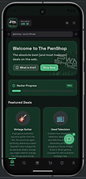
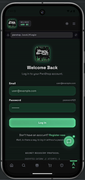
受**传奇的 OWASP Juice Shop** 启发,**The PwnShop** 是一款**专门为移动设备构建的**、**故意设计为不安全的教育类**应用程序。它专为从**初学者**到**经验丰富的专业人士**的**所有人**而设计,提供了一个**实践环境**,让您可以直接在 Android 设备上**测试、学习并掌握**现实世界中的漏洞。
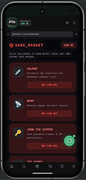
**The PwnShop** 旨在通过**实际动手经验**来教授**现实世界中的安全**概念。此环境中**注入了**生产应用程序中常见的**大量漏洞**,从经典的 **SQL injection** 和 **Cross-Site Scripting (XSS)**,到复杂的**业务逻辑缺陷**、**泄露的 API** 以及**隐藏的 endpoint**。
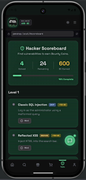
您的**终极目标**是化身为一名**道德黑客**。浏览应用程序,搜寻安全的**配置错误**,并利用这些**蓄意制造的缺陷**。在发现漏洞的过程中,您将在您的**Hacker Inventory** 中**解锁物品**,了解**漏洞利用为何奏效**的**底层机制**,并探索**业界标准的缓解策略**。
密切关注 **Hacker Scoreboard** 以追踪您的进度。您发现的**漏洞**越多,就越接近获得您的**结业证书!** 祝您好运,并请记住:**能力越大**,责任越大。请始终**合乎道德和法律**地进行**安全**研究。
## **游戏玩法**
 ## **如何游玩**
### 1. 探索与发现
通过点击应用程序的**每一个角落**来**寻找**“泄露的”信息。留意那些明目张胆留下的**开发者笔记**、**配置错误的按钮**,以及那些本不该让最终用户看到的**隐藏菜单**。
### 2. 尝试破坏它
向应用程序输入**“损坏的”**数据,**利用**其在**本地**保存信息的方式,并尝试**欺骗界面**,使其为您提供不该提供的**访问权限或信息**。
### 3. 为了学习而破解,为了构建而学习
发现一个**漏洞**不仅仅是一场**胜利**——它更是一堂**课**。您发现的每一个漏洞都**揭示了**技术上的“原因”以及**修复**它的**业界标准**方法。
## 📱 **移动应用程序**
**前置条件:** Node.js
1. 从 **Releases** 页面将**最新**的 `.apk` **下载**到您的 **Android** 设备上。
2. 在您的 **Android** **安全**设置中启用**“安装未知来源应用”**。
3. **安装**,然后**启动**该应用程序。
## 🚀 **在本地运行 (在 PC 上)**
```
# 1. Clone 仓库
git clone https://github.com/K4N3CO-LABS/PwnShop-Mobile.git
```
```
# 2. 进入项目
cd PwnShop-Mobile-main
```
```
# 3. 安装依赖
npm install
```
```
# 4. 启动开发服务器
npm run dev
```
**要打开应用程序:**
**点击终端**中显示的 **URL** *(通常是 http://localhost:3000 或 http://0.0.0.0:3000)*。
## 📄 **许可证**
本项目基于 **MIT License** **授权**。
## **重要提示**
为**教育目的**而创建。**请勿**对**真实目标**执行这些**攻击**。
**祝您游玩愉快!!**
## **如何游玩**
### 1. 探索与发现
通过点击应用程序的**每一个角落**来**寻找**“泄露的”信息。留意那些明目张胆留下的**开发者笔记**、**配置错误的按钮**,以及那些本不该让最终用户看到的**隐藏菜单**。
### 2. 尝试破坏它
向应用程序输入**“损坏的”**数据,**利用**其在**本地**保存信息的方式,并尝试**欺骗界面**,使其为您提供不该提供的**访问权限或信息**。
### 3. 为了学习而破解,为了构建而学习
发现一个**漏洞**不仅仅是一场**胜利**——它更是一堂**课**。您发现的每一个漏洞都**揭示了**技术上的“原因”以及**修复**它的**业界标准**方法。
## 📱 **移动应用程序**
**前置条件:** Node.js
1. 从 **Releases** 页面将**最新**的 `.apk` **下载**到您的 **Android** 设备上。
2. 在您的 **Android** **安全**设置中启用**“安装未知来源应用”**。
3. **安装**,然后**启动**该应用程序。
## 🚀 **在本地运行 (在 PC 上)**
```
# 1. Clone 仓库
git clone https://github.com/K4N3CO-LABS/PwnShop-Mobile.git
```
```
# 2. 进入项目
cd PwnShop-Mobile-main
```
```
# 3. 安装依赖
npm install
```
```
# 4. 启动开发服务器
npm run dev
```
**要打开应用程序:**
**点击终端**中显示的 **URL** *(通常是 http://localhost:3000 或 http://0.0.0.0:3000)*。
## 📄 **许可证**
本项目基于 **MIT License** **授权**。
## **重要提示**
为**教育目的**而创建。**请勿**对**真实目标**执行这些**攻击**。
**祝您游玩愉快!!**
## **如何游玩**
### 1. 探索与发现
通过点击应用程序的**每一个角落**来**寻找**“泄露的”信息。留意那些明目张胆留下的**开发者笔记**、**配置错误的按钮**,以及那些本不该让最终用户看到的**隐藏菜单**。
### 2. 尝试破坏它
向应用程序输入**“损坏的”**数据,**利用**其在**本地**保存信息的方式,并尝试**欺骗界面**,使其为您提供不该提供的**访问权限或信息**。
### 3. 为了学习而破解,为了构建而学习
发现一个**漏洞**不仅仅是一场**胜利**——它更是一堂**课**。您发现的每一个漏洞都**揭示了**技术上的“原因”以及**修复**它的**业界标准**方法。
## 📱 **移动应用程序**
**前置条件:** Node.js
1. 从 **Releases** 页面将**最新**的 `.apk` **下载**到您的 **Android** 设备上。
2. 在您的 **Android** **安全**设置中启用**“安装未知来源应用”**。
3. **安装**,然后**启动**该应用程序。
## 🚀 **在本地运行 (在 PC 上)**
```
# 1. Clone 仓库
git clone https://github.com/K4N3CO-LABS/PwnShop-Mobile.git
```
```
# 2. 进入项目
cd PwnShop-Mobile-main
```
```
# 3. 安装依赖
npm install
```
```
# 4. 启动开发服务器
npm run dev
```
**要打开应用程序:**
**点击终端**中显示的 **URL** *(通常是 http://localhost:3000 或 http://0.0.0.0:3000)*。
## 📄 **许可证**
本项目基于 **MIT License** **授权**。
## **重要提示**
为**教育目的**而创建。**请勿**对**真实目标**执行这些**攻击**。
**祝您游玩愉快!!**标签:Android, CISA项目, DSL, MITM代理, 后端开发, 安全, 安全教育, 漏洞靶场, 目录枚举, 移动安全, 超时处理, 防御检测