ahmxdniazi/cti-stix-pipeline
GitHub: ahmxdniazi/cti-stix-pipeline
将 PDF 格式的网络威胁情报报告通过 AI 与正则技术自动提取实体,并转换为标准 STIX 2.1 JSON Bundle 的自动化流水线工具。
Stars: 0 | Forks: 0






利用 AI 驱动的实体提取技术,将非结构化的网络威胁情报报告转换为机器可读的 STIX 2.1 bundles。
## 目录
- [概述](#overview)
- [功能](#features)
- [截图](#screenshots)
- [安装说明](#installation)
- [用法](#usage)
- [项目结构](#project-structure)
- [技术栈](#technologies)
- [未来改进](#future-improvements)
- [作者](#author)
- [许可证](#license)
## 概述
**CTI-STIX Pipeline** 是一个基于 Python 的自动化工具,它填补了原始威胁情报文档与结构化、可共享的网络安全数据之间的空白。
安全分析师通常需要花费数小时手动将威胁报告转换为 STIX 格式,以便 OpenCTI、MISP 和 Splunk 等平台能够接入。此 pipeline 通过三个阶段将这一过程自动化:
```
PDF Report ──► Entity Extraction ──► STIX 2.1 Bundle ──► Visualizer
(regex / GPT-4o-mini) (stix2 library) (stix2viz)
```
该项目使用来自 **Anthropic 的 2025 年 8 月威胁情报报告** 的真实威胁情报开发,该报告记录了高级 AI 辅助的网络攻击,包括氛围劫持、朝鲜 IT 工人欺诈 以及 AI 生成的勒索软件即服务。
## 功能
| 功能 | 描述 |
|---------|-------------|
| 📄 **PDF 接入** | 通过 PyMuPDF 从多页 CTI 报告中提取全文 |
| 🔍 **双提取模式** | 正则表达式/关键词(快速、离线)或 LLM 驱动(GPT-4o-mini,更丰富) |
| 🛡️ **兼容 STIX 2.1** | 生成 Malware、AttackPattern、Indicator、ThreatActor SDOs + Relationships |
| 📦 **Bundle 导出** | 序列化为可移植的 `stix_bundle.json`,适用于任何兼容 TAXII 的平台 |
| 📊 **图可视化** | 兼容 STIX Visualizer,用于生成交互式实体关系图 |
| 🌐 **支持 Colab** | 包含完整的 notebook,可在云端零配置执行 |
| 🧩 **模块化架构** | 每个阶段都是独立的、可导入的 Python 模块 |
## 截图
### 🔧 步骤 1 — 在 Google Colab 中安装库
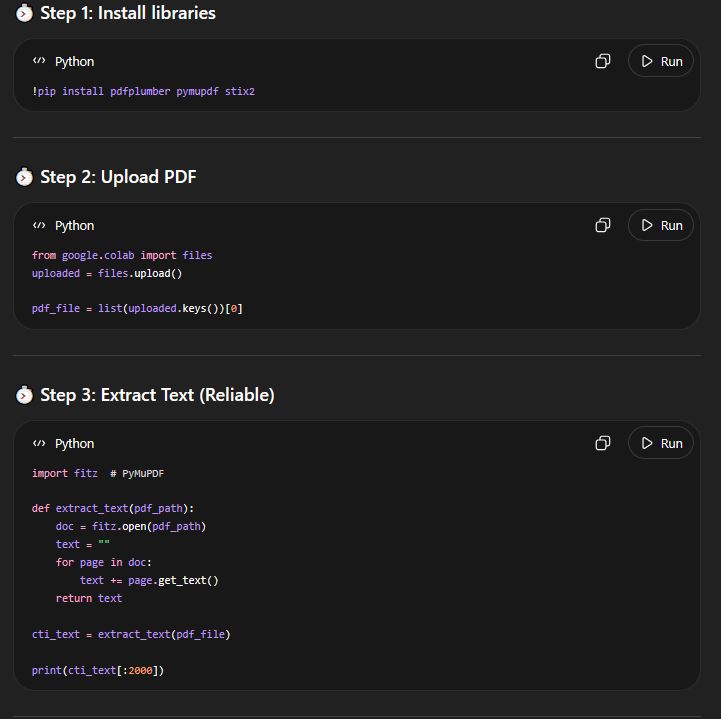
Installing pdfplumber, pymupdf, and stix2 in Colab
### 📄 步骤 2 — 上传 PDF 并提取文本
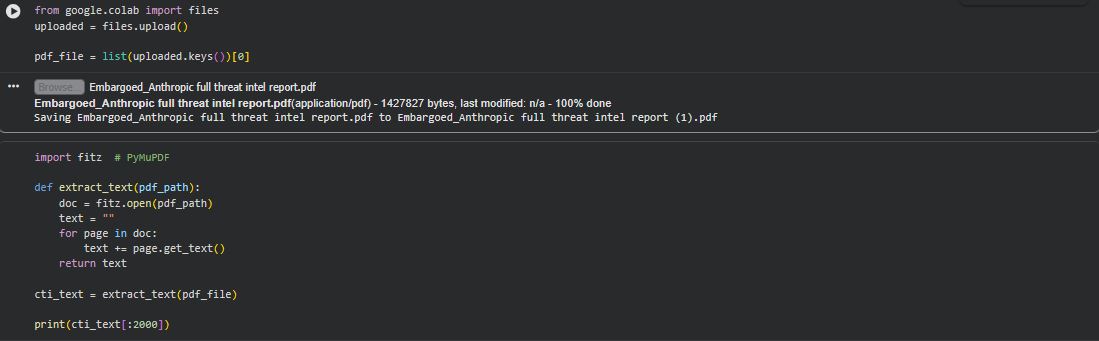
Uploading the Anthropic Threat Intelligence Report PDF and extracting raw text
### 🤖 步骤 3 — LLM 实体提取
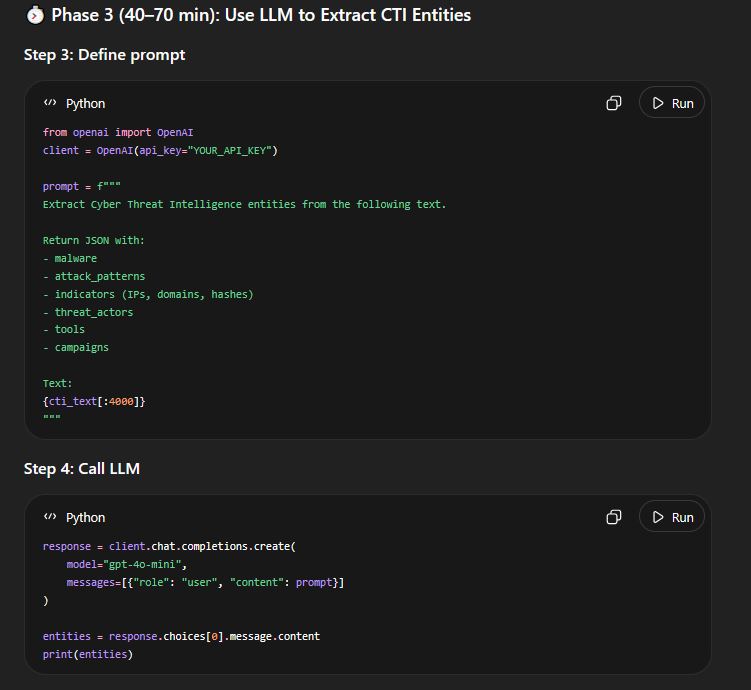
GPT-4o-mini extracts structured CTI entities from the report text
### 🔬 步骤 4 — 实体提取输出
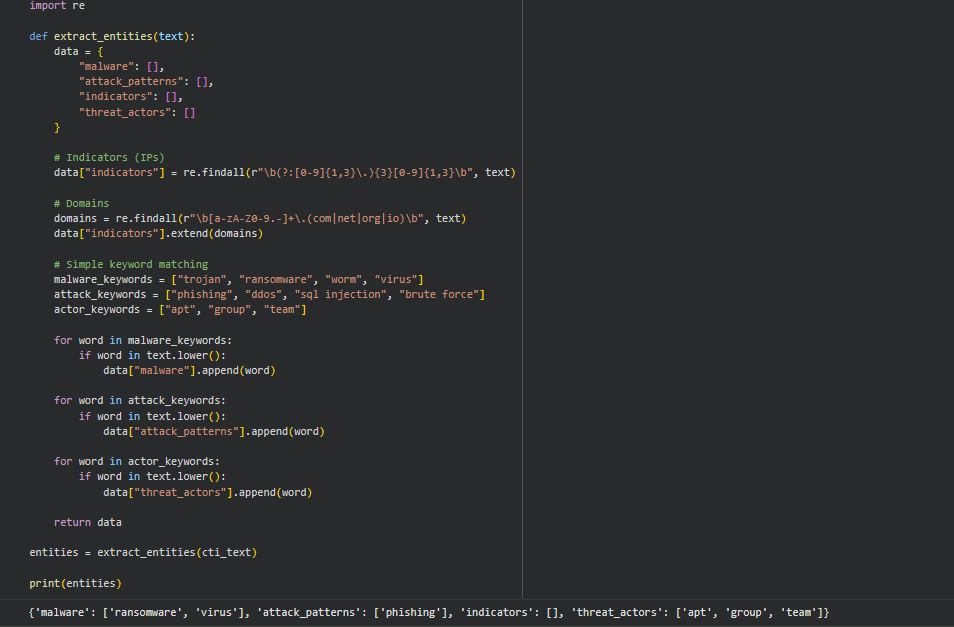
Regex extraction identifies malware families, attack patterns, and threat actors
### 🧱 步骤 5 — 创建 STIX 对象
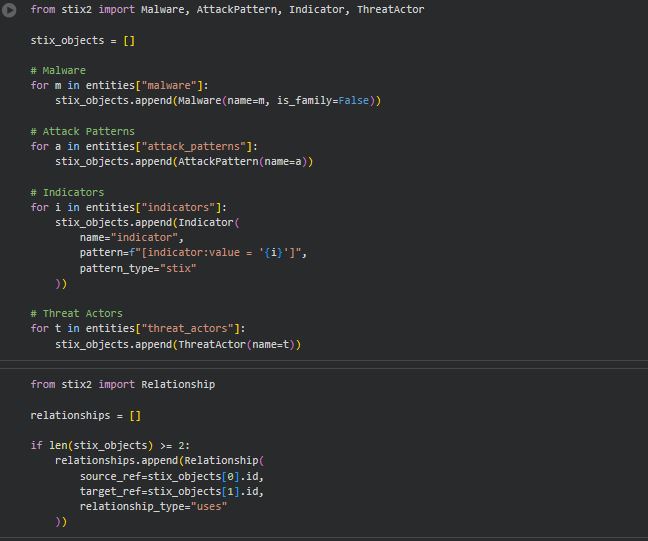
Converting entities into typed STIX 2.1 SDOs using the stix2 library
### 📦 步骤 6 — 构建并下载 Bundle
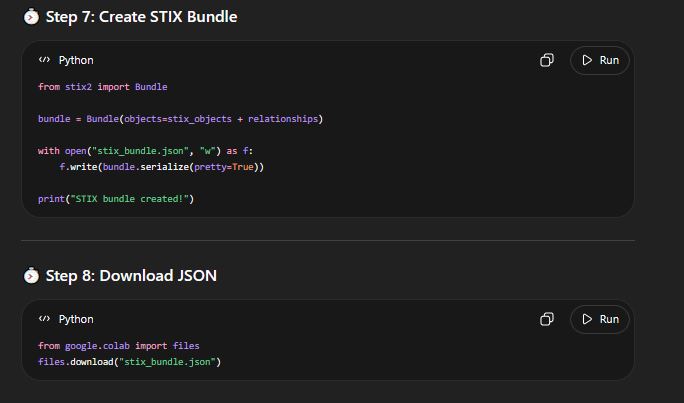
Creating the STIX Bundle and downloading the JSON output
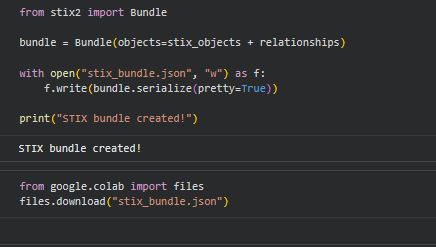
STIX bundle saved and ready for download from Colab
### 📊 步骤 7 — 可视化 STIX 图
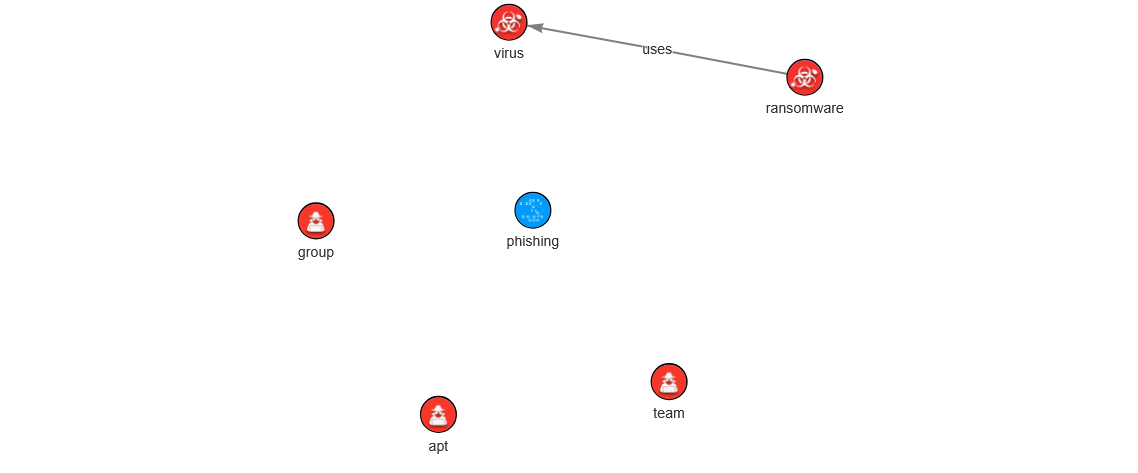
Interactive STIX graph showing Malware, ThreatActor, and AttackPattern nodes with uses relationships
### 🌐 完整的 Colab Notebook 界面
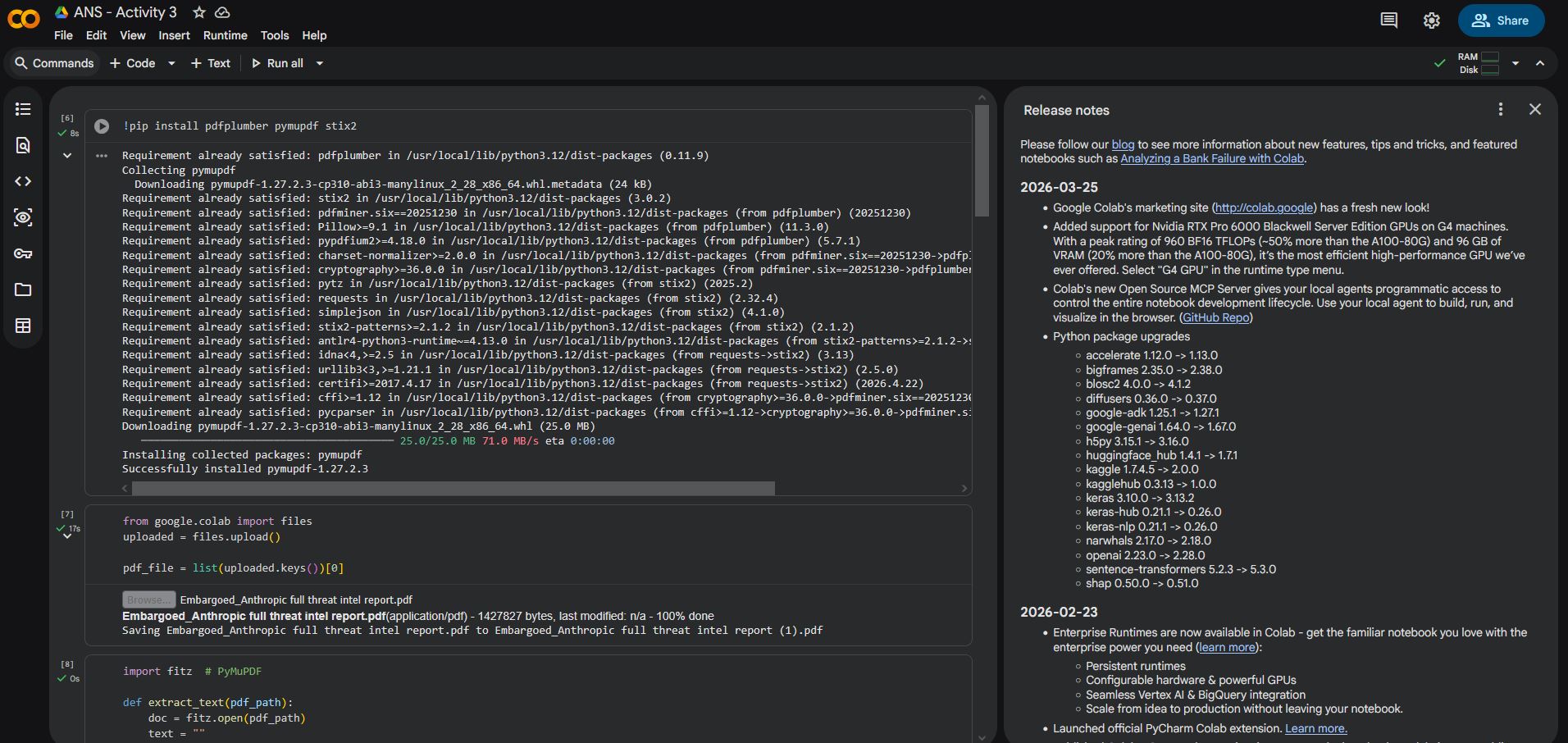
Complete CTI-STIX pipeline running end-to-end in Google Colab
## 安装说明
### 选项 A — 本地 Python 环境
```
# 1. Clone 仓库
git clone https://github.com/muhammadahmad/cti-stix-pipeline.git
cd cti-stix-pipeline
# 2. 创建并激活虚拟环境
python -m venv venv
source venv/bin/activate # Windows: venv\Scripts\activate
# 3. 安装所有依赖
pip install -r requirements.txt
```
### 选项 B — Google Colab(推荐用于快速入门)
[](https://colab.research.google.com/github/muhammadahmad/cti-stix-pipeline/blob/main/notebooks/cti_stix_pipeline.ipynb)
打开 notebook 并运行所有单元格——无需本地设置。
## 用法
### 命令行界面 — 快速运行(正则表达式模式)
```
cd src
python pipeline.py --pdf /path/to/threat_report.pdf --output stix_bundle.json
```
### 命令行界面 — LLM 模式(更丰富的提取)
```
# 设置你的 API key
export OPENAI_API_KEY="sk-your-key-here"
python pipeline.py \
--pdf /path/to/threat_report.pdf \
--output stix_bundle.json \
--llm
```
### 模块用法
```
from src.pdf_extractor import extract_text_from_pdf
from src.entity_extractor import extract_entities
from src.stix_builder import create_stix_bundle, save_bundle
# 阶段 1:提取文本
cti_text = extract_text_from_pdf("threat_report.pdf")
# 阶段 2:提取实体
entities = extract_entities(cti_text)
# {'malware': ['ransomware', 'virus'], 'attack_patterns': ['phishing'], ...}
# 阶段 3:构建并保存 STIX bundle
bundle = create_stix_bundle(entities)
save_bundle(bundle, "stix_bundle.json")
```
### LLM 提取模块
```
from src.llm_extractor import extract_entities_with_llm
entities = extract_entities_with_llm(
text=cti_text,
api_key="sk-...", # or set OPENAI_API_KEY env var
model="gpt-4o-mini",
)
print(entities["threat_actors"])
# ['APT41', 'Lazarus Group', ...]
```
### 可视化输出
1. 前往 [STIX Visualizer](https://oasis-open.github.io/cti-stix-visualization/)
2. 上传您的 `stix_bundle.json`
3. 探索交互式实体关系图
## 项目结构
```
cti-stix-pipeline/
│
├── 📁 src/ # Core Python modules
│ ├── pdf_extractor.py # Stage 1: PDF → raw text
│ ├── entity_extractor.py # Stage 2a: regex/keyword extraction
│ ├── llm_extractor.py # Stage 2b: LLM-powered extraction
│ ├── stix_builder.py # Stage 3: entities → STIX 2.1 bundle
│ └── pipeline.py # End-to-end CLI runner
│
├── 📁 notebooks/
│ └── cti_stix_pipeline.ipynb # Google Colab notebook (all stages)
│
├── 📁 docs/
│ └── project_overview.md # Full project documentation
│
├── 📁 assets/
│ ├── banner/
│ │ └── banner.svg # Repository banner
│ ├── images/ # Pipeline screenshots
│ │ ├── stix_visualizer.jpg
│ │ ├── entity_extraction_output.jpg
│ │ ├── stix_object_creation.jpg
│ │ └── ...
│ └── stix_bundle_sample.json # Example STIX 2.1 output
│
├── requirements.txt # Python dependencies
├── .gitignore # Git ignore rules
├── LICENSE # MIT License
├── CONTRIBUTING.md # Contribution guidelines
└── README.md # This file
```
## 技术栈




| 库 | 版本 | 用途 |
|---------|---------|---------|
| `PyMuPDF` (fitz) | ≥ 1.23.0 | 快速、准确的 PDF 文本提取 |
| `pdfplumber` | ≥ 0.10.0 | 备用 PDF 提取器 |
| `stix2` | ≥ 3.0.2 | STIX 2.1 对象建模与序列化 |
| `openai` | ≥ 1.30.0 | GPT-4o-mini LLM 实体提取 |
| `python-dotenv` | ≥ 1.0.0 | 安全的 API key 管理 |
## 未来改进
- [ ] **命名实体识别 (NER)** — 集成 spaCy 与网络安全 NER 模型,以在不产生 LLM 成本的情况下进行更精确的实体提取
- [ ] **CVE 提取** — 用于 CVE ID 的正则表达式模式,并映射到 STIX Vulnerability 对象
- [ ] **哈希指标** — MD5、SHA-1、SHA-256 模式匹配和 STIX Indicator SDOs
- [ ] **TAXII 集成** — 将生成的 bundles 直接推送到 TAXII 2.1 服务器
- [ ] **OpenCTI 导出** — 针对 OpenCTI 威胁情报平台的原生连接器
- [ ] **关系推断** — 超越前两个对象启发式算法,由 LLM 驱动生成 SRO
- [ ] **Web 界面** — Streamlit dashboard,用于拖放式 PDF 处理与实时可视化
- [ ] **批处理** — 文件夹监视模式,用于自动处理新报告
- [ ] **测试套件** — 包含 STIX 验证的 pytest 单元测试
## 作者
Muhammad Ahmad
学号 25I-7705
FAST-NUCES
GitHub
|
## 许可证
本项目基于 **MIT License** 授权——详情请参见 [LICENSE](LICENSE) 文件。
使用 ⚡ 和 stix2 构建 · 威胁情报,结构化。
标签:Cloudflare, DLL 劫持, GPT-4o-mini, MITRE ATT&CK, NLP, OpenCTI, PDF解析, Python, STIX 2.1, 人工智能, 大语言模型, 威胁情报, 安全运营, 实体识别, 实时处理, 开发者工具, 情报共享, 扫描框架, 数据提取, 数据管道, 文本挖掘, 无后门, 用户模式Hook绕过, 网络安全, 软件工程, 逆向工具, 隐私保护