**离线飞行日志分析,从第一天就为代理设计**
一条命令,从原始日志到可调的 PID/FFT/MagFit 参数——无需特殊飞行




ArduPilot · Betaflight · PX4
[快速开始](#quick-start) ·
[针对代理](#for-agents) ·
[命令](#commands) ·
[输出格式](#output-formats) ·
[架构](#architecture)
## 安装
```
pip install git+https://github.com/raylanlin/smarttune-cli.git
# . "Development" – Translate to "开发".
pip install "git+https://github.com/raylanlin/smarttune-cli.git#egg=smarttune[all]"
# 3. "or" – Translate to "或".
git clone https://github.com/raylanlin/smarttune-cli.git
cd smarttune-cli
pip install -e ".[dev,all]"
```
## 针对代理
SmartTune 专为 **LLM 代理工具调用工作流**而设计。命令行接口的各个方面都遵循代理友好的原则:
| 原则 | 实现方式 |
|-----------|---------------|
| **确定性输出** | 当管道输出到文件时,无交互提示,无 TUI,无进度条。相同输入 → 相同输出。 |
| **默认结构化** | 通过 MCP 服务器 (`smarttune_analyze_log`) 输出 JSON。通过 CLI `--report md\|html` 输出 Markdown/HTML。无需解析脆弱的 ANSI 转义终端输出。 |
| **自描述** | `stune platforms` 列出可用适配器。错误代码标准化(E10xx–E50xx)。退出代码有意义。 |
| **快速失败与隔离** | 单个模块故障不会中止整个分析。每个模块都有自己的 try/except 块。 |
| **无需配置** | 无需配置文件。所有内容均为标志或自动检测。无需环境变量。 |
| **离线优先** | 无网络调用。无 API 密钥。无速率限制。适用于隔离/气隙环境。 |
| **机器可推荐** | 调优建议包含置信度评分和推理,而不仅仅是参数值。代理可以权衡多个建议。 |
### 代理可以通过 SmartTune 学到什么
SmartTune 不仅仅是代理*调用*的工具——它是代理学习飞控调参技艺的方式:
| 技能 | SmartTune 如何教授 |
|-------|--------------------------|
| **PID 调参直觉** | 带有置信度评分的阶跃响应分析。代理学习哪些超调/上升时间模式需要更高的 Kp 还是增加阻尼。 |
| **频域分析** | FFT 频谱与峰值检测。代理学会根据频谱形状区分振动源(螺旋桨/电机/机架共振)。 |
| **滤波器设计逻辑** | 带有波特图的陷波和低通滤波器建议。代理可以看到滤波与相位滞后的权衡。 |
| **平台差异** | ArduPilot 与 Betaflight 参数约定。ParamRef 在它们之间映射——代理学会跨平台转化调参知识。 |
| **安全意识** | 所有建议上限为 ±20%。代理默认学会保守调参。 |
| **基于规则的推理** | 6层知识库是纯 JSON。代理可以阅读、理解,甚至通过写入用户层来提出规则更改。 |
### 代理可以用 SmartTune 做什么
- **批量分析** — 通过循环分析数百个日志;每个文件输出 JSON
- **自动调参** — 通过 MAVLink 或 CLI 将建议反馈到飞控
- **机队监控** — 跨多架飞行器汇总振动/PID 指标
- **CI/CD 集成** — 作为飞行前验证管道的一部分运行 `stune analyze`
- **协作诊断** — 让代理比较事故前后的日志
### MCP 服务器(模型上下文协议)
SmartTune 包含一个**只读 MCP 服务器**,允许 LLM 代理直接调用分析工具——无需 shell,无需子进程,无需任意文件写入。
```
pip install -e ".[all,mcp]"
```
**运行 MCP 服务器:**
```
smarttune-mcp # stdio transport (for agent frameworks)
# 4. "Full analysis (auto-detect platform)" – Translate to "完整分析(自动检测平台)". Keep "auto-detect" as is? It's a technical term, so perhaps keep in English? No, in the example, "auto-detect" isn't mentioned, but I can translate it. "auto-detect" can be translated as "自动检测". I'll translate it.
python -m smarttune.mcp_server
```
**可用的 MCP 工具(共 13 个):**
| 工具 | 用途 |
|------|---------|
| `smarttune_list_platforms` | 列出支持的平台、扩展和功能 |
| `smarttune_log_quality` | 解析日志并返回质量分数、数据可用性、验证问题 |
| `smarttune_analyze_log` | 完整分析(PID + FFT + 滤波器 + 磁罗盘 + 系统辨识 + 硬件)输出为 JSON/Markdown |
| `smarttune_analyze_pid` | 每个轴的 PID 阶跃响应分析 |
| `smarttune_analyze_fft` | 带峰值检测的 FFT 振动频谱 |
| `smarttune_analyze_magfit` | 磁力计校准分析 |
| `smarttune_analyze_sysid` | ARX 系统辨识(固有频率,阻尼比) |
| `smarttune_analyze_filter` | 滤波器传递函数分析(波特图数据) |
| `smarttune_analyze_hardware` | 硬件配置报告 |
| `smarttune_generate_plot` | 生成分析图表(base64 PNG) |
| `smarttune_list_params` | **v3.0 新增** — 列出平台的固件参数 |
| `smarttune_search_params` | **v3.0 新增** — 跨平台按关键字搜索参数 |
| `smarttune_validate_param` | **v3.0 新增** — ⚠️ 在推荐前验证参数存在且值在范围内 |
所有工具都标注了 `readOnlyHint=True`, `destructiveHint=False`, `idempotentHint=True`。
**⚠️ 参数验证是强制性的。** 在推荐任何参数更改之前,调用 `smarttune_validate_param(param_name, value, platform)`。这可以防止代理建议目标固件中不存在的参数——这是一个关键问题,因为:
- Betaflight 4.5+ 重命名了许多参数(`d_min_roll` → `d_max_roll`, `gyro_lowpass_hz` → `gyro_lpf1_static_hz`)
- 参数名称在不同固件版本间存在差异
- 一些参数有严格的值范围必须遵守
**安全边界:**
- 无 shell 执行 — 仅限库调用
- 无任意文件写入 — 结果内联返回
- 无参数变更 — 无 MAVLink 写入,无固件刷新
- 路径验证 — 允许的根目录、扩展名(`.bin`, `.log`, `.bbl`, `.bfl`, `.ulg`)、文件大小限制、符号链接解析
- 可通过环境变量配置:
```
export SMARTTUNE_MCP_ALLOWED_ROOTS="/path/a:/path/b"
export SMARTTUNE_MCP_MAX_FILE_MB="300"
```
**OpenClaw / Claude Desktop 配置:**
```
{
"mcp": {
"servers": {
"SmartTune": {
"command": "smarttune-mcp",
"args": [],
"env": {
"SMARTTUNE_MCP_ALLOWED_ROOTS": "/home/user/.openclaw/workspace/files/inbox:/home/user/.openclaw/workspace/files/output:/tmp",
"SMARTTUNE_MCP_MAX_FILE_MB": "300"
}
}
}
}
}
```
## 快速开始
```
# 5. "With charts (human-friendly)" – "带有图表(人类友好)". "human-friendly" might be translated as "人性化" or "易于理解", but I'll go with "人类友好" as it's a common translation.
stune analyze -i flight.bin
# 6. "Per-module deep dive" – "每个模块深入分析".
stune analyze -i flight.bbl --visual
# 7. "Export to Markdown report" – "导出到 Markdown 报告". Keep "Markdown" in English as it's a format name.
stune pid -i flight.bin -a roll --visual
stune fft -i flight.bin --visual
stune magfit -i flight.bin
stune sysid -i flight.bin -a pitch
stune hardware -i flight.bin
# 8. "Export to HTML report" – "导出到 HTML 报告". Keep "HTML" in English.
stune analyze -i flight.bin --report md -o report.md
# 9. "List supported platforms" – "列出支持的平台".
stune analyze -i flight.bin --report html -o report.html
# 10. "For JSON output, use the MCP server (see "For Agents" above)" – Translate to "对于 JSON 输出,请使用 MCP 服务器(参见上方“For Agents”)". Keep "JSON", "MCP" in English. "For Agents" might be a section title, so keep it in English as per instructions? The instruction says to keep proper nouns, so if "For Agents" is a proper noun or section name, keep it in English. I'll assume it is.
stune platforms
# 11. "`stune analyze`" – This is a command or tool name. Keep "stune" in English, but translate the word "analyze" if it's part of the command? No, the instruction says to keep tool names in original English form. So, it should be kept as is: "`stune analyze`". But I need to output the translation, so for the command, since it's a technical term, keep it in English. However, the instruction is for headings, so I should translate the text around it. But this line is exactly "`stune analyze`", so I'll output it as is, or perhaps translate the meaning? No, it's a specific command name, so keep it in English. To be safe, since it's in backticks, I'll output it unchanged.
```
## 输出格式
SmartTune 支持多种输出格式,每种格式专为特定的使用场景设计:
| 格式 | 使用场景 | 示例 |
|--------|----------|---------|
| **终端** | 在 shell 中人工检查 | `stune analyze -i flight.bin` |
| **JSON** | 代理/脚本使用 | MCP: `smarttune_analyze_log(log_path="flight.bin")` |
| **Markdown** | 报告、READMEs、文档 | `stune analyze -i flight.bin --report md -o report.md` |
| **HTML** | 带嵌入图表的可视化报告 | `stune analyze -i flight.bin --report html -o report.html` |
### JSON 输出示例
```
{
"platform": "ArduPilot",
"timestamp": "2026-05-03T22:30:00",
"pid": {
"roll": {
"rating": "GOOD",
"confidence": 0.87,
"kp": {"current": 0.12, "recommended": 0.14, "reason": "Slight oscillation at 8 Hz"},
"ki": {"current": 0.05, "recommended": 0.05, "reason": "No steady-state error"},
"max_overshoot_pct": 8.2,
"rise_time_ms": 85,
"settling_time_ms": 210
}
},
"fft": {
"vibration": {
"level_rms": 2.1,
"grade": "EXCELLENT"
},
"peaks": [
{"freq_hz": 47.5, "magnitude_db": -12.3, "source": "propeller"}
]
}
}
```
## 命令
### Looking at the example: 'Running Naabu' -> '运行 Naabu'. Here, "Running" is translated, but "Naabu" is kept. So for "`stune analyze`", "analyze" might be translated, but "stune" is the tool name. In this case, it's a command, so probably keep it as "`stune analyze`". I think for such command-like lines, keep them in English as per the instruction to keep tool/library/framework names in English.
全频谱分析:PID + FFT + MagFit + 硬件 — 一次完成。
```
stune analyze -i flight.bin # Auto-detect
stune analyze -i flight.bbl --platform betaflight # Force platform
stune analyze -i flight.bin --visual # With charts
stune analyze -i flight.bin --report md -o report.md # Markdown export
stune analyze -i flight.bin --report html -o report.html # HTML export
```
### 12. "`stune pid`" – Similarly, keep as is.
PID 阶跃响应分析,带逐轴调优建议。
```
stune pid -i flight.bin # All axes
stune pid -i flight.bin -a roll # Single axis
stune pid -i flight.bbl --visual # Betaflight
```
### 13. "`stune fft`" – Keep as is.
频域振动分析,带陷波滤波器建议。
```
stune fft -i flight.bin # Full spectrum
stune fft -i flight.bin --visual # With spectrum plot
```
### 14. "`stune magfit`" – Keep as is.
磁力计校准 — 硬铁/软铁偏移、覆盖度、磁场强度。
```
stune magfit -i flight.bin # ArduPilot only
```
### 15. "`stune sysid`" – Keep as is.
ARX 系统辨识 — 固有频率和阻尼比。
```
stune sysid -i flight.bin -a roll # Single axis
stune sysid -i flight.bin -a pitch --na 4 --nb 3 # Custom order
```
### 16. "`stune hardware`" – Keep as is.
完整硬件配置报告:固件版本、传感器、电池、参数。
```
stune hardware -i flight.bin
stune hardware -i flight.bbl
```
### 17. "`stune filter`" – Keep as is.
滤波器链分析,带波特图。
```
stune filter -i flight.bin --gyro-filter 40 --visual
stune filter -i flight.bin --auto # Auto-derive from params
```
### 18. "`stune platforms`" – Keep as is.
列出所有可用的平台适配器及其功能。
```
stune platforms
```
### 19. "`stune params` 🆕 v3.0" – Keep "stune params" in English, and the emoji and version as is. Translate "params" if needed, but it's part of the command, so keep it. Output as "`stune params` 🆕 v3.0".
查询和验证固件参数表。数据从官方固件源代码抓取。
```
# 20. "List all parameters for a platform" – "列出平台的所有参数".
stune params ap # ArduPilot (2,574 params)
stune params bf # Betaflight (45 params, BF 4.5+ names)
stune params px4 # PX4 (20 params)
# 21. "Show parameter details" – "显示参数详细信息".
stune params ATC_RAT_RLL_P # Auto-detects platform
# 22. "⚠️ Validate before recommending (exit 0 = valid, 1 = invalid)" – Translate with the warning icon: "⚠️ 推荐前进行验证(exit 0 = 有效,1 = 无效)". Keep "exit 0" and "1" as is, as they might be technical codes.
stune params --validate ATC_RAT_RLL_P 0.15 -p ardupilot
stune params --validate p_roll 999 -p betaflight # fails: exceeds max
# 23. "Search and filter" – "搜索和过滤".
stune params --search notch # Cross-platform search
stune params --category pid -p betaflight
```
**架构**: 参数存储在 `smarttune/knowledge/params/
.json`。更新 JSON 即可刷新——无需更改代码。参见[知识库](#knowledge-base)。
## 支持的平台
| 平台 | 日志格式 | 解析器 | 状态 |
|----------|-----------|--------|--------|
| **ArduPilot** | `.bin` / `.log` (DataFlash) | pymavlink | ✅ 完全支持 |
| **Betaflight** | `.bbl` / `.bfl` (Blackbox) | Pure Python | ✅ 完全支持 |
| **PX4** | `.ulg` (ULog) | pyulog | 🔲 v2.x 版本支持 |
### 自动检测
SmartTune 通过文件头识别你的日志格式——无需 `--platform` 标志:
| 字节 | 平台 |
|-------|----------|
| `0xA3 0x95` | ArduPilot DataFlash |
| `H Product:Blackbox` | Betaflight Blackbox |
| ULog magic | PX4 ULog |
## 架构
```
┌─────────────────────────────────────────────┐
│ CLI Layer │
│ stune analyze / pid / fft / ... │
│ --report md / html │
└──────────────────┬──────────────────────────┘
│
┌──────────────────┤ ┌───────────────────────┐
│ │ │ MCP Server (stdio) │
│ │ │ smarttune-mcp │
│ │ │ JSON / Markdown out │
│ │ │ Read-only · No shell │
│ │ └───────────┬───────────┘
│ │ │
│ ┌───────────────▼──────────────▼────────────┐
│ │ Services Layer (shared) │
│ │ services/analysis.py · services/serialize │
│ └───────────────┬──────────────────────────┘
│ │
┌──────────────────▼──────────────────────────┐
│ Platform Adapter Layer │
│ ArduPilot · Betaflight · PX4 │
│ Parsers → FlightData (unified IR) │
└──────────────────┬──────────────────────────┘
│
┌──────────────────▼──────────────────────────┐
│ Analysis Engine (platform-aware) │
│ PID / FFT / SysID / MagFit / Filter / HW │
│ Per-platform modules: │
│ ardupilot/ → WebTools-aligned FFT │
│ betaflight/ → Wiener deconvolution FFT │
│ px4/ → stubs │
│ BF: Feedforward · RPM Filter · D-term │
│ Protocol-based interface constraints │
└──────────────────┬──────────────────────────┘
│ AnalysisResult + ParamRef
┌──────────────────▼──────────────────────────┐
│ Knowledge Base (6-layer deep merge) │
│ common → platform → user → Pro │
│ JSON-based rules — inspectable & editable │
└──────────────────┬──────────────────────────┘
│
┌──────────────────▼──────────────────────────┐
│ Output Layer │
│ Terminal (Rich) / JSON / Markdown / HTML │
│ ParamRef → platform-native parameter names │
└─────────────────────────────────────────────┘
```
## 知识库
一个 6 层深度合并的规则引擎驱动所有调优建议。每一层覆盖前一层:
| # | 层 | 位置 | 可编辑 |
|---|-------|----------|----------|
| 1 | 通用物理规则 | `smarttune/knowledge/rules/common/` | ❌ 内置 |
| 2 | 平台规则 | `smarttune/knowledge/rules/{platform}/` | ❌ 内置 |
| 3 | 用户通用规则 | `~/.smarttune/knowledge/common/` | ✅ |
| 4 | 用户平台规则 | `~/.smarttune/knowledge/{platform}/` | ✅ |
| 5 | 专业通用规则 | `smarttune-knowledge-pro` (可选) | 🔒 |
| 6 | 专业平台规则 | `smarttune-knowledge-pro` (可选) | 🔒 |
规则是标准的 JSON 文件。添加一个文件,重启命令,引擎就会加载它。无需编译,无需数据库,无需设置。
## 开发
```
# 24. "Install with dev dependencies" – "安装开发依赖". "dev" might be kept as "dev" since it's technical, but I can translate to "开发". I'll use "安装开发依赖".
pip install -e ".[dev,all]"
# 25. "Run tests" – "运行测试".
pytest tests/ -v # 96 tests, 1.5s
pytest tests/test_bbl_parser.py -v # BBL parser only
pytest tests/test_betaflight_analyzers.py -v # BF-specific analyzers
# 26. "Lint" – "代码检查" or "Lint", but as per instruction, keep "Lint" if it's a tool name. "Lint" is a tool, so keep it in English. But in the context, it might be a general term. I think "Lint" should be kept as is.
ruff check smarttune/
black --check smarttune/
```
### 添加新平台
1. **创建适配器** — 子类化 `PlatformAdapter`,实现 `parse()`, `detect()`, `map_param_to_platform()`
2. **添加知识规则** — 将 JSON 文件放入 `smarttune/knowledge/rules/{platform}/`
3. **注册** — 使用 `@register` 装饰器
```
@register
class MyPlatform(PlatformAdapter):
name = "myplatform"
...
```
`stune platforms` 将会自动发现它。
## 代理栈集成
SmartTune 设计为可与任何 LLM 代理框架配合工作。以下是它的适配方式:
| 框架 | 集成方式 |
|-----------|-------------|
| **OpenClaw** | `smarttune-mcp` 作为 MCP 服务器 — 结构化 JSON 输出,只读,无需配置 |
| **Claude Code / Codex** | MCP 服务器或 shell 工具调用 — `stune analyze -i log.bin --report md` |
| **Hermes Agent** | 确定性输出,适用于人在环调优工作流 |
| **自定义代理** | 通过 `smarttune.services.analysis` 可 pip 安装、可导入的 Python API |
代理调用 `stune`,获取结构化的调优建议,并可以据此行动。无需导航 TUI,无需回答提示,无需脆弱的屏幕抓取。
## 示例
### 终端输出
```
Platform: Betaflight
╭──────────────────────────────────────────────────────────────────╮
│ PID Step Response Analysis │
╰──────────────────────────────────────────────────────────────────╯
PITCH: MARGINAL (steps: 4)
ROLL: MARGINAL (steps: 1)
YAW: MARGINAL (steps: 1)
Overall: MARGINAL
╭──────────────────────────────────────────────────────────────────╮
│ FFT Vibration Analysis │
╰──────────────────────────────────────────────────────────────────╯
Vibration: MARGINAL (10.0 m/s²)
Freq (Hz) Amplitude (dB) Source
93.7 -46.5 motor
→ gyro_notch1_hz: 93.7
→ gyro_lowpass_hz: 40
→ acc_lpf_hz: 10
✓ Analysis complete!
```
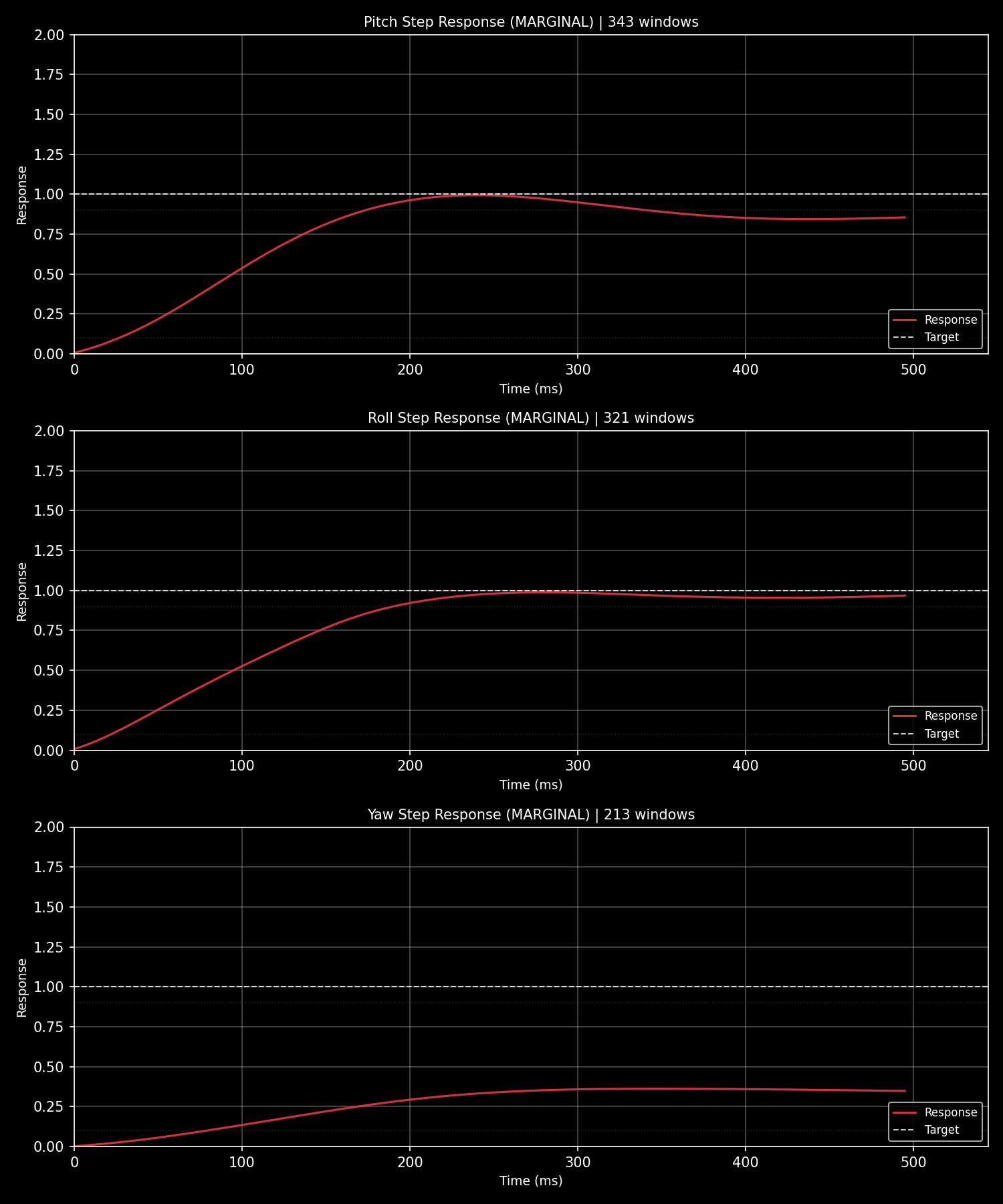
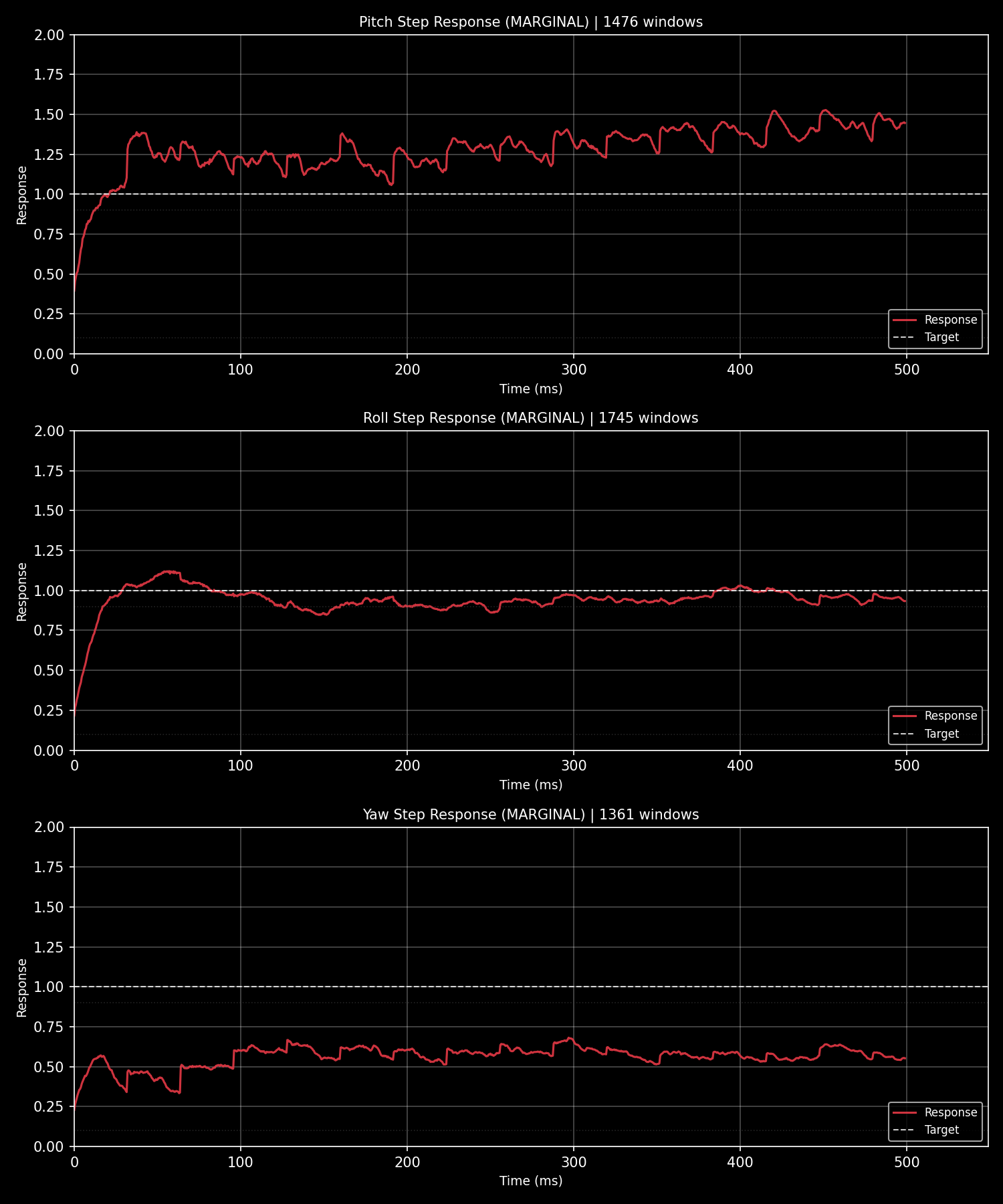
### PID 阶跃响应
**ArduPilot** (DataFlash `.bin` 日志):
**Betaflight** (Blackbox `.bbl` 日志):
### 代理分析报告
当 AI 代理通过 SmartTune 分析飞行日志时,它会生成一份结构化的诊断报告,如下所示:
```
ArduPilot Flight Log Analysis Report
Log: 2026-04-26 13-46-44.bin | Duration: 995s | Platform: ArduPilot
```
#### 1. PID 阶跃响应分析
| 轴 | 评级 | 上升时间 | 超调 | 稳定时间 | 振荡 |
|------|--------|-----------|-----------|----------|-------------|
| Roll | 临界 | -1ms | 0.0% | 510ms | 8 |
| Pitch | 临界 | -1ms | 0.0% | 510ms | 4 |
| Yaw | 临界 | -1ms | -1.0% | -1ms | - |
**滚转轴建议:**
| 参数 | 当前值 → 新值 | 变化 | 原因 |
|-----------|---------------|--------|--------|
| `ATC_RAT_RLL_D` | 0.0036 → 0.0040 | +10% | 减少振荡(8 个周期) |
| `ATC_RAT_RLL_I` | 0.115 → 0.144 | +25% | 消除稳态误差(99.8%) |
| `ATC_RAT_RLL_P` | 0.115 → 0.104 | -10% | 减少振荡 |
**俯仰轴建议:**
| 参数 | 当前值 → 新值 | 变化 | 原因 |
|-----------|---------------|--------|--------|
| `ATC_RAT_PIT_I` | 0.115 → 0.144 | +25% | 消除稳态误差(99.8%) |
| `ATC_RAT_PIT_D` | 0.0036 → 0.0040 | +10% | 减少振荡(4 个周期) |
| `ATC_RAT_PIT_P` | 0.115 → 0.104 | -10% | 减少振荡 |
**偏航轴:** 无需更改——参数已可接受。
#### 2. FFT 振动分析
**评级:** 优秀 (0.5 m/s²)
**当前滤波器设置:**
| 参数 | 值 |
|-----------|-------|
| `INS_GYRO_FILTER` | 60 Hz |
| `INS_ACCEL_FILTER` | 10 Hz |
| 陷波滤波器 | 未启用 |
#### 3. 磁力计校准
**适应度:** 567.98 mGauss — 差
**检测到的问题:**
| 问题 | 阈值 | 实际值 |
|-------|-----------|--------|
| 硬铁偏移 (max \|OFS\|) | 600 | 625 |
| 软铁异常 (DIA_X/Y/Z) | — | 0.300 |
| 电机干扰 (max \|MOT\|) | 100.0 | 200.0 |
| 飞行覆盖 | — | 无姿态变化 |
**建议:**
- 移除硬铁干扰源(扬声器、磁铁)
- 优化软铁布局(电池/电机位置)
- 使用正确的飞行模式重新校准:偏航 > 300°,俯仰/滚转 > ±30°
#### 总结
| 模块 | 状态 | 操作 |
|--------|--------|--------|
| 振动 | ✅ 优秀 | 硬件状况良好 |
| PID | ⚠️ 临界 | 在滚转/俯仰上增加 I 和 D 增益,略微降低 P |
| 指南针 | ❌ 差 | 精确飞行前重新校准 |
代理解释 SmartTune 的结构化 JSON 输出,添加上下文,并生成人类可读的摘要——弥合原始数据与可操作调优建议之间的鸿沟。
## 面向人类
是的,终端输出也很漂亮。Rich 驱动的表格、进度条、彩色诊断——你期望现代命令行工具拥有的一切。但底层架构是代理优先的。
```
# 27. "Human-friendly terminal output (default)" – "人类友好的终端输出(默认)".
stune analyze -i flight.bin
# 28. "Machine-parseable via MCP server" – "通过 MCP 服务器可机器解析".
# 29. "smarttune_analyze_log(log_path="flight.bin", response_format="json")" – This is a function call, so keep it in English as per technical jargon. Output as is.
```
## 路线图
| 阶段 | 内容 | 状态 |
|-------|---------|--------|
| v1.x | ArduPilot 完全支持 | ✅ |
| v2.0 阶段 1 | 多平台架构 | ✅ |
| v2.0 阶段 2 | Betaflight BBL 解析器 + 分析 | ✅ |
| v2.1 | 平台特定分析器 + 协议约束 | ✅ |
| v2.2 | 完整英文文档,CLI --help,OpenClaw SKILL.md | ✅ |
| v2.4 | 技术债务清理 + HTML 报告对等 | ✅ |
| **v3.0** | **固件参数表 + MCP 验证工具 + 知识库** | ✅ |
| v3.x | PX4 ULog 适配器,工具调用清单,Web UI | 🔲 |
## 作者
**Raylan LIN** — [@raylanlin](https://github.com/raylanlin)
由一位构建 ArduPilot 固件(ParallelFC,自学习 PID,STM32H7 定制飞控板)并教他的 AI 代理调得比他更好的飞行员构建和维护。
## 许可证
MIT — 详情请参见 [LICENSE](LICENSE)。
`smarttune-knowledge-pro` 是一个独立的闭源调优知识库,包含专有的调优规则和行业经验。
如需商业合作——定制调优知识库、机队级专业知识集成或企业调优规则开发——请通过 [raylanlin@gmail.com](mailto:raylanlin@gmail.com) 联系。