kristinaxm/kx-intellect

GitHub: kristinaxm/kx-intellect

一个基于 Spring Boot 和 Kotlin 构建的 GDPR 合规 AI 中间件,在前端应用与 LLM 之间提供安全的数据保护桥接。

Stars: 0 | Forks: 0

### **KX INTELLECT** #### *符合 GDPR 的 AI 中间件* ##### `KX INTELLECT 是一个中间件服务,它通过 OpenRouter 在用户和大型语言模型 之间充当安全且符合 GDPR 标准的桥梁。`

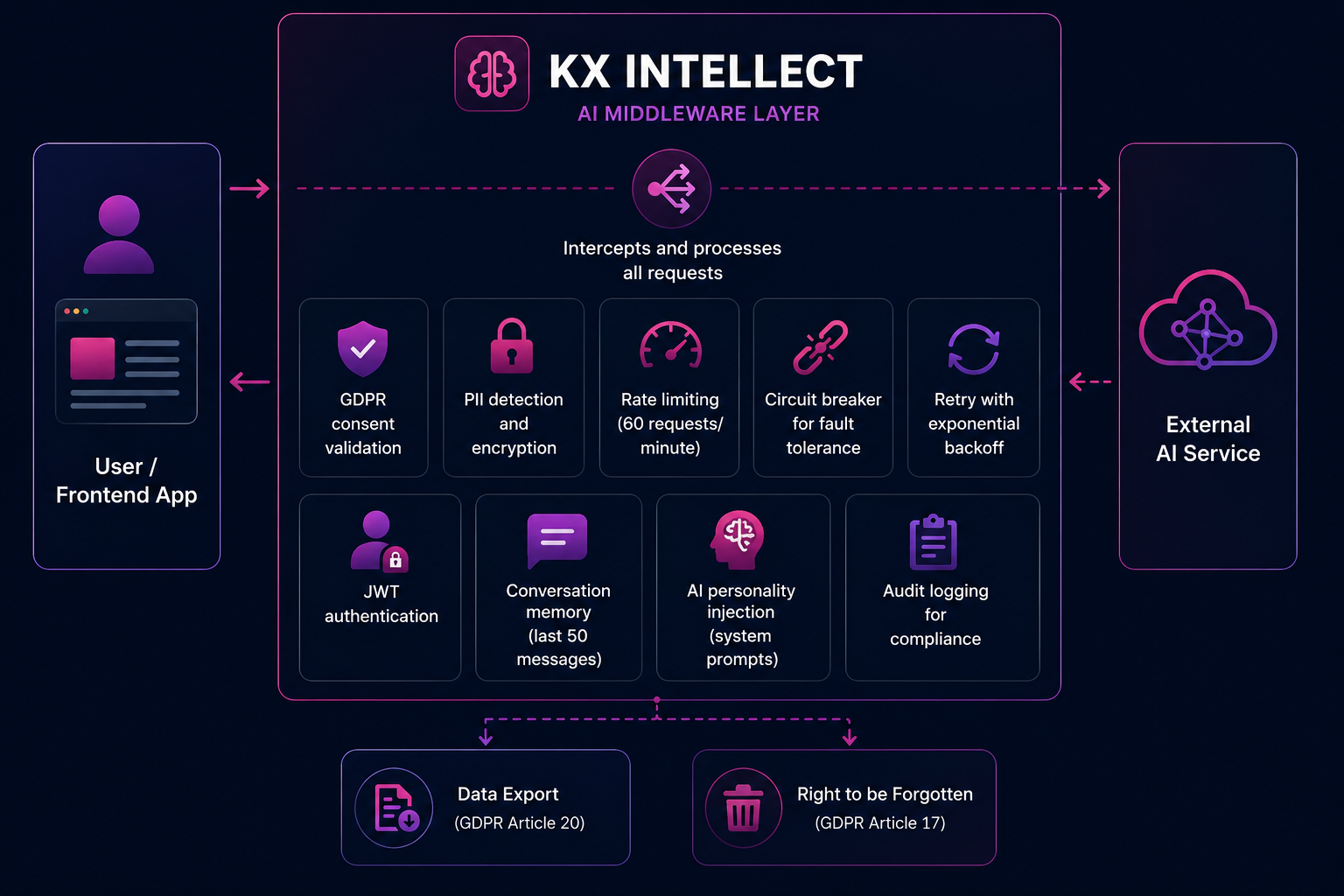
KX Intellect Middleware Flow

#### 构建技术 ``` Backend: Spring Boot 3.5.0, Kotlin 2.3.21 Frontend: React, Vite AI: OpenRouter Security: JWT, AES-256 GCM, GDPR, CORS, CSRF, GitHub OAuth Resilience: Resilience4j (Rate Limiting, Circuit Breaker, Retry) Docs: OpenAPI / Swagger UI Monitoring: Spring Actuator Database: H2 (file-based) ``` #### 功能特性 ``` • Secure middleware between frontend apps and LLM providers • GDPR consent management and compliance flow • PII detection with AES-256 GCM encryption • Session-based conversation memory • GDPR data export and Right to be Forgotten • JWT authentication and GitHub OAuth login • Rate limiting, retry and circuit breaker protection • OpenAPI / Swagger UI documentation • Audit logging with PII-safe logs • Spring Boot Actuator for health and metrics • H2 database console for development ``` #### KX INTELLECT - AI 中间件层

KX Intellect Middleware Flow

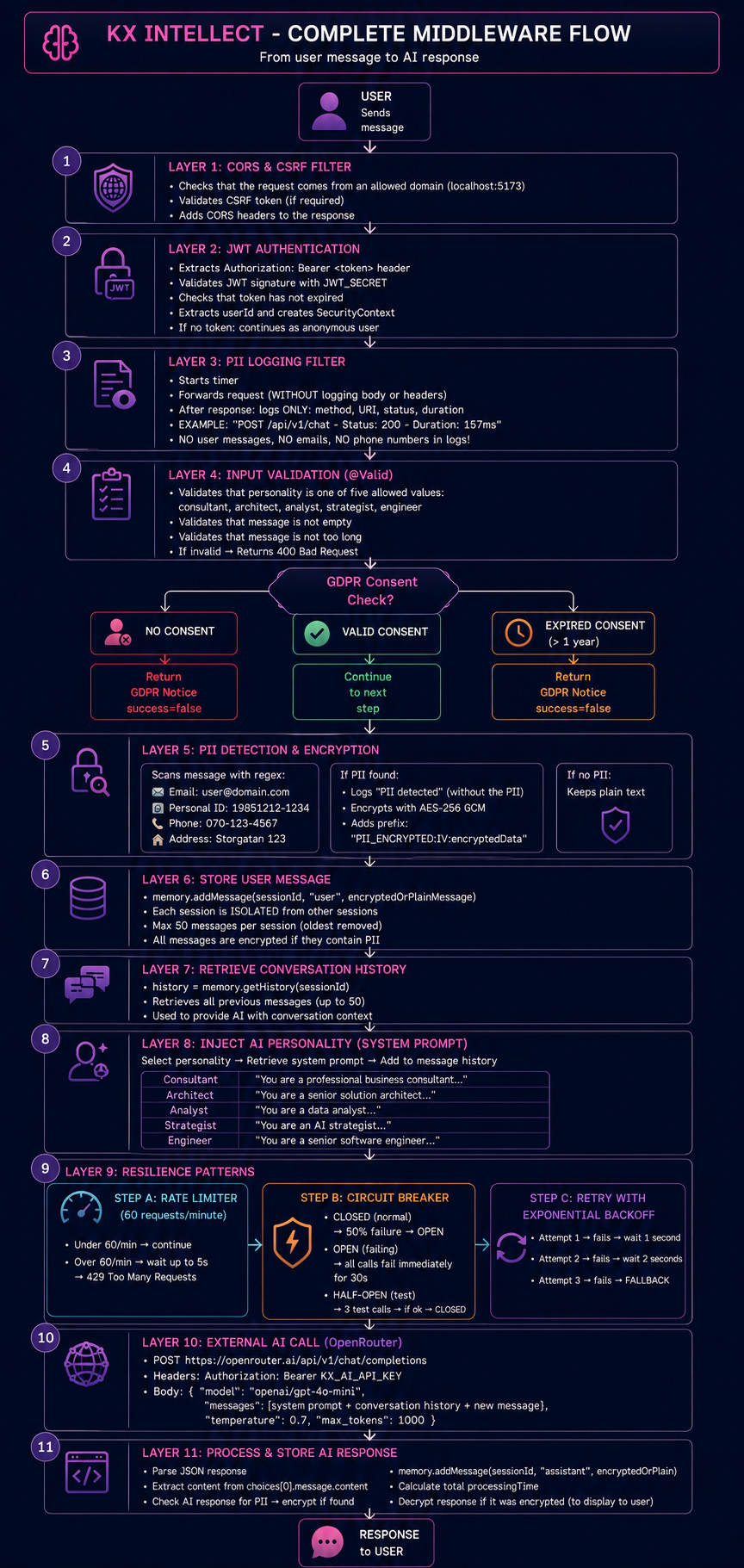
#### KX INTELLECT - 完整的中间件流程

KX Intellect Complete Middleware Flow

## 环境变量 ``` ┌──────────────────────┬───────────────┬────────────────────────────────────────────┬──────────────────────────────────────────────────────────────┐ │ Variable │ Required? │ Description │ Example │ ├──────────────────────┼───────────────┼────────────────────────────────────────────┼──────────────────────────────────────────────────────────────┤ │ JWT_SECRET │ ✅ Yes │ JWT signing key (minimum 32 characters) │ export JWT_SECRET="minimum-32-character-secret-key" │ │ KX_AI_API_KEY │ ✅ Yes │ OpenRouter API key │ export KX_AI_API_KEY="sk-or-v1-xxxxx" │ │ GITHUB_CLIENT_ID │ ⚠️ Optional │ GitHub OAuth Client ID │ export GITHUB_CLIENT_ID="Ov23li..." │ │ GITHUB_CLIENT_SECRET │ ⚠️ Optional │ GitHub OAuth Client Secret │ export GITHUB_CLIENT_SECRET="..." │ │ VITE_GNEWS_API_KEY │ ⚠️ Optional │ GNews API key for AI news panel │ VITE_GNEWS_API_KEY="your-gnews-api-key" │ │ GDPR_ENCRYPTION_KEY │ ❌ Optional │ Fixed AES-256 key, otherwise auto-created │ export GDPR_ENCRYPTION_KEY="base64-encoded-key" │ └──────────────────────┴───────────────┴────────────────────────────────────────────┴──────────────────────────────────────────────────────────────┘ ``` ## API 密钥 | 密钥 | 获取途径 | |------|----------------| | `JWT_SECRET` | 使用 `openssl rand -base64 32` 生成 | | `KX_AI_API_KEY` | [OpenRouter](https://openrouter.ai) | | `GITHUB_CLIENT_ID` | [GitHub 开发者设置](https://github.com/settings/developers) | | `GITHUB_CLIENT_SECRET` | [GitHub 开发者设置](https://github.com/settings/developers) | | `VITE_GNEWS_API_KEY` | [GNews.io](https://gnews.io) | | `GDPR_ENCRYPTION_KEY` | 可选,如未设置将自动生成 | ## 快速开始 ``` # 1. Clone git clone https://github.com/kristinaxm/kx-intellect.git ``` ``` # 2. 启动后端 cd kx-intellect/backend # 选项 A:使用 export export JWT_SECRET="your-32+character-secret-key" export KX_AI_API_KEY="sk-or-v1-your-key" # 选项 B:使用 .env 文件 Step 1: Setup backend cd kx-intellect/backend cp .env.example .env Then open backend/.env and replace the values with your actual API keys: JWT_SECRET=your-actual-secret-key-here KX_AI_API_KEY=sk-or-v1-your-actual-key-here GITHUB_CLIENT_ID=your-github-client-id GITHUB_CLIENT_SECRET=your-github-client-secret Step 2: Setup frontend cd ../frontend cp .env.example .env Then open frontend/.env and add your GNews API key: VITE_GNEWS_API_KEY=your-gnews-api-key-here ``` ``` # 3. 启动后端 cd ../backend ./gradlew bootRun ``` ``` # 4. 在单独的终端中启动前端 cd kx-intellect/frontend npm install npm run dev ``` ``` # 5. 测试后端 curl http://localhost:8080/api/v1/health ``` 打开: ``` http://localhost:5173 ``` ## API 端点 ### 基础 URL ``` http://localhost:8080/api/v1 ``` ### 所有端点 ``` ┌────────┬──────────────────────────────────────┬──────────────────────────────────────────────┬──────────────────────┐ │ Method │ Endpoint │ Description │ Auth │ ├────────┼──────────────────────────────────────┼──────────────────────────────────────────────┼──────────────────────┤ │ GET │ /health │ Health check │ No │ │ POST │ /chat │ Send message to AI │ No │ │ POST │ /gdpr/consent │ Give GDPR consent │ No │ │ GET │ /gdpr/notice/{sessionId} │ Get GDPR information │ No │ │ GET │ /gdpr/rights │ List all GDPR rights │ No │ │ GET │ /gdpr/export/{sessionId} │ Export user data │ No │ │ DELETE │ /gdpr/data/{sessionId} │ Delete all data (Right to be forgotten) │ No │ │ GET │ /auth/github │ GitHub login redirect │ No │ │ GET │ /auth/github/callback │ GitHub OAuth callback │ No │ │ GET │ /auth/me │ Get current user │ Yes (Bearer token) │ └────────┴──────────────────────────────────────┴──────────────────────────────────────────────┴──────────────────────┘ ``` ## 监控及其他端点 ### Spring Boot Actuator ``` ┌────────┬──────────────────────────────┬──────────────────────────────────────────────┐ │ Method │ Endpoint │ Description │ ├────────┼──────────────────────────────┼──────────────────────────────────────────────┤ │ GET │ /actuator/health │ Application health status │ │ GET │ /actuator/info │ Application information │ │ GET │ /actuator/metrics │ Performance metrics │ └────────┴──────────────────────────────┴──────────────────────────────────────────────┘ ``` ### H2 数据库控制台 ``` ┌────────┬──────────────────────────────┬──────────────────────────────────────────────┐ │ Method │ Endpoint │ Description │ ├────────┼──────────────────────────────┼──────────────────────────────────────────────┤ │ GET │ /h2-console │ H2 Database web console │ └────────┴──────────────────────────────┴──────────────────────────────────────────────┘ ``` ### H2 控制台连接设置 ``` Driver Class: org.h2.Driver JDBC URL: jdbc:h2:file:./data/kxintellect Username: sa Password: leave empty ``` ## 监控测试 ### Actuator 健康检查 ``` curl http://localhost:8080/actuator/health ``` 预期响应: ``` { "status": "UP" } ``` ### Actuator 信息 ``` curl http://localhost:8080/actuator/info ``` 预期响应: ``` {} ``` ### Actuator 指标 ``` curl http://localhost:8080/actuator/metrics ``` 预期响应: ``` { "names": [ "jvm.memory.used", "jvm.memory.max", "http.server.requests", "process.cpu.usage" ] } ``` ## 用于测试的 Curl 命令 ### 1. 健康检查 ``` curl http://localhost:8080/api/v1/health ``` 预期响应: ``` { "status": "UP", "service": "KX INTELLECT", "gdprCompliant": true, "encryption": "AES-256" } ``` ### 2. Actuator 健康检查 ``` curl http://localhost:8080/actuator/health ``` 预期响应: ``` { "status": "UP" } ``` ### 3. 列出 GDPR 权利 ``` curl http://localhost:8080/api/v1/gdpr/rights ``` 预期响应: ``` { "article_15": "Right of access...", "article_17": "Right to erasure..." } ``` ## GDPR 授权流程 ### 创建会话 ``` SESSION_ID="test-$(date +%s)" echo "Session ID: $SESSION_ID" ``` ### 给予授权 ``` curl -X POST http://localhost:8080/api/v1/gdpr/consent \ -H "Content-Type: application/json" \ -d "{\"sessionId\":\"$SESSION_ID\",\"dataStorageConsent\":true}" ``` 预期响应: ``` { "status": "Consent recorded successfully", "sessionId": "test-123...", "dataStorage": true, "message": "Your data will be stored securely for 30 days" } ``` ### 获取 GDPR 通知 ``` curl http://localhost:8080/api/v1/gdpr/notice/$SESSION_ID ``` 预期响应: ``` { "message": "Thank you for your consent...", "dataRetentionPeriod": "30 days", "dataDeletionDate": "2025-01-01T12:00:00", "consentRequired": "Consent already given", "rightsUrl": "/api/v1/gdpr/rights" } ``` ## 聊天测试 ### 在无授权情况下发送消息 ``` curl -X POST http://localhost:8080/api/v1/chat \ -H "Content-Type: application/json" \ -d '{"personality":"consultant","message":"Hello","sessionId":"no-consent-test"}' ``` 预期响应: ``` { "reply": "GDPR Notice: Please provide consent before continuing...", "success": false } ``` ### 在有授权情况下发送消息 ``` curl -X POST http://localhost:8080/api/v1/chat \ -H "Content-Type: application/json" \ -d "{ \"personality\": \"consultant\", \"message\": \"What is the capital of France?\", \"sessionId\": \"$SESSION_ID\" }" ``` 预期响应: ``` { "reply": "The capital of France is Paris.", "sessionId": "test-123...", "success": true, "processingTimeMs": 1234, "conversationLength": 1, "gdprCompliant": true, "dataEncrypted": false } ``` ### 发送包含 PII 的消息 ``` curl -X POST http://localhost:8080/api/v1/chat \ -H "Content-Type: application/json" \ -d "{ \"personality\": \"consultant\", \"message\": \"My email is john@example.com and my phone is 070-123-4567\", \"sessionId\": \"$SESSION_ID\" }" ``` 预期响应: ``` { "reply": "...", "dataEncrypted": true } ``` ## 测试不同的人格设定 ### 顾问 ``` curl -X POST http://localhost:8080/api/v1/chat \ -H "Content-Type: application/json" \ -d "{\"personality\":\"consultant\",\"message\":\"How do I improve my business?\",\"sessionId\":\"$SESSION_ID\"}" ``` ### 架构师 ``` curl -X POST http://localhost:8080/api/v1/chat \ -H "Content-Type: application/json" \ -d "{\"personality\":\"architect\",\"message\":\"How to design a microservice?\",\"sessionId\":\"$SESSION_ID\"}" ``` ### 工程师 ``` curl -X POST http://localhost:8080/api/v1/chat \ -H "Content-Type: application/json" \ -d "{\"personality\":\"engineer\",\"message\":\"How to write a for-loop in Kotlin?\",\"sessionId\":\"$SESSION_ID\"}" ``` ### 分析师 ``` curl -X POST http://localhost:8080/api/v1/chat \ -H "Content-Type: application/json" \ -d "{\"personality\":\"analyst\",\"message\":\"What trends can you see in this data?\",\"sessionId\":\"$SESSION_ID\"}" ``` ### 战略家 ``` curl -X POST http://localhost:8080/api/v1/chat \ -H "Content-Type: application/json" \ -d "{\"personality\":\"strategist\",\"message\":\"How should we implement AI in our company?\",\"sessionId\":\"$SESSION_ID\"}" ``` ## GDPR 权利 - 导出和删除 ### 导出所有数据 ``` curl http://localhost:8080/api/v1/gdpr/export/$SESSION_ID ``` 预期响应: ``` { "sessionId": "test-123...", "conversationHistory": [ { "role": "user", "content": "What is the capital of France?" }, { "role": "assistant", "content": "The capital of France is Paris." } ], "metadata": { "exportedAt": "2024-01-01T12:00:00" }, "exportedAt": "2024-01-01T12:00:00", "dataEncrypted": false, "gdprComplianceVersion": "1.0" } ``` ### 删除所有数据 ``` curl -X DELETE http://localhost:8080/api/v1/gdpr/data/$SESSION_ID ``` 预期响应: ``` { "status": "Data deleted successfully", "sessionId": "test-123...", "message": "All your data has been permanently deleted (GDPR Article 17 - Right to erasure)" } ``` ## 错误处理测试 ### 无效的人格设定 ``` curl -X POST http://localhost:8080/api/v1/chat \ -H "Content-Type: application/json" \ -d '{"personality":"invalid","message":"Hello","sessionId":"test"}' ``` 预期响应: ``` { "status": 400, "error": "Validation Failed", "message": "Invalid request parameters", "details": "{personality=Personality must be: consultant, architect, analyst, strategist, or engineer}" } ``` ### 空消息 ``` curl -X POST http://localhost:8080/api/v1/chat \ -H "Content-Type: application/json" \ -d '{"personality":"consultant","message":"","sessionId":"test"}' ``` 预期响应: ``` { "status": 400, "error": "Validation Failed", "message": "Invalid request parameters", "details": "{message=Message is required}" } ``` ### 在无授权情况下导出 ``` curl -X GET http://localhost:8080/api/v1/gdpr/export/no-consent-session ``` 预期响应: ``` { "timestamp": "...", "status": 500, "error": "Internal Server Error", "message": "Cannot export data without valid consent" } ``` ## 速率限制测试 此测试发送 65 个请求,以演示每分钟 60 个请求的限制。 ``` for i in {1..65}; do curl -s -o /dev/null -w "Request $i: %{http_code}\n" \ -X POST http://localhost:8080/api/v1/chat \ -H "Content-Type: application/json" \ -d "{\"personality\":\"consultant\",\"message\":\"Test $i\",\"sessionId\":\"$SESSION_ID\"}" done ``` 预期输出: ``` Request 1: 200 Request 2: 200 ... Request 60: 200 Request 61: 429 Request 62: 429 ... ``` 速率限制器每分钟重置一次。 ## PII 加密测试 此测试验证个人身份信息 是否被检测并使用 AES-256 GCM 加密。 ``` # 创建会话 SESSION_ID="pii-$(date +%s)" echo "Session ID: $SESSION_ID" # 授予权限 curl -X POST http://localhost:8080/api/v1/gdpr/consent \ -H "Content-Type: application/json" \ -d "{\"sessionId\":\"$SESSION_ID\",\"dataStorageConsent\":true}" # 发送包含 PII 的消息 curl -X POST http://localhost:8080/api/v1/chat \ -H "Content-Type: application/json" \ -d "{ \"personality\": \"consultant\", \"message\": \"My email is john@example.com and my phone is 070-123-4567\", \"sessionId\": \"$SESSION_ID\" }" ``` 预期响应: ``` { "reply": "...", "dataEncrypted": true } ``` 检测到的 PII 示例: ``` Email addresses: user@example.com Swedish personnummer: 19851212-1234 Phone numbers: 070-123-4567 Street addresses: Storgatan 123 ``` 发生的情况: ``` 1. Regex patterns scan the message 2. If PII is found, the message is encrypted with AES-256 GCM 3. Data is stored as PII_ENCRYPTED:[IV]:[encryptedData] 4. Logs show that PII was detected 5. The actual PII is never written to logs ``` ## 弹性模式测试 此测试验证了熔断器、重试和回退行为。 ### 开始之前 使用 `Ctrl + C` 停止后端,然后使用一个 **无效的** API 密钥重新启动它: ``` export KX_AI_API_KEY="sk-or-v1-INVALID-KEY-THAT-WILL-FAIL" ./gradlew bootRun ``` ### 运行测试 ``` # 创建会话 RESILIENCE_SESSION="resilience-$(date +%s)" echo "Session: $RESILIENCE_SESSION" # 授予权限 curl -X POST http://localhost:8080/api/v1/gdpr/consent \ -H "Content-Type: application/json" \ -d "{\"sessionId\":\"$RESILIENCE_SESSION\",\"dataStorageConsent\":true}" # 发送多个请求以触发 Circuit Breaker for i in {1..10}; do echo "Request $i:" curl -s -X POST http://localhost:8080/api/v1/chat \ -H "Content-Type: application/json" \ -d "{\"personality\":\"consultant\",\"message\":\"Test $i\",\"sessionId\":\"$RESILIENCE_SESSION\"}" echo "" sleep 0.5 done ``` 预期日志输出: ``` # 在 Circuit Breaker 打开之前 Calling AI model for session: resilience-xxx Circuit breaker fallback due to: 401 Unauthorized Message processed in 21ms # 在 Circuit Breaker 打开之后 Circuit breaker fallback due to: CircuitBreaker 'ai-service' is OPEN Message processed in 2ms ``` 熔断器开启后的预期响应: ``` { "reply": "I apologize, but the AI service is currently unavailable. Please try again in a few moments. (Circuit breaker active)", "success": true, "processingTimeMs": 2 } ``` ### 弹性模式说明 ``` ┌─────────────────┬──────────────────────────────┬────────────────────────────────────────────┐ │ Pattern │ Configuration │ Behavior │ ├─────────────────┼──────────────────────────────┼────────────────────────────────────────────┤ │ Rate Limiter │ 60 requests/minute │ Blocks requests over limit with 429 │ │ Retry │ 3 attempts, 1s and 2s wait │ Retries temporary failures │ │ Circuit Breaker │ 50% failure, opens for 30s │ Fails fast after repeated failures │ │ Fallback │ Friendly error response │ Hides raw exceptions from users │ └─────────────────┴──────────────────────────────┴────────────────────────────────────────────┘ ``` 已重试的失败: ``` ✅ IOException ✅ SocketTimeoutException ✅ 5xx server errors ``` 未重试的: ``` ❌ 4xx client errors ❌ NullPointerException ❌ IllegalArgumentException ``` ## Swagger UI - API 文档 KX INTELLECT 包含内置的 OpenAPI 文档,用于交互式 API 测试和端点探索。 ### Swagger UI ``` Swagger UI (main) http://localhost:8080/swagger-ui.html Swagger UI (direct) http://localhost:8080/swagger-ui/index.html OpenAPI JSON (main) http://localhost:8080/api-docs Swagger Config http://localhost:8080/api-docs/swagger-config ``` ### 在 Swagger UI 中您可以做什么 ``` ┌────────────────────────────────────┬──────────────────────────────────────────────────────────────┐ │ Feature │ Description │ ├────────────────────────────────────┼──────────────────────────────────────────────────────────────┤ │ Browse all endpoints │ View every API endpoint, HTTP method, and route │ │ Request/response schemas │ See expected request bodies and response structures │ │ Live API testing │ Execute requests directly from the browser │ │ Authentication requirements │ Check which endpoints require Bearer authentication │ │ Download OpenAPI specification │ Export /api-docs for SDK and client generation │ └────────────────────────────────────┴──────────────────────────────────────────────────────────────┘ ``` ### Swagger UI 健康检查 ``` # 测试 Swagger UI 可用性 curl -s -o /dev/null -w "Swagger UI: %{http_code}\n" http://localhost:8080/swagger-ui.html # 测试直接访问 Swagger UI index curl -s -o /dev/null -w "Swagger UI (direct): %{http_code}\n" http://localhost:8080/swagger-ui/index.html # 测试 OpenAPI JSON (main) curl -s -o /dev/null -w "OpenAPI JSON: %{http_code}\n" http://localhost:8080/api-docs # 测试 Swagger config curl -s -o /dev/null -w "Swagger Config: %{http_code}\n" http://localhost:8080/api-docs/swagger-config ``` 预期输出: ``` Swagger UI: 302 Swagger UI (direct): 200 OpenAPI JSON: 200 Swagger Config: 200 ``` ### 在浏览器控制台测试 CORS 打开 http://localhost:5173,按 F12,然后运行: ``` fetch('http://localhost:8080/api/v1/health') .then(r => r.json()) .then(data => console.log('Response:', data)) .catch(e => console.error('CORS error:', e)) Expected output: json { "status": "UP", "service": "KX INTELLECT", "gdprCompliant": true, "encryption": "AES-256" } ``` ## HTTP 状态码和错误消息 ### HTTP 状态码 ``` ┌───────┬──────────────────────────────┬──────────────────────────────────────────────┬────────────────────────────────────────────────────────────────────┐ │ Code │ Meaning │ When does it happen? │ Solution │ ├───────┼──────────────────────────────┼──────────────────────────────────────────────┼────────────────────────────────────────────────────────────────────┤ │ 200 │ OK │ Successful request │ - │ │ 400 │ Bad Request │ Wrong personality or empty message │ Use a valid personality value │ │ 401 │ Unauthorized │ Accessing /auth/me without JWT token │ Login via GitHub first │ │ 429 │ Too Many Requests │ More than 60 requests per minute │ Wait 60 seconds before next request │ │ 500 │ Internal Server Error │ Missing consent during export │ Give consent first │ │ 503 │ Service Unavailable │ AI service down / circuit breaker OPEN │ Wait 30 seconds and try again │ └───────┴──────────────────────────────┴──────────────────────────────────────────────┴────────────────────────────────────────────────────────────────────┘ ``` ### 错误消息 - 含义解析 ``` ┌──────────────────────────────────────────────────────────────────────────────┬────────────────────────────────────────────┬──────────────────────────────────────────────────────┐ │ Error Message │ Cause │ Solution │ ├──────────────────────────────────────────────────────────────────────────────┼────────────────────────────────────────────┼──────────────────────────────────────────────────────┤ │ "GDPR Notice: Please provide consent before continuing..." │ No valid consent │ Call POST /gdpr/consent first │ │ "Cannot export data without valid consent" │ Export attempted without consent │ Give consent first │ │ "Personality must be: consultant, architect, analyst, strategist..." │ Invalid personality value │ Use one of the five allowed values │ │ "Message is required" │ Empty message │ Send an actual message │ │ "AI service is temporarily unavailable. Please try again later." │ AI service down or circuit breaker OPEN │ Wait and try again │ │ "The AI service is currently unavailable... (Circuit breaker active)" │ Circuit breaker is OPEN │ Wait 30 seconds, system auto-tests recovery │ └──────────────────────────────────────────────────────────────────────────────┴────────────────────────────────────────────┴──────────────────────────────────────────────────────┘ ``` ## 安全功能摘要 ``` ┌──────────────────────┬────────────────────────────────────────────────────────────────────────┐ │ Feature │ Description │ ├──────────────────────┼────────────────────────────────────────────────────────────────────────┤ │ JWT Authentication │ Token-based auth with 24h expiration │ │ Rate Limiting │ 60 requests per minute protects against overload │ │ Circuit Breaker │ Opens at 50% failures, prevents cascade failures │ │ Retry │ 3 attempts with exponential backoff │ │ Fallback │ Friendly error messages instead of stack traces │ │ PII Encryption │ AES-256 GCM encryption of personal data │ │ PII Filtering │ No PII in logs, only method, URI, status and duration │ │ CSRF Protection │ Protection against cross-site request forgery │ │ Input Validation │ @Valid annotations stop invalid data │ │ Audit Logging │ GDPR events logged with AUDIT: prefix │ │ CORS │ Only allowed domains can call the API │ │ Actuator │ Health, info and metrics endpoints │ │ H2 Console │ Database console for development │ └──────────────────────┴────────────────────────────────────────────────────────────────────────┘ ``` ## 审计日志示例 ``` # 当应用运行时,你会在终端中看到: 23:43:48 - POST /api/v1/chat - Status: 200 - Duration: 157ms 23:43:48 - POST /api/v1/gdpr/consent - Status: 200 - Duration: 176ms 23:43:54 - PII detected in message from session: user-123 - Encrypting before storage 23:43:54 - AUDIT: Data access - User: user-123 - Action: GDPR_CONSENT_GIVEN 23:43:54 - AUDIT: Data deletion - User: user-123 - Type: CONVERSATION_HISTORY ``` ## 故障排除 ### 后端无法启动 - 缺少 JWT_SECRET 现象: ``` Could not resolve placeholder 'JWT_SECRET' in value "${JWT_SECRET}" ``` 原因: ``` Missing environment variable. ``` 解决方案: ``` export JWT_SECRET="my-own-secret-key-at-least-32-characters" ``` ### 无效的 OpenRouter API 密钥 现象: ``` 401 Unauthorized from OpenRouter or "User not found" in logs ``` 原因: ``` The API key is missing, expired, or invalid. ``` 解决方案: ``` 1. Check if your API key is valid at https://openrouter.ai/keys 2. Generate a new key if it has expired 3. Update your environment variable 4. Restart the backend ``` ``` export KX_AI_API_KEY="sk-or-v1-your-new-key" ``` ### 端口 8080 已被占用 现象: ``` Web server failed to start. Port 8080 was already in use ``` 解决方案: ``` # Windows - 查找占用端口 8080 的进程 netstat -ano | findstr :8080 # Windows - 终止进程 taskkill /PID /F # Mac/Linux - 查找占用端口 8080 的进程 lsof -i :8080 # Mac/Linux - 终止进程 kill -9 ``` ### 429 请求过多 现象: ``` HTTP 429 Too Many Requests ``` 原因: ``` Rate limit of 60 requests per minute exceeded. ``` 解决方案: ``` Wait 60 seconds. The rate limiter resets every minute. ``` ### 503 服务不可用 / 熔断器已激活 ``` "The AI service is currently unavailable... (Circuit breaker active)" ``` 原因: ``` AI service failed repeatedly, and the Circuit Breaker opened. ``` 解决方案: ``` Wait 30 seconds. The system will test the service with 3 calls and close the circuit if successful. ``` ### 前端中的 CORS 错误 现象: ``` Access to fetch at 'http://localhost:8080/api/v1/chat' from origin 'http://localhost:5173' has been blocked by CORS policy ``` 原因: ``` The frontend origin is not allowed in the backend CORS configuration. ``` 解决方案: ``` .allowedOrigins( "http://localhost:5173", "http://localhost:5174", "http://localhost:5175" ) ``` ### GitHub 登录重定向错误 现象: ``` redirect_uri_mismatch ``` 原因: ``` Callback URL in GitHub OAuth settings does not match exactly. ``` 解决方案: ``` Set the GitHub OAuth callback URL to: http://localhost:8080/api/v1/auth/github/callback Use your production URL when deployed. ``` 现象: ``` HTTP 403 Forbidden or HTTP 404 Not Found ``` 解决方案: ``` 1. Verify the backend is running on port 8080 2. Allow Swagger endpoints in SecurityConfig.kt 3. Verify SpringDoc configuration in application.yml 4. Ensure SpringDoc dependency exists in build.gradle 5. Restart the backend ``` SecurityConfig.kt: ``` .requestMatchers( "/swagger-ui.html", "/swagger-ui/**", "/api-docs/**", "/v3/api-docs/**" ).permitAll() ``` application.yml: ``` springdoc: api-docs: path: /api-docs swagger-ui: path: /swagger-ui.html ``` build.gradle: ``` implementation("org.springdoc:springdoc-openapi-starter-webmvc-ui:2.8.9") ``` ### H2 控制台未显示 现象: ``` /h2-console returns 404 or blank page ``` 解决方案: application.yml: ``` spring: h2: console: enabled: true path: /h2-console ``` SecurityConfig.kt: ``` .requestMatchers("/h2-console/**").permitAll() ``` ### 会话已过期 / 需要 GDPR 授权 现象: ``` "GDPR Notice: Please provide consent before continuing..." ``` 原因: ``` Consent expired after 1 year or was deleted. ``` 解决方案: ``` curl -X POST http://localhost:8080/api/v1/gdpr/consent \ -H "Content-Type: application/json" \ -d '{"sessionId":"your-session-id","dataStorageConsent":true}' ``` ### 找不到 gradlew 命令 现象: ``` 'gradlew' is not recognized as an internal or external command ``` 解决方案: ``` # Mac/Linux chmod +x gradlew # Windows/Mac/Linux ./gradlew bootRun ``` ### JDK 版本问题 现象: ``` Unsupported class file major version or MockK errors ``` 解决方案: ``` java { toolchain { languageVersion = JavaLanguageVersion.of(21) } } ``` ## 快速参考 ``` ┌──────────────────────────┬──────────────────────────────────────────────┐ │ Problem │ Quick Fix │ ├──────────────────────────┼──────────────────────────────────────────────┤ │ JWT_SECRET missing │ export JWT_SECRET="..." │ │ Invalid API key │ Generate new key at openrouter.ai/keys │ │ Port 8080 in use │ Kill process or change port │ │ 429 Rate limit │ Wait 60 seconds │ │ 503 Circuit breaker │ Wait 30 seconds │ │ CORS error │ Add origin to CorsConfig │ │ GitHub callback error │ Check redirect URI │ │ Swagger 403 │ Add permitAll in SecurityConfig │ │ H2 404 │ Enable console in application.yml │ │ Consent expired │ Give consent again │ └──────────────────────────┴──────────────────────────────────────────────┘ ``` ### 总结 *KX INTELLECT 作为中间件*
如果没有中间件层,前端应用程序将直接调用 AI 提供商。这会将 API 密钥暴露给客户端,没有对话记忆、没有 GDPR 授权、没有 PII 加密、没有数据导出或删除、没有速率限制、没有熔断器保护,也没有审计日志。当 AI 服务失败时,用户会看到原始的异常信息。成本可能会失去控制。 **KX INTELLECT** 通过位于前端和 AI 提供商之间解决了所有这些问题。API 密钥在后端保持隐藏。该中间件管理最多五十条消息的基于会话的对话记忆,处理带有时间戳的 GDPR 授权,检测并使用 AES-256 GCM 加密个人信息,并提供完整的数据导出和“被遗忘权”端点。速率限制将请求限制为每分钟 60 个。熔断器在反复失败后开启,使调用在几毫秒内失败,而不是等待超时。带有指数退避的重试机制负责处理暂时性故障,回退机制则返回友好的错误消息。审计日志记录所有 GDPR 事件,而 PII 过滤器确保日志中永远不会出现敏感数据。 本项目作为一个学校项目构建,但完全开源且免费使用。它专注于安全性和 GDPR 合规性,使其成为任何希望安全集成 AI 的人的坚实基础。代码是模块化的,可以针对不同的用例进行扩展或自定义。对于生产部署,H2 数据库可以替换为 PostgreSQL 或 MySQL,并且应正确设置环境变量。 *随着 AI 在应用程序中变得越来越普遍,拥有一个安全且合规的中间件层变得至关重要。KX INTELLECT 正好提供了这一点,使开发者能够专注于构建功能,而无需担心数据隐私、安全漏洞或法律合规问题。*

标签:AES-256 GCM, AI中间件, AI安全, API文档, Chat Copilot, CISA项目, CORS, CSRF, DLL 劫持, GDPR合规, GitHub OAuth, H2数据库, JWT认证, Kotlin, LLM网关, OpenAPI, OpenRouter, PII检测, React, Resilience4j, Spring Actuator, Spring Boot, Swagger, Syscalls, Vite, 个人隐私信息保护, 企业级安全, 会话管理, 前后端分离, 大语言模型, 安全代理, 审计日志, 对话记忆, 应用监控, 微服务架构, 数据加密, 数据合规, 数据导出, 熔断器, 网络安全, 自定义脚本, 被遗忘权, 请求响应过滤, 重试机制, 限流, 隐私保护, 隐私计算