2H-K/copyfailRecurrence
GitHub: 2H-K/LinuxKernelVULRecurrence
针对 CVE-2026-31431 Linux 内核本地提权漏洞的一键式复现与调试环境,基于 QEMU 和自定义编译的 Linux 6.6.1 内核构建。
Stars: 0 | Forks: 0
# Copy Fail (CVE-2026-31431) 内核漏洞复现环境
# 📌 漏洞简介
Copy Fail(CVE-2026-31431)是一个 Linux 内核本地提权漏洞:
- 影响范围:Linux 4.14 ~ 6.18 修复前
- 利用方式:普通用户 → root
- 类型:逻辑漏洞(非 race)
- 模块:`algif_aead`(AF_ALG 接口)
debootstrap---
# 🧠 为什么选择 6.6.1
本项目使用 Linux **6.6.1**:
- ✔ 属于 6.6 LTS 分支
- ✔ 处于漏洞影响范围内
- ✔ patch 最少 → 编译最快
- ✔ 调试路径最干净
Linux 6.6.1 是 6.6 系列早期稳定版本,由官方发布并维护
# 🧰 一、宿主机环境要求
- Ubuntu 20.04 / 22.04 / 24.04(物理机或虚拟机)
- x86_64 CPU
- 支持 KVM
检查:
```
ls /dev/kvm
```
# 📦 二、安装依赖
```
sudo apt update
sudo apt install -y build-essential flex bison libncurses-dev libssl-dev libelf-dev \
qemu-system-x86 qemu-utils wget cpio gdb curl e2fsprogs \
debootstrap
```
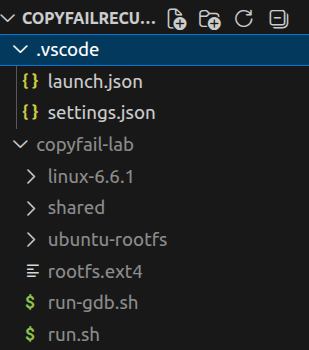
# 📁 三、工作目录
```
mkdir -p ~/copyfail-lab
cd ~/copyfail-lab
```
# 📥 四、下载内核源码
## 官方源(推荐)
```
wget https://cdn.kernel.org/pub/linux/kernel/v6.x/linux-6.6.1.tar.xz
```
## 清华镜像(国内更快)
```
wget https://mirrors.tuna.tsinghua.edu.cn/kernel/v6.x/linux-6.6.1.tar.xz
```
## 解压
```
tar -xf linux-6.6.1.tar.xz
cd linux-6.6.1
```
# ⚙️ 五、配置内核
```
make defconfig
```
然后一键写入所有必需配置:
```
./scripts/config --enable CONFIG_BLK_DEV_INITRD
./scripts/config --enable CONFIG_DEVTMPFS
./scripts/config --enable CONFIG_DEBUG_INFO
./scripts/config --enable CONFIG_CRYPTO_USER_API_AEAD
./scripts/config --enable CONFIG_CRYPTO_USER_API
./scripts/config --enable CONFIG_VIRTIO
./scripts/config --enable CONFIG_VIRTIO_PCI
./scripts/config --enable CONFIG_VIRTIO_BLK
./scripts/config --enable CONFIG_EXT4_FS
./scripts/config --enable CONFIG_NET_9P
./scripts/config --enable CONFIG_NET_9P_VIRTIO
./scripts/config --enable CONFIG_9P_FS
./scripts/config --disable CONFIG_RANDOMIZE_BASE
./scripts/config --enable CONFIG_FTRACE
./scripts/config --enable CONFIG_FUNCTION_TRACER
./scripts/config --enable CONFIG_FUNCTION_GRAPH_TRACER
./scripts/config --enable CONFIG_DYNAMIC_FTRACE
# 2. 自动解决依赖冲突并更新 .config
make olddefconfig
```
# 🔧 六、编译内核
```
make -j$(nproc)
```
生成:
* `vmlinux`(GDB 使用)
* `bzImage`(QEMU 启动)
# 📦 七、构建 rootfs(debootstrap 定制方案)
[build_rootfs](./build_rootfs.sh)是一键配置脚本
使用 debootstrap 从零构建极简 rootfs,仅包含漏洞复现所需的最小包集,排除 cloud-init / systemd 冗余服务等干扰。
## 7.1 debootstrap 构建最小系统
```
cd ~/copyfail-lab
sudo debootstrap --variant=minbase --include=python3,strace \
noble ubuntu-rootfs http://archive.ubuntu.com/ubuntu
```
## 7.2 chroot 定制
```
sudo chroot ubuntu-rootfs /bin/bash -c '
echo "copyfail" > /etc/hostname
echo "root:root" | chpasswd
useradd -m -s /bin/bash asdf
echo "asdf:test" | chpasswd
echo "none /dev devtmpfs defaults 0 0" > /etc/fstab
apt clean
rm -rf /var/lib/apt/lists/*
'
```
## 7.3 写入 init 脚本
```
sudo bash -c 'cat > ubuntu-rootfs/init < run.sh <<'EOF'
#!/bin/bash
KERNEL_IMAGE="./linux-6.6.1/arch/x86/boot/bzImage"
ROOTFS="./rootfs.ext4"
KERNEL_APPEND="console=ttyS0 nokaslr root=/dev/vda rw init=/init"
SHARED_DIR="./shared"
qemu-system-x86_64 \
-kernel "$KERNEL_IMAGE" \
-drive file="$ROOTFS",format=raw,if=virtio \
-append "$KERNEL_APPEND" \
-nographic \
-s \
-m 512 \
-enable-kvm \
-fsdev local,id=shared,path="$SHARED_DIR",security_model=none \
-device virtio-9p-pci,fsdev=shared,mount_tag=shared
EOF
chmod +x run.sh
```
## 8.2 创建共享目录
```
mkdir -p shared
```
将 exploit 文件放入 `shared/` 目录。
## 8.3 VS Code 图形化调试(推荐)
**Step 1** — 启动 QEMU(不带 `-S`,内核直接启动):
```
./run.sh
```
等 QEMU 终端出现 `asdf@(none):~$` 提示符。
**Step 2** — VS Code 按 `Ctrl+Shift+D`,顶部选 **"QEMU Kernel Debug"**,按 **F5** 连接。
**Step 3** — 在 VS Code 中打开 `crypto/algif_aead.c`,点击第 95 行左侧设断点。
**Step 4** — QEMU 终端执行 exploit:
```
python3 /mnt/shared/exp.py
```
VS Code 会在断点处暂停,可图形化查看变量、调用栈、内存。
## 8.4 终端 GDB 调试
**终端 1** — 启动 QEMU(带 `-S`,暂停等 GDB):
```
./run-gdb.sh
```
**终端 2** — GDB 连接,放行内核启动:
```
gdb ./linux-6.6.1/vmlinux -ex "target remote :1234" -ex "continue"
```
等终端 1 出现 `asdf@` 提示符后,终端 2 按 `Ctrl+C` 暂停内核,设断点:
```
b _aead_recvmsg
b crypto_aead_decrypt
continue
```
# 🔥 九、触发漏洞
**终端 1**(QEMU 虚拟机内,已自动以 asdf 身份登录)直接执行 exploit:
来自`https://copy.fail/#exploit`或者`https://github.com/theori-io/copy-fail-CVE-2026-31431/blob/main/copy_fail_exp.py`
放到shared/exp.py中
```
python3 /mnt/shared/exp.py
```
# 🎯 十、调试重点
关键函数:
* `_aead_recvmsg`
* `crypto_authenc_esn_decrypt`
观察:
* `assoclen`
* `scatterlist`
* `dst buffer`
# ❗ 十一、常见问题
## ❌ VFS: 无法挂载 root fs
检查内核配置包含以下选项(用 `grep CONFIG_XXX .config` 确认):
```
CONFIG_VIRTIO=y
CONFIG_VIRTIO_PCI=y
CONFIG_VIRTIO_BLK=y
CONFIG_EXT4_FS=y
```
## ❌ GDB 断点无法插入
内核启动完成前内存不可访问。先 `continue` 放行内核,等 shell 出现后再 `Ctrl+C` 设断点。
## ❌ 编译慢
```
make -j$(nproc)
```
## ❌ debootstrap 卡在下载
国内网络访问 `archive.ubuntu.com` 较慢,可换清华镜像:
```
sudo debootstrap --variant=minbase --include=python3,strace \
noble ubuntu-rootfs http://mirrors.tuna.tsinghua.edu.cn/ubuntu
```
## ❌ rootfs 空间不足
debootstrap minbase 约 150-200MB,`dd count=512`(512MB)通常够用。如需额外包,增大 count 值。
标签:0day挖掘, AF_ALG, algif_aead, Copy Fail, CVE-2026-31431, Debootstrap, Exploit, KVM, Linux 6.6.1, Linux内核, LPE, QEMU, Root权限, Subfinder, Web报告查看器, 内核安全, 内核编译, 内联执行, 利用程序, 安全渗透, 提权漏洞, 本地提权, 漏洞分析, 漏洞复现, 环境搭建, 网络安全, 虚拟化安全, 路径探测, 身份验证强制, 逆向工具, 逻辑漏洞, 隐私保护