JadenRazo/llm-lint
GitHub: JadenRazo/llm-lint
一款专注于检测并清除代码仓库中AI助手产物(如CLAUDE.md、Co-authored-by尾注、.cursorrules等)的扫描工具,可集成到CI/CD流水线实现自动化拦截。
Stars: 0 | Forks: 0
# llm-lint
[](https://github.com/JadenRazo/llm-lint/actions/workflows/ci.yml)
[](https://github.com/JadenRazo/llm-lint/releases)
[](https://www.npmjs.com/package/@jadenrazo/llm-lint)
[](https://www.npmjs.com/package/@jadenrazo/llm-lint)
[](LICENSE)
一款 SonarQube/gitleaks 风格的扫描器,在 LLM 产物进入生产环境之前将其捕获:`CLAUDE.md`、`.claude/` 目录、`Co-authored-by: Claude` 提交尾注、`.cursorrules`、GitHub Copilot 配置、源代码中泄露的 AI 拒绝文本等。
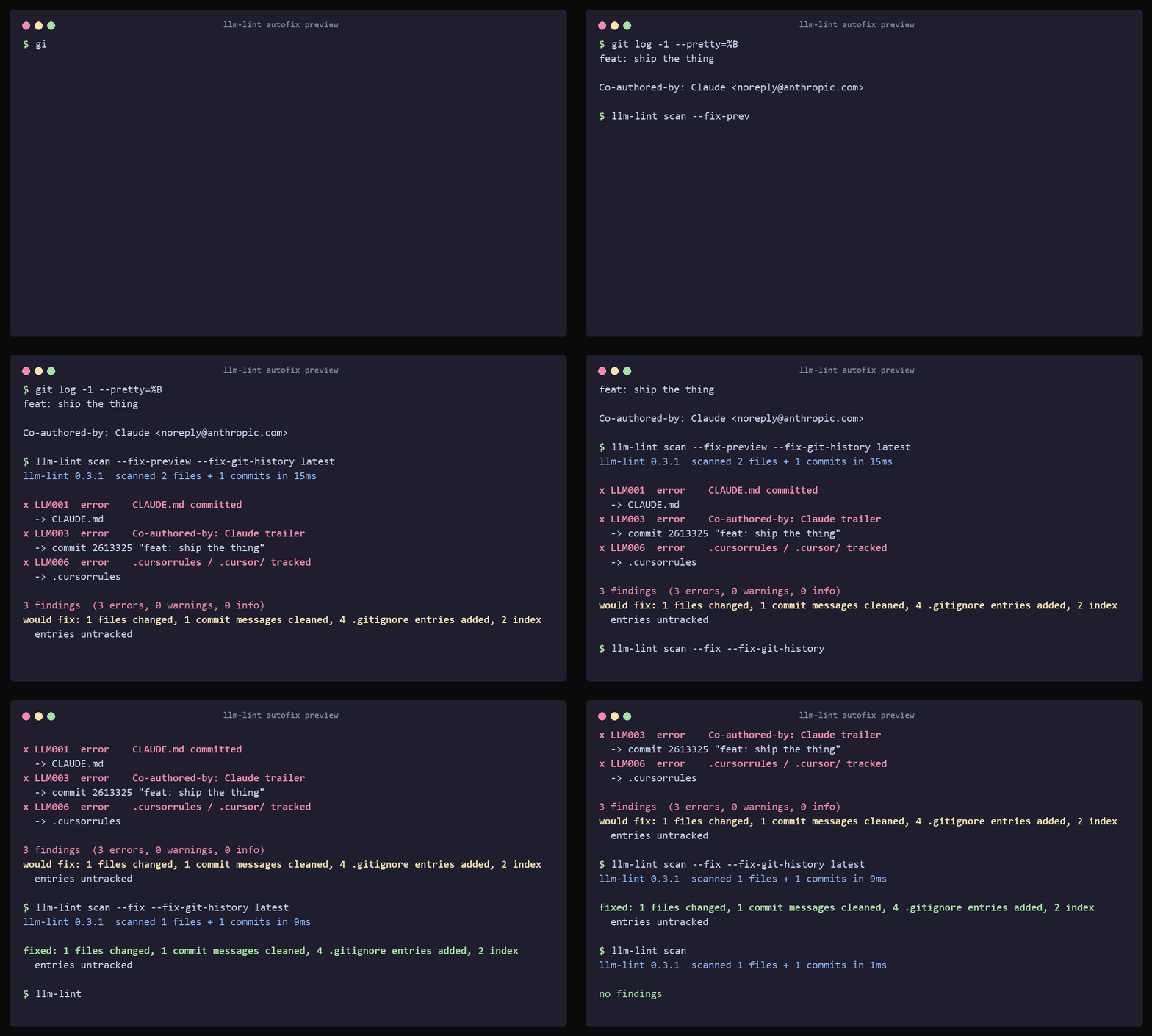
对于每个发现项,`llm-lint` 会告诉你**发现了什么**、**在哪里**、**为什么重要**,以及**如何彻底防止再次发生**(例如,对于 Claude 尾注:编辑 `~/.claude/settings.json` 并设置 `"includeCoAuthoredBy": false`)。
```
✗ LLM003 error Co-authored-by: Claude trailer
└─ commit ab12cd3 "feat: add user search" (Alice )
To prevent this on future commits, edit your local Claude Code settings:
# ~/.claude/settings.json
{ "includeCoAuthoredBy": false }
```
## 检测范围
| ID | 严重级别 | 检测内容 |
|---|---|---|
| `LLM001` | error | 任意层级中的 `CLAUDE.md` 被提交 |
| `LLM002` | error | `.claude/` 目录被 git 跟踪 |
| `LLM003` | error | `Co-authored-by: Claude` 提交尾注 |
| `LLM004` | warning | 提交信息中的 `🤖 Generated with [Claude Code]` / `Generated with Claude` |
| `LLM005` | warning | `CLAUDE_NOTES.md`、`CLAUDE_*.md`、`.claude.local.md` |
| `LLM006` | error | `.cursorrules`、`.cursor/`、`.cursorignore` |
| `LLM007` | warning | `.github/copilot-instructions.md`、`.copilotignore`、`.github/copilot/` |
| `LLM008` | warning | `.aider*`(配置、历史、输入日志) |
| `LLM009` | warning | `.continue/`、`.continuerc.json` |
| `LLM010` | warning | `.codeium/`、`codeium.toml` |
| `LLM011` | warning | `.windsurfrules`、`.windsurf/` |
| `LLM012` | warning | `Co-authored-by: ` 尾注 |
| `LLM013` | info | 源代码中的 LLM 拒绝/模板字符串("As an AI language model…"、"I'm sorry, but I can't…") |
| `LLM014` | info | 注释中的 "Generated by ChatGPT/GPT-4/Claude/Copilot" 标记 |
| `LLM015` | info | 引用 claude-code MCP 服务器的 `.mcp.json` |
运行 `llm-lint rules show LLM003` 查看任何规则的完整描述和修复方法。
## 快速开始
**无需安装,运行一次:**
```
npx @jadenrazo/llm-lint scan
```
这就是全部设置步骤。需要 Node 18+;支持 Linux、macOS(Intel + Apple Silicon)和 Windows。
npm 包通过 [esbuild-style optionalDependencies 模式](https://github.com/evanw/esbuild/tree/main/npm) 附带原生 Go 二进制文件 — npm 仅拉取与你的平台匹配的二进制文件(约 3 MB),安装后无需 postinstall 脚本,也不依赖 Node 运行时。
退出码:
- `0` — 在 `--fail-on` 严重级别(默认为 `error`)及以上没有发现项
- `1` — 发现项超过阈值
- `2` — 内部错误(配置错误、IO 问题等)
## 自动修复
要进行确定性清理,请运行:
```
llm-lint scan --fix
```
自动修复会:移除匹配的 LLM 模板/注释标记行,将安全忽略模式追加到 `.gitignore`,使用 `git rm --cached` 取消跟踪本地 AI/工具文件但保留在工作区,并从最新的提交信息中剥离 AI 尾注/标记。
在不更改文件、git 索引或历史的情况下预览相同的计划:
```
llm-lint scan --fix-preview
```
提交信息清理可配置:
```
llm-lint scan --fix-preview --fix-git-history scanned # preview broad history cleanup
llm-lint scan --fix --fix-git-history latest # default: only HEAD
llm-lint scan --fix --fix-git-history scanned # rewrite all matching scanned commits on HEAD history
llm-lint scan --fix --fix-git-history none # leave commit findings as manual
```
当你想故意从扫描的历史中清除所有匹配的 AI 痕迹时使用 `scanned`。这会重写已清理提交及其后代的提交 ID,并且重写的提交不会保留提交签名,因此请在使用前与他人协调。
## CI 集成
### GitHub Actions(推荐:原生注解)
在 CI 中,`--format github` 会发出内联 PR 注解和 Markdown 步骤摘要。当设置了 `GITHUB_ACTIONS=true` 且未明确选择 `--format` 时,它会自动激活 — 因此这样即可正常工作:
```
- run: llm-lint scan --fail-on error
```
如需内联 PR 审查评论和带有发现项的持久 PR 评论:
```
- run: llm-lint scan --fail-on error --pr-comment
env:
GITHUB_TOKEN: ${{ secrets.GITHUB_TOKEN }}
```
持久评论会在多次运行中原地编辑(每个 PR 一个评论,而非 N 个)。PR 评论失败永远不会导致构建失败 — 它们会记录到 stderr 并被跳过。
当你想让发现项进入 GitHub Code Scanning 警报时,请使用 `--format sarif`:
### GitHub Actions(旧版:SARIF 上传)
将此放入 `.github/workflows/llm-lint.yml`。发现项通过 SARIF 进入 **Code Scanning** 标签。`ubuntu-latest` 预装了 Node,因此 `npx` 是最短路径:
```
name: llm-lint
on:
pull_request:
push:
branches: [main, master]
permissions:
contents: read
security-events: write
jobs:
scan:
runs-on: ubuntu-latest
steps:
- uses: actions/checkout@v4
with: { fetch-depth: 0 } # full history; required for trailer rules
- run: npx -y @jadenrazo/llm-lint@latest scan --format sarif --output llm-lint.sarif --fail-on error
- uses: github/codeql-action/upload-sarif@v3
if: always()
with: { sarif_file: llm-lint.sarif }
```
固定特定版本(`@jadenrazo/llm-lint@0.2.1`)以确保可复现运行。
### GitLab CI
```
llm-lint:
stage: test
image: ghcr.io/jadenrazo/llm-lint:latest
variables:
GIT_DEPTH: "0"
script:
- llm-lint scan --format json --output llm-lint.json --fail-on error
artifacts:
when: always
paths: [llm-lint.json]
```
### pre-commit
最快的方式是让 llm-lint 为你编写钩子:
```
llm-lint hook install
```
这会自动检测:如果你已有 `.pre-commit-config.yaml`,它会在其中添加条目;否则它会将托管的 shell 钩子写入 `.git/hooks/pre-commit`。无论哪种方式,提交都会在 `llm-lint scan --staged-only` 上进行门控,该命令会扫描 git 索引 — 即使在大型仓库中也通常不到 100ms。运行 `llm-lint hook status` 检查,运行 `llm-lint hook uninstall` 移除。
如果你更喜欢自己管理 `.pre-commit-config.yaml`:
```
# .pre-commit-config.yaml
repos:
- repo: https://github.com/JadenRazo/llm-lint
rev: v0.2.3
hooks:
- id: llm-lint
```
pre-commit 钩子以 `--staged-only` 模式运行,因此只有路径/内容规则会对暂存的 blob 触发。尾注/消息规则需要实际提交并被跳过(它们在扫描时应用,而非 pre-commit 时)。
### Docker
```
docker run --rm -v "$PWD":/workspace ghcr.io/jadenrazo/llm-lint:latest scan
```
## 基线化现有发现项
在已有历史产物的仓库上采用 llm-lint,如果 CI 第一天就失败会很痛苦。基线文件接受当前发现项而不失去可见性 — 它们仍会被报告,标记为 `(baselined)`,但被排除在 `--fail-on` 退出码门控之外。
```
llm-lint baseline create # snapshots .llmlint-baseline.yaml from current findings
git add .llmlint-baseline.yaml # commit it; the file is meant to be in version control
```
之后,`llm-lint scan` 会忽略用于 CI门控的基线发现项,但仍会标记任何新发现项。当团队修复基线发现项时:
```
llm-lint baseline status # see how many are baselined / new / stale
llm-lint baseline prune # drop entries that no longer match any finding
llm-lint baseline update # re-snapshot (alias for `create --force`)
```
目标是让基线缩小到零。过期条目(其发现项已被修复的条目)默认会打印警告;在 `.llmlint.yaml` 中设置 `baseline.stale_action: fail` 以强制在 CI 中进行清理。
指纹在行偏移(对于内容发现项)和严重级别更改(严重级别是配置,而非发现项标识)时保持稳定。路径重命名会使路径发现项失效 — 这是故意的,因为重命名是故意的更改。SARIF 输出为基线发现项发出 `baselineState: unchanged`,因此 GitHub Code Scanning 会将它们视为原生抑制(从 PR 摘要中)。
## 配置
在仓库根目录放置 `.llmlint.yaml`。每个键都是可选的 — 默认值适用于大多数项目。
```
version: 1
# Filter to specific categories. Omit for "all".
categories:
- claude
- cursor
- copilot
# Per-rule overrides
rules:
LLM013:
severity: warning # bump info → warning
LLM004:
enabled: false # don't care about Claude attribution comments
# Paths to ignore (gitignore-style globs)
ignore:
- "vendor/**"
- "node_modules/**"
- "**/*.min.js"
- "testdata/**"
# Scan modes
scan:
filesystem: true
git_history: true
git_history_depth: 1000 # 0 = full history
# Auto-fix policy used when `llm-lint scan --fix` runs
fix:
git_history: latest # none | latest | scanned
fail_on: error # error | warning | info | none
```
更详细的注释示例位于 [`examples/.llmlint.yaml`](
其他安装方式
``` # Persistent install via npm npm install -g @jadenrazo/llm-lint llm-lint scan # Native binary, no Node (Linux/macOS, AMD64/ARM64) arch=$(uname -m); [ "$arch" = aarch64 ] && arch=arm64 curl -sSfL "https://github.com/JadenRazo/llm-lint/releases/latest/download/llm-lint_$(uname -s)_${arch}.tar.gz" \ | sudo tar -xz -C /usr/local/bin llm-lint llm-lint scan # Docker docker run --rm -v "$PWD":/workspace ghcr.io/jadenrazo/llm-lint:latest scan # Homebrew, apt, yum — see https://github.com/JadenRazo/llm-lint/releases ```标签:AI生成内容检测, AI辅助编程, Artifacts检测, CLAUDE.md, Co-authored-by, .cursorrules, EVTX分析, Git, gitleaks, lint, Linux安全, LLM, MITM代理, SonarQube, Unmanaged PE, 云安全监控, 代码审查, 代码规范, 回调移除, 威胁情报, 安全扫描, 开发者工具, 提交信息检查, 日志审计, 时序注入, 请求拦截, 静态分析