
Phoenix:浴火重生,更加强大
r3ngine v3 — 终极 Web 侦察与漏洞扫描器
New V3 Dashboard
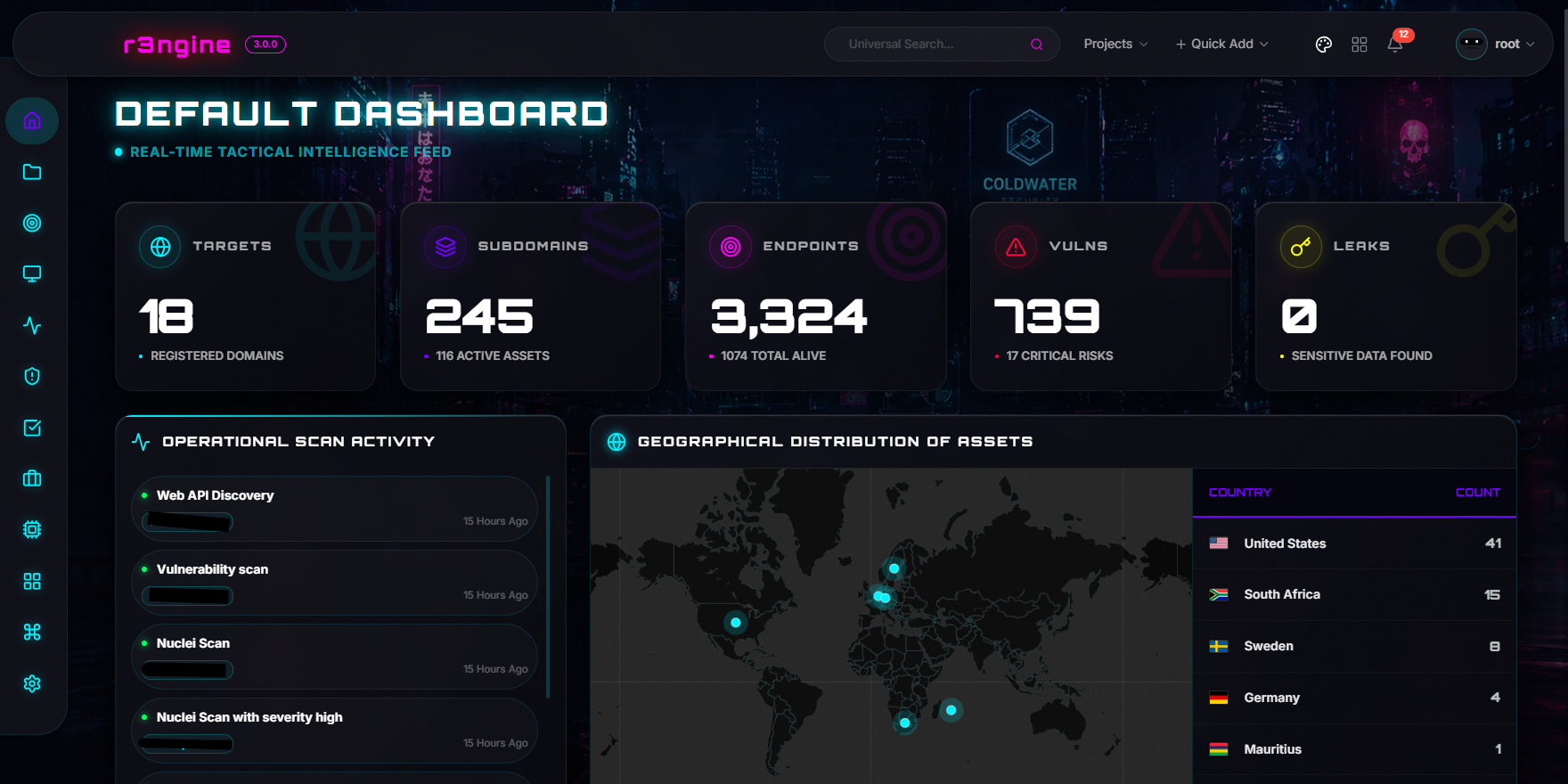




r3ngine 3.7.0:凤凰重生
r3ngine v3.7.0 是该平台的生产级稳定、企业级演进版本。它基于原始的 reNgine 构建,并进一步受到 rengine-ng 的启发(如果你还不了解,请查看 rengine-ng v3!)此版本大幅扩展了 攻击路径建模引擎(179 条规则,MITRE ATT&CK,10 因子评分),分布式远程 Worker,证书情报(由 tlsx 驱动的 TLS 侦察),身份基础设施情报(SSO/IdP 检测),扩展的图谱与 API 情报(组织 → 应用程序 → APIEndpoint 链,配备专用的全链路可视化工具),暴露面关联引擎(跨工具去重 + 18 类分类体系),WPScan/WPTaint SAST 集成,Nuclei 代理轮换,基于会话的 LinkedIn OSINT,Tier 7 LLM 自动富化,离线哈希破解,智能 Tier 5 工具门控,以及完整的 目标编辑 工作流。基础设施依然由 Django 5.2.3 LTS、PostgreSQL 16 和 Gunicorn + Uvicorn ASGI 生产级服务进行强化。基于 v3.2.0 中 Celery 到 Temporal 的迁移——使用提供崩溃安全执行、完整重放历史和暂停/恢复信号的持久化工作流引擎取代了旧版的 at-most-once 任务代理——v3.7.0 专注于攻击情报深度、运营安全、水平扩展以及大规模的生产可靠性。

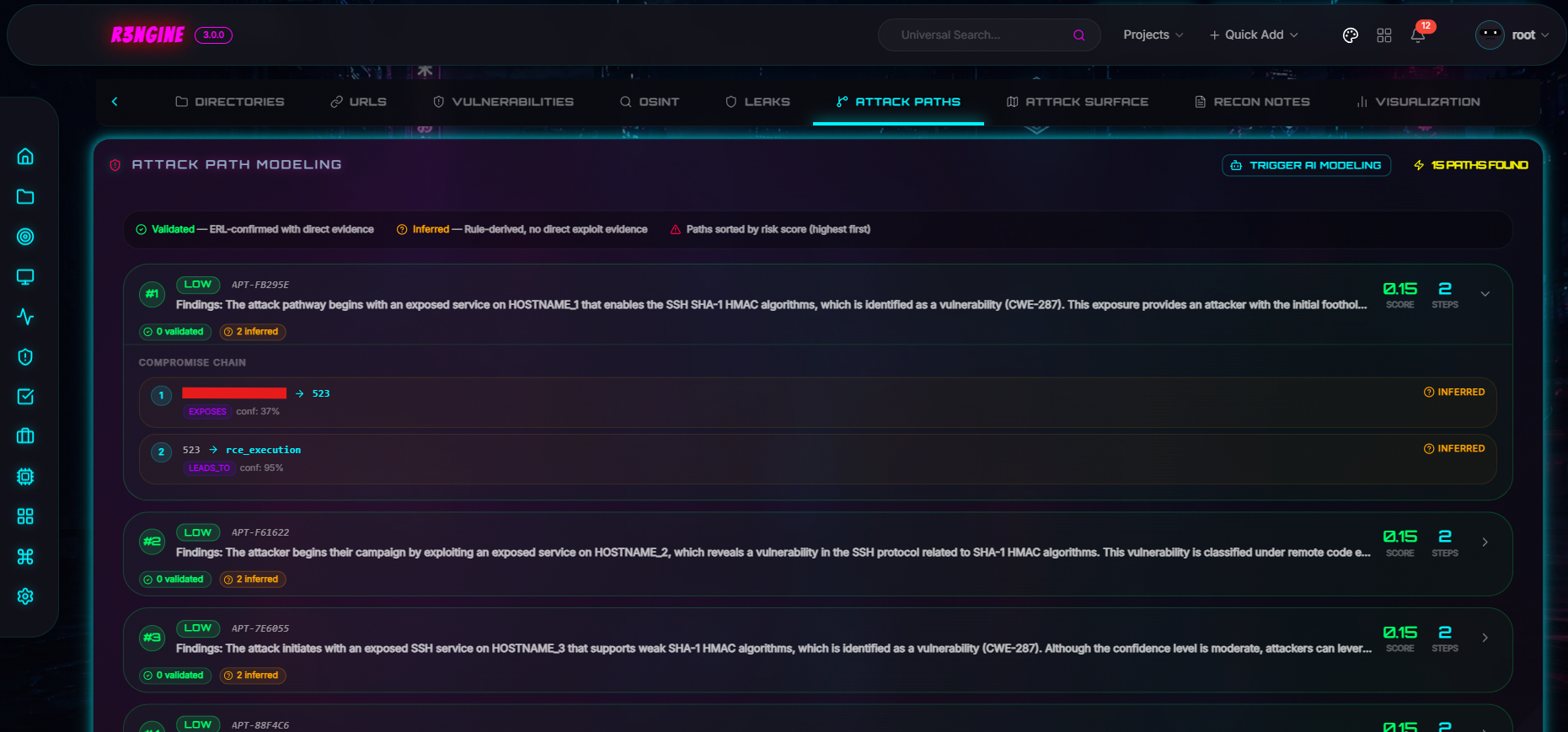
Attack Path Modeling Engine


| 仪表盘 | 地理战术地图 | 扫描详情 | 扫描编排 |
| :---: | :---: | :---: | :---: |
|
|
|
|
|
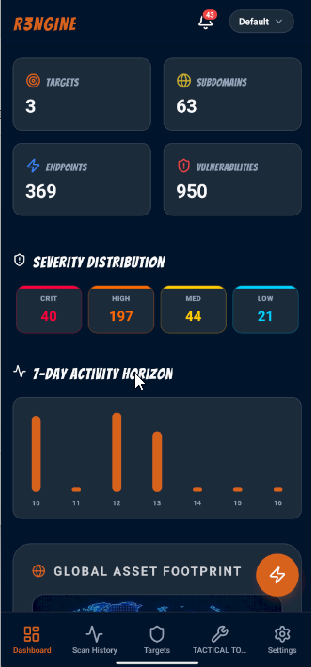
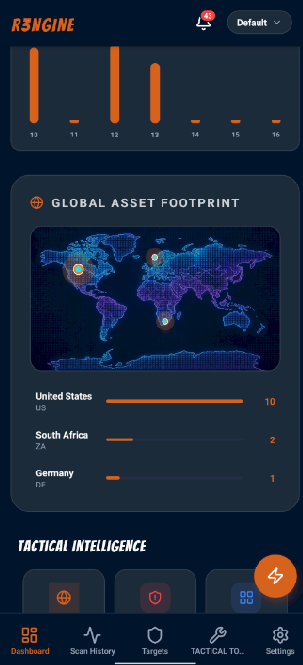
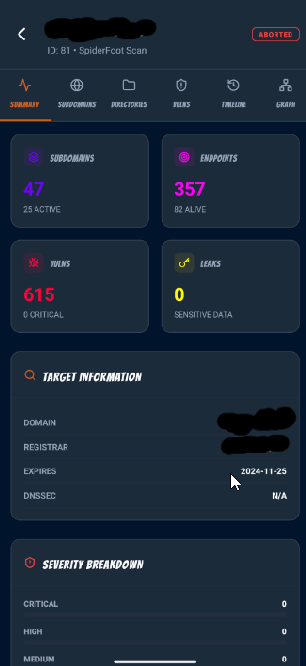
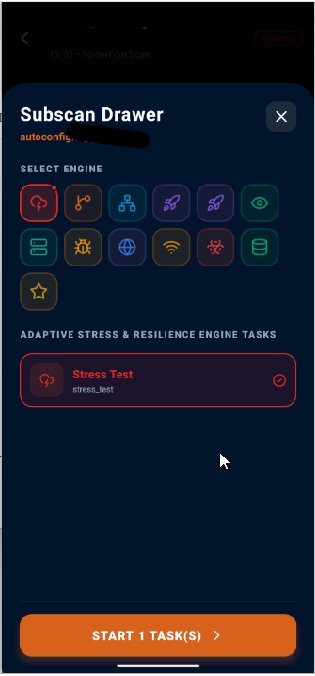
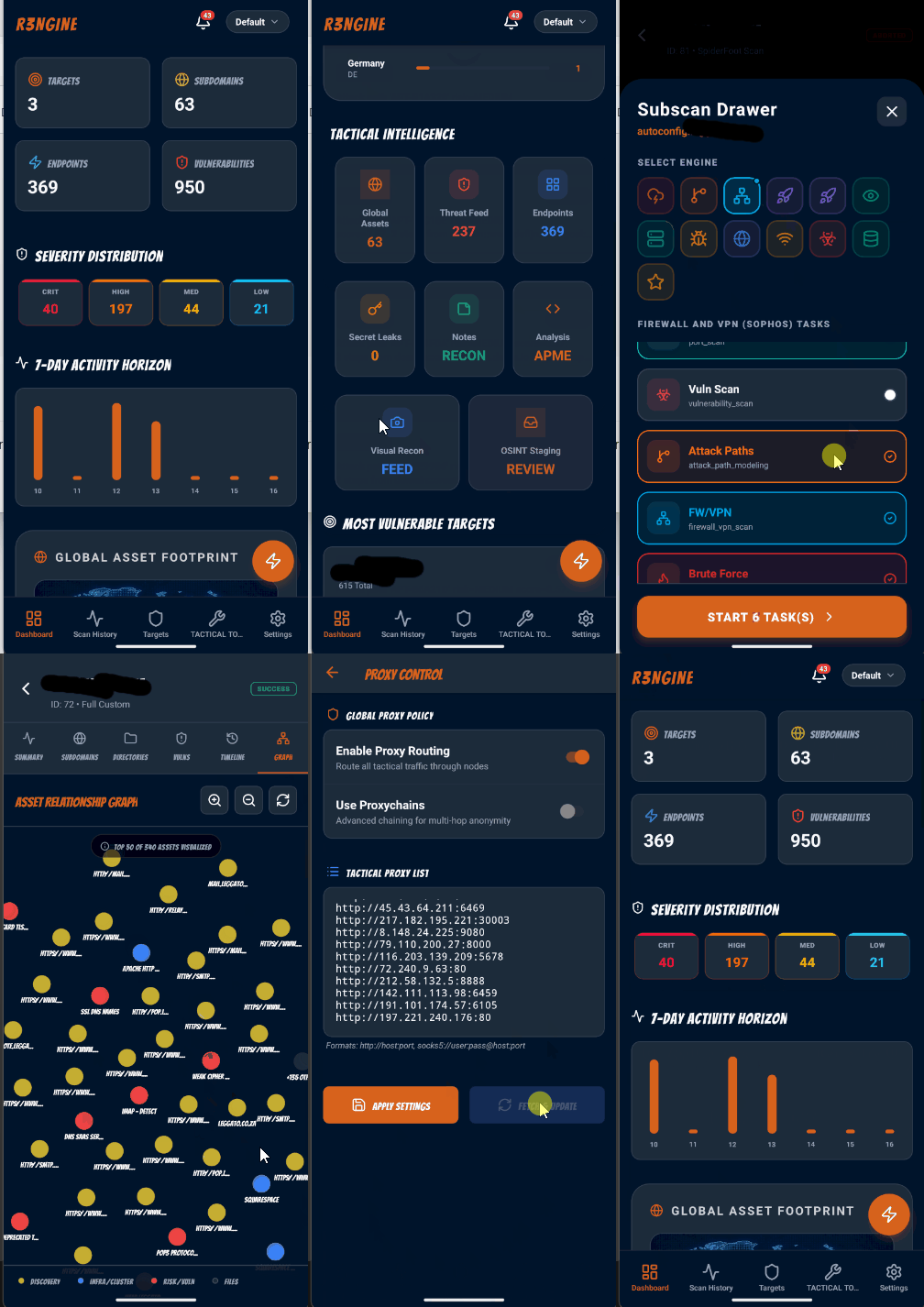
r3ngine 移动端 SOC 伴侣应用提供了一个完整的命令与控制界面,用于从任何设备管理扫描、审查发现结果和监控目标。功能包括 4 步扫描向导、插件选择器、实时任务日志流、动态活动徽章、ReconX 监控设置以及地理战术地图可视化。


| Active Directory |
| :---: |
|
|
| 活动利用 |
| :---: |
|
|
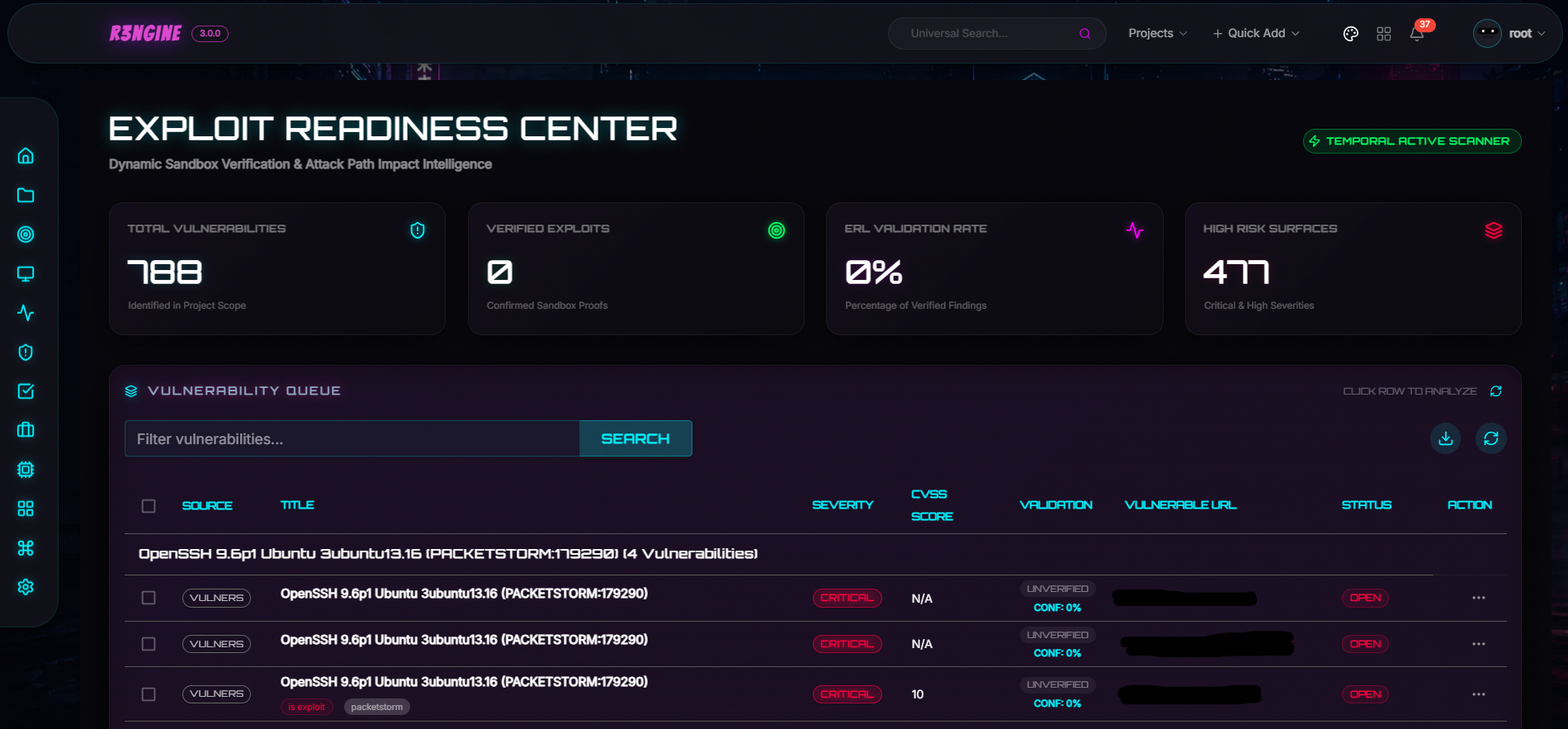
| 漏洞利用准备层 |
| :---: |
|
|
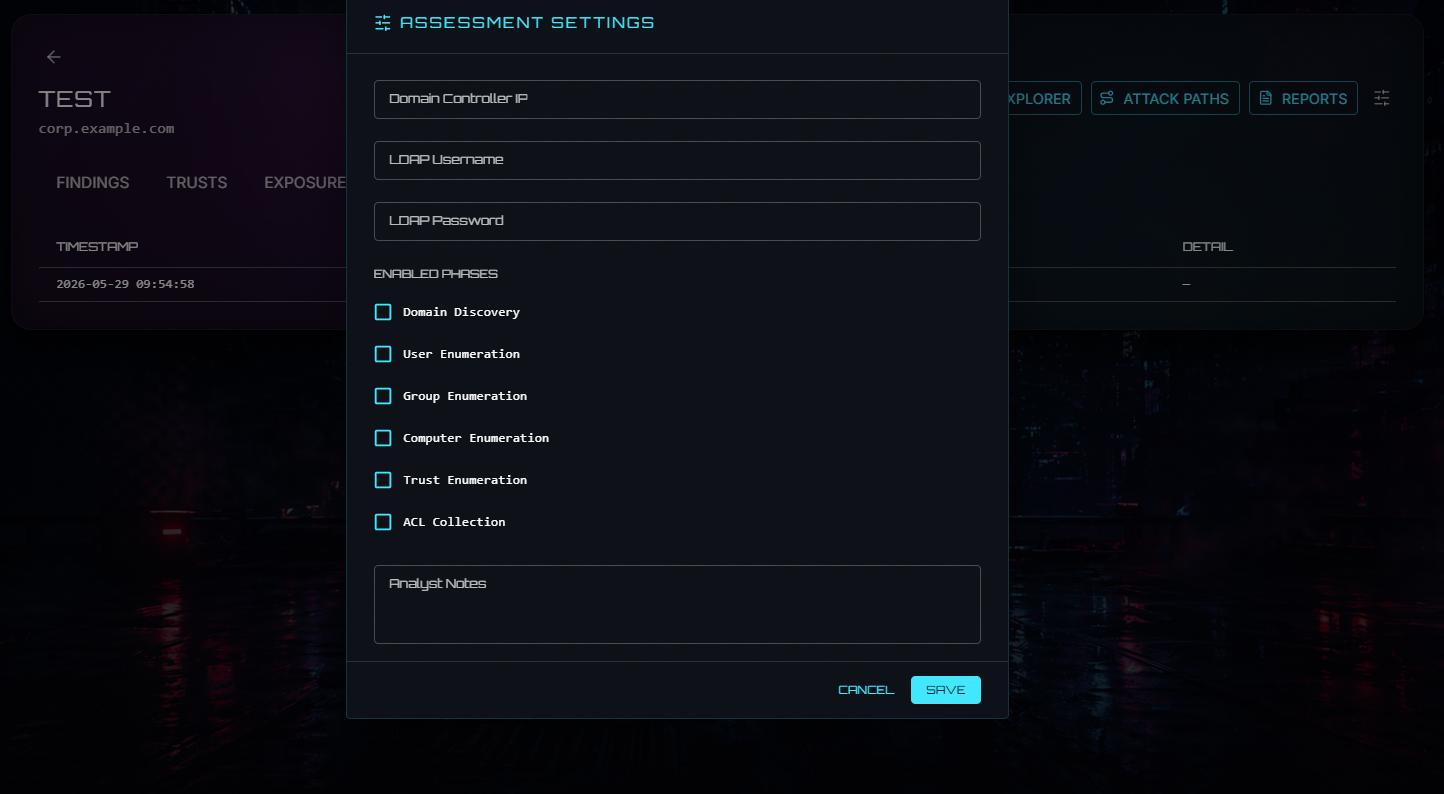
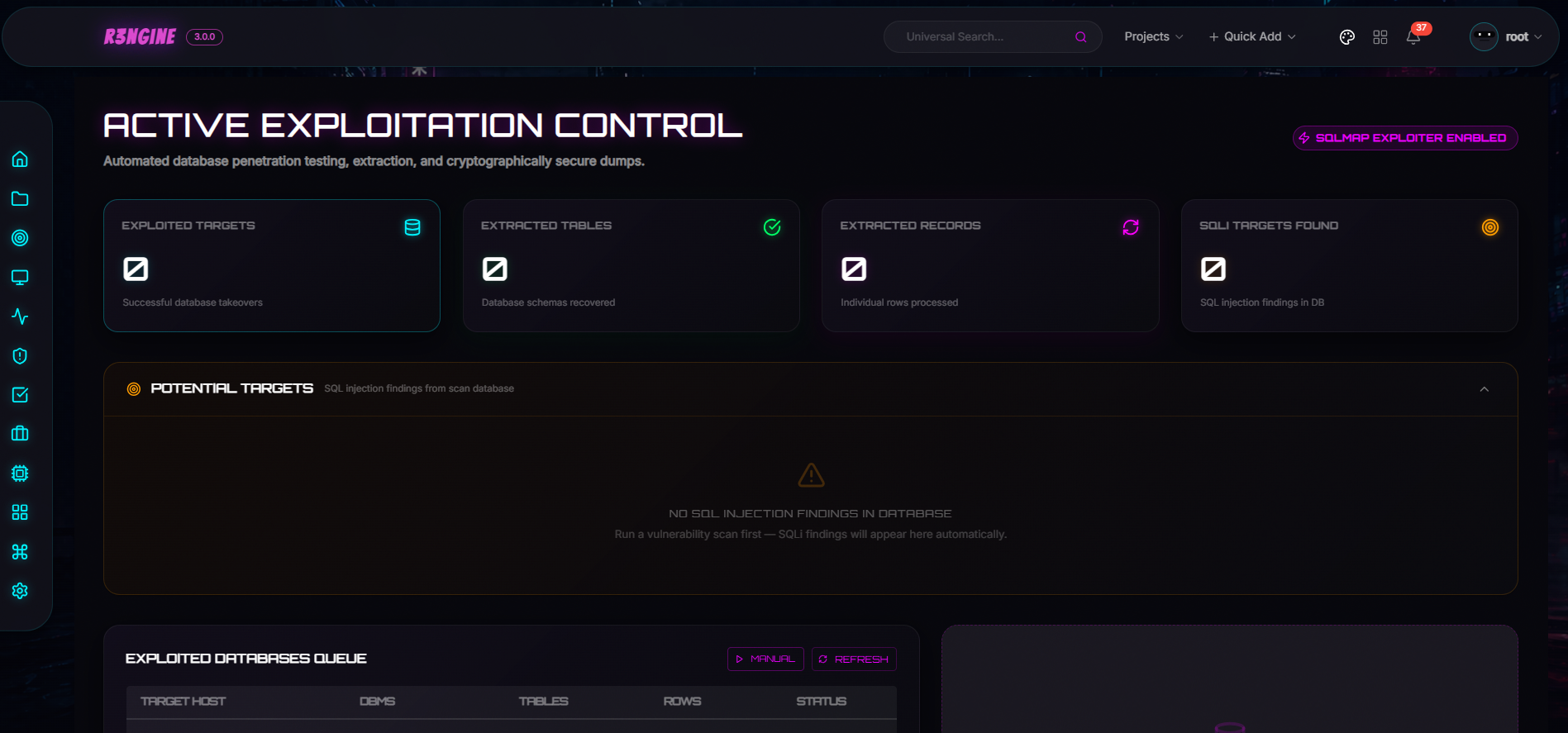
插件系统支持动态安装、带有 Ed25519 验证的签名 `.r3n` 包、Temporal 连接的活动,以及直接加载到宿主路由器中的 Module Federation UI。可用的插件包括 Active Directory Intelligence、Active Exploitation、Exploit Readiness Layer、Burp Suite Integration 和 Email Security。


## 目录
* [关于 r3ngine](#about-r3ngine)
* [工作流](#workflow)
* [项目架构](#project-schema)
* [功能](#features)
* [快速安装](#quick-installation)
* [管理与恢复](#-administration--recovery)
* [贡献](#contributing)
* [报告安全漏洞](#reporting-security-vulnerabilities)
* [许可证](#license)

## 关于 r3ngine
r3ngine 是一个生产级 Web 侦察和漏洞扫描平台。它将 7 层扫描流水线与 AI 驱动的情报收集、基于图谱的攻击路径建模、来自官方威胁情报源的 CVE 富化以及运营安全控制相结合——所有这些都由 [Temporal](https://temporal.io) 编排,以实现持久、崩溃安全的执行。
🦾 **端到端侦察**:通过 30 多种集成的安全工具实现,包括子域名发现、端口扫描、HTTP 爬取、目录模糊测试、屏幕截图捕获、机密扫描、漏洞评估(Nuclei, Semgrep, WPScan, Dalfox)等。
🗃️ **统一数据模型**:配备自定义查询语言。可使用类似 `http_status=200&name=admin` 的自然语言运算符跨所有发现类型过滤侦察数据。
🔧 **高度可配置的扫描引擎**:通过 YAML 进行配置。预置配置包括完整扫描、被动扫描、屏幕截图收集和 OSINT 扫描。每个参数——线程、超时、速率限制——均可调。
💎 **子扫描**:对进行中的发现立即做出响应。针对任何子域名发起定向端口扫描或漏洞评估,无需等待完整的流水线执行完毕。
🧠 **CVE 情报**:自动获取来自 NVD 的 CVSS v3.1 评分、来自 FIRST 的 EPSS 利用概率以及 CISA KEV 标记——每次启动时都会进行富化,并可通过 API 查询。
🤖 **本地 LLM 编排**:直接从 LLM Toolkit 仪表盘原生管理您本地化的 Ollama Docker 容器,以支持离线漏洞风险评估、缓解策略生成和智能报告,所有这些都无需离开您的基础设施。
📃 **PDF 报告**:支持完整扫描、漏洞和 OSINT 报告类型,配备可自定义的模板、执行摘要、由 LLM 生成的影响叙事以及修复优先级。
🌐 **分布式远程 Worker**:通过部署具有 UI 管理、安全令牌认证和自动心跳验证的独立远程 Worker,实现扫描基础设施的水平扩展。
⚙️ **基于角色的访问控制**:提供系统管理员、渗透测试员和审计员角色,并具有精确定义的权限。

## 工作流
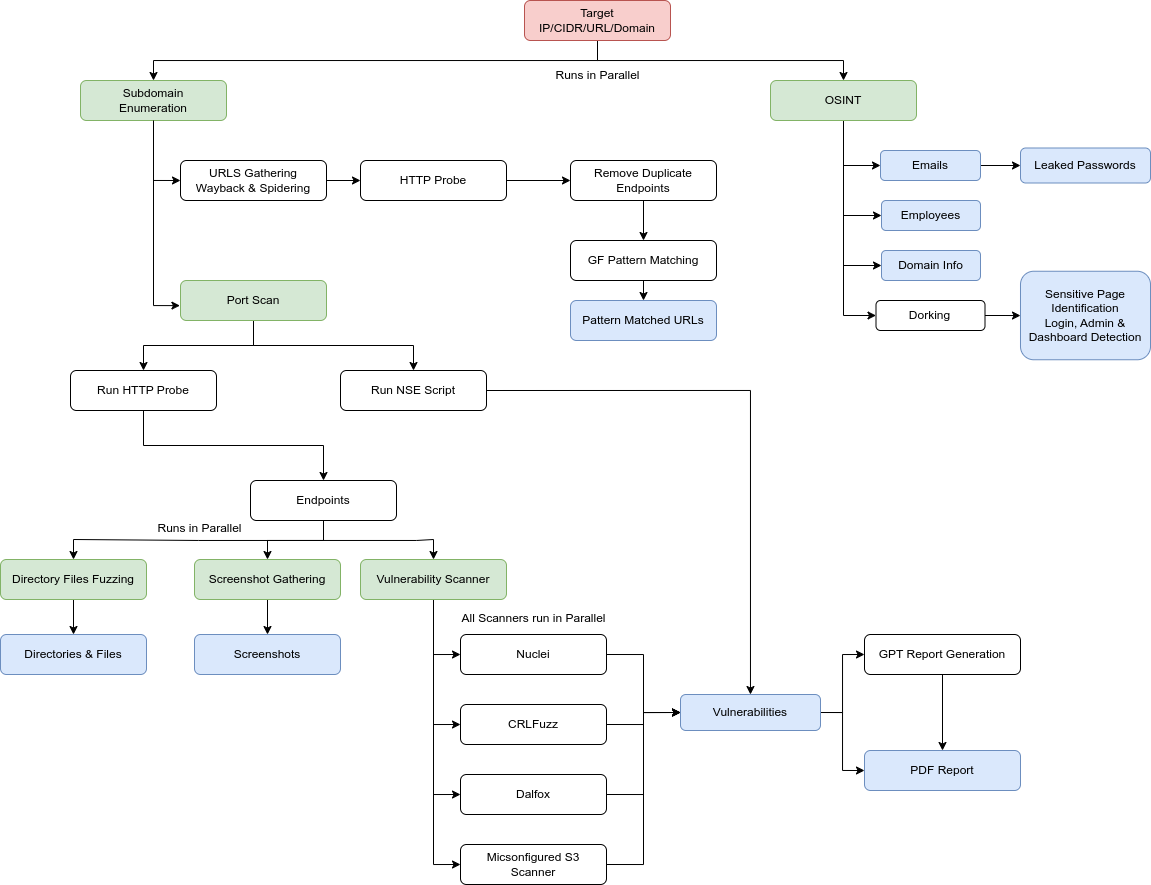
### Temporal 扫描流水线 (v3.2.0+)
完整的扫描流水线由 Temporal 上的 `MasterScanWorkflow` 编排。每个层级边界都是一个硬同步点——在上一层级的所有活动完成且其结果持久化到数据库之前,下一层级不会启动。
```
flowchart TD
START([▶ Scan Initiated]) --> TP
subgraph S0["⚙️ Step 0 — Target Setup"]
direction TB
TP[TargetProfilingActivity] --> LC[LoadCheckpointActivity]
end
LC --> F1(( ))
F1 --> SD & AI & FW & DNS & OS & SF & BD
subgraph T1["🔍 Tier 1 — Discovery · all parallel"]
direction TB
SD[RunSubdomainDiscoveryActivity]
AI[RunAmassIntelDiscoveryActivity]
FW[RunFirewallVPNScanActivity]
DNS[RunDNSSecurityActivity]
OS["RunGenericTaskActivity · osint"]
SF["RunGenericTaskActivity · spiderfoot_scan
─ requires yaml spiderfoot_scan block"]
BD["RunGenericTaskActivity · subdomain_discovery
uses_tools: [baddns]"]
end
SD & AI & FW & DNS & OS & SF & BD --> J1(( ))
J1 --> PDR[ParseDiscoveryResultsActivity]
PDR --> CP1{{"⏸ Pause Checkpoint"}}
CP1 --> F2(( ))
F2 --> HC & PS & VD
subgraph T2["🌐 Tier 2 — Endpoint Discovery · all parallel"]
direction TB
HC["RunHTTPCrawlActivity
via SeedEndpointsForCrawlActivity"] --> PHC[ParseHTTPCrawlResultsActivity]
PS[RunPortScanActivity]
VD["RunVigoliumDiscoveryActivity
─ requires vigolium_discovery.run_vigolium_discovery"]
end
PHC & PS & VD --> PT2[Dispatch tier_2 plugins]
PT2 --> F3(( ))
F3 --> FU & SS
subgraph T3["🔗 Tier 3 — URL Fetching + Screenshot · parallel"]
direction TB
FU[RunFetchURLActivity]
SS[RunScreenshotActivity]
end
FU & SS --> DFF
subgraph T4["📁 Tier 4 — Directory & File Fuzzing · sequential"]
direction TB
DFF[RunDirFileFuzzActivity] --> PFF[ParseFuzzResultsActivity]
end
PFF --> PER[ParseEnumerationResultsActivity]
PER --> CP2{{"⏸ Pause Checkpoint"}}
CP2 --> F4(( ))
F4 --> WAD & WD & SEC & VA
subgraph T5["🔬 Tier 5 — Analysis · all parallel"]
direction TB
WAD[RunWebAPIDiscoveryActivity]
WD[RunWAFDetectionActivity]
SEC[RunSecretScanningActivity]
VA["RunVigoliumAnalysisActivity
─ requires vigolium_analysis.run_vigolium_analysis"]
end
WAD & WD & SEC & VA --> J3(( ))
J3 --> PAR[ParseAnalysisResultsActivity]
PAR --> CP3{{"⏸ Pause Checkpoint"}}
CP3 --> NUC
subgraph T6["🎯 Tier 6 — Security Assessment"]
direction TB
subgraph NP["NucleiPlannerWorkflow · child workflow · runs first"]
direction TB
NUC[RunNucleiActivity / vuln stage chain]
end
NUC --> G6(( ))
G6 --> WB & VS
WB[RunWAFBypassActivity]
VS["RunVigoliumScanActivity
─ requires vulnerability_scan.run_vigolium"]
end
WB & VS --> PASM[ParseAssessmentResultsActivity]
PASM --> CP4{{"⏸ Pause Checkpoint"}}
CP4 --> CV
subgraph T7["🧠 Tier 7 — Intelligence · sequential"]
direction TB
CV[CorrelateVulnerabilitiesActivity]
EC[EnrichScanCVEsActivity]
CR[CalculateRiskScoresActivity]
GI[GenerateImpactAssessmentActivity]
SG[SyncGraphActivity]
APME["RunGenericTaskActivity · run_apme"]
CV --> EC --> CR --> GI --> SG --> APME
end
APME --> SN[SendScanNotificationActivity]
SN --> DONE([✓ Scan Complete])
```
## 项目架构
`documents/PROJECT_SCHEMA.md` 是一份动态的架构图,说明了所有权边界、工作流清单、请求路径,以及对于特定更改通常需要注意的文件夹。
针对 AI 的入职指引也可以在 `AGENTS.md`、`CLAUDE.md` 和 `.cursorrules` 中找到,方便以低 token 消耗交接给其他 AI 助手。

## 功能
### 🛰️ 分布式 Worker、TLS、身份与 API 情报 (v3.7.0)
* **分布式远程 Worker**:`ScanWorker` 模型 + `RemoteWorkersPage` 设置 UI 管理隔离的 worker 池,并带有 `auth_token` 共享密钥和抗时序攻击的心跳验证。Worker 通过 `docker-compose.worker.yml` 以无头模式运行,并发出非阻塞的 `asyncio.to_thread` 心跳;扫描仅路由到 5 分钟内活跃的 worker。
* **证书情报**:`CertificateIntelligence` 模型 + `tlsx` 接收管道持久化每个主机的颁发者/接收者/SAN/有效性/签名/指纹/通配符/自签名元数据。带有 `PROTECTS` 边和 `x_cert_intel.yaml` 规则的 APME `Certificate` 节点会突出显示过期、自签名和弱签名路径。提供 `/api/cert-intel/
/` REST 端点 + `CertIntelTab` 面板。
* **身份基础设施情报**:`IdentityInfraDiscovery` 通过 URL → 标题 → 标头的优先级管道对 Okta/ADFS/Auth0/Ping/Azure AD/Keycloak/通用 SAML/OIDC 端点进行编目。APME `x_identity_infra.yaml` 规则将发现映射到凭据收集和认证访问能力。提供 `/api/identity-infra//` + `IdentityInfraPanel`。
* **扩展的图谱与 API 情报**:`APIIntelligenceProfile` 通过 `(base_url, api_type)` 聚合端点,并具备 REST/GraphQL/SOAP/通用分类。新的 `Organization`(来自 `Domain.project`)、`Application`(按 Web 服务器指纹识别的子域名)和 `APIEndpoint` APME 节点及 `DEPENDS_ON`、`TRUSTS_DOMAIN` 和 `PART_OF` 边构成了新链路的顶端。`x_api_intelligence.yaml` 规则涵盖了 GraphQL 数据泄露、未经身份验证的 REST → 账户接管以及 SOAP → RCE。新的 `/api/graph/chain/` REST 端点支持带有统计磁贴和按类型深入分析的 `FullChainGraphTab` 可视化工具。采用带有白名单验证标签的两次遍历节点 + 边查询取代了先前的笛卡尔积截断。
* **暴露面关联引擎与分类体系扩展**:`ExposureCorrelator` 通过模糊 URL + 签名匹配,整合了来自 Nuclei、Semgrep、Trivy 和 Dalfox 的重复暴露面。新增 18 个暴露类别,带有 MITRE 技术映射和修复优先级,并由 18 个新测试提供支持;强化了 14 个审查边缘案例。
* **APME 攻击树 UX**:`RiskSummaryBar`、`PriorityBadge`、评分权重工具提示、推测路径部分(显示路径为何被门控拦截)以及叶节点可检测性芯片。通过 URL 编码 `targetId` 修复了攻击树的 404 问题。`ImpactExplorer` 已完全类型化并应用主题;MITRE 辅助程序合并到了 `apme.utils.mitre` 中。
* **暴露面 UI**:`ExposureList` 汇总统计栏和状态过滤芯片。`ExposureCard` 资产摘要(主机 + 路径 + 方法)。`ExposureDetailsDrawer` 将证据渲染为带有时间戳和内联关联漏洞的键值列表。
* **Feroxbuster 目录模糊测试**:新的 `run_feroxbuster` 引擎配置键可在 `ffuf` 旁边运行 `feroxbuster`,共享字典表/代理设置;结果在 URL 上进行合并和去重。在捆绑的引擎 YAML 中默认禁用。
### 🔬 CVE 情报与富化 (v3.5.0)
* **CVE 富化服务**:从 **NVD API v2.0** 获取 CVSS v3.1 指标,从 **FIRST EPSS**(通过本地源每日同步)获取利用概率评分,并同步 **CISA KEV**(已知被利用漏洞)目录。富化后的数据会被缓存(CVE 缓存 7 天,KEV 缓存 1 小时),并在外部 API 不可用时优雅降级。
* **漏洞历史追踪**:`VulnerabilityHistory` 模型可追踪历史扫描中的漏洞,自动将发现分类为、持续存在或已修复。
* **多准则关联评分**:使用可配置的工具权重、资产重要性、CISA KEV/EPSS 可利用性因子以及时间修饰符生成综合评分。扫描内重复抑制会在写入之前将发现归组到一个 `group_key` 下。
* **基于 ID 的 Neo4j 图谱同步**:Neo4j 中的 CVE 节点通过精确的 CVE ID 进行链接,并将 CVSS 基础分数和 EPSS 分数作为节点属性进行摄取,以用于攻击路径富化。
* **启动富化**:在每次编排器启动时,`sync_cve_data` 会在图谱同步完成 5 分钟后触发——自动富化所有未富化的 CVE 并刷新 KEV 目录。
* **管理命令**:使用 `python manage.py sync_cve_data --all` 进行完整的手动同步。
### 🧠 情报与 AI 中心
* **集中化 AI 管理**:统一界面支持 **OpenAI、Anthropic (Claude 3)、Google Gemini 和本地 Ollama 模型**。
* **漏洞影响情报**:通过 LLM 自动生成影响叙事、缓解策略和优先级,并通过交互式 **Cytoscape.js 攻击路径**和状态感知的 **Impact Explorer** 进行可视化。
* **PII 网关安全**:高级隐私层,可在将敏感数据(IP、电子邮件、主机名)发送到外部 LLM 之前对其进行匿名化处理。
* **GPT 攻击面生成器**:自动生成目标配置文件并识别高价值资产。
* **自然语言查询**:使用类人运算符进行复杂的数据库查询。
### 🛠️ 高级扫描与执行引擎
* **Burp Suite Professional 集成**(v3.4.0 插件):两阶段 Temporal 同步(导入 → 关联)、双向作用域推送、可过滤的问题网格以及实时连接健康徽章。
* **Active Directory Intelligence 插件**:全面的 AD 攻击面分析——带有 5 种布局预设的 Cytoscape.js 图谱、实时 WebSocket 流(150 毫秒批处理)、分页发现 API、7 部分 PDF 报告(`ad_modern`、`cyber_pro` 模板)以及 RBAC 证据日志。
* **攻击路径建模引擎 (APME)**:基于 Neo4j 的图谱,发现可行的攻击路线(例如,SQLi → 数据库访问 → 内网渗透),包含跨 13 个 YAML 分类文件的 **179 条攻击规则**、MITRE ATT&CK 归因、10 因子置信度评分、带有语义去重的 Dijkstra 寻路算法、约束门控(22 个门)的可行性过滤以及自动化的“目标注入”。
* **自适应压力与弹性引擎 (ASRE)**:`k6`、`wrk`、`hping3` 和 `Locust` 编排,通过 Redis Streams 和 WebSockets 提供实时 ECharts 遥测,具备安全终止开关和由 LLM 驱动的瓶颈 PDF 报告。
* **漏洞利用准备层 (ERL)**:容器化、非破坏性的漏洞验证,在适配器层内置了原生代理轮换和 OpSec 合规性。
* **自主侦察编排**:Temporal 持久化工作流,具备崩溃安全执行、10 次重试上限、在 `localhost:8080` 进行完整历史重放以及基于 UI 的恢复功能。
* **Nmap Vulners NSE 分组发现**:在 UI 和 PDF 报告中按产品版本分组显示漏洞,并提供可折叠/展开的 CVE 子表。
* **Nuclei 按严重性顺序执行**:`NucleiPlannerWorkflow` 按严重性顺序运行,以防止在大型目标集上出现 OOM,并在时间线中显示每个严重性活动的状态。
* **漏洞关联引擎**:将来自 Nuclei、Semgrep、Trivy、Gitleaks、Acunetix、Retire.js 等的发现结果统一起来,形成具有持久状态追踪的优先威胁视图。
* **扫描排队**:可选的并发限制器(`最多 1 个主扫描 + 1 个子扫描`),带有 Temporal 轮询循环和设置面板开关。
### 🕵️ 精准侦察与 OSINT
* **高级 Web API 发现**:Kiterunner、Arjun、ParamSpider、LinkFinder 和 InQL 流水线。
* **深度追踪 OSINT 引擎**:电子邮件追踪,跨平台社交档案映射,社交存在发现,战术身份排列,以及一个 **由 Playwright 驱动的 LinkedIn 情报引擎**,具备会话状态 + cookie 存储认证——兼容 MFA,不存储密码,在会话过期时可优雅地继续扫描。
* **URL 去重**:在 `fetch_url` 之后进行两次去重——URL 签名去重(保存前)合并参数变体,基于内容的去重(保存后)移除重复的 HTTP 响应——从而减少第 4-6 层的负载。
* **漏洞扫描**:Nuclei(按严重性顺序执行,自动更新模板)、Semgrep(并行下载,限制 500 个文件,每个文件限制 5 MB)、WPScan、Dalfox(深度扫描,WAF 绕过,远程有效载荷)、CRLFuzzer、S3Scanner、Gitleaks、Retire.js。
* **自定义参数发现引擎 (CPDE)**:定义自定义正则表达式和具有严重性级别的字符串匹配器,以便在爬取过程中自动标记未记录或高价值的参数。
* **WHOIS、WAF 检测和 IP 地理定位**。
### 🥷 隐秘行动与运营安全
* **增强的代理编排**:在所有发现模块中自动获取、验证和按工具轮换代理。
* **集中式暴力破解编排**:集成 Hydra 和 Medusa 以及 Proxychains4。多服务定位:SSH、FTP、HTTP、SMB、RDP、Telnet。
* **OpSec 预设**:User-Agent 轮换、隐秘时间控制、自定义 DNS 解析器、WAF 绕过标头以及 TOR 线路轮换。
* **强化的扫描终止**:`abort_scan_history()` / `abort_subscan()` 在数据库更新之前取消所有子扫描和 Temporal 工作流,从而消除孤儿进程。
### 🎨 可视化与管理界面
* **赛博朋克 V3 UI**:毛玻璃效果仪表盘——提供 Hacker(赛博朋克)、Hybrid(现代暗色)和 Enterprise(专业板岩)主题。
* **攻击面地图 v4.0**:fCoSE 和 KLay 布局,分层资产集群,AI 驱动的图谱搜索。
* **战术地理地图可视化**:带有 CSS 动画标记和工具提示交互的全球资产定位。
* **Bounty Hub**:HackerOne 项目管理,资产追踪以及直接的漏洞报告。
* **自动化启动同步**:在每次编排器启动时——图谱同步、CISA KEV 目录刷新、Semgrep 规则同步、卡住的扫描恢复以及完整的 CVE 富化——都将作为一次性 Temporal 计划任务触发。
* **配置导出/导入**:将 API 密钥、字典表、工具配置和扫描引擎备份和恢复到一个单一的 `.zip` 文件中。
* **扫描结果恢复**:`recover_scan_results` 管理命令可根据磁盘上的 `scan_results` 卷重建数据库——幂等操作,默认为试运行。
* **可自定义的警报**:通过 Slack、Discord、Telegram 和 Lark 发送通知。
### ⚡ 基础设施与性能
* **Django 5.2.3 LTS**(支持至 2028 年 4 月)+ **PostgreSQL 16**(支持至 2028 年 11 月)。
* **Gunicorn + Uvicorn ASGI**:4 个 worker 的生产级服务器,完全支持 HTTP 和 Django Channels WebSocket 流的 ASGI。
* **Temporal 工作流引擎**:持久化执行,带有可配置退避的自动重试,以及针对单个工作流的取消功能。
* **自动化基础设施升级**(`make fullupgrade`):8 步操作程序,涵盖数据库备份、PostgreSQL 大版本升级(幂等)、镜像重建、应用迁移以及健康验证。
* **全局 Redis 缓存**:采用统一的 Redis 支持的缓存,取代进程级的本地内存,以提高共享状态的效率。
* **确定性资源限制**:为所有生产服务设置 Docker `deploy.resources` 限制。

## 🛠️ 开发与类型安全
r3ngine 前端始终秉承“安全第一”的理念,在全局采用 `strict: true` 的 TypeScript 构建。
* **完全严格模式**:在构建时消除隐藏的空指针和未定义的属性访问。
* **契约完整性**:前端模型映射到自动生成的 OpenAPI schema(`src/types/api.ts`),并使用 `verbatimModuleSyntax` 进行 tree-shaking。
* **模块化架构**:基于功能的结构——每个模块(`targets`、`scans`、`vulnerabilities`)都维护自己的 API hooks 和类型。
* **生产强化**:CI/CD 会针对每个提交验证 `tsc -b` 和 `vite build`。

## 快速安装
### Ubuntu/VPS 的快速设置
1. 克隆代码库
git clone https://github.com/whiterabb17/r3ngine && cd r3ngine
2. 配置环境
nano .env
**为确保安全,请务必更改 `POSTGRES_PASSWORD`。**
3. (可选)对于非交互式安装,请在 `.env` 中设置管理员凭据
DJANGO_SUPERUSER_USERNAME=yourUsername
DJANGO_SUPERUSER_EMAIL=YourMail@example.com
DJANGO_SUPERUSER_PASSWORD=yourStrongPassword
4. 在 `.env` 中配置 Temporal worker 并发数(可选)
TEMPORAL_MAX_CONCURRENT_ACTIVITIES=20
TEMPORAL_MAX_CONCURRENT_WORKFLOWS=10
根据可用 RAM 推荐的值:
* 4 GB:`TEMPORAL_MAX_CONCURRENT_ACTIVITIES=10`
* 8 GB:`TEMPORAL_MAX_CONCURRENT_ACTIVITIES=20`
* 16 GB+:`TEMPORAL_MAX_CONCURRENT_ACTIVITIES=40`
Temporal UI 可在 `http://localhost:8080` 访问,用于工作流检查、历史重放和手动干预。
5. 运行安装脚本:
sudo ./install.sh
对于非交互式安装:`sudo ./install.sh -n`
*注意:如有需要,请先运行 `chmod +x install.sh`。*
**r3ngine 可通过 `https://127.0.0.1`(或您的 VPS IP)访问。在生产环境中,请勿通过直接端口访问暴露。**
### 在其他平台上安装
对于 Mac、Windows 或其他系统,请参阅 [`docker/`](docker/) 中的安装说明,或提出 issue 以获取针对特定平台的指导。
## 更新
```
cd r3ngine && sudo ./update.sh
```
对于大版本升级(包括基础设施变更),请始终使用 `make fullupgrade`,而不是简单的 `docker compose up`。

## 🔧 管理与恢复
### 扫描结果恢复
如果数据库丢失或损坏,但 `scan_results` Docker 卷完好无损,则可以使用 `recover_scan_results` 管理命令从磁盘上的文件重建数据库。
**可恢复的内容**(当存在相应的输出文件时):
| 数据 | 源文件 |
|------|----------------|
| 域名 | 从文件夹名解析 (`domain_scanid`) |
| 扫描历史 | 文件夹的 mtime 用作扫描日期 |
| 子域名 | `#id_subdomain_discovery.txt`, `subdomains_*.txt`, 子扫描目录 |
| 端口 + IP 地址 | `#id_port_scan.txt` — naabu JSONL 和旧版 JSON 对象格式 |
| 端点 | `#id_fetch_url.txt`, `urls_*.txt` |
| 漏洞 | `*_nmap_vulns.json`, `#id_nuclei_*_module.txt` |
| WAF 关联 | `#id_waf_detection.txt` 链接到匹配的子域名 |
**用法**(在 `web` 容器内运行):
```
# Dry-run — 预览将要恢复的内容而不写入任何内容
python manage.py recover_scan_results
# Apply — 将恢复的记录写入数据库
python manage.py recover_scan_results --apply
# 恢复单个 scan 文件夹
python manage.py recover_scan_results --apply --scan-dir /usr/src/scan_results/example.io_108
# 使用非默认的 results 根目录
python manage.py recover_scan_results --apply --results-root /alt/path/scan_results
```
```
docker-compose exec web python manage.py recover_scan_results --apply
```
该命令是**幂等的**——每次运行时都会跳过数据库中已有的扫描。
### CVE 数据同步
```
# 在 web 容器内:
python manage.py sync_cve_data # Enrich unenriched CVEs
python manage.py sync_cve_data --kev # Sync CISA KEV catalog only
python manage.py sync_cve_data --refresh 30 # Re-enrich CVEs from last 30 days
python manage.py sync_cve_data --all # Full sync (KEV + unenriched)
```
在每次编排器启动 5 分钟后,也会自动运行 CVE 富化。
### 调试
1. 启用调试模式——编辑 `docker/web/entrypoint.sh` 并在顶部添加 `export DEBUG=1`,然后执行 `docker-compose restart web`。
2. 查看日志:`make logs` 或 `docker compose logs temporal-python-orchestrator`。
3. Temporal UI:`http://localhost:8080`——完整的工作流历史、信号、事件重放。
4. 完成禁用调试模式:设置 `DEBUG=0` 并重启。

## 截图
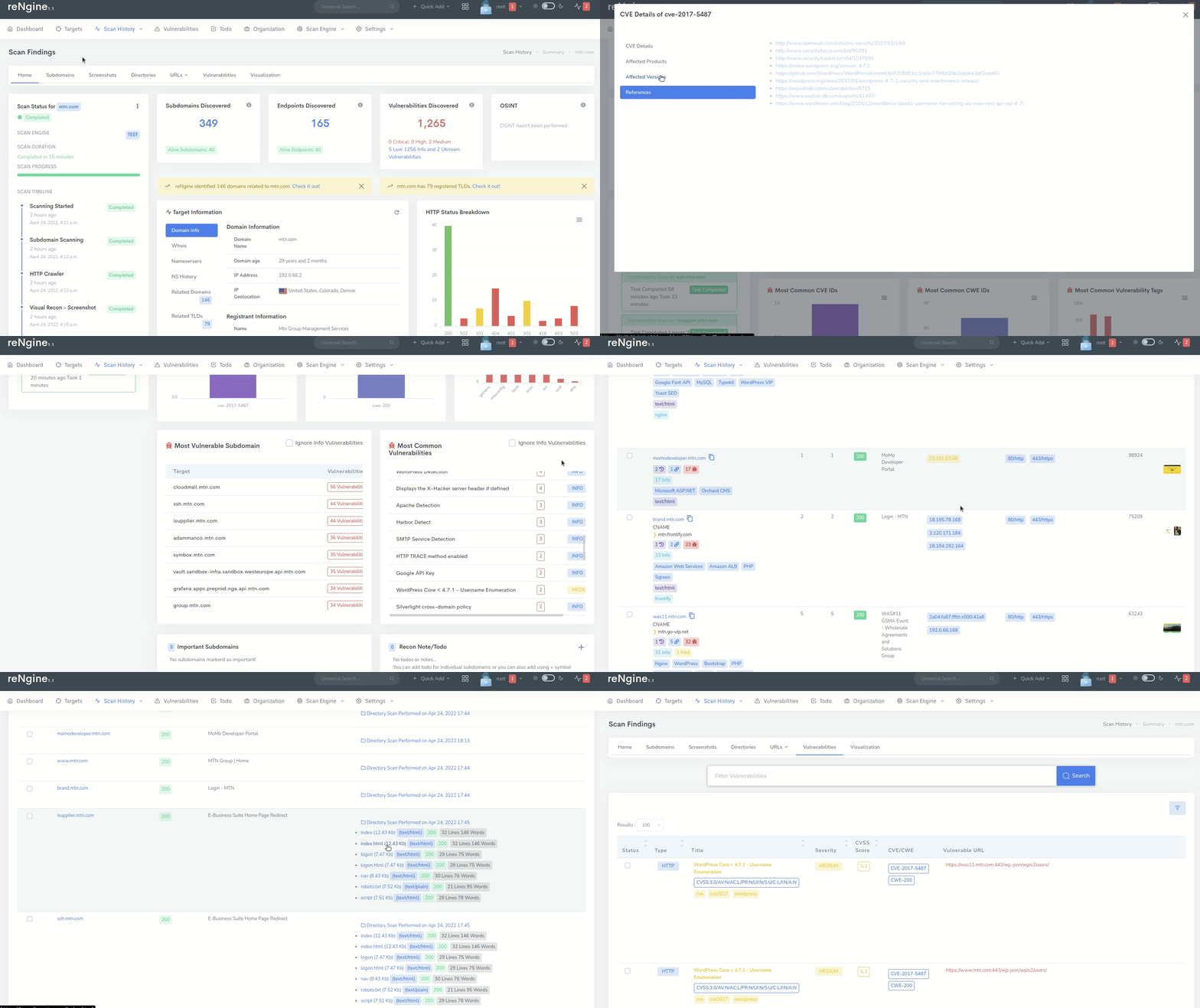
### 扫描结果
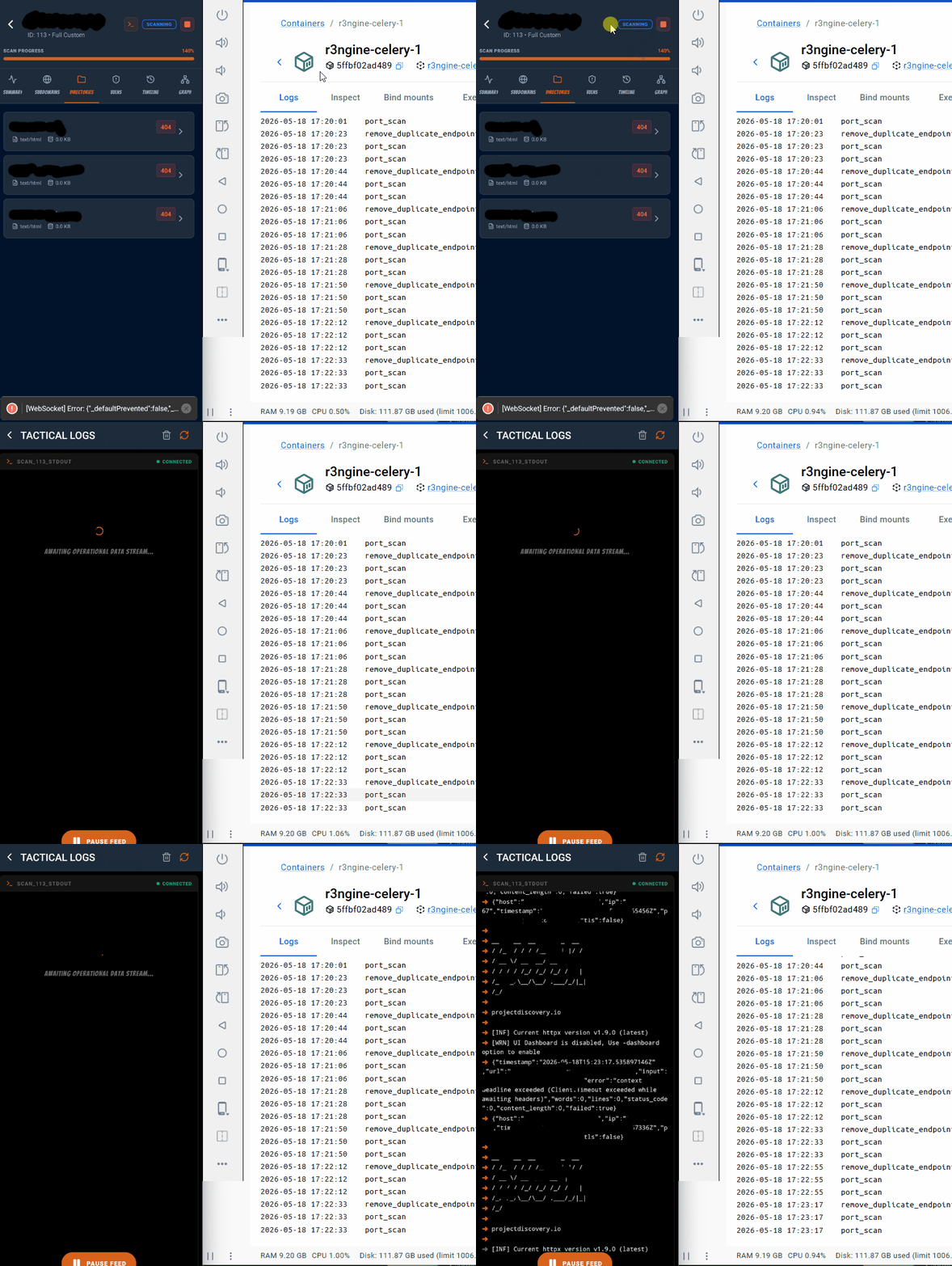
### 实时日志
### 移动端界面

## 贡献
欢迎任何规模的贡献。无论是修复拼写错误、改进 UI 还是添加新功能——每一份贡献都很重要。
您可以通过以下方式做出贡献:
* 代码改进和错误修复
* 文档更新
* 新功能建议和实现
* UI/UX 改进
* 插件开发
入门指南:
1. 查看我们的[贡献指南](.github/CONTRIBUTING.md)
2. 挑选一个[未解决的 issue](https://github.com/whiterabb17/r3ngine/issues) 或提出一个新的
3. Fork 该代码库并创建您的分支
4. 进行更改并提交 pull request

## 提交 Issue
提交 issue 时,请尽可能提供详细的信息:
1. 启用调试模式(参见上方的[调试](#debugging))
2. 运行 `make logs` 以捕获完整的堆栈跟踪
3. 检查浏览器开发者控制台是否存在 XHR 500 错误
4. 提交一个包含堆栈跟踪、重现步骤和系统信息的 GitHub issue

## 报告安全漏洞
**请勿**在 GitHub issue 上公开披露安全漏洞。
前往 [Security 标签页](https://github.com/whiterabb17/r3ngine/security) 并点击 **"Report a vulnerability"** 以打开 GitHub 的私人漏洞报告表单。请包含:
- 重现步骤
- 潜在影响
- 建议的修复或缓解措施(如有)
报告将在 48-72 小时内进行审查。除非您希望保持匿名,否则在修复发布后,我们将公开致谢负责的披露行为。

## 许可证
基于 GNU GPL v3 许可证分发。更多信息请参见 [LICENSE](LICENSE)。

注意:本 README 的部分内容是使用 AI 语言模型编写或润色的。