initstring/linkedin2username
GitHub: initstring/linkedin2username
一个从LinkedIn公司页面自动生成多样化用户名列表的OSINT工具。
Stars: 1788 | Forks: 218
# s and translating the rest.
OSINT工具:从LinkedIn公司页面生成用户名列表。
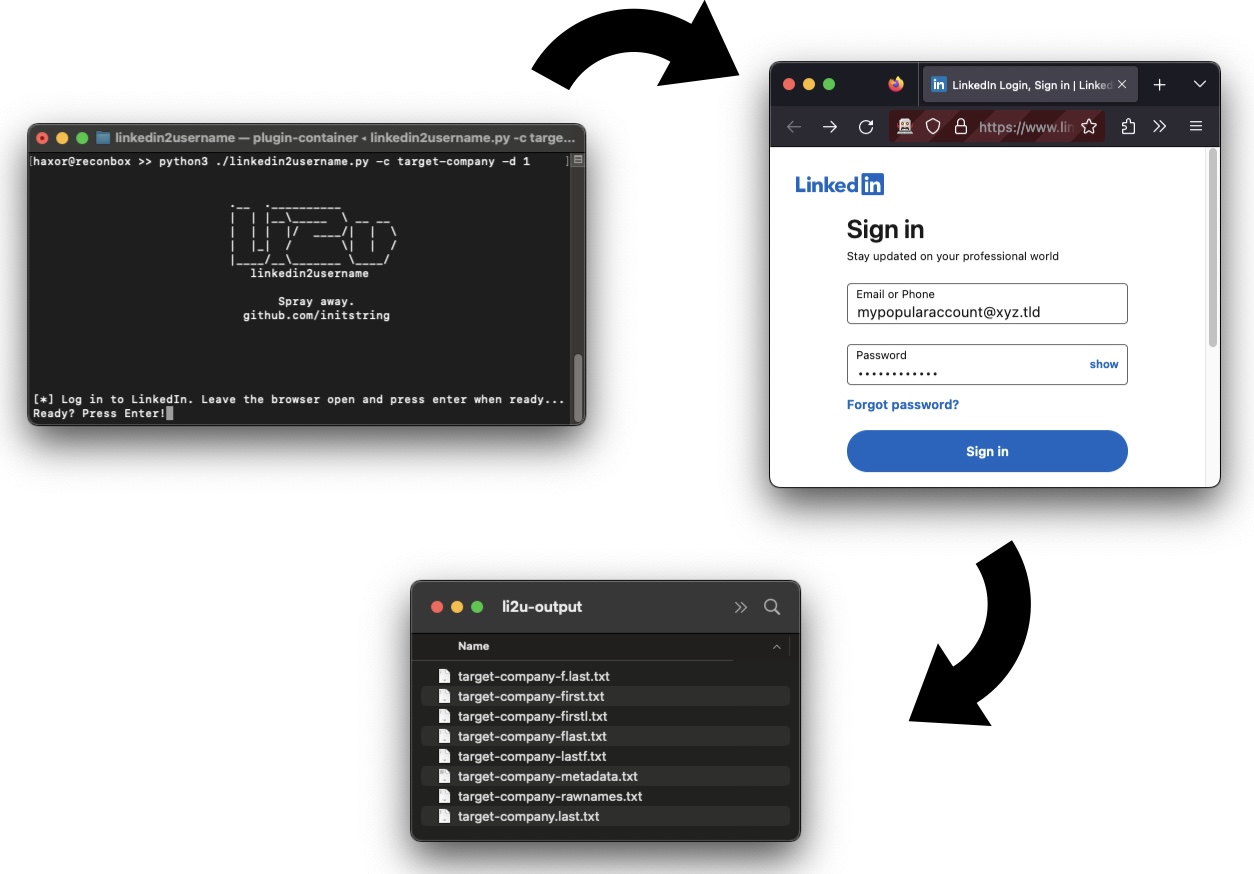
这是一个纯网络爬虫,无需API密钥。您使用有效的LinkedIn用户名和密码登录,它将为您指定公司的所有员工创建多种可能的用户名格式列表。
以下是生成的文件:
- first.last.txt:类似Joe.Schmoe的用户名
- f.last.txt:类似J.Schmoe的用户名
- flast.txt:类似JSchmoe的用户名
- firstl.txt:类似JoeS的用户名
- first.txt:类似Joe的用户名
- lastf.txt:类似SchmoeJ的用户名
- rawnames.txt:完整姓名如Joe Schmoe
- metadata.txt:包含full_name,occupation的CSV文件
可选择为用户名追加@domain.xxx后缀。
## 警告
若您的LinkedIn账户受到速率限制甚至封禁,请勿归咎于我。这是一款安全研究工具——仅在阅读代码并完全理解其工作原理后使用。
自工具编写以来,我尚未听闻任何账户被封禁的情况,但当触及"商业搜索限制"时会偶尔触发速率限制。目前该限制是临时性的(按月计量)。
## 使用说明
### 前置条件
安装[uv](https://docs.astral.sh/uv/getting-started/installation/),然后从仓库根目录运行:
```
uv sync
```
这将自动创建虚拟环境并安装所有依赖项。使用以下命令运行工具:
```
uv run python linkedin2username.py -c targetco
```
您还需要安装在典型路径下的Chrome、Chromium或Firefox,确保Selenium能自动发现。系统将临时启动网页浏览器处理登录流程。
### 完整用法
```
usage: linkedin2username.py [-h] -c COMPANY [-n DOMAIN] [-d DEPTH]
[-s SLEEP] [-x PROXY] [-k KEYWORDS] [-g] [-o OUTPUT]
OSINT tool to generate lists of probable usernames from a given company's LinkedIn page.
This tool may break when LinkedIn changes their site.
Please open issues on GitHub to report any inconsistencies.
optional arguments:
-h, --help show this help message and exit
-c COMPANY, --company COMPANY
Company name exactly as typed in the company linkedin profile page URL.
-n DOMAIN, --domain DOMAIN
Append a domain name to username output.
[example: "-n targetco.com" would output jschmoe@targetco.com]
-d DEPTH, --depth DEPTH
Search depth (how many loops of 25). If unset, will try to grab them
all.
-s SLEEP, --sleep SLEEP
Seconds to sleep between search loops. Defaults to 0.
-x PROXY, --proxy PROXY
Proxy server to use. WARNING: WILL DISABLE SSL VERIFICATION.
[example: "-p https://localhost:8080"]
-k KEYWORDS, --keywords KEYWORDS
Filter results by a a list of command separated keywords.
Will do a separate loop for each keyword,
potentially bypassing the 1,000 record limit.
[example: "-k 'sales,human resources,information technology']
-g, --geoblast Attempts to bypass the 1,000 record search limit by running
multiple searches split across geographic regions.
-o OUTPUT, --output OUTPUT
Output Directory, defaults to li2u-output
```
### 示例
您需要提供LinkedIn上的公司名称。可通过查看公司页面URL获取,形如`https://linkedin.com/company/targetco`。该名称可能并非公司全称。
以下是获取targetco所有员工的示例:
```
$ python linkedin2username.py -c targetco
```
以下是获取更短列表并为用户名追加域名@targetco.com的示例:
```
$ python linkedin2username.py -c targetco -d 5 -n 'targetco.com'
```
### 提示
请使用人脉连接较多的账户,否则效果不佳。在目标公司添加少量连接会有帮助——本工具可处理三度人脉内的连接。请注意[LinkedIn将搜索结果上限设置为1000名员工](https://www.linkedin.com/help/linkedin/answer/129/what-you-get-when-you-search-on-linkedin?lang=en)。您可使用`--geoblast`或`--keywords`功能突破此限制。详情请查看下方帮助信息。
## 故障排除
当LinkedIn更新界面时,工具可能失效。此处使用的API无官方文档,可能需要调试才能恢复运行。如发现异常请提交issue。
您可按以下方式验证Selenium是否在您的机器上正常工作:
```
$ python3
from selenium import webdriver
driver = webdriver.Firefox() # or webdriver.Chrome()
driver.get("https://linkedin.com/login")
```
可尝试使用`--proxy`标志通过Burp检查流量。目前该工具不会检查Selenium浏览器的登录过程,因为该过程相当透明可见。
*这是一款安全研究工具。仅限在网络所有者明确授权的情况下使用。*
标签:逆向工具