Anjali-Khantaal/Federated-Incident-Response-Assistant
GitHub: Anjali-Khantaal/Federated-Incident-Response-Assistant
基于联邦学习的隐私保护事件响应助手,允许多个组织在不共享原始数据的前提下协同训练意图分类器,并检索本地运行手册生成运维答案。
Stars: 0 | Forks: 0
# 联合事件响应助手
联合事件响应助手是一个用于事件支持工作流的本地参考应用程序。它通过 Flower 在三个模拟组织之间训练一个共享意图分类器,从选定客户端的本地语料库中检索运行手册,并通过可配置的答案后端生成面向操作人员的答案。
核心理念很简单:在不将原始工单或运行手册移出各个客户端边界的情况下,改进共享分类器。
## 它的功能
- 通过 Flower FedAvg 跨 3 个模拟客户端训练 PyTorch 意图分类器。
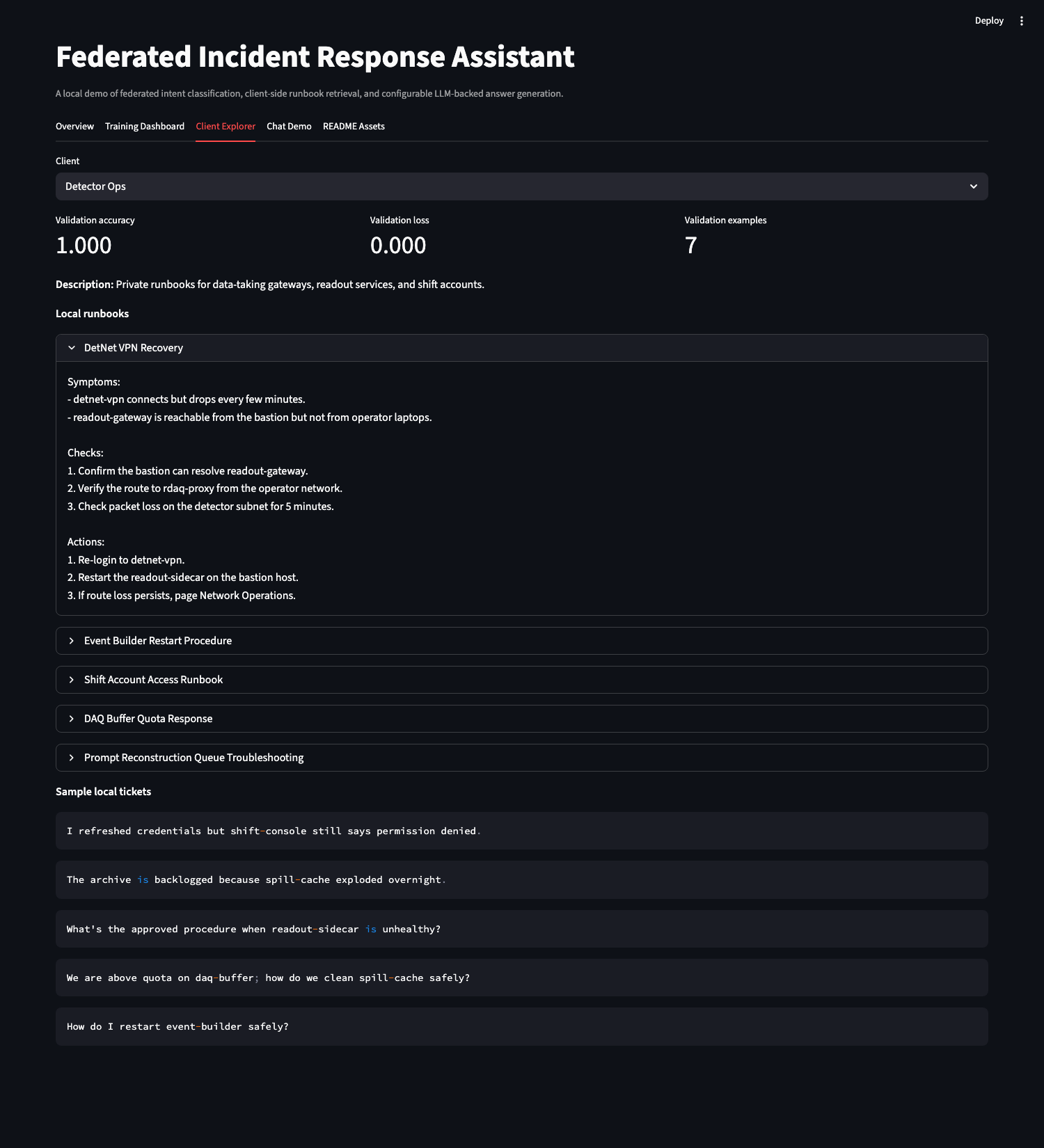
- 将每个客户端的支持工单和运行手册保留在该客户端本地。
- 通过客户端本地的 TF-IDF 搜索检索相关的运行手册片段。
- 通过选定的后端生成答案:`template`、`dspy_ollama`、`dspy_openai_compatible` 或 `nemo_agent_toolkit`。
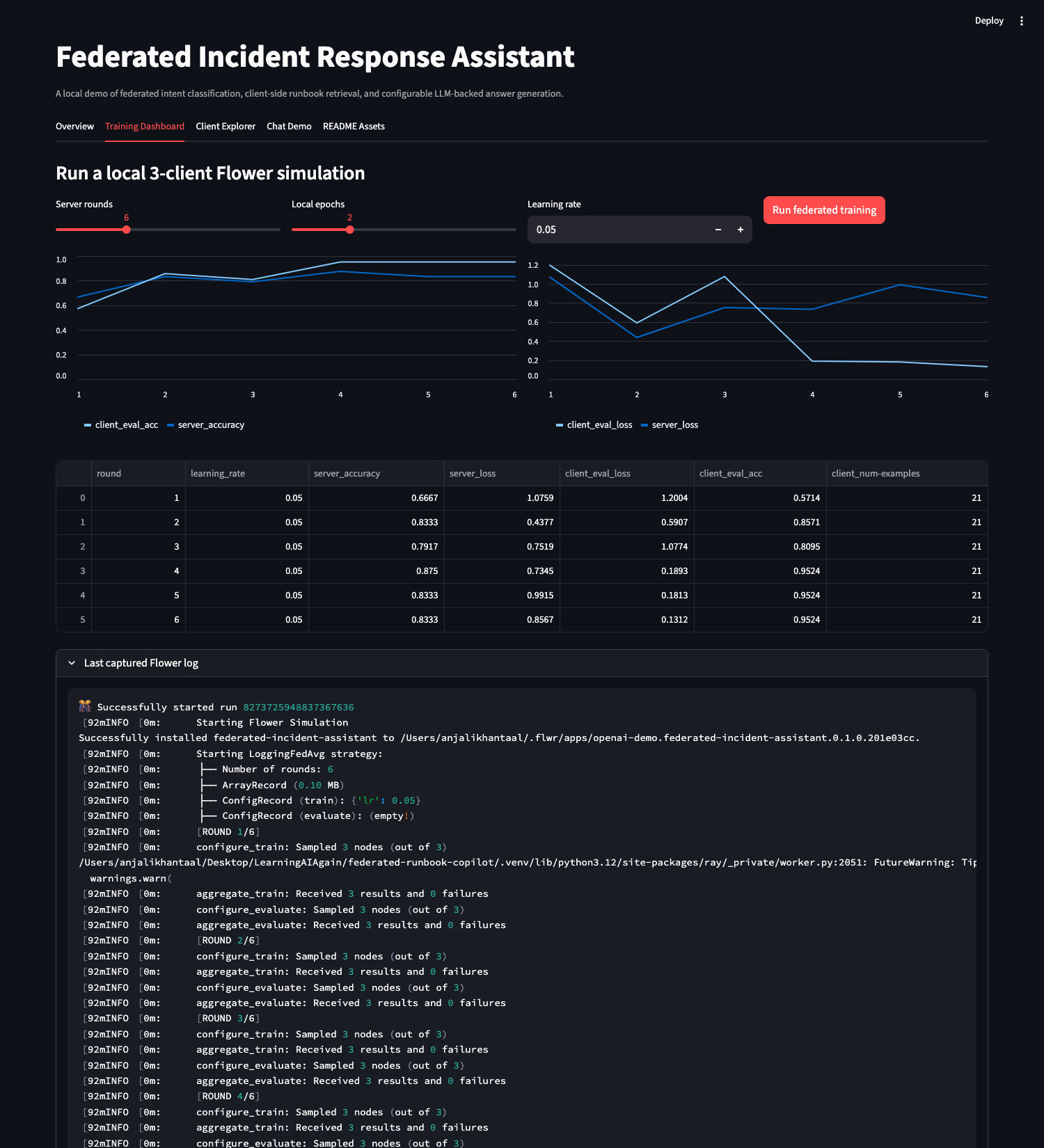
- 在 Streamlit 中展示完整的工作流:训练指标、客户端数据、聊天答案、检索到的来源和日志。
- 将可复现的输出写入 `artifacts/` 目录,并包含针对训练、检索、后端和 UI 服务路径的测试。
## 系统流程
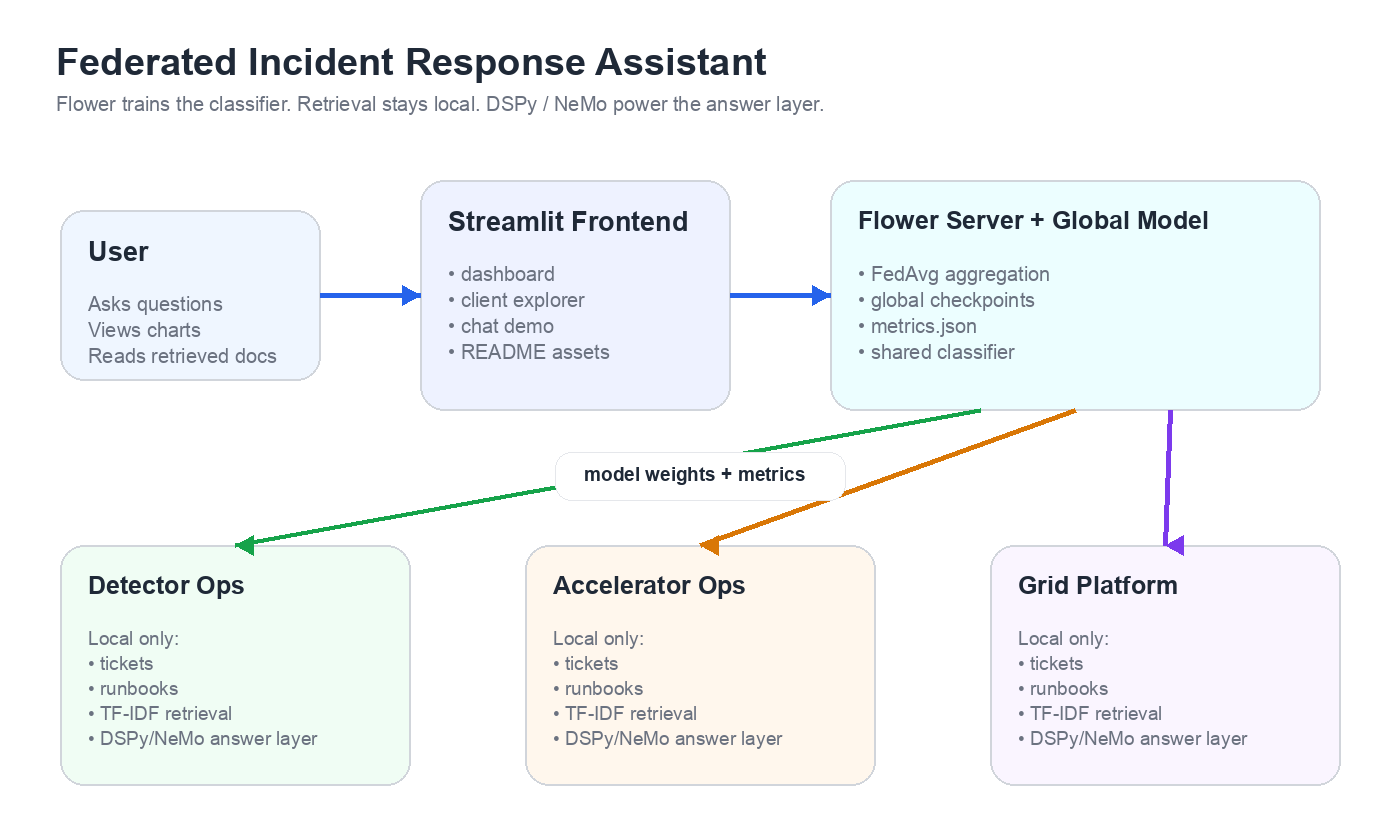
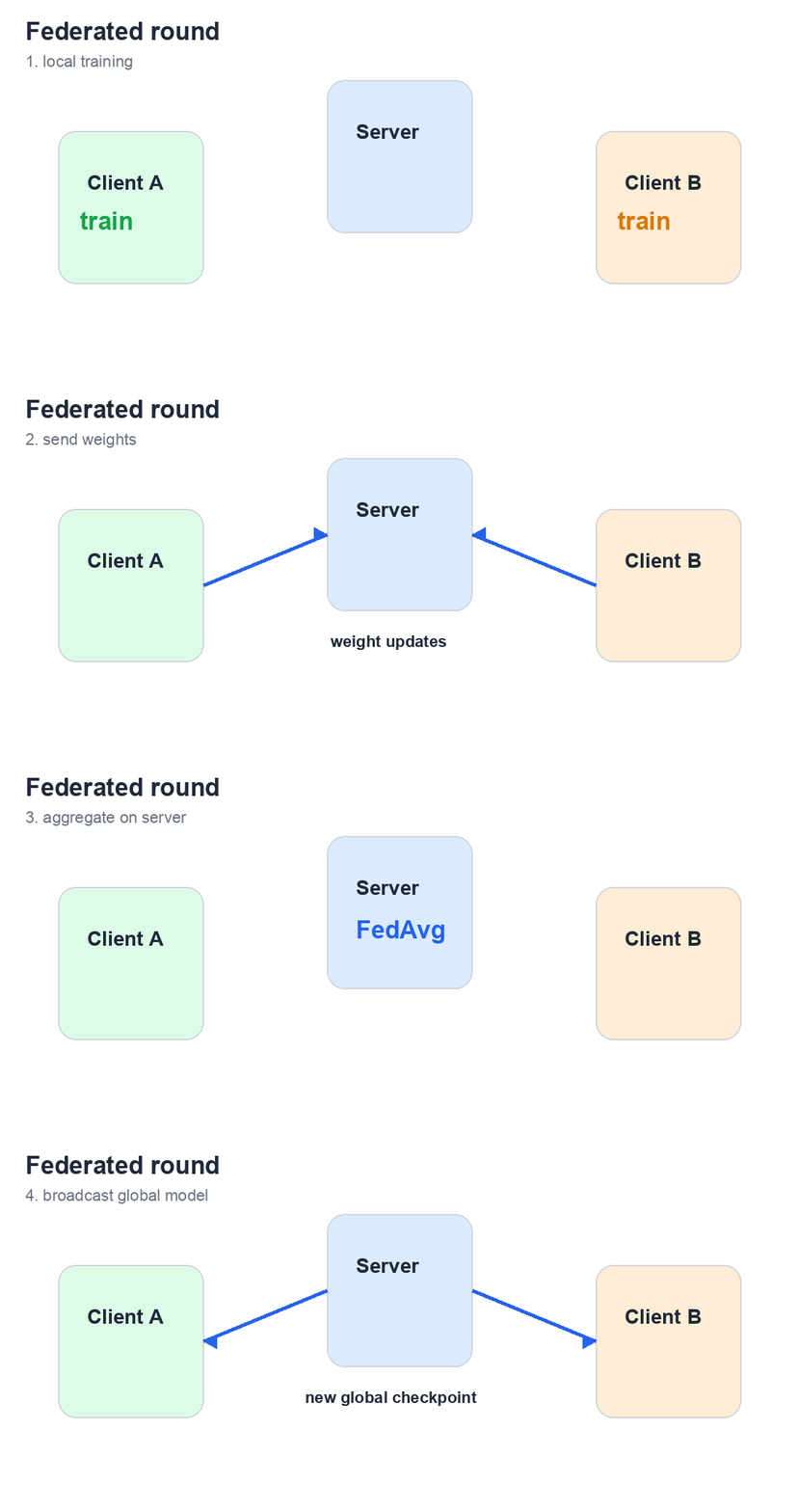
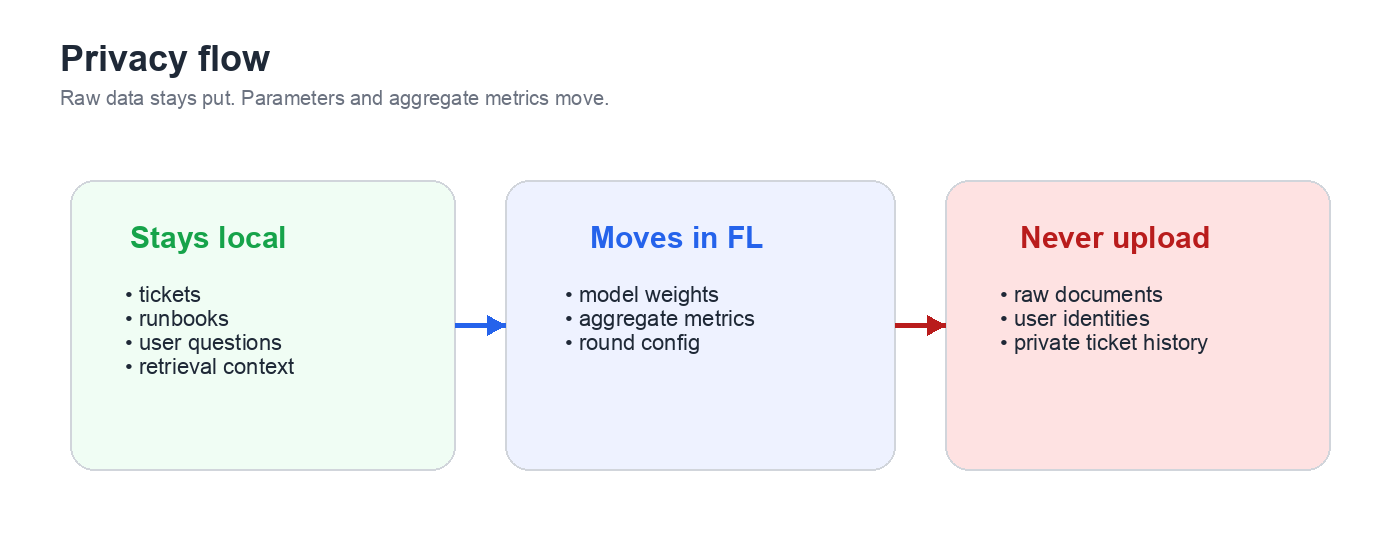
## 应用程序截图
### 概述
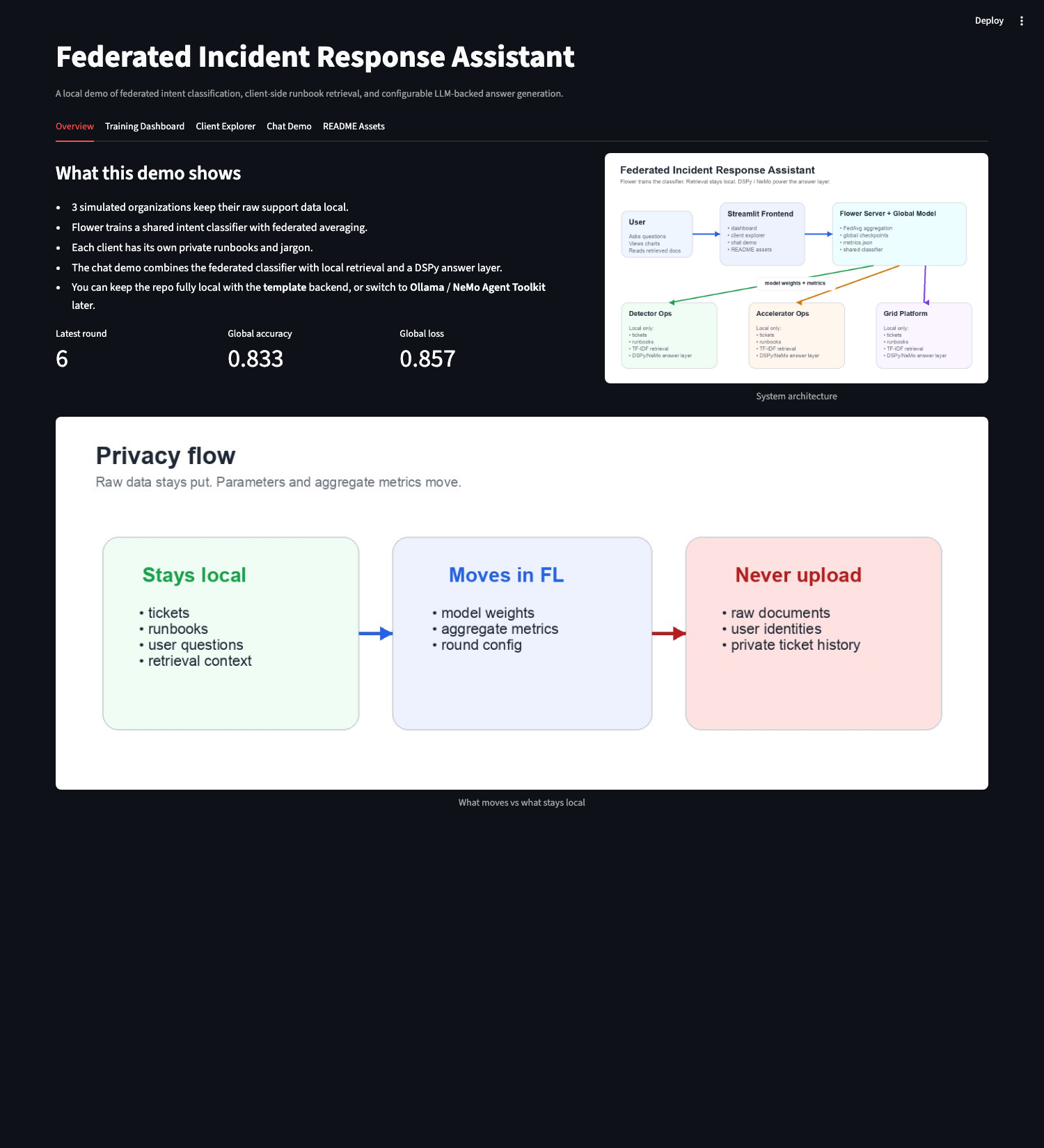
### 训练仪表板
### 客户端浏览器
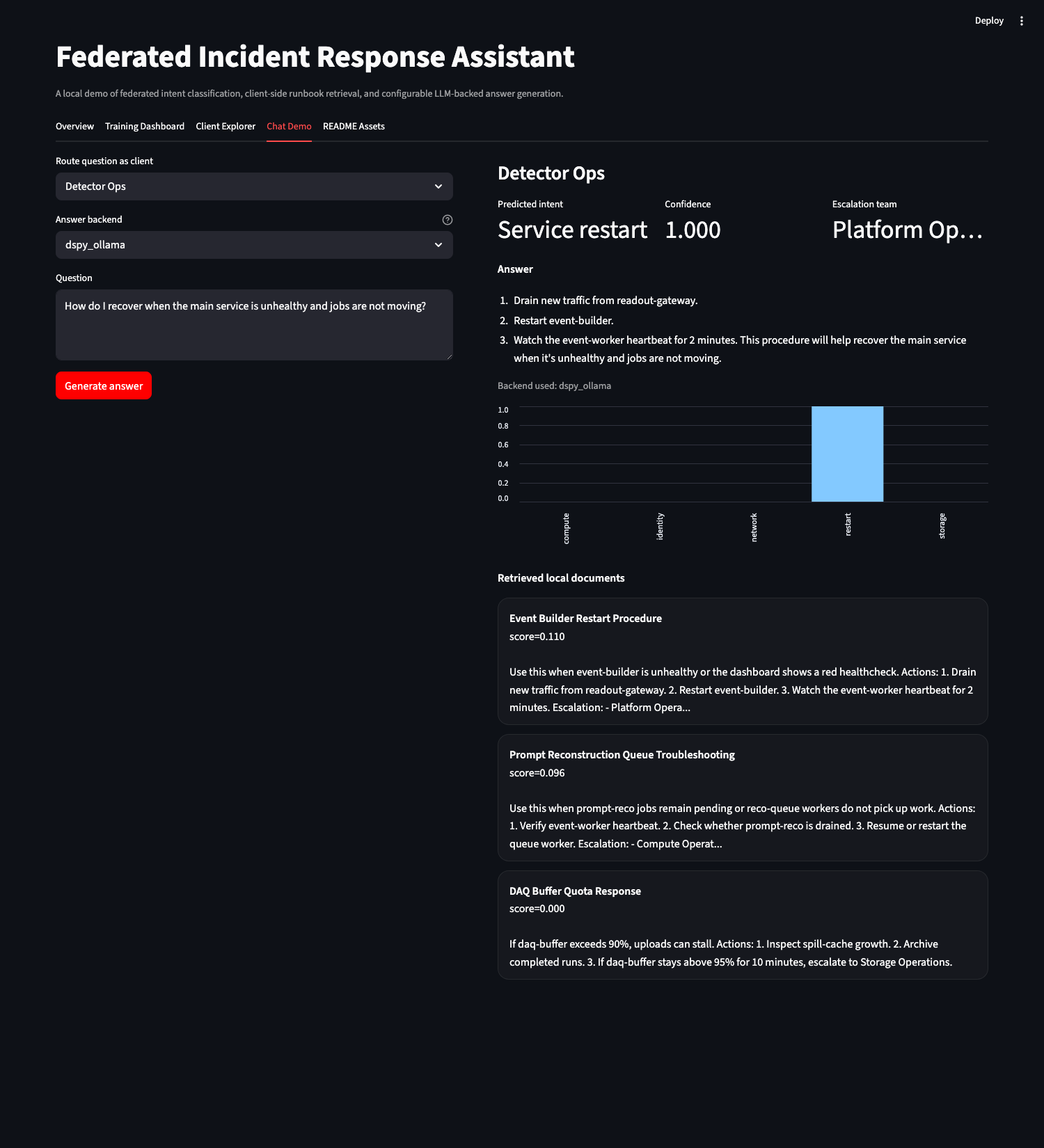
### 使用 DSPy + Ollama 的聊天演示
## 快速开始
从代码库的根目录运行以下命令。
```
make venv
source .venv/bin/activate
cp .env.example .env
make check-backends
make test
make train
make app
```
打开由 `make app` 打印的 Streamlit URL,通常为:
```
http://localhost:8501
```
代码库中附带了初始构建产物,因此您可以在训练之前启动该应用程序。运行 `make train` 会用真实的 Flower 模拟运行替换这些初始文件。
## 提问
在 Streamlit 中打开 **Chat Demo** 选项卡。
1. 选择 **Route question as client**。
2. 选择 **Answer backend**。
3. 输入运维问题。
4. 点击 **Generate answer**。
有用的示例:
```
How do I recover when the main service is unhealthy and jobs are not moving?
I cannot log in to the portal; my proxy may have expired.
The archive queue backlog keeps rising after last night's run.
Where is the runbook for restarting the gateway after heartbeats stop?
```
每个答案都会显示预测的意图、置信度、上报团队、使用的后端、概率图表以及检索到的客户端本地文档。
## 后端模式
分类器和检索步骤始终在本地运行。`LLM_BACKEND` 仅更改答案生成层。
| 后端 | 适用场景 | 所需配置 |
| --- | --- | --- |
| `template` | 需要一个无需密钥的本地演示。 | `LLM_BACKEND=template` |
| `dspy_ollama` | 拥有本地 Ollama 模型。 | `DSPY_OLLAMA_MODEL`、`DSPY_OLLAMA_API_BASE` |
| `dspy_openai_compatible` | 拥有任何与 OpenAI 兼容的 chat completions 服务器。 | `OPENAI_COMPATIBLE_MODEL`、`OPENAI_COMPATIBLE_BASE_URL`、`OPENAI_COMPATIBLE_API_KEY` |
| `nemo_agent_toolkit` | 需要 DSPy 调用 NeMo Agent Toolkit 的 OpenAI 兼容端点。 | `NEMO_MODEL_NAME`、`NEMO_OPENAI_BASE_URL`、`NEMO_OPENAI_API_KEY` |
### DSPy + Ollama
请使用 Ollama 中安装的确切模型标签。
```
ollama list
ollama run llama3.2:3b
```
设置:
```
LLM_BACKEND=dspy_ollama
DSPY_OLLAMA_MODEL=llama3.2:3b
DSPY_OLLAMA_API_BASE=http://localhost:11434
```
验证实时路径:
```
python scripts/check_llm_backends.py --backend dspy_ollama --live
```
### DSPy + OpenAI 兼容服务器
设置:
```
LLM_BACKEND=dspy_openai_compatible
OPENAI_COMPATIBLE_BASE_URL=http://localhost:8000/v1
OPENAI_COMPATIBLE_MODEL=gpt-oss-20b
OPENAI_COMPATIBLE_API_KEY=EMPTY
```
`EMPTY` 仅适用于不需要身份验证的本地服务器。对于托管或受保护的端点,请将其替换为真实的 API 密钥。
### DSPy + NeMo Agent Toolkit
NeMo Agent Toolkit 在独立的环境中运行,因为其依赖项限制与 Flower 当前的 `rich` 要求存在冲突。
```
make nemo-venv
make nemo-validate
make nemo-serve
```
设置:
```
LLM_BACKEND=nemo_agent_toolkit
NEMO_OPENAI_BASE_URL=http://localhost:8000/v1
NEMO_MODEL_NAME=gpt-oss-20b
NEMO_OPENAI_API_KEY=EMPTY
```
在此模式下,请求路径为:
```
App -> DSPy -> NeMo Agent Toolkit -> upstream model
```
参考配置文件为 [config/nemo_agent_toolkit_reference.yml](config/nemo_agent_toolkit_reference.yml)。它在端口 `8000` 上提供与 OpenAI 兼容的端点,并默认转发到位于 `http://localhost:9000/v1` 的上游模型服务器。
## 输出与日志
| 输出 | 位置 |
| --- | --- |
| 全局模型检查点 | `artifacts/global_model.pt` |
| 每轮训练和评估指标 | `artifacts/metrics.json` |
| 最新训练摘要 | `artifacts/summary.json` |
| 上一次 Flower 运行配置 | `artifacts/last_run_config.json` |
| 捕获的 Flower 日志 | `artifacts/last_run.log` |
| Streamlit 日志 | 运行 `make app` 的终端 |
该应用程序不会持久化每个问题的追踪信息。聊天演示会在页面内显示相关的追踪状态:选定的客户端、使用的后端、预测的意图、置信度、概率分布、检索到的文档以及生成的答案。如果 LLM 后端发生故障,应用程序将回退到 `template` 并在答案中包含失败原因。
## 项目布局
```
repo-root/
├── app.py # Streamlit UI
├── artifacts/ # checkpoints, metrics, summaries, logs
├── assets/ # diagrams and captured screenshots
├── config/ # NeMo Agent Toolkit reference config
├── fedrunbook/
│ ├── client_app.py # Flower ClientApp
│ ├── server_app.py # Flower ServerApp
│ ├── strategy.py # FedAvg strategy and artifact export
│ ├── task.py # model, data loaders, train/eval
│ ├── retrieval.py # client-local TF-IDF retrieval
│ ├── dspy_pipeline.py # DSPy answer signature/program
│ ├── llm_backends.py # backend selection and DSPy config
│ └── service.py # app-facing service functions
├── scripts/
│ ├── check_llm_backends.py
│ ├── capture_readme_screenshots.py
│ ├── generate_readme_assets.py
│ └── run_training.py
├── tests/
└── pyproject.toml
```
## 更新 README 资源
重新生成静态图表:
```
python scripts/generate_readme_assets.py
```
启动应用程序后刷新 Streamlit 截图:
```
make app
python scripts/capture_readme_screenshots.py
```
如果 Streamlit 运行在其他端口:
```
STREAMLIT_URL=http://localhost:8502 python scripts/capture_readme_screenshots.py
```
## 验证
```
make test
make check-backends
```
`make check-backends` 用于验证后端配置而无需发起实时模型调用。当目标模型服务器正在运行时,可以在 `scripts/check_llm_backends.py` 命令中添加 `--live` 参数。
标签:AI风险缓解, DLL 劫持, DSPy, FedAvg, Flower, Kubernetes, LLM评估, NeMo, Ollama, OpenAI, PyTorch, Runbook, Streamlit, TF-IDF, 人工智能, 内存规避, 凭据扫描, 分布式机器学习, 大语言模型, 安全运营, 意图分类, 扫描框架, 数据隐私, 文本检索, 用户模式Hook绕过, 联邦学习, 自动化响应, 访问控制, 逆向工具, 隐私计算