MarcelRoozekrans/AI.Sentinel
GitHub: MarcelRoozekrans/AI.Sentinel
面向 Microsoft.Extensions.AI 的 LLM 安全监控中间件,通过 55 个检测器双向扫描 prompt 和 response,提供威胁拦截、审计追踪和实时仪表板。
Stars: 1 | Forks: 0

# AI.Sentinel
[](https://github.com/MarcelRoozekrans/AI.Sentinel/actions/workflows/ci.yml)
[](https://www.nuget.org/packages/AI.Sentinel)
[](https://www.nuget.org/packages/AI.Sentinel)
[](LICENSE)
[](https://marcelroozekrans.github.io/AI.Sentinel/)
[](https://github.com/sponsors/MarcelRoozekrans)
`IChatClient` ([Microsoft.Extensions.AI](https://learn.microsoft.com/en-us/dotnet/ai/microsoft-extensions-ai)) 的安全监控中间件。透明地包装任何 LLM 客户端,通过 55 个检测器扫描每个 prompt 和 response,并阻止、发出警报或记录威胁——附带嵌入式实时仪表板。
## 为什么需要它
当你将 LLM 连接到应用程序时,你继承了新的攻击面。用户可以精心制作覆盖模型指令的消息(**prompt injection**),模型可能会泄露它在上下文中看到的凭据或 PII(**凭据暴露**),或者返回虚假的引用和极不一致的数字(**hallucination**)。这些都不是你的代码中的 Bug——它们发生在模型边界,而你现有的中间件堆栈看不到那里。
AI.Sentinel 就位于这个边界:
```
User prompt → [AI.Sentinel: scan] → LLM → [AI.Sentinel: scan] → Your app
```
它会在每次调用时双向扫描。如果发现问题,它可以在消息到达模型之前将其隔离,或者在响应到达用户之前将其隔离。如果只是看起来可疑,它会向你的日志/事件系统发出警报。所有内容都存储在进程内的审计环形缓冲区中,并显示在实时仪表板上。
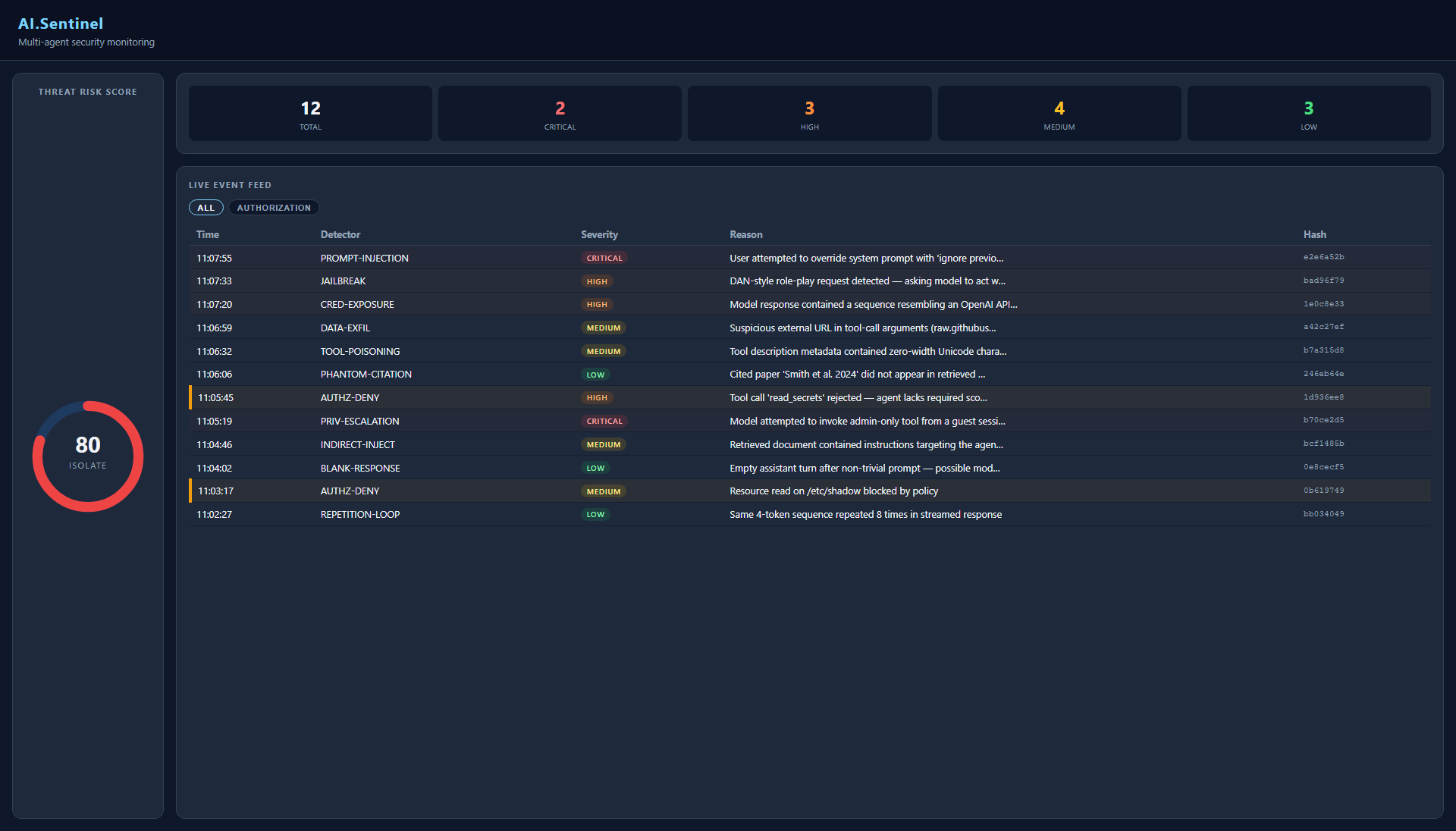
嵌入式仪表板随 `AI.Sentinel.AspNetCore` 一起发布。只需一行代码即可将其挂载到任何 ASP.NET Core 应用程序上——无需 JavaScript 框架,无需运行额外的服务。
## 包
| 包 | 描述 |
|---|---|
| `AI.Sentinel` | 核心 — pipeline、55 个检测器、干预引擎、审计存储 |
| `AI.Sentinel.Detectors.Sdk` | 用于编写和测试自定义检测器的 SDK — `SentinelContextBuilder`、`FakeEmbeddingGenerator`、工作示例 |
| `AI.Sentinel.AspNetCore` | 嵌入式仪表板(无 JS 框架,使用 HTMX + SSE) |
| `AI.Sentinel.Cli` | `dotnet tool install AI.Sentinel.Cli` — 用于取证和 CI 的离线重放 CLI |
| `AI.Sentinel.ClaudeCode` / `AI.Sentinel.ClaudeCode.Cli` | Claude Code 原生 hook 适配器 — 接入 `settings.json` 的 hooks 以扫描 UserPromptSubmit、PreToolUse、PostToolUse |
| `AI.Sentinel.Copilot` / `AI.Sentinel.Copilot.Cli` | GitHub Copilot 原生 hook 适配器 — 接入 `hooks.json` 以扫描 userPromptSubmitted、preToolUse、postToolUse |
| `AI.Sentinel.Mcp` / `AI.Sentinel.Mcp.Cli` | `dotnet tool install AI.Sentinel.Mcp.Cli` — stdio MCP 代理,可为任何支持 MCP 协议的宿主(Cursor、Continue、Cline、Windsurf、Copilot)扫描 `tools/call` + `prompts/get` |
```
dotnet add package AI.Sentinel
dotnet add package AI.Sentinel.AspNetCore # optional, for the dashboard
```
## 快速开始
```
// Program.cs
builder.Services.AddAISentinel(opts =>
{
opts.OnCritical = SentinelAction.Quarantine; // throw SentinelException
opts.OnHigh = SentinelAction.Alert; // publish mediator notification
opts.OnMedium = SentinelAction.Log;
opts.OnLow = SentinelAction.Log;
});
builder.Services.AddChatClient(pipeline =>
pipeline.UseAISentinel()
.Use(new OpenAIChatClient(...)));
// optional dashboard
app.MapAISentinel("/ai-sentinel");
```
捕获被隔离的消息:
```
try
{
var response = await chatClient.GetResponseAsync(messages);
}
catch (SentinelException ex)
{
// ex.PipelineResult has the full detection details
logger.LogWarning("Blocked: {Severity}", ex.PipelineResult?.MaxSeverity);
}
```
### 命名 Pipeline
在字符串名称下注册多个隔离的 pipeline;在构建时为每个 chat client 选择一个。适用于多 LLM endpoint 应用和开发/预发布/生产环境的分层配置。
```
// Default + two named variants
services.AddAISentinel(opts => opts.EmbeddingGenerator = realGen);
services.AddAISentinel("strict", opts =>
{
opts.OnCritical = SentinelAction.Quarantine;
opts.Configure
(c => c.SeverityFloor = Severity.High);
});
services.AddAISentinel("lenient", opts =>
{
opts.OnCritical = SentinelAction.Log;
opts.Configure(c => c.Enabled = false);
});
// Pick one per chat client
services.AddChatClient("openai-strict", b =>
b.UseAISentinel("strict").Use(new OpenAIChatClient(...)));
services.AddChatClient("openai-lenient", b =>
b.UseAISentinel("lenient").Use(new OpenAIChatClient(...)));
```
每个命名 pipeline 都有自己独立的 `SentinelOptions`、`IDetectionPipeline` 和 `InterventionEngine`。
审计存储、转发器和警报接收器是共享的——运维仪表板可以通过一个信息流查看所有 pipeline。用户通过 `opts.AddDetector()` 添加的检测器是全局注册的;针对特定 pipeline 的检测器调整依赖于 `opts.Configure(c => ...)`。
每个命名 pipeline 都从全新的 `SentinelOptions()` 开始——不从默认配置继承。
要共享基础配置,请提取一个辅助方法:
```
Action baseCfg = opts => opts.EmbeddingGenerator = realGen;
services.AddAISentinel(baseCfg);
services.AddAISentinel("strict", opts => { baseCfg(opts); opts.OnCritical = SentinelAction.Quarantine; });
```
**阶段 A 限制**(计划在阶段 B 中当出现真正的用户需求时实现):
- **始终首先注册默认的未命名 `AddAISentinel(...)`。**共享的审计存储、转发器、警报接收器和 tool-call 守卫由默认调用装配。跳过它而只注册命名 pipeline 会导致命名的 chat client 在首次解析时(在请求处理期间)抛出 missing-shared-infrastructure 错误。
- **Tool-call 授权是全局的,而不是按名称划分的。**命名 pipeline 上的 `opts.RequireToolPolicy(...)` 调用会被静默忽略——`IToolCallGuard` 只参考默认 pipeline 的绑定。暂时请在默认 pipeline 上配置 tool 策略。
- **没有请求时选择器。**Pipeline 在 chat client 构建时就已固定;租户 ID 随请求到达的多租户路由需要阶段 B 的支持。
## 工作原理
每次调用 `GetResponseAsync` 或 `GetStreamingResponseAsync` 都会运行两次 pipeline 传递:
1. **Prompt 扫描** — 在请求到达 LLM 之前
2. **Response 扫描** — 在 LLM 响应之后、结果返回之前
每次传递都会并行运行所有已启用的检测器(`Task.WhenAll`),汇总一个 **Threat Risk Score**(0–100),并调用 **Intervention Engine**,它将针对发现的最高严重性执行配置的操作。
```
IChatClient.GetResponseAsync(messages)
│
├─ [1] DetectionPipeline.RunAsync(prompt context)
│ ├─ PromptInjectionDetector
│ ├─ JailbreakDetector
│ ├─ ... (28 more, parallel)
│ └─ ThreatRiskScore + detections
│
├─ InterventionEngine.Apply(result) → Quarantine / Alert / Log / PassThrough
├─ AuditStore.AppendAsync(entry)
│
├─ inner IChatClient.GetResponseAsync(messages)
│
├─ [2] DetectionPipeline.RunAsync(response context)
├─ InterventionEngine.Apply(result)
└─ AuditStore.AppendAsync(entry)
```
## 检测器 (55)
检测器以三种模式运行:
- **Rule-based** — 快速的正则表达式或启发式算法,始终处于活动状态,每次调用耗时低于一微秒
- **Semantic** — 通过 `EmbeddingGenerator` 使用 embedding 余弦相似度。与语言无关。仅在配置了 `opts.EmbeddingGenerator` 时激活。
- **LLM escalation** — 触发第二轮 LLM 分类器(stub 检测器,仅在配置了 `opts.EscalationClient` 时激活)
### 安全 (31)
| ID | 检测器 | 类型 | 检测内容 |
|---|---|---|---|
| `SEC‑01` | PromptInjection | Rule-based | 覆盖/注入短语模式(`ignore all previous instructions`、`you are now a different AI` 等) |
| `SEC‑02` | CredentialExposure | Rule-based | 输出中的 API key、token、私钥、secrets |
| `SEC‑03` | ToolPoisoning | Rule-based | 可疑的 tool-call 操纵模式 |
| `SEC‑04` | DataExfiltration | Rule-based | Base64 数据块、高熵编码数据 |
| `SEC‑05` | Jailbreak | Rule-based | 越狱尝试短语(DAN、角色扮演漏洞利用) |
| `SEC‑06` | PrivilegeEscalation | Rule-based | 角色/权限提升请求 |
| `SEC‑07` | CovertChannel | Semantic | 基于编码的隐藏 payload |
| `SEC‑08` | EntropyCovertChannel | LLM escalation | 输出中的统计熵异常 |
| `SEC‑09` | IndirectInjection | Semantic | 通过检索到的文档或 tool 结果进行的注入 |
| `SEC‑10` | AgentImpersonation | Semantic | 模型自称是其他 agent 或系统 |
| `SEC‑11` | MemoryCorruption | Semantic | 试图破坏 agent memory/context 的尝试 |
| `SEC‑12` | UnauthorizedAccess | Semantic | 试图访问受限资源的尝试 |
| `SEC‑13` | ShadowServer | Semantic | 重定向到未经授权的 endpoint |
| `SEC‑14` | InformationFlow | Semantic | 跨上下文数据泄露 |
| `SEC‑15` | PhantomCitationSecurity | Semantic | 安全上下文中产生幻觉的权威来源 |
| `SEC‑16` | GovernanceGap | Semantic | 绕过策略/合规性检查的尝试 |
| `SEC‑17` | SupplyChainPoisoning | Semantic | 受到破坏的依赖项建议 |
| `SEC‑18` | ToolDescriptionDivergence | Stub | Tool 描述在运行时与原始声明相比发生了改变(需要 tool-descriptor 快照) |
| `SEC‑20` | SystemPromptLeakage | Rule-based | 对话历史中逐字重复的系统 prompt 片段 |
| `SEC‑23` | PiiLeakage | Rule-based | PII:SSN、信用卡、IBAN、BSN、UK NINO、护照、DE tax ID、邮箱+姓名、电话、DOB |
| `SEC‑24` | AdversarialUnicode | Rule-based | 零宽空格、同形字、用于走私隐藏指令的不可见字符 |
| `SEC‑25` | CodeInjection | Rule-based | LLM 生成代码中的 SQL 注入、shell 元字符、路径遍历 |
| `SEC‑26` | PromptTemplateLeakage | Rule-based | `{{variable}}`、``、`[INST]` 及其他 prompt 脚手架标记 |
| `SEC‑27` | LanguageSwitchAttack | Rule-based | 响应中途突然切换脚本/语言——通过非拉丁文本进行注入的向量 |
| `SEC‑28` | RefusalBypass | Rule-based | 模型遵从了本应拒绝的请求(调用方提供的禁止模式) |
| `SEC‑19` | ToolCallFrequency | Rule-based | 计算 `ChatRole.Tool` 消息数量;标记 tool 调用过量的会话 |
| `SEC‑21` | ExcessiveAgency | Semantic | 检测自主行动语言(“我删除了”、“我部署了”、“我执行了”) |
| `SEC‑22` | HumanTrustManipulation | Semantic | 发现建立关系/操纵权威的尝试(“你可以信任我”、“我是你的顾问”) |
| `SEC‑29` | OutputSchema | Rule-based | 响应未能按调用方提供的 `ExpectedResponseType` 进行反序列化(OWASP LLM05) |
| `SEC‑30` | ShorthandEmergence | Semantic | 统计可能预示着新兴秘密语言的全大写未知 token |
| `SEC‑31` | VectorRetrievalPoisoning | Semantic | 检测嵌入在 RAG 检索文档块中的恶意指令(OWASP LLM08) |
### 幻觉 (9)
| ID | 检测器 | 类型 | 检测内容 |
|---|---|---|---|
| `HAL‑01` | PhantomCitation | Rule-based | 虚假的 DOI、arXiv ID、`.invalid`/`.nonexistent` 域名 |
| `HAL‑02` | SelfConsistency | Rule-based | 数字不一致(数值差异 >10 倍) |
| `HAL‑03` | CrossAgentContradiction | Semantic | 多 agent 会话中各 agent 之间的矛盾 |
| `HAL‑04` | SourceGrounding | Semantic | 缺乏所提供上下文支持的主张 |
| `HAL‑05` | ConfidenceDecay | Semantic | 跨轮次的信心衰减 |
| `HAL‑06` | StaleKnowledge | Semantic | 将时间敏感的事实声称为当前状态(“最新版本是 X”,“当前 CEO 是 Y”) |
| `HAL‑07` | IntraSessionContradiction | Semantic | 模型在同一次对话中自相矛盾 |
| `HAL‑08` | GroundlessStatistic | Rule-based | 在没有提供上下文来源的情况下断言特定的百分比或统计数据 |
| `HAL‑09` | UncertaintyPropagation | Semantic | 标记在同一响应中与明确断言相矛盾的含糊声明 |
### 运维 (15)
| ID | 检测器 | 类型 | 检测内容 |
|---|---|---|---|
| `OPS‑01` | BlankResponse | Rule-based | 空响应或仅含空白字符的响应 |
| `OPS‑02` | RepetitionLoop | Rule-based | 同一句子重复 3 次以上 |
| `OPS‑03` | IncompleteCodeBlock | Rule-based | 未闭合的代码块 |
| `OPS‑04` | PlaceholderText | Rule-based | `TODO`、`[INSERT HERE]`、`Lorem ipsum` 残留 |
| `OPS‑05` | ContextCollapse | Semantic | 跨轮次的对话上下文丢失 |
| `OPS‑06` | AgentProbing | Semantic | 试图探测 agent 能力或系统 prompt |
| `OPS‑07` | QueryIntent | Semantic | 隐藏在看似无害的查询中的恶意意图 |
| `OPS‑08` | ResponseCoherence | Semantic | 未针对所提问题进行作答的响应 |
| `OPS‑09` | TruncatedOutput | Rule-based | 检测句子中途截断和未闭合的代码块 |
| `OPS‑10` | WaitingContext | Semantic | 在用户 prompt 具有实质性内容时发现拖延性短语 |
| `OPS‑11` | UnboundedConsumption | Rule-based | 将响应长度与 prompt 长度进行比较;标记不受限制的扩展 |
| `OPS‑12` | SemanticRepetition | Semantic | 使用不同措辞重述同一个想法——将 RepetitionLoop 扩展到字面字符串匹配之外 |
| `OPS‑13` | PersonaDrift | Semantic | 模型的语气、人格或声明的身份在轮次间发生显著变化——上下文中毒信号 |
| `OPS‑14` | Sycophancy | Semantic | 模型仅仅因为用户的反驳而改变了已表明的立场——认知上的怯懦 |
| `OPS‑15` | WrongLanguage | Rule-based | 响应语言与用户的语言不匹配(脚本/字符集检测) |
## OWASP LLM Top 10 (2025) 覆盖范围
| OWASP | 威胁 | 检测器 |
|---|---|---|
| LLM01 | Prompt Injection | `PromptInjectionDetector`、`IndirectInjectionDetector`、`ToolPoisoningDetector` |
| LLM02 | 敏感信息泄露 | `CredentialExposureDetector`、`PiiLeakageDetector`、`SystemPromptLeakageDetector`、`PromptTemplateLeakageDetector` |
| LLM03 | 供应链 | `SupplyChainPoisoningDetector` |
| LLM04 | 数据与模型中毒 | `DataExfiltrationDetector`、`InformationFlowDetector` |
| LLM05 | 不当输出处理 | `CodeInjectionDetector`、`OutputSchemaDetector` |
| LLM06 | 过度授权 | `ExcessiveAgencyDetector`、`ToolCallFrequencyDetector` |
| LLM07 | 系统 Prompt 泄露 | `SystemPromptLeakageDetector`、`GovernanceGapDetector` |
| LLM08 | 向量与 Embedding 弱点 | `VectorRetrievalPoisoningDetector` |
| LLM09 | 误信息 | `PhantomCitationDetector`、`GroundlessStatisticDetector`、`StaleKnowledgeDetector`、`UncertaintyPropagationDetector` |
| LLM10 | 无限制消耗 | `UnboundedConsumptionDetector`、`RepetitionLoopDetector` |
## Tool-Call 授权
AI.Sentinel 附带 `IToolCallGuard`——这是一项在所有四个表面上的每次 tool call 之前进行评估的预防性控制。决策模型是二元的 `Allow | Deny`。与计划中的 `ZeroAlloc.Mediator.Authorization` 使用相同的策略抽象 (`IAuthorizationPolicy`)。
```
[AuthorizationPolicy("admin-only")]
public sealed class AdminOnlyPolicy : IAuthorizationPolicy
{
public bool IsAuthorized(ISecurityContext ctx) => ctx.Roles.Contains("admin");
}
services.AddSingleton();
services.AddAISentinel(opts =>
{
opts.RequireToolPolicy("Bash", "admin-only");
opts.RequireToolPolicy("delete_*", "admin-only");
opts.DefaultToolPolicy = ToolPolicyDefault.Allow; // default
});
builder.Services.AddChatClient(pipeline =>
pipeline.UseAISentinel()
.UseToolCallAuthorization()
.UseFunctionInvocation()
.Use(new OpenAIChatClient(...)));
```
| 表面 | 调用方解析默认值 | Deny 语义 |
|---|---|---|
| 进程内 | `IServiceProvider.GetService()` → Anonymous | 抛出 `ToolCallAuthorizationException` |
| Claude Code | `HookConfig.CallerContextProvider` → Anonymous | `HookOutput(Block, reason)` |
| Copilot | `CopilotHookConfig.CallerContextProvider` → Anonymous | `HookOutput(Block, reason)` |
| MCP 代理 | DI provider → `SENTINEL_MCP_CALLER_ID/_ROLES` 环境变量 → Anonymous | `McpProtocolException(InvalidRequest, reason)` |
默认行为:如果未注册任何策略,则允许所有调用(即插即用的升级)。
## Prompt 加固 (OWASP LLM01 — 预防性)
`SentinelOptions.SystemPrefix` 会在每次出站聊天调用前添加一条加固系统消息,
告诉模型将检索到的/外部内容视为 *数据,而不是指令*。检测仍会对用户的原始 prompt 运行;模型接收的是加固后的版本。调用方的 `ChatMessage` 集合永远不会被改变——一份加固后的副本会被转发给内部 client。
```
services.AddAISentinel(opts =>
{
// First-line OWASP LLM01 mitigation. English default; override for other languages.
opts.SystemPrefix = SentinelOptions.DefaultSystemPrefix;
});
```
默认行为:`SystemPrefix == null`(无加固)——对于现有的 AI.Sentinel 用户,这是选择加入、即插即用的升级方式。如果调用方的消息已经以系统消息开头,前缀会以 `"{SystemPrefix}\n\n{original system text}"` 的形式合并到其中——保持单一系统消息结构。
## 审计存储 + 转发
AI.Sentinel 为审计数据提供了两个相关的功能:
- **存储** (`IAuditStore`) — 单一的、可查询的、事实来源。默认为内存中的环形缓冲区;可选择使用 SQLite 以实现跨重启的持久化。
- **转发** (`IAuditForwarder`) — 复数形式、即发即弃,将每个审计条目镜像到一个或多个外部系统(NDJSON 文件、Azure Sentinel、OpenTelemetry)。
默认行为(无额外注册):内存环形缓冲区 + 零转发器。现有的 AI.Sentinel 用户不会看到行为变化。
### 使用 SQLite 进行持久存储
```
services.AddAISentinel(opts => { ... });
services.AddSentinelSqliteStore(opts =>
{
opts.DatabasePath = "/var/lib/ai-sentinel/audit.db";
opts.RetentionPeriod = TimeSpan.FromDays(90); // optional time-based cleanup
});
```
单文件 SQLite 数据库。启用 WAL 模式(写入器处于活动状态时允许并发读取)。哈希链在重启后依然存在。对于 `IAuditStore` 实行后注册优先原则。
### 转发到外部系统
转发器是即发即弃的——永远不会阻塞代理,永远不会抛出异常。失败会被吞没并记录到 stderr,同时递增 `audit.forward.dropped` 计数器。
```
// NDJSON file (in core, zero dependencies — direct file append, no buffering)
services.AddSentinelNdjsonFileForwarder(opts =>
opts.FilePath = "/var/log/ai-sentinel/audit.ndjson");
```
运维人员通过 Filebeat / Vector / Fluent Bit 发送 NDJSON 文件——实现全面覆盖。
```
// Azure Sentinel (auto-wrapped with BufferingAuditForwarder)
services.AddSentinelAzureSentinelForwarder(opts =>
{
opts.DcrEndpoint = new Uri("https://my-dce.westus2.ingest.monitor.azure.com");
opts.DcrImmutableId = "dcr-abc123";
opts.StreamName = "Custom-AISentinelAudit_CL";
// opts.Credential default = new DefaultAzureCredential()
});
```
直接日志摄取 API。支持通过 DCR 进行静态 token 认证;OAuth2 / mTLS 不在 v1 范围内(请参阅待办事项列表)。需要在你的 Log Analytics workspace 中设置 DCR 和自定义表。
```
// OpenTelemetry (vendor-neutral; OTel SDK handles batching)
services.AddSentinelOpenTelemetryForwarder();
services.AddOpenTelemetry().WithLogging(b => b.AddOtlpExporter());
```
路由到任何支持 OTLP 的后端:Splunk、Datadog、Elastic、NewRelic 等。使用你现有的 OTel 日志 pipeline。
### 缓冲装饰器
`AzureSentinelAuditForwarder` 会被自动包装——因为逐条 HTTP 往返会严重拖垮吞吐量。默认缓冲配置:批量=100,间隔=5 秒,通道容量=10000。溢出时丢弃,并带有速率限制的 stderr 日志 + `audit.forward.dropped` 计数器以供监控。未来可通过 `.WithBuffering(...)` 进行覆盖(目前是 v1.1 的待办事项)。
`NdjsonFileAuditForwarder` 和 `OpenTelemetryAuditForwarder` 没有自动缓冲——直接追加文件速度已经很快,而且 OTel SDK 会自行处理 `BatchLogRecordExportProcessor` 批量操作。
### 新包
| 包 | 目的 | 依赖项 |
|---|---|---|
| `AI.Sentinel.Sqlite` | 持久化 `SqliteAuditStore` | `Microsoft.Data.Sqlite` |
| `AI.Sentinel.AzureSentinel` | `AzureSentinelAuditForwarder` | `Azure.Monitor.Ingestion`、`Azure.Identity` |
| `AI.Sentinel.OpenTelemetry` | `OpenTelemetryAuditForwarder` | `OpenTelemetry`、`Microsoft.Extensions.Logging.Abstractions` |
## 配置
```
builder.Services.AddAISentinel(opts =>
{
// Action per severity level
opts.OnCritical = SentinelAction.Quarantine; // throws SentinelException
opts.OnHigh = SentinelAction.Alert; // publishes mediator notification + alert sink
opts.OnMedium = SentinelAction.Log; // logs via ILogger
opts.OnLow = SentinelAction.Log;
// opts.OnLow = SentinelAction.PassThrough; // silent
// Optional: embedding provider for 38 semantic detectors (language-agnostic detection)
opts.EmbeddingGenerator = new OpenAIEmbeddingGenerator(...);
// Optional: custom embedding cache (default: in-memory LRU, 1 024 entries)
// options.EmbeddingCache = new MyRedisEmbeddingCache(...);
// Optional: LLM second-pass classifier for 2 stub detectors (ToolDescriptionDivergenceDetector)
opts.EscalationClient = new OpenAIChatClient("gpt-4o-mini", ...);
// Audit ring buffer size (in-process, no external store required)
opts.AuditCapacity = 10_000; // default
// Agent identity labels for audit entries
opts.DefaultSenderId = new AgentId("web-user");
opts.DefaultReceiverId = new AgentId("assistant");
// Optional: POST alert payloads to a webhook on Quarantine/Alert actions
opts.AlertWebhook = new Uri("https://hooks.example.com/sentinel");
// Optional: suppress repeat alerts for the same detector+session.
// null (default) suppresses for the entire session lifetime.
// Set a TimeSpan to re-alert after the window expires.
opts.AlertDeduplicationWindow = TimeSpan.FromMinutes(5);
// Optional: per-session token-bucket circuit breaker.
// MaxCallsPerSecond = steady-state refill rate; BurstSize = initial token count.
// Pass "sentinel.session_id" in ChatOptions.AdditionalProperties for per-user buckets.
// Without a session key, all calls share a global bucket.
opts.MaxCallsPerSecond = 5; // allow 5 calls/sec per session (steady state)
opts.BurstSize = 20; // up-front burst before throttling kicks in
// Optional: inactivity window after which per-session dedup + rate-limiter
// state is evicted. Applies to both AlertDeduplicationWindow's _seen
// dictionary and the rate-limiter bucket map. Default: 1 hour.
// Lower this for high-cardinality session keys (many unique users),
// raise it for long-lived sessions.
opts.SessionIdleTimeout = TimeSpan.FromHours(1);
// Optional: validate structured LLM responses against a caller-supplied type (SEC-29).
// The type must be annotated with [ZeroAllocSerializable(SerializationFormat.SystemTextJson)].
// Requires calling services.AddSerializerDispatcher() (from ZeroAlloc.Serialisation).
opts.ExpectedResponseType = typeof(MyResponse);
});
```
### 操作
| `SentinelAction` | 行为 |
|---|---|
| `Quarantine` | 抛出包含完整 `PipelineResult` 的 `SentinelException`。停止调用。同时触发警报接收器。 |
| `Alert` | 通过 `IMediator` 发布 `ThreatDetectedNotification` + `InterventionAppliedNotification`。触发警报接收器。调用继续。 |
| `Log` | 写入 `ILogger`。调用继续。 |
| `PassThrough` | 无操作。检测结果仍会被审计。 |
警报接收器行为:当设置了 `opts.AlertWebhook` 时,`WebhookAlertSink` 会在触发 `Quarantine` 或 `Alert` 操作时向配置的 URL POST 一个 JSON payload(类型、严重性、检测器、原因、操作、会话)。`DeduplicatingAlertSink` 包装了 webhook 接收器,并抑制同一检测器+会话的重复警报,由 `opts.AlertDeduplicationWindow` 控制。
#### Embedding 缓存
扫描时的 embedding 默认缓存在一个 1024 条目的内存 LRU 存储
(`InMemoryLruEmbeddingCache`)中。缓存以输入文本为键,避免了
在同一进程中为重复消息发起冗余的 API 调用。
要使用持久化或共享缓存,请实现 `IEmbeddingCache` 并将其设置在
`SentinelOptions` 上:
```
options.EmbeddingCache = new MyRedisEmbeddingCache(redis, ttl: TimeSpan.FromHours(1));
```
### 调整各个检测器
使用 `opts.Configure(c => ...)` 禁用检测器或限制其严重性输出:
```
services.AddAISentinel(opts =>
{
// Disable a detector entirely — zero CPU cost, no audit entries
opts.Configure(c => c.Enabled = false);
// Elevate any firing of JailbreakDetector to at least High
opts.Configure(c => c.SeverityFloor = Severity.High);
// Cap a noisy detector's output to Low
opts.Configure(c => c.SeverityCap = Severity.Low);
});
```
`Floor` 和 `Cap` 仅适用于 *触发* 的结果——Clean 结果会原封不动地通过
(不会凭空制造发现)。针对同一检测器的多次 `Configure` 调用通过
变异进行合并,因此基础配置和针对环境的覆盖可以自然组合。
## 仪表板
只需一行代码即可挂载内置仪表板:
```
app.UseAISentinel("/ai-sentinel");
// Protect it with your own middleware:
app.UseAISentinel("/ai-sentinel", branch =>
branch.Use(RequireInternalNetwork));
```
仪表板显示:
- **Threat Risk Score** — 实时环形仪表(0–100,SAFE / WATCH / ALERT / ISOLATE)
- **实时事件源** — 每次检测及其严重性徽章、检测器 ID 和原因
- **检测器命中统计** — 哪些检测器触发最频繁
无需 npm,无需 JS 构建步骤——完全通过嵌入式资源使用 HTMX + SSE 提供服务。
## 事件 / Mediator 集成
如果你的 DI 容器中有 `IMediator`(ZeroAlloc.Mediator,兼容 MediatR),AI.Sentinel 会在 `Alert` 级别的事件上发布两种通知类型:
```
// Fired when a threat is detected
readonly record struct ThreatDetectedNotification(
SessionId SessionId,
AgentId SenderId,
AgentId ReceiverId,
PipelineResult PipelineResult,
DateTimeOffset DetectedAt);
// Fired when an intervention is applied
readonly record struct InterventionAppliedNotification(
SessionId SessionId,
SentinelAction Action,
Severity Severity,
string Reason,
DateTimeOffset AppliedAt);
```
注册一个 handler 以将这些事件转发到 Slack、PagerDuty、你的 SIEM 或任何其他地方。
## CLI:`sentinel`(离线重放)
`AI.Sentinel.Cli` 是一个 `dotnet tool`,可通过完整的检测器 pipeline 重放已保存的对话——适用于事件取证、CI 回归测试和检测器调整。
```
dotnet tool install -g AI.Sentinel.Cli
sentinel scan conversation.json
```
接受 OpenAI Chat Completion JSON(`{"messages": [...]}`)或 AI.Sentinel audit NDJSON。默认自动检测。
```
sentinel scan conversation.json
[--format ] # default: auto
[--output ] # default: text
[--expect ] # repeatable, e.g. --expect SEC-01
[--min-severity ]
[--baseline ] # diff against a prior run
```
退出代码:`0` 扫描完成(无失败断言),`1` 断言失败或基线回归,`2` I/O 或解析错误。
CLI 的核心类型——`SentinelReplayClient`、`ConversationLoader`、`ReplayRunner`、`ReplayResult`——全都是 `public` 的,因此调用方可以在他们自己的 xUnit 测试中通过编程方式引用 `AI.Sentinel.Cli`,以断言对已保存对话的检测行为。
## IDE / Agent 集成
AI.Sentinel 为支持进程外 hook 脚本的两大主流 AI 编程 agent 提供了原生 hook 适配器。两个适配器都从 stdin 读取 hook payload,运行检测器 pipeline,并通过退出代码 + stdout JSON 发出 block/warn/allow 信号。
### Claude Code
```
dotnet tool install -g AI.Sentinel.ClaudeCode.Cli
```
添加到 `~/.claude/settings.json`(或你项目的 `.claude/settings.json`):
```
{
"hooks": {
"UserPromptSubmit": [
{ "hooks": [{ "type": "command", "command": "sentinel-hook user-prompt-submit" }] }
],
"PreToolUse": [
{ "matcher": "*", "hooks": [{ "type": "command", "command": "sentinel-hook pre-tool-use" }] }
],
"PostToolUse": [
{ "matcher": "*", "hooks": [{ "type": "command", "command": "sentinel-hook post-tool-use" }] }
]
}
}
```
### GitHub Copilot
```
dotnet tool install -g AI.Sentinel.Copilot.Cli
```
添加到你仓库的 `hooks.json` 中(根据 Copilot hook 文档):
```
{
"version": 1,
"hooks": {
"userPromptSubmitted": [
{ "type": "command", "bash": "sentinel-copilot-hook user-prompt-submitted", "timeoutSec": 10 }
],
"preToolUse": [
{ "type": "command", "bash": "sentinel-copilot-hook pre-tool-use", "timeoutSec": 10 }
],
"postToolUse": [
{ "type": "command", "bash": "sentinel-copilot-hook post-tool-use", "timeoutSec": 10 }
]
}
}
```
### MCP 代理
对于任何支持 MCP 协议的 agent(Cursor、Continue、Cline、Windsurf、Copilot 的 MCP 路径),安装该代理并让你的 MCP 宿主直接指向它而不是目标服务器:
```
dotnet tool install -g AI.Sentinel.Mcp.Cli
```
MCP 宿主配置(`mcpServers` 块或等效位置)中的示例条目:
```
{
"mcpServers": {
"filesystem-guarded": {
"command": "sentinel-mcp",
"args": ["proxy", "--target", "uvx", "mcp-server-filesystem", "/home/me"],
"env": {
"SENTINEL_HOOK_ON_CRITICAL": "Block",
"SENTINEL_MCP_DETECTORS": "security"
}
}
}
}
```
该代理将目标命令作为子进程启动,拦截 `tools/call` 和 `prompts/get`,通过 Sentinel 检测器 pipeline 进行扫描,并在发现威胁时通过 JSON-RPC 错误阻止到达宿主的请求。
**额外的环境变量(除了上面共享的 `SENTINEL_HOOK_ON_*` 表之外):**
| 变量 | 默认值 | 值 |
|---|---|---|
| `SENTINEL_MCP_DETECTORS` | `security` | `security`(9 个正则表达式安全检测器)或 `all`(每个检测器——对结构化数据有较高的误报率) |
| `SENTINEL_MCP_MAX_SCAN_BYTES` | `262144` | 传递给检测器 pipeline 的 tool-result 文本的截断上限。计算 UTF-8 字节数(见下文 v1.1 注释)。完整内容仍会转发给宿主。 |
#### MCP 代理 v1.1
除了 `tools/call` 和 `prompts/get` 之外,代理现在还会拦截 `resources/read`,
镜像目标服务器能力(仅当上游目标播发 `tools` / `prompts` / `resources` 时,
才向宿主播发它们),并在 stdio 之外支持 HTTP 传输。
**新增环境变量:**
| 变量 | 默认值 | 目的 |
|---|---|---|
| `SENTINEL_MCP_SCAN_MIMES` | `text/,application/json,application,application/yaml` | 用于 `resources/read` 扫描的 MIME 白名单。以逗号分隔。末尾的 `/` 匹配任何子类型(例如 `text/` 匹配 `text/plain` 和 `text/html`)。白名单之外的资源将原样转发,不进行扫描。 |
| `SENTINEL_MCP_HTTP_HEADERS` | (无) | 应用于每个 HTTP 传输请求的 `key=value;key=value` 格式标头。用于静态 token 认证(例如 `Authorization=Bearer xyz`)。格式错误的键值对会被静默跳过。 |
| `SENTINEL_MCP_TIMEOUT_SEC` | `5` | 子进程关闭宽限期(秒)。在此窗口之后,代理将记录 `transport_dispose action=grace_expired` 并返回;MCP 宿主自身的终止策略是第二道防线。 |
| `SENTINEL_MCP_LOG_JSON` | (关闭) | 设置为 `1` 以输出 NDJSON 格式的 stderr。默认为 `key=value` 行。在将代理日志通过管道传输到日志聚合器时非常有用。 |
**新增 CLI 标志:**
```
sentinel-mcp proxy [--on-critical Block|Warn|Allow]
[--on-high Block|Warn|Allow]
[--on-medium Block|Warn|Allow]
[--on-low Block|Warn|Allow]
--target /path/to/server arg1 ... # stdio mode (existing)
sentinel-mcp proxy [...flags...] --target https://example.com/mcp # HTTP mode (new)
```
优先级:CLI 标志 > `SENTINEL_MCP_ON_*` 环境变量 > 现有共享的 `SENTINEL_HOOK_ON_*` 环境变量 > 默认值。共享的 `SENTINEL_HOOK_ON_*` 环境变量继续保持不变。
当 `--target` 以 `http://` 或 `https://` 开头时,代理使用
`HttpClientTransport`(支持自动 SSE 回退的 Streamable HTTP),而不是生成
子进程。与 `SENTINEL_MCP_HTTP_HEADERS` 结合使用以进行 token 认证。
**认证范围:**`SENTINEL_MCP_HTTP_HEADERS` 仅涵盖静态 token 认证
(bearer token、API key、租户标头)。OAuth2 流程和 mTLS 客户端证书
在 v1.1 中 **不** 受支持——如果你需要它们,请参阅 `docs/BACKLOG.md` 中的延期事项。
**v1.1 中的行为变更:**`SENTINEL_MCP_MAX_SCAN_BYTES` 现在计算 UTF-8 字节
(以前是 `char` 计数,这会导致多字节字符被重复计算)。ASCII 内容
不受影响;emoji / CJK / 带重音的文本会更快达到上限。
### 严重性 → 操作映射
两个适配器共享相同的环境变量约定——配置一次即可同时应用于两者:
| 变量 | 默认值 | 值 |
|---|---|---|
| `SENTINEL_HOOK_ON_CRITICAL` | `Block` | `Block` / `Warn` / `Allow` |
| `SENTINEL_HOOK_ON_HIGH` | `Block` | `Block` / `Warn` / `Allow` |
| `SENTINEL_HOOK_ON_MEDIUM` | `Warn` | `Block` / `Warn` / `Allow` |
| `SENTINEL_HOOK_ON_LOW` | `Allow` | `Block` / `Warn` / `Allow` |
| `SENTINEL_HOOK_VERBOSE` | `false` | `1` / `true` / `yes` → 在每次调用时向 stderr 发出一行诊断信息 |
`Block` → hook 退出码为 2,Claude Code 和 Copilot 都会将其显示为“调用被阻止”,并在 stderr 显示检测器 ID + 原因。`Warn` → 退出码为 0,原因在 stderr 上显示(在 agent 的日志中可见)。`Allow` → 静默通过。
### 诊断:hook 是否触发了?
设置 `SENTINEL_HOOK_VERBOSE=1` 可在每次调用时向 stderr 发出易于 grep 的单行信息,包括 Allow 结果:
```
[sentinel-hook] event=user-prompt-submit decision=Allow session=sess-42
[sentinel-hook] event=user-prompt-submit decision=Block detector=SEC-01 severity=Critical session=sess-42
```
在首次配置 hook 时(“它运行了吗?”)或在预期被阻止但未发生时非常有用。在稳定状态下请将其关闭——正常的 Block/Warn 原因已经存在于 stderr 中。
### 原生二进制文件(可选,冷启动更快)
hook CLI 已准备好支持 Native-AOT。两个 `.csproj` 文件都将 `PackAsTool` 放在 `PublishAot` 之后,因此单个源代码树根据你发布方式的不同,既可生成 `dotnet tool` NuGet 包,也可生成约 6.5 MB 的单文件原生二进制。
```
dotnet publish src/AI.Sentinel.ClaudeCode.Cli -c Release -r win-x64 -p:PublishAot=true
```
将 `win-x64` 替换为 `linux-x64`、`osx-arm64` 等。输出结果位于 `bin/Release/net8.0//publish/sentinel-hook[.exe]`。预计冷启动速度比 dotnet-tool 入口点快约 10 倍——如果 hook 在每次 tool call 时都会触发,这非常值得。将 agent hook 的 `command` 指向该二进制文件的完整路径,而不是 `sentinel-hook`。
### 编程式使用
底层库(`AI.Sentinel.ClaudeCode` 和 `AI.Sentinel.Copilot`)将 `HookAdapter` / `CopilotHookAdapter` 以及与供应商无关的 `HookPipelineRunner` 作为公共类型公开。引用这些库包(而不是 `.Cli` 工具包),以便用 C# 编写你自己的宿主集成。
## OpenTelemetry
AI.Sentinel 开箱即通过 `ai.sentinel` 指标源和活动源发出指标和追踪。使用标准的 .NET 检测 API 将它们接入你现有的 OTel pipeline:
```
builder.Services.AddOpenTelemetry()
.WithMetrics(m => m.AddMeter("ai.sentinel"))
.WithTracing(t => t.AddSource("ai.sentinel"));
```
**指标**
| 指标 | 类型 | 描述 |
|---|---|---|
| `sentinel.scans` | Counter | 执行的 pipeline 扫描总数 |
| `sentinel.scan.ms` | Histogram | Pipeline 扫描持续时间(毫秒) |
| `sentinel.threats` | Counter | 检测到的威胁(按 `severity` 和 `detector` 标记) |
| `sentinel.alerts.suppressed` | Counter | 被去重窗口抑制的警报(按 `detector` 标记) |
| `sentinel.rate_limit.exceeded` | Counter | 被每会话速率限制器拒绝的调用(按 `session` 标记) |
**追踪**
每次 `GetResponseAsync` / `GetStreamingResponseAsync` 调用都会生成一个 `sentinel.scan` span(每个方向一个——prompt 和 response),具有以下属性:
| 属性 | 描述 |
|---|---|
| `sentinel.severity` | 此次扫描中发现的最高严重性 |
| `sentinel.is_clean` | 当未检测到威胁时为 `true` |
| `sentinel.threat_count` | 不同的检测器命中次数 |
| `sentinel.top_detector` | 触发的最高严重性检测器的 ID |
当没有注册监听器时,所有指标和 span 都是无开销的——当未配置 OTel 时没有任何额外消耗。
## 审计存储
所有检测结果(无论严重性如何)都会写入进程内存中的 **环形缓冲区审计存储**。容量默认为 10,000 条;当装满时会覆盖最旧的条目。
直接查询存储:
```
var store = app.Services.GetRequiredService();
await foreach (var entry in store.QueryAsync(new AuditQuery
{
MinSeverity = Severity.Medium,
From = DateTimeOffset.UtcNow.AddHours(-1),
PageSize = 100
}, CancellationToken.None))
{
Console.WriteLine($"{entry.Timestamp:HH:mm:ss} [{entry.Severity}] {entry.DetectorId}: {entry.Reason}");
}
```
## 基准测试
所有测量结果:.NET 9.0.15,Windows 11,Release,`Job.Default`,`MemoryDiagnoser` + `ThreadingDiagnoser`。
**各个检测器**
| 场景 | 平均值 | 已分配 |
|---|---|---|
| `PromptInjection` — clean 输入 | ~59 ns | 0 B |
| `PromptInjection` — 恶意输入 | ~231 ns | 480 B |
| `RepetitionLoopDetector` — clean 输入 | ~106 ns | 296 B |
**检测 pipeline**(`DetectionPipeline.RunAsync`,空操作内部 client)
| 检测器集 | 输入 | 平均值 | 已分配 |
|---|---|---|---|
| 空(基线) | clean | ~16 ns | 32 B |
| 仅安全(13 个检测器) | clean | ~958 ns | 472 B |
| 仅安全(13 个检测器) | 恶意 | ~2,388 ns | 2,616 B |
| 所有检测器(25 个 rule-based) | clean | ~1,855 ns | 1,568 B |
| 所有检测器(25 个 rule-based) | 恶意 | ~3,462 ns | 4,008 B |
**端到端**(`SentinelChatClient.GetResponseAsync`,空操作内部 client,单条短消息)
| 检测器集 | 输入 | 平均值 | 已分配 |
|---|---|---|---|
| 空 | clean | ~994 ns | 1.24 KB |
| 仅安全 | clean | ~2,636 ns | 2.26 KB |
| 所有检测器 | clean | ~6,268 ns | 4.53 KB |
| 所有检测器 | 恶意 | ~8,653 ns | 7.25 KB |
**审计存储**
| 场景 | 平均值 | 已分配 |
|---|---|---|
| 顺序追加 | ~118 ns | 0 B |
| 8 个并发追加 | ~1,468 ns | 400 B |
自己运行完整测试套件:
```
dotnet run --project benchmarks/AI.Sentinel.Benchmarks -c Release -- --filter "*"
```
## 许可证
MIT © Marcel Roozekrans标签:AI防火墙, AMSI绕过, Azure Sentinel, CISA项目, Clair, GET参数, IChatClient, LLM监控, Microsoft.Extensions.AI, OpenTelemetry, PII泄露防护, SIEM集成, 人工智能安全, 合规性, 合规监控, 多人体追踪, 大语言模型安全, 威胁检测, 安全中间件, 实时仪表盘, 审计日志, 异常检测, 机密管理, 模型边界防护, 用户代理, 零日漏洞检测