BishopFox/aimap
GitHub: BishopFox/aimap
AIMap 是一个用于发现、指纹识别和安全测试互联网暴露AI服务端点的专用平台。
Stars: 232 | Forks: 42
# AIMap
**面向互联网规模的暴露型AI智能体基础设施发现与安全测试平台。**
`)
5. 点击 **运行** — 扫描管道将执行:
- **Shodan搜索** — 拉取匹配的主机
- **httpx扫描** — 验证主机是否存活
- **Nuclei扫描** — 对存活主机运行自定义模板
- **富化** — 框架检测、认证探测、风险评分
6. 通过实时WebSocket状态栏或轮询扫描详情页监控进度
### 搜索端点
使用带Shodan风格查询语法的搜索栏:
```
protocol:mcp # MCP servers
auth:none # No authentication
risk:critical # Risk score >= 9.0
risk:high # Risk score 7.0 – 8.9
risk:medium # Risk score 4.0 – 6.9
risk:low # Risk score 1.0 – 3.9
tool:query_db # Endpoints exposing a specific tool
country:US # By country code
port:11434 # By port number
org:"Amazon AWS" # By hosting organization (quote multi-word values)
has:system_prompt # Endpoints with leaked system prompts
```
自由组合过滤器:
```
protocol:mcp auth:none country:US # Unauthenticated MCP servers in the US
risk:critical tool:exec_code # Critical endpoints with code execution tools
protocol:ollama port:11434 # Ollama on default port
```
任何不匹配 `key:value` 模式的文本都将作为跨所有索引字段的自由文本搜索。
### 启动攻击测试
1. 导航到端点详情页
2. 点击 **攻击** 打开测试面板
3. 选择一个攻击配置文件 — 系统会根据协议自动选择引擎:
- **MCP** → 工具枚举、未授权工具调用、通过工具描述的提示词注入
- **Ollama** → 模型列表、模型权重提取、提示词注入
- **OpenAI兼容** → 模型枚举、补全滥用、系统提示词提取
4. 通过WebSocket实时查看流式传入的结果
5. 结果包括严重性评级、原始请求/响应对以及修复指导
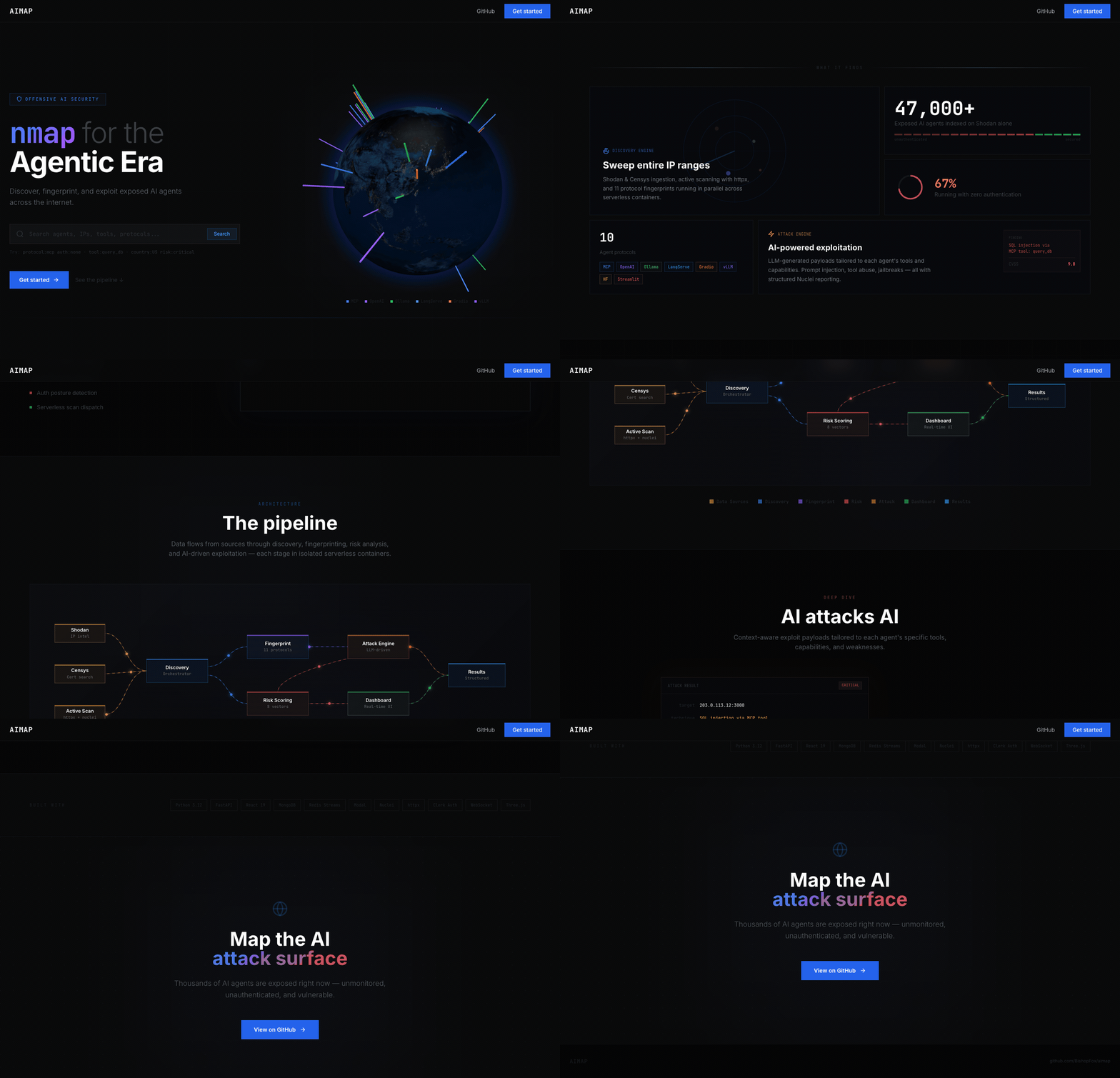
### 探索地球仪
着陆页包含一个交互式3D地球仪,展示所有已发现的端点:
- **图钉颜色** = 协议类型 (蓝色 = MCP, 绿色 = Ollama, 紫色 = OpenAI兼容 等)
- **图钉高度** = 风险评分
- **悬停** 查看端点摘要 (IP、端口、协议、风险、认证、工具、模型、位置)
- **点击** 导航到端点详情页
- 鼠标拖动旋转,滚轮缩放
## Nuclei模板
`templates/` 目录中的自定义模板:
| 模板文件 | 用途 |
|----------|---------|
| `mcp-server-detect.yaml` | 通过SSE传输和JSON-RPC能力响应检测MCP服务器 |
| `mcp-tool-enum.yaml` | 枚举MCP服务器暴露的工具 (名称、描述、输入模式) |
| `openai-compat-detect.yaml` | 通过 `/v1/models` 检测OpenAI兼容端点 |
| `langserve-detect.yaml` | 检测暴露Playground的LangServe部署 |
| `prompt-leak.yaml` | 尝试通过常见注入技术提取系统提示词 |
## API参考
所有端点都以 `/api/` 为前缀。
| 方法 | 路径 | 描述 |
|--------|------|-------------|
| `GET` | `/health` | 健康检查 |
| `GET` | `/endpoints` | 列出端点 (分页、可过滤) |
| `POST` | `/endpoints/search` | 使用查询语法进行高级搜索 |
| `GET` | `/endpoints/globe` | 3D地球仪的地理数据 |
| `GET` | `/endpoints/stats` | 聚合统计信息 |
| `GET` | `/endpoints/{id}` | 端点详情 |
| `POST` | `/endpoints/{id}/enrich` | 触发单个端点的富化 |
| `POST` | `/endpoints/enrich-all` | 批量富化 |
| `GET` | `/scans` | 列出扫描 |
| `POST` | `/scans` | 创建扫描 |
| `POST` | `/scans/{id}/run` | 执行扫描 |
| `GET` | `/scans/query-presets` | 可用的Shodan查询预设 |
| `WS` | `/scans/{id}/progress` | 实时扫描进度 |
| `POST` | `/attack` | 启动攻击测试 |
| `WS` | `/attack/{id}/stream` | 实时攻击日志流 |
| `GET` | `/attack/{id}/status` | 攻击状态 |
## 项目结构
```
aimap/
├── backend/
│ ├── app/
│ │ ├── main.py # FastAPI app, lifespan, CORS, routers
│ │ ├── config.py # Pydantic settings from env
│ │ ├── auth.py # Clerk JWT verification (bypass when CLERK_ISSUER empty)
│ │ ├── database.py # Async MongoDB (Motor) connection
│ │ ├── limiter.py # SlowAPI rate limiting
│ │ ├── routes/
│ │ │ ├── endpoints.py # CRUD + search + globe + enrichment
│ │ │ ├── scans.py # Scan lifecycle + execution + WebSocket
│ │ │ └── attack.py # Attack dispatch + Redis Streams + WebSocket
│ │ ├── discovery/
│ │ │ ├── orchestrator.py # Scan pipeline: Shodan → httpx → Nuclei → ingest
│ │ │ ├── shodan_adapter.py # 32 curated Shodan queries + result normalization
│ │ │ ├── nuclei_runner.py # Nuclei subprocess runner + finding parser
│ │ │ └── base.py # SourceAdapter abstract base
│ │ └── services/
│ │ ├── attack_mcp.py # MCP protocol attack engine
│ │ ├── attack_ollama.py # Ollama attack engine
│ │ ├── attack_openclaw.py # OpenClaw/Clawdbot attack engine
│ │ ├── enrichment.py # Shodan/Nuclei enrichment + risk scoring
│ │ ├── live_probe.py # HTTP probing for model/tool enumeration
│ │ ├── search.py # Shodan-style query parser → MongoDB filters
│ │ ├── redis_client.py # Async Redis singleton with fallback
│ │ └── concurrency.py # Semaphore + Redis-based slot limiting
│ ├── Dockerfile
│ └── requirements.txt
├── frontend/
│ ├── src/
│ │ ├── App.tsx # Routes + Clerk auth wrapper
│ │ ├── pages/
│ │ │ ├── Marketing.tsx # Public landing page with 3D globe
│ │ │ ├── Landing.tsx # Authenticated dashboard with globe
│ │ │ ├── Search.tsx # Endpoint search with query syntax
│ │ │ ├── Explore.tsx # Browse/filter all endpoints
│ │ │ ├── AgentDetail.tsx # Single endpoint deep-dive
│ │ │ ├── TestAgent.tsx # Attack test launcher
│ │ │ ├── Scans.tsx # Scan management
│ │ │ └── Ranges.tsx # CIDR range management
│ │ ├── components/
│ │ │ ├── GlobeVisualization.tsx # globe.gl 3D globe + legend
│ │ │ ├── Layout.tsx # App shell (sidebar + navbar)
│ │ │ └── ui/ # shadcn/ui components
│ │ ├── hooks/useApi.ts # SWR hooks for all API endpoints
│ │ └── lib/api-client.ts # Fetch wrapper with Clerk token injection
│ ├── Dockerfile
│ ├── nginx.conf
│ └── tailwind.config.js
├── templates/ # Nuclei YAML templates
├── docs/ # GitHub Pages static site
├── docker-compose.yml
├── .env.example
└── README.md
```
## 并发限制
平台强制实施全局并发限制以防止滥用:
- **最多3个并发扫描** — 额外的扫描将收到HTTP 429响应
- **最多5个并发攻击** — 额外的攻击将收到HTTP 429响应
- **速率限制** — 扫描和攻击创建端点10次请求/分钟
使用Docker Compose时,这些限制通过Redis计数器 (跨容器) 执行。在本地开发模式下,它们回退到 `asyncio.Semaphore` (单进程)。
## 可选:Modal无服务器
```
MODAL_ENABLED=true
```
启用后,`POST /scans/{id}/run` 和 `POST /attack` 将调用 `modal.Function.from_name("aimap", "run_scan_task")` / `run_attack_task` 而不是本地运行。如果Modal调度失败,则回退到本地执行。
## 许可证
MIT 许可证。详情参见 [LICENSE](LICENSE)。
本项目由 [Bishop Fox](https://bishopfox.com) 维护。
标签:WSL, 搜索引擎查询, 请求拦截, 逆向工具