b-nnett/codex-plusplus
GitHub: b-nnett/codex-plusplus
Codex++ 是一个为 OpenAI Codex 桌面应用提供本地插件加载与开发框架的 tweak 系统。
Stars: 3602 | Forks: 183
# Codex++
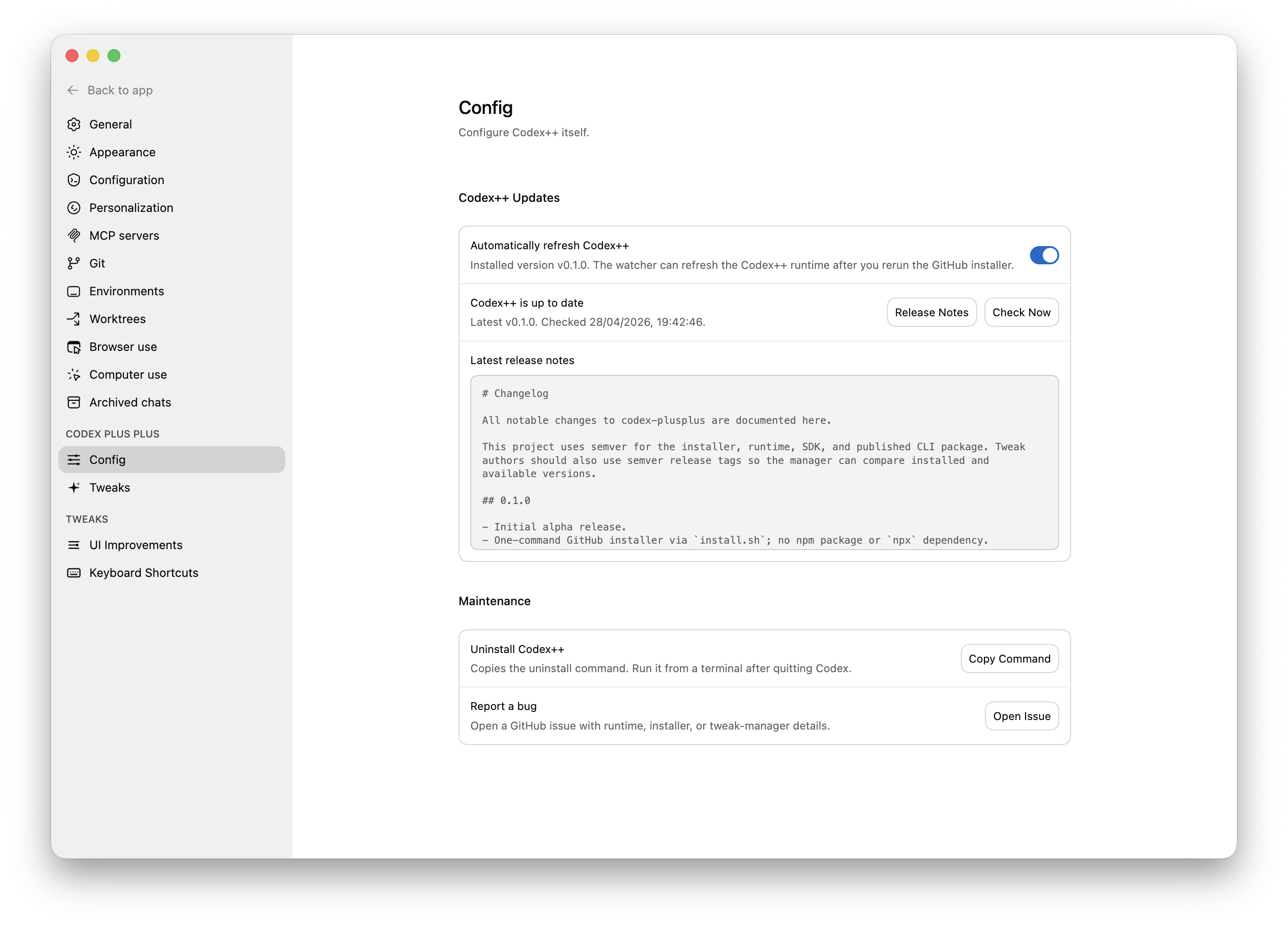
Codex++ 允许你将本地 tweak 安装到 OpenAI Codex 桌面应用中。Tweak 可以更改 UI、添加设置页面、运行主进程代码,并通过 Codex++ bridge 使用原生 OS 级功能。
[加入 Discord 社区](https://discord.gg/6bY6gGX36H)。
 ## TL;DR
Codex++ 会对你的本地 Codex 应用进行 patch,使其在启动时加载一个小型的 Codex++ runtime。
该 runtime 位于你的用户数据目录中,而不是 Codex 内部。它会在本地的 `tweaks/` 文件夹中查找 tweak,并在 Codex 打开时加载它们。
应用的 patch 非常小。你的 tweak、config、log、backup 和 runtime 文件都保留在应用包之外,因此你无需重新构建 Codex 即可编辑 tweak。
当 Codex 更新时,patch 通常会被移除。Codex++ 会安装一个 watcher 来检测这种情况并重新应用 patch。
1.0.0 版本增加了更清晰的 patch 方式、更好的调试输出、Owl runtime 检测、浏览器宿主调试,以及对 AppKit、Metal、helper 进程和 tweak 拥有的原生模块的原生 bridge 支持。
## 目录
- [安装](#install)
- [Codex++ 是什么](#what-codex-is)
- [工作原理](#how-it-works)
- [常用命令](#common-commands)
- [文件存放位置](#where-files-live)
- [编写 Tweak](#writing-tweaks)
- [Owl 与原生 Bridge](#owl-and-native-bridge)
- [浏览器宿主模式](#browser-host-mode)
- [更新与恢复](#updates-and-recovery)
- [安全性](#security)
- [更多文档](#more-docs)
## 安装
从 Codex 进行自动安装:
```
Inspect and install this for me: https://github.com/b-nnett/codex-plusplus
Tell me where you install it and send me the local path for adding new tweaks.
```
Homebrew:
```
brew install b-nnett/codex-plusplus/codexplusplus
codexplusplus install
```
GitHub 源码安装器:
```
curl -fsSL https://raw.githubusercontent.com/b-nnett/codex-plusplus/main/install.sh | bash
```
Windows PowerShell:
```
irm https://raw.githubusercontent.com/b-nnett/codex-plusplus/main/install.ps1 | iex
```
Bun:
```
bun install -g github:b-nnett/codex-plusplus
codexplusplus install
```
安装完成后,正常启动 Codex。打开“设置”并查找 Codex++ 部分。
## Codex++ 是什么
Codex++ 是一个用于 Codex Desktop 的 tweak 加载器。
它为你提供:
- 一个本地的 `tweaks/` 文件夹。
- 一个可加载渲染器和主进程 tweak 的 runtime。
- Codex 内部的 Codex++ 设置部分。
- 用于安装、修复、更新、调试和 tweak 开发的 CLI 工具。
- 一个在 Codex 更新后修复 Codex++ 的 watcher。
- 一个面向 tweak 作者的公开 SDK。
- 用于高级 macOS tweak 的原生 bridge API。
它不会替换 Codex、代理你的账户,也不会运行一个独立的 Codex 克隆版本。
它只是修改你已安装的应用,以便其能够加载本地代码。
## 工作原理
安装流程:
1. Codex++ 查找你的 Codex 应用。
2. 它会备份未 patch 的应用文件。
3. 它会对 Codex 的 `app.asar` 进行 patch,使 Codex++ 加载器优先运行。
4. 它会将 Codex++ runtime 暂存到你的用户数据目录中。
5. 它会在需要时对应用进行重新签名。
6. 它会安装一个 watcher 以应对未来的 Codex 更新。
Runtime 流程:
1. 你启动 Codex。
2. Codex++ 加载器启动。
3. 加载器从磁盘启动 Codex++ runtime。
4. Codex 正常启动。
5. Codex++ 发现已启用的 tweak。
6. 渲染器 tweak 在 Codex 窗口中运行。
7. 主进程 tweak 在 Codex 主进程中运行。
8. 设置 UI 显示 Codex++ 页面和 tweak 控件。
## 常用命令
| 命令 | 功能 |
|---|---|
| `codexplusplus install` | 对 Codex 进行 patch 并安装 runtime。 |
| `codexplusplus status` | 显示已安装的版本和 patch 状态。 |
| `codexplusplus debug` | 显示应用路径、runtime 类型、路径、打开状态和 bridge 状态。 |
| `codexplusplus repair` | 在应用更新或安装损坏后重新应用 patch。 |
| `codexplusplus update` | 从最新的 GitHub release 更新 Codex++。 |
| `codexplusplus update-codex` | 为官方更新器准备 Codex,并在重启后重新进行 patch。 |
| `codexplusplus doctor` | 诊断签名、完整性、权限和常见故障。 |
| `codexplusplus safe-mode` | 在不删除所有 tweak 的情况下禁用它们。 |
| `codexplusplus safe-mode --off` | 退出安全模式。 |
| `codexplusplus uninstall` | 移除 Codex++ 并在安全的情况下恢复应用。 |
| `codexplusplus uninstall --purge` | 同时删除 tweak、config、log、backup 和 Codex++ 用户数据。 |
Tweak 开发命令:
| 命令 | 功能 |
|---|---|
| `codexplusplus create-tweak ./my-tweak` | 创建一个新的 tweak 文件夹。 |
| `codexplusplus validate-tweak ./my-tweak` | 验证 tweak manifest 和入口文件。 |
| `codexplusplus dev ./my-tweak` | 将本地 tweak 链接到 Codex++ 中进行开发。 |
源码检出命令:
```
npm run build
npm test
node packages/installer/dist/cli.js install
node packages/installer/dist/cli.js debug
```
## 文件存放位置
Codex++ 将几乎所有内容都保留在 Codex 之外。
| 项目 | 位置 |
|---|---|
| 加载器 patch | Codex 的 `app.asar` 内部 |
| Runtime | `
## TL;DR
Codex++ 会对你的本地 Codex 应用进行 patch,使其在启动时加载一个小型的 Codex++ runtime。
该 runtime 位于你的用户数据目录中,而不是 Codex 内部。它会在本地的 `tweaks/` 文件夹中查找 tweak,并在 Codex 打开时加载它们。
应用的 patch 非常小。你的 tweak、config、log、backup 和 runtime 文件都保留在应用包之外,因此你无需重新构建 Codex 即可编辑 tweak。
当 Codex 更新时,patch 通常会被移除。Codex++ 会安装一个 watcher 来检测这种情况并重新应用 patch。
1.0.0 版本增加了更清晰的 patch 方式、更好的调试输出、Owl runtime 检测、浏览器宿主调试,以及对 AppKit、Metal、helper 进程和 tweak 拥有的原生模块的原生 bridge 支持。
## 目录
- [安装](#install)
- [Codex++ 是什么](#what-codex-is)
- [工作原理](#how-it-works)
- [常用命令](#common-commands)
- [文件存放位置](#where-files-live)
- [编写 Tweak](#writing-tweaks)
- [Owl 与原生 Bridge](#owl-and-native-bridge)
- [浏览器宿主模式](#browser-host-mode)
- [更新与恢复](#updates-and-recovery)
- [安全性](#security)
- [更多文档](#more-docs)
## 安装
从 Codex 进行自动安装:
```
Inspect and install this for me: https://github.com/b-nnett/codex-plusplus
Tell me where you install it and send me the local path for adding new tweaks.
```
Homebrew:
```
brew install b-nnett/codex-plusplus/codexplusplus
codexplusplus install
```
GitHub 源码安装器:
```
curl -fsSL https://raw.githubusercontent.com/b-nnett/codex-plusplus/main/install.sh | bash
```
Windows PowerShell:
```
irm https://raw.githubusercontent.com/b-nnett/codex-plusplus/main/install.ps1 | iex
```
Bun:
```
bun install -g github:b-nnett/codex-plusplus
codexplusplus install
```
安装完成后,正常启动 Codex。打开“设置”并查找 Codex++ 部分。
## Codex++ 是什么
Codex++ 是一个用于 Codex Desktop 的 tweak 加载器。
它为你提供:
- 一个本地的 `tweaks/` 文件夹。
- 一个可加载渲染器和主进程 tweak 的 runtime。
- Codex 内部的 Codex++ 设置部分。
- 用于安装、修复、更新、调试和 tweak 开发的 CLI 工具。
- 一个在 Codex 更新后修复 Codex++ 的 watcher。
- 一个面向 tweak 作者的公开 SDK。
- 用于高级 macOS tweak 的原生 bridge API。
它不会替换 Codex、代理你的账户,也不会运行一个独立的 Codex 克隆版本。
它只是修改你已安装的应用,以便其能够加载本地代码。
## 工作原理
安装流程:
1. Codex++ 查找你的 Codex 应用。
2. 它会备份未 patch 的应用文件。
3. 它会对 Codex 的 `app.asar` 进行 patch,使 Codex++ 加载器优先运行。
4. 它会将 Codex++ runtime 暂存到你的用户数据目录中。
5. 它会在需要时对应用进行重新签名。
6. 它会安装一个 watcher 以应对未来的 Codex 更新。
Runtime 流程:
1. 你启动 Codex。
2. Codex++ 加载器启动。
3. 加载器从磁盘启动 Codex++ runtime。
4. Codex 正常启动。
5. Codex++ 发现已启用的 tweak。
6. 渲染器 tweak 在 Codex 窗口中运行。
7. 主进程 tweak 在 Codex 主进程中运行。
8. 设置 UI 显示 Codex++ 页面和 tweak 控件。
## 常用命令
| 命令 | 功能 |
|---|---|
| `codexplusplus install` | 对 Codex 进行 patch 并安装 runtime。 |
| `codexplusplus status` | 显示已安装的版本和 patch 状态。 |
| `codexplusplus debug` | 显示应用路径、runtime 类型、路径、打开状态和 bridge 状态。 |
| `codexplusplus repair` | 在应用更新或安装损坏后重新应用 patch。 |
| `codexplusplus update` | 从最新的 GitHub release 更新 Codex++。 |
| `codexplusplus update-codex` | 为官方更新器准备 Codex,并在重启后重新进行 patch。 |
| `codexplusplus doctor` | 诊断签名、完整性、权限和常见故障。 |
| `codexplusplus safe-mode` | 在不删除所有 tweak 的情况下禁用它们。 |
| `codexplusplus safe-mode --off` | 退出安全模式。 |
| `codexplusplus uninstall` | 移除 Codex++ 并在安全的情况下恢复应用。 |
| `codexplusplus uninstall --purge` | 同时删除 tweak、config、log、backup 和 Codex++ 用户数据。 |
Tweak 开发命令:
| 命令 | 功能 |
|---|---|
| `codexplusplus create-tweak ./my-tweak` | 创建一个新的 tweak 文件夹。 |
| `codexplusplus validate-tweak ./my-tweak` | 验证 tweak manifest 和入口文件。 |
| `codexplusplus dev ./my-tweak` | 将本地 tweak 链接到 Codex++ 中进行开发。 |
源码检出命令:
```
npm run build
npm test
node packages/installer/dist/cli.js install
node packages/installer/dist/cli.js debug
```
## 文件存放位置
Codex++ 将几乎所有内容都保留在 Codex 之外。
| 项目 | 位置 |
|---|---|
| 加载器 patch | Codex 的 `app.asar` 内部 |
| Runtime | `/runtime/` |
| Tweaks | `/tweaks/` |
| Tweak 数据 | `/tweak-data/` |
| Config | `/config.json` |
| State | `/state.json` |
| Logs | `/log/` |
| Backups | `/backup/` |
默认用户数据路径:
| OS | 路径 |
|---|---|
| macOS | `~/Library/Application Support/codex-plusplus/` |
| Windows | `%APPDATA%/codex-plusplus/` |
| Linux | `$XDG_DATA_HOME/codex-plusplus/` 或 `~/.local/share/codex-plusplus/` |
对于 Windows Store 安装,Codex++ 还会在 `%LOCALAPPDATA%/codex-plusplus/store-apps/` 下创建一个可写的受管应用副本。请对该副本使用 Codex++ 快捷方式。
## 编写 Tweak
一个 tweak 是一个包含 manifest 和入口文件的文件夹:
```
my-tweak/
manifest.json
index.js
```
最简的 `manifest.json`:
```
{
"id": "com.you.my-tweak",
"name": "My Tweak",
"version": "0.1.0",
"githubRepo": "you/my-tweak",
"description": "Adds a Codex++ settings page.",
"scope": "renderer",
"main": "index.js"
}
```
最简的 `index.js`:
```
module.exports = {
start(api) {
api.settings.registerPage({
id: "main",
title: api.manifest.name,
render(root) {
root.textContent = "Hello from Codex++.";
},
});
},
stop() {},
};
```
本地开发流程:
```
codexplusplus create-tweak ./my-tweak --id com.you.my-tweak --name "My Tweak"
codexplusplus validate-tweak ./my-tweak
codexplusplus dev ./my-tweak
```
完整文档请见[编写 Tweak](./docs/WRITING-TWEAKS.md)。
## Owl 与原生 Bridge
当前的 macOS Codex 构建版本使用 Owl:一个带有 Chromium 和兼容 Electron 的 JavaScript runtime 的原生应用外壳。
Codex++ 1.0.0 会检测 Owl 并通过以下方式报告能力状态:
```
codexplusplus debug
```
Tweak 作者应使用 Codex++ SDK,而不是原始的 Owl 内部组件:
- `api.codex.runtime.getInfo()`
- `api.codex.runtime.getCapabilities()`
- `api.codex.windows.*`
- `api.codex.cdp.*`
- `api.codex.native.*`
原生 bridge 支持包括:
- Tweak 拥有的 `.node` 模块。
- 用于 Swift、AppKit、Metal 和 MetalKit 的 Objective-C++/N-API shim。
- 原生子面板。
- 由 Metal 支持的子窗口 overlay。
- Helper 进程。
从[原生 Bridge](./docs/tweaks/native-bridge.md)开始了解。
## 浏览器宿主模式
浏览器宿主模式会在普通浏览器标签页中打开 Codex React UI,同时由一个隐藏的 Codex 窗口提供私有应用 bridge:
```
codexplusplus browser --port 8765
```
然后打开:
```
http://127.0.0.1:8765/
```
这对于调试和浏览器自动化非常有用。这是实验性功能。在此模式下,应用内浏览器使用 iframe shim,因此某些网站可能会阻止嵌入。
## 更新与恢复
更新 Codex++:
```
codexplusplus update
```
在 macOS 上运行官方 Codex 更新器:
```
codexplusplus update-codex
```
修复 Codex++:
```
codexplusplus repair --force
```
临时禁用 tweak:
```
codexplusplus safe-mode
```
恢复正常的 tweak 加载:
```
codexplusplus safe-mode --off
```
卸载:
```
codexplusplus uninstall
```
彻底卸载(包括 tweak/config/log/backup):
```
codexplusplus uninstall --purge
```
## 安全性
Codex++ 会在你的 Codex 桌面应用中运行本地代码。请仅从你信任的来源安装 tweak。
重要细节:
- Codex++ 不会静默更新 tweak 文件。
- Tweak 更新检查会链接到 GitHub Releases 以供审查。
- 原生 tweak 可以运行原生代码,需要额外的审查。
- 原生 bridge 路径仅限于 tweak 目录内的文件。
- Tweak 数据 API 默认使用 Codex++ 的用户数据目录。
请参见[安全性](./SECURITY.md)。
## 更多文档
- [架构](./docs/ARCHITECTURE.md)
- [故障排除](./docs/TROUBLESHOOTING.md)
- [编写 Tweak](./docs/WRITING-TWEAKS.md)
- [Tweak API 参考](./docs/tweaks/api-reference.md)
- [Manifest 参考](./docs/tweaks/manifest.md)
- [Runtime 与生命周期](./docs/tweaks/runtime-lifecycle.md)
- [UI 与 DOM 模式](./docs/tweaks/ui-and-dom.md)
- [MCP 服务器](./docs/tweaks/mcp.md)
- [Owl Runtime 接口](./docs/OWL-RUNTIME.md)
- [Owl Bridge 路线图](./docs/OWL-BRIDGE-ROADMAP.md)
## 贡献者
- [Alex Naidis (@TheCrazyLex)](https://github.com/TheCrazyLex) - macOS 权限强化和 sudo 安装处理。
## 许可证
MIT。
## TL;DR
Codex++ 会对你的本地 Codex 应用进行 patch,使其在启动时加载一个小型的 Codex++ runtime。
该 runtime 位于你的用户数据目录中,而不是 Codex 内部。它会在本地的 `tweaks/` 文件夹中查找 tweak,并在 Codex 打开时加载它们。
应用的 patch 非常小。你的 tweak、config、log、backup 和 runtime 文件都保留在应用包之外,因此你无需重新构建 Codex 即可编辑 tweak。
当 Codex 更新时,patch 通常会被移除。Codex++ 会安装一个 watcher 来检测这种情况并重新应用 patch。
1.0.0 版本增加了更清晰的 patch 方式、更好的调试输出、Owl runtime 检测、浏览器宿主调试,以及对 AppKit、Metal、helper 进程和 tweak 拥有的原生模块的原生 bridge 支持。
## 目录
- [安装](#install)
- [Codex++ 是什么](#what-codex-is)
- [工作原理](#how-it-works)
- [常用命令](#common-commands)
- [文件存放位置](#where-files-live)
- [编写 Tweak](#writing-tweaks)
- [Owl 与原生 Bridge](#owl-and-native-bridge)
- [浏览器宿主模式](#browser-host-mode)
- [更新与恢复](#updates-and-recovery)
- [安全性](#security)
- [更多文档](#more-docs)
## 安装
从 Codex 进行自动安装:
```
Inspect and install this for me: https://github.com/b-nnett/codex-plusplus
Tell me where you install it and send me the local path for adding new tweaks.
```
Homebrew:
```
brew install b-nnett/codex-plusplus/codexplusplus
codexplusplus install
```
GitHub 源码安装器:
```
curl -fsSL https://raw.githubusercontent.com/b-nnett/codex-plusplus/main/install.sh | bash
```
Windows PowerShell:
```
irm https://raw.githubusercontent.com/b-nnett/codex-plusplus/main/install.ps1 | iex
```
Bun:
```
bun install -g github:b-nnett/codex-plusplus
codexplusplus install
```
安装完成后,正常启动 Codex。打开“设置”并查找 Codex++ 部分。
## Codex++ 是什么
Codex++ 是一个用于 Codex Desktop 的 tweak 加载器。
它为你提供:
- 一个本地的 `tweaks/` 文件夹。
- 一个可加载渲染器和主进程 tweak 的 runtime。
- Codex 内部的 Codex++ 设置部分。
- 用于安装、修复、更新、调试和 tweak 开发的 CLI 工具。
- 一个在 Codex 更新后修复 Codex++ 的 watcher。
- 一个面向 tweak 作者的公开 SDK。
- 用于高级 macOS tweak 的原生 bridge API。
它不会替换 Codex、代理你的账户,也不会运行一个独立的 Codex 克隆版本。
它只是修改你已安装的应用,以便其能够加载本地代码。
## 工作原理
安装流程:
1. Codex++ 查找你的 Codex 应用。
2. 它会备份未 patch 的应用文件。
3. 它会对 Codex 的 `app.asar` 进行 patch,使 Codex++ 加载器优先运行。
4. 它会将 Codex++ runtime 暂存到你的用户数据目录中。
5. 它会在需要时对应用进行重新签名。
6. 它会安装一个 watcher 以应对未来的 Codex 更新。
Runtime 流程:
1. 你启动 Codex。
2. Codex++ 加载器启动。
3. 加载器从磁盘启动 Codex++ runtime。
4. Codex 正常启动。
5. Codex++ 发现已启用的 tweak。
6. 渲染器 tweak 在 Codex 窗口中运行。
7. 主进程 tweak 在 Codex 主进程中运行。
8. 设置 UI 显示 Codex++ 页面和 tweak 控件。
## 常用命令
| 命令 | 功能 |
|---|---|
| `codexplusplus install` | 对 Codex 进行 patch 并安装 runtime。 |
| `codexplusplus status` | 显示已安装的版本和 patch 状态。 |
| `codexplusplus debug` | 显示应用路径、runtime 类型、路径、打开状态和 bridge 状态。 |
| `codexplusplus repair` | 在应用更新或安装损坏后重新应用 patch。 |
| `codexplusplus update` | 从最新的 GitHub release 更新 Codex++。 |
| `codexplusplus update-codex` | 为官方更新器准备 Codex,并在重启后重新进行 patch。 |
| `codexplusplus doctor` | 诊断签名、完整性、权限和常见故障。 |
| `codexplusplus safe-mode` | 在不删除所有 tweak 的情况下禁用它们。 |
| `codexplusplus safe-mode --off` | 退出安全模式。 |
| `codexplusplus uninstall` | 移除 Codex++ 并在安全的情况下恢复应用。 |
| `codexplusplus uninstall --purge` | 同时删除 tweak、config、log、backup 和 Codex++ 用户数据。 |
Tweak 开发命令:
| 命令 | 功能 |
|---|---|
| `codexplusplus create-tweak ./my-tweak` | 创建一个新的 tweak 文件夹。 |
| `codexplusplus validate-tweak ./my-tweak` | 验证 tweak manifest 和入口文件。 |
| `codexplusplus dev ./my-tweak` | 将本地 tweak 链接到 Codex++ 中进行开发。 |
源码检出命令:
```
npm run build
npm test
node packages/installer/dist/cli.js install
node packages/installer/dist/cli.js debug
```
## 文件存放位置
Codex++ 将几乎所有内容都保留在 Codex 之外。
| 项目 | 位置 |
|---|---|
| 加载器 patch | Codex 的 `app.asar` 内部 |
| Runtime | `标签:AI合规, Electron, 云资产清单, 数据可视化, 桌面应用, 系统增强, 自定义脚本, 逆向工程