nexu-io/open-design
GitHub: nexu-io/open-design
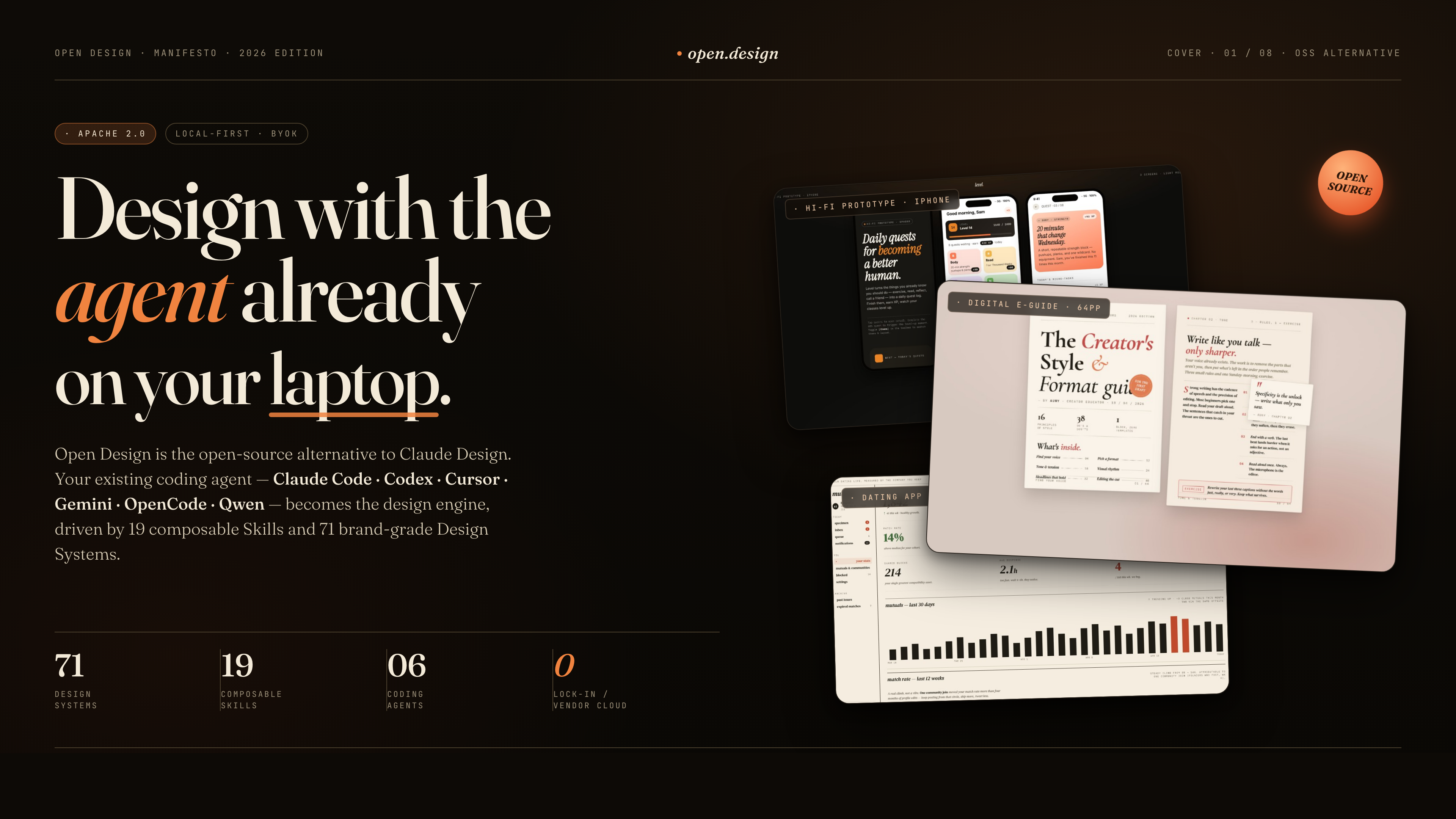
Open Design 是 Anthropic Claude Design 的开源替代方案,通过本地守护进程桥接用户已有的编程 Agent,配合 71 套设计系统和 19 种技能,以「产物优先」的方式生成高质量设计原型与演示文稿。
Stars: 82760 | Forks: 9570
# 开放设计
`,几秒钟后即可在沙盒 iframe 中渲染出来。
这不是“AI 试图随便设计点什么”。这是一个通过 Prompt 堆栈训练出来的 AI,其行为就像一位资深设计师,拥有可用的文件系统、确定性的调色板库和清单文化——这正是 Claude Design 所设定的标准,但它是开源的,属于你自己。
OD 站在四个开源巨人的肩膀上:
- [**`alchaincyf/huashu-design`**](https://github.com/alchaincyf/huashu-design) — 设计哲学指南针。初级设计师工作流、5 步品牌资产协议、反 AI 模板化清单、五维自我批判,以及我们方向选择器背后的“5 大流派 × 20 种设计哲学”理念——所有这些都浓缩在 [`src/prompts/discovery.ts`](src/prompts/discovery.ts) 中。
- [**`op7418/guizang-ppt-skill`**](https://github.com/op7418/guizang-ppt-skill) — 演示文稿模式。以原样打包在 [`skills/guizang-ppt/`](skills/guizang-ppt/) 下,并保留了原始 LICENSE;包含杂志风格布局、WebGL 主视觉、P0/P1/P2 检查清单。
- [**`OpenCoworkAI/open-codesign`**](https://github.com/OpenCoworkAI/open-codesign) — UX 领域的北极星,也是我们最接近的同行。它是首个开源的 Claude Design 替代方案。我们借鉴了其流式传输 artifact 循环、沙盒 iframe 预览模式(内置 React 18 + Babel)、实时 Agent 面板(待办事项 + 工具调用 + 可中断生成)以及五格式导出列表(HTML / PDF / PPTX / ZIP / Markdown)。我们在产品形态上刻意与其分道扬镳——他们是一个捆绑了 [`pi-ai`][piai] 的桌面 Electron 应用;而我们是一个 Web 应用 + 本地守护进程,直接委派给你现有的 CLI。
- [**`multica-ai/multica`**](https://github.com/multica-ai/multica) — 守护进程与运行时架构。PATH 扫描 Agent 检测、将本地守护进程作为唯一特权进程,以及“Agent 即队友”的世界观。
## 一览
| | 你能得到什么 |
|---|---|
| **支持的编程 Agent** | Claude Code · Codex CLI · Cursor Agent · Gemini CLI · OpenCode · Qwen Code · Anthropic API(BYOK 备用方案) |
| **内置设计系统** | **71** 种 — 2 个手工编写的入门模板 + 69 个产品系统(Linear, Stripe, Vercel, Airbnb, Tesla, Notion, Anthropic, Apple, Cursor, Supabase, Figma, …)从 [`awesome-design-md`][acd2] 导入 |
| **内置技能** | **19** 个 — 原型、演示文稿、移动端、仪表盘、定价页、文档、博客、SaaS 落地页,外加 10 个文档/工作产出模板(产品经理规范、每周更新、OKR、运维手册、看板等) |
| **视觉方向** | 5 个精选流派(Editorial Monocle · Modern Minimal · Tech Utility · Brutalist · Soft Warm) — 每个都提供确定性的 OKLch 调色板和字体栈 |
| **设备边框** | iPhone 15 Pro · Pixel · iPad Pro · MacBook · Browser Chrome — 像素级精确,跨屏幕共享 |
| **Agent 运行时** | 本地守护进程在你的项目文件夹中启动 CLI — Agent 获得针对真实磁盘环境的 `Read`、`Write`、`Bash`、`WebFetch` 权限 |
| **可部署到** | 本地 (`pnpm dev`) · Vercel · 单进程生产环境 (`npm start`) |
| **开源许可证** | Apache-2.0 |
## 演示
## 技能
内置了 19 种技能。每种技能都是 [`skills/`](skills/) 下的一个文件夹,遵循 Claude Code 的 [`SKILL.md`][skill] 约定,并带有扩展的 `od:` 前置元数据(`mode`、`platform`、`scenario`、`preview`、`design_system`)。
### 展示案例
你可能最先尝试的、视觉上最具特色的技能。每个技能都附带一个真实的 `example.html`,你可以直接从仓库中打开它,以准确查看 Agent 会生成什么——无需认证,无需设置。
### 设计界面
| 技能 | 模式 | 默认用于 | 生成内容 |
|---|---|---|---|
| [`web-prototype`](skills/web-prototype/) | prototype | 桌面端 | 单页 HTML — 落地页、营销页、主视觉页面 |
| [`saas-landing`](skills/saas-landing/) | prototype | 桌面端 | 主视觉 / 功能 / 定价 / CTA 营销布局 |
| [`dashboard`](skills/dashboard/) | prototype | 桌面端 | 包含侧边栏和数据密集布局的管理后台 / 分析页 |
| [`pricing-page`](skills/pricing-page/) | prototype | 桌面端 | 独立的定价页与对比表 |
| [`docs-page`](skills/docs-page/) | prototype | 桌面端 | 三栏文档布局 |
| [`blog-post`](skills/blog-post/) | prototype | 桌面端 | 社论式长文 |
| [`mobile-app`](skills/mobile-app/) | prototype | 移动端 | 带 iPhone 15 Pro / Pixel 边框的应用界面 |
| [`simple-deck`](skills/simple-deck/) | deck | 桌面端 | 极简的水平滑动演示文稿 |
| [`guizang-ppt`](skills/guizang-ppt/) | deck | 演示文稿的**默认**选项 | 杂志风格网页 PPT — 捆绑自 [op7418/guizang-ppt-skill][guizang] |
### 文档 / 工作产出界面
| 技能 | 模式 | 生成内容 |
|---|---|---|
| [`pm-spec`](skills/pm-spec/) | template | 带有目录和决策记录的产品经理规范文档 |
| [`weekly-update`](skills/weekly-update/) | template | 包含进展 / 阻碍 / 下一步计划的团队周报 |
| [`meeting-notes`](skills/meeting-notes/) | template | 会议决策记录 |
| [`eng-runbook`](skills/eng-runbook/) | template | 故障事件运维手册 |
| [`finance-report`](skills/finance-report/) | template | 高管财务摘要 |
| [`hr-onboarding`](skills/hr-onboarding/) | template | 岗位入职计划 |
| [`invoice`](skills/invoice/) | template | 单页发票 |
| [`kanban-board`](skills/kanban-board/) | template | 看板快照 |
| [`team-okrs`](skills/team-okrs/) | template | OKR 评分表 |
添加一项技能只需要一个文件夹。请阅读 [`docs/skills-protocol.md`](docs/skills-protocol.md) 了解扩展的前置元数据,复制一个现有的技能,重启守护进程,它就会出现在选择器中。
## 六大核心支柱理念
### 1 · 我们不提供 Agent。你自己的就足够好了。
守护进程在启动时会扫描你的 `PATH`,查找 [`claude`](https://docs.anthropic.com/en/docs/claude-code)、[`codex`](https://github.com/openai/codex)、[`cursor-agent`](https://www.cursor.com/cli)、[`gemini`](https://github.com/google-gemini/gemini-cli)、[`opencode`](https://opencode.ai/) 和 [`qwen`](https://github.com/QwenLM/qwen-code)。无论找到哪一个,它都会成为设计引擎——通过 stdio 驱动,每个 CLI 都有一个对应的适配器。灵感来源于 [`multica`](https://github.com/multica-ai/multica) 和 [`cc-switch`](https://github.com/farion1231/cc-switch)。没有找到 CLI?`Anthropic API · BYOK` 是同一条流水线,只是少了生成子进程的步骤。
### 2 · 技能是文件,不是插件。
遵循 Claude Code 的 [`SKILL.md` 约定](https://docs.anthropic.com/en/docs/claude-code/skills),每个技能都是 `SKILL.md` + `assets/` + `references/` 的组合。将一个文件夹放入 [`skills/`](skills/),重启守护进程,它就会出现在选择器中。内置的 `magazine-web-ppt` 就是原封不动提交的 [`op7418/guizang-ppt-skill`](https://github.com/op7418/guizang-ppt-skill) —— 保留了原始许可证和署名。
### 3 · 设计系统是可移植的 Markdown,而不是主题 JSON。
来自 [`VoltAgent/awesome-design-md`][acd2] 的 9 段式 `DESIGN.md` 模式 —— 包含颜色、排版、间距、布局、组件、动效、语气、品牌和反面模式。每个 artifact 都会从当前激活的系统中读取。切换系统 → 下次渲染就会使用新的 token。下拉菜单中内置了 **Linear, Stripe, Vercel, Airbnb, Tesla, Notion, Apple, Anthropic, Cursor, Supabase, Figma, Resend, Raycast, Lovable, Cohere, Mistral, ElevenLabs, X.AI, Spotify, Webflow, Sanity, PostHog, Sentry, MongoDB, ClickHouse, Cal, Replicate, Clay, Composio…** —— 总计 71 种。
### 4 · 交互式问题表单避免了 80% 的返工。
OD 的 Prompt 堆栈硬编码了一条 `RULE 1`:每一份全新的设计需求都以 `` 开始,而不是直接写代码。涵盖界面 · 受众 · 调性 · 品牌背景 · 规模 · 约束条件。一段长长的需求简报仍可能留下未定的设计决策——视觉基调、色彩倾向、规模——这些正是表单能在 30 秒内敲定的事情。选错方向的代价仅仅是一轮对话,而不是一整个做完的演示文稿。
这就是从 [`huashu-design`](https://github.com/alchaincyf/huashu-design) 中提炼出的**初级设计师模式**:预先批量提出问题,尽早展示可见的内容(哪怕是带灰色色块的线框图),让用户以极低的成本改变方向。结合品牌资产协议(定位 · 下载 · `grep` 提取十六进制色值 · 写入 `brand-spec.md` · 口头确认),这是输出内容不再像 AI 随性发挥,而更像是一位在下笔前做足功课的设计师的最重要原因。
### 5 · 守护进程让 Agent 感觉就像在你的笔记本电脑上一样,因为它确实如此。
守护进程在启动 CLI 时,会将 `cwd` 设置为项目的 artifact 文件夹,位于 `.od/projects//` 下。Agent 拥有 `Read`、`Write`、`Bash`、`WebFetch` —— 这些都是针对真实文件系统的真实工具。它可以 `Read` 读取技能的 `assets/template.html`,`grep` 提取你 CSS 中的十六进制色值,编写 `brand-spec.md`,放入生成的图片,并生成 `.pptx` / `.zip` / `.pdf` 文件,当这一轮对话结束时,这些文件会以下载标签的形式出现在文件工作区中。会话、对话、消息和标签页都持久化保存在本地的 SQLite 数据库中 —— 明天重新打开项目,Agent 的待办卡片还在你昨天离开时的位置。
### 6 · Prompt 堆栈就是产品本身。
你在发送时所组合的内容并不是简单的“系统指令 + 用户输入”,而是
```
DISCOVERY directives (turn-1 form, turn-2 brand branch, TodoWrite, 5-dim critique)
+ identity charter (OFFICIAL_DESIGNER_PROMPT, anti-AI-slop, junior-pass)
+ active DESIGN.md (71 systems available)
+ active SKILL.md (19 skills available)
+ project metadata (kind, fidelity, speakerNotes, animations, inspiration ids)
+ skill side files (auto-injected pre-flight: read assets/template.html + references/*.md)
+ (deck kind, no skill seed) DECK_FRAMEWORK_DIRECTIVE (nav / counter / scroll / print)
```
每一层都是可组合的。每一层都是一个你可以编辑的文件。阅读 [`src/prompts/system.ts`](src/prompts/system.ts) 和 [`src/prompts/discovery.ts`](src/prompts/discovery.ts) 以查看实际的契约。
## 架构
```
┌────────────────────────── browser ─────────────────────────────┐
│ │
│ Vite + React SPA (chat · file workspace · iframe preview) │
│ │
└──────────────┬───────────────────────────────────┬─────────────┘
│ /api/* (proxied in dev) │ direct (BYOK)
▼ ▼
┌──────────────────────┐ ┌──────────────────────┐
│ Local daemon │ │ Anthropic SDK │
│ (Express + SQLite) │ │ (browser fallback) │
│ │ └──────────────────────┘
│ /api/agents │
│ /api/skills │
│ /api/design-systems│
│ /api/projects/... │
│ /api/chat (SSE) │
│ │
└─────────┬────────────┘
│ spawn(cli, [...], { cwd: .od/projects/ })
▼
┌──────────────────────────────────────────────────────────┐
│ claude · codex · cursor-agent · gemini · opencode · qwen│
│ reads SKILL.md + DESIGN.md, writes artifacts to disk │
└──────────────────────────────────────────────────────────┘
```
| 层级 | 技术栈 |
|---|---|
| 前端 | Vite 5 + React 18 + TypeScript |
| 守护进程 | Node 18+ · Express · SSE 流式传输 · 使用 `better-sqlite3` 管理 projects/conversations/messages/tabs |
| Agent 传输 | 带有针对 Claude Code 的 `claude-stream-json` 解析器的 `child_process.spawn`,其余采用行缓冲的纯文本 stdout |
| 存储 | `.od/projects//` 中的普通文件 + 位于 `.od/db.sqlite` 的 SQLite(已加入 gitignore) |
| 预览 | 通过 `srcsrcdoc` 的沙盒 iframe + 每个技能对应的 `` 解析器 |
| 导出 | HTML(内联资源) · PDF(浏览器打印) · PPTX(技能定义) · ZIP(压缩包) |
## 快速开始
```
git clone https://github.com/nexu-io/open-design.git
cd open-design
pnpm install # or npm install
pnpm dev:all # daemon (:7456) + Vite (:5173)
open http://localhost:5173
```
首次加载:
1. 检测你的 `PATH` 上有哪些 Agent CLI,并自动选择一个。
2. 加载 19 种技能 + 71 个设计系统。
3. 弹出欢迎对话框,以便你可以粘贴 Anthropic 密钥(仅在 BYOK 备用路径中需要)。
4. **自动创建 `./.od/`** —— 用于存放 SQLite 项目数据库、每个项目的 artifact 和已保存渲染结果的本地运行时文件夹。不需要 `od init` 步骤;守护进程在启动时会 `mkdir` 它所需的一切。
输入一段提示词,点击 **Send**,看着问题表单出现,填写它,看着待办事项卡片流式呈现,看着 artifact 渲染出来。点击 **Save to disk** 或将其下载为项目 ZIP 压缩包。
### 首次运行状态 (`./.od/`)
守护进程拥有仓库根目录下的一个隐藏文件夹。其中的所有内容都被加入了 gitignore 并且仅限本机使用 —— 永远不要提交它。
```
.od/
├── app.sqlite ← projects · conversations · messages · open tabs
├── artifacts/ ← one-off "Save to disk" renders (timestamped)
└── projects// ← per-project working dir, also the agent's cwd
```
| 想要… | 执行此操作 |
|---|---|
| 检查里面的内容 | `ls -la .od && sqlite3 .od/app.sqlite '.tables'` |
| 重置到干净状态 | 停止守护进程,`rm -rf .od`,再次运行 `pnpm dev:all` |
| 将其移至别处 | 暂不支持 —— 该路径是相对于仓库硬编码的 |
完整的文件映射、脚本和故障排除 → [`QUICKSTART.md`](QUICKSTART.md)。
## 仓库结构
```
open-design/
├── README.md ← this file
├── README.zh-CN.md ← 简体中文
├── QUICKSTART.md ← run / build / deploy guide
├── package.json ← pnpm workspace, single bin: od
│
├── daemon/ ← Node + Express, the only server
│ ├── cli.js ← `od` bin entry point
│ ├── server.js ← /api/* routes (projects, chat, files, exports)
│ ├── agents.js ← PATH scanner + per-CLI argv builders
│ ├── claude-stream.js ← streaming JSON parser for Claude Code stdout
│ ├── skills.js ← SKILL.md frontmatter loader
│ ├── design-systems.js ← DESIGN.md loader + swatch extractor
│ ├── design-system-preview.js ← live one-shot showcase per system
│ ├── design-system-showcase.js ← multi-section gallery render
│ ├── lint-artifact.js ← P0/P1 self-check on agent output
│ ├── projects.js ← per-project filesystem helpers
│ ├── db.js ← SQLite schema (projects/messages/templates/tabs)
│ └── frontmatter.js ← zero-dep YAML-subset parser
│
├── src/ ← Vite + React + TS frontend
│ ├── App.tsx ← routing, bootstrap, settings
│ ├── components/ ← 27 components (chat, composer, picker, preview, sketch, …)
│ ├── prompts/
│ │ ├── system.ts ← composeSystemPrompt(base, skill, DS, metadata)
│ │ ├── official-system.ts ← identity charter
│ │ ├── discovery.ts ← turn-1 form + turn-2 branch + 5-dim critique
│ │ ├── directions.ts ← 5 visual directions × OKLch palette + font stack
│ │ └── deck-framework.ts ← deck nav / counter / print stylesheet
│ ├── artifacts/
│ │ ├── parser.ts ← streaming tag extractor
│ │ └── question-form.ts ← JSON schema + replay
│ ├── runtime/
│ │ ├── srcdoc.ts ← iframe sandbox wrapper
│ │ ├── markdown.tsx ← assistant message renderer
│ │ ├── exports.ts ← HTML / PDF / ZIP export helpers
│ │ └── zip.ts ← project archive
│ ├── providers/
│ │ ├── daemon.ts ← /api/chat SSE stream consumer
│ │ ├── anthropic.ts ← BYOK Anthropic SDK path
│ │ └── registry.ts ← /api/agents, /api/skills, /api/design-systems
│ └── state/ ← config + projects (localStorage + daemon-backed)
│
├── skills/ ← 19 SKILL.md skill bundles
│ ├── web-prototype/ ← default for prototype mode
│ ├── saas-landing/ ← marketing page (hero / features / pricing / CTA)
│ ├── dashboard/ ← admin / analytics
│ ├── pricing-page/ ← standalone pricing + comparison
│ ├── docs-page/ ← 3-column documentation
│ ├── blog-post/ ← editorial long-form
│ ├── mobile-app/ ← phone-frame screen(s)
│ ├── simple-deck/ ← horizontal-swipe minimal
│ ├── guizang-ppt/ ← bundled magazine-web-ppt (default for deck)
│ │ ├── SKILL.md
│ │ ├── assets/template.html ← seed
│ │ └── references/{themes,layouts,components,checklist}.md
│ ├── pm-spec/ ← PM specification doc
│ ├── weekly-update/ ← team weekly
│ ├── meeting-notes/ ← decision log
│ ├── eng-runbook/ ← incident / runbook
│ ├── finance-report/ ← exec summary
│ ├── hr-onboarding/ ← role onboarding
│ ├── invoice/ ← single-page invoice
│ ├── kanban-board/ ← board snapshot
│ ├── mobile-onboarding/ ← multi-screen mobile flow
│ └── team-okrs/ ← OKR scoresheet
│
├── design-systems/ ← 71 DESIGN.md systems
│ ├── default/ ← Neutral Modern (starter)
│ ├── warm-editorial/ ← Warm Editorial (starter)
│ ├── linear-app/ vercel/ stripe/ airbnb/ notion/ cursor/ apple/ …
│ └── README.md ← catalog overview
│
├── assets/
│ └── frames/ ← shared device frames (used cross-skill)
│ ├── iphone-15-pro.html
│ ├── android-pixel.html
│ ├── ipad-pro.html
│ ├── macbook.html
│ └── browser-chrome.html
│
├── templates/
│ └── deck-framework.html ← deck baseline (nav / counter / print)
│
├── scripts/
│ └── sync-design-systems.mjs ← re-import upstream awesome-design-md tarball
│
├── docs/
│ ├── spec.md ← product spec, scenarios, differentiation
│ ├── architecture.md ← topologies, data flow, components
│ ├── skills-protocol.md ← extended SKILL.md od: frontmatter
│ ├── agent-adapters.md ← per-CLI detection + dispatch
│ ├── modes.md ← prototype / deck / template / design-system
│ ├── references.md ← long-form provenance
│ ├── roadmap.md ← phased delivery
│ ├── schemas/ ← JSON schemas
│ └── examples/ ← canonical artifact examples
│
└── .od/ ← runtime data, gitignored, auto-created
├── app.sqlite ← projects / conversations / messages / tabs
├── projects// ← per-project working folder (agent's cwd)
└── artifacts/ ← saved one-off renders
```
## 设计系统
该库通过 [`scripts/sync-design-systems.mjs`](scripts/sync-design-systems.mjs) 从 [`VoltAgent/awesome-design-md`][acd2] 导入。重新运行以刷新。
## 视觉方向
当用户没有品牌规范时,Agent 会发出包含五个精选方向的第二个表单——这是对 [`huashu-design` 的“5 大流派 × 20 种设计哲学”备用方案](https://github.com/alchaincyf/huashu-design#%E8%AE%BE%E8%AE%A1%E6%96%B9%E5%90%91%E9%A1%BE%E9%97%AE-fallback)的 OD 适配。每个方向都是一个确定性的规范——包括 OKLch 中的调色板、字体栈、布局姿态提示和参考——Agent 会将其逐字绑定到种子模板的 `:root` 中。一次单选点击 → 一个完全明确的视觉系统。没有即兴发挥,没有 AI 模板化。
| 方向 | 氛围 | 参考 |
|---|---|---|
| Editorial — Monocle / FT | 印刷杂志,墨水 + 米色 + 暖铁锈色 | Monocle · FT Weekend · NYT Magazine |
| Modern minimal — Linear / Vercel | 冷峻、结构化、极简的强调色 | Linear · Vercel · Stripe |
| Tech utility | 信息密度高、等宽字体、终端感 | Bloomberg · Bauhaus tools |
| Brutalist | 原始、超大字体、无阴影、刺眼的强调色 | Bloomberg Businessweek · Achtung |
| Soft warm | 宽松、低对比度、桃色系中性色 | Notion marketing · Apple Health |
完整规范 → [`src/prompts/directions.ts`](src/prompts/directions.ts)。
## 反 AI 模板化机制
下面的整套机制是 [`huashu-design`](https://github.com/alchaincyf/huashu-design) 的实战策略,被移植到了 OD 的 Prompt 堆栈中,并通过附属文件预检步骤在每个技能中强制执行。阅读 [`src/prompts/discovery.ts`](src/prompts/discovery.ts) 以了解具体的措辞:
- **问题表单优先。** 第 1 轮只包含 `` —— 没有思考,没有工具,没有叙述。用户以单选按钮的速度选择默认值。
- **品牌规范提取。** 当用户附上屏幕截图或 URL 时,Agent 会在编写 CSS 之前运行一个五步协议(定位 · 下载 · grep 提取十六进制色值 · 编写 `brand-spec.md` · 口头确认)。**绝不凭记忆猜测品牌颜色。**
- **五维批判。** 在发出 `` 之前,Agent 会在理念 / 层级 / 执行 / 特异性 / 克制这五个维度上对其输出进行 1-5 分的静默打分。任何低于 3/5 的项目都被视为退步 —— 必须修复并重新打分。两次迭代是常态。
- **P0/P1/P2 检查清单。** 每个技能都附带一个 `references/checklist.md`,其中包含硬性的 P0 门控要求。Agent 必须在通过 P0 后才能发出产物。
- **模板化黑名单。** 刺眼的紫色渐变、通用的 emoji 图标、左侧带边框强调色的圆角卡片、手绘风格的 SVG 人物、将 Inter 用作 *展示* 字体、虚构的指标 —— 这些在 Prompt 中被明确禁止。
- **诚实的占位符 > 伪造的数据。** 当 Agent 没有真实的数字时,它会写 `—` 或一个带标签的灰色色块,而不是“10倍速提升”。
## 对比
| 维度 | [Claude Design][cd] (Anthropic) | [Open CoDesign][ocod] | **Open Design** |
|---|---|---|---|
| 开源许可证 | 闭源 | MIT | **Apache-2.0** |
| 产品形态 | Web (claude.ai) | 桌面端 | **Web 应用 + 本地守护进程** |
| 可部署在 Vercel | ❌ | ❌ | **✅** |
| Agent 运行时 | 内置 | 内置 ([`pi-ai`][piai]) | **委派给用户现有的 CLI** |
| 技能 | 专有 | 12 个自定义 TS 模块 + `SKILL.md` | **19 个基于文件的 [`SKILL.md`][skill] 捆绑包,可直接放入** |
| 设计系统 | 专有 | `DESIGN.md`(v0.2 路线图) | **`DESIGN.md` × 71 个内置系统** |
| 供应商灵活性 | 仅限 Anthropic | 7+ 通过 [`pi-ai`][piai] | **受你的 Agent 支持的任何提供商** |
| 初始化问题表单 | ❌ | ❌ | **✅ 硬性规则,第 1 轮** |
| 方向选择器 | ❌ | ❌ | **✅ 5 个确定性方向** |
| 实时待办进度 + 工具流 | ❌ | ✅ | **✅** (UX 模式源自 open-codesign) |
| 沙盒 iframe 预览 | ❌ | ✅ | **✅** (模式源自 open-codesign) |
| 评论模式精准编辑 | ❌ | ✅ | 🚧 路线图(借鉴自 open-codesign) |
| AI 发出的调整面板 | ❌ | ✅ | 🚧 路线图(借鉴自 open-codesign) |
| 文件系统级别的工作区 | ❌ | 部分 | **✅ 真实的 cwd、真实的工具、持久化的 SQLite** |
| 五维自我批判 | ❌ | ❌ | **✅ 发出产物前的门控** |
| 导出格式 | 有限 | HTML / PDF / PPTX / ZIP / Markdown | **HTML / PDF / PPTX / ZIP / Markdown** |
| PPT 技能复用 | N/A | 内置 | **[`guizang-ppt-skill`][guizang] 可直接放入** |
| 最低计费 | Pro / Max / Team | BYOK | **BYOK** |
## 支持的编程 Agent
在守护进程启动时从 `PATH` 自动检测。无需配置。
| Agent | 二进制文件 | 流式传输 | 备注 |
|---|---|---|---|
| [Claude Code](https://docs.anthropic.com/en/docs/claude-code) | `claude` | `--output-format stream-json`(类型化事件) | 一等公民 —— 保真度最高 |
| [Codex CLI](https://github.com/openai/codex) | `codex` | 行缓冲 | `codex exec ` |
| [Cursor Agent](https://www.cursor.com/cli) | `cursor-agent` | 行缓冲 | `cursor-agent -p` |
| [Gemini CLI](https://github.com/google-gemini/gemini-cli) | `gemini` | 行缓冲 | `gemini -p` |
| [OpenCode](https://opencode.ai/) | `opencode` | 行缓冲 | `opencode run` |
| [Qwen Code](https://github.com/QwenLM/qwen-code) | `qwen` | 行缓冲 | `qwen -p` |
| Anthropic API · BYOK | n/a | 直接 SSE | 当 PATH 上没有 CLI 时的浏览器备用方案 |
添加新的 CLI 只需在 [`daemon/agents.js`](daemon/agents.js) 中增加一条记录。流式传输格式为 `claude-stream-json`(类型化事件)或 `plain`(原始文本)中的任意一种。
## 参考资料与渊源
本仓库借鉴的每一个外部项目。每个链接都指向源码,以便你验证出处。
| 项目 | 在此扮演的角色 |
|---|---|
| [`Claude Design`][cd] | 本仓库作为其开源替代方案所对标的那款闭源产品。 |
| [**`alchaincyf/huashu-design`**](https://github.com/alchaincyf/huashu-design) | 设计哲学核心。初级设计师工作流、5 步品牌资产协议、反 AI 模板化清单、五维自我批判,以及我们方向选择器背后的“5 大流派 × 20 种设计哲学”库 —— 全部被浓缩到 [`src/prompts/discovery.ts`](src/prompts/discovery.ts) 和 [`src/prompts/directions.ts`](src/prompts/directions.ts) 中。 |
| [**`op7418/guizang-ppt-skill`**][guizang] | 杂志风格网页 PPT 技,以原样打包在 [`skills/guizang-ppt/`](skills/guizang-ppt/) 下并保留了原始 LICENSE。作为演示文稿模式的默认选项。其 P0/P1/P2 检查清单文化被借鉴到了其他所有技能中。 |
| [**`multica-ai/multica`**](https://github.com/multica-ai/multica) | 守护进程 + 适配器架构。PATH 扫描 Agent 检测、将本地守护进程作为唯一特权进程、“Agent 即队友”的世界观。我们采纳了该模型,但没有将其代码直接打包进仓库。 |
| [**`OpenCoworkAI/open-codesign`**][ocod] | 首个开源的 Claude Design 替代方案,也是我们最接近的同行。采纳的 UX 模式:流式 artifact 循环、沙盒 iframe 预览(内置 React 18 + Babel)、实时 Agent 面板(待办事项 + 工具调用 + 可中断)、五格式导出列表(HTML/PDF/PPTX/ZIP/Markdown)、本地优先的存储中心、`SKILL.md` 品味注入。已列入我们路线图的 UX 模式:评论模式精准编辑、AI 发出的调整面板。**我们刻意没有将 [`pi-ai`][piai] 打包进仓库** —— open-codesign 将其作为 Agent 运行时捆绑;我们则委派给用户已有的 CLI。 |
| [`VoltAgent/awesome-claude-design`][acd] / [`awesome-design-md`][acd2] | 9 段式 `DESIGN.md` 模式的来源以及通过 [`scripts/sync-design-systems.mjs`](scripts/sync-design-systems.mjs) 导入的 69 个产品系统。 |
| [`farion1231/cc-switch`](https://github.com/farion1231/cc-switch) | 为跨多个 Agent CLI 的基于符号链接的技能分发提供了灵感。 |
| [Claude Code 技能][skill] | 原样采纳的 `SKILL.md` 约定 —— 任何 Claude Code 技能放入 `skills/` 后都会被守护进程识别。 |
详细出处说明——我们借鉴了什么,刻意没有借鉴什么——存放在 [`docs/references.md`](docs/references.md)。
## 路线图
- [x] 守护进程 + Agent 检测 + 技能注册表 + 设计系统目录
- [x] Web 应用 + 聊天 + 问题表单 + 待办进度 + 沙盒预览
- [x] 19 个技能 + 71 个设计系统 + 5 个视觉方向 + 5 个设备边框
- [x] 基于 SQLite 的 projects · conversations · messages · tabs · templates
- [ ] 评论模式精准编辑(点击元素 → 输入指令 → 应用补丁) —— 模式源自 [`open-codesign`][ocod]
- [ ] AI 发出的调整面板(模型展示值得调整的参数) —— 模式源自 [`open-codesign`][ocod]
- [ ] Vercel + 隧道部署方案(拓扑 B)
- [ ] 一键 `npx od init` 命令,用于搭建一个带有 `DESIGN.md` 的项目
- [ ] 技能市场(`od skills install `)
分阶段交付计划 → [`docs/roadmap.md`](docs/roadmap.md)。
## 当前状态
这是一个早期的实现 —— 完整闭环(检测 → 选择技能 + 设计系统 → 聊天 → 解析 `` → 预览 → 保存)已经可以端到端地运行。Prompt 堆栈和技能库是项目核心价值所在,且已趋于稳定。组件级别的 UI 正在以每天一个版本的速度迭代发布。
## 贡献
欢迎提交 Issue、PR、新技能和新设计系统。最高杠杆的贡献通常只需要一个文件夹、一个 Markdown 文件或一个 PR 级别的适配器:
- **添加一项技能** —— 按照 [`SKILL.md`][skill] 约定将一个文件夹放入 [`skills/`](skills/)。
- **添加一个设计系统** —— 使用 9 段式模式将一个 `DESIGN.md` 放入 [`design-systems//`](design-systems/)。
- **接入一个新的编程 Agent CLI** —— 在 [`daemon/agents.js`](daemon/agents.js) 中添加一条记录。
完整的演练、合并标准、代码风格以及我们不接受的内容 → [`CONTRIBUTING.md`](CONTRIBUTING.md)([简体中文](CONTRIBUTING.zh-CN.md))。
## 开源许可证
Apache-2.0。捆绑的 `skills/guizang-ppt/` 保留了其原始的 [LICENSE](skills/guizang-ppt/LICENSE)(MIT)以及对 [op7418](https://github.com/op7418) 的作者署名。





English · 简体中文
## 为什么会有这个项目 Anthropic 的 [Claude Design][cd](发布于 2026-04-17,Opus 4.7)向我们展示了当 LLM 停止写长篇大论,转而直接输出设计产物时会发生什么。它迅速走红——但始终保持闭源、仅限付费、仅限云端,并被锁定在 Anthropic 的模型与技能体系中。用户无法进行结账、无法自托管、无法部署到 Vercel,也无法替换成你自己的 Agent。 **Open Design (OD) 就是那个开源的替代方案。** 同样的闭环,同样的“产物优先”心智模型,但没有任何锁定。我们不提供 Agent——最强大的编程 Agent 已经存在于你的笔记本电脑中。我们将它们接入到一个由技能驱动的设计工作流中,该工作流通过 `pnpm dev` 运行,可部署到 Vercel,并在每一层都保持 BYOK(自带密钥)。 输入 `make me a magazine-style pitch deck for our seed round`。在模型凭空想象出哪怕一个像素之前,一个交互式问题表单会率先弹出。Agent 会从五个精选的视觉方向中选择一个。一个实时的 `TodoWrite` 计划会流式传输到界面中。守护进程会在磁盘上构建一个真实的项目文件夹,其中包含种子模板、布局库和自检清单。Agent 会读取它们——强制执行预检步骤——对其自身的输出运行五维批判,并发出一个单一的 `
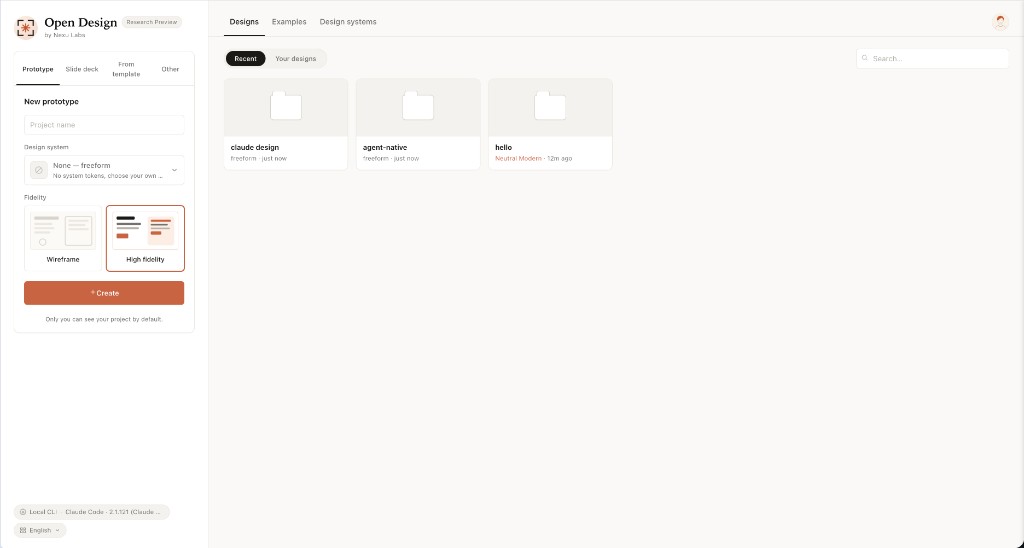 Entry view — pick a skill, pick a design system, type the brief. The same surface for prototypes, decks, mobile apps, dashboards, and editorial pages. |
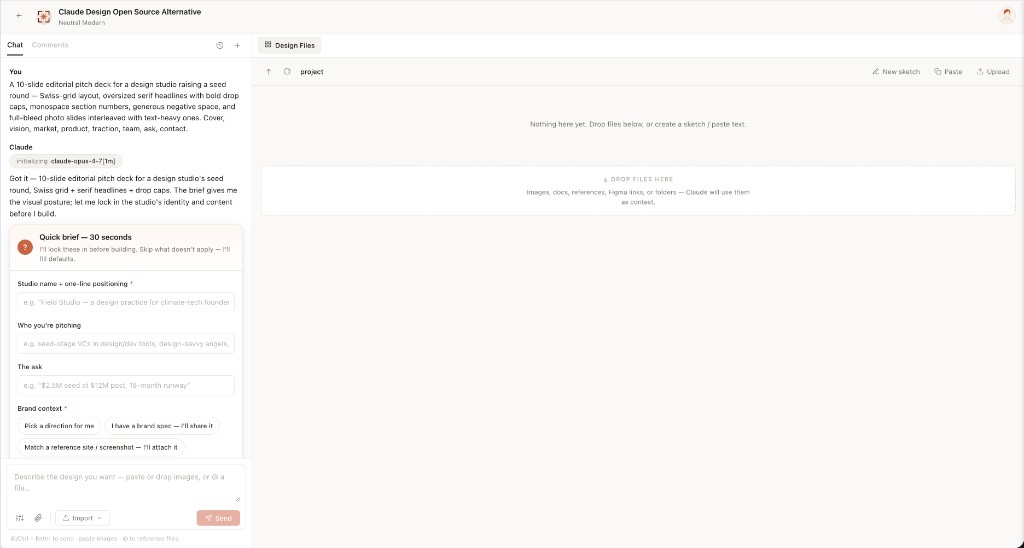 Turn-1 discovery form — before the model writes a pixel, OD locks the brief: surface, audience, tone, brand context, scale. 30 seconds of radios beats 30 minutes of redirects. |
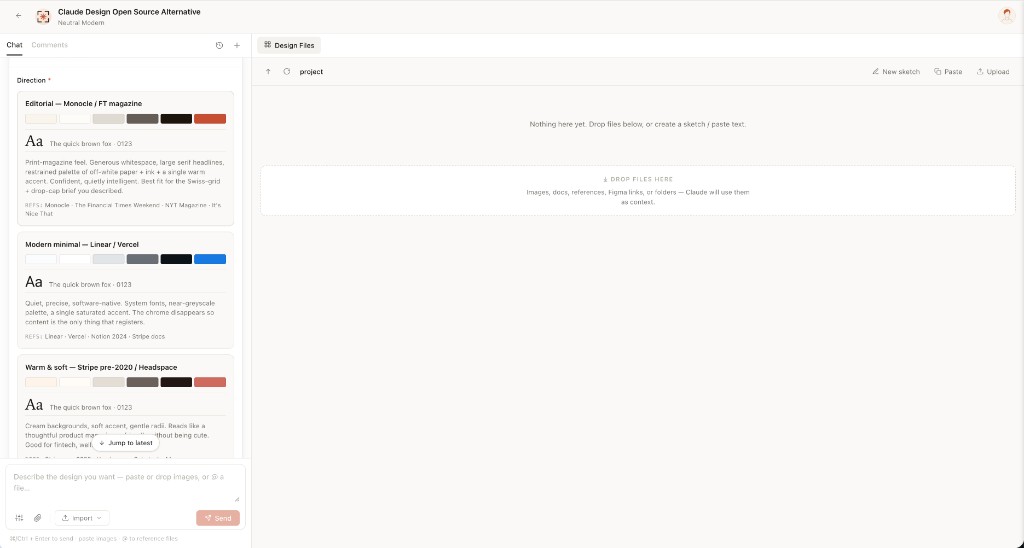 Direction picker — when the user has no brand, the agent emits a second form with 5 curated directions (Monocle / Modern Minimal / Tech Utility / Brutalist / Soft Warm). One radio click → a deterministic palette + font stack, no model freestyle. |
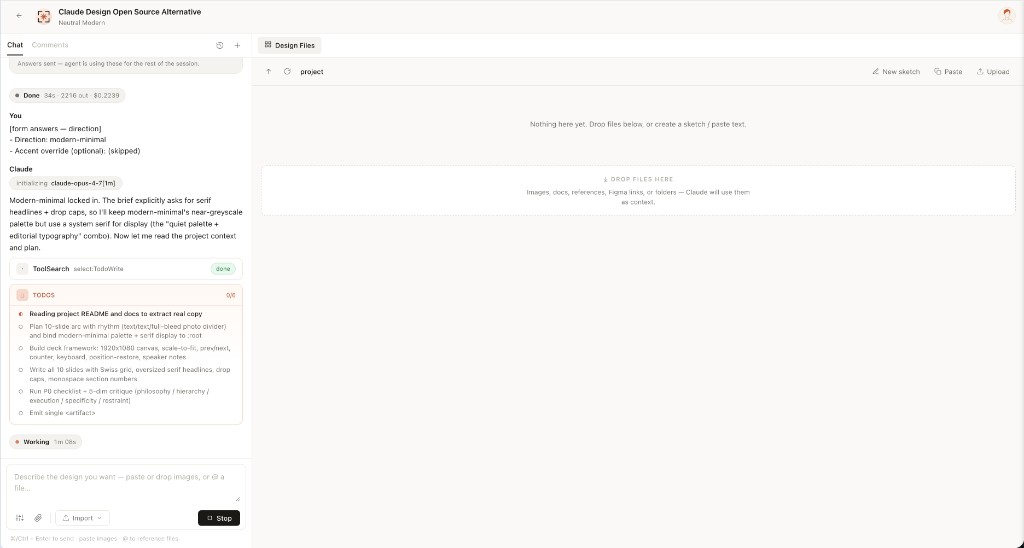 Live todo progress — the agent's plan streams as a live card. in_progress → completed updates land in real time. The user can redirect cheaply, mid-flight.
|
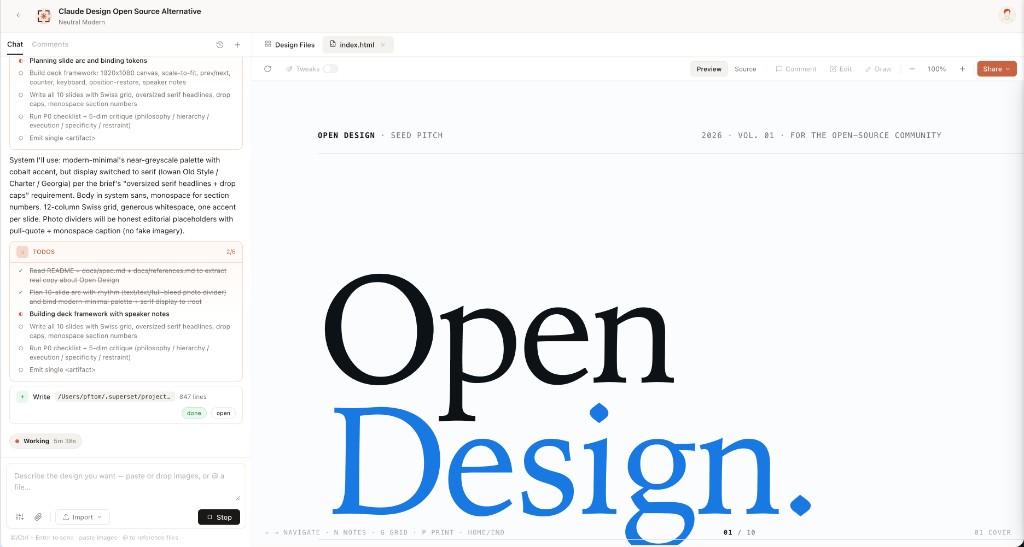 Sandboxed preview — every <artifact> renders in a clean srcdoc iframe. Editable in place via the file workspace; downloadable as HTML, PDF, ZIP.
|
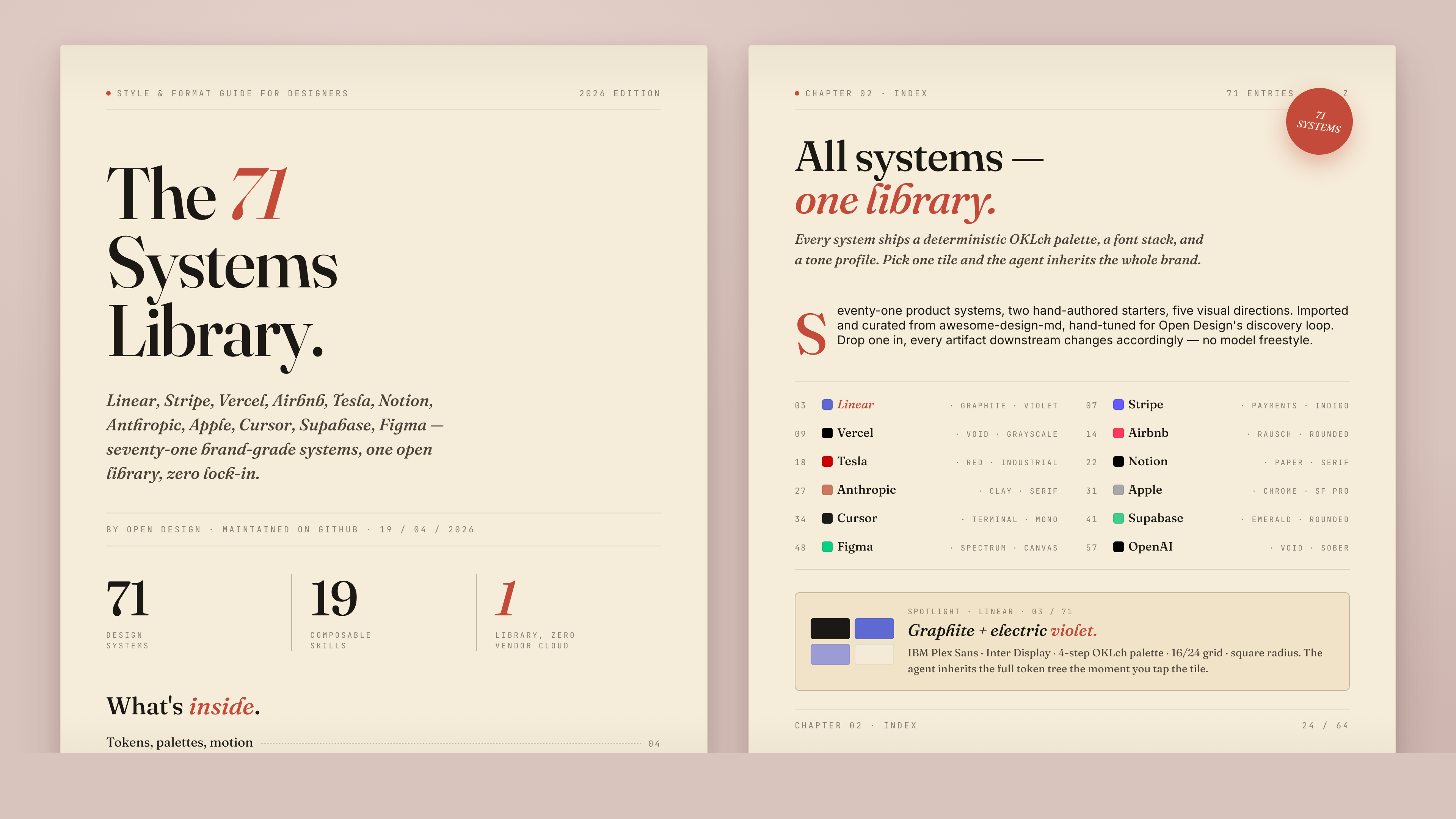
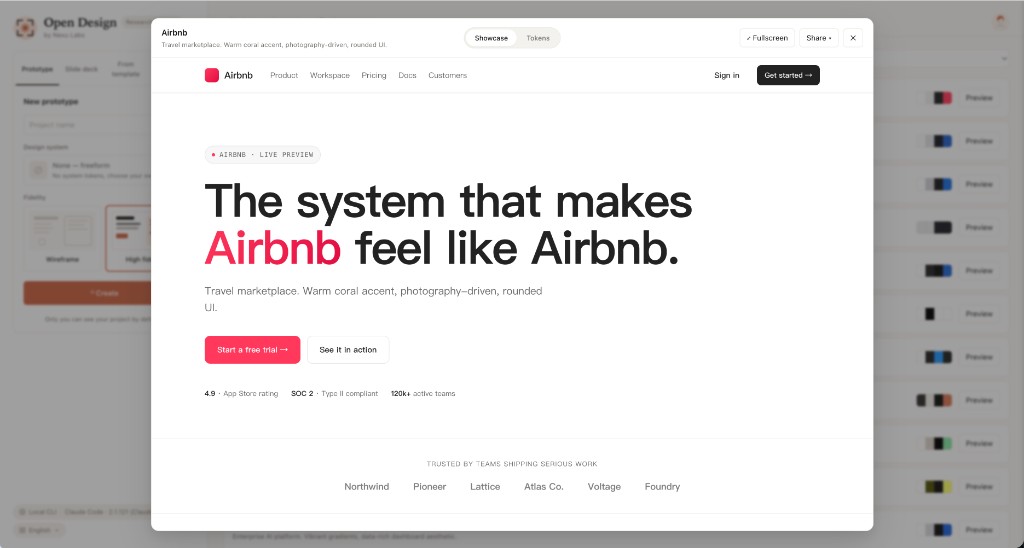 71-system library — every product system shows its 4-color signature. Click for the full DESIGN.md, swatch grid, and live showcase.
|
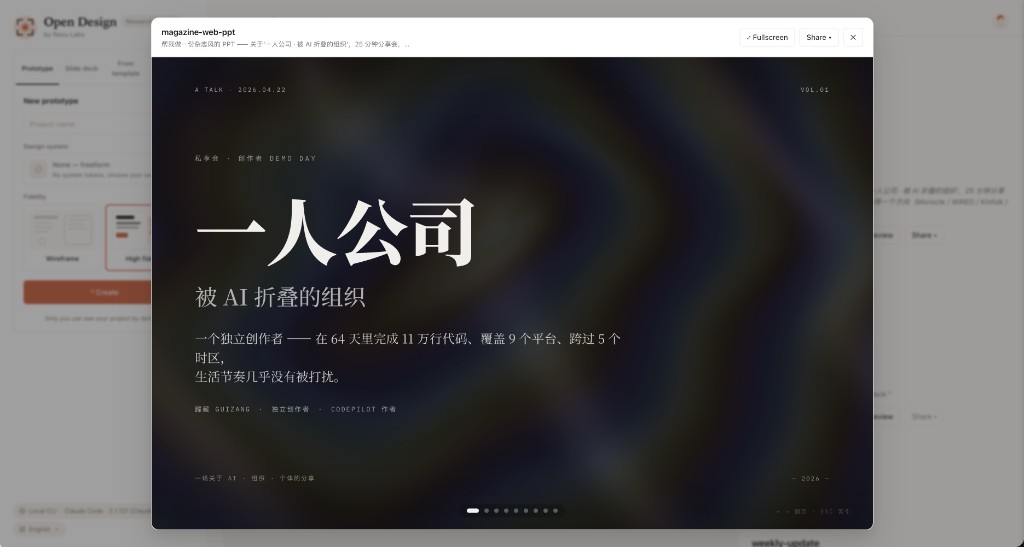 Deck mode (guizang-ppt) — the bundled guizang-ppt-skill drops in unchanged. Magazine layouts, WebGL hero backgrounds, single-file HTML output, PDF export.
|
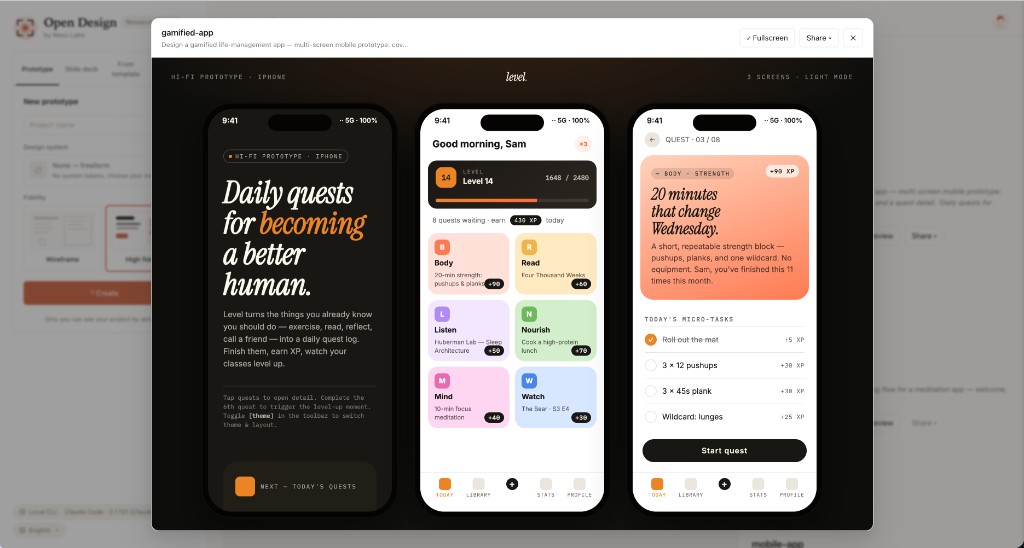 Mobile prototype — pixel-accurate iPhone 15 Pro chrome (Dynamic Island, status bar SVGs, home indicator). Multi-screen prototypes use the shared /frames/ assets so the agent never re-draws a phone.
|
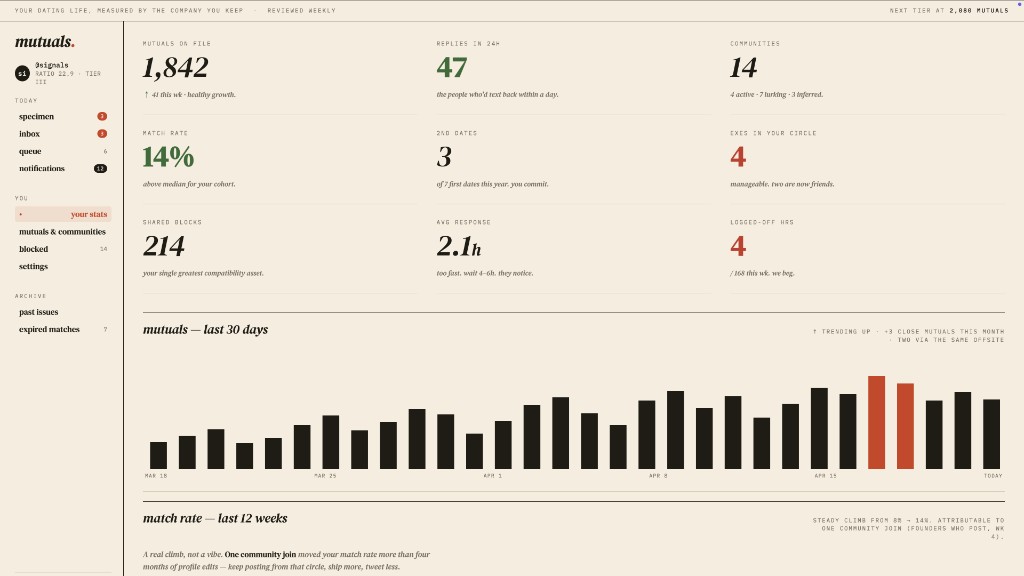 dating-web · prototypeConsumer dating / matchmaking dashboard — left rail nav, ticker bar, KPIs, 30-day mutual-matches chart, editorial typography. |
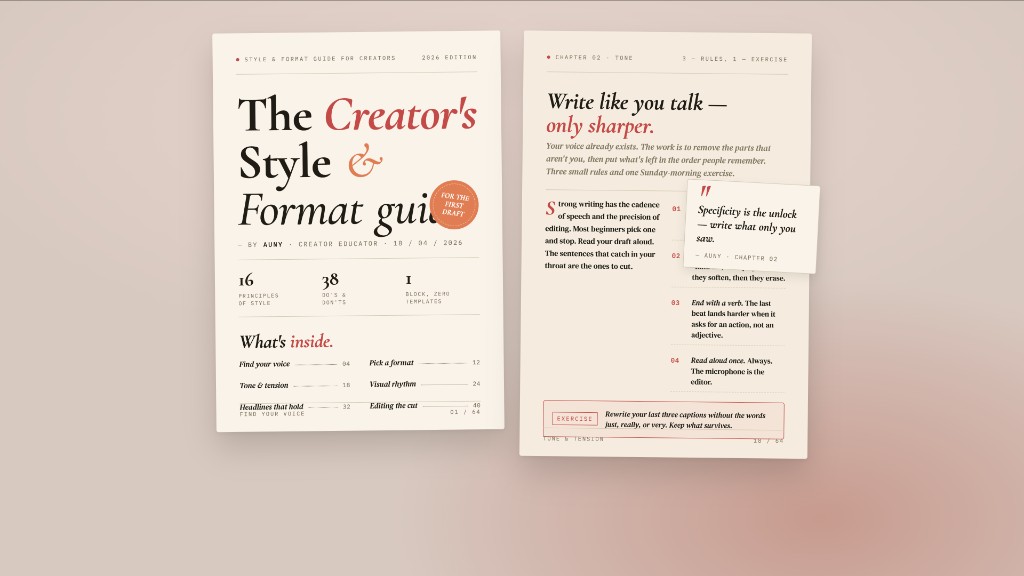 digital-eguide · templateTwo-spread digital e-guide — cover (title, author, TOC teaser) + lesson spread with pull-quote and step list. Creator / lifestyle tone. |
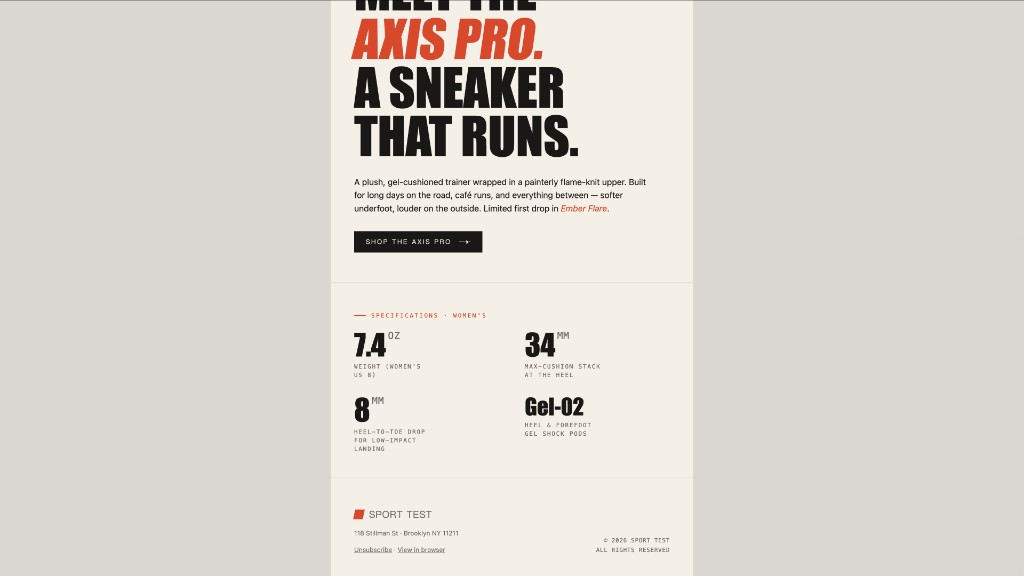 email-marketing · prototypeBrand product-launch HTML email — masthead, hero image, headline lockup, CTA, specs grid. Centered single-column, table-fallback safe. |
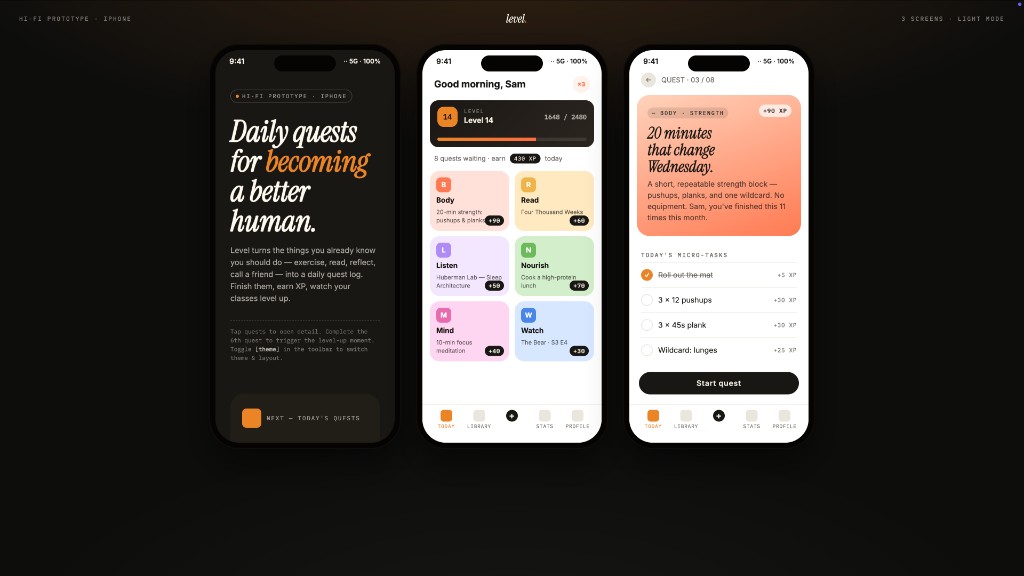 gamified-app · prototypeThree-frame gamified mobile-app prototype on a dark showcase stage — cover, today's quests with XP ribbons + level bar, quest detail. |
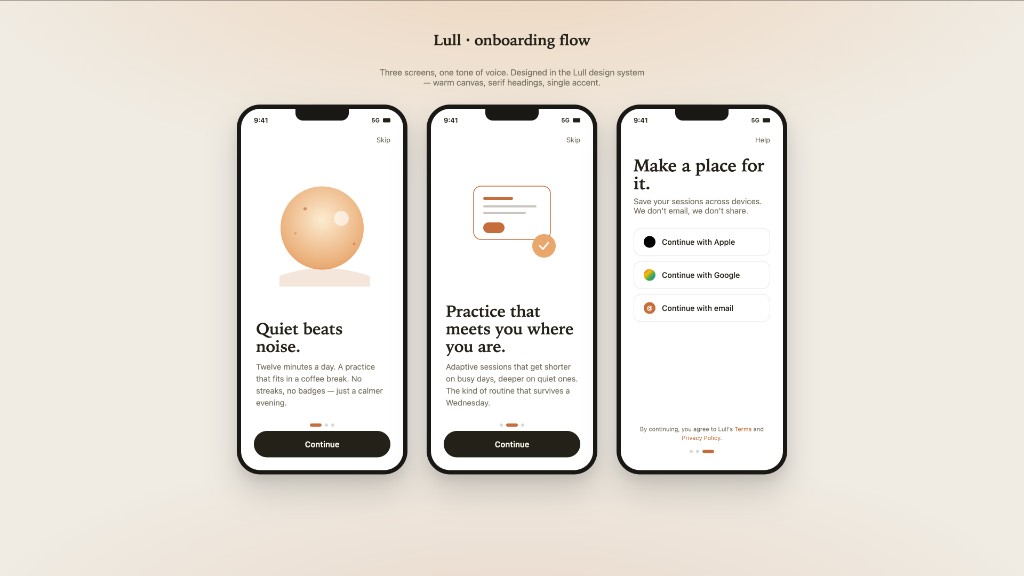 mobile-onboarding · prototypeThree-frame mobile onboarding flow — splash, value-prop, sign-in. Status bar, swipe dots, primary CTA. |
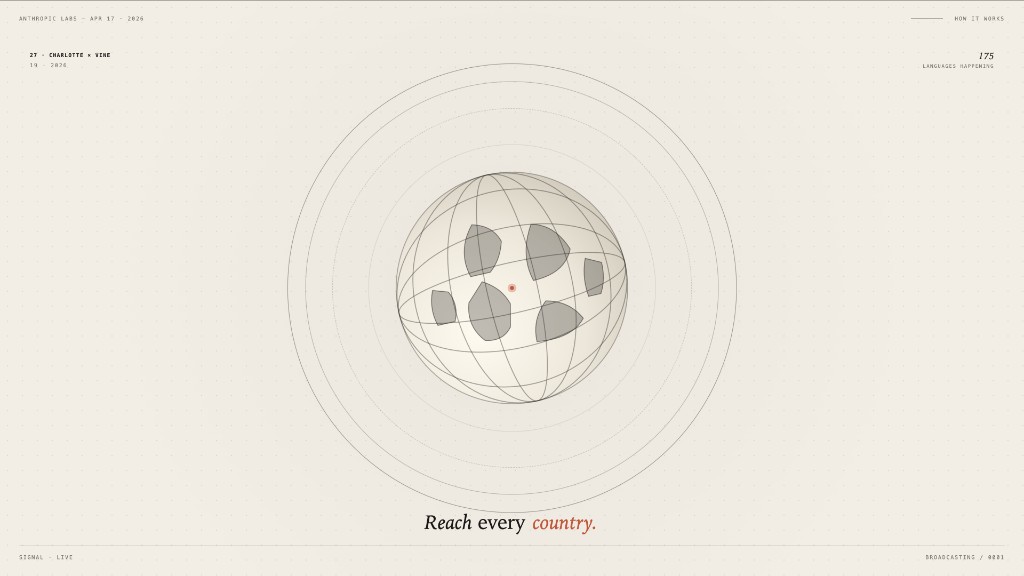 motion-frames · prototypeSingle-frame motion-design hero with looping CSS animations — rotating type ring, animated globe, ticking timer. Hand-off ready for HyperFrames. |
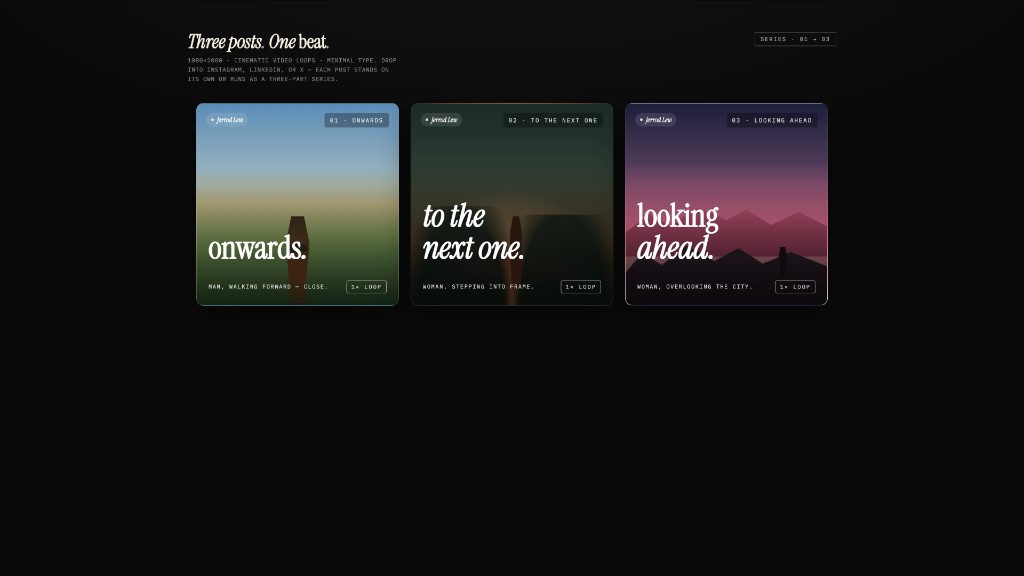 social-carousel · prototypeThree-card 1080×1080 social-media carousel — cinematic panels with display headlines that connect across the series, brand mark, loop affordance. |
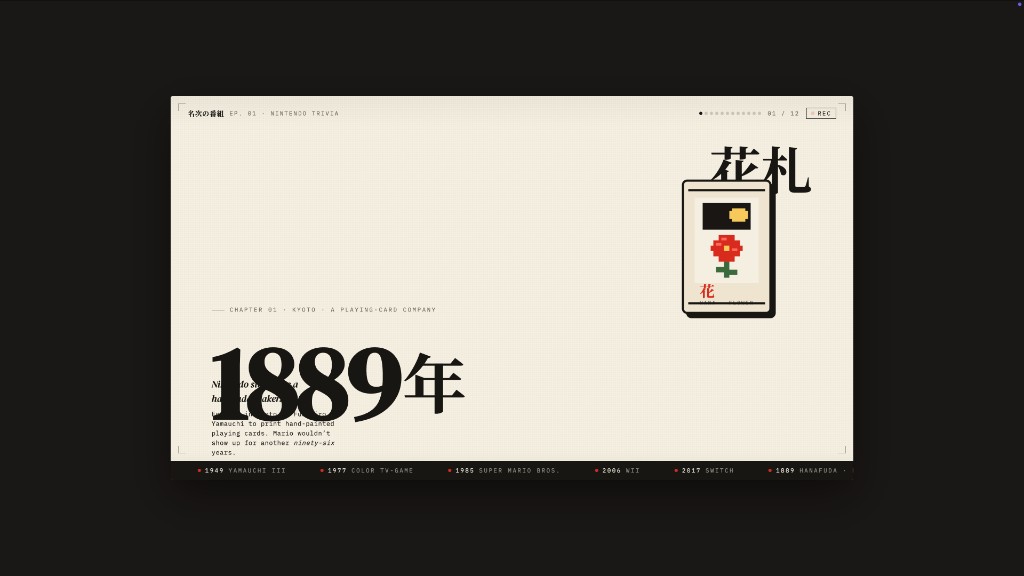 sprite-animation · prototypePixel / 8-bit animated explainer slide — full-bleed cream stage, animated pixel mascot, kinetic Japanese display type, looping CSS keyframes. |
完整目录(点击展开)
**AI & LLM** — `claude` · `cohere` · `mistral-ai` · `minimax` · `together-ai` · `replicate` · `runwayml` · `elevenlabs` · `ollama` · `x-ai` **Developer Tools** — `cursor` · `vercel` · `linear-app` · `framer` · `expo` · `clickhouse` · `mongodb` · `supabase` · `hashicorp` · `posthog` · `sentry` · `warp` · `webflow` · `sanity` · `mintlify` · `lovable` · `composio` · `opencode-ai` · `voltagent` **Productivity** — `notion` · `figma` · `miro` · `airtable` · `superhuman` · `intercom` · `zapier` · `cal` · `clay` · `raycast` **Fintech** — `stripe` · `coinbase` · `binance` · `kraken` · `mastercard` · `revolut` · `wise` **E-Commerce** — `shopify` · `airbnb` · `uber` · `nike` · `starbucks` · `pinterest` **Media** — `spotify` · `playstation` · `wired` · `theverge` · `meta` **Automotive** — `tesla` · `bmw` · `ferrari` · `lamborghini` · `bugatti` · `renault` **Other** — `apple` · `ibm` · `nvidia` · `vodafone` · `sentry` · `resend` · `spacex` **Starters** — `default` (Neutral Modern) · `warm-editorial`标签:AI设计, Claude Code, Cursor, Gemini CLI, GNU通用公共许可证, HTML导出, LLM Agent, Local-first, MITM代理, Node.js, PDF导出, pnpm, PPTX导出, UI设计, Vercel部署, 交互设计, 品牌设计, 大语言模型应用, 开源替代方案, 开源设计工具, 提示词工程, 本地优先, 沙盒预览, 策略决策点, 组件库, 自动化攻击, 设计系统