RamBeer6/SentinelOps
GitHub: RamBeer6/SentinelOps
一个轻量级 SOC 检测与调查流水线,将原始安全日志转化为结构化事件,通过规则检测、MITRE 富化和关联分析生成告警与报告,适合检测工程学习与实验。
Stars: 1 | Forks: 0
# SentinelOps
SentinelOps 是一个用 Python 编写的轻量级 SOC 检测与调查流水线。它接收原始安全日志,将其规范化为结构化事件,应用检测规则,生成富化告警,将结果存储在 SQLite 中,并生成调查报告。
本项目旨在用于学习、实验,以及演示如何使用简单、可检查的代码来对检测工程工作流进行建模。
## 流水线
```
Raw Logs -> Parsed Events -> Detection Rules -> Alerts -> Investigation -> Reports -> SQLite
```
## 功能特性
- 从文本文件获取原始日志
- 针对 SSH、API 和系统活动的结构化事件解析
- 可配置的检测阈值和受信任的 IP 范围
- 基于规则的检测,包括身份验证攻击、可疑 IP 活动、敏感文件访问和异常进程行为
- 使用 IP 信誉、资产关键性和 MITRE ATT&CK 上下文进行告警富化
- 用于升级相关检测的关联逻辑
- JSON 告警输出
- 文本事件报告
- 执行摘要生成
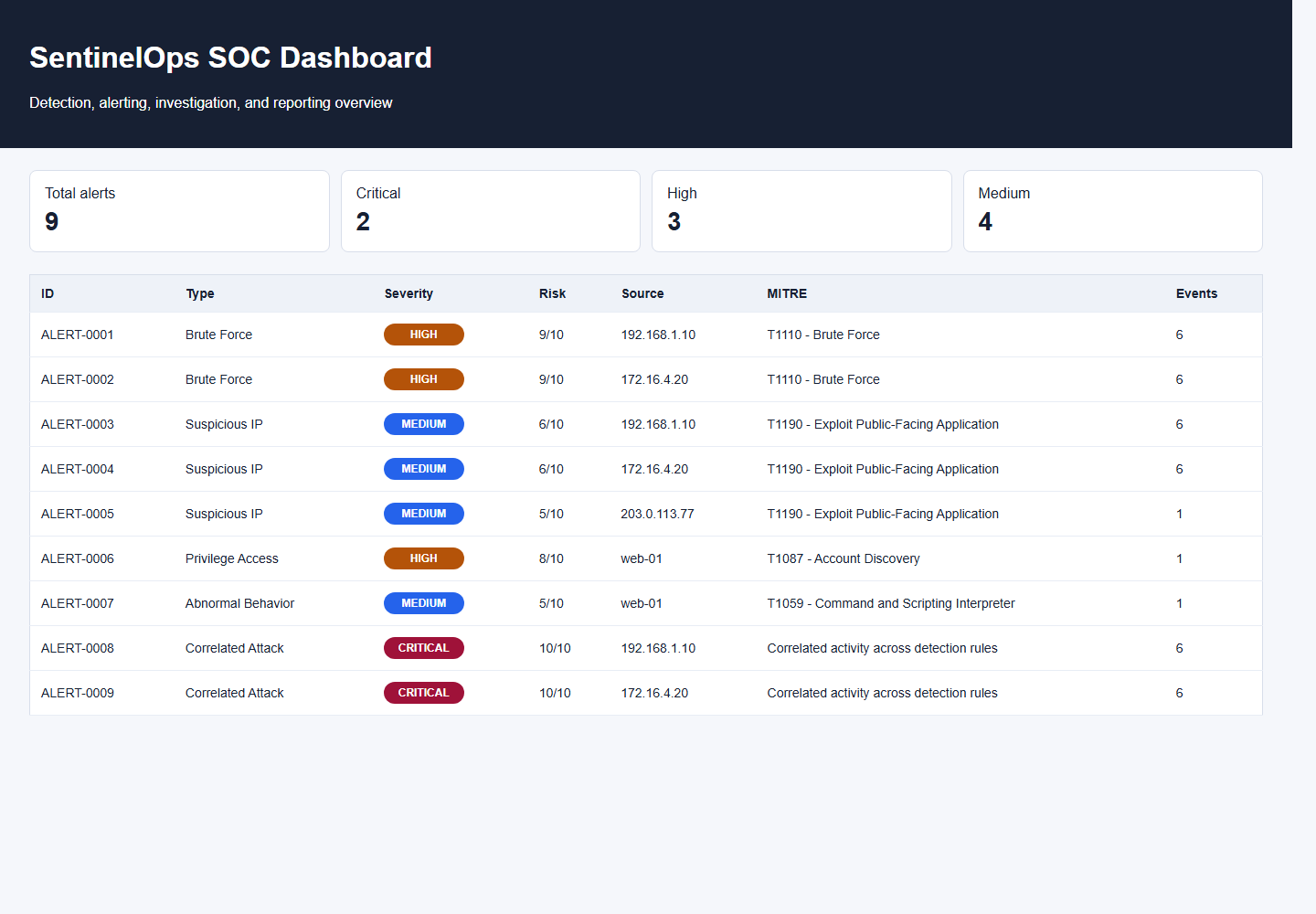
- 静态 HTML 仪表板
- 使用 SQLite 存储告警和调查历史记录
- 示例攻击场景
- 检测行为的单元测试
## 仪表板预览
## 检测规则
| 规则 | 描述 | 严重程度 |
| --- | --- | --- |
| Brute Force | 检测来自同一 IP 地址的失败登录尝试次数是否超过配置的数量 | HIGH |
| Suspicious IP | 检测来自不受信任的 IP 地址的身份验证或管理员活动 | MEDIUM |
| Privilege Access | 检测对已配置的敏感文件(如 `/etc/passwd` 或 `/etc/shadow`)的访问 | HIGH |
| Abnormal Behavior | 检测超过配置的 CPU 阈值的进程活动 | MEDIUM |
| Correlated Attack | 升级处理存在暴力破解活动与可疑 IP 活动相关联的情况 | CRITICAL |
检测设置定义在:
```
config/detection_config.json
```
## 项目结构
```
SentinelOps/
alerts/ Alert creation and JSON export
config/ Detection settings and MITRE mappings
detector/ Detection and correlation rules
enrichment/ Alert enrichment logic
investigation/ Investigation summaries and recommendations
logs/ Sample logs and scenarios
parser/ Raw log normalization
reports/ Report and dashboard generation
storage/ SQLite persistence
tests/ Unit tests
loader.py Log file loader
main.py Command-line runner
```
## 文档
- [架构](docs/architecture.md)
- [检测规则](docs/detection_rules.md)
- [调查手册](docs/investigation_playbook.md)
- [示例事件报告](docs/sample_incident_report.md)
## 环境要求
- Python 3.10 或更新版本
- 无需额外的 Python 包
## 快速入门
运行默认流水线:
```
python main.py --clean
```
这将读取:
```
logs/system_logs.txt
```
并生成:
```
alerts/alerts.json
reports/alert-*.txt
reports/executive_summary.md
reports/dashboard.html
data/sentinelops.db
```
## CLI 使用
```
python main.py --help
```
常用选项:
```
python main.py --log-file logs/system_logs.txt
python main.py --config config/detection_config.json
python main.py --reports-dir reports
python main.py --alerts-file alerts/alerts.json
python main.py --db data/sentinelops.db
python main.py --no-db
python main.py --clean
```
## 示例场景
暴力破解身份验证尝试:
```
python main.py --clean --log-file logs/scenario_bruteforce.log
```
敏感文件访问:
```
python main.py --clean --log-file logs/scenario_sensitive_access.log
```
API 滥用:
```
python main.py --clean --log-file logs/scenario_api_abuse.log
```
## 示例告警
```
{
"id": "ALERT-0007",
"type": "Correlated Attack",
"severity": "CRITICAL",
"risk_score": 10,
"description": "Brute-force activity from an untrusted IP requires escalation",
"source": "172.16.4.20",
"source_ip": "172.16.4.20",
"enrichment": {
"ip_reputation": "internal_untrusted",
"asset_criticality": "LOW",
"mitre_tactic": "Multiple",
"mitre_technique": "Correlated activity across detection rules"
}
}
```
## 报告
SentinelOps 会生成多种报告格式:
- 位于 `reports/alert-*.txt` 的单告警事件报告
- 位于 `reports/executive_summary.md` 的执行摘要
- 位于 `reports/dashboard.html` 的静态仪表板
生成的仪表板可以直接在浏览器中打开。
## 运行测试
```
python -m unittest
```
## 数据存储
当启用 SQLite 持久化时,SentinelOps 会将运行历史记录、告警和调查结果写入:
```
data/sentinelops.db
```
使用 `--no-db` 可以在不写入 SQLite 的情况下运行流水线。
## 注意事项
SentinelOps 使用示例日志和确定性的检测规则。它不能替代生产环境的 SIEM、EDR 或 SOAR 工具,但它提供了一个紧凑的检测与调查工作流的参考实现。
标签:AMSI绕过, CCTV/网络接口发现, CI/CD 安全, Cloudflare, DevSecOps, HTTP工具, meg, MITRE ATT&CK, PoC, Python, SQLite, 上游代理, 仪表盘, 信息安全, 关联分析, 多模态安全, 威胁情报, 威胁检测, 安全告警, 安全报告, 安全调查, 安全运营, 开发者工具, 异常行为检测, 扫描框架, 数据投毒防御, 数据规范化, 无后门, 无线安全, 日志解析, 暴力破解, 网络安全, 证书伪造, 轻量级 SOC, 逆向工具, 隐私保护