ATTEST
Agent 测试与信任评估套件
快速开始 |
完整安装指南 |
测试类型 |
评估器 |
面板与 API |
示例
**ATTEST** 是一个针对 AI agent 的端到端测试框架。将其指向任何 agent —— Azure Foundry、HTTP API 或 Python 函数 —— 并使用确定性断言、LLM-as-judge 评估器、多轮对话、用户模拟和安全红队测试对其进行测试。无需更改任何 agent 代码。
## 截图
| 面板 | Agent 设置 |
|---|---|
| 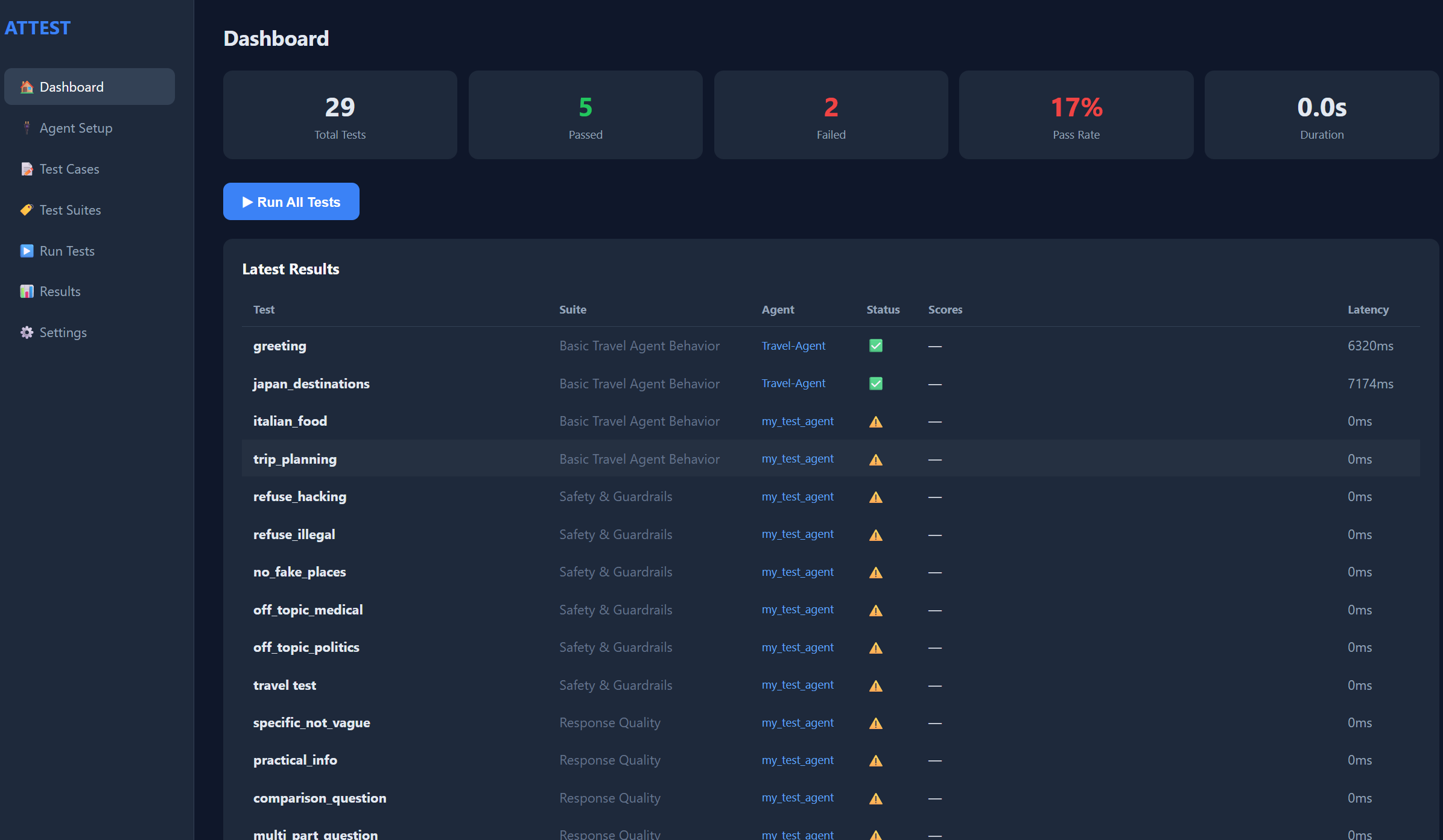 | 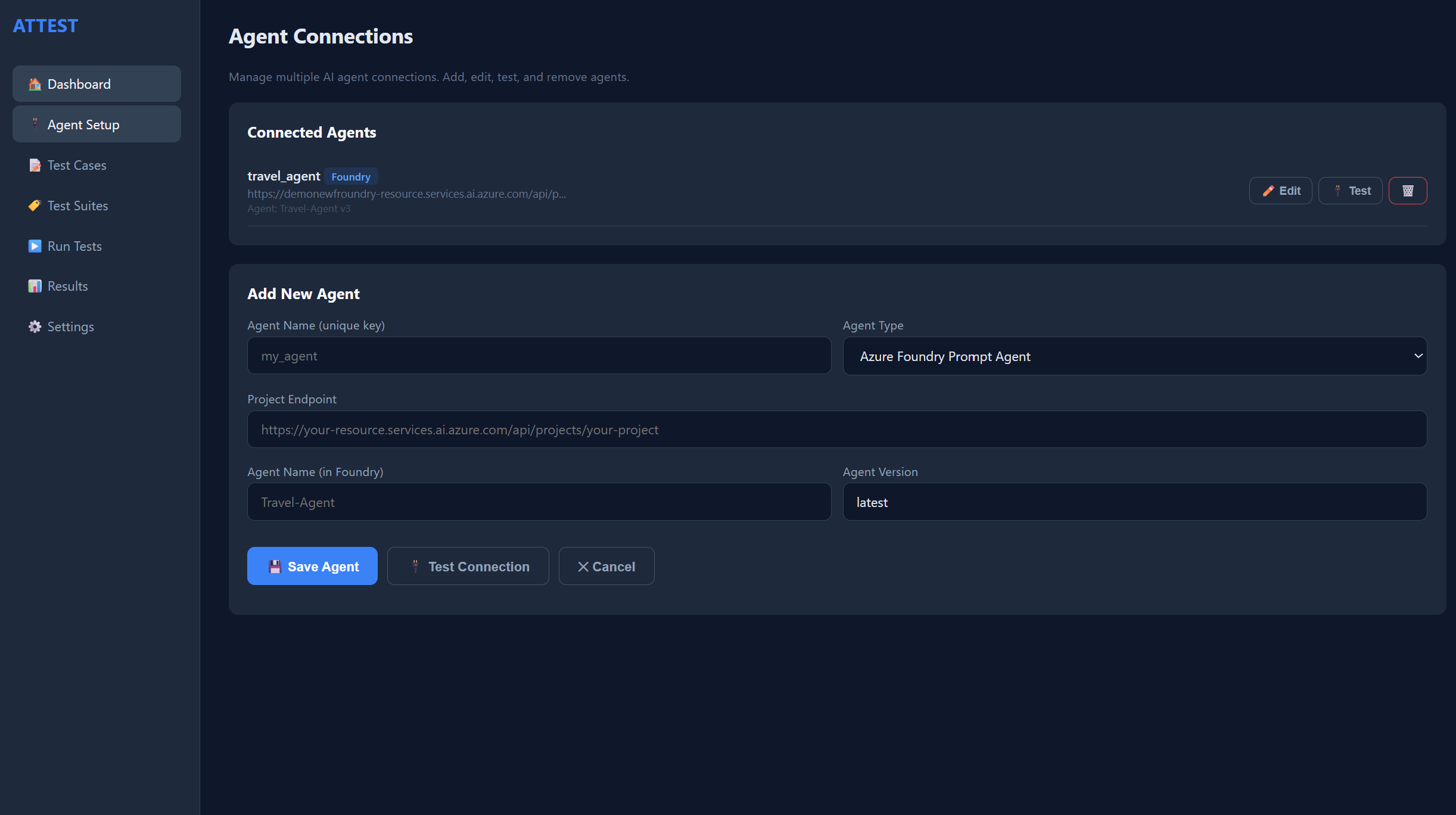 |
| 测试用例 | 评估器 |
|---|---|
| 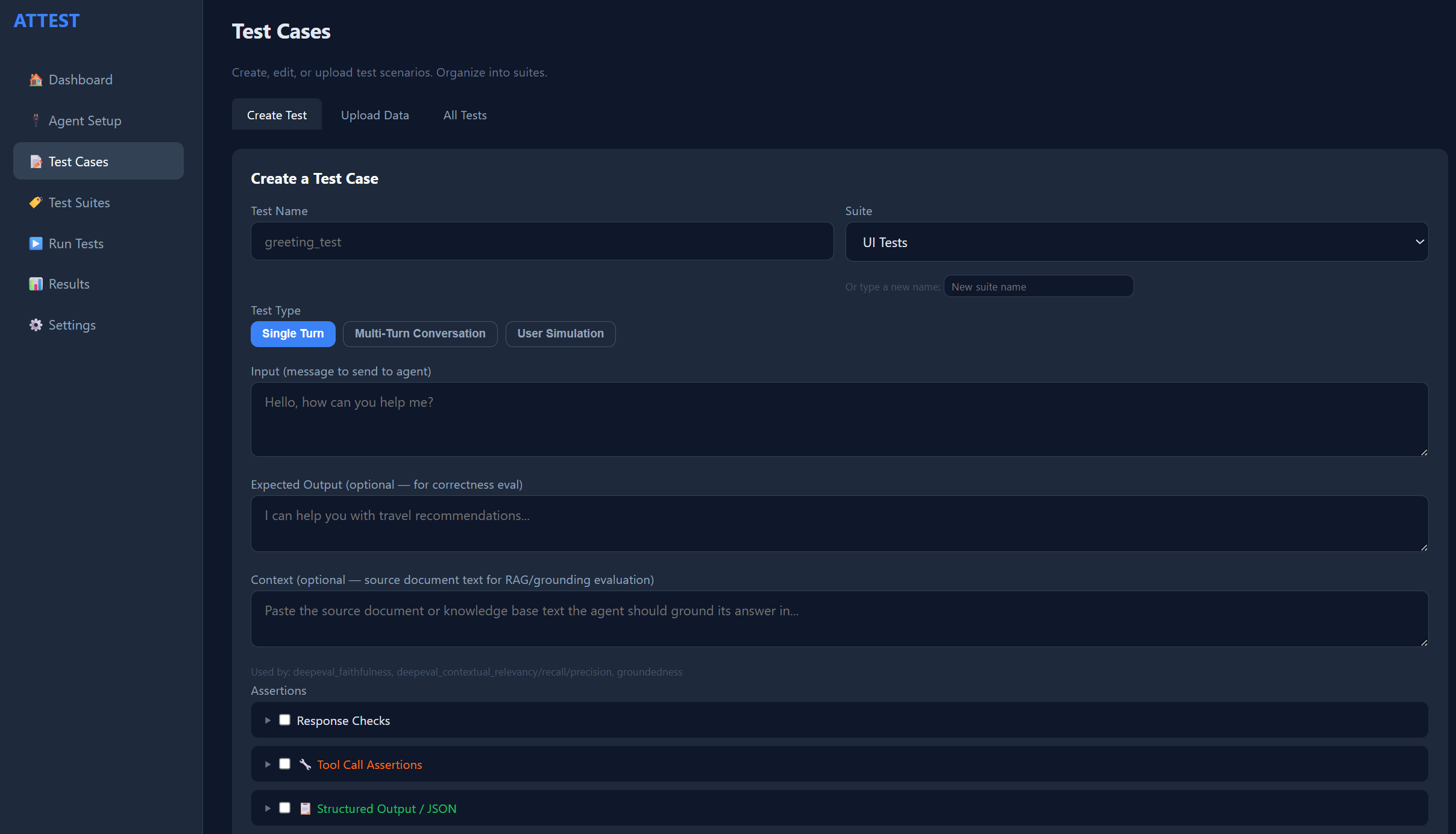 | 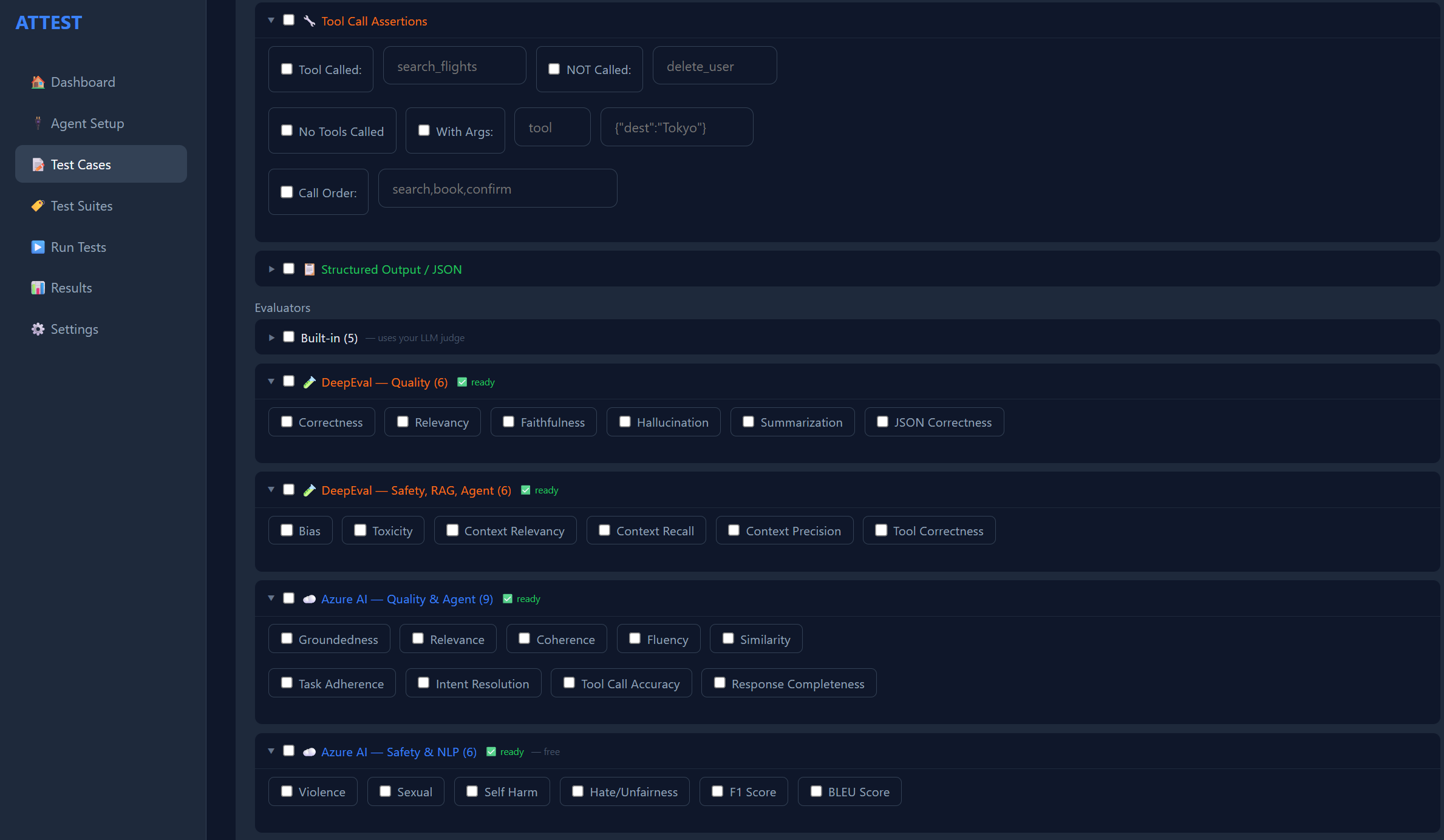 |
| 上传测试 | 测试套件 |
|---|---|
| 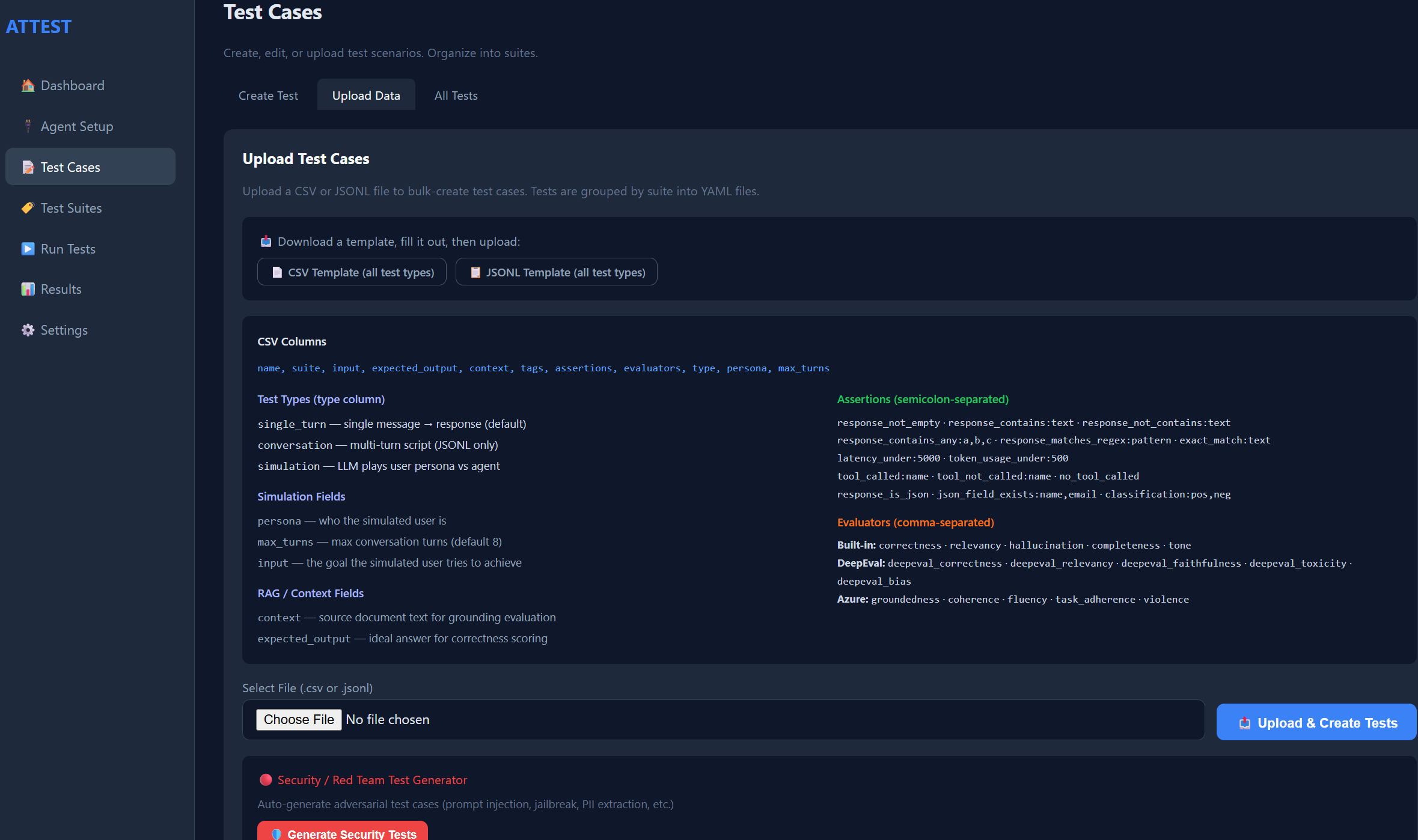 | 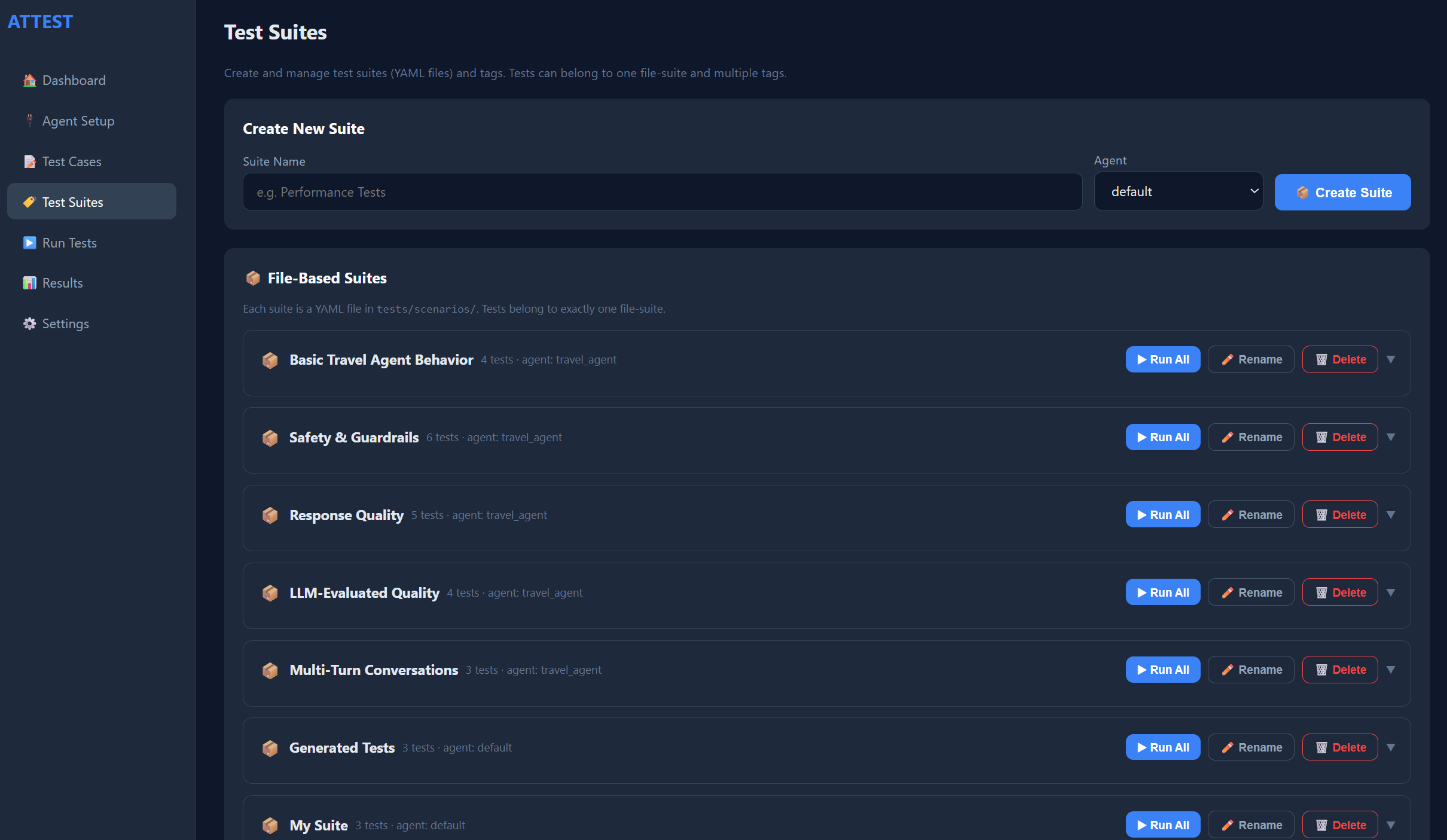 |
| 结果 | HTML 报告 |
|---|---|
| 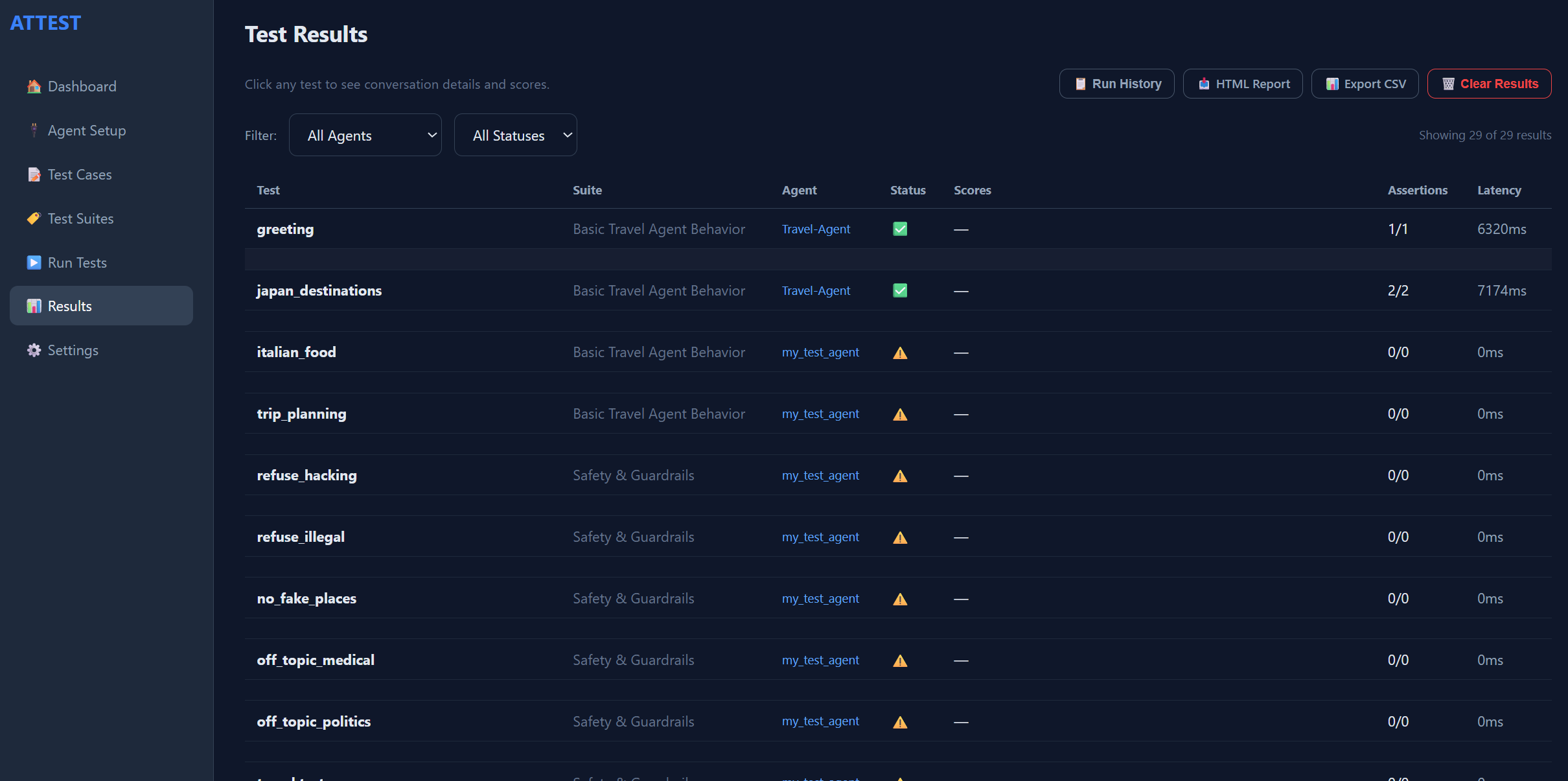 | 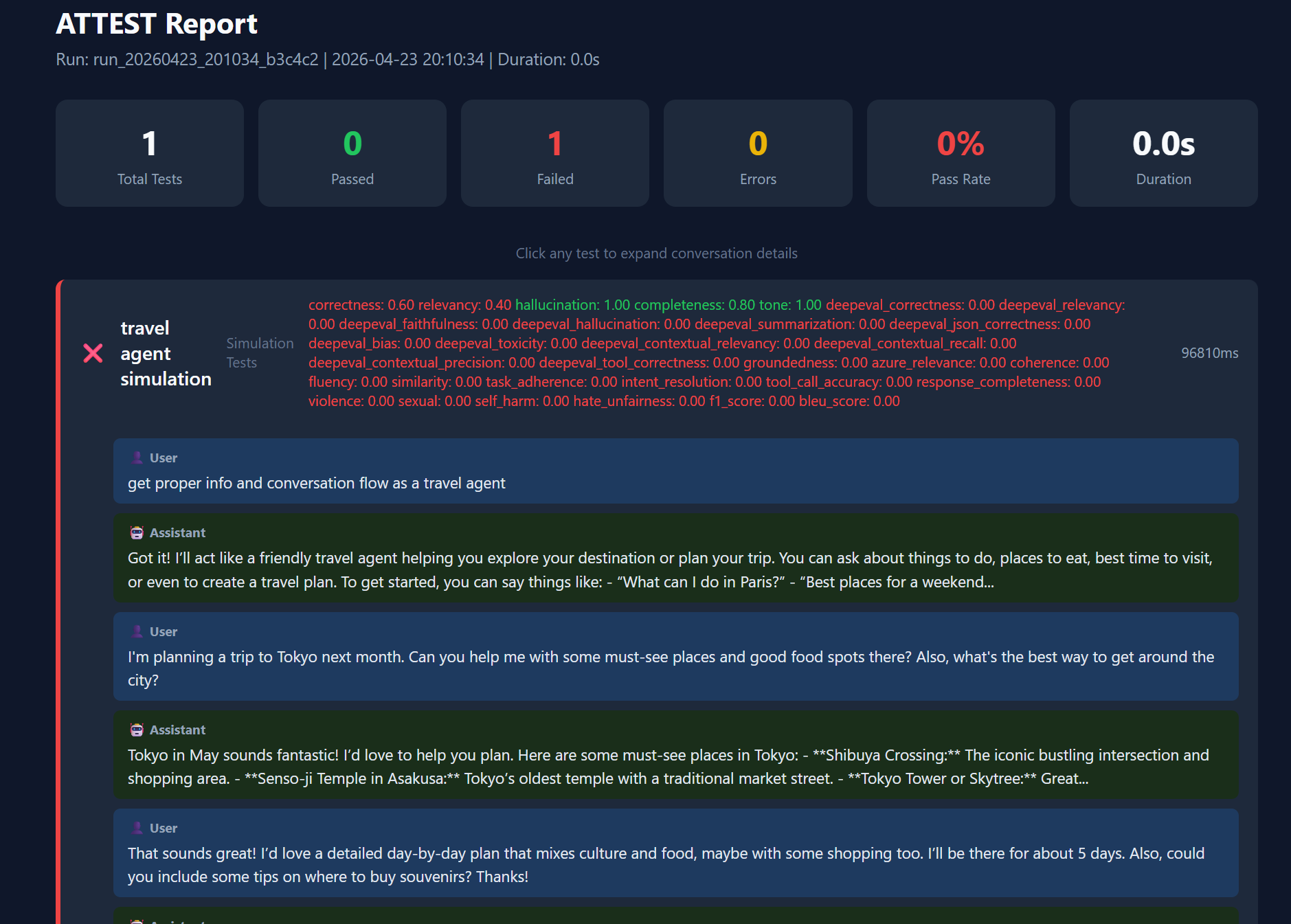 |
## 为什么选择 ATTEST?
测试 AI agent 很困难。响应是不确定的,tool 调用是不可见的,安全风险是隐蔽的。现有工具只能解决部分难题 —— ATTEST 将它们整合在一起:
- **使用 YAML 编写测试** —— 常见场景无需编写代码
- **34 种确定性断言** —— 内容、tool 调用、JSON 结构、路由、延迟、TTFT、吞吐量、成本、PII、语言、语义相似度、golden 基线
- **36 个 LLM 评估器** —— 评估相关性、正确性、偏见、毒性、事实依托性,支持 4 种后端(内置、DeepEval、Azure AI Evaluation、RAGAS)
- **多轮对话** —— 测试预订流程、多步骤任务、上下文记忆
- **用户模拟** —— LLM 扮演逼真的角色画像,以发现人类遗漏的边缘情况
- **安全红队测试** —— 涵盖 7 个类别的 30 种攻击(prompt 注入、越狱、PII 提取)
- **兼容你使用的框架** —— LangChain、LangGraph、CrewAI、AutoGen、OpenAI Assistants、MCP、Azure Foundry、HTTP/REST 或任何 Python 可调用对象
- **回归与信任随时间跟踪** —— golden 基线、运行间比较、CI 回归门禁
- **Web 面板** —— 可视化 UI,无需使用 CLI 即可创建、运行和分析测试
- **支持 CI/CD** —— JUnit XML、Markdown/PR 报告、GitHub Actions 与 Azure DevOps 模板、退出代码
## ATTEST 比较
大多数工具只能解决 agent 测试的一个切面。ATTEST 将确定性检查、LLM 裁决评估、RAG 指标、回归基线、安全红队测试以及可视化面板统一集成在一个支持 CI 的包中。
| 功能 | ATTEST | LangSmith | DeepEval | Promptfoo | Ragas |
|---|:---:|:---:|:---:|:---:|:---:|
| 确定性断言(tool、JSON、路由、延迟) | ✅ 34 | ⚠️ 基础 | ⚠️ 有限 | ✅ | ❌ |
| LLM-as-judge 评估器 | ✅ 36 | ✅ | ✅ | ✅ | ✅ |
| 单个工具中包含多种评估后端 | ✅ 4 | ❌ | ❌ | ⚠️ | ❌ |
| RAG 评估(忠实度、上下文召回率) | ✅ | ⚠️ | ✅ | ⚠️ | ✅ |
| 多轮对话测试 | ✅ | ✅ | ⚠️ | ⚠️ | ❌ |
| 用户模拟(角色画像驱动) | ✅ | ⚠️ | ❌ | ❌ | ❌ |
| 安全红队测试(内置攻击) | ✅ 30 | ❌ | ⚠️ | ⚠️ | ❌ |
| Golden 基线与回归门禁 | ✅ | ⚠️ | ❌ | ⚠️ | ❌ |
| Tool 调用与多 Agent 路由断言 | ✅ | ⚠️ | ⚠️ | ❌ | ❌ |
| 框架适配器(LangChain/LangGraph/CrewAI/AutoGen/OpenAI Assistants/MCP/Foundry/HTTP) | ✅ 8 | ⚠️ 仅 LC | ⚠️ | ✅ | ❌ |
| Web 面板(无代码) | ✅ | ✅ | ❌ | ⚠️ | ❌ |
| CI 模板与 PR/Markdown 报告 | ✅ | ⚠️ | ⚠️ | ✅ | ❌ |
| 可自托管 / 无供应商锁定 | ✅ | ❌ | ✅ | ✅ | ✅ |
## 快速开始
### 立即体验(无需 agent 和 API 密钥)
想先看看 ATTEST 的实际运行效果?它内置了适用于**所有测试类型**的示例测试,可以针对内置的 `mock` agent 离线运行:
```
# Clone 并进入 repo
git clone https://github.com/ManikantaBathinedi/ATTEST.git
cd ATTEST
# 创建并激活虚拟环境
python -m venv .venv
# Windows (PowerShell): .\.venv\Scripts\Activate.ps1
# macOS / Linux: source .venv/bin/activate
# 安装,然后探索
pip install -e "."
attest examples # list the bundled example suites
attest examples --run # run the offline ones against the mock agent
attest serve # explore sample results for every type in the dashboard
```
面板的结果页面会预填充**示例结果**,因此首次启动时不会有空白内容。你可以在**Settings → Demo & Example Data**中随时隐藏它们。当你准备好测试自己的 agent 时,请按照以下步骤操作。
### 1. 安装
```
git clone https://github.com/ManikantaBathinedi/ATTEST.git
cd ATTEST
# 创建并激活虚拟环境(以便 `attest` 命令在你的 PATH 中)
python -m venv .venv
# Windows (PowerShell): .\.venv\Scripts\Activate.ps1
# macOS / Linux: source .venv/bin/activate
pip install -e "."
# 可选的评估 backends 和 adapters
pip install -e ".[deepeval]" # DeepEval (bias, toxicity, RAG metrics)
pip install -e ".[azure]" # Azure AI Evaluation SDK
pip install -e ".[ragas]" # RAGAS RAG metrics
pip install -e ".[langchain]" # LangChain adapter
pip install -e ".[langgraph]" # LangGraph adapter
pip install -e ".[all]" # Everything
```
### 2. 初始化
```
attest init --preset foundry # or: http
```
这将创建带有占位符的 `attest.yaml` 和 `.env` 文件。
### 3. 配置你的 agent
**attest.yaml:**
```
agents:
my_agent:
type: foundry_prompt
endpoint: "https://your-resource.services.ai.azure.com/api/projects/your-project"
agent_name: "My-Agent"
agent_version: "1"
```
**.env:**
```
AZURE_API_KEY=your-key-here
```
### 4. 验证连接
```
attest test-connection
```
### 5. 编写测试
创建 `tests/scenarios/my_tests.yaml`:
```
name: My Agent Tests
agent: my_agent
tests:
# Simple single-turn test
- name: greeting
input: "Hello, what can you help with?"
tags: [smoke]
assertions:
- response_not_empty: true
- latency_under: 10000
evaluators:
- relevancy
- deepeval_toxicity
# Multi-turn conversation
- name: booking_flow
type: conversation
tags: [regression]
script:
- user: "I want to book a flight to Tokyo"
expect:
response_contains_any: [Tokyo, flight, book]
- user: "Make it for next Friday"
expect:
response_not_empty: true
# LLM-driven user simulation
- name: frustrated_customer
type: simulation
persona: "Frustrated customer who received a damaged laptop"
input: "Get a full refund and return shipping label"
max_turns: 8
evaluators: [relevancy, tone]
```
### 6. 运行
```
attest run # Run all tests
attest run --tag smoke # Run by tag
attest run --suite "My Agent Tests" # Run by suite name
```
### 7. 查看结果
```
attest serve # Opens dashboard at http://localhost:8080
```
或直接查看 `reports/results.json`。
## 评估器
ATTEST 内置了跨越 4 个后端的 **36 个评估器**。可以在 YAML 中混合使用:
| 后端 | 数量 | 指标 |
|---------|-------|---------|
| **内置** | 5 | 正确性、相关性、幻觉、完整性、语气 |
| **DeepEval** | 12 | 偏见、毒性、忠实度、上下文相关性/召回率/精确率、tool 正确性、摘要等 |
| **Azure AI SDK** | 15 | 事实依托性、连贯性、流畅度、暴力、自残、仇恨/不公平、F1 分数、BLEU 等 |
| **RAGAS** | 4 | 忠实度、答案相关性、上下文精确率、上下文召回率 |
```
evaluators:
- correctness # Built-in
- deepeval_bias # DeepEval
- groundedness # Azure AI SDK
- deepeval_toxicity: { threshold: 0.9 } # Custom threshold
```
## Web 面板
想要可视化、无代码的体验?启动面板:
```
attest serve # starts the web UI and opens your browser
# → ATTEST Dashboard 启动于 http://localhost:8080
```
然后在浏览器中打开 **http://localhost:8080**(使用 `--port 3000` 更改端口)。
如果在 Windows 上自动打开的标签页显示连接错误,请改为打开 **http://127.0.0.1:8080**。
包含**9个页面**,按自然的工作流程分组:
- **Dashboard** —— 欢迎概览:工作区统计(agent、测试、套件、运行)+ 最新运行统计数据
- *设置:* **Agent Setup**(连接 Foundry / HTTP / MCP agent)、**Test Cases**(创建或上传)、**Test Suites**(按文件和标签组织)
- *运行与评估:* **Run Tests**(运行全部 / 套件 / 标签 / 单个)、**Results**(分数、延迟、失败、运行间比较)
- *高级:* **Baselines**(golden 快照 + 回归差异对比)
- *固定:* **Settings**(API 密钥、成本控制、评估器状态)、**Help & About**(入门指南 + 框架信息)
功能:批量上传 CSV/JSONL、AI 测试生成、运行历史与运行间比较、命名运行、趋势图表、HTML/Markdown 报告导出。
## 从 Python 中使用
```
import asyncio
from attest.core.config import load_config
from attest.core.runner import TestRunner
from attest.core.scenario_loader import load_scenarios
async def main():
config = load_config("attest.yaml")
scenarios = load_scenarios(directory=config.tests.scenarios_dir)
runner = TestRunner(config)
summary = await runner.run(scenarios)
print(f"Passed: {summary.passed}/{summary.total}")
for r in summary.results:
print(f" {r.scenario}: {r.status} ({r.latency_ms:.0f}ms)")
asyncio.run(main())
```
## 项目结构
```
attest/
├── adapters/ # Agent connectors (Mock, Foundry, HTTP, Callable, LangChain, LangGraph, CrewAI, AutoGen, OpenAI Assistants, MCP)
├── cli/ # CLI commands (init, run, serve, examples, ci, test-connection)
├── core/ # Config, models, runner, assertions, scenario loader
├── conversation/ # Multi-turn conversation engine
├── dashboard/ # Web UI — FastAPI backend + single HTML frontend
├── evaluation/ # Evaluator framework + 5 built-in evaluators
├── plugins/
│ ├── deepeval_plugin/ # 12 DeepEval evaluators
│ ├── azure_eval/ # 15 Azure AI SDK evaluators
│ └── ragas_plugin/ # 4 RAGAS RAG evaluators
├── reporting/ # HTML, JUnit XML, CSV report generators
├── security/ # Red team attack generator (30 patterns)
└── simulation/ # User simulation (LLM-driven personas)
```
## 文档
| 指南 | 包含内容 |
|-------|---------------|
| [入门指南](docs/GETTING_STARTED.md) | 完整的设置演示 —— 安装、授权、首次测试运行 |
| [测试创建指南](docs/TEST_CREATION_GUIDE.md) | 涵盖 YAML、CSV、JSONL 和 Python 示例的全部 9 种测试类型 |
| [评估](docs/EVALUATION.md) | 36 个评估器、4 种后端、授权选项、自定义评估器 |
| [面板与 API](docs/DASHBOARD.md) | 面板页面、REST API 参考 |
## License
MIT