i014n/RightHand-Persistence
GitHub: i014n/RightHand-Persistence
基于 C++ 和 COM 技术实现的 Windows 右键菜单处理程序,演示了一种利用用户交互触发的隐蔽权限维持技术。
Stars: 90 | Forks: 11
# RightHand 持久化
灵感来源于 [CVE-2026-21509](https://www.zscaler.com/blogs/security-research/apt28-leverages-cve-2026-21509-operation-neusploit)
## 用于持久化的 C++ COM 上下文菜单处理程序
这是一个使用 C++ 和 COM 实现的 Windows 上下文菜单处理程序示例,演示了一种隐蔽的持久化技术。通过注册自定义的 COM 对象,每当用户在 Windows 资源管理器中对特定目标(文件、文件夹或背景)点击鼠标右键时,你的代码就会被执行。
## 概念验证 (POC)
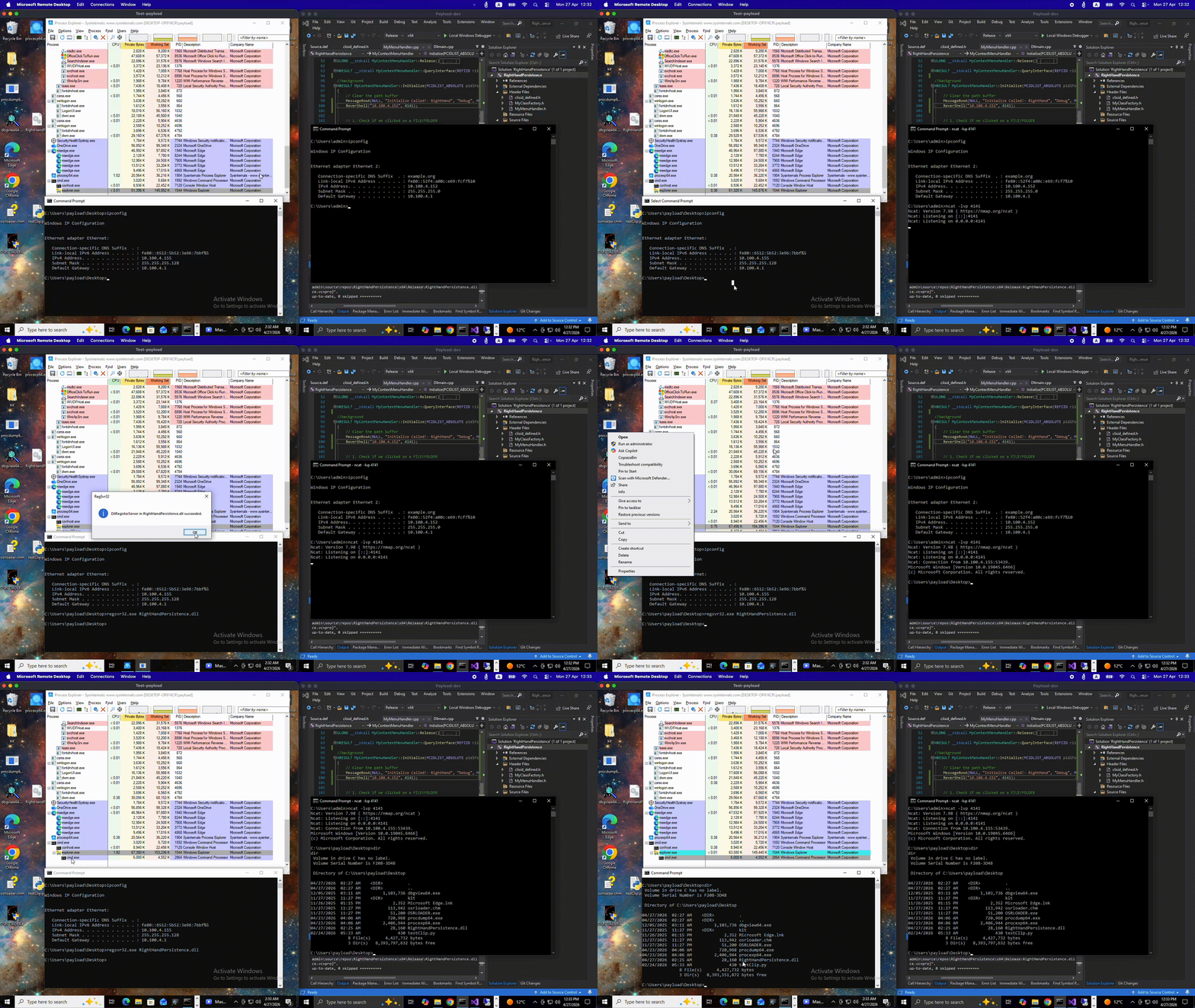
## 入门指南
### 前置条件
* C++ 编译器(例如:Visual Studio 的 MSVC,或 MinGW-w64)
* Windows SDK
* 测试虚拟机(用于安全的注册和执行)
### 我的开发环境
* **IDE:** Visual Studio 2019
* **VM 开发环境:** Windows 10 x64 (Build 19045)
* **VM 测试环境:** Windows 10 x64 / Windows 11 x64
## 项目架构
```
DllMain.cpp
+-----------------------+
| DLL Template Project |
+-------+-------+-------+
____/ | \_____
| | |
v v v
+------------+ +----------------+ +--------------+
| Define | | MyClassFactory | | Define |
clsid_defined.h | CLSID | +----------------+ | Export | Source.def
+------------+ ClassFactory | Functions |
class +--------------+
|
|
v
+--------------+
| MyMenuHandler|
+--------------+
MyMenuHandler
class
```
### DllMain.cpp
包含 COM 对象注册和注销 DLL 所需的标准函数。
* `DllRegisterServer()`:写入与目标文件扩展名/背景对应的注册表路径。在注册 DLL 时执行。
```
STDAPI DllRegisterServer() {
std::wstring clsidString = MyStringFromCLSID(CLSID_DecrypShellExtensionx64);
std::wstring dllPath = MyGetModuleFilename();
// 1. Register the COM Class (CLSID)
std::wstring clsidBaseKey = L"SOFTWARE\\Classes\\CLSID\\" + clsidString;
SetRegistryKey(HKEY_LOCAL_MACHINE, clsidBaseKey, L"", L"MyMenuHandler Object");
// 2. Register the DLL Path and Threading Model
std::wstring inprocKey = clsidBaseKey + L"\\InprocServer32";
SetRegistryKey(HKEY_LOCAL_MACHINE, inprocKey, L"", dllPath);
SetRegistryKey(HKEY_LOCAL_MACHINE, inprocKey, L"ThreadingModel", L"Apartment");
// 3. Register for all Shell Contexts
// Array of paths to cover Files, Folders, Backgrounds, and Desktop
std::wstring handlerPaths[] = {
L"SOFTWARE\\Classes\\*\\shellex\\ContextMenuHandlers\\",
L"SOFTWARE\\Classes\\Directory\\shellex\\ContextMenuHandlers\\",
L"SOFTWARE\\Classes\\Directory\\Background\\shellex\\ContextMenuHandlers\\",
L"SOFTWARE\\Classes\\DesktopBackground\\shellex\\ContextMenuHandlers\\"
};
for (const auto& path : handlerPaths) {
std::wstring fullPath = path + L"MyMenuHandler"; // Replace with your handler's name
SetRegistryKey(HKEY_LOCAL_MACHINE, fullPath, L"", clsidString);
}
// 4. Register in the Approved list (Required for many Windows versions)
std::wstring approvedKey = L"SOFTWARE\\Microsoft\\Windows\\CurrentVersion\\Shell Extensions\\Approved";
SetRegistryKey(HKEY_LOCAL_MACHINE, approvedKey, clsidString, L"MyMenuHandler");
// 5. Notify the Shell that things have changed
SHChangeNotify(SHCNE_ASSOCCHANGED, SHCNF_IDLIST, NULL, NULL);
return S_OK;
}
```
* `DllUnregisterServer()`:清理注册表。在注销 DLL 时调用。
### MyClassFactory
用于实例化 COM 对象的必需要素。[了解更多关于类工厂的信息](https://learn.microsoft.com/en-us/windows/win32/directshow/class-factories-and-factory-templates)。
### Clsid_defined.h
包含应用程序在资源管理器中注册时使用的 GUID。你可以使用 Visual Studio 的 `guidgen.exe` 或在线的 [GUID 生成器](https://guidgenerator.com) 生成新的 GUID。
```
// {CEF1AA1B-42F7-4A54-AF46-BCEE5B3FE6BF}
DEFINE_GUID(CLSID_DecrypShellExtensionx64, 0xcef1aa1b, 0x42f7, 0x4a54, 0xaf, 0x46, 0xbc, 0xee, 0x5b, 0x3f, 0xe6, 0xbf);
```
### Source.def
模块定义文件。它决定了 DLL 导出哪些函数。[了解更多关于 .DEF 文件的信息](https://learn.microsoft.com/en-us/cpp/build/reference/module-definition-dot-def-files)。
```
EXPORTS
DllGetClassObject PRIVATE
DllCanUnloadNow PRIVATE
DllRegisterServer PRIVATE
DllUnregisterServer PRIVATE
```
### MyMenuHandler.cpp
实现 `IShellExtInit` 和 `IContextMenu` 的核心类。你可以在这里定义自定义操作。
* `MyContextMenuHandler::Initialize(PCIDLIST_ABSOLUTE pidlFolder, IDataObject* pdtobj, HKEY hkeyProgID)`
每次在已注册的目标上点击右键时调用。用于解析被点击的文件或文件夹。
```
HRESULT MyContextMenuHandler::Initialize(PCIDLIST_ABSOLUTE pidlFolder, IDataObject* pdtobj, HKEY hkeyProgId)
{
MessageBoxA(NULL, "Initialize Called!", "Debug", MB_OK);
// 1. Check if we clicked on a FILE/FOLDER
if (pdtobj)
{
STGMEDIUM medium;
FORMATETC fe = { CF_HDROP, NULL, DVASPECT_CONTENT, -1, TYMED_HGLOBAL };
if (SUCCEEDED(pdtobj->GetData(&fe, &medium)))
{
DragQueryFileA((HDROP)medium.hGlobal, 0, m_szFile, MAX_PATH);
ReleaseStgMedium(&medium);
return S_OK; // Success!
}
}
// 2. Check if we clicked the BACKGROUND (pidlFolder)
if (pidlFolder)
{
if (SHGetPathFromIDListA(pidlFolder, m_szFile))
{
return S_OK; // Success!
}
}
// 3. Fallback: If we got neither, still return S_OK to show the menu.
// You just won't have a path populated in m_szFile.
return S_OK;
}
```
* `MyContextMenuHandler::InvokeCommand(LPCMINVOKECOMMANDINFO picp)`
当用户从上下文菜单中点击你特定的自定义选项时调用。这是你的持久化 payload 或自定义操作执行的地点。
## 测试
在目标虚拟机上,复制编译好的 DLL 并运行以下命令:
### 1. 注册
使用标准的 Windows 二进制文件注册 DLL。
```
regsvr32.exe RightHandPersistence.dll
```
### 2. 重启资源管理器
重启 `explorer.exe` 进程,以确保它将新的 shell 扩展加载到内存中。
```
taskkill /f /im explorer.exe & start explorer.exe
```
### 3. 注销
要移除上下文菜单处理程序并清理注册表,请使用带有 `/u` 标志的 `regsvr32.exe`。这将调用你的 `DllUnregisterServer` 函数。
```
regsvr32.exe /u RightHandPersistence.dll
```
## 自定义
### 1. 针对特定位置
Windows 对“空白区域”的分类与文件不同。要以背景为目标,请将你的注册表项映射到这些特定位置。
| 右键目标 | 注册表项路径 |
| :--- | :--- |
| **文件 (所有)** | `HKEY_CLASSES_ROOT\*\shellex\ContextMenuHandlers` |
| **文件夹 (图标)** | `HKEY_CLASSES_ROOT\Directory\shellex\ContextMenuHandlers` |
| **文件夹背景** | `HKEY_CLASSES_ROOT\Directory\Background\shellex\ContextMenuHandlers` |
| **桌面背景** | `HKEY_CLASSES_ROOT\DesktopBackground\shellex\ContextMenuHandlers` |
有关映射扩展名的更多详细信息,请参见 [Microsoft Shell 上下文菜单文档](https://learn.microsoft.com/en-us/windows/win32/shell/context-menu-handlers)。
### 2. 创建自定义菜单命令
你可以通过实现 `IContextMenu::QueryContextMenu` 方法为菜单指定自定义文本(例如,“Custom Copy”或“Run Diagnostics”)。点击此自定义文本将触发你在 `IContextMenu::InvokeCommand` 中的逻辑。
## 参考文献
* [创建快捷菜单处理程序 (Microsoft Learn)](https://learn.microsoft.com/en-us/windows/win32/shell/context-menu-handlers)
* [IShellExtInit 接口 (Microsoft Learn)](https://learn.microsoft.com/en-us/windows/win32/api/shobjidl_core/nn-shobjidl_core-ishellextinit)
* [IContextMenu 接口 (Microsoft Learn)](https://learn.microsoft.com/en-us/windows/win32/api/shobjidl_core/nn-shobjidl_core-icontextmenu)
* [注册 Shell 扩展处理程序 (Microsoft Learn)](https://learn.microsoft.com/en-us/windows/win32/shell/reg-shell-exts)
* [使用 DEF 文件从 DLL 导出 (Microsoft Learn)](https://learn.microsoft.com/en-us/cpp/build/exporting-from-a-dll-using-def-files)
* [GuidGenerator.com](https://guidgenerator.com/)
标签:C++, COM对象劫持, COM技术, Conpot, CVE复现, DLL注入, MSVC, Shell扩展, Visual Studio, Windows安全, Windows持久化, 上下文菜单处理程序, 右键菜单, 后门, 嗅探欺骗, 恶意软件 persistence, 攻击技术, 数据展示, 数据擦除, 权限维持, 流量审计, 私有化部署, 端点可见性, 红队, 网络安全, 防御规避, 隐私保护