sandeepmothukuri/advanced-soc-lab-v2.0
GitHub: sandeepmothukuri/Enterprise-Detection-Engineering-SOC-Lab
一个基于 Docker Compose 编排十二款主流安全工具与 AI 智能体的高级 SOC 实战靶场,为蓝队培训和红队模拟提供开箱即用的沉浸式攻防演练环境。
Stars: 7 | Forks: 1
# 高级 SOC 实验室 v2.0
[](https://github.com/sandeepmothukuri/advanced-soc-lab-v2.0/actions) [](https://cybertechnology.in) [](https://attack.mitre.org/)
**作者:** Sandeep Mothukuri
**技术栈:** 12 个工具 · 100% 免费 · MITRE ATT&CK v14 · Docker Compose
**最低配置:** 16 GB 内存 · 50 GB 磁盘 · Linux / WSL2 / macOS
## 截图
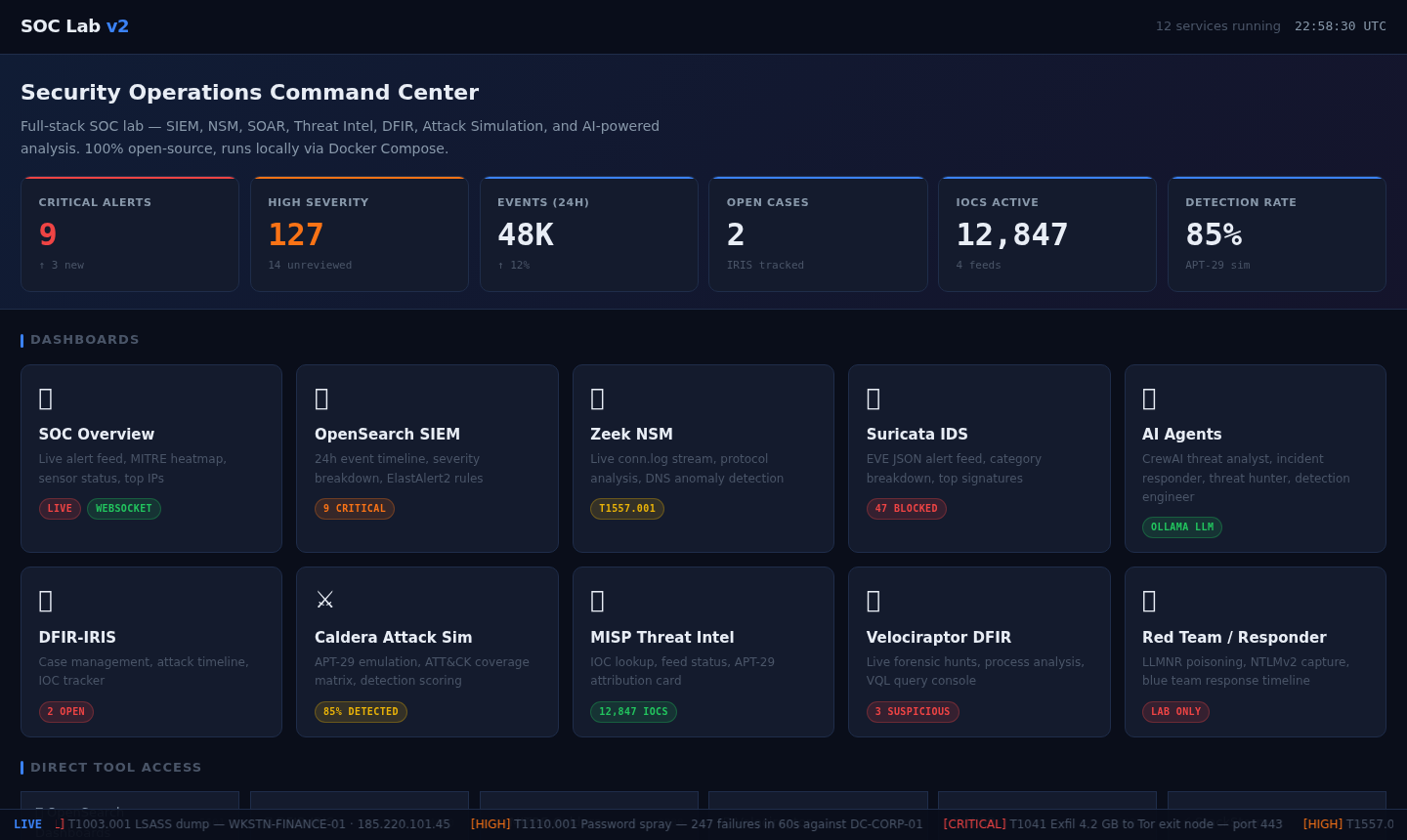
### 指挥中心门户
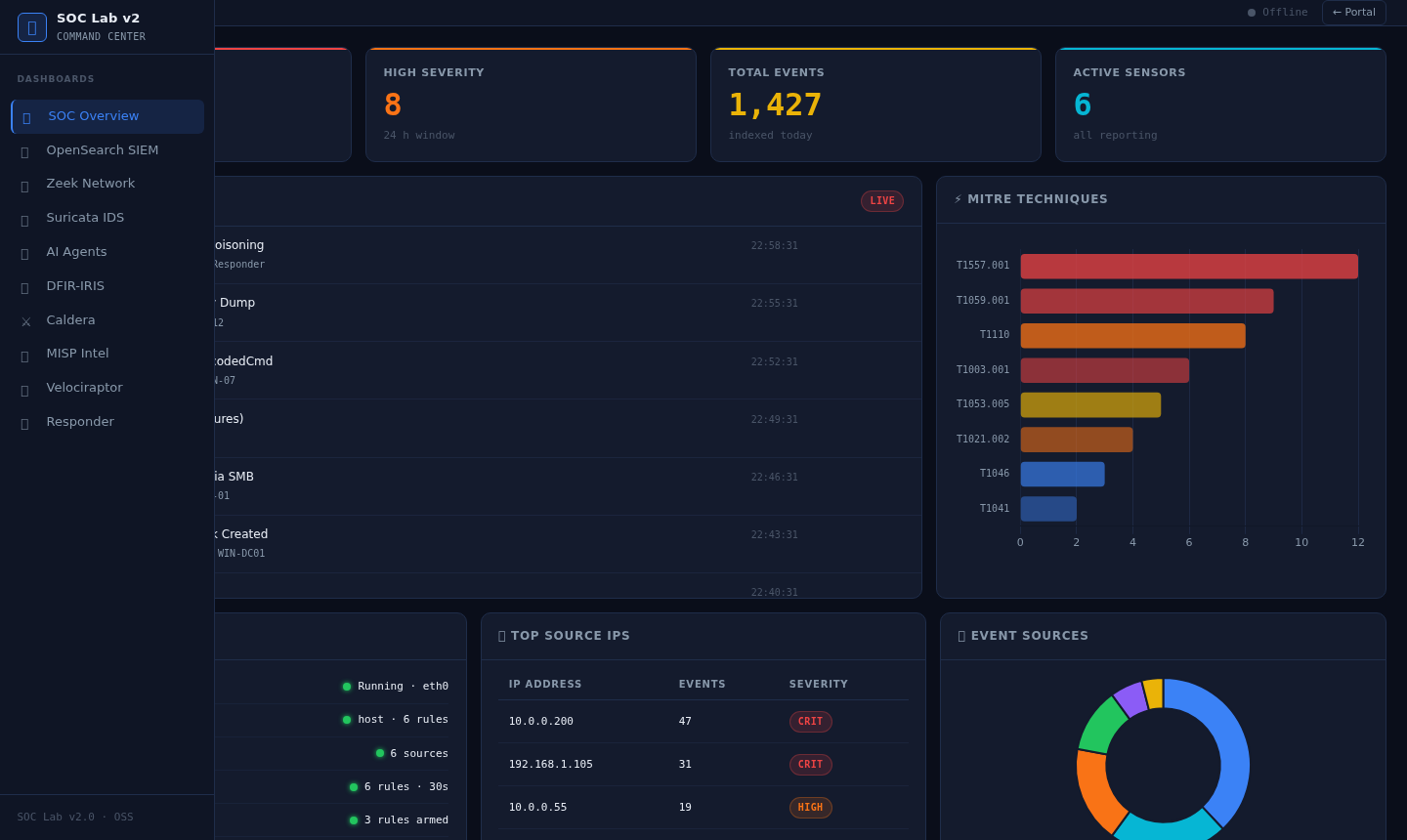
### SOC 概览 — 实时告警信息流
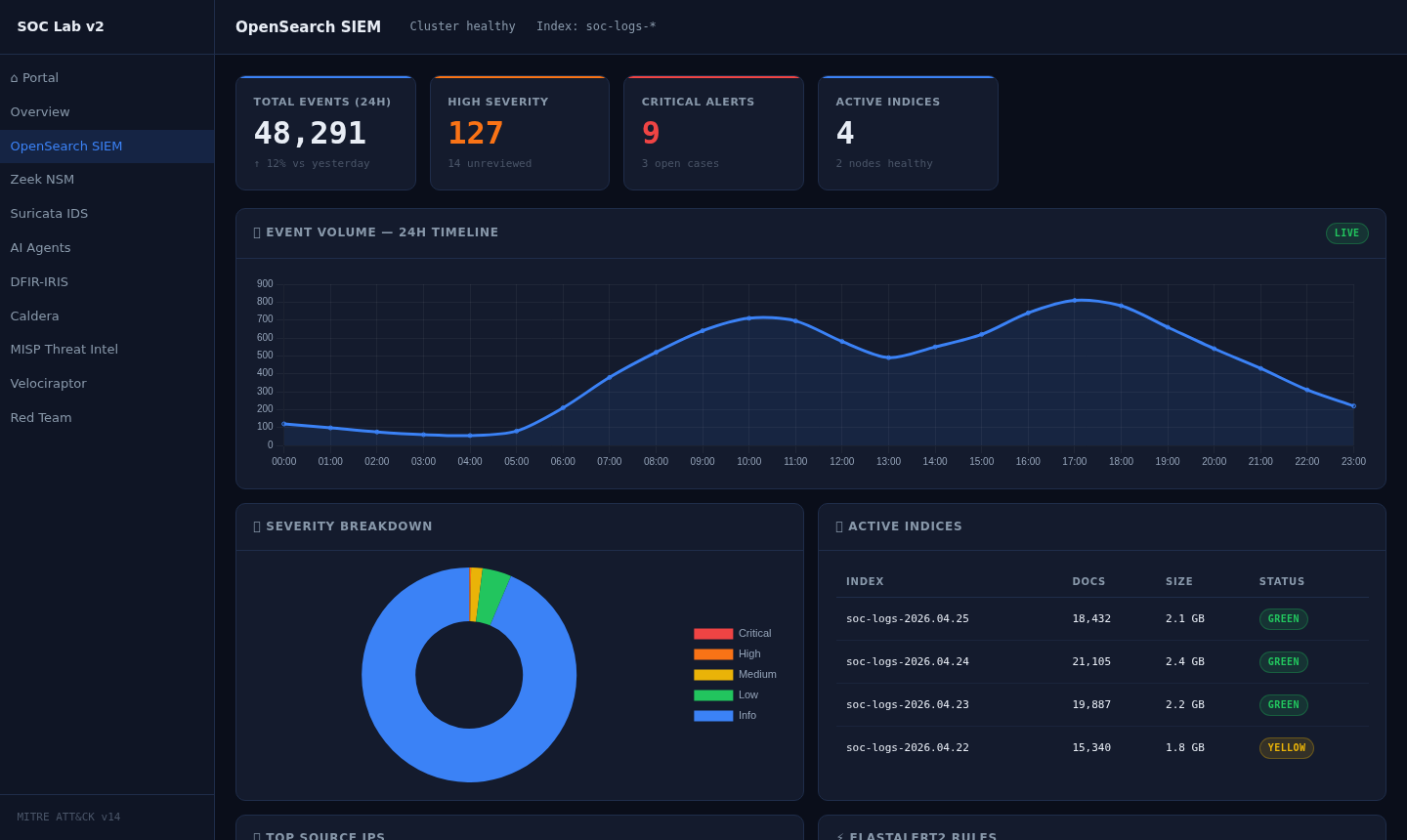
### OpenSearch SIEM — 24小时事件时间轴
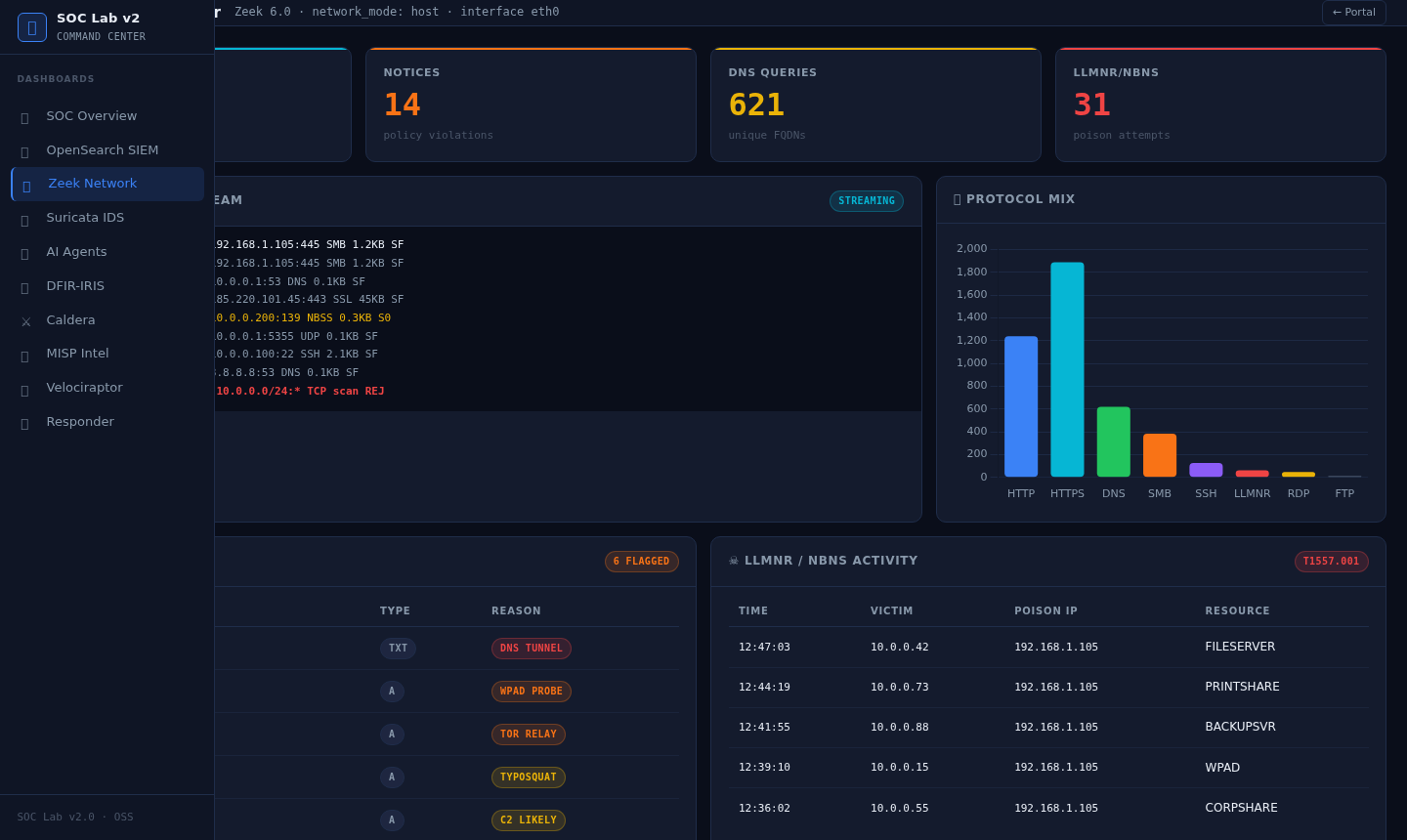
### Zeek NSM — 网络流量分析
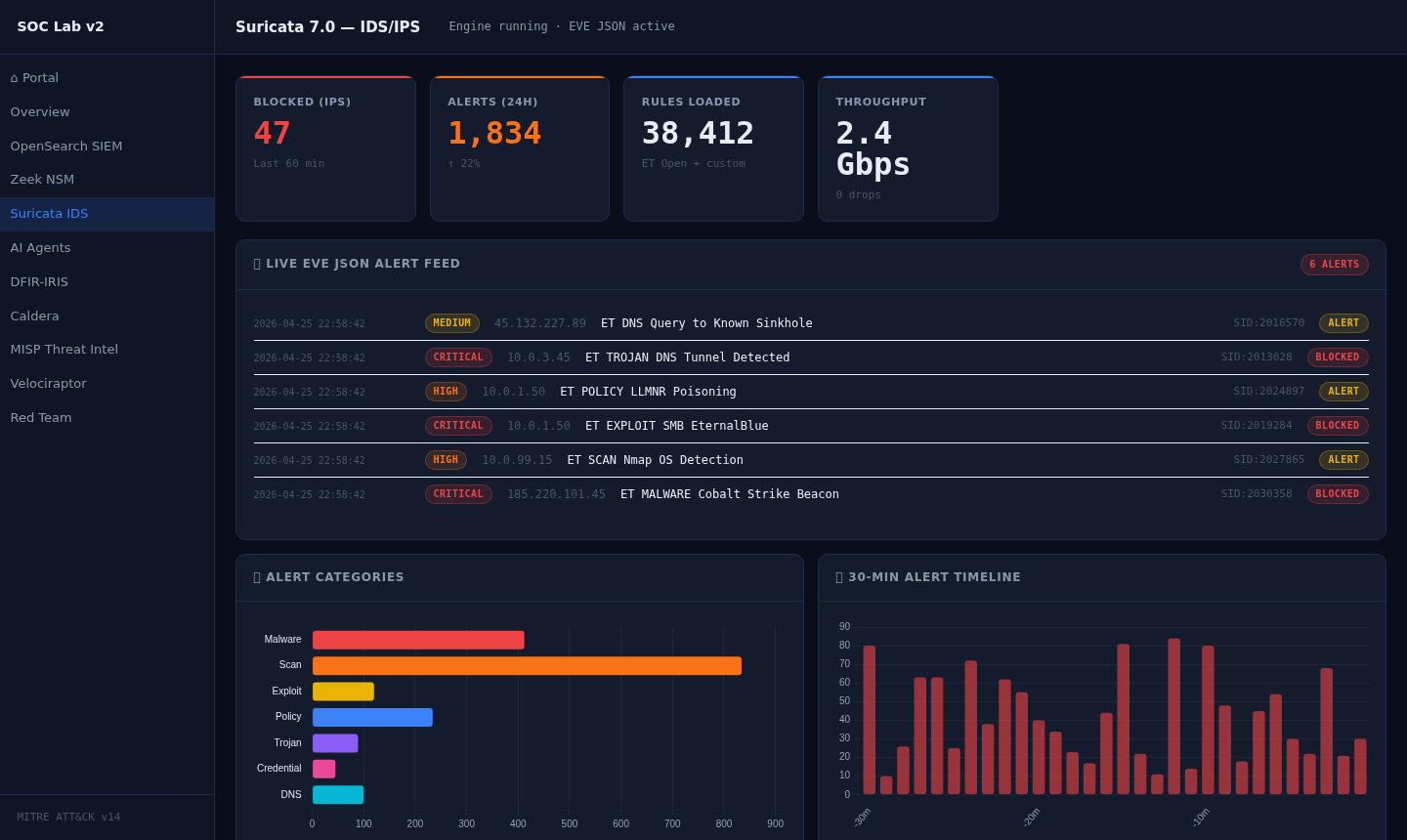
### Suricata IDS — EVE JSON 告警信息流
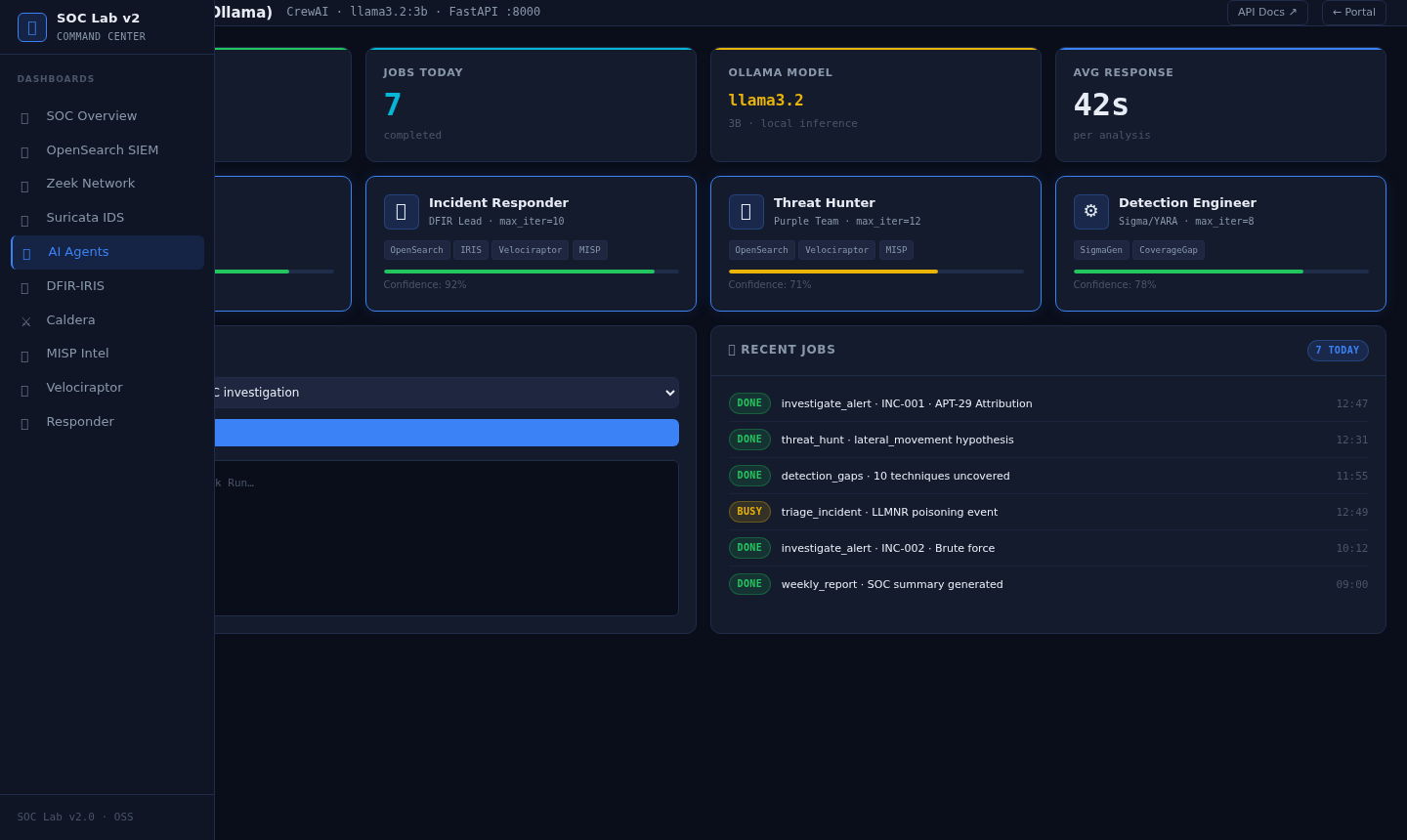
### AI 代理 — CrewAI 威胁分析
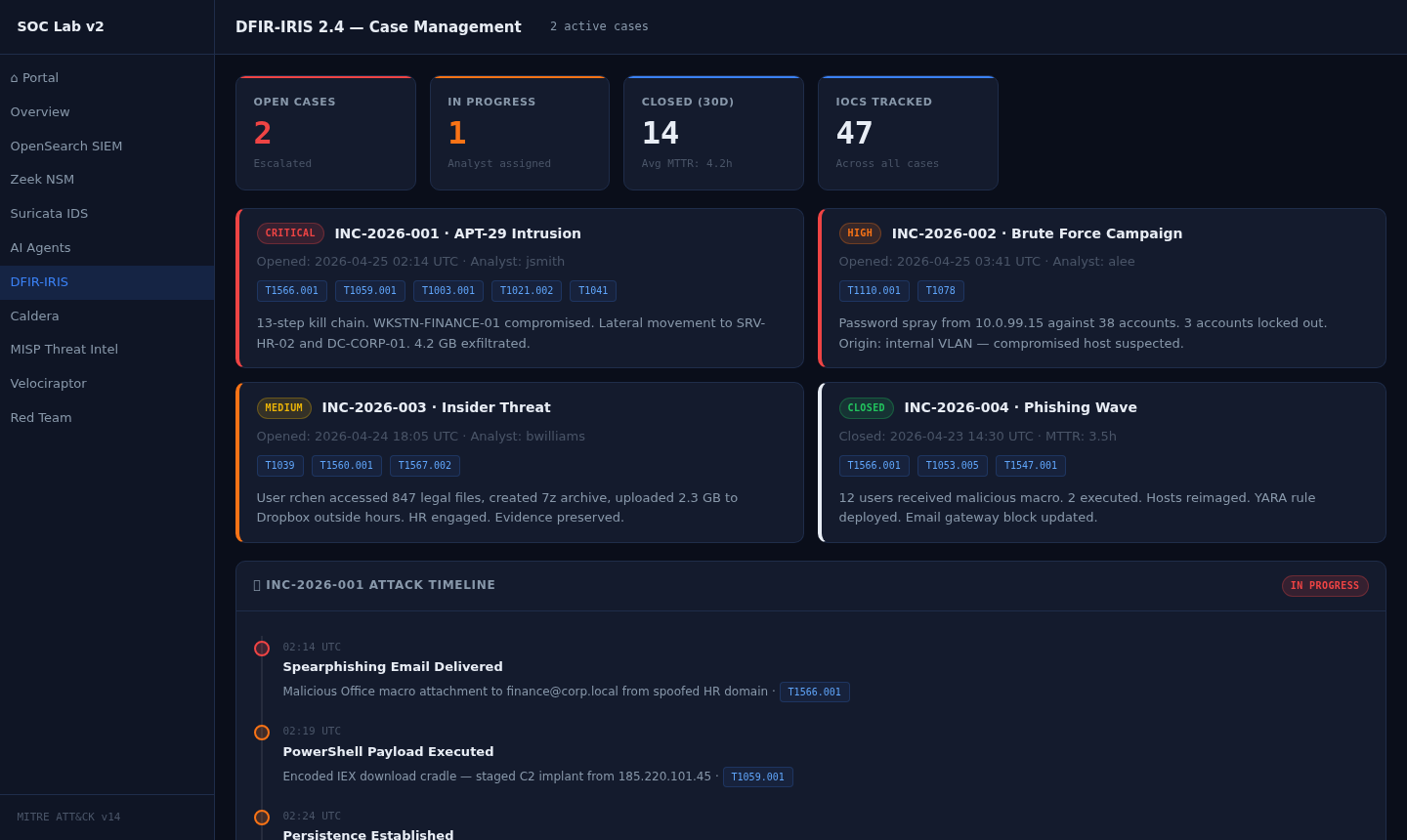
### DFIR-IRIS — 案例管理与攻击时间轴
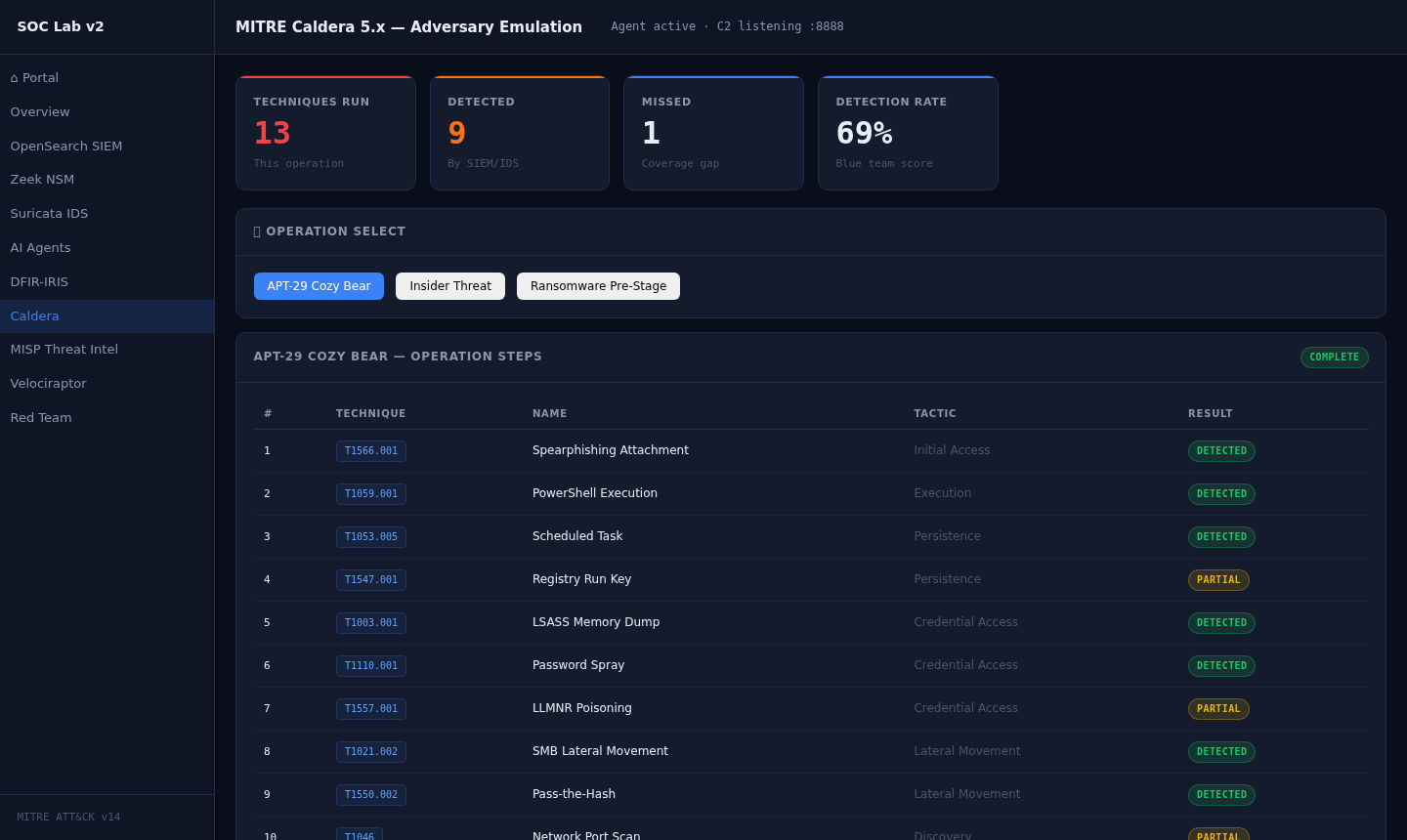
### MITRE Caldera — 对手模拟
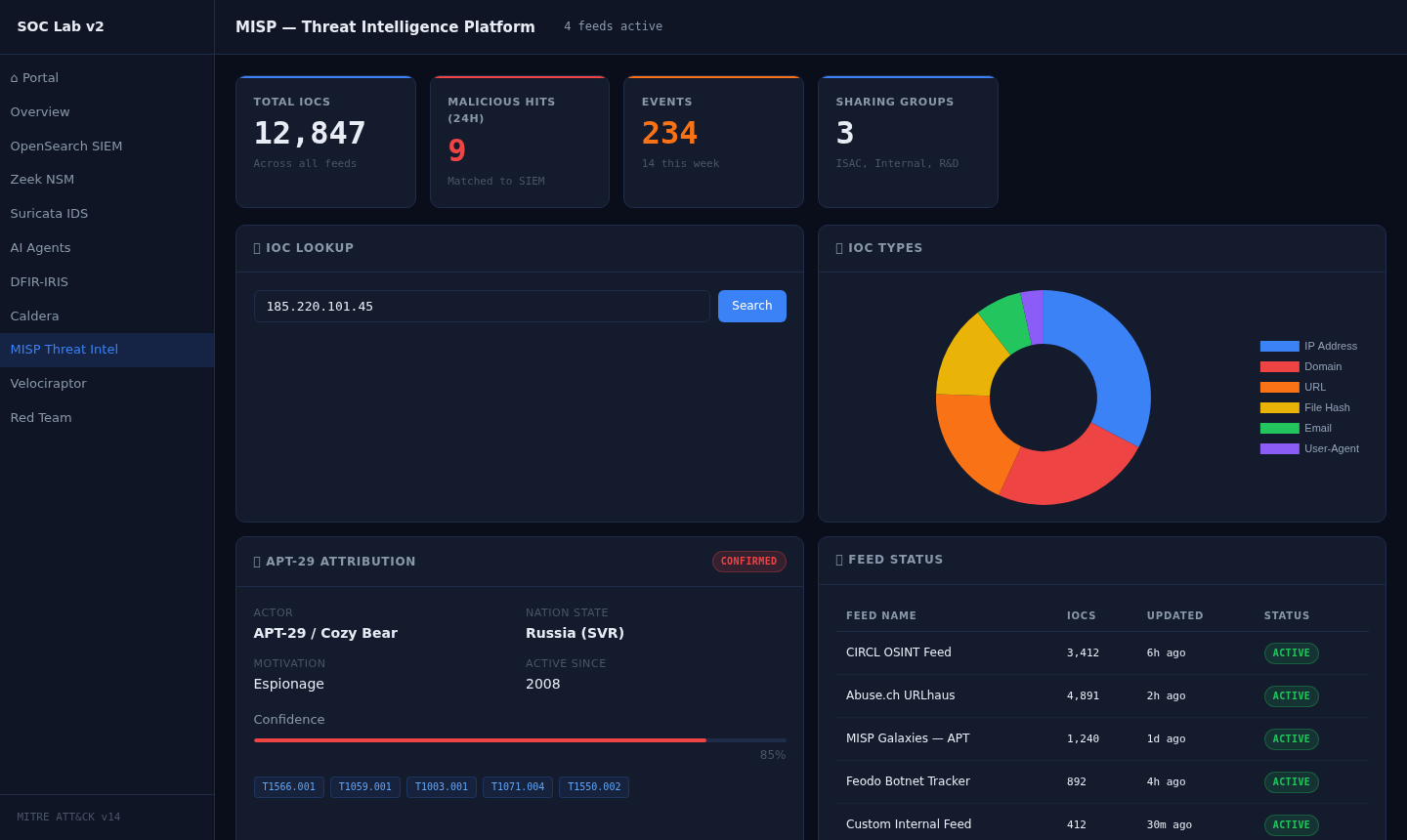
### MISP — 威胁情报平台
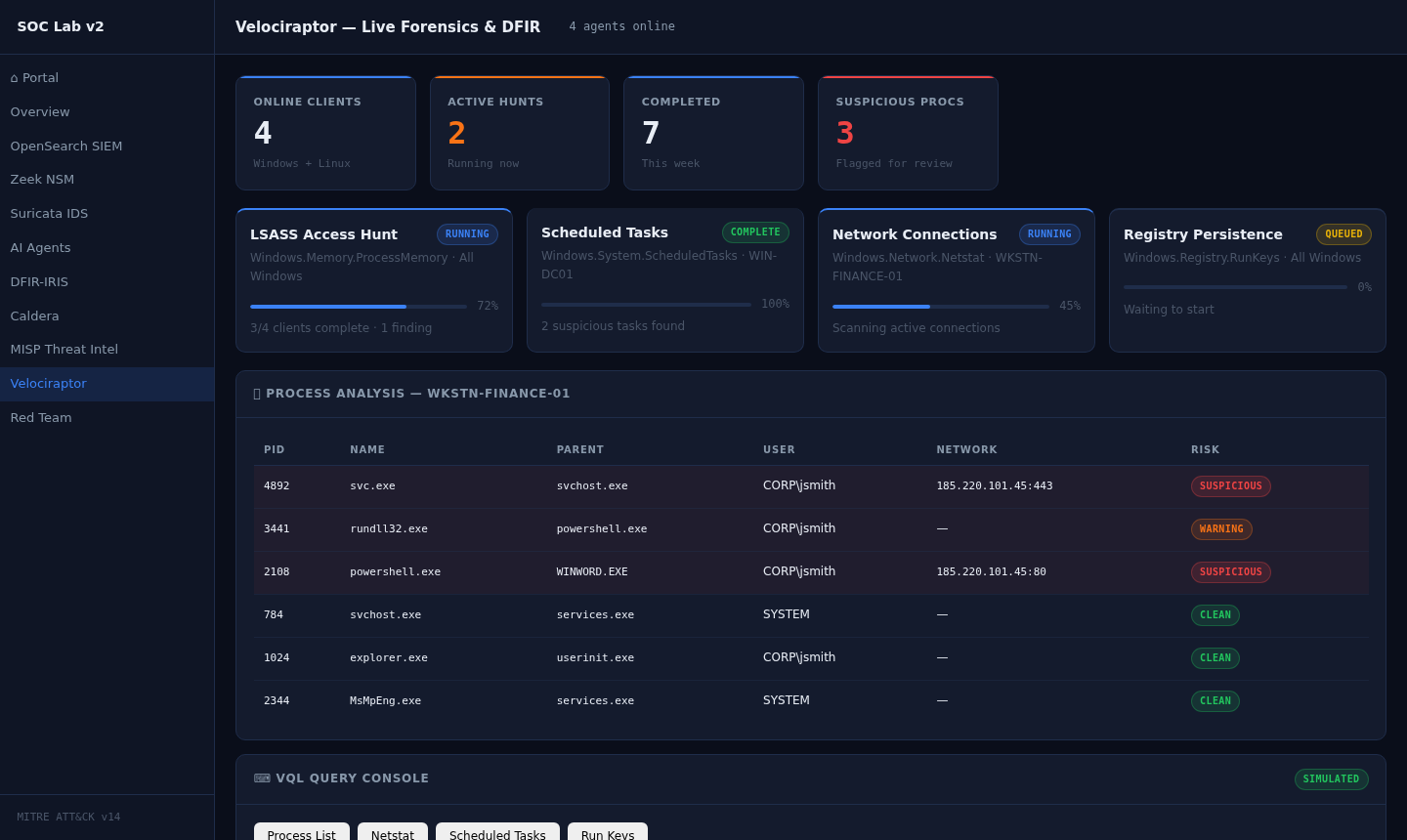
### Velociraptor — 实时取证与 DFIR
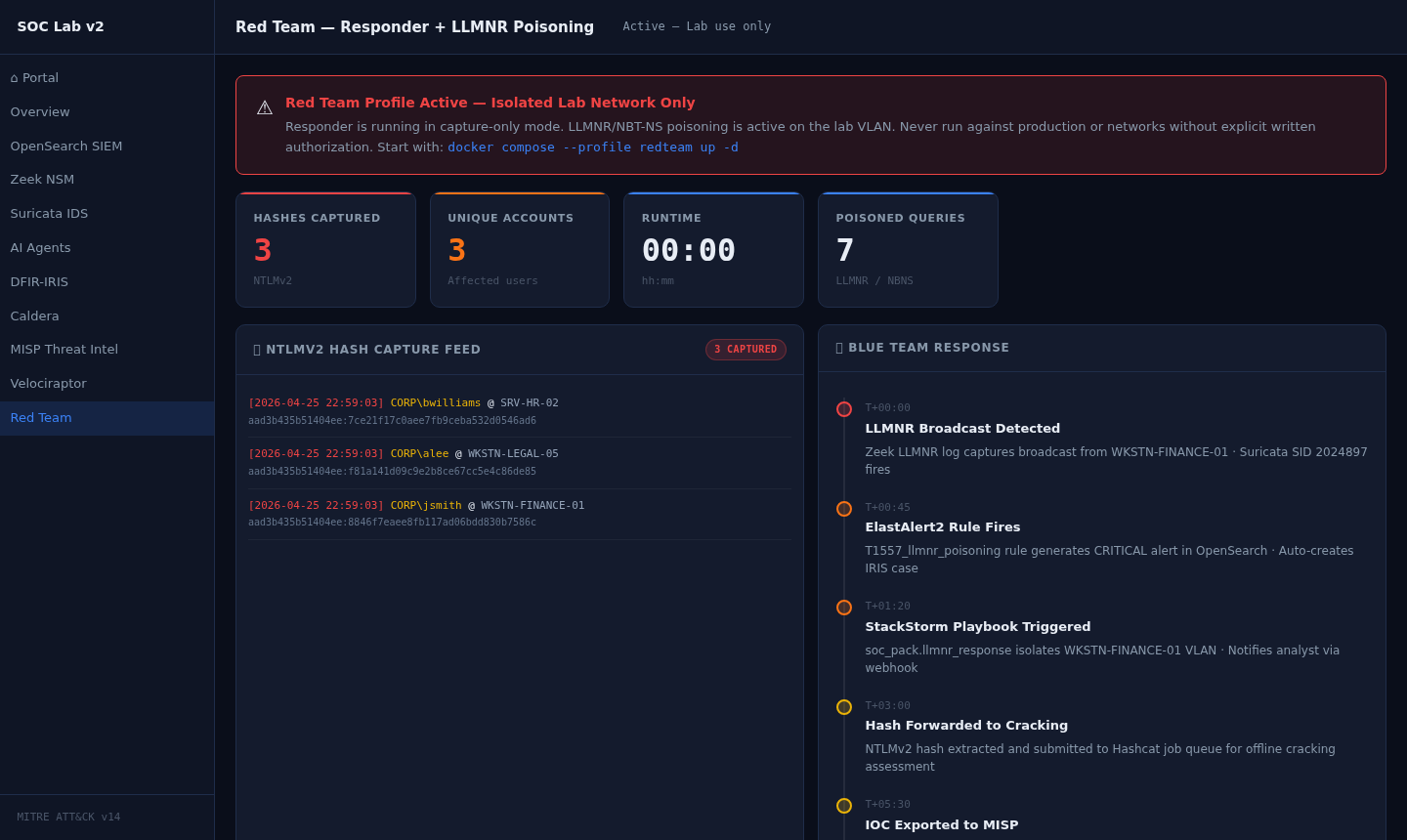
### 红队 — Responder + LLMNR 毒化攻击
## 概述
Advanced SOC Lab v2.0 是一个完整的、独立的安全运营环境,专为实践学习而设计。所有组件均开源,并通过 Docker Compose 进行编排,您可以在 15 分钟内启动完整的 SOC 技术栈。
### 您将获得
| 层级 | 工具 | 用途 |
|---|---|---|
| **SIEM** | OpenSearch 2.13 + Dashboards | 日志获取、搜索、可视化 |
| **日志流水线** | Vector 0.38 | 统一日志路由和转换 |
| **检测** | ElastAlert2 | 基于 OpenSearch 的规则告警 |
| **网络安全监控 (NSM)** | Zeek 6.0 + Suricata 7.0 | 数据包级别的网络安全监控 |
| **SOAR** | StackStorm 3.8 | 自动化响应剧本 |
| **案例管理** | DFIR-IRIS 2.4 | 事件跟踪、时间轴、IOC |
| **威胁情报** | MISP | IOC 共享、信息源、归属分析 |
| **DFIR** | Velociraptor | 实时取证、VQL 狩猎 |
| **攻击模拟** | MITRE Caldera 5.x | 对手模拟、ATT&CK 映射 |
| **红队** | Responder | LLMNR/NBT-NS 毒化攻击(实验环境配置) |
| **AI 分析** | Ollama + CrewAI | LLM 驱动的 SOC 代理 |
### 检测规则 (内置 15 条)
| 规则 | 技术 | 严重程度 |
|---|---|---|
| 暴力破解 / 密码喷洒 | T1110.001 | 高 |
| LSASS 内存转储 | T1003.001 | 严重 |
| PowerShell 编码命令 | T1059.001 | 高 |
| 通过 SMB 横向移动 | T1021.002 | 严重 |
| LLMNR/NBT-NS 毒化攻击 | T1557.001 | 高 |
| 计划任务创建 | T1053.005 | 中 |
| 注册表 Run 键持久化 | T1547.001 | 中 |
| DNS 隧道 C2 | T1071.004 | 高 |
| 哈希传递 | T1550.002 | 严重 |
| 网络端口扫描 | T1046 | 中 |
| 通过 C2 通道数据外传 | T1041 | 严重 |
| Defender 被禁用 | T1562.001 | 严重 |
| 鱼叉式钓鱼附件 | T1566.001 | 高 |
| 批量文件收集 | T1039 | 中 |
| 非工作时间账户登录 | T1078 | 中 |
### AI 代理
| 代理 | 角色 | 能力 |
|---|---|---|
| 威胁分析师 | APT 归属分析、TTP 映射 | 将 IOC 与威胁行为者关联 |
| 事件响应人员 | 分诊与遏制 | 生成响应剧本 |
| 威胁猎手 | 主动狩猎 | 基于假设构建 VQL 查询 |
| 检测工程师 | 规则创建 | 编写 ElastAlert2 和 Sigma 规则 |
## 架构
```
Internet / Lab Network
│
┌────▼─────────────────────────────────────────────┐
│ Docker Compose Network │
│ │
│ ┌──────────┐ ┌──────────┐ ┌────────────────┐ │
│ │ Zeek │ │ Suricata │ │ Log Sources │ │
│ │ (NSM) │ │ (IDS) │ │ Sysmon/Win │ │
│ └────┬─────┘ └────┬─────┘ └───────┬────────┘ │
│ └─────────────┴────────────────┘ │
│ │ Vector 0.38 │
│ ┌─────▼──────┐ │
│ │ OpenSearch │◄─── ElastAlert2 │
│ │ (SIEM) │ │
│ └─────┬──────┘ │
│ │ │
│ ┌────────────┼────────────┐ │
│ ▼ ▼ ▼ │
│ StackStorm DFIR-IRIS MISP │
│ (SOAR) (Cases) (Threat Intel) │
│ │ │ │ │
│ └────────────┴────────────┘ │
│ │ │
│ ┌──────▼──────┐ │
│ │ AI Agents │ │
│ │ Ollama/Crew │ │
│ └─────────────┘ │
│ │
│ ┌──────────────┐ ┌──────────────┐ │
│ │ Caldera │ │ Velociraptor│ │
│ │ (Attack Sim)│ │ (DFIR) │ │
│ └──────────────┘ └──────────────┘ │
└───────────────────────────────────────────────────┘
```
## 系统要求
| 要求 | 最低配置 | 推荐配置 |
|---|---|---|
| 内存 (RAM) | 14 GB | 16–32 GB |
| 磁盘 | 30 GB | 50 GB |
| CPU | 4 核 | 8 核 |
| 操作系统 | Ubuntu 22.04 / Debian 12 / WSL2 | Ubuntu 22.04 LTS |
| Docker | 24.x | 最新版 |
| Docker Compose | v2.x | 最新版 |
## 安装说明
### 步骤 1 — 克隆代码仓库
```
git clone https://github.com/sandeepmothukuri/advanced-soc-forge.git
cd advanced-soc-lab-v2
```
### 步骤 2 — 赋予脚本执行权限
```
chmod +x setup.sh health-check.sh simulate-attack.sh
```
### 步骤 3 — 运行安装脚本
安装脚本会处理所有事务:环境配置、内核调优、Docker 镜像拉取以及分阶段的服务部署。
```
sudo ./setup.sh
```
脚本分 4 个阶段运行:
```
── Stage 1/4 — Core infrastructure (OpenSearch, Vector) ──
── Stage 2/4 — Security tools (MISP, IRIS, Velociraptor) ──
── Stage 3/4 — SOAR + Detection (StackStorm, ElastAlert2) ──
── Stage 4/4 — AI agents + Attack simulation (Ollama, Caldera) ──
```
### 步骤 4 — 验证所有服务健康状态
```
./health-check.sh
```
预期输出:
```
Advanced SOC Lab v2.0 — Health Check
Core Infrastructure
✔ OpenSearch cluster:green · 0 documents
✔ OpenSearch Node 1 container running
✔ OpenSearch Node 2 container running
✔ OpenSearch Dashboards HTTP 200
✔ Vector Pipeline container running
Security Tools
✔ DFIR-IRIS HTTP 200
✔ MISP HTTP 200
✔ Velociraptor HTTP 200
✔ StackStorm HTTP 200
✔ ElastAlert2 container running
Attack Simulation & AI
✔ MITRE Caldera HTTP 200
✔ AI Agents API HTTP 200
✔ Ollama LLM HTTP 200
✔ WebSocket Streamer container running
Results: 14 passed 0 failed 1 warnings (15 checks)
All critical services healthy.
```
### 步骤 5 — 打开仪表板门户
在浏览器中打开 `dashboards/index.html`。所有 10 个仪表板均可从该门户访问。
## 配置
### 环境变量
凭据由 `setup.sh` 自动生成并保存至 `.env` 文件中。请在使用前查阅并进行自定义:
```
cat .env
```
关键变量:
| 变量 | 默认值 | 描述 |
|---|---|---|
| `OPENSEARCH_PASSWORD` | 自动生成 | OpenSearch 管理员密码 |
| `IRIS_SECRET_KEY` | 自动生成 | DFIR-IRIS Flask 密钥 |
| `CALDERA_RED_PASSWORD` | `changeme` | Caldera 红队密码 |
| `CALDERA_BLUE_PASSWORD` | `changeme` | Caldera 蓝队密码 |
| `MISP_KEY` | 自动生成 | MISP API 密钥 |
| `ST2_AUTH_TOKEN` | 自动生成 | StackStorm 身份验证令牌 |
### 内核参数
OpenSearch 需要更高的内存映射限制。安装脚本会自动应用此配置:
```
sudo sysctl -w vm.max_map_count=262144
# 设为永久
echo "vm.max_map_count=262144" | sudo tee -a /etc/sysctl.conf
```
### 终端代理安装
**Windows (PowerShell — 以管理员身份运行):**
```
# 安装 Velociraptor agent
$url = "http://YOUR_LAB_IP:8889/api/v1/GetFile?name=velociraptor-agent-windows.exe"
Invoke-WebRequest -Uri $url -OutFile "velociraptor-agent.exe"
.\velociraptor-agent.exe --config agent.config.yaml service install
# 安装 Sysmon 以进行详细的进程日志记录
Invoke-WebRequest -Uri https://download.sysinternals.com/files/Sysmon.zip -OutFile Sysmon.zip
Expand-Archive Sysmon.zip -DestinationPath Sysmon
.\Sysmon\Sysmon64.exe -accepteula -i config/sysmon/sysmon-config.xml
```
**Linux:**
```
# 安装 Velociraptor agent
curl -L http://YOUR_LAB_IP:8889/api/v1/GetFile?name=velociraptor-agent-linux \
-o velociraptor-agent
chmod +x velociraptor-agent
sudo ./velociraptor-agent --config agent.config.yaml service install
```
## 运行攻击模拟
`simulate-attack.sh` 脚本会将逼真的 MITRE ATT&CK 事件直接注入到 OpenSearch 中,以用于分析师培训。
### APT-29 杀伤链 (13 种技术)
```
./simulate-attack.sh apt29
```
注入事件包括:T1566.001 → T1059.001 → T1053.005 → T1547.001 → T1003.001 → T1110.001 → T1557.001 → T1021.002 → T1550.002 → T1046 → T1041 → T1071.004 → T1562.001
### 暴力破解 / 密码喷洒
```
./simulate-attack.sh bruteforce
```
模拟跨 12 个账户的密码喷洒及账户锁定事件。
### 内部威胁
```
./simulate-attack.sh insider
```
模拟批量文件收集、云上传数据外传以及日志删除。
### 运行所有场景
```
./simulate-attack.sh all
```
### 验证事件是否已索引
```
./simulate-attack.sh verify
```
## 服务 URL
| 服务 | URL | 凭据 |
|---|---|---|
| **仪表板门户** | `dashboards/index.html` | — |
| **OpenSearch Dashboards** | http://localhost:5601 | admin / `$OPENSEARCH_PASSWORD` |
| **DFIR-IRIS** | http://localhost:4460 | admin / `changeme` |
| **MITRE Caldera** | http://localhost:8888 | red / `$CALDERA_RED_PASSWORD` |
| **Velociraptor** | http://localhost:8889 | admin / `changeme` |
| **MISP** | http://localhost:4000 | admin@admin.test / `admin` |
| **StackStorm** | http://localhost:9000 | st2admin / `changeme` |
| **AI 代理 API** | http://localhost:8000/docs | — |
| **Ollama** | http://localhost:11434 | — |
| **OpenSearch API** | http://localhost:9200 | admin / `$OPENSEARCH_PASSWORD` |
## 可选:红队配置
Responder 容器 (LLMNR/NBT-NS 毒化攻击) 默认禁用。仅在隔离的实验网络中启动它:
```
# 启动 red team 配置
docker compose --profile redteam up -d
# 停止 red team 配置
docker compose --profile redteam down
```
## 停止与管理实验环境
```
# 停止所有服务 (保留数据)
docker compose down
# 停止并删除所有数据卷
docker compose down -v
# 重启单个服务
docker compose restart elastalert2
# 查看服务日志
docker compose logs -f ai-agents
# 检查资源使用情况
docker stats
```
## 项目结构
```
advanced-soc-lab-v2/
├── docker-compose.yml # All 12 services + red team profile
├── .env.example # Environment variable template
├── setup.sh # One-command deployment script
├── health-check.sh # Service health validation
├── simulate-attack.sh # Attack scenario injection
├── README.md # This file
│
├── dashboards/ # Web UI dashboards
│ ├── index.html # Main portal
│ ├── soc-theme.css # Shared dark design system
│ ├── 01_soc_overview.html # Live alert feed + MITRE heatmap
│ ├── 02_opensearch_siem.html # 24h timeline + index stats
│ ├── 03_zeek_network.html # conn.log stream + DNS anomalies
│ ├── 04_suricata_ids.html # EVE JSON feed + top signatures
│ ├── 05_ai_agents.html # CrewAI agent console
│ ├── 06_iris_cases.html # Incident cases + IOC tracker
│ ├── 07_caldera_attack.html # ATT&CK coverage matrix
│ ├── 08_misp_ti.html # IOC lookup + feed status
│ ├── 09_velociraptor.html # Hunt progress + VQL console
│ └── 10_responder_redteam.html # NTLMv2 capture + blue response
│
├── config/
│ ├── opensearch/ # OpenSearch + Dashboards config
│ ├── elastalert2/rules/ # 15 detection rules (YAML)
│ ├── caldera/operations/ # APT-29 + Insider Threat operations
│ ├── nginx/ # Reverse proxy config
│ └── misp/ # MISP server config
│
├── ai-agents/ # CrewAI SOC agents
│ ├── agents/ # threat_analyst, incident_responder,
│ │ # threat_hunter, detection_engineer
│ ├── tools/ # OpenSearch, MISP, IRIS, Velociraptor tools
│ └── api.py # FastAPI + WebSocket server
│
├── soar-playbooks/ # StackStorm automation packs
├── detection-rules/ # Sigma rules + ElastAlert2 configs
├── endpoint-configs/ # Sysmon, Velociraptor, Zeek configs
├── cloud-logs/ # AWS CloudTrail, Azure, GCP parsers
└── threat-hunting/ # Pre-built hunting queries
```
## 故障排除
| 问题 | 原因 | 解决方法 |
|---|---|---|
| OpenSearch 无法启动 | `vm.max_map_count` 过低 | `sudo sysctl -w vm.max_map_count=262144` |
| 集群状态为 RED | 内存不足 | 关闭其他应用程序;确保有 16 GB 可用内存 |
| Caldera 代理离线 | 防火墙拦截了 8888 端口 | `ufw allow 8888` |
| Ollama 模型缺失 | 下载失败 | `docker exec ollama ollama pull llama3.2:3b` |
| 容器不断重启 | 磁盘空间不足 | 释放空间:`docker system prune` |
| ElastAlert2 无告警 | OpenSearch 中无数据 | 先运行 `./simulate-attack.sh apt29` |
| MISP 登录失败 | 容器仍在初始化中 | 启动后等待 2–3 分钟 |
### 查看服务日志
```
docker compose logs -f opensearch-node1
docker compose logs -f elastalert2
docker compose logs -f ai-agents
docker compose logs -f caldera
```
### 完全重置
```
docker compose down -v
sudo rm -rf data/
./setup.sh
```
## 学习练习
实验环境启动后,请按顺序完成以下练习:
1. **告警分诊** — 运行 `./simulate-attack.sh apt29`,打开 OpenSearch Dashboards,并根据严重程度对注入的 13 条告警进行分诊
2. **创建案例** — 打开 DFIR-IRIS,为 APT-29 入侵行为创建新案例。添加 IOC 并链接 MITRE 技术
3. **网络取证** — 审查 Zeek Network 仪表板,寻找 LLMNR 毒化攻击和 DNS 隧道的迹象
4. **威胁狩猎** — 使用 Velociraptor VQL 控制台狩猎可疑的计划任务和 LSASS 访问行为
5. **检测盲点分析** — 运行 Caldera APT-29 攻击操作,并审查哪些技术被检测到、哪些被遗漏
6. **SOAR 自动化** — 通过注入暴力破解场景并观察自动化响应来触发 StackStorm 剧本
7. **AI 辅助分析** — 使用 AI 代理仪表板运行 APT-29 归因场景并查看 LLM 分析结果
8. **红队实战 (可选)** — 启用红队配置,通过 Responder 捕获 NTLMv2 哈希,并跟进蓝队响应时间轴
## 贡献
欢迎提交 Pull Request。请在进行重大更改前先提出 Issue 进行讨论。
1. Fork 本仓库
2. 创建特性分支:`git checkout -b feature/my-detection-rule`
3. 提交您的更改:`git commit -m 'Add T1055 process injection detection rule'`
4. 推送到分支:`git push origin feature/my-detection-rule`
5. 发起 Pull Request
## 许可证
MIT 许可证 — 可免费用于教育及研究目的的使用、修改和分发。
## 作者
**Sandeep Mothukuri**
实践性 SOC 培训环境而构建,旨在促进蓝队技能发展、威胁检测实践和对手模拟研究。
*Advanced SOC Lab v2.0 · 12 个工具 · 100% 开源 · MITRE ATT&CK v14*
## 👤 作者
**Sandeep Mothukuri**
- GitHub: [@sandeepmothukuri](https://github.com/sandeepmothukuri)
- 网站: [cybertechnology.in](https://cybertechnology.in)
- LinkedIn: [linkedin.com/in/sandeepmothukuris](https://www.linkedin.com/in/sandeepmothukuris)
- 邮箱: sandeep.mothukuris@gmail.com
## 🗂️ 所有代码仓库
| 代码仓库 | 描述 |
|---|---|
| [ai-soc-lab](https://github.com/sandeepmothukuri/ai-soc-lab) | 基于 AI 增强的 SOC,结合 Wazuh + TheHive + Ollama (LLaMA3) 实现自动化分诊 |
| [advanced-soc-lab-v2.0](https://github.com/sandeepmothukuri/advanced-soc-lab-v2.0) | 包含 12 个工具的 SOC 实验室,集成 OpenSearch, Suricata, Zeek, MISP, Caldera, Velociraptor |
| [Autonomous-SOC-Lab](https://github.com/sandeepmothukuri/Autonomous-SOC-Lab) | 具备 AI 驱动检测和自我修复剧本的自主 SOC |
| [soc-threat-hunting-lab](https://github.com/sandeepmothukuri/soc-threat-hunting-lab) | 威胁检测实验室 — Zeek, RITA, Arkime, Velociraptor, OSQuery, MISP |
| [soc-lab-free](https://github.com/sandeepmothukuri/soc-lab-free) | 免费的安全运营中心实验室 — OpenVAS, Wazuh, pfSense, Proxmox Mail, Lynis |
| [soc-lab](https://github.com/sandeepmothukuri/soc-lab) | SOC 分析师家庭实验室 — Wazuh SIEM, Sysmon, MITRE ATT&CK 映射 |
| [cyberblue](https://github.com/sandeepmothukuri/cyberblue) | 容器化蓝队平台 — SIEM, DFIR, CTI, SOAR, 网络分析 |
标签:AI风险缓解, Burp项目解析, Caldera, Cloudflare, CrewAI, DFIR-IRIS, Docker, Docker Compose, IP 地址批量处理, Metaprompt, MITRE ATT&CK, Rootkit, SOC实验室, Suricata, Velociraptor, Zeek, 人工智能, 后端开发, 威胁情报, 安全培训, 安全大模型, 安全实验, 安全运营中心, 安全防御评估, 库, 应急响应, 开发者工具, 攻击模拟, 数字取证, 数据展示, 版权保护, 现代安全运营, 用户态调试, 用户模式Hook绕过, 红队, 网络安全, 网络映射, 网络流量分析, 自动化脚本, 逆向工具, 防御绕过, 隐私保护, 驱动签名利用