kitavim2-commits/windows-sysmon-splunk-siem-lab
GitHub: MKitavi/windows-sysmon-splunk-siem-lab
基于 Sysmon 与 Splunk 搭建的 Windows 端点检测实验环境,覆盖多种 MITRE ATT&CK 技术的检测规则编写与对抗模拟验证。
Stars: 0 | Forks: 0
# 🔍 Windows 端点检测实验室 — Sysmon + Splunk SIEM








[](https://attack.mitre.org/techniques/T1003/001/)
[](https://attack.mitre.org/techniques/T1218/)
## 📸 视觉证据
### 检测触发 — T1059.001 (PowerShell 编码命令)
实时检测到对手风格的编码 PowerShell 命令,并通过 Splunk Add-on for Microsoft Sysmon 实现了完整字段提取。时间、用户、父进程、映像和命令行均被清晰地捕获——这正是 SOC 分析师在生产环境中会看到的情况。

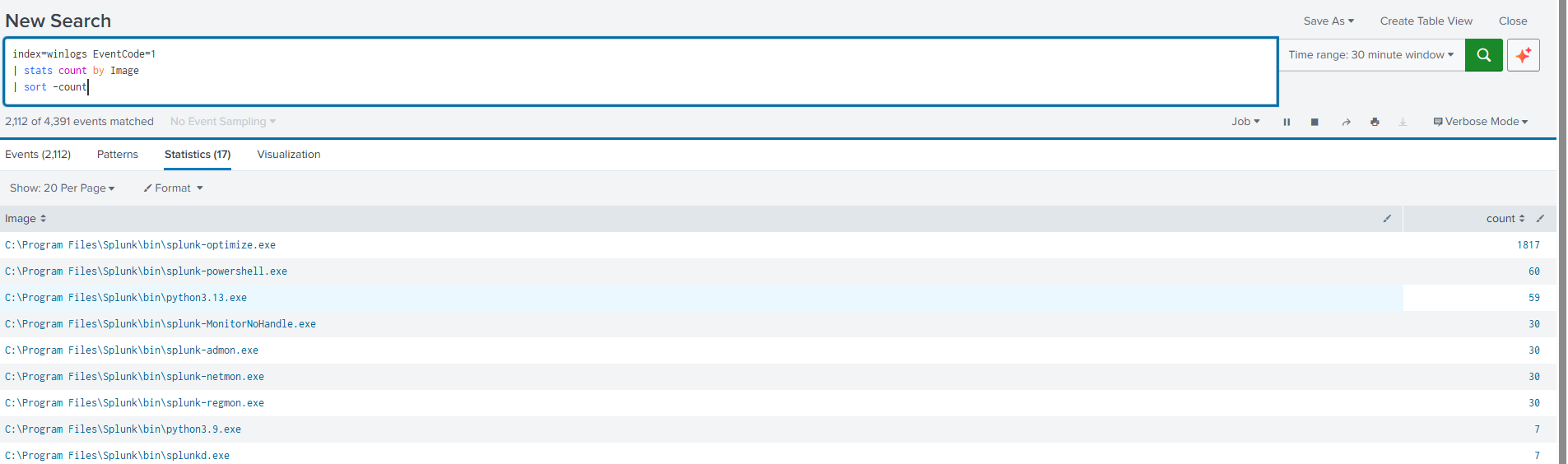
### 数据接入管道
四个 Windows 日志源流入专用的 `winlogs` 索引:Security、System、Application 和 Sysmon Operational。
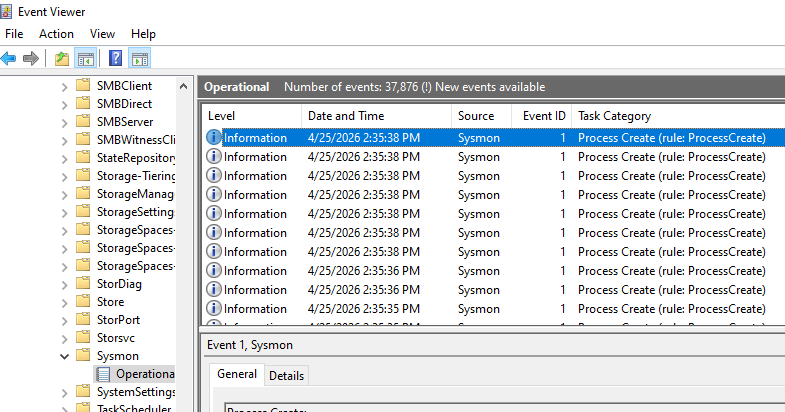
### Sysmon 在 OS 层生成事件
事件查看器中的 Sysmon Operational 日志,显示在转发到 Splunk 之前在内核级别捕获的 Event ID 1 (进程创建) 条目。
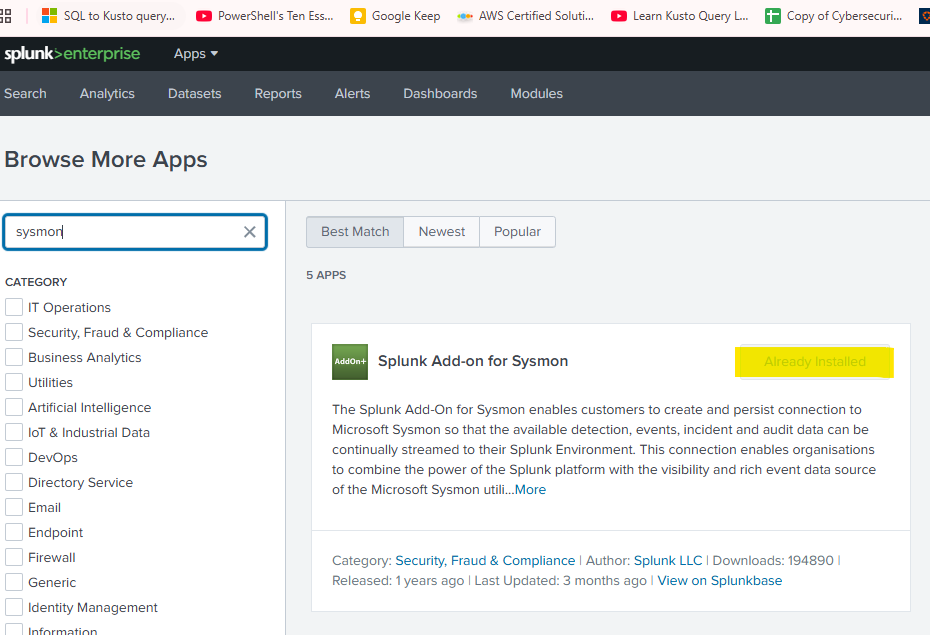
### 已安装 Splunk Add-on for Sysmon
Splunk Add-on for Microsoft Sysmon 能够从 Sysmon 的 XML 事件格式中正确提取字段 (Image、CommandLine、ParentImage 等)。
### 检测触发 — T1547.001 (注册表 Run 键持久化)
Sysmon Event ID 13 捕获了一次良性持久化模拟:通过 PowerShell 植入一个指向 `notepad.exe` 的注册表 Run 键。检测捕获了写入进程、完整的注册表路径、目标可执行文件和用户——SOC 分诊所需的一切信息。

### 检测触发 — T1071.001 (DNS 信标 / C2)
DNS 信标流量的统计检测:在约 60 秒内,针对单个可疑 `.xyz` 父域进行了 20 次具有唯一子域名的查询。PowerShell 作为发起进程。1:1 的计数与唯一子域名比率是铁证。

### 检测触发 — T1003.001 (LSASS 内存访问)
Sysmon Event ID 10 捕获到 PowerShell 使用 `GrantedAccess: 0x1410` 打开了指向 `lsass.exe` 的句柄——这是 Mimikatz `sekurlsa` 的访问掩码。经过允许列表过滤的查询准确返回了两个模拟事件,零误报。`splunkd.exe` (0x1fffff) 和 `svchost.exe` (0x1000) 在基线收集期间被识别并抑制。
[](https://static.pigsec.cn/wp-content/uploads/repos/2026/04/0321427a0d105612.png)
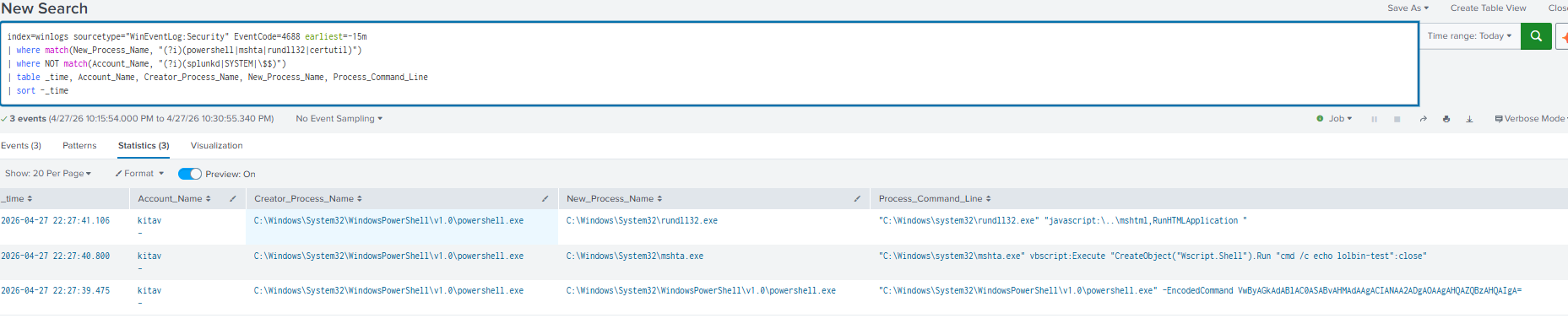
### 检测触发 — T1059.001 / T1218 (通过 Event 4688 实现 LOLBin)
Security Event 4688 捕获了横跨三种 MITRE 技术的四个 LOLBin 模拟事件——`rundll32.exe javascript:`、`mshta.exe vbscript:Execute` 和 `powershell.exe -EncodedCommand`——全部在 `kitav` 账户下运行,并填充了完整的命令行。在将 Splunk 和机器账户加入允许列表后,实现了零误报。编码的 PowerShell 事件在 Security 日志 (4688) 和 Sysmon Event 1 中独立触发,验证了双源覆盖的有效性。
[](https://static.pigsec.cn/wp-content/uploads/repos/2026/04/7f0fb93dce105614.png)
[](https://static.pigsec.cn/wp-content/uploads/repos/2026/04/9dd6e7cd61105615.png)
## 📋 项目概述
本项目在单台 Windows 主机上搭建了一个功能完备的端点检测实验室。它从操作系统捕获丰富的进程、网络和文件遥测数据,将其转发到本地 Splunk 实例,并根据通过 Atomic Red Team 和手动技术执行模拟的真实对手行为来验证检测逻辑。
该实验室以作品集就绪的方式演示了核心 SOC 分析师工作流:**启用日志记录 → 集中化 → 搜索 → 检测 → 模拟 → 验证 → 调优。**
### 核心目标 (已完成 ✅)
- [x] * ~~启用 Event ID 4688 进程创建日志记录~~ — LOLBin 检测已构建 ✅
- [x] 部署具有经过调优配置的 Sysmon,以实现更丰富的端点遥测
- [x] **检测对手持久化 (T1547.001 — 注册表 Run 键)** 🆕
- [x] 安装并配置 Splunk Enterprise 作为本地 SIEM
- [x] 将 Windows Security、System、Application 和 Sysmon 日志接入到专用索引中
- [x] 安装 Atomic Red Team 进行对手模拟
- [x] **生成对手遥测数据并在 Splunk 中成功检测到** 🎯
- [x] 为确保可重现性和作品集使用而记录工作流
- [x] **检测对手 C2 信标 (T1071.001 — DNS)** 🆕
## 🏗️ 架构
```
┌─────────────────────────────────────────────────────────────┐
│ Windows 10/11 Endpoint │
│ │
│ ┌──────────────────┐ ┌──────────────────────┐ │
│ │ Windows Native │ │ Sysmon │ │
│ │ Audit Policy │ │ (SwiftOnSecurity │ │
│ │ (Event 4688) │ │ config) │ │
│ └────────┬─────────┘ └──────────┬───────────┘ │
│ │ │ │
│ ▼ ▼ │
│ ┌──────────────────────────────────────────────────┐ │
│ │ Windows Event Log Subsystem │ │
│ │ Security │ System │ Application │ Sysmon/Op │ │
│ └──────────────────────┬───────────────────────────┘ │
│ │ │
│ ▼ │
│ ┌──────────────────────────────────────────────────┐ │
│ │ Splunk Enterprise (localhost) │ │
│ │ Index: winlogs │ │
│ │ Search & Reporting App │ │
│ └──────────────────────┬───────────────────────────┘ │
│ │ │
│ ▼ │
│ ┌──────────────────────────────────────────────────┐ │
│ │ Detection Queries (SPL) │ │
│ │ Mapped to MITRE ATT&CK techniques │ │
│ └──────────────────────────────────────────────────┘ │
│ ▲ │
│ │ │
│ ┌──────────────────────┴───────────────────────────┐ │
│ │ Atomic Red Team / Manual Adversary Sim │ │
│ │ (TTP generation for validation) │ │
│ └──────────────────────────────────────────────────┘ │
└─────────────────────────────────────────────────────────────┘
```
## 🛠️ 技术栈
| 组件 | 版本 | 用途 |
|---|---|---|
| Windows 10/11 | — | 宿主操作系统 |
| Sysmon | 15.20 | 增强端点遥测 |
| SwiftOnSecurity Sysmon Config | latest | 社区调优的基线配置 |
| Splunk Enterprise | 9.x | 日志聚合、索引、搜索 |
| Atomic Red Team | latest | 映射到 MITRE ATT&CK 的对手模拟 |
| Windows Event Log | native | Security、System、Application 事件源 |
| PowerShell | 5.1+ | 配置自动化与验证 |
## 🔧 构建阶段
### 阶段 1 — 启用 Windows 原生进程审计
```
auditpol /set /subcategory:"Process Creation" /success:enable
reg add "HKLM\SOFTWARE\Microsoft\Windows\CurrentVersion\Policies\System\Audit" `
/v ProcessCreationIncludeCmdLine_Enabled /t REG_DWORD /d 1 /f
```
### 阶段 2 — 部署 Sysmon
```
cd C:\Tools
Invoke-WebRequest -Uri "https://raw.githubusercontent.com/SwiftOnSecurity/sysmon-config/master/sysmonconfig-export.xml" `
-OutFile "sysmonconfig-export.xml"
.\Sysmon64.exe -accepteula -i sysmonconfig-export.xml
```
### 阶段 3 — 安装 Splunk Enterprise
- 已安装 Splunk Enterprise (Windows MSI)
- 创建了专用索引:`winlogs`
### 阶段 4 — 配置 Splunk 输入
通过 GUI 配置 Windows 日志;Sysmon 通过手动编辑 `inputs.conf` 添加:
```
[WinEventLog://Microsoft-Windows-Sysmon/Operational]
disabled = 0
index = winlogs
renderXml = true
```
### 阶段 5 — 验证数据流
```
index=winlogs earliest=-30m | stats count by source
```
**结果:**
| 来源 | 事件数 (30 分钟) |
|---|---|
| `WinEventLog:Security` | 3,021 |
| `WinEventLog:Microsoft-Windows-Sysmon/Operational` | 2,609 |
| `WinEventLog:System` | 43 |
### 阶段 6 — 安装 Atomic Red Team
在 Malwarebytes (主要防病毒软件;Defender 处于 SxS Passive Mode) 中为 `C:\AtomicRedTeam` 添加了文件夹排除项,然后安装了该框架:
```
Set-ExecutionPolicy Bypass -Scope CurrentUser -Force
IEX (IWR 'https://raw.githubusercontent.com/redcanaryco/invoke-atomicredteam/master/install-atomicredteam.ps1' -UseBasicParsing)
Install-AtomicRedTeam -getAtomics -Force
Import-Module "C:\AtomicRedTeam\invoke-atomicredteam\Invoke-AtomicRedTeam.psd1" -Force
```
### 阶段 7 — 对手模拟与首次检测触发 🎯
**决定:** 在执行前已使用 `-ShowDetails` 查阅了 Atomic 测试。可用的 T1059.001 测试需要外部下载 (Mimikatz、BloodHound、PowerSploit) 或框架依赖项。我们没有部署真正的攻击性工具,而是手动执行了核心技术——实现了同等的 TTP,风险极低。
**执行的测试:**
```
powershell.exe -NoProfile -EncodedCommand VwByAGkAdABlAC0ASABvAHMAdAAgACIASABlAGwAbABvACAAZgByAG8AbQAgAHQAaABlACAAYQB0AHQAYQBjAGsAZQByACIA
```
Base64 解码结果为:`Write-Host "Hello from the attacker"`
**MITRE ATT&CK 映射:**
- T1059.001 — 命令和脚本解释器:PowerShell
- T1027 — 混淆的文件或信息
**检测查询 (针对 XML 编码的 Sysmon 事件的原始文本回退方案):**
```
index=winlogs source="WinEventLog:Microsoft-Windows-Sysmon/Operational"
powershell.exe EncodedCommand
```
**结果:✅ 匹配到 1 个事件 — 检测在几秒钟内触发。** 捕获的完整事件包括:
- Image:`C:\Windows\System32\WindowsPowerShell\v1.0\powershell.exe`
- CommandLine:可见完整的编码命令
- ParentImage / ParentCommandLine (进程树完整)
- User:`DESKTOP-SKETBJN\`
- 文件哈希:MD5、SHA256、IMPHASH
- ProcessGuid、ParentProcessGuid (关联 ID)
- IntegrityLevel:High
### 附加项 — 真实的事件响应演练
在未完全审查的情况下意外触发 ATR 测试 #1 (Mimikatz) 后,使用 SIEM 取证查询进行了影响分析:
```
# 是否有任何 PowerShell download cradle 运行?
index=winlogs source="WinEventLog:Microsoft-Windows-Sysmon/Operational" EventCode=1
CommandLine="*DownloadString*"
```
**结果:** 0 个事件。
```
# 主机是否连接到 GitHub 以获取 payload?
index=winlogs source="WinEventLog:Microsoft-Windows-Sysmon/Operational" EventCode=3
(DestinationHostname="*githubusercontent*" OR DestinationHostname="*raw.github*")
```
**结果:** 0 个事件。
确认下载在上游被阻止——测试从未执行。这演变成一次真实的事件响应演练:**识别 → 查询 SIEM → 确认范围 → 文档化 → 清理。**
## 🕵️ 检测查询
### 编码的 PowerShell 命令 (T1059.001, T1027) — 已验证 ✅
```
index=winlogs source="WinEventLog:Microsoft-Windows-Sysmon/Operational" EventCode=1
Image="*powershell.exe"
(CommandLine="*-EncodedCommand*" OR CommandLine="*-Enc *" OR CommandLine="*-e *")
```
### Office 应用程序生成命令行外壳 (T1566.001)
```
index=winlogs source="WinEventLog:Microsoft-Windows-Sysmon/Operational" EventCode=1
(ParentImage="*winword.exe" OR ParentImage="*excel.exe"
OR ParentImage="*powerpnt.exe" OR ParentImage="*outlook.exe")
(Image="*cmd.exe" OR Image="*powershell.exe"
OR Image="*wscript.exe" OR Image="*cscript.exe")
```
### LOLBIN 滥用 — certutil 下载 (T1105)
```
index=winlogs source="WinEventLog:Microsoft-Windows-Sysmon/Operational" EventCode=1
Image="*certutil.exe"
(CommandLine="*urlcache*" OR CommandLine="*-f *http*")
```
### 来自脚本引擎的可疑网络连接
```
index=winlogs source="WinEventLog:Microsoft-Windows-Sysmon/Operational" EventCode=3
(Image="*powershell.exe" OR Image="*cscript.exe" OR Image="*wscript.exe")
| table _time Image DestinationIp DestinationHostname
```
### 事件响应搜索 — 下载宿主程序检测
```
index=winlogs source="WinEventLog:Microsoft-Windows-Sysmon/Operational" EventCode=1
CommandLine="*DownloadString*"
```
### 从用户临时目录运行的进程 (T1036)
```
index=winlogs source="WinEventLog:Microsoft-Windows-Sysmon/Operational" EventCode=1
(Image="*\\AppData\\Local\\Temp\\*" OR Image="*\\AppData\\Roaming\\*")
| table _time User Image CommandLine ParentImage
```
### 失败的登录尝试 (T1110)
```
index=winlogs EventCode=4625
| stats count by Account_Name, Workstation_Name, Source_Network_Address
| sort -count
```
### T1547.001 — 注册表 Run 键持久化 — 已验证 ✅
```
index=winlogs sourcetype=xmlwineventlog EventCode=13
(TargetObject="*\\CurrentVersion\\Run\\*"
OR TargetObject="*\\CurrentVersion\\RunOnce\\*")
| table _time User Image TargetObject Details
| sort -_time
```
查看完整案例研究:[`docs/case-studies/T1547-001-persistence-registry-runkey.md`](docs/case-studies/T1547-001-persistence-registry-runkey.md)
### T1071.001 — DNS 信标 — 已验证 ✅
统计检测,寻找来自单个进程对单个父域的高计数与唯一子域名比率——这是经典的 DNS 隧道/信标指纹。
```
index=winlogs sourcetype=xmlwineventlog EventCode=22 earliest=-10m
| rex field=QueryName "(?[^.]+\.[^.]+)$"
| stats count, dc(QueryName) as unique_subdomains, min(_time) as first_seen, max(_time) as last_seen by parent_domain, Image
| eval duration_sec = last_seen - first_seen
| where count >= 10 AND unique_subdomains >= 5
| sort -count
```
查看完整案例研究:[`docs/case-studies/T1071-001-dns-beaconing.md`](docs/case-studies/T1071-001-dns-beaconing.md)
### T1003.001 — LSASS 内存访问 — 已验证 ✅
检测非系统进程使用与凭据转储工具相关的访问掩码打开指向 `lsass.exe` 的句柄。`GrantedAccess` 位掩码对工具进行了指纹识别,而不管二进制文件名称如何——使得基于名称的规避失效。
```
index=winlogs sourcetype=xmlwineventlog EventCode=10
| where like(TargetImage, "%lsass.exe")
| where NOT match(SourceImage, "(?i)(splunkd|svchost|MsMpEng|mbam|malwarebytes|csrss|werfault|WerFaultSecure|SecurityHealth|lsass|taskmgr|procexp)")
| eval access_hex=lower(GrantedAccess)
| eval access_label=case(
access_hex="0x1fffff", "PROCESS_ALL_ACCESS — high suspicion",
access_hex="0x1438", "Mimikatz sekurlsa signature",
access_hex="0x143a", "Mimikatz variant",
access_hex="0x1410", "Mimikatz sekurlsa signature",
access_hex="0x1010", "Mimikatz sekurlsa signature",
access_hex="0x0040", "PROCESS_VM_READ only",
true(), "Unknown mask — review: ".GrantedAccess
)
| where access_label!="Unknown mask — review: ".GrantedAccess
| table _time, SourceImage, TargetImage, GrantedAccess, access_label, CallTrace
| sort -_time
```
查看完整案例研究:[`docs/case-studies/T1003.001-LSASS-Memory-Access.md`](docs/case-studies/T1003.001-LSASS-Memory-Access.md)
### T1059.001 / T1218 通过 Event 4688 实现 LOLBin 执行 — 已验证 ✅
通过 Windows Security Event 4688 进程创建检测 LOLBin 滥用和编码的 PowerShell。涵盖 `rundll32.exe` javascript/VBScript 执行、`mshta.exe` 内联脚本、`certutil.exe` 下载/解码以及 PowerShell `-EncodedCommand`——全部通过 `Process_Command_Line` 模式匹配实现。同时在检测 #1 (Sysmon Event 1) 之外,为 T1059.001 提供了独立的双源覆盖。
```
index=winlogs sourcetype="WinEventLog:Security" EventCode=4688
| where NOT match(Account_Name, "(?i)(splunkd|SYSTEM|LOCAL SERVICE|NETWORK SERVICE|DWM-|UMFD-)")
| where NOT match(Account_Name, "\$$")
| eval proc=lower(New_Process_Name)
| eval cmdline=lower(Process_Command_Line)
| eval detection=case(
match(cmdline, "(-enc|-encodedcommand|-e\s+[a-z0-9+/=]{20,})"),
"T1059.001 — PowerShell encoded command",
match(proc, "mshta\.exe") AND match(cmdline, "(vbscript|javascript|http)"),
"T1218.005 — MSHTA LOLBin",
match(proc, "rundll32\.exe") AND match(cmdline, "(javascript|vbscript|\.dll,)"),
"T1218.011 — Rundll32 LOLBin",
match(proc, "certutil\.exe") AND match(cmdline, "(-decode|-encode|-urlcache|-ping)"),
"T1105/T1140 — Certutil abuse",
match(proc, "regsvr32\.exe") AND match(cmdline, "(/s|/u|http|scrobj)"),
"T1218.010 — Regsvr32 LOLBin",
match(proc, "(wscript|cscript)\.exe") AND match(cmdline, "\.(js|vbs|wsf|hta)"),
"T1059.005 — Script interpreter",
match(proc, "msiexec\.exe") AND match(cmdline, "(http|/q|/quiet)"),
"T1218.007 — Msiexec remote payload",
match(proc, "bitsadmin\.exe") AND match(cmdline, "(transfer|download|addfile)"),
"T1197 — BITSAdmin download",
true(), null()
)
| where isnotnull(detection)
| table _time, Account_Name, Creator_Process_Name, New_Process_Name, Process_Command_Line, detection
| sort -_time
```
查看完整案例研究:[`docs/case-studies/T1059-T1218-LOLBin-4688.md`](docs/case-studies/T1059-T1218-LOLBin-4688.md)
## 🎯 关键事件 ID 参考
| 事件 ID | 来源 | 含义 |
|---|---|---|
| 4688 | Windows Security | 进程创建 (原生) |
| 4625 | Windows Security | 登录失败 |
| 4624 | Windows Security | 登录成功 |
| Sysmon 1 | Sysmon Operational | 进程创建 (增强) |
| Sysmon 3 | Sysmon Operational | 网络连接 |
| Sysmon 7 | Sysmon Operational | 映像 / DLL 加载 |
| Sysmon 10 | Sysmon Operational | 进程访问 |
| Sysmon 11 | Sysmon Operational | 文件创建 |
| Sysmon 22 | Sysmon Operational | DNS 查询 |
| Sysmon 10 | Sysmon Operational | 进程访问 (LSASS 凭据转储) |
| Security 4688 | WinEventLog:Security | 包含完整命令行的进程创建 (LOLBin、编码 PS) |
| Security 4698 | WinEventLog:Security | 计划任务创建 (待定 — 检测 #6) |
## 🧠 经验教训
- **PowerShell 需要显式的 `.\` 前缀** —— 早期的绊脚石强化了良好的安全执行习惯。
- **记事本必须以管理员身份运行** 才能编辑 `C:\Program Files\` 下的文件。静默保存失败促使我完全绕过记事本,转而使用来自提升权限的 PowerShell 的 `Add-Content` —— 更快且更可靠。
- **Splunk `btool`** 对于验证哪些配置文件生效是不可或缺的:`splunk btool inputs list --debug` 确认了每个节 (stanza) 的有效来源。
- **Sysmon 的日志路径** (`Microsoft-Windows-Sysmon/Operational`) 不在 Splunk 默认的 GUI 下拉列表中 —— 必须通过 `inputs.conf` 添加。
- **在没有 Splunk Sysmon Add-on 的情况下使用 `renderXml = true`** 会导致字段无法提取 —— 像 `Image` 和 `CommandLine` 这样的值存在于 XML 属性中,而不是作为可搜索的字段。请务必安装该附加组件或搜索原始事件文本。
- **在执行 Atomic Red Team 测试之前,请务必运行 `-ShowDetails`。** 测试编号与安全性无关 —— T1059.001 下的测试 #1 是 Mimikatz。
- **纵深防御拯救了我。** 在意外触发 Mimikatz 测试后,取证 SIEM 查询确认下载已被阻止。这成为了一次真实的事件响应 (IR) 演练 —— 正是真实调查中使用的工作流。
- **在运行第三方防病毒软件的系统上**,Microsoft Defender 会进入 SxS Passive Mode。`Add-MpPreference` 调用会失败并提示 `0x800106ba`,因为活动的防病毒软件 (此处为 Malwarebytes) 是排除项的决策者。
## 🚀 路线图
- [x] 搭建日志记录和 SIEM
- [x] 验证针对模拟 TTP 的首次检测
- [x] 安装 **Splunk Add-on for Microsoft Sysmon** 以实现干净的字段提取
- [x] 构建用于实时端点可见性的 **Splunk 仪表板**
- [x] * ~~运行更广泛的 Atomic Red Team 活动~~ T1003.001 LSASS 凭据访问 — 已检测到
- [ ] 将 **Universal Forwarder** 部署到第二台 VM 以实现多主机接入
- [ ] 通过 Splunk lookup 集成 **威胁情报源** (MISP、OTX IOC)
- [ ] 迁移到 **Olaf Hartong 的模块化 Sysmon 配置** 以实现更精细的调优
- [ ] 将经过验证的检测集保存为计划的 **Splunk 警报**
## 📚 参考资料与资源
- [Microsoft Sysmon 文档](https://learn.microsoft.com/en-us/sysinternals/downloads/sysmon)
- [SwiftOnSecurity Sysmon 配置](https://github.com/SwiftOnSecurity/sysmon-config)
- [Olaf Hartong Sysmon 模块化配置](https://github.com/olafhartong/sysmon-modular)
- [MITRE ATT&CK 框架](https://attack.mitre.org/)
- [Atomic Red Team](https://github.com/redcanaryco/atomic-red-team)
- [Invoke-AtomicRedTeam](https://github.com/redcanaryco/invoke-atomicredteam)
- [SigmaHQ 检测规则](https://github.com/SigmaHQ/sigma)
- [终极 Windows 安全事件百科全书](https://www.ultimatewindowssecurity.com/securitylog/encyclopedia/)
- [Splunk 文档](https://docs.splunk.com/)
## 📝 许可证
用于教育目的的个人家庭实验室构建。引用的工具和配置保留其各自的许可证。
*作为动手实践 SOC 分析师学习路径的一部分构建。从“什么是 Event ID 4688?”到首次实时检测触发 —— 端到端记录。*
标签:AI合规, ATT&CK验证, Cloudflare, EDR, Homelab, IPv6, MITRE ATT&CK, OpenCanary, PowerShell, Splunk Enterprise, SPL查询, Sysmon, Windows 10, Windows 11, Windows端点安全, 事件查看器, 安全测试, 安全运营中心, 家庭实验室, 攻击性安全, 数据摄取管道, 数据解析, 日志采集, 知识库安全, 端点检测与响应, 系统管理员, 网络安全, 网络映射, 脆弱性评估, 脱壳工具, 隐私保护