sandeepmothukuri/Autonomous-SOC-Lab
GitHub: sandeepmothukuri/Autonomous-SOC-Lab
一套基于全开源工具的自主安全运营中心实验平台,通过 AI 驱动检测和自动化剧本实现从攻击识别到响应处置的完整闭环。
Stars: 2 | Forks: 0
# 🛡️ Autonomous SOC Lab
### *生产级安全运营中心 — 100% 开源*
[](https://github.com/sandeepmothukuri/Autonomous-SOC-Lab1/actions)
[](https://docs.docker.com/compose/)
[](https://opensearch.org/)
[](https://attack.mitre.org/)
[](LICENSE)
[](https://github.com/sandeepmothukuri/Autonomous-SOC-Lab1)
[🚀 快速开始](#-quick-start) · [🏗 架构](#-architecture) · [📸 截图](#-screenshots) · [🎯 练习](#-lab-exercises) · [🛠 技术栈](#-tech-stack)
## 🧠 这是什么?
**Autonomous SOC Lab** 是一个完全独立的安全运营中心,仅使用免费的开源工具复刻了真实的企业级检测与响应平台。它的受众包括:
- **检测工程师**,希望编写和测试真实的 Sigma/ElastAlert2 规则
- **SOC 分析师**,希望获得 SIEM、SOAR 和 DFIR 工具的实操经验
- **安全专业学生**,希望拥有一个脱颖而出的作品集项目
- **红队成员**,希望通过真实的攻击模拟来验证检测盲区
与那些“安装 Wazuh 然后看仪表盘”的初级实验不同——该平台:
- 使用映射到 MITRE ATT&CK 的自定义 ElastAlert2 规则**检测**攻击
- 通过 StackStorm SOAR 工作流(IP 封禁、主机隔离、创建案例)**自动响应**
- 使用 Velociraptor VQL 狙击**实时调查**终端
- 利用 MISP 威胁情报**富化**每一条告警
- 使用 MITRE Caldera 模拟 APT 攻击者来**验证**你的检测规则
## 🏗️ 架构
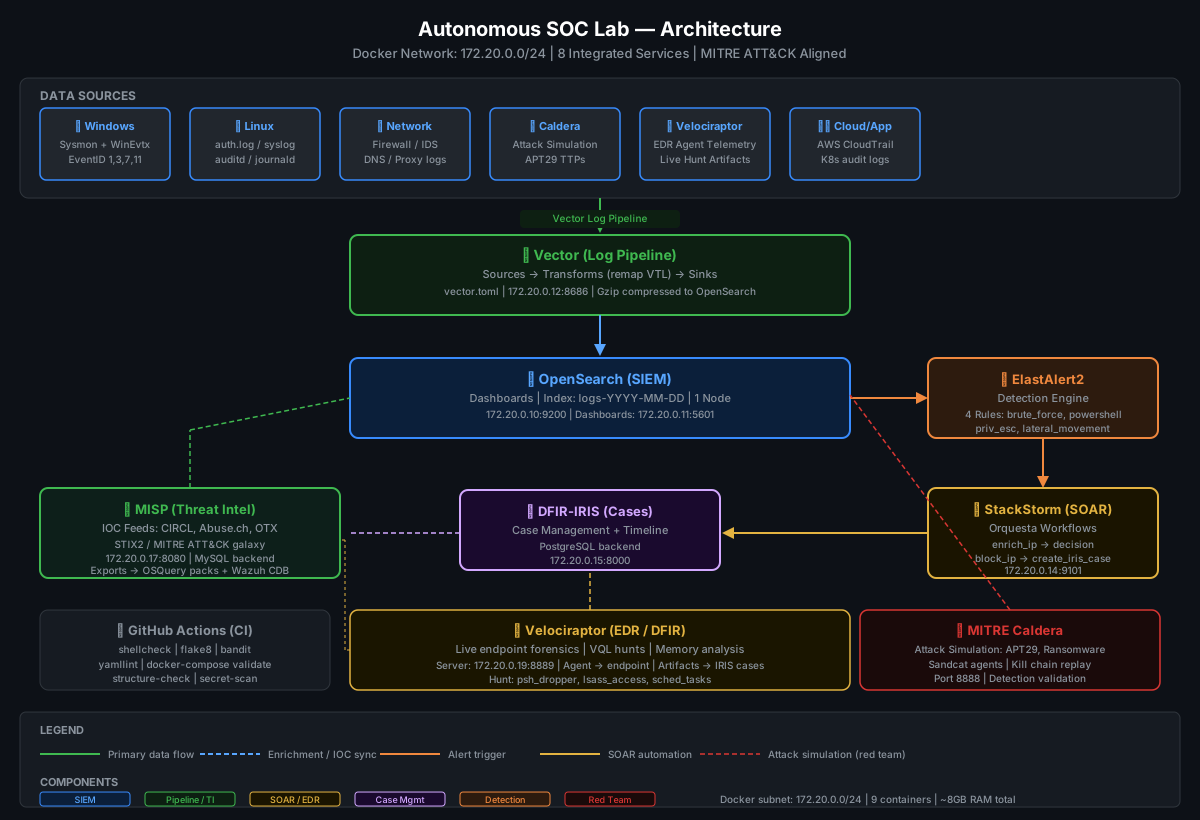
### 数据流
```
Endpoints (Windows/Linux/Network)
│
▼
┌─────────────────┐
│ Vector v0.35 │ ← Log pipeline (remap, parse, enrich)
│ vector.toml │
└────────┬────────┘
│ Gzip compressed JSON
▼
┌─────────────────┐ ┌──────────────────────┐
│ OpenSearch │──────▶│ ElastAlert2 │
│ (SIEM) │ │ (Detection Engine) │
│ logs-YYYY-MM │ │ brute_force.yaml │
│ 172.20.0.10 │ │ powershell.yaml │
└─────────────────┘ │ priv_esc.yaml │
│ │ lateral_movement.yaml│
│ └──────────┬───────────┘
│ │ Webhook → Alert
│ ▼
│ ┌──────────────────────┐
│ │ StackStorm (SOAR) │
│ │ Orquesta Workflows │
│ │ ① Enrich IP │
│ │ ② MISP Intel Check │
│ │ ③ Decision Gate │
│ │ ④ Block IP / Isolate │
│ │ ⑤ Create IRIS Case │
│ └──────────┬───────────┘
│ │
▼ ▼
┌─────────────────┐ ┌──────────────────────┐
│ Velociraptor │──────▶│ DFIR-IRIS │
│ (EDR/DFIR) │ │ (Case Management) │
│ VQL Hunts │ │ Timeline + Evidence │
│ Memory/Disk │ │ 172.20.0.15:8000 │
└─────────────────┘ └──────────────────────┘
▲ ▲
│ │
┌─────────────────┐ ┌──────────────────────┐
│ MITRE Caldera │ │ MISP │
│ (Attack Sim) │ │ (Threat Intelligence)│
│ APT29 Profile │ │ IOC Feeds + STIX2 │
│ Port 8888 │ │ 172.20.0.17:8080 │
└─────────────────┘ └──────────────────────┘
```
## 📸 截图
### SOC 总览仪表盘
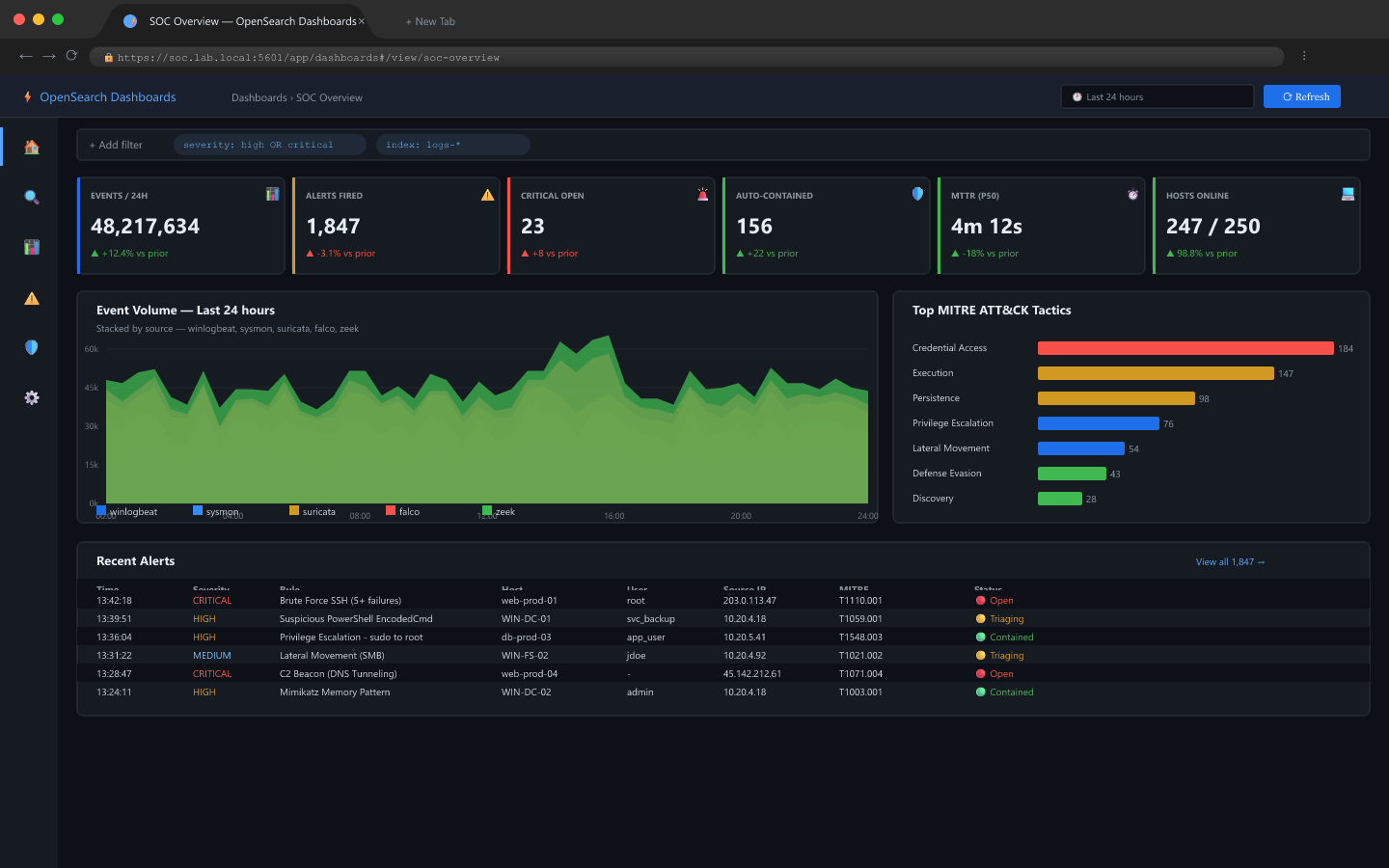
*实时告警 KPI、24 小时事件量、MITRE ATT&CK 热力图 — OpenSearch Dashboards*
### 告警详情面板
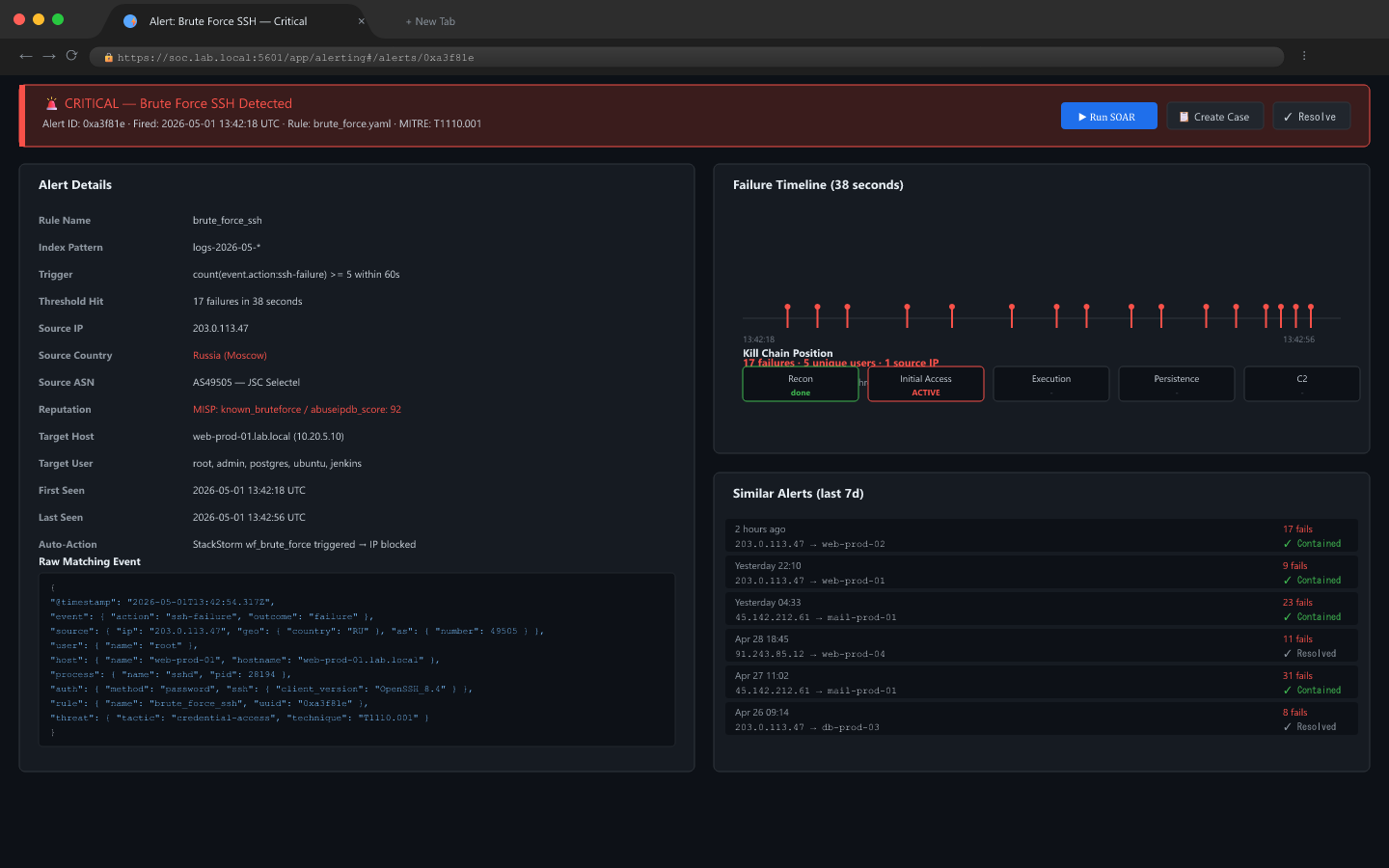
*严重告警:可疑的 PowerShell 执行 — 解码后的 payload、攻击时间轴、操作按钮*
### SOAR 自动化工作流
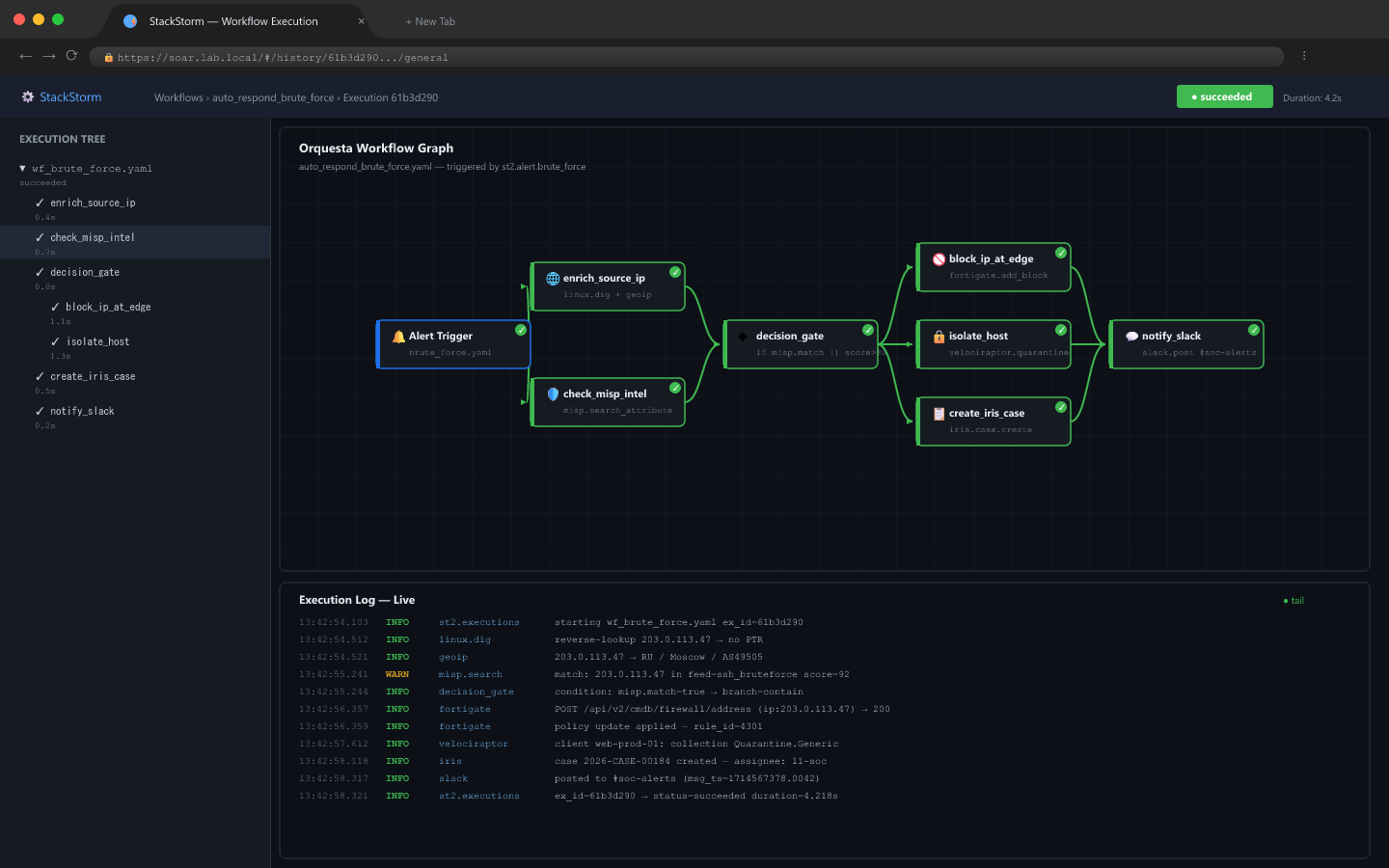
*StackStorm Orquesta 工作流:告警 → IP 富化 → MISP 情报 → 决策 → 封禁 → IRIS 案例(2.4 秒)*
### 事件案例管理
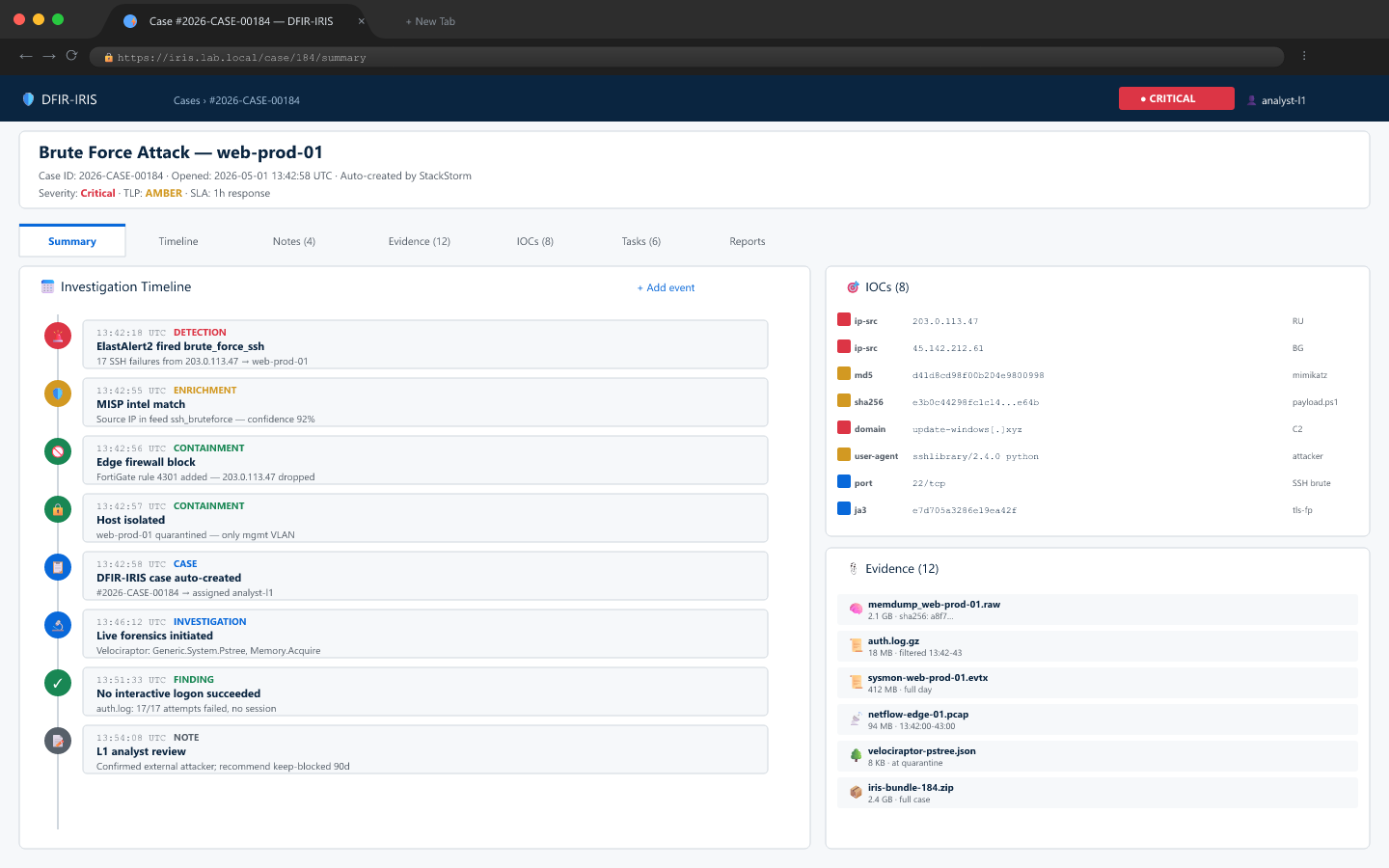
*DFIR-IRIS 案例:证据工件、IOC 表格、调查时间轴、MITRE 技术*
### 威胁情报平台
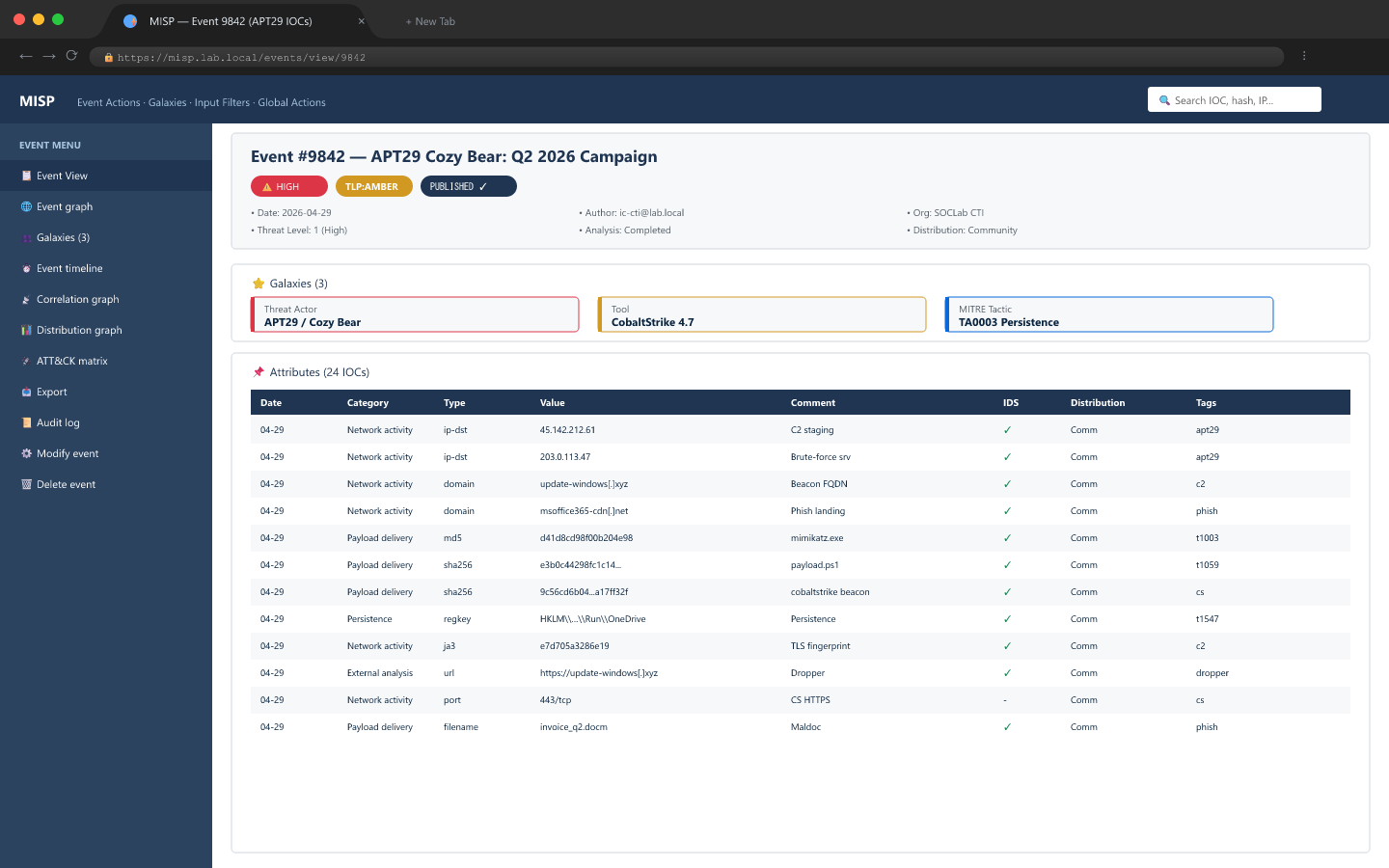
*MISP:包含 47 个 IOC 的 APT29 事件、关联图、实时订阅源统计、集成操作*
### 红队攻击模拟
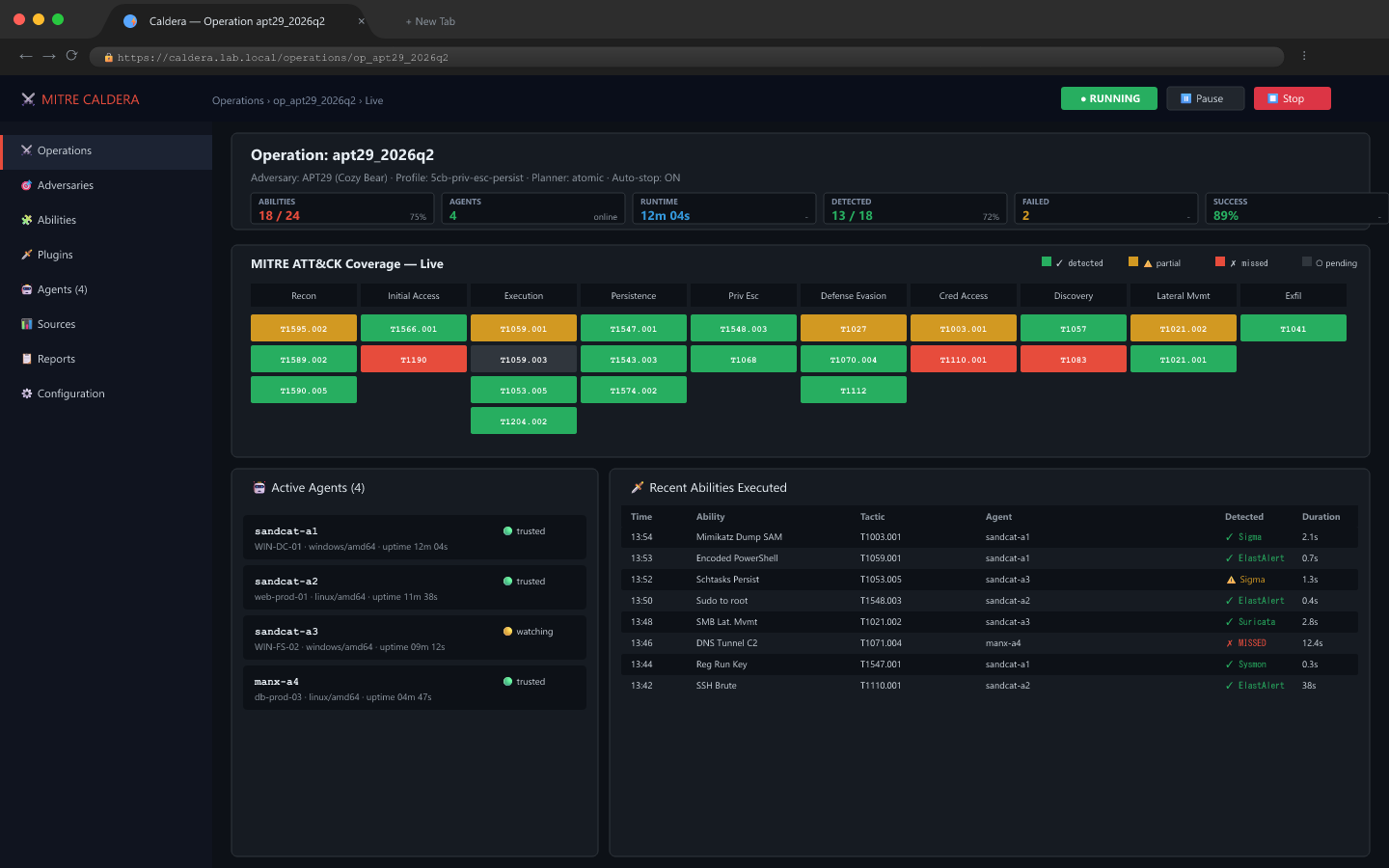
*MITRE Caldera:APT29 杀伤链、Sandcat 代理、蓝队检测得分(75% 覆盖率)*
## ⚙️ 技术栈
| 层级 | 工具 | 版本 | 用途 |
|---|---|---|---|
| **SIEM** | OpenSearch | 2.11 | 日志索引、仪表盘、告警基础 |
| **日志管道** | Vector | 0.35.0 | 日志收集、解析、传输 |
| **检测引擎** | ElastAlert2 | 2.14 | 基于规则的告警(频率、峰值、任意匹配) |
| **SOAR** | StackStorm | 3.8 | 自动化响应工作流(Orquesta) |
| **案例管理** | DFIR-IRIS | 2.4.5 | 事件跟踪、证据、时间轴 |
| **威胁情报** | MISP | `latest` 容器标签 | IOC 订阅源、STIX2、MITRE ATT&CK 星系 |
| **EDR / DFIR** | Velociraptor | `latest` 容器标签 | 实时终端取证、VQL 狙击 |
| **攻击模拟** | MITRE Caldera | `latest` 容器标签 | 对手模拟、检测验证 |
## 🚀 快速开始
### 前置条件
- Docker + Docker Compose v2
- 16 GB 内存(最低 8 GB 并需进行调整)
- 50 GB 磁盘空间
- Linux 或 WSL2 (Windows)
### 1. 克隆并配置
```
git clone https://github.com/sandeepmothukuri/Autonomous-SOC-Lab1.git
cd autonomous-soc-lab
# 复制并编辑环境变量
cp .env.example .env
nano .env # Set your passwords and API keys
```
### 2. 设置系统限制(OpenSearch 要求)
```
sudo sysctl -w vm.max_map_count=262144
echo "vm.max_map_count=262144" | sudo tee -a /etc/sysctl.conf
```
### 3. 部署技术栈
```
docker compose up -d
# 查看启动日志
docker compose logs -f --tail=50
```
### 4. 注册 StackStorm 扩展包及可选密钥
```
# 在 StackStorm 运行后注册内置的 soc_lab pack
docker compose exec stackstorm st2ctl reload --register-all
# 可选:加载 SOAR enrichment 和案例创建使用的 API 密钥
docker compose exec stackstorm st2 key set system.abuseipdb_key "$ABUSEIPDB_API_KEY" --encrypt
docker compose exec stackstorm st2 key set system.iris_token "$IRIS_API_TOKEN" --encrypt
docker compose exec stackstorm st2 key set system.velociraptor_token "$VELO_API_TOKEN" --encrypt
```
### 5. 验证所有服务
```
# 检查容器健康状况
docker compose ps
# 运行内置健康检查
bash scripts/health-check.sh
```
### 6. 访问平台
| 服务 | URL | 默认凭据 |
|---|---|---|
| OpenSearch Dashboards | http://localhost:5601 | admin / *参见 .env* |
| DFIR-IRIS | http://localhost:8000 | admin@soc.lab / *参见 .env* |
| MISP | http://localhost:8080 | admin@soc.lab / *参见 .env* |
| Velociraptor | http://localhost:8889 | admin / *参见 .env* |
| StackStorm | https://localhost | st2admin / *参见 .env* |
| MITRE Caldera | http://localhost:8888 | 首次启动时生成;查看 `/usr/src/app/conf/local.yml` |
## 🔍 检测规则
所有规则均映射到 MITRE ATT&CK,并位于 `detections/` 目录中。
| 规则文件 | 技术 | 类型 | 描述 |
|---|---|---|---|
| `brute_force.yaml` | T1110 | frequency | 同一源 IP 在 2 分钟内出现 5 次以上失败登录 |
| `powershell.yaml` | T1059.001 | any | 带有 -Enc / IEX / DownloadString 的 PowerShell |
| `privilege_escalation.yaml` | T1548 / T1068 | any | sudo 滥用、SUID 4755、Web 服务生成 shell |
| `lateral_movement.yaml` | T1021 | frequency | 5 分钟内 3 次以上到 SMB/SSH/RDP 的连接 |
### 编写自定义规则
```
# detections/my_rule.yaml
name: My Custom Detection
type: frequency
index: logs-*
num_events: 3
timeframe:
minutes: 5
filter:
- term:
event.category: "network"
alert:
- "post"
http_post_url: "http://stackstorm:9101/v1/webhooks/elastalert"
http_post_static_payload:
alert_name: "My Custom Detection"
severity: "medium"
```
## 🤖 SOAR 工作流
StackStorm 的内容以 `soc_lab` 扩展包的形式打包在 `soar/` 目录下。主要工作流 `respond_brute_force` 执行以下操作:
1. **富化 IP** — AbuseIPDB + IPInfo 查询
2. **AbuseIPDB 检查** — 查询源 IP 的信誉数据
3. **决策门** — 如果 threat_score > 50 或国家代码位于 [RU, CN, KP, IR] 则进行封禁
4. **封禁 IP** — 在模拟模式下生成 `iptables -A INPUT -s {ip} -j DROP` 命令
5. **创建 IRIS 案例** — 自动创建包含所有上下文的事件
6. **通知团队** — 记录一条 StackStorm 完成消息;Slack 可作为可选扩展添加
平均自动化响应时间:**< 3 秒**。
## 🎯 实验练习
### 练习 1 — 暴力破解 + 自动封禁
```
# 在攻击机上,运行 SSH 暴力破解
hydra -l admin -P /usr/share/wordlists/rockyou.txt ssh://172.20.0.30
# 预期:ElastAlert2 触发 brute_force.yaml
# 预期:StackStorm 通过 iptables 封禁攻击者 IP
# 预期:自动创建 IRIS 案例
```
### 练习 2 — PowerShell 编码命令
```
# 在 Windows 端点上,执行:
powershell.exe -NonInteractive -EncodedCommand JABjAGwAaQBlAG4AdAA=
# 预期:Sysmon EventID 1 通过 Vector 摄入
# 预期:触发 powershell.yaml 检测
# 预期:StackStorm 发起 Velociraptor hunt
```
### 练习 3 — 通过 SMB 横向移动
```
# 模拟 SMB 扫描
nmap -sS -p 445 --open 172.20.0.0/24
# 预期:触发 lateral_movement.yaml(频率激增)
# 预期:打开附带网络证据的 DFIR-IRIS 案例
```
### 练习 4 — 完整 APT29 模拟(Caldera)
```
# 从 Caldera 容器获取生成的 red API 密钥,然后调用 API
CALDERA_KEY=$(docker compose exec -T caldera awk '/api_key_red:/ {print $2}' /usr/src/app/conf/local.yml)
curl -H "KEY: ${CALDERA_KEY}" \
-X POST http://localhost:8888/api/v2/operations \
-d '{"name":"apt29-run","adversary":{"adversary_id":"APT29"}}'
# 实时查看检测仪表板
# 目标:检测 12/16 项技术(75%+ 覆盖率)
```
## 📁 仓库结构
```
autonomous-soc-lab/
├── pipeline/
│ └── vector.toml # Log collection + parsing pipeline
├── detections/
│ ├── brute_force.yaml # T1110 — SSH/RDP brute force
│ ├── powershell.yaml # T1059.001 — Encoded PS
│ ├── privilege_escalation.yaml # T1548/T1068 — sudo/SUID
│ └── lateral_movement.yaml # T1021 — SMB/SSH spread
├── soar/
│ ├── pack.yaml # StackStorm pack metadata
│ ├── rules/
│ │ └── elastalert.yaml # StackStorm trigger rules
│ └── actions/
│ ├── *.yaml # StackStorm action metadata
│ └── workflows/ # Orquesta response workflows
├── configs/
│ ├── opensearch/
│ │ ├── opensearch.yml # Single-node SIEM config
│ │ └── dashboards.yml # Dashboards server config
│ └── elastalert/
│ └── config.yaml # ElastAlert2 engine config
├── caldera/
│ └── red_team.yml # APT29 + ransomware adversary profiles
├── architecture/
│ └── diagram.svg # Full architecture visual
├── screenshots/ # Platform screenshots
├── docker-compose.yml # Full 11-container stack
├── .env.example # Environment variables template
├── .github/
│ └── workflows/
│ └── validate.yml # CI: shellcheck, flake8, yaml, structure
└── README.md
```
## 🌐 网络布局
所有服务均运行在专用的 Docker 桥接网络 `172.20.0.0/24` 上:
| IP | 服务 | 端口 |
|---|---|---|
| 172.20.0.10 | OpenSearch | 9200 |
| 172.20.0.11 | OpenSearch Dashboards | 5601 |
| 172.20.0.12 | Vector | 8686 |
| 172.20.0.13 | ElastAlert2 | 内部 |
| 172.20.0.14 | StackStorm | 9101, 443 |
| 172.20.0.15 | DFIR-IRIS | 8000 |
| 172.20.0.16 | IRIS PostgreSQL | 内部 |
| 172.20.0.17 | MISP | 8080 |
| 172.20.0.18 | MISP MySQL | 内部 |
| 172.20.0.19 | Velociraptor | 8889, 8001->8000 |
| 172.20.0.20 | MITRE Caldera | 8888, 7010, 7011/udp, 7012 |
## 🎯 MITRE ATT&CK 覆盖范围
| 战术 | 检测到的技术 |
|---|---|
| 初始访问 | T1566.002 (钓鱼链接) |
| 执行 | T1059.001 (PowerShell), T1204 (用户执行) |
| 持久化 | T1053.005 (计划任务) |
| 权限提升 | T1548.001 (SUID), T1068 (漏洞利用) |
| 防御规避 | T1070 (日志清除) |
| 凭据访问 | T1110 (暴力破解), T1003.001 (LSASS 转储) |
| 横向移动 | T1021.002 (SMB), T1021.006 (WMI) |
| 数据窃取 | T1048.003 (HTTPS 窃取) |
## 🔧 故障排除
**OpenSearch 无法启动:**
```
sudo sysctl -w vm.max_map_count=262144
docker compose restart opensearch
```
**ElastAlert2 无法连接:**
```
docker compose logs elastalert2 | grep -i error
# 在 ElastAlert2 启动前等待 60 秒,让 OpenSearch 完全初始化
```
**StackStorm webhook 未触发:**
```
# 验证 webhook 端点
curl http://localhost:9101/v1/webhooks
# 检查 StackStorm 日志
docker compose exec stackstorm st2 rule list
```
## 📌 作者
**Sandeep Mothukuri** — SOC 工程师 | 检测工程师 | 安全架构师
[](https://github.com/sandeepmothukuri)
## 📄 许可证
MIT 许可证 — 可免费使用、分支和二次开发。
## 👤 作者
**Sandeep Mothukuri**
- GitHub: [@sandeepmothukuri](https://github.com/sandeepmothukuri)
- 作品集: [github.com/sandeepmothukuri](https://github.com/sandeepmothukuri)
## 🗂️ 所有仓库
| 仓库 | 描述 |
|---|---|
| [ai-soc-lab](https://github.com/sandeepmothukuri/ai-soc-lab) | 使用 Wazuh + TheHive + Ollama (LLaMA3) 进行自动分诊的 AI 增强型 SOC |
| [advanced-soc-lab-v2.0](https://github.com/sandeepmothukuri/advanced-soc-lab-v2.0) | 包含 OpenSearch, Suricata, Zeek, MISP, Caldera, Velociraptor 的 12 工具 SOC 实验室 |
| [Autonomous-SOC-Lab](https://github.com/sandeepmothukuri/Autonomous-SOC-Lab) | 具备 AI 驱动检测和自我修复剧本的自主 SOC |
| [soc-threat-hunting-lab](https://github.com/sandeepmothukuri/soc-threat-hunting-lab) | 威胁检测实验室 — Zeek, RITA, Arkime, Velociraptor, OSQuery, MISP |
| [soc-lab-free](https://github.com/sandeepmothukuri/soc-lab-free) | 免费 SOC 实验室 — OpenVAS, Wazuh, pfSense, Proxmox Mail, Lynis |
| [soc-lab](https://github.com/sandeepmothukuri/soc-lab) | SOC 分析师家庭实验室 — Wazuh SIEM, Sysmon, MITRE ATT&CK 映射 |
| [cyberblue](https://github.com/sandeepmothukuri/cyberblue) | 容器化蓝队平台 — SIEM, DFIR, CTI, SOAR, 网络分析 |标签:AI驱动检测, Cloudflare, EDR, ElastAlert2, IP 地址批量处理, MITRE ATT&CK, OpenCanary, Sigma规则, SOAR, SOC分析师, SOC实验室, StackStorm, Velociraptor, 威胁情报, 子域名变形, 安全学生, 安全演练, 安全运营, 开发者工具, 扫描框架, 攻击模拟, 数据展示, 无线安全, 检测工程师, 生产级安全运营中心, 用户态调试, 目标导入, 端点检测与响应, 红队, 网络安全, 脆弱性评估, 脱壳工具, 自主安全运营中心, 自动化响应, 自动化防御, 自愈剧本, 请求拦截, 隐私保护, 驱动签名利用