egemsec/Hash-Verification-Tool
GitHub: egemsec/Hash-Verification-Tool
Stars: 1 | Forks: 1
# Hash Verification Tool
A small, dependency-light Python tool for checking how trustworthy a
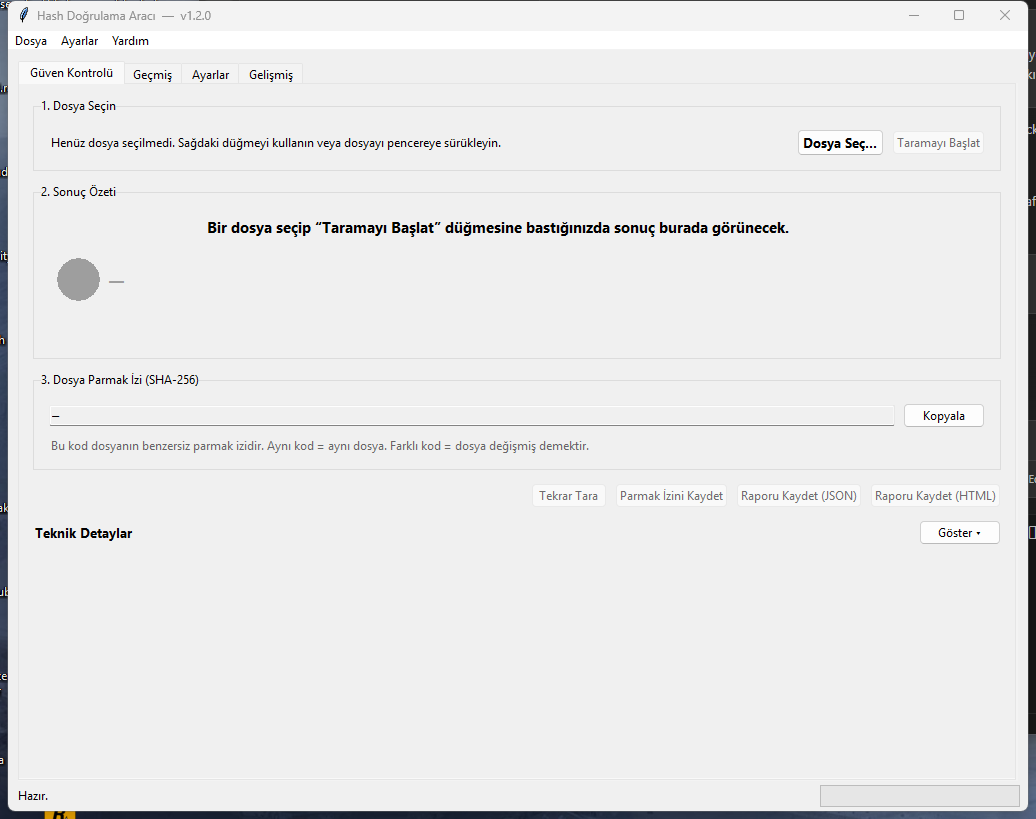
file is. Starting in v1.2 the main surface is a beginner-friendly
**"Güven Kontrolü"** screen that hashes a file, looks the hash up on
VirusTotal, checks the Windows digital signature, compares against a
local fingerprint and shows a plain-language risk summary — without
ever uploading the file. The original CLI and the **Advanced** tab
keep all of v1.1's hash / verify / report power.
## What's new in v1.2.0
- **Güven Kontrolü tab** — pick one file, get a single Düşük / Orta /
Yüksek risk badge plus a Turkish-first explanation.
- **VirusTotal hash lookup** (no file upload) — paste your free API key
in the *Ayarlar* tab and the app queries `files/{sha256}` for you.
- **Authenticode signature check** on Windows via PowerShell — surfaces
signer name without bundling a native PE parser.
- **Local fingerprint book** — remember a file's hash today, compare it
later to see if it has been tampered with.
- **Risk engine + smart summary** — combines VT + signature + local
results into one explainable score with auditable factor list.
- **Scan history** — last N runs persisted as JSON, double-click to
re-scan.
- **JSON / HTML reports** — single-file shareable trust report.
The original *Advanced* tab still exposes Hash / Verify / Report and
all CLI subcommands (`hash`, `verify`, `report`) work unchanged.
See [CHANGELOG.md](CHANGELOG.md) for v1.1 history.
## Features
- Hash a single file or recursively hash every file under a folder
- Algorithms: **MD5**, **SHA-1**, **SHA-256** (default: `sha256`), **SHA-512**
- Saves a structured **JSON manifest** with relative path, hash,
algorithm, size and last-modified time per file
- Re-verifies a folder against an existing manifest and classifies
every file as **unchanged / modified / new / missing / error**
- Exports the verification report as **JSON** or **CSV**
- Streams files in 64 KiB chunks so multi-GB files do not exhaust RAM
- Live progress reporting via a typed `ProgressEvent` callback (GUI
progress bar, CLI `-v` debug lines, or your own consumer)
- Bilingual GUI (Türkçe / English) with on-the-fly language switch
- Robust error handling: missing files, permission errors, broken
manifests and I/O failures are reported, not crashed on
- Optional ANSI colour output (degrades gracefully if `colorama` is
not installed or stdout is not a TTY)
- Lightweight logging to `logs/hash_tool.log`
## Project Layout
Hash Verification Tool/
├── main.py # CLI entry point (argparse)
├── gui_main.py # GUI entry point (thin wrapper)
├── core/
│ ├── __init__.py
│ ├── hash_utils.py # Streamed hashing + ProgressEvent
│ ├── manifest_manager.py # Folder manifest dataclass + JSON I/O
│ ├── verifier.py # Compare live folder vs manifest
│ ├── reporter.py # Console / JSON / CSV folder reports
│ ├── file_info.py # Human-readable single-file metadata
│ ├── vt_client.py # VirusTotal v3 hash lookup (no upload)
│ ├── signature_checker.py # Windows Authenticode via PowerShell
│ ├── local_verify.py # "Did this file change?" fingerprint store
│ ├── risk_engine.py # Düşük / Orta / Yüksek risk scoring
│ ├── smart_summary.py # Plain-Turkish summary builder
│ ├── history_manager.py # Last-N-scans JSON store
│ ├── trust_report.py # JSON + HTML trust report export
│ └── trust_pipeline.py # Orchestrates the trust-check flow
├── gui/
│ ├── __init__.py
│ ├── app.py # Tk root + tab wiring + thread plumbing
│ ├── i18n.py # TR / EN translation table
│ └── views/
│ ├── trust_check_view.py # Main beginner-friendly screen
│ ├── history_view.py # Scan history tab
│ └── settings_view.py # VirusTotal / history / language tab
├── utils/
│ ├── __init__.py
│ ├── logger.py # Logging helper (GUI-safe)
│ └── settings.py # JSON-backed settings + AppSettings
├── tests/ # 37 unit tests, stdlib only
├── demo.py # End-to-end legacy demo
├── build_exe.bat # Build dist/HashTool.exe (CLI)
├── build_gui_exe.bat # Build dist/HashToolGUI.exe (GUI)
├── requirements.txt
├── CHANGELOG.md
├── LICENSE
└── README.md
## Installation
Requires **Python 3.10+** (uses PEP 604 `|` type unions and modern
typing). Tested on Windows 11.
# 1. Clone or download the project, then:
cd "Hash Verification Tool"
# 2. (Recommended) create a virtualenv
python -m venv .venv
.venv\Scripts\activate
# 3. Install runtime dependencies (all optional but recommended)
pip install -r requirements.txt
Every package in `requirements.txt` is optional — the app falls back
to stdlib if any are missing. Installing them gives you `requests` for
faster VirusTotal calls, `windnd` for drag-and-drop and `colorama` for
coloured CLI output.
### Don't want to install Python?
Pre-built single-file Windows executables are published on the
**[GitHub Releases](../../releases)** page of this repository
(not committed into the repo itself — binary files belong in Releases).
| File | Purpose | Approx. size |
|------------------------|---------|--------------|
| `HashTool.exe` | CLI | ~8 MB |
| `HashToolGUI.exe` | GUI | ~12 MB |
Both are single-file PyInstaller builds — no installer, no registry
changes. Delete the file to uninstall.
## Running the GUI
### Option A — From source (Python)
cd "Hash Verification Tool"
pip install -r requirements.txt # one-time, optional but recommended
python gui_main.py
### Option B — From the pre-built EXE
After running `build_gui_exe.bat` (or downloading a release):
dist\HashToolGUI.exe
You can also double-click `dist\HashToolGUI.exe` from File Explorer.
The EXE is self-contained — no Python install required on the target
machine. Settings and history are written next to the EXE
(`hashtool_settings.json`, `data\history.json`, `data\known_files.json`).
### First-run setup (both options)
1. Switch to the **Ayarlar** tab.
2. Get a free API key at
and paste it into the *API Anahtarı* field.
3. Click **Anahtarı Test Et** to confirm it works, then **Kaydet**.
You can use the app without a VirusTotal key — you just won't get the
malicious / suspicious engine counts; everything else (hash, signature,
local fingerprint) still works.
### How to scan a file
1. **Güven Kontrolü** tab → click **Dosya Seç…** (or drag a file onto
the window if `windnd` is installed).
2. Click **Taramayı Başlat**.
3. Read the risk badge (Düşük / Orta / Yüksek / Bilinmiyor) and the
short summary at the top.
4. Click **Teknik Detaylar → Göster ▾** if you want the full hashes,
raw VirusTotal stats and signature details.
5. Optional next steps:
- **Parmak İzini Kaydet** — remember this file's SHA-256 so the
next scan will tell you if the file changed.
- **Raporu Kaydet (JSON / HTML)** — export a shareable report.
The other top-level tabs:
- **Geçmiş** — last N scans, double-click a row to re-run the check.
- **Ayarlar** — VirusTotal key, auto-query toggle, history limit, UI
language.
- **Gelişmiş** — the original v1.1 Hash / Verify / Report tools for
bulk folder integrity checks.
## Usage — CLI
The CLI exposes three subcommands: `hash`, `verify`, `report`.
python main.py --help
python main.py hash --help
python main.py verify --help
python main.py report --help
### 1. Hash a single file
python main.py hash --file "C:\example\file.txt"
python main.py hash --file "C:\example\file.txt" --algo sha1
python main.py hash --file "C:\example\file.txt" --output single.json
When `--output` is omitted you get a one-liner on stdout
(` `). With `--output` you get a manifest JSON
that contains the same metadata as a folder scan.
### 2. Hash an entire folder
python main.py hash --folder "C:\example_folder" --algo sha256 --output manifest.json
python main.py -v hash --folder "C:\example_folder" --output manifest.json
The folder is walked recursively and each file is added to the
manifest. Files that cannot be read (permission, missing during scan,
etc.) are skipped with a warning rather than aborting the run. Pass
`-v` for per-file debug lines (live progress in the terminal).
### 3. Verify a folder against a manifest
python main.py verify --folder "C:\example_folder" --manifest manifest.json
python main.py verify --folder "C:\example_folder" --manifest manifest.json --show-details
python main.py verify --folder "C:\example_folder" --manifest manifest.json --report report.json
python main.py verify --folder "C:\example_folder" --manifest manifest.json --report report.csv
Exit codes are CI-friendly:
- `0` — folder matches the manifest
- `1` — differences detected (modified / new / missing / errors)
- `2` — bad arguments
- `3` — unrecoverable failure (manifest broken, folder missing, …)
### 4. Convert a saved JSON report to CSV (or vice versa)
python main.py report --input report.json --format csv
python main.py report --input report.json --format csv --output report.csv
### 5. Quick end-to-end demo
python demo.py
`demo.py` builds a small folder under `demo_data/`, hashes it,
deliberately tampers with it, then re-verifies — so you can see all
five status categories light up in one run.
## Manifest Format
Manifests are plain JSON, easy to diff in version control:
{
"metadata": {
"schema_version": "1.0",
"tool_version": "1.1.0",
"created_at": "2026-04-20T12:34:56+00:00",
"algorithm": "sha256",
"root_path": "C:/example_folder",
"file_count": 3
},
"entries": {
"docs/readme.txt": {
"hash": "9f86d081...",
"algorithm": "sha256",
"size": 1024,
"mtime": 1714478096.512
}
}
}
Paths are always stored with forward slashes so the same manifest can
be verified on Windows and POSIX systems.
## Progress callback (for embedders)
Both `build_manifest_for_folder` and `Verifier.verify` accept an
optional `on_progress` callback so a host application can render a
progress bar:
from core.hash_utils import ProgressEvent, count_files
from core.manifest_manager import build_manifest_for_folder
root = "C:/example_folder"
total = count_files(root)
def on_progress(ev: ProgressEvent) -> None:
print(f"[{ev.done}/{ev.total}] {ev.percent:5.1f}% {ev.path}")
manifest = build_manifest_for_folder(root, algorithm="sha256",
on_progress=on_progress)
`ProgressEvent` carries `done`, `total`, `path` and a computed `percent`
property. The callback fires after every file (success *or* error) so
the numerator and denominator always stay consistent.
## Why SHA-256 by default?
- **Collision-resistant in practice.** No public collisions exist for
SHA-256, while MD5 has been broken since 2004 and SHA-1 since 2017
(Google's SHAttered).
- **Standardised.** SHA-256 is part of NIST's SHA-2 family and is the
baseline integrity primitive used by TLS certificates, Bitcoin,
Linux package managers, Git's modern object format and most
forensic tools.
- **Fast enough.** On modern CPUs the bottleneck is disk I/O, not
hashing.
### When *might* you still want MD5 / SHA-1?
Only for **non-security-critical** parity checks — comparing a backup
to its source on a trusted system, deduplicating files, etc. Both are
considered cryptographically broken and **must not** be used to prove
that a file was not tampered with by an adversary.
## Building the executables yourself
Run the matching `.bat` file from the project root:
# GUI (no console window) — produces dist\HashToolGUI.exe (~15 MB)
build_gui_exe.bat
# CLI (legacy advanced tools) — produces dist\HashTool.exe (~8 MB)
build_exe.bat
Both scripts:
- install PyInstaller on first run if it is missing,
- clean previous build artefacts,
- emit a single-file EXE under `dist\`.
After building the GUI, double-click `dist\HashToolGUI.exe` to launch
the app. Delete the EXE to uninstall — there is no installer and no
registry footprint.
Both scripts install PyInstaller on first run if it is missing and
clean up previous build artefacts before each build.
## Running the tests
python -m unittest discover -s tests -v
The test suite is pure standard library — no extra dependencies
needed. 23 tests covering hashing, manifest round-trip, verifier
classification, `count_files`, `ProgressEvent.percent` and the
progress-callback behaviour on both folder hashing and verification.
## Roadmap (post-v1.1 ideas)
- Parallel hashing for huge folders (process pool)
- Glob-based include / exclude rules (`--exclude "*.tmp"`)
- HMAC mode for keyed integrity verification
- Signed manifests (Ed25519) for tamper-evident reports
- Watch mode (`--watch`) using `watchdog`
- Drag-and-drop support in the GUI
- macOS / Linux GUI builds (the code is already platform-agnostic;
only the build scripts are Windows-specific)
## License
Released under the [MIT License](LICENSE). No warranty — verify before
relying on it for anything safety-critical.
标签:Authenticode签名, JSON报告生成, MD5校验, Python GUI, SHA-256校验, Tkinter, VirusTotal查杀, Windows PE文件, 勒索软件/篡改检测, 哈希校验工具, 安全基线核查, 安全审计工具, 安全扫描历史记录, 恶意软件检测, 数字签名验证, 文件信任度评估, 文件完整性校验, 本地指纹比对, 白名单管理, 知识库安全, 离线安全检测, 端点安全辅助, 配置管理, 静态安全分析, 风险评级引擎