ahmxdniazi/advanced-dynamic-malware-analysis
GitHub: ahmxdniazi/advanced-dynamic-malware-analysis
一套端到端的 Windows 恶意软件动态分析流程文档,使用专业取证工具完成从样本引爆到 IOC 提取与 MITRE ATT&CK 映射的完整实验记录。
Stars: 0 | Forks: 0

[](https://nu.edu.pk)
[]()
[]()
[]()
## 📋 目录
- [概述](#-overview)
- [目标](#-objectives)
- [使用的工具](#-tools-used)
- [分析工作流](#-analysis-workflow)
- [逐步演练](#-step-by-step-walkthrough)
- [关键发现](#-key-findings)
- [发现的 IOCs](#-iocs-discovered)
- [方法论](#-methodology)
- [项目结构](#-project-structure)
- [作者](#-author)
## 🔍 概述
本项目记录了在 **FAST NUCES** 大学实验室活动中作为一部分进行的完整**端到端动态分析工作流**。使用一套专业级的取证工具,恶意软件样本被安全地引爆,其整个行为足迹被记录和分析。
与静态分析(读取反汇编代码)不同,动态分析**捕获恶意软件在运行时实际执行的操作**——包括混淆行为、释放的 payload 以及 C2 回调。
## 🎯 目标
| # | 目标 |
|---|-----------|
| 1 | 使用 Regshot 捕获**执行前系统基线** |
| 2 | 通过 Procmon 监控**实时进程、文件和注册表事件** |
| 3 | 通过 FakeNet-NG 拦截并分析**出站网络通信** |
| 4 | 检查**活动进程树**以查找注入或恶意进程 |
| 5 | 执行**执行前后差异对比**以识别恶意软件造成的所有系统更改 |
| 6 | 记录所有**入侵指标 (IOCs)** 用于威胁情报 |
## 🛠️ 使用的工具
|
**🔵 Regshot**
注册表及文件系统快照与差异对比工具
|
**🟠 Process Monitor**
实时事件记录 (Procmon)
|
**🔴 FakeNet-NG**
网络流量模拟与捕获
|
|
**🟣 System Informer**
进程树与内存检查
|
**📊 Microsoft Excel**
离线 CSV 日志分析
|
**🖥️ Windows Sandbox**
隔离的恶意软件执行环境
|
## 🔄 分析工作流
```
┌─────────────────────────────────────────────────────────────────────┐
│ DYNAMIC ANALYSIS PIPELINE │
└─────────────────────────────────────────────────────────────────────┘
[1] Regshot Shot 1 ──► Baseline snapshot (pre-infection)
│
▼
[2] Start Monitoring ──► FakeNet-NG + Procmon + System Informer
│
▼
[3] Execute Malware ──► Controlled detonation in sandbox
│
▼
[4] Observe Behavior ──► Network callbacks, file drops, registry writes
│
▼
[5] Stop & Export Logs ──► Procmon CSV export for offline analysis
│
▼
[6] Regshot Shot 2 ──► Post-infection snapshot
│
▼
[7] Compare & Report ──► Diff reveals ALL system changes & IOCs
```
## 📸 逐步演练
### 步骤 1 — Regshot:执行前基线快照
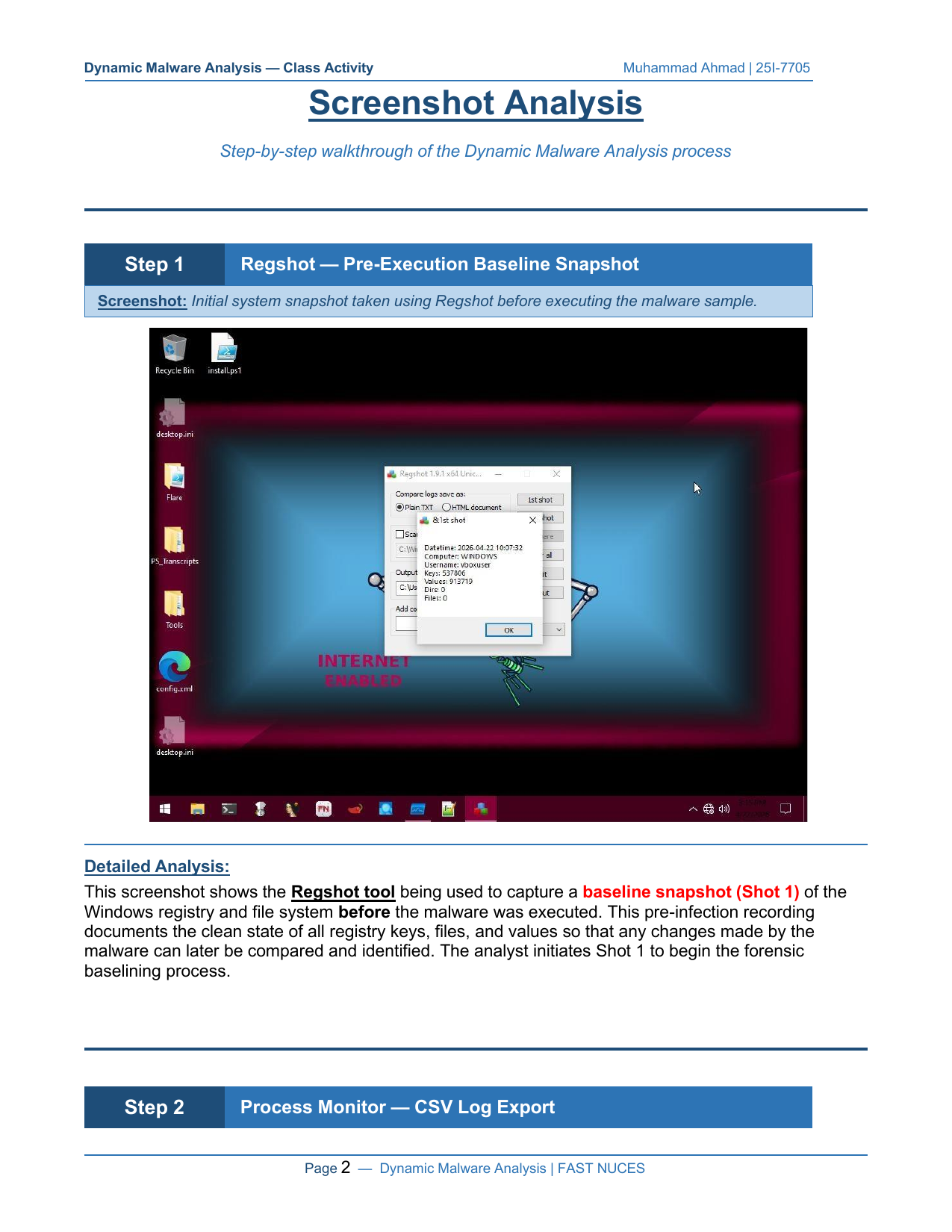
在执行恶意软件之前,使用 **Regshot** 对以下内容进行了完整快照 (快照 1):
- 所有 Windows 注册表键和值
- 文件系统状态
这建立了一个干净状态的指纹。恶意软件所做的任何修改在随后的对比中都将清晰可见。
### 步骤 2 — Process Monitor:CSV 日志导出
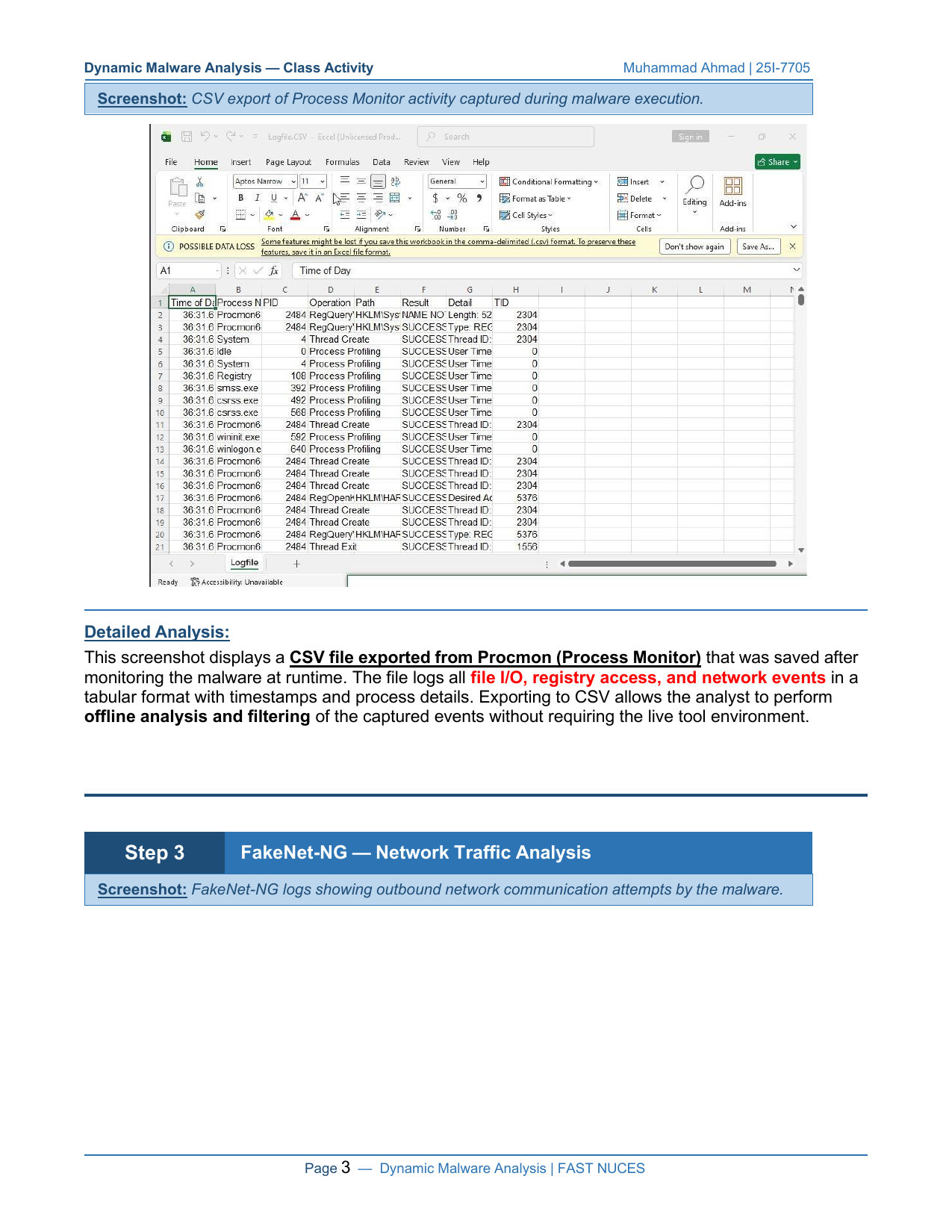
恶意软件执行后,**Process Monitor (Procmon)** 的日志被导出为 CSV 格式。该日志包含每一个操作系统级别的事件,包括:
- `RegQueryValue` / `RegOpenKey` — 注册表读取
- `CreateFile` / `ReadFile` — 文件系统交互
- 线程创建和进程分析事件
### 步骤 3 — FakeNet-NG:网络流量分析
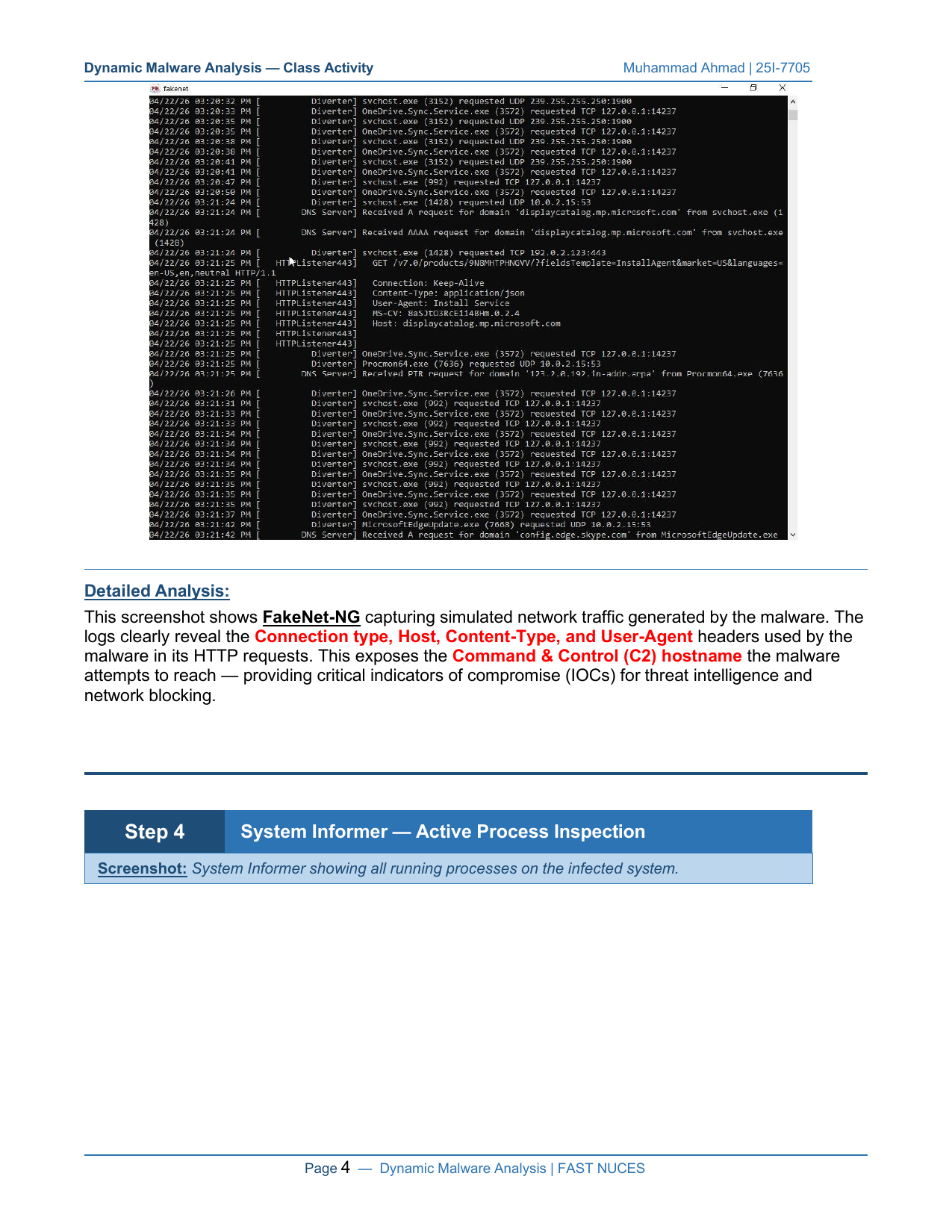
**FakeNet-NG** 模拟真实的互联网服务 (DNS, HTTP, HTTPS) 以诱骗恶意软件进行网络连接,从而揭示:
| 字段 | 值 |
|-------|-------|
| 连接类型 | HTTP Keep-Alive |
| Content-Type | `application/json` |
| User-Agent | `Install Service` |
| C2 主机 | `displaycatalog.mp.microsoft.com` |
| 协议 | TCP |
### 步骤 4 — System Informer:活动进程检查
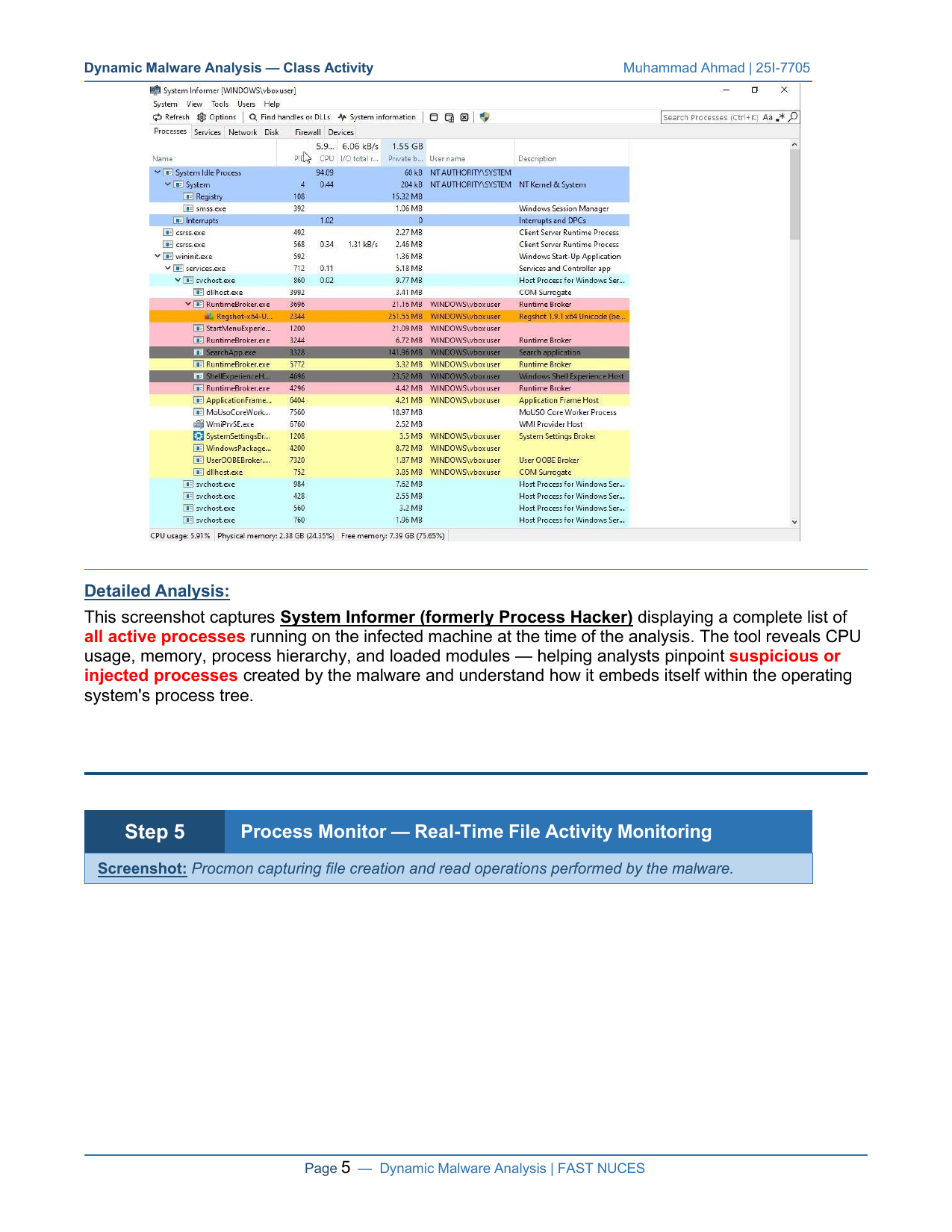
**System Informer**(前称 Process Hacker)在感染期间提供了整个进程树的实时视图:
- 带有父子关系的完整进程层级
- 每个进程的 CPU、内存和 I/O 使用情况
- 已加载的 DLL 和模块
- 高亮显示可疑/异常进程
### 步骤 5 — Process Monitor:实时文件活动
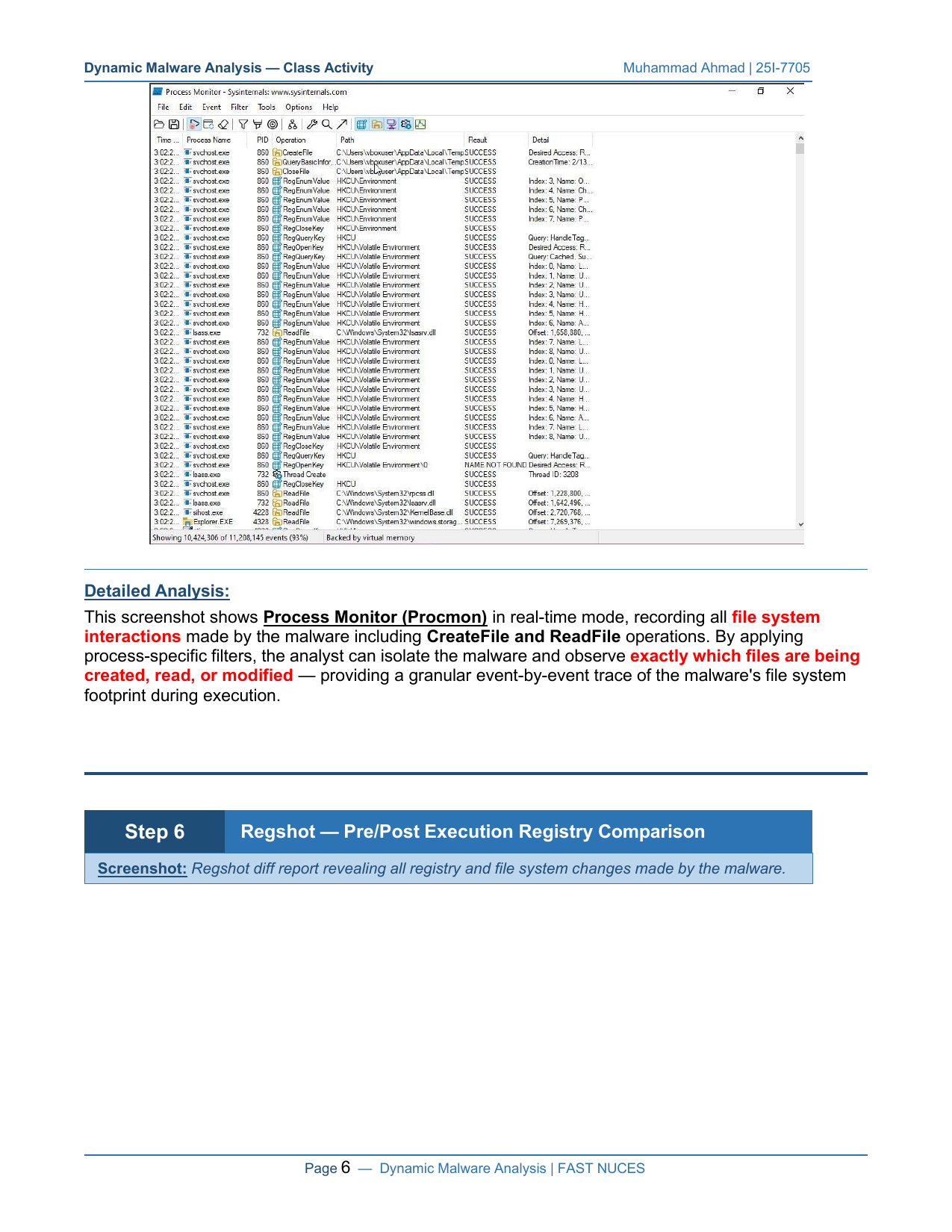
在 Procmon 以实时模式运行并过滤到恶意软件进程的情况下,我们捕获了:
```
svchost.exe → CreateFile → C:\Users\vboxuser\AppData\Local\Temp → SUCCESS
svchost.exe → ReadFile → C:\Windows\System32\vpcss.dll → SUCCESS
svchost.exe → ReadFile → C:\Windows\System32\KernelBase.dll → SUCCESS
```
### 步骤 6 — Regshot:执行前后注册表对比
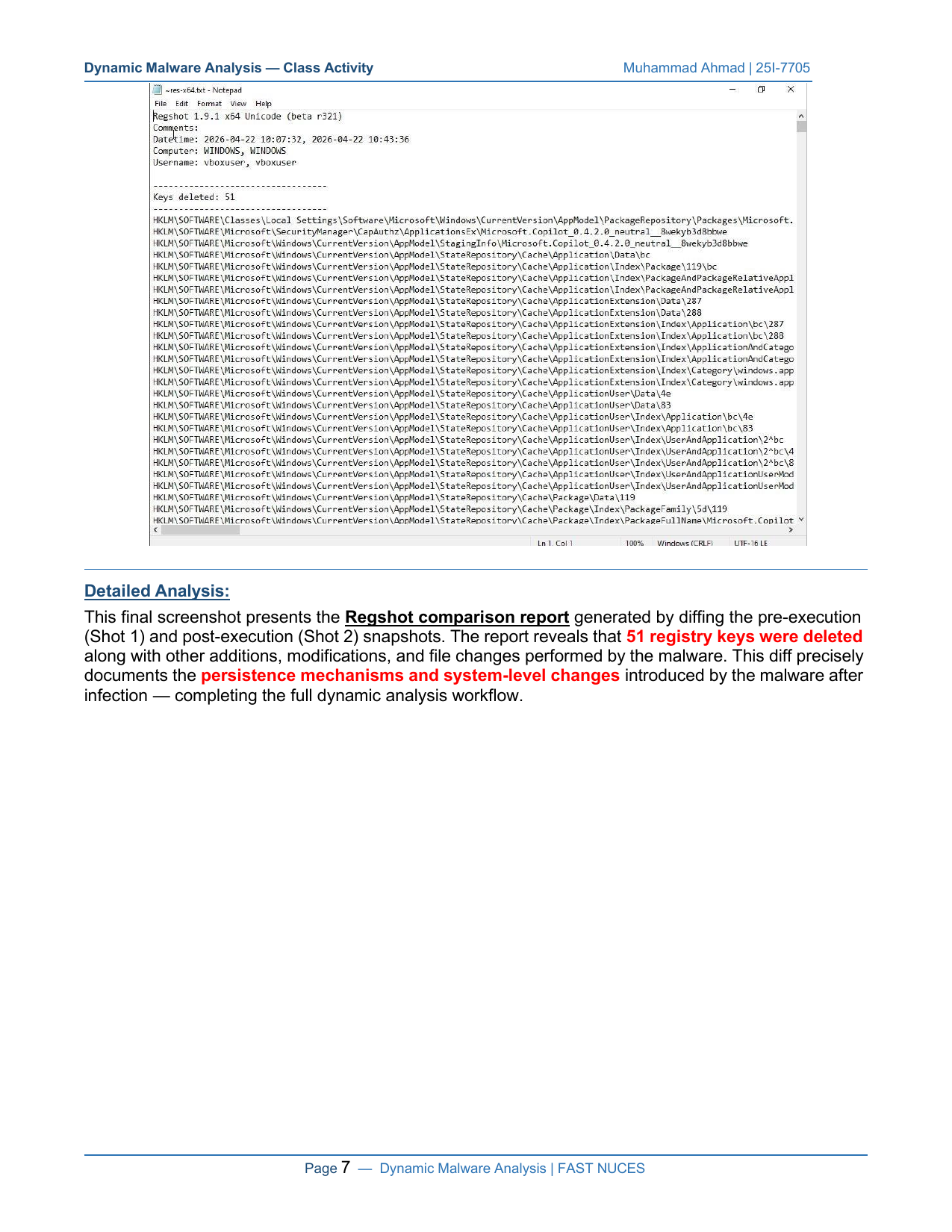
最终的 Regshot 差异对比 (快照 1 vs 快照 2) 揭示了完整的系统影响:
| 更改类型 | 数量 |
|-------------|-------|
| 🔴 删除的键 | **51** |
| 🟡 修改的键 | 多个 |
| 🟢 新增的键 | 多个 |
| 📁 修改的文件 | 多个 |
## 🚨 关键发现
```
╔══════════════════════════════════════════════════════════════════╗
║ THREAT BEHAVIOR SUMMARY ║
╠══════════════════════════════════════════════════════════════════╣
║ Network: C2 communication via disguised HTTP requests ║
║ Persistence: Registry modifications in CurrentVersion keys ║
║ Evasion: Masquerades as legitimate Windows services ║
║ File System: Temp directory usage + system DLL access ║
║ Anti-Forensic:51 registry key deletions post-execution ║
╚══════════════════════════════════════════════════════════════════╝
```
## 🔎 发现的 IOCs
| IOC 类型 | 值 | 严重程度 |
|----------|-------|----------|
| C2 域名 | `displaycatalog.mp.microsoft.com` | 🔴 高 |
| 协议 | HTTP/1.1 Keep-Alive GET | 🟡 中 |
| User-Agent | `Install Service` | 🔴 高 |
| Content-Type | `application/json` | 🟡 中 |
| 文件路径 | `C:\Users\vboxuser\AppData\Local\Temp\*` | 🟡 中 |
| 注册表 | `HKLM\SOFTWARE\Microsoft\Windows\CurrentVersion\AppModel\StateRepository\Cache` | 🔴 高 |
| DLL 访问 | `vpcss.dll`, `KernelBase.dll`, `windows.storage.dll` | 🟡 中 |
## 🧪 方法论
本次分析遵循了**标准动态恶意软件分析方法论**:
1. **隔离** — 在没有持久网络访问权限的 VirtualBox 虚拟机 (`vboxuser`) 中进行分析
2. **工具配备** — 使用反映真实 SOC/DFIR 工作流的专业级取证工具
3. **基线建立** — 在执行任何恶意软件之前获取干净状态的快照
4. **受控引爆** — 在所有监控工具同时激活的情况下执行恶意软件
5. **证据收集** — 导出并保存所有日志以供离线审查
6. **差异分析** — 执行前后对比以进行全面变更检测
7. **IOC 提取** — 记录网络、文件和注册表指标以用于威胁情报
## 📁 项目结构
```
advanced-dynamic-malware-analysis/
│
├── 📄 README.md ← You are here
│
├── 📁 assets/
│ └── banner.svg ← Project banner
│
├── 📁 screenshots/
│ ├── step1_regshot_baseline.png ← Pre-execution Regshot snapshot
│ ├── step2_procmon_csv.png ← Process Monitor CSV export
│ ├── step3_fakenet_network.png ← FakeNet-NG network capture
│ ├── step4_system_informer.png ← System Informer process tree
│ ├── step5_procmon_realtime.png ← Procmon real-time file monitoring
│ └── step6_regshot_diff.png ← Regshot pre/post diff report
│
├── 📁 reports/
│ ├── full_analysis_report.md ← Detailed written analysis
│ └── ioc_summary.md ← IOC reference sheet
│
└── 📄 TOOLS.md ← Tool setup & configuration guide
```
## 👤 作者
### Muhammad Ahmad
**学号 25I-7705**
FAST 国家计算机与新兴科学大学
[](https://linkedin.com)
[](https://github.com)
*作为高级动态恶意软件分析课程的一部分提交*
*FAST NUCES — 2025/2026*

标签:C2检测, DAST, FakeNet-NG, IOC提取, IP 地址批量处理, MITRE ATT&CK映射, payload分析, Process Monitor, Procmon, Regshot, System Informer, 动态脱壳, 命令与控制检测, 大学项目, 失陷标示提取, 威胁情报, 安全实验室, 开发者工具, 恶意软件分析, 数据包嗅探, 无线安全, 沙箱分析, 注册表分析, 系统基线, 网络信息收集, 网络安全, 网络安全审计, 网络拦截, 行为取证, 隐私保护, 高级恶意软件分析