DerrickLongkai/EdgeGuard-Honeypot
GitHub: DerrickLongkai/EdgeGuard-Honeypot
一款基于Cowrie蜜罐的实时威胁情报可视化平台,解决SSH/Telnet攻击的地理与行为分析问题。
Stars: 0 | Forks: 0
# EdgeGuard:威胁情报态势感知平台


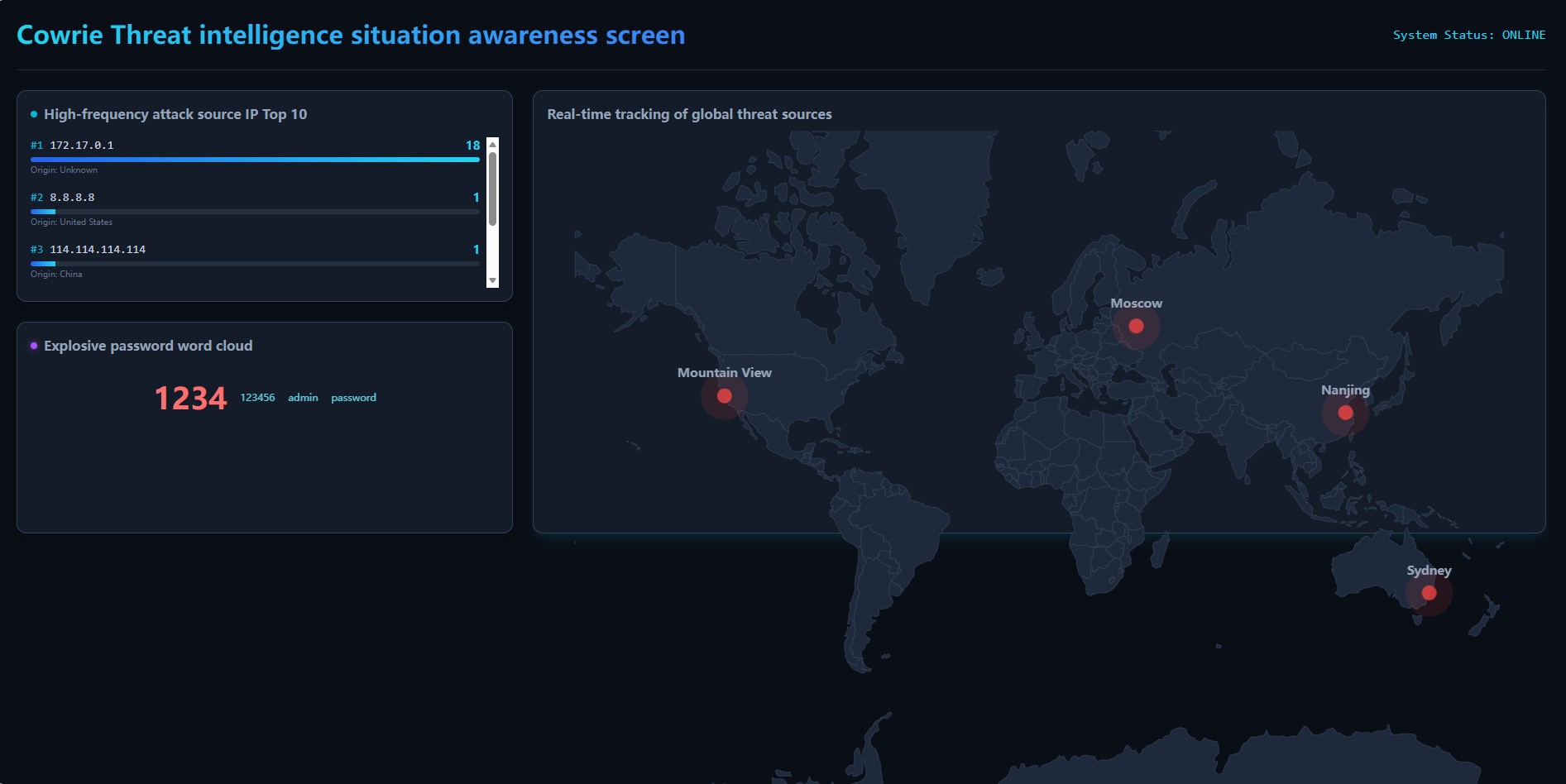
一款全栈的实时威胁情报仪表盘,旨在可视化由 Cowrie 蜜罐捕获的 SSH/Telnet 暴力破解攻击。
## 核心功能
* **实时全球追踪:** 使用 MaxMind GeoLite2 引擎将攻击者 IP 地址映射到地理坐标。
* **威胁分析:** 动态识别高频攻击源 IP。
* **凭据情报:** 通过动态词云可视化爆炸性的密码尝试(弱口令)。
* **自动化数据 Pipeline:** 健壮的 Python daemon 负责解析蜜罐日志,使用 GeoIP 数据丰富它们,并将其存储在 MySQL 中。
## 架构
1. **传感器:** Cowrie 蜜罐拦截未经授权的访问尝试。
2. **ETL 引擎:** Python 脚本提取遥测数据,解析 IP 地理位置信息,并将数据持久化到 MySQL 关系型数据库中。
3. **后端 API:** 轻量级 Flask REST API 为前端提供威胁情报服务。
4. **前端仪表盘:** 基于 React.js + Vite 的应用程序,利用 `react-simple-maps` 实现交互式威胁可视化。
## 仪表盘预览
## 如何启动
### 1. 数据库设置
执行 SQL schema 以初始化 `attacks` 表:
```
CREATE DATABASE edgeguard;
USE edgeguard;
CREATE TABLE attacks (
id INT AUTO_INCREMENT PRIMARY KEY,
src_ip VARCHAR(50) NOT NULL,
username VARCHAR(100),
password VARCHAR(255),
country VARCHAR(100),
city VARCHAR(100),
latitude DECIMAL(10, 6),
longitude DECIMAL(11, 6),
timestamp DATETIME DEFAULT CURRENT_TIMESTAMP
);
```
### 2. 后端环境(Flask API)
导航至 backend 目录,设置 Python 虚拟环境,安装依赖项,并启动服务器:
```
cd backend
python3 -m venv venv
source venv/bin/activate
pip install -r requirements.txt
python3 app.py
```
### 3. 前端环境(React 仪表盘)
```
cd frontend
npm install --legacy-peer-deps
npm run dev
```
标签:Flask, HTTP/HTTPS抓包, React, Syscalls, 全栈开发, 威胁情报, 开发者工具, 态势感知, 数据可视化, 自定义脚本, 蜜罐, 证书利用