rapid7/rapid7-bulk-export-mcp
GitHub: rapid7/rapid7-bulk-export-mcp
基于 MCP 与 AgentSkill 的 Rapid7 数据 AI 分析工具,解决批量导出数据的结构化查询与上下文理解难题。
Stars: 19 | Forks: 4
# Rapid7 Bulk Export MCP
使用 MCP ([Model Context Protocol](https://modelcontextprotocol.io/docs/getting-started/intro)) 和 [AgentSkills](https://agentskills.io/home) 对 Rapid7 命令平台数据进行 AI 赋能分析。
此工具尽最大努力提供支持,但由于工具和流程的定制化以及不断变化的特性,我们无法在 MCP 代码和 AgentSkill 内容之外提供支持或指导。
## 这是什么?
此工具通过 [Rapid7 批量导出 API](https://docs.rapid7.com/insightvm/bulk-export-api/) 导出 Rapid7 命令平台的数据,并使其可在生成式 AI 和代理工作流中可查询。
- **MCP 服务器**:嵌入工具,用于获取、处理和查询数据
- **Agent Skill**:提供额外的上下文、模式知识和使用 MCP 工具的说明
- **DuckDB 数据库**:基于文件的本地数据库,用于实现快速的、结构化的查询
## 演示
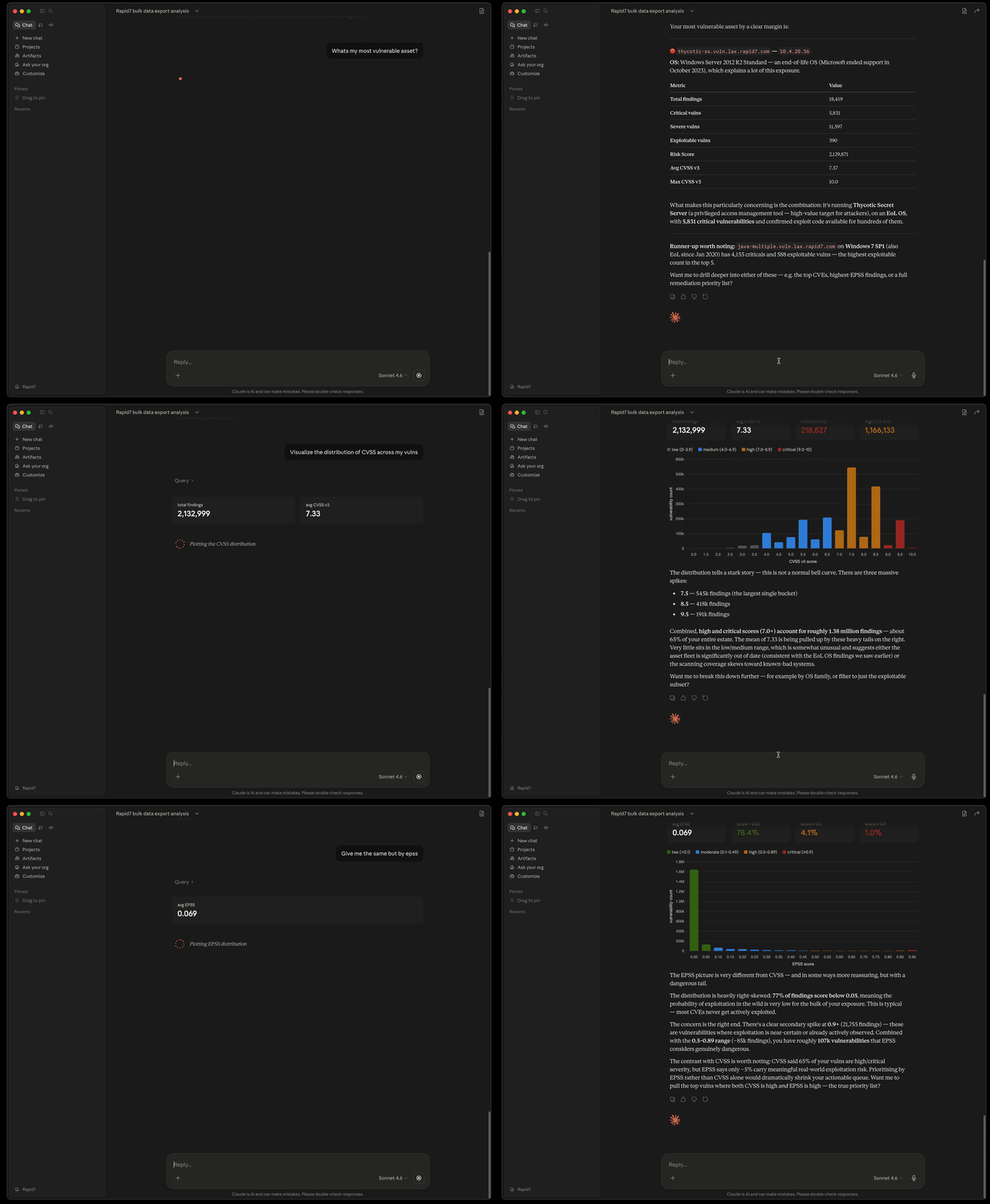
## Claude Desktop 快速开始
从右侧 GitHub 发布页面下载 mcpb 和 zip 文件。有关其他 AI 工具和更详细的说明,请参见下面的入门指南。
### 安装
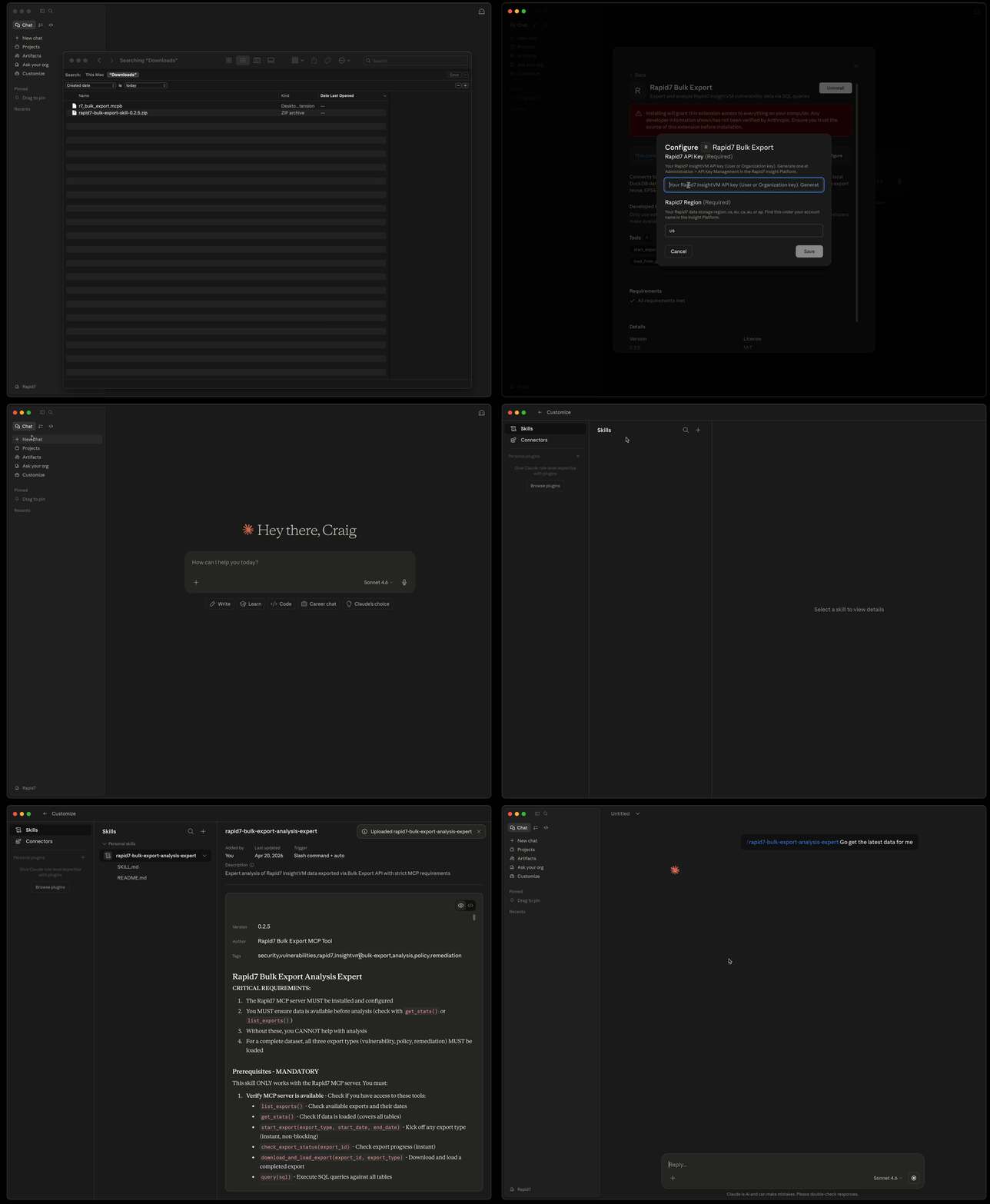
### 初始化数据
每天执行一次,耗时 1-5 分钟,具体取决于组织规模。
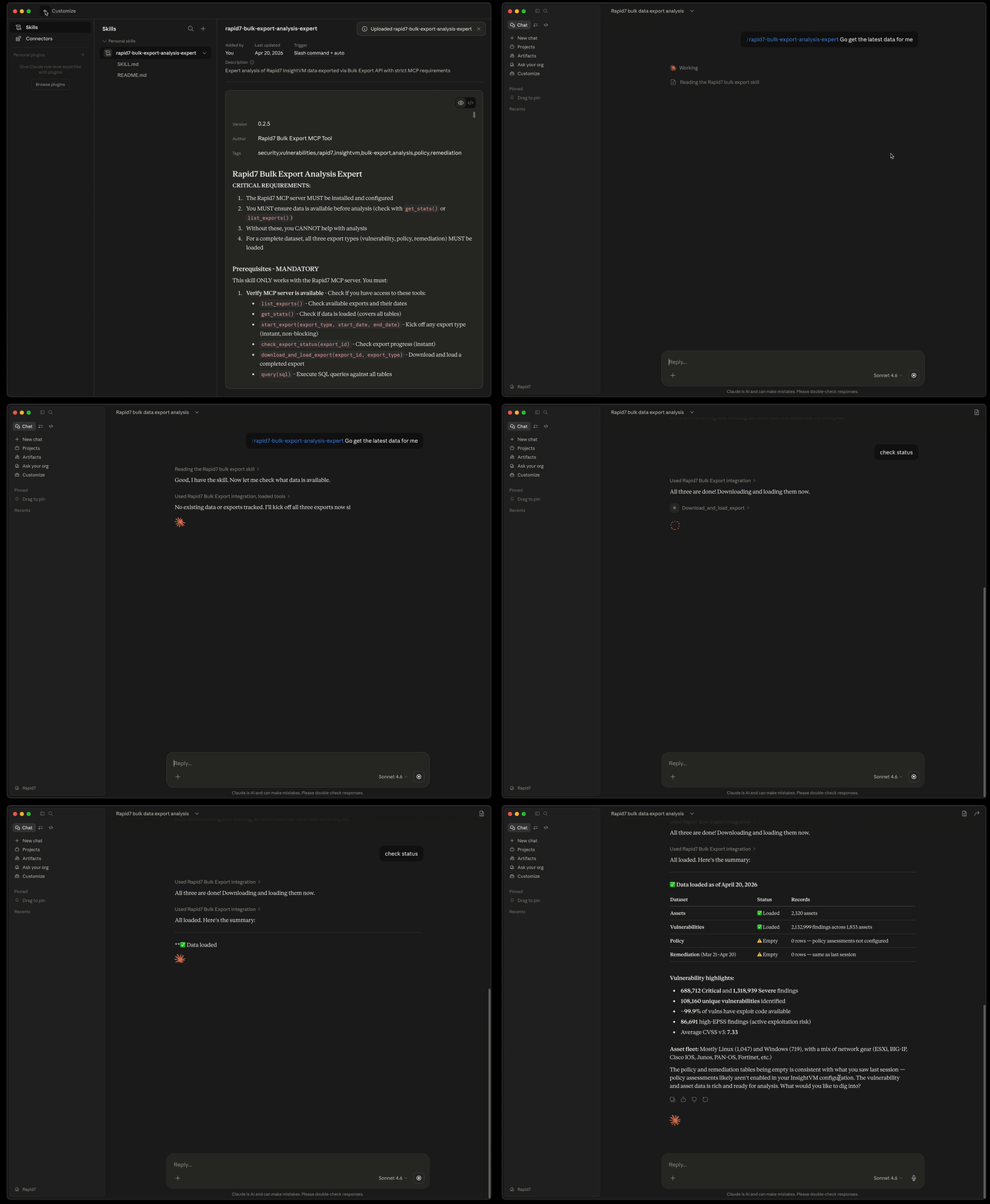
## 功能特性
- **AI 赋能分析**:可与 Kiro、Claude Desktop 或任何 MCP 兼容的 AI 助理配合使用
- **按需数据加载**:通过 `export_and_load` 工具自动获取并加载 Rapid7 数据
- **导出重用**:自动重用当天的导出数据,避免冗余的 API 调用
- **自然语言查询**:使用普通英语提问
- **SQL 查询执行**:对漏洞、资产及其他数据运行复杂的 SQL 查询
- **模式探索**:发现可用的数据字段
- **统计与洞察**:即时获取摘要和分布信息
## MCP 服务器工具
- `export_and_load()` - **首先调用**:从 Rapid7 获取并加载数据(如果当天已有导出则重用)
- `list_exports(limit)` - 查看最近的导出及其元数据
- `query_vulnerabilities(sql)` - 执行 SQL 查询
- `get_schema()` - 查看表结构
- `get_stats()` - 获取汇总统计
- `suggest_query(task)` - 获取查询建议
## 快速开始
### 0. 获取 Rapid7 API 密钥和区域
在开始之前,您需要从 Rapid7 Insight Platform 账户获取凭证。
**生成 API 密钥:**
1. 登录 [Rapid7 Insight Platform](https://insight.rapid7.com)
2. 导航至 Administration → API Key Management
3. 选择密钥类型:
- **用户密钥**:继承您的账户权限(任何用户均可创建)
- **组织密钥**:完整的管理员权限(需要平台管理员角色)
4. 点击“生成新用户密钥”(或针对组织密钥点击“生成新管理员密钥”)
5. 选择您的组织并为密钥命名
6. 立即复制密钥——之后您将无法再次查看!
**查找区域:**
您的区域决定了要使用的 API 端点。要查找您的区域:
1. 访问 [insight.rapid7.com](https://insight.rapid7.com) 并登录
2. 在账户名称下方右上角的标签中查找“数据存储区域”
更多详细信息请参考:
- [管理平台 API 密钥](https://docs.rapid7.com/insight/managing-platform-api-keys)
- [产品 API 与区域](https://docs.rapid7.com/insight/product-apis)
### 1. 安装
```
# Using pip
pip install git+https://github.com/rapid7/rapid7-bulk-export-mcp.git
# Or using uv
uv pip install git+https://github.com/rapid7/rapid7-bulk-export-mcp.git
```
### 2. 配置 MCP 服务器
配置格式和位置因 AI 助理而异。以下是流行工具的示例:
### 3. 安装 Agent Skill
Agent Skill 为漏洞分析提供领域专业知识。
**该 Skill 提供:**
- 理解批量导出数据模式
- SQL 查询模式和示例
- 安全分析最佳实践
- 风险优先级指导
**注意:** 该 Skill 提供知识和指导。MCP 服务器(在第 2 步中配置)执行实际的查询。
### 4. 验证安装
Copilot, Kiro, Claude Desktop, etc.] end subgraph "Rapid7 Bulk Export MCP Tool" MCP[MCP Server
rapid7-bulk-export] Skill[Agent Skill
rapid-bulk-export-skill] end subgraph "Data Layer" DB[(DuckDB
rapid7_bulk_export.db)] Tracker[(Export Tracker
rapid7_bulk_export_tracking.db)] end subgraph "Rapid7 API" R7[Rapid7 Bulk Export API
/export/graphql ] end LLM <-->|Model Context Protocol| MCP LLM -.->|Enhanced Context| Skill MCP -->|SQL Queries| DB MCP -->|Track Exports| Tracker MCP -->|Fetch Data| R7 R7 -->|Parquet Files| MCP MCP -->|Load Data| DB style LLM fill:#e1f5ff style MCP fill:#fff4e1 style Skill fill:#f0e1ff style DB fill:#e8f5e9 style Tracker fill:#e8f5e9 style R7 fill:#ffe1e1 ``` ## 开发快速开始 对 AgentSkill 和 MCP 的修改可以在本地进行,以适配您的环境——欢迎为此仓库贡献代码。 ### 1. 克隆并安装 ``` # Clone the repository git clone https://github.com/rapid7/rapid7-bulk-export-mcp.git cd rapid7-bulk-export-mcp # Install dependencies uv sync # Or using pip pip install -e . ``` ### 2. 为开发配置 MCP 服务器 创建或编辑 `.kiro/settings/mcp.json`: **选项 A:使用 uv(推荐)** ``` { "mcpServers": { "rapid7-bulk-export": { "command": "uv", "args": ["run", "rapid7-mcp-server"], "cwd": "/absolute/path/to/rapid7-bulk-export-mcp", "env": { "RAPID7_API_KEY": "your-api-key-here", "RAPID7_REGION": "us" } } } } ``` **选项 B:直接使用 Python** ``` { "mcpServers": { "rapid7-bulk-export": { "command": "python", "args": ["-m", "src.mcp_server"], "cwd": "/absolute/path/to/rapid7-bulk-export-mcp", "env": { "RAPID7_API_KEY": "your-api-key-here", "RAPID7_REGION": "us" } } } } ```
AWS Kiro
创建或编辑 `.kiro/settings/mcp.json`: ``` { "mcpServers": { "rapid7-bulk-export": { "command": "rapid7-mcp-server", "args": [], "env": { "RAPID7_API_KEY": "your-api-key-here", "RAPID7_REGION": "us" } } } } ``` **配置说明:** - `RAPID7_API_KEY` - 必需:您的 Rapid7 InsightVM API 密钥 - `RAPID7_REGION` - 必需:您的区域(`us`、`eu`、`ca`、`au` 或 `ap`)Claude Code (IDE)
使用 Claude Code CLI 添加 MCP 服务器: ``` claude mcp add --transport stdio \ --env RAPID7_API_KEY=your-api-key-here \ --env RAPID7_REGION=us \ rapid7-bulk-export \ -- rapid7-mcp-server ``` 或手动编辑 `~/.claude.json`(用户范围)或 `.mcp.json`(项目范围): ``` { "mcpServers": { "rapid7-bulk-export": { "command": "rapid7-mcp-server", "args": [], "env": { "RAPID7_API_KEY": "your-api-key-here", "RAPID7_REGION": "us" } } } } ``` **配置说明:** - `RAPID7_API_KEY` - 必需:您的 Rapid7 InsightVM API 密钥 - `RAPID7_REGION` - 必需:您的区域(`us`、`eu`、`ca`、`au` 或 `ap`) - 使用 `--scope user` 实现跨项目访问,或使用 `--scope project` 实现团队共享Claude Desktop
编辑 `claude_desktop_config.json`: - macOS:`~/Library/Application Support/Claude/claude_desktop_config.json` - Windows:`%APPDATA%\Claude\claude_desktop_config.json` ``` { "mcpServers": { "rapid7-bulk-export": { "command": "rapid7-mcp-server", "args": [], "env": { "RAPID7_API_KEY": "your-api-key-here", "RAPID7_REGION": "us" } } } } ``` **配置说明:** - `RAPID7_API_KEY` - 必需:您的 Rapid7 InsightVM API 密钥 - `RAPID7_REGION` - 必需:您的区域(`us`、`eu`、`ca`、`au` 或 `ap`)GitHub Copilot (VS Code)
在 VS Code 中编辑 MCP 设置: - 使用命令面板:“MCP: 编辑配置” - 或手动编辑:`.vscode/mcp.json`(工作区)或用户设置 ``` { "mcpServers": { "rapid7-bulk-export": { "command": "rapid7-mcp-server", "args": [], "env": { "RAPID7_API_KEY": "your-api-key-here", "RAPID7_REGION": "us" } } } } ``` **配置说明:** - `RAPID7_API_KEY` - 必需:您的 Rapid7 InsightVM API 密钥 - `RAPID7_REGION` - 必需:您的区域(`us`、`eu`、`ca`、`au` 或 `ap`)Kiro
``` # User-level (available in all workspaces) cp rapid7-bulk-export-skill/SKILL.md ~/.kiro/skills/rapid7-bulk-export.md # Or workspace-level (only in current workspace) cp rapid7-bulk-export-skill/SKILL.md .kiro/skills/rapid7-bulk-export.md ``` 在聊天中激活该 Skill: ``` #rapid7-bulk-export ```Claude Code (IDE)
``` # User-level (available in all projects) mkdir -p ~/.claude/skills/rapid7-bulk-export cp rapid7-bulk-export-skill/SKILL.md ~/.claude/skills/rapid7-bulk-export/ # Or project-level (only in current project) mkdir -p .claude/skills/rapid7-bulk-export cp rapid7-bulk-export-skill/SKILL.md .claude/skills/rapid7-bulk-export/ ``` Claude Code 会在相关时自动发现并使用该 Skill。GitHub Copilot (VS Code)
``` # Project-level (recommended, stored in repository) mkdir -p .github/skills/rapid7-bulk-export cp rapid7-bulk-export-skill/SKILL.md .github/skills/rapid7-bulk-export/ # Or user-level (available across all projects) mkdir -p ~/.copilot/skills/rapid7-bulk-export cp rapid7-bulk-export-skill/SKILL.md ~/.copilot/skills/rapid7-bulk-export/ ``` 在聊天中使用斜杠命令调用该 Skill: ``` /rapid7-bulk-export ``` GitHub Copilot 也会在相关请求时自动加载该 Skill。其他 AI 助理
对于 Claude Desktop 和其他 AI 助理,您可以根据需要手动将 Skill 内容包含在提示词或对话中。Kiro
1. 重启或重新连接 MCP 服务器(命令面板 → “MCP:重新连接所有服务器”) 2. 检查 MCP 面板中是否显示 “rapid7-bulk-export” 服务器(应显示 “已连接”)Claude Code (IDE)
1. 重启 Claude Code 或重新加载窗口 2. 在聊天中输入 `/mcp` 检查服务器状态 3. 验证 “rapid7-bulk-export” 是否出现在列表中Claude Desktop
1. 重启 Claude Desktop 2. 在聊天界面中查找 MCP 服务器图标
summary>GitHub Copilot (VS Code)
1. 重新加载 VS Code 窗口
2. 在状态栏或输出面板中检查 MCP 状态
尝试查询:
```
Load the latest vulnerability data from Rapid7
```
**注意:** 首次导出可能需要 5 分钟以上。完成后,数据会被缓存;同一天内再次加载将重用相同的导出数据。
### 5. 开始分析
```
Show me the top 10 critical vulnerabilities
```
或:
```
What's the severity distribution of my vulnerabilities?
```
## 架构
```
graph TB
subgraph "AI Layer"
LLM[LLM/AI AssistantCopilot, Kiro, Claude Desktop, etc.] end subgraph "Rapid7 Bulk Export MCP Tool" MCP[MCP Server
rapid7-bulk-export] Skill[Agent Skill
rapid-bulk-export-skill] end subgraph "Data Layer" DB[(DuckDB
rapid7_bulk_export.db)] Tracker[(Export Tracker
rapid7_bulk_export_tracking.db)] end subgraph "Rapid7 API" R7[Rapid7 Bulk Export API
/export/graphql ] end LLM <-->|Model Context Protocol| MCP LLM -.->|Enhanced Context| Skill MCP -->|SQL Queries| DB MCP -->|Track Exports| Tracker MCP -->|Fetch Data| R7 R7 -->|Parquet Files| MCP MCP -->|Load Data| DB style LLM fill:#e1f5ff style MCP fill:#fff4e1 style Skill fill:#f0e1ff style DB fill:#e8f5e9 style Tracker fill:#e8f5e9 style R7 fill:#ffe1e1 ``` ## 开发快速开始 对 AgentSkill 和 MCP 的修改可以在本地进行,以适配您的环境——欢迎为此仓库贡献代码。 ### 1. 克隆并安装 ``` # Clone the repository git clone https://github.com/rapid7/rapid7-bulk-export-mcp.git cd rapid7-bulk-export-mcp # Install dependencies uv sync # Or using pip pip install -e . ``` ### 2. 为开发配置 MCP 服务器 创建或编辑 `.kiro/settings/mcp.json`: **选项 A:使用 uv(推荐)** ``` { "mcpServers": { "rapid7-bulk-export": { "command": "uv", "args": ["run", "rapid7-mcp-server"], "cwd": "/absolute/path/to/rapid7-bulk-export-mcp", "env": { "RAPID7_API_KEY": "your-api-key-here", "RAPID7_REGION": "us" } } } } ``` **选项 B:直接使用 Python** ``` { "mcpServers": { "rapid7-bulk-export": { "command": "python", "args": ["-m", "src.mcp_server"], "cwd": "/absolute/path/to/rapid7-bulk-export-mcp", "env": { "RAPID7_API_KEY": "your-api-key-here", "RAPID7_REGION": "us" } } } } ```
标签:AES-256, AgentSkills, AI 分析, DuckDB, GPT, MCP, meg, Model Context Protocol, Rapid7, SQL 查询, 信息安全, 威胁情报, 安全数据, 安全运营, 导出API, 开发者工具, 扫描框架, 批量导出, 数据导出, 数据查询, 本地数据库, 漏洞管理, 漏洞评估, 生成式AI, 索引, 自动化加载, 自然语言查询, 资产洞察, 逆向工具