blue0x1/rosemary
GitHub: blue0x1/rosemary
一款跨平台透明网络隧道工具,通过内核级拦截实现无需代理配置的流量转发,解决复杂代理链与多跳路由的运维与安全测试难题。
Stars: 12 | Forks: 1
# Rosemary
**跨平台透明隧道平台。无 TUN。无 proxychains。**
[](https://www.gnu.org/licenses/gpl-3.0)
[](https://github.com/blue0x1/rosemary/releases)
[](https://github.com/blue0x1/rosemary/releases)

[](https://github.com/blue0x1/rosemary/stargazers)
 Rosemary 在远程主机上部署轻量级代理,并在内核层透明拦截流量:无需代理设置、无需 TUN/TAP 设备、无需 proxychains。一旦代理连接,你即可像直接在该主机上一样访问其整个网络。
## 目录
- [工作原理](#how-it-works)
- [功能特性](#features)
- [支持平台](#platforms)
- [截图展示](#screenshots)
- [快速开始](#quick-start)
- [CLI 参考](#cli-reference)
- [API 接口](#api)
- [构建说明](#build)
- [安全说明](#security)
- [许可证](#license)
- [作者信息](#author)
## 工作原理
在你的机器上运行 **服务端**,并在任意远程主机上部署一个 **代理**。代理回连服务端,服务端为代理的子网安装内核级拦截规则,从此所有流向这些子网的流量都会被透明转发,无需代理配置、无需 TUN 设备、也无需修改应用程序。
```
curl http://192.168.1.50 ───► agent dials 192.168.1.50 and bridges it back
ssh user@192.168.1.20
ping 192.168.1.1
```
可同时连接多个代理,流量会根据目标自动路由到对应的代理。
## 功能特性
| 类别 | 能力 |
|----------|------------|
| **拦截** | 透明 TCP · UDP · ICMP · DNS,无需客户端配置 |
| **出站** | 默认出站代理可将所有互联网流量路由至指定代理 |
| **SOCKS5** | 支持用户名/密码认证的每代理 SOCKS5 代理 |
| **端口转发** | TCP/UDP 端口转发 · 反向端口转发(服务端监听,代理主动连接) |
| **发现** | Ping · Ping 扫描 · 通过代理进行 TCP/UDP 端口扫描 |
| **DNS** | 拦截 DNS,通过代理解析,支持私有与公共域名 |
| **跳板** | 多代理多跳(已测试 3+ 跳) |
| **仪表盘** | 实时代理拓扑图与路由表、日志查看器的 Web UI |
| **API** | 带 token 权限(read/write/admin)的完整 REST API |
| **CLI** | 交互式 REPL 与基于 Web 的 CLI 面板 |
| **扩展** | 快速访问的浏览器扩展 |
| **代理** | 后台模式 · 绑定模式 · 自动子网发现 · 联网检测 |
| **配置** | JSON 导入/导出 · 实时密钥轮换 · 逐端口配置 |
## 支持平台
| 平台 | TCP | UDP | DNS | ICMP | SOCKS5 | 出站 |
|----------|:---:|:---:|:---:|:----:|:------:|:------:|
| **Linux** | ✓ | ✓ | ✓ | ✓ | ✓ | ✓ |
| **Windows** | ✓ | ✓ | ✓ | ✓ | ✓ | ✓ |
| **macOS** | ✓ | ✓ | ✓ | ✓ | ✓ | ✓ |
| **FreeBSD** | ✓ | ✓ | ✓ | ✓ | ✓ | ✓ |
| **OpenBSD** | ✓ | ✓ | ✓ | ✓ | ✓ | ✓ |
**代理** 在上述所有平台均可运行。代理端无需 root 权限。
## 截图展示
### 仪表盘 | 代理拓扑图
*交互式网络拓扑图,展示已连接代理及其关系*
Rosemary 在远程主机上部署轻量级代理,并在内核层透明拦截流量:无需代理设置、无需 TUN/TAP 设备、无需 proxychains。一旦代理连接,你即可像直接在该主机上一样访问其整个网络。
## 目录
- [工作原理](#how-it-works)
- [功能特性](#features)
- [支持平台](#platforms)
- [截图展示](#screenshots)
- [快速开始](#quick-start)
- [CLI 参考](#cli-reference)
- [API 接口](#api)
- [构建说明](#build)
- [安全说明](#security)
- [许可证](#license)
- [作者信息](#author)
## 工作原理
在你的机器上运行 **服务端**,并在任意远程主机上部署一个 **代理**。代理回连服务端,服务端为代理的子网安装内核级拦截规则,从此所有流向这些子网的流量都会被透明转发,无需代理配置、无需 TUN 设备、也无需修改应用程序。
```
curl http://192.168.1.50 ───► agent dials 192.168.1.50 and bridges it back
ssh user@192.168.1.20
ping 192.168.1.1
```
可同时连接多个代理,流量会根据目标自动路由到对应的代理。
## 功能特性
| 类别 | 能力 |
|----------|------------|
| **拦截** | 透明 TCP · UDP · ICMP · DNS,无需客户端配置 |
| **出站** | 默认出站代理可将所有互联网流量路由至指定代理 |
| **SOCKS5** | 支持用户名/密码认证的每代理 SOCKS5 代理 |
| **端口转发** | TCP/UDP 端口转发 · 反向端口转发(服务端监听,代理主动连接) |
| **发现** | Ping · Ping 扫描 · 通过代理进行 TCP/UDP 端口扫描 |
| **DNS** | 拦截 DNS,通过代理解析,支持私有与公共域名 |
| **跳板** | 多代理多跳(已测试 3+ 跳) |
| **仪表盘** | 实时代理拓扑图与路由表、日志查看器的 Web UI |
| **API** | 带 token 权限(read/write/admin)的完整 REST API |
| **CLI** | 交互式 REPL 与基于 Web 的 CLI 面板 |
| **扩展** | 快速访问的浏览器扩展 |
| **代理** | 后台模式 · 绑定模式 · 自动子网发现 · 联网检测 |
| **配置** | JSON 导入/导出 · 实时密钥轮换 · 逐端口配置 |
## 支持平台
| 平台 | TCP | UDP | DNS | ICMP | SOCKS5 | 出站 |
|----------|:---:|:---:|:---:|:----:|:------:|:------:|
| **Linux** | ✓ | ✓ | ✓ | ✓ | ✓ | ✓ |
| **Windows** | ✓ | ✓ | ✓ | ✓ | ✓ | ✓ |
| **macOS** | ✓ | ✓ | ✓ | ✓ | ✓ | ✓ |
| **FreeBSD** | ✓ | ✓ | ✓ | ✓ | ✓ | ✓ |
| **OpenBSD** | ✓ | ✓ | ✓ | ✓ | ✓ | ✓ |
**代理** 在上述所有平台均可运行。代理端无需 root 权限。
## 截图展示
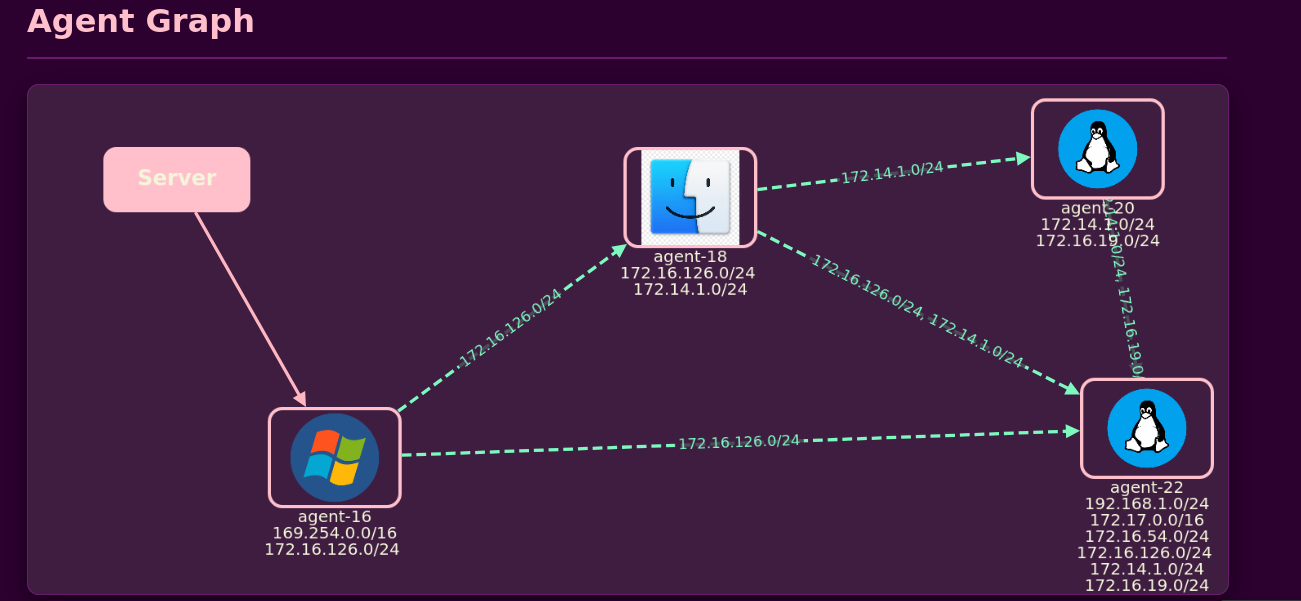
### 仪表盘 | 代理拓扑图
*交互式网络拓扑图,展示已连接代理及其关系*
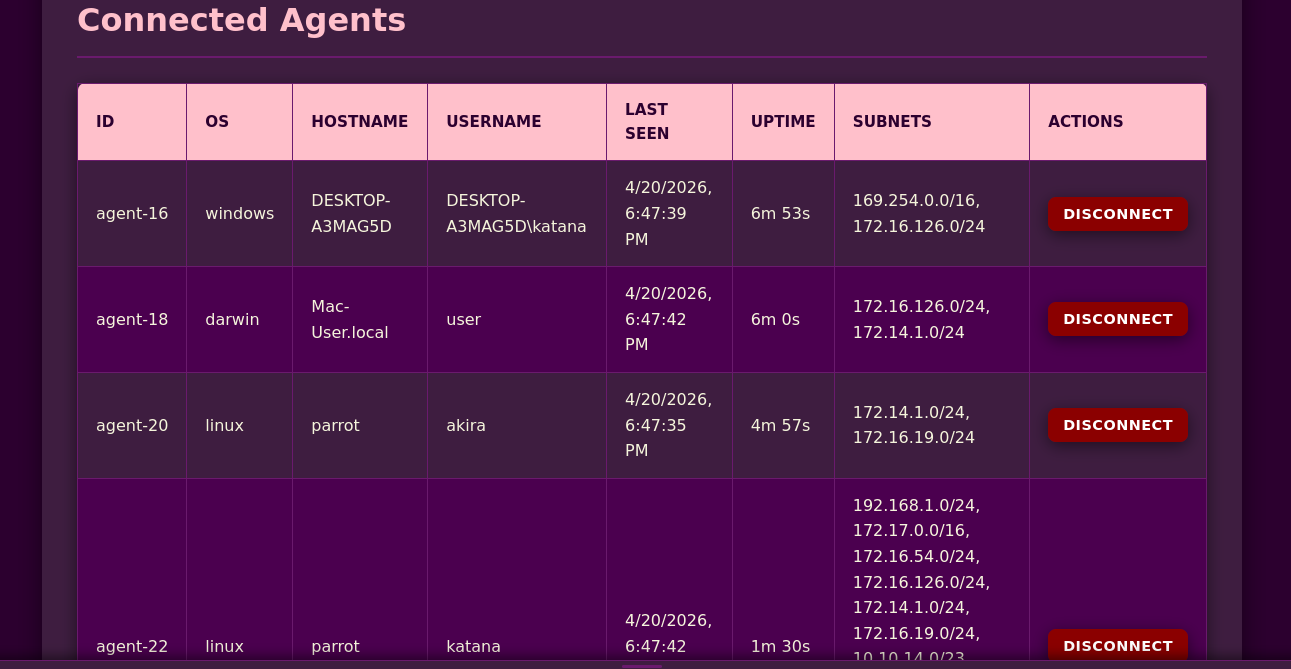
 ### 仪表盘 | 表格视图
*包含操作系统、主机名、子网与连接状态的详细代理信息*
### 仪表盘 | 表格视图
*包含操作系统、主机名、子网与连接状态的详细代理信息*
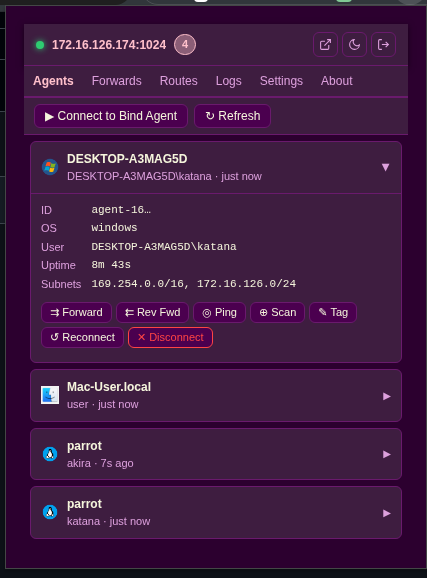
 ### Chrome 扩展
*浏览器扩展,便于通过隧道轻松访问与路由流量*
### Chrome 扩展
*浏览器扩展,便于通过隧道轻松访问与路由流量*
 **安装方式:**
1. 打开 Chrome,访问 `chrome://extensions/`
2. 启用 **开发者模式**(右上角开关)
3. 点击 **加载已解压的扩展程序**
4. 选择仓库中的 `extension/` 文件夹
扩展图标将出现在浏览器工具栏。
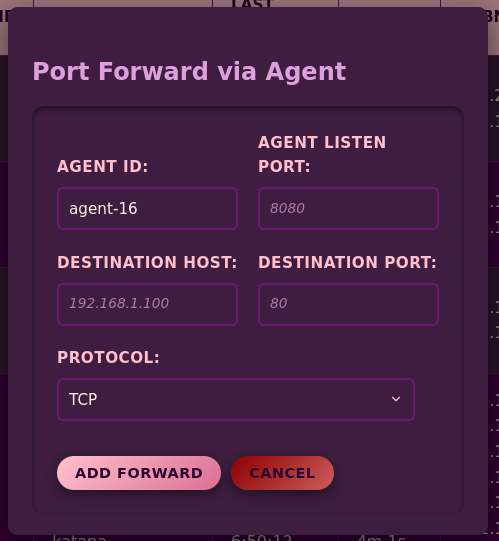
### 端口转发管理
*通过任意代理创建与管理 TCP/UDP 端口转发*
**安装方式:**
1. 打开 Chrome,访问 `chrome://extensions/`
2. 启用 **开发者模式**(右上角开关)
3. 点击 **加载已解压的扩展程序**
4. 选择仓库中的 `extension/` 文件夹
扩展图标将出现在浏览器工具栏。
### 端口转发管理
*通过任意代理创建与管理 TCP/UDP 端口转发*
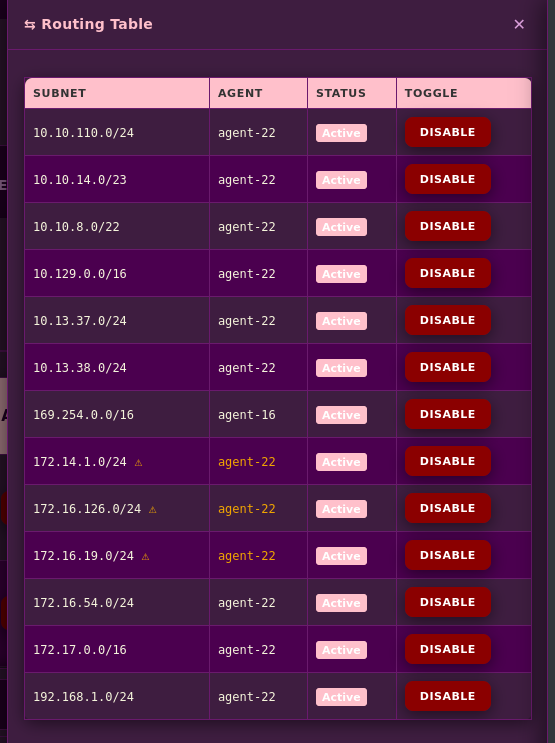
 ### 路由表
*查看并切换子网路由,实时显示状态*
### 路由表
*查看并切换子网路由,实时显示状态*
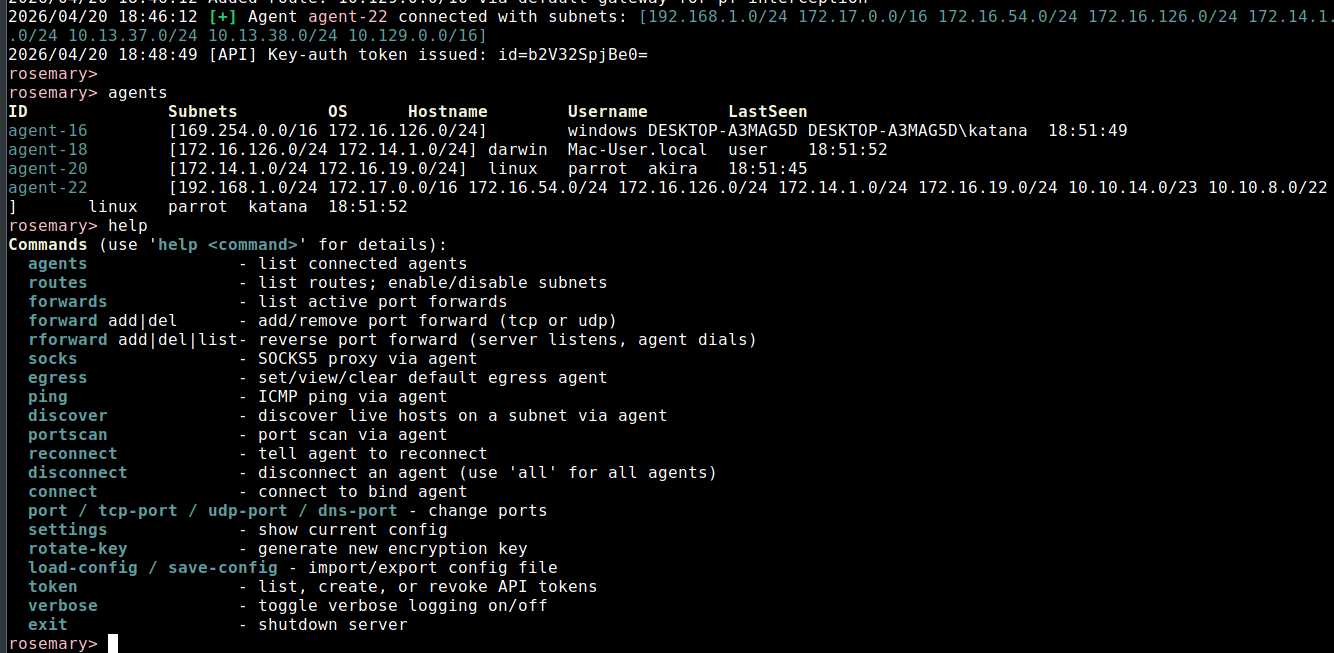
 ### CLI 面板
*内置 REPL,实现完整服务端控制*
### CLI 面板
*内置 REPL,实现完整服务端控制*
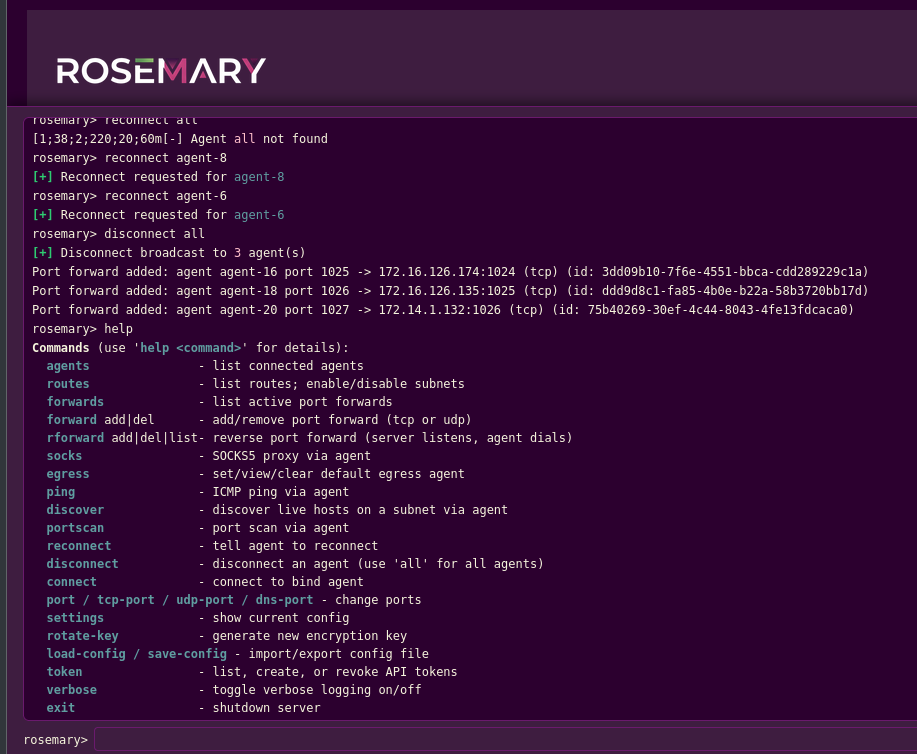
 ### Web CLI 面板
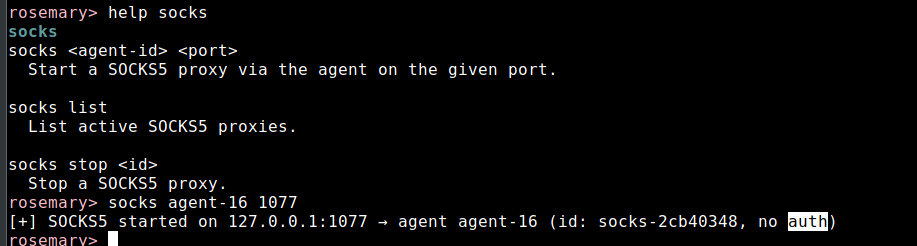
 ### SOCKS5 代理管理
*通过任意代理启动/停止 SOCKS5 代理,可选身份认证*
### SOCKS5 代理管理
*通过任意代理启动/停止 SOCKS5 代理,可选身份认证*
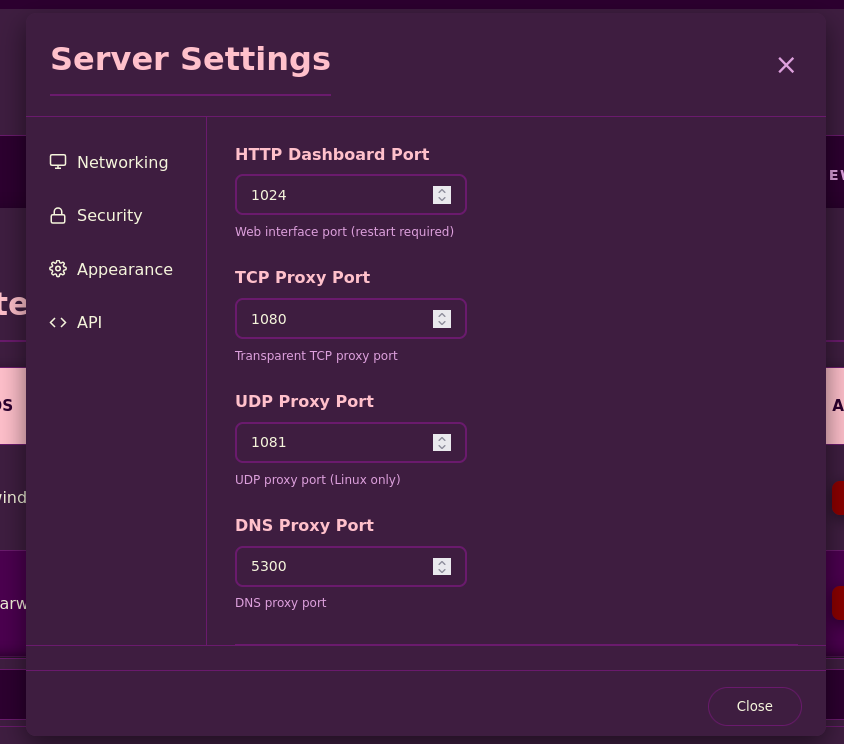
 ### 设置弹窗
*配置服务端端口、加密密钥与 API 令牌*
### 设置弹窗
*配置服务端端口、加密密钥与 API 令牌*
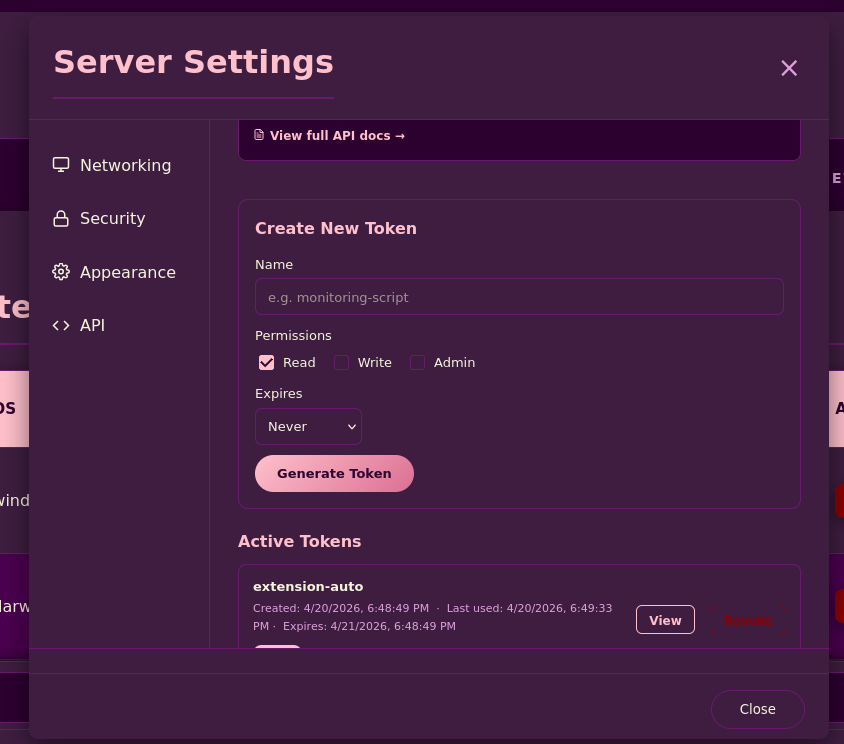
 ### API 令牌
*创建与管理具有细粒度权限的 REST API 令牌*
### API 令牌
*创建与管理具有细粒度权限的 REST API 令牌*
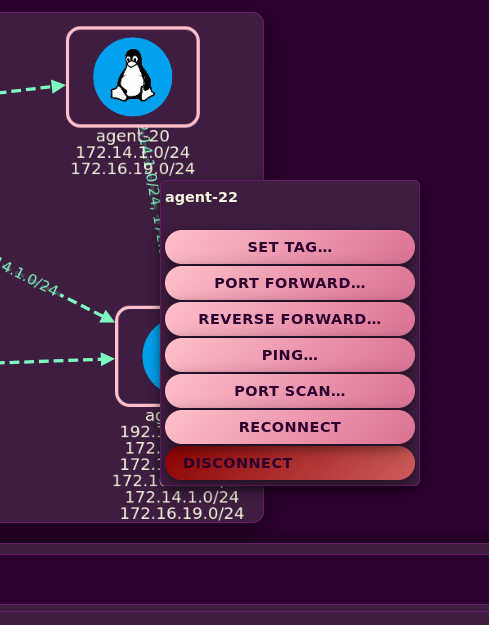
 ### 代理右键菜单
*快捷操作:打标签、转发、Ping、端口扫描、重连、断开*
### 代理右键菜单
*快捷操作:打标签、转发、Ping、端口扫描、重连、断开*
 ## 快速开始
### 安装
```
# Install via go install
go install github.com/blue0x1/rosemary/rosemary@latest
go install github.com/blue0x1/rosemary/agent@latest # For install agent
# Copy to system path for sudo use
sudo cp ~/go/bin/rosemary /usr/local/bin/
```
或从 [发行版](https://github.com/blue0x1/rosemary/releases) 下载预编译二进制文件。
### 1. 启动服务端
```
# Auto-generate a key
sudo rosemary
# Or provide your own
sudo rosemary -k YOUR_BASE64_KEY
```
仪表盘地址为 `http://server-ip:1024`,使用密钥登录。
### 2. 部署代理
```
# Standard (agent connects to server)
./agent-linux-amd64 -s server-ip:1024 -k YOUR_KEY
# Background mode
./agent-linux-amd64 -b -s server-ip:1024 -k YOUR_KEY
# Windows
agent-windows-amd64.exe -s server-ip:1024 -k YOUR_KEY
```
连接成功后,代理的子网会自动路由到服务端。
### 3. 绑定模式(代理位于 NAT 后)
```
# On the agent host: agent listens for the server to connect
./agent-linux-amd64 -m agent-bind -l 0.0.0.0:9001 -k YOUR_KEY
# On the server CLI
rosemary> connect agent-ip:9001
```
### 4. 出站:路由所有互联网流量
```
rosemary> egress agent-1
[+] Default egress set to agent-1
```
所有流向未知代理子网的 IP 流量现在都经过 `agent-1`。DNS 对私有与公共域名均保持可用。
## CLI 参考
在 REPL 中输入 `help` 或 `help <命令>` 可查看完整用法。
### 代理管理
```
agents List all connected agents
disconnect
## 快速开始
### 安装
```
# Install via go install
go install github.com/blue0x1/rosemary/rosemary@latest
go install github.com/blue0x1/rosemary/agent@latest # For install agent
# Copy to system path for sudo use
sudo cp ~/go/bin/rosemary /usr/local/bin/
```
或从 [发行版](https://github.com/blue0x1/rosemary/releases) 下载预编译二进制文件。
### 1. 启动服务端
```
# Auto-generate a key
sudo rosemary
# Or provide your own
sudo rosemary -k YOUR_BASE64_KEY
```
仪表盘地址为 `http://server-ip:1024`,使用密钥登录。
### 2. 部署代理
```
# Standard (agent connects to server)
./agent-linux-amd64 -s server-ip:1024 -k YOUR_KEY
# Background mode
./agent-linux-amd64 -b -s server-ip:1024 -k YOUR_KEY
# Windows
agent-windows-amd64.exe -s server-ip:1024 -k YOUR_KEY
```
连接成功后,代理的子网会自动路由到服务端。
### 3. 绑定模式(代理位于 NAT 后)
```
# On the agent host: agent listens for the server to connect
./agent-linux-amd64 -m agent-bind -l 0.0.0.0:9001 -k YOUR_KEY
# On the server CLI
rosemary> connect agent-ip:9001
```
### 4. 出站:路由所有互联网流量
```
rosemary> egress agent-1
[+] Default egress set to agent-1
```
所有流向未知代理子网的 IP 流量现在都经过 `agent-1`。DNS 对私有与公共域名均保持可用。
## CLI 参考
在 REPL 中输入 `help` 或 `help <命令>` 可查看完整用法。
### 代理管理
```
agents List all connected agents
disconnect Disconnect agent(s)
reconnect Force agent to reconnect
connect Connect to a bind-mode agent
```
### 路由管理
```
routes Show routing table
routes enable Re-enable a disabled route
routes disable Disable a route without disconnecting
routes default Set default egress agent
routes default off Clear default egress
egress Alias: set default egress agent
egress none Alias: clear default egress
```
### 端口转发
```
forward add [tcp|udp]
forward del
forwards List active forwards
```
### 反向转发
```
rforward add
rforward del
rforward list
```
### SOCKS5 代理
```
socks [username] [password]
socks list
socks stop
```
### 主动探测
```
ping [count]
discover [timeout_ms] [workers]
portscan tcp|udp [ports]
```
### 服务端控制
```
settings Show current config
verbose Toggle debug logging
rotate-key Regenerate encryption key
save-config Export config to JSON
load-config Import config from JSON
token list|create|view|revoke Manage API tokens
exit Shutdown
```
## API 接口
首次认证获取 token,后续请求均使用该 token。
```
# Authenticate
curl -X POST http://server:1024/api/v1/auth \
-H "Content-Type: application/json" \
-d '{"key":"YOUR_KEY"}'
# List agents
curl -H "Authorization: Bearer tun_xxx" \
http://server:1024/api/v1/agents
# Port forward
curl -X POST http://server:1024/api/v1/forwards \
-H "Authorization: Bearer tun_xxx" \
-H "Content-Type: application/json" \
-d '{"action":"add","agent_id":"agent-1","local_port":8080,"target_host":"192.168.1.10","target_port":80}'
# SOCKS5 proxy
curl -X POST http://server:1024/api/v1/socks \
-H "Authorization: Bearer tun_xxx" \
-H "Content-Type: application/json" \
-d '{"agent_id":"agent-1","port":1080}'
# Run any CLI command
curl -X POST http://server:1024/api/v1/cli \
-H "Authorization: Bearer tun_xxx" \
-H "Content-Type: application/json" \
-d '{"command":"discover agent-1 10.10.10.0/24"}'
```
**端点地址:** `/api/v1/auth` · `/api/v1/agents` · `/api/v1/routes` · `/api/v1/forwards` · `/api/v1/rforwards` · `/api/v1/socks` · `/api/v1/cli` · `/api/v1/settings` · `/api/v1/tokens` · `/api/v1/shutdown`
令牌权限等级:`read` · `write` · `admin`
## 构建说明
```
git clone https://github.com/blue0x1/rosemary.git
cd rosemary
# Build all platforms and architectures
bash build.sh
# Build specific target
bash build.sh rosemary linux amd64
bash build.sh agent windows arm64
# Output goes to dist/
```
**支持架构:**
- linux, freebsd, openbsd: `amd64` `arm64` `arm` `386`
- windows: `amd64` `arm6` `386`
- darwin: `amd64` `arm64`
### Windows 服务端:WinDivert 依赖
Windows 服务端使用 WinDivert 进行内核级包拦截。构建前需准备:
1. 从 [reqrypt.org/windivert.html](https://reqrypt.org/windivert.html)(v2.x,64 位)下载 **WinDivert.dll** 与 **WinDivert64.sys**
2. 将两个文件放入 `rosemary/` 目录
它们会在构建时被嵌入到二进制文件中。
## 安全说明
- **加密**:所有代理 ↔ 服务端通信使用 AES-256-GCM
- **认证**:WebSocket 连接时采用 challenge-response 机制,需共享密钥
- **仪表盘**:基于会话的登录并启用 CSRF 令牌保护
- **API 令牌**:细粒度权限(read/write/admin)
- **权限分离**:代理无需 root 权限,仅服务端需要提权
## 许可证
GNU General Public License v3.0:参见 [LICENSE](LICENSE)
## 作者
**blue0x1**(Chokri Hammedi)
[GitHub](https://github.com/blue0x1) · [赞助](https://github.com/sponsors/blue0x1)
Rosemary 在远程主机上部署轻量级代理,并在内核层透明拦截流量:无需代理设置、无需 TUN/TAP 设备、无需 proxychains。一旦代理连接,你即可像直接在该主机上一样访问其整个网络。
## 目录
- [工作原理](#how-it-works)
- [功能特性](#features)
- [支持平台](#platforms)
- [截图展示](#screenshots)
- [快速开始](#quick-start)
- [CLI 参考](#cli-reference)
- [API 接口](#api)
- [构建说明](#build)
- [安全说明](#security)
- [许可证](#license)
- [作者信息](#author)
## 工作原理
在你的机器上运行 **服务端**,并在任意远程主机上部署一个 **代理**。代理回连服务端,服务端为代理的子网安装内核级拦截规则,从此所有流向这些子网的流量都会被透明转发,无需代理配置、无需 TUN 设备、也无需修改应用程序。
```
curl http://192.168.1.50 ───► agent dials 192.168.1.50 and bridges it back
ssh user@192.168.1.20
ping 192.168.1.1
```
可同时连接多个代理,流量会根据目标自动路由到对应的代理。
## 功能特性
| 类别 | 能力 |
|----------|------------|
| **拦截** | 透明 TCP · UDP · ICMP · DNS,无需客户端配置 |
| **出站** | 默认出站代理可将所有互联网流量路由至指定代理 |
| **SOCKS5** | 支持用户名/密码认证的每代理 SOCKS5 代理 |
| **端口转发** | TCP/UDP 端口转发 · 反向端口转发(服务端监听,代理主动连接) |
| **发现** | Ping · Ping 扫描 · 通过代理进行 TCP/UDP 端口扫描 |
| **DNS** | 拦截 DNS,通过代理解析,支持私有与公共域名 |
| **跳板** | 多代理多跳(已测试 3+ 跳) |
| **仪表盘** | 实时代理拓扑图与路由表、日志查看器的 Web UI |
| **API** | 带 token 权限(read/write/admin)的完整 REST API |
| **CLI** | 交互式 REPL 与基于 Web 的 CLI 面板 |
| **扩展** | 快速访问的浏览器扩展 |
| **代理** | 后台模式 · 绑定模式 · 自动子网发现 · 联网检测 |
| **配置** | JSON 导入/导出 · 实时密钥轮换 · 逐端口配置 |
## 支持平台
| 平台 | TCP | UDP | DNS | ICMP | SOCKS5 | 出站 |
|----------|:---:|:---:|:---:|:----:|:------:|:------:|
| **Linux** | ✓ | ✓ | ✓ | ✓ | ✓ | ✓ |
| **Windows** | ✓ | ✓ | ✓ | ✓ | ✓ | ✓ |
| **macOS** | ✓ | ✓ | ✓ | ✓ | ✓ | ✓ |
| **FreeBSD** | ✓ | ✓ | ✓ | ✓ | ✓ | ✓ |
| **OpenBSD** | ✓ | ✓ | ✓ | ✓ | ✓ | ✓ |
**代理** 在上述所有平台均可运行。代理端无需 root 权限。
## 截图展示
### 仪表盘 | 代理拓扑图
*交互式网络拓扑图,展示已连接代理及其关系*
### 仪表盘 | 表格视图
*包含操作系统、主机名、子网与连接状态的详细代理信息*
### Chrome 扩展
*浏览器扩展,便于通过隧道轻松访问与路由流量*
**安装方式:**
1. 打开 Chrome,访问 `chrome://extensions/`
2. 启用 **开发者模式**(右上角开关)
3. 点击 **加载已解压的扩展程序**
4. 选择仓库中的 `extension/` 文件夹
扩展图标将出现在浏览器工具栏。
### 端口转发管理
*通过任意代理创建与管理 TCP/UDP 端口转发*
### 路由表
*查看并切换子网路由,实时显示状态*
### CLI 面板
*内置 REPL,实现完整服务端控制*
### Web CLI 面板
### SOCKS5 代理管理
*通过任意代理启动/停止 SOCKS5 代理,可选身份认证*
### 设置弹窗
*配置服务端端口、加密密钥与 API 令牌*
### API 令牌
*创建与管理具有细粒度权限的 REST API 令牌*
### 代理右键菜单
*快捷操作:打标签、转发、Ping、端口扫描、重连、断开*
## 快速开始
### 安装
```
# Install via go install
go install github.com/blue0x1/rosemary/rosemary@latest
go install github.com/blue0x1/rosemary/agent@latest # For install agent
# Copy to system path for sudo use
sudo cp ~/go/bin/rosemary /usr/local/bin/
```
或从 [发行版](https://github.com/blue0x1/rosemary/releases) 下载预编译二进制文件。
### 1. 启动服务端
```
# Auto-generate a key
sudo rosemary
# Or provide your own
sudo rosemary -k YOUR_BASE64_KEY
```
仪表盘地址为 `http://server-ip:1024`,使用密钥登录。
### 2. 部署代理
```
# Standard (agent connects to server)
./agent-linux-amd64 -s server-ip:1024 -k YOUR_KEY
# Background mode
./agent-linux-amd64 -b -s server-ip:1024 -k YOUR_KEY
# Windows
agent-windows-amd64.exe -s server-ip:1024 -k YOUR_KEY
```
连接成功后,代理的子网会自动路由到服务端。
### 3. 绑定模式(代理位于 NAT 后)
```
# On the agent host: agent listens for the server to connect
./agent-linux-amd64 -m agent-bind -l 0.0.0.0:9001 -k YOUR_KEY
# On the server CLI
rosemary> connect agent-ip:9001
```
### 4. 出站:路由所有互联网流量
```
rosemary> egress agent-1
[+] Default egress set to agent-1
```
所有流向未知代理子网的 IP 流量现在都经过 `agent-1`。DNS 对私有与公共域名均保持可用。
## CLI 参考
在 REPL 中输入 `help` 或 `help <命令>` 可查看完整用法。
### 代理管理
```
agents List all connected agents
disconnect 标签:EVTX分析, Go语言, GPLv3, JSON 请求, Python 3.9+, SEO: 内网穿透, SEO: 无TUN隧道, SEO: 跨平台VPN, SEO: 透明隧道, SEO: 零配置代理, 内核级拦截, 内网穿透, 多平台支持, 安全隧道, 开源, 无TUN, 无代理设置, 无代理链, 日志审计, 流量劫持, 程序破解, 端口转发, 网络测绘, 网络穿透, 轻量级代理, 远程访问, 透明转发, 透明隧道, 零配置