0xarchit/Grafyx
GitHub: 0xarchit/Grafyx
Grafyx 是一款基于 Rust + D3.js 的本地代码知识图谱工具,能将代码库解析为交互式力导向关系图,帮助开发者快速理解项目架构与依赖关系。
Stars: 23 | Forks: 1
# `Grafyx` - 代码知识图谱与文档工具
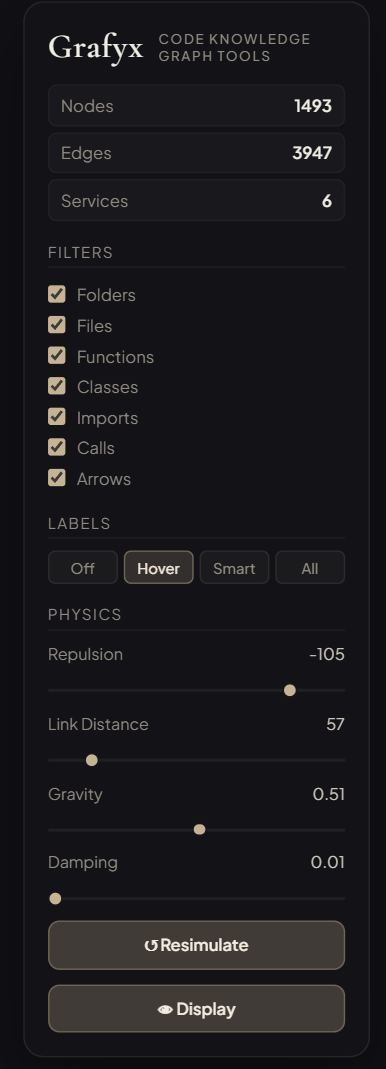 ### 作用力参数
- **排斥力**:决定节点之间相互推开的程度。
- **连线距离**:控制边的目标长度。
- **重力(中心力)**:将所有节点拉向中心点。
- **阻尼**:调整运动的衰减率以保持稳定性。
## ⬢ 安装说明
### ✦ 推荐:二进制安装(快捷)
只需一条命令即可全局安装 Grafyx。安装程序会自动配置你的 `PATH`。
#### **Linux (AMD64)**
```
curl -L https://github.com/0xarchit/grafyx/releases/latest/download/grafyx-linux-amd64-static -o grafyx && chmod +x grafyx && ./grafyx install && rm grafyx
```
#### **macOS (Apple Silicon)**
```
curl -L https://github.com/0xarchit/grafyx/releases/latest/download/grafyx-macos-aarch64 -o grafyx && chmod +x grafyx && ./grafyx install && rm grafyx
```
#### **macOS (Intel)**
```
curl -L https://github.com/0xarchit/grafyx/releases/latest/download/grafyx-macos-x86_64 -o grafyx && chmod +x grafyx && ./grafyx install && rm grafyx
```
#### **Windows (PowerShell)**
```
iwr https://github.com/0xarchit/grafyx/releases/latest/download/grafyx-windows-amd64.exe -OutFile grafyx.exe; .\grafyx install; del grafyx.exe
```
### ✦ 手动:从源码构建
```
git clone https://github.com/0xarchit/grafyx.git
cd grafyx/tool
cargo build --release
```
## ✦ 新用户快速入门
如果你是第一次使用 Grafyx,请在你的项目根目录下运行以下命令。
### 扫描命令
```
grafyx --dirs
### 作用力参数
- **排斥力**:决定节点之间相互推开的程度。
- **连线距离**:控制边的目标长度。
- **重力(中心力)**:将所有节点拉向中心点。
- **阻尼**:调整运动的衰减率以保持稳定性。
## ⬢ 安装说明
### ✦ 推荐:二进制安装(快捷)
只需一条命令即可全局安装 Grafyx。安装程序会自动配置你的 `PATH`。
#### **Linux (AMD64)**
```
curl -L https://github.com/0xarchit/grafyx/releases/latest/download/grafyx-linux-amd64-static -o grafyx && chmod +x grafyx && ./grafyx install && rm grafyx
```
#### **macOS (Apple Silicon)**
```
curl -L https://github.com/0xarchit/grafyx/releases/latest/download/grafyx-macos-aarch64 -o grafyx && chmod +x grafyx && ./grafyx install && rm grafyx
```
#### **macOS (Intel)**
```
curl -L https://github.com/0xarchit/grafyx/releases/latest/download/grafyx-macos-x86_64 -o grafyx && chmod +x grafyx && ./grafyx install && rm grafyx
```
#### **Windows (PowerShell)**
```
iwr https://github.com/0xarchit/grafyx/releases/latest/download/grafyx-windows-amd64.exe -OutFile grafyx.exe; .\grafyx install; del grafyx.exe
```
### ✦ 手动:从源码构建
```
git clone https://github.com/0xarchit/grafyx.git
cd grafyx/tool
cargo build --release
```
## ✦ 新用户快速入门
如果你是第一次使用 Grafyx,请在你的项目根目录下运行以下命令。
### 扫描命令
```
grafyx --dirs --output ./
```
=============================================================
██████╗ ██████╗ █████╗ ███████╗██╗ ██╗██╗ ██╗
██╔════╝ ██╔══██╗██╔══██╗██╔════╝╚██╗ ██╔╝╚██╗██╔╝
██║ ███╗██████╔╝███████║█████╗ ╚████╔╝ ╚███╔╝
██║ ██║██╔══██╗██╔══██║██╔══╝ ╚██╔╝ ██╔██╗
╚██████╔╝██║ ██║██║ ██║██║ ██║ ██╔╝ ██╗
╚═════╝ ╚═╝ ╚═╝╚═╝ ╚═╝╚═╝ ╚═╝ ╚═╝ ╚═╝
=============================================================
Visualize Your Codebase Like Never Before
```
_*本项目处于 Beta 阶段,可能包含 bug*_
[](https://github.com/0xarchit/grafyx)
[](https://github.com/0xarchit/grafyx/actions/workflows/release.yml)
[](LICENSE)
[](https://rust-lang.org)
[](https://d3js.org)
[](https://github.com/0xarchit/grafyx/stargazers)
[](https://github.com/0xarchit/grafyx/releases)
[](https://github.com/0xarchit/grafyx)
[](https://github.com/0xarchit/grafyx/issues)
[](https://github.com/0xarchit/grafyx)
[](https://grafyx.0xarchit.is-a.dev)
## ✦ 目录
1. [概述](#-overview)
2. [视觉演示](#-visual-demo)
3. [架构](#-architecture)
4. [功能](#-features)
5. [实时物理引擎](#-live-physics-engine)
6. [安装说明](#-installation)
7. [新用户快速入门](#-quick-start-for-new-users)
8. [用法](#-usage)
9. [配置](#-configuration)
10. [致谢](#-attribution)
## ✦ 概述
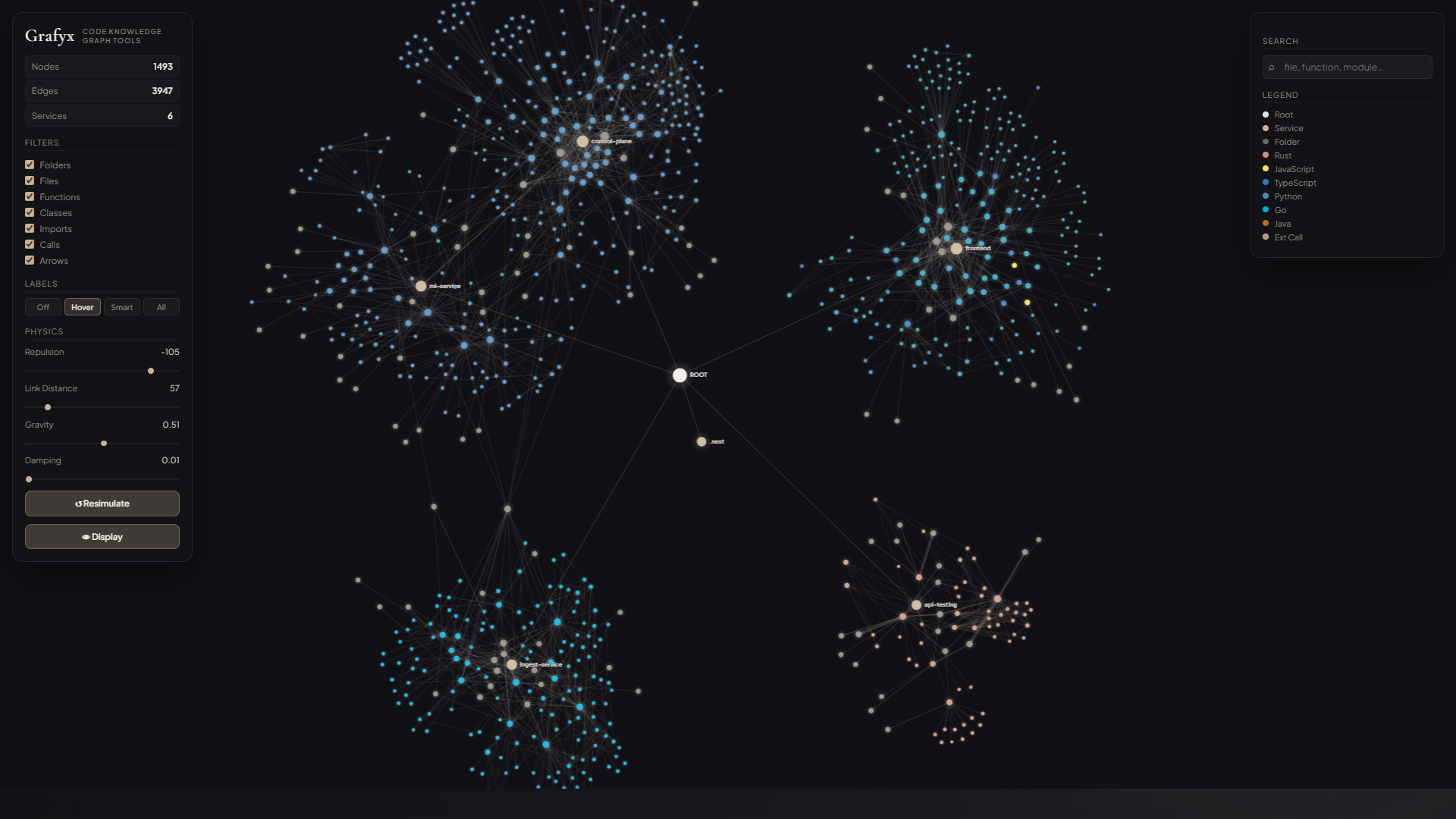
**Grafyx** 是一款高性能、由 CLI 驱动的代码知识图谱工具,旨在映射和可视化现代代码库中的复杂关系。通过解析目录结构和服务交互,Grafyx 会生成一个交互式的 2D/3D 力导向图,帮助开发者一目了然地理解依赖链、结构性瓶颈以及项目架构。
Grafyx 使用 **Rust** 开发以保证安全性和速度,并利用 **D3.js** 实现流畅的前端交互,成功在静态分析与直观的可视化探索之间架起了桥梁。
## ⬢ 视觉演示
## ❖ 架构
Grafyx 遵循解耦的架构,确保了高速的处理能力和响应迅速的用户体验。
```
┌─────────────────────────────────────────────────────────────────────────┐
│ GRAFYX PLATFORM │
├─────────────────────────────────────────────────────────────────────────┤
│ │
│ ┌──────────────┐ ┌─────────────────┐ ┌──────────────┐ │
│ │ Rust CLI │ │ Graph Engine │ │ Storage │ │
│ │ (Parser) │◄──►│ (Node/Edge IR) │◄──►│ (SQLite/JSON)│ │
│ └──────────────┘ └────────┬────────┘ └──────────────┘ │
│ │ │
│ ▼ │
│ ┌─────────────────┐ │
│ │ D3.js Frontend │ │
│ │ (Interactive) │ │
│ └─────────────────┘ │
│ │
└─────────────────────────────────────────────────────────────────────────┘
```
## ✥ 功能
| 功能 | 描述 | 状态 |
|---------|-------------|--------|
| **递归扫描** | 扫描整个项目以映射文件/目录层次结构。 | ✔ 启用 |
| **实时物理** | 实时可调的模拟作用力,响应时间达到亚毫秒级。 | ✔ 启用 |
| **静态二进制文件** | 针对 Arch 和 Ubuntu 优化的通用 Linux (MUSL) 二进制文件。 | ✔ 启用 |
| **自我管理** | 内置 `install` 和 `upgrade` 命令,实现零摩擦安装。 | ✔ 启用 |
| **Apple Silicon 原生支持** | 通过 ARM64 目标为 M1/M2/M3 架构提供原生性能。 | ✔ 启用 |
| **双重存储** | 同时输出人类可读的 JSON 和性能优化的 SQLite。 | ✔ 启用 |
## ◈ 实时物理引擎
Grafyx 配备了受 Obsidian 等工具启发的“热更新”物理引擎。调整滑块的效果会立即在图谱中产生连锁反应,无需进行完整的重新渲染,从而保持模拟的流畅性和“液态”感。
_*本项目处于 Beta 阶段,可能包含 bug*_
标签:D3.js, Homebrew安装, Rust, SOC Prime, 代码分析, 代码可视化, 代码理解, 凭证管理, 可视化界面, 开发工具, 文档结构分析, 网络流量审计, 通知系统