AxthonyV/WhoKnocks
GitHub: AxthonyV/WhoKnocks
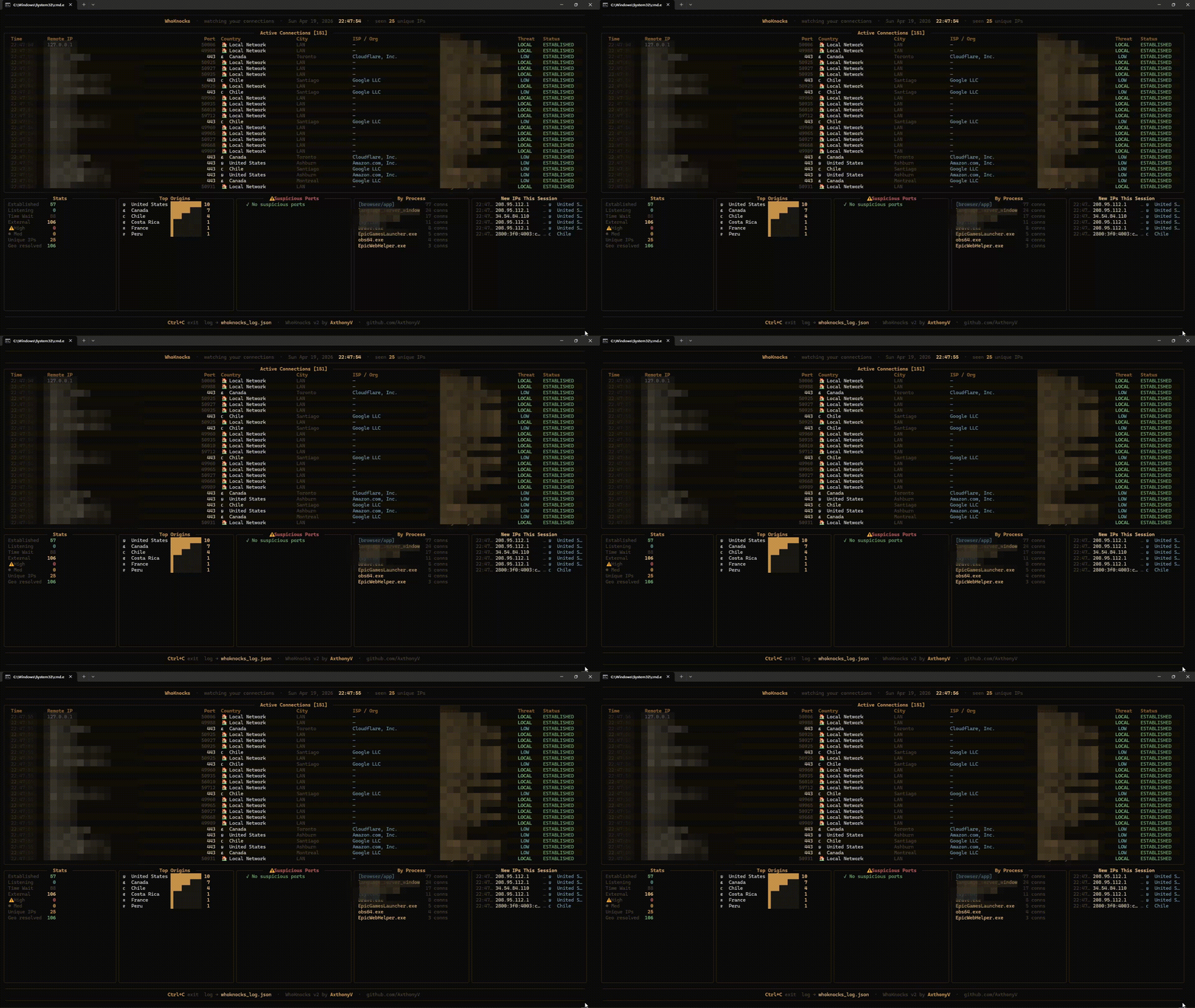
实时监控终端入站连接,识别来源 IP、威胁等级并记录日志的零配置仪表盘。
Stars: 0 | Forks: 0
``` ██╗ ██╗██╗ ██╗ ██████╗ ██╗ ██╗███╗ ██╗ ██████╗ ██████╗██╗ ██╗███████╗ ██║ ██║██║ ██║██╔═══██╗██║ ██╔╝████╗ ██║██╔═══██╗██╔════╝██║ ██╔╝██╔════╝ ██║ █╗ ██║███████║██║ ██║█████╔╝ ██╔██╗ ██║██║ ██║██║ █████╔╝ ███████╗ ██║███╗██║██╔══██║██║ ██║██╔═██╗ ██║╚██╗██║██║ ██║██║ ██╔═██╗ ╚════██║ ╚███╔███╔╝██║ ██║╚██████╔╝██║ ██╗██║ ╚████║╚██████╔╝╚██████╗██║ ██╗███████║ ╚══╝╚══╝ ╚═╝ ╚═╝ ╚═════╝ ╚═╝ ╚═╝╚═╝ ╚═══╝ ╚═════╝ ╚═════╝╚═╝ ╚═╝╚══════╝ ``` **实时监控终端入站连接。** *精准识别访问你机器的每个“敲门者”及其目的。*
[](https://python.org) [](https://github.com/AxthonyV/WhoKnocks) [](LICENSE)
 ## Getting Started
### Requirements
- Python 3.8+
- pip
### Installation
```
# Clone the repository
git clone https://github.com/AxthonyV/WhoKnocks.git
cd WhoKnocks
```
**Linux / macOS**
```
bash install.sh
```
**Windows**
```
install.bat
```
**手动安装**
```
pip install -r requirements.txt
```
### Run
```
# Linux / macOS (recommended: sudo for full process visibility)
sudo python3 whoknocks.py
# Without sudo (works, some process names may show as "?")
python3 whoknocks.py
# Windows (run as Administrator for best results)
python whoknocks.py
```
## Understanding Threat Levels
| Level | Color | Meaning |
|-------|-------|---------|
| `HIGH` | 🔴 Red | 连接位于已知高危端口(RDP、SMB、VNC 等) |
| `MED` | 🟡 Amber | 来自外部的连接,目标为特权端口(<1024) |
| `LOW` | 🔵 Teal | 来自外部的连接,目标为标准端口 |
| `LOCAL` | 🟢 Green | 同一局域网内的连接 |
## Monitored Suspicious Ports
| Port | Service | Port | Service |
|------|---------|------|---------|
| 22 | SSH | 3389 | RDP |
| 23 | Telnet | 5900 | VNC |
| 445 | SMB | 1433 | MSSQL |
| 3306 | MySQL | 6379 | Redis |
| 27017 | MongoDB | 9200 | Elasticsearch |
| 4444 | Metasploit | 1337 | Backdoor/Leet |
## Log Output
WhoKnocks 会自动每隔几秒保存一次 JSON 快照:
```
[
{
"time": "14:55:03",
"remote_ip": "142.250.80.46",
"remote_port": 443,
"country": "United States",
"city": "Mountain View",
"process": "chrome",
"threat": "LOW",
"status": "ESTABLISHED"
}
]
```
## Dependencies
| Package | Version | Purpose |
|---------|---------|---------|
| `psutil` | ≥ 6.1.0 | 网络连接与进程信息 |
| `rich` | ≥ 13.9.4 | 终端 UI 渲染 |
| `requests` | ≥ 2.32.3 | IP 地理位置查询 |
## Compatibility
| OS | Status |
|----|--------|
| Windows 10 / 11 | ✅ 完全支持 |
| Ubuntu / Debian | ✅ 完全支持 |
| Arch Linux | ✅ 完全支持 |
| macOS 12+ | ✅ 完全支持 |
| Raspberry Pi OS | ✅ 完全支持 |
## Project Structure
```
WhoKnocks/
├── whoknocks.py # Main application
├── requirements.txt # Dependencies
├── install.sh # Linux/macOS installer
├── install.bat # Windows installer
├── whoknocks_log.json # Auto-generated connection log
├── LICENSE
└── README.md
```
## Educational Use
WhoKnocks 旨在作为网络工程与计算机科学学生的学习工具,演示:
- 使用 `psutil` 实时监控套接字
- 通过公共 API 进行 IP 地理位置查询
- 基于知名端口注册表的威胁启发式规则
- 使用 Python 线程进行异步后台数据获取
- Rich 终端 UI 设计
## License
MIT License — see [LICENSE](LICENSE) for details.
## Getting Started
### Requirements
- Python 3.8+
- pip
### Installation
```
# Clone the repository
git clone https://github.com/AxthonyV/WhoKnocks.git
cd WhoKnocks
```
**Linux / macOS**
```
bash install.sh
```
**Windows**
```
install.bat
```
**手动安装**
```
pip install -r requirements.txt
```
### Run
```
# Linux / macOS (recommended: sudo for full process visibility)
sudo python3 whoknocks.py
# Without sudo (works, some process names may show as "?")
python3 whoknocks.py
# Windows (run as Administrator for best results)
python whoknocks.py
```
## Understanding Threat Levels
| Level | Color | Meaning |
|-------|-------|---------|
| `HIGH` | 🔴 Red | 连接位于已知高危端口(RDP、SMB、VNC 等) |
| `MED` | 🟡 Amber | 来自外部的连接,目标为特权端口(<1024) |
| `LOW` | 🔵 Teal | 来自外部的连接,目标为标准端口 |
| `LOCAL` | 🟢 Green | 同一局域网内的连接 |
## Monitored Suspicious Ports
| Port | Service | Port | Service |
|------|---------|------|---------|
| 22 | SSH | 3389 | RDP |
| 23 | Telnet | 5900 | VNC |
| 445 | SMB | 1433 | MSSQL |
| 3306 | MySQL | 6379 | Redis |
| 27017 | MongoDB | 9200 | Elasticsearch |
| 4444 | Metasploit | 1337 | Backdoor/Leet |
## Log Output
WhoKnocks 会自动每隔几秒保存一次 JSON 快照:
```
[
{
"time": "14:55:03",
"remote_ip": "142.250.80.46",
"remote_port": 443,
"country": "United States",
"city": "Mountain View",
"process": "chrome",
"threat": "LOW",
"status": "ESTABLISHED"
}
]
```
## Dependencies
| Package | Version | Purpose |
|---------|---------|---------|
| `psutil` | ≥ 6.1.0 | 网络连接与进程信息 |
| `rich` | ≥ 13.9.4 | 终端 UI 渲染 |
| `requests` | ≥ 2.32.3 | IP 地理位置查询 |
## Compatibility
| OS | Status |
|----|--------|
| Windows 10 / 11 | ✅ 完全支持 |
| Ubuntu / Debian | ✅ 完全支持 |
| Arch Linux | ✅ 完全支持 |
| macOS 12+ | ✅ 完全支持 |
| Raspberry Pi OS | ✅ 完全支持 |
## Project Structure
```
WhoKnocks/
├── whoknocks.py # Main application
├── requirements.txt # Dependencies
├── install.sh # Linux/macOS installer
├── install.bat # Windows installer
├── whoknocks_log.json # Auto-generated connection log
├── LICENSE
└── README.md
```
## Educational Use
WhoKnocks 旨在作为网络工程与计算机科学学生的学习工具,演示:
- 使用 `psutil` 实时监控套接字
- 通过公共 API 进行 IP 地理位置查询
- 基于知名端口注册表的威胁启发式规则
- 使用 Python 线程进行异步后台数据获取
- Rich 终端 UI 设计
## License
MIT License — see [LICENSE](LICENSE) for details.标签:Cloudflare, IP定位, MITRE ATT&CK, Python, WhoKnocks, 地理定位, 威胁情报, 威胁评估, 安全可视化, 工具集, 开发者工具, 开源安全工具, 无后门, 监控仪表盘, 终端仪表盘, 网络连接监控, 进程识别, 连接追踪, 逆向工具, 逆向工程平台, 零配置