FredySandoval/showsignature
GitHub: FredySandoval/showsignature
一个CLI工具,用于提取源代码文件的结构化信息,帮助开发者快速理解代码库并准备上下文。
Stars: 41 | Forks: 0
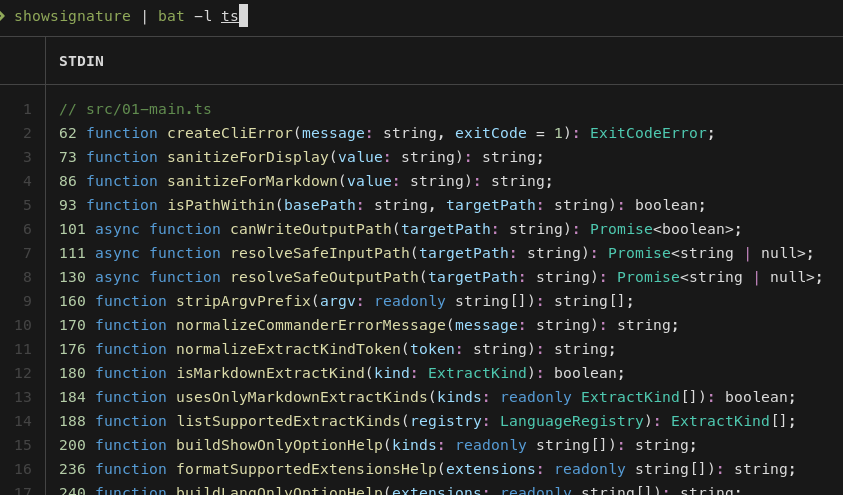
# 显示签名
一个从源代码文件中提取有用结构的命令行工具:包括签名、导入、类型、变量、注释以及 Markdown 部分。
用它来快速理解代码库、审查文件,或为 AI 助手创建简洁的上下文。
## 安装
### 步骤 1. 添加技能
```
# 在 pi 上安装
pi install npm:showsignature
pi install git:github.com/FredySandoval/showsignature
pi install https://github.com/FredySandoval/showsignature
# 所有代理
npx skills add https://github.com/FredySandoval/showsignature --skill showsignature
```
### 步骤 2. 本地或全局安装
```
# 全局安装
npm install -g showsignature
# 本地安装
npm install showsignature
```
用于开发的源码安装:
```
git clone https://github.com/FredySandoval/showsignature.git
cd showsignature
pnpm install
pnpm build
pnpm link --global
```
```
# 无需安装即可使用
npx showsignature --help
```
需要 Node.js 18+。
## 为什么?
大文件信息量庞大且杂乱。`showsignature` 让你在阅读具体实现之前就能把握项目的结构:
- 存在哪些函数/类?
- 每个文件导入/导出了什么?
- 数据的类型和接口是如何定义的?
- Markdown 文件中有哪些标题/表格/代码块?
## 用法
| 选项 | 描述 |
| ------------------------ | ------------------------------------- |
| `--file
` | 检查单个文件。 |
| `--folder ` | 检查一个文件夹。 |
| `--stdin` | 从标准输入读取源代码。 |
| `--lang-only ` | 强制指定语言,与 stdin 配合使用时有用。 |
| `--show-only ` | 选择提取器。 |
| `--output ` | 保存输出。 |
| `--include-tests` | 在文件夹扫描中包含测试文件。 |
| `--max-depth ` | 限制文件夹扫描深度。 |
| `--ignore-folder ` | 跳过指定文件夹。 |
## 提取器
代码文件:
| 模式 | 显示内容 |
| ------------ | ---------------------------------------- |
| `signatures` | 函数、类、方法、构造函数。 |
| `imports` | 导入语句。 |
| `interfaces` | TypeScript/Go 接口。 |
| `types` | 类型别名/声明。 |
| `variables` | 变量/常量。 |
| `comments` | 代码注释。 |
Markdown 文件:
| 模式 | 显示内容 |
| --------------- | -------------- |
| `md:headings` | 标题。 |
| `md:tables` | 表格。 |
| `md:codeblocks` | 围栏代码块。 |
| `md:all` | 完整文档。 |
## 支持的文件
| 语言 | 扩展名 |
| ---------- | --------------------- |
| TypeScript | `.ts`, `.mts`, `.cts` |
| JavaScript | `.js`, `.mjs`, `.cjs` |
| Go | `.go` |
| Python | `.py` |
| Markdown | `.md` |
## 基本用法示例
```
showsignature [--file | --folder | --stdin] [options]
```
```
showsignature --help # Show available options
showsignature --file src/01-main.ts # Inspect one file
showsignature --folder ./src # Inspect a folder
showsignature --folder . # Inspect the current directory
cat src/01-main.ts | showsignature --stdin --lang-only ts # Read TypeScript from stdin
showsignature --folder . --show-only imports # Show imports only
showsignature --folder ./src --show-only signatures,imports # Show code structure and imports
showsignature --folder ./src --show-only interfaces,types # Show data shapes
showsignature --file src/01-main.ts --show-only variables # Show variables
showsignature --file README.md --show-only md:headings # Extract Markdown headings
showsignature --file README.md --show-only md:codeblocks # Extract Markdown code blocks
showsignature --folder . --show-only md:tables # Extract Markdown tables
showsignature --folder . --lang-only py # Process Python files only
showsignature --folder . --max-depth 2 # Limit recursive scan depth
showsignature --folder . --ignore-folder dist # Skip a noisy folder
showsignature --folder src --show-only signatures,imports --output structure.md # Save compact context
```
用逗号组合多种模式:
```
showsignature --folder src --show-only signatures,imports,comments
```
## 管道用法
`showsignature` 默认输出到标准输出,因此可以很好地与 `rg`、`grep`、`fzf`、`less`、`head`、`tee` 等工具以及 shell 重定向配合使用。
```
showsignature --folder src | rg "function|class" # Search extracted structure with ripgrep
showsignature --folder src --show-only imports | rg "node:" # Find matching imports
showsignature --folder src --show-only signatures | rg "async" # Find async functions or methods
showsignature --folder src --show-only comments,signatures | rg -C 2 "ExtractKind" # Search comments/signatures with nearby context
showsignature --folder src --show-only signatures,imports | less # Page through large output
showsignature --folder src --show-only signatures | head -50 # Preview the first 50 lines
showsignature --folder src --show-only signatures,imports | tee structure.md # View and save output
```
## 开发
```
pnpm install
pnpm build
pnpm test
pnpm typecheck
pnpm format
```
## 故障排除
- 命令未找到?对于本地构建,请使用 `node dist/02-cli.js --help`,或检查你的全局 npm bin 路径。
- 文件夹扫描为空?仅扫描支持的文件类型;遵守 `.gitignore` 规则;除非设置了 `--include-tests`,否则跳过测试文件。
- 标准输入的语言未知?请添加 `--lang-only ts`、`--lang-only py`、`--lang-only go` 等选项。
## 许可证
ISC。参见 [LICENSE](LICENSE)。标签:AI助手, GNU通用公共许可证, Markdown解析, MITM代理, Node.js, npm, SOC Prime, 云安全监控, 代码分析, 代码审查, 代码理解, 代码阅读工具, 凭证管理, 变量提取, 导入分析, 开发工具, 数据可视化, 数据管道, 文档结构分析, 暗色界面, 注释提取, 源代码提取, 签名提取, 类型提取, 结构提取, 自动化攻击, 软件工程, 静态分析