danishtechie/brute_force_detection
GitHub: danishtechie/brute_force_detection
基于 Python 与机器学习的实时暴力破解检测与 SOC 仪表板。
Stars: 0 | Forks: 0
# 🛡️ BruteGuard SOC 平台
## **企业级暴力破解检测系统**,适用于 Windows 安全事件日志,具备实时监控、机器学习异常检测、威胁情报增强以及专业的 SOC 仪表板。
 ## 📐 架构
这是该项目的架构
```
brute_force_detection/
├── config/
│ └── config.yaml # Master configuration (all tunables)
├── src/
│ ├── collectors/
│ │ ├── windows_log_collector.py # Live/EVTX/Simulation collector
│ │ └── simulation.py # Realistic attack event generator
│ ├── detectors/
│ │ ├── threshold_detector.py # Rule-based detection engine
│ │ ├── ml_detector.py # Isolation Forest anomaly detector
│ │ └── pipeline.py # Multi-threaded orchestrator
│ ├── enrichment/
│ │ └── ip_reputation.py # AbuseIPDB + GeoIP enrichment
│ ├── response/
│ │ └── alert_manager.py # Alert lifecycle + notifications
│ ├── database/
│ │ ├── models.py # SQLAlchemy ORM models
│ │ └── db_manager.py # Session management + queries
│ ├── api/
│ │ ├── app.py # Flask + SocketIO factory
│ │ └── routes/
│ │ ├── auth.py # Login/logout endpoints
│ │ ├── dashboard.py # HTML page routes
│ │ └── api.py # REST API endpoints
│ ├── reporting/
│ │ └── report_generator.py # PDF/CSV/JSON report generation
│ └── utils/
│ ├── config_loader.py # YAML + env var config
│ └── logger.py # Structured logging (loguru)
├── dashboard/
│ └── templates/
│ ├── dashboard.html # SOC dashboard (Chart.js + SocketIO)
│ └── login.html # Authentication page
├── scripts/
│ └── simulate_attacks.py # Standalone data generator
├── tests/
│ └── test_detection.py # 25+ unit & integration tests
├── docker/
│ └── nginx.conf # Nginx reverse proxy config
├── main.py # Application entry point
├── Dockerfile
├── docker-compose.yml
└── requirements.txt
```
## ⚡ 快速开始
### 选项 1:本地 Python
```
# 克隆/解压项目
cd brute_force_detection
# 创建虚拟环境
python -m venv venv
source venv/bin/activate # Linux/macOS
venv\Scripts\activate # Windows
# 安装依赖
pip install -r requirements.txt
# 使用7天模拟数据初始化并启动
python main.py --seed
# Dashboard → http://localhost:8000
# 登录: admin / admin_changeme_2024!
```
### 选项 2:Docker(推荐用于演示)
```
# 构建并启动所有服务
docker compose up --build
# Dashboard → http://localhost:8000
```
### 选项 3:仅种子(无 Web 服务器)
```
# 仅生成7天历史数据
python scripts/simulate_attacks.py --days 7 --intensity high
# 然后启动服务器
python main.py --no-pipeline # Web server only, no live detection
```
## 🔑 默认凭据
| 用户名 | 密码 | 角色 |
|--------|------|------|
| admin | `admin_changeme_2024!` | admin |
| analyst | `analyst_changeme_2024!` | analyst |
## 🔧 配置
所有可调参数位于 `config/config.yaml`。关键部分:
```
collection:
mode: simulation
poll_interval_seconds: 5
detection:
threshold:
failed_attempts_per_ip: 5 # Brute force trigger
time_window_seconds: 300 # Detection window
threat_intelligence:
abuseipdb:
api_key: "YOUR_KEY_HERE" # Get free key at abuseipdb.com
alerting:
slack:
enabled: true
webhook_url: "https://hooks.slack.com/..."
email:
enabled: true
smtp_host: "smtp.gmail.com"
```
### 环境变量覆盖
任何配置值均可通过 `BG__` 前缀的环境变量覆盖:
```
export BG_COLLECTION__MODE=live
export BG_DETECTION__THRESHOLD__FAILED_ATTEMPTS_PER_IP=10
export BG_THREAT_INTELLIGENCE__ABUSEIPDB__API_KEY=your_key
```
## 🎯 检测逻辑
### 1. 阈值检测器(`threshold_detector.py`)
| 模式 | 触发条件 | 默认严重性 |
|------|----------|-----------|
| **暴力破解** | 5 次失败来自同一 IP,5 分钟内 | HIGH |
| **用户暴力破解** | 同一账户在 5 分钟内失败 ≥10 次 | MEDIUM |
| **密码喷洒** | 1 个 IP 针对 ≥5 个不同用户名在 5 分钟内 | HIGH |
| **凭证填充** | 所有 IP 在 60 秒内失败 ≥20 次 | CRITICAL |
| **账户锁定** | 任意事件 ID 4740 | HIGH |
所有窗口使用 **内存中的滑动窗口**(无数据库往返),实现微秒级延迟检测。告警 **冷却机制** 会在相同(模式,IP)对在 2 分钟内重复触发时抑制重复告警。
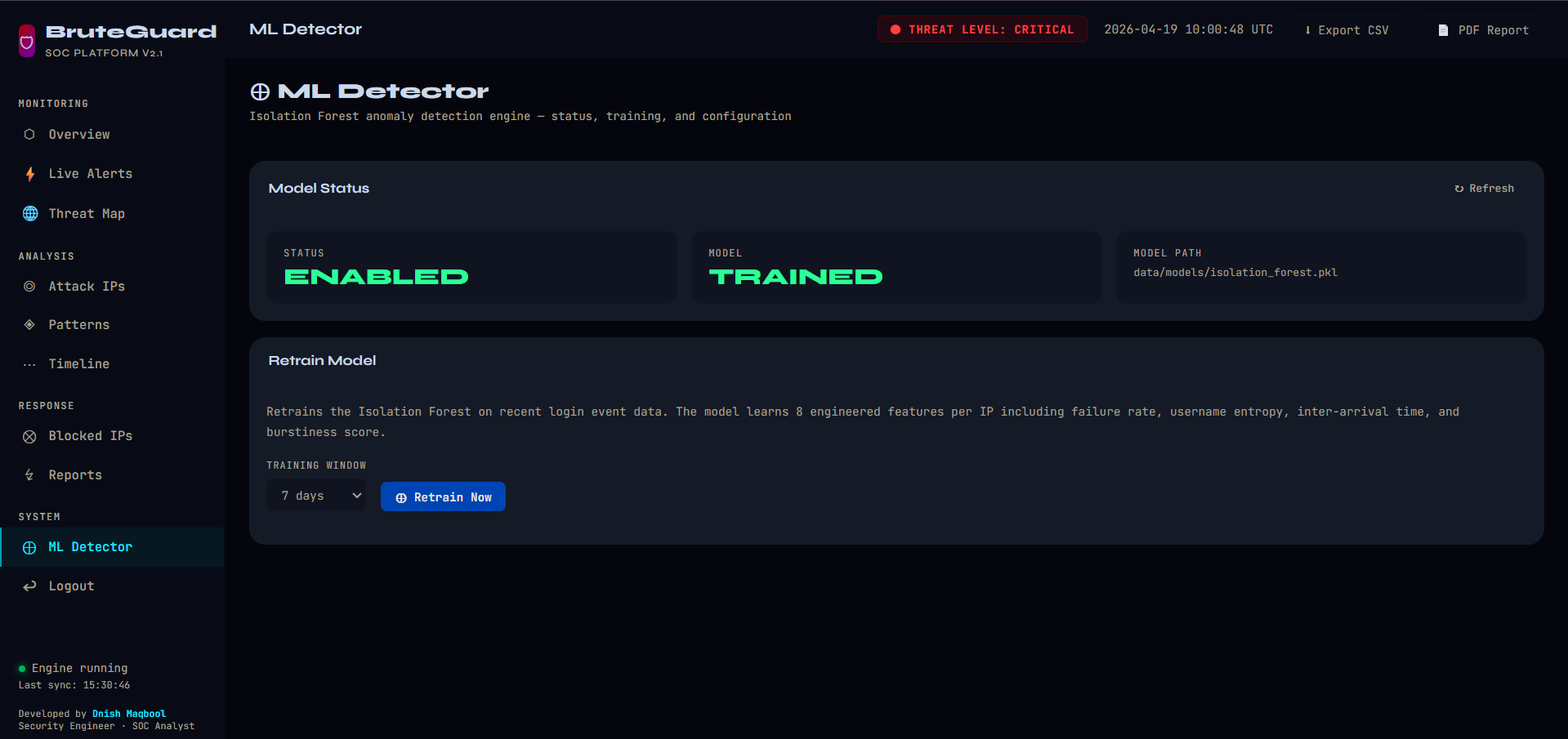
### 2. 机器学习异常检测(`ml_detector.py`)
使用 **孤立森林** 模型,基于每个 IP 的滚动 5 分钟窗口提取的 8 个工程化特征进行训练:
| 特征 | 描述 |
|------|------|
| `fail_count` | 窗口内总失败次数 |
| `fail_rate_per_min` | 每分钟失败次数(速度) |
| `username_entropy` | 目标用户名的香农熵(喷洒) |
| `mean_iat_sec` | 平均到达间隔(低值表示快速攻击) |
| `std_iat_sec` | IAT 标准差(爆发性) |
| `unique_users` | 不同目标账户数量 |
| `hour_deviation` | 偏离小时基线 |
| `burstiness` | IAT 变化的系数 |
模型在启动时若无保存模型,则自动使用 7 天历史数据进行训练,并保存至 `data/models/isolation_forest.pkl` 以供后续使用。
### 3. 威胁情报(`ip_reputation.py`)
- **AbuseIPDB**:滥用置信度评分(0–100)、类别标签、TOR 检测
- **ip-api.com**:国家、城市、ISP、ASN、纬度/经度(免费,45 请求/分钟)
- **SQLite 缓存**:24 小时 TTL 防止重复 API 调用
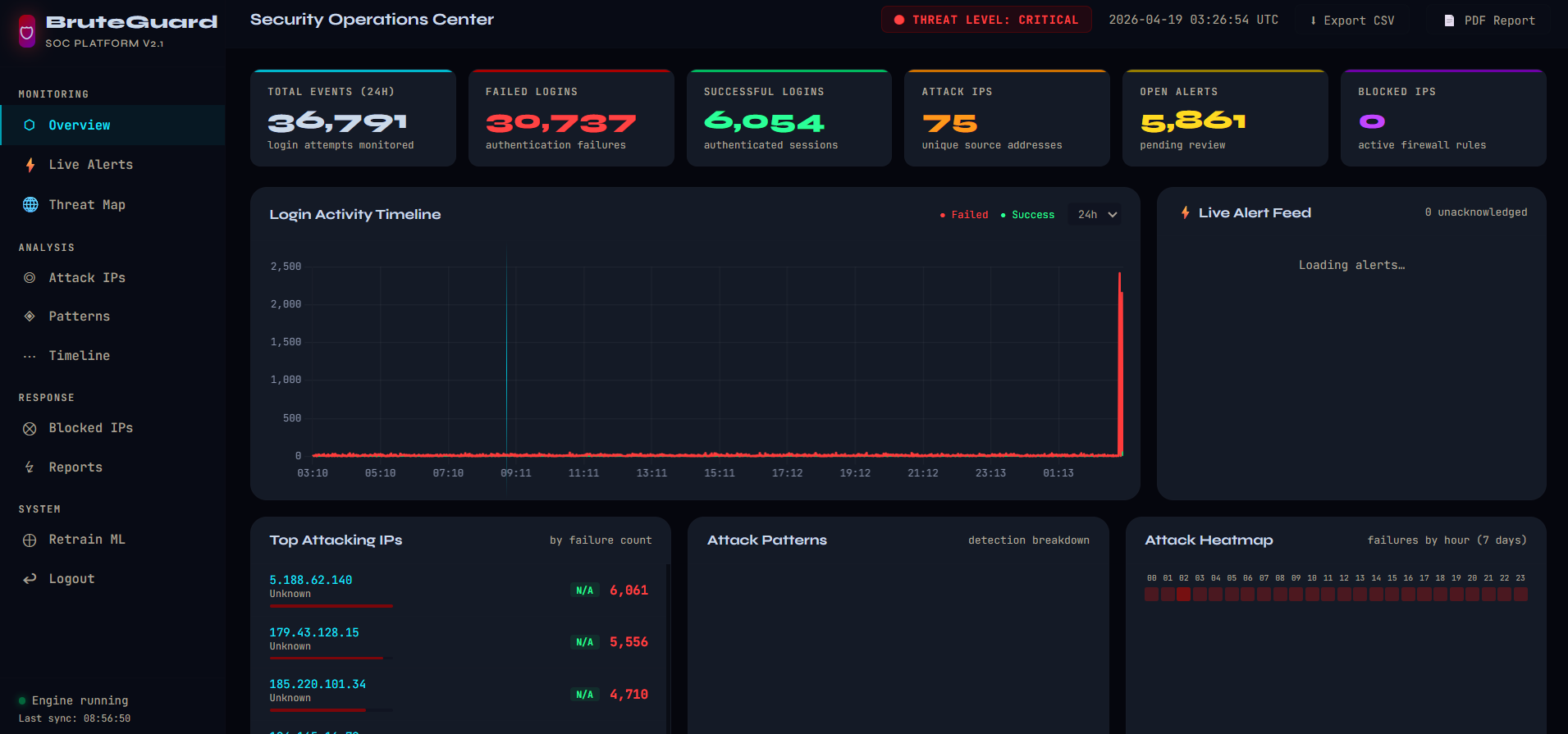
## 📊 仪表板功能
| 面板 | 描述 |
|------|------|
| **KPI 行** | 实时事件计数、攻击 IP、打开的告警 |
| **登录时间线** | 6 小时 / 24 小时 / 72 小时失败与成功的时间序列 |
| **实时告警流** | WebSocket 推送告警,支持一键确认 |
| **Top 攻击 IP** | 按失败次数排名,并附带 AbuseIPDB 评分 |
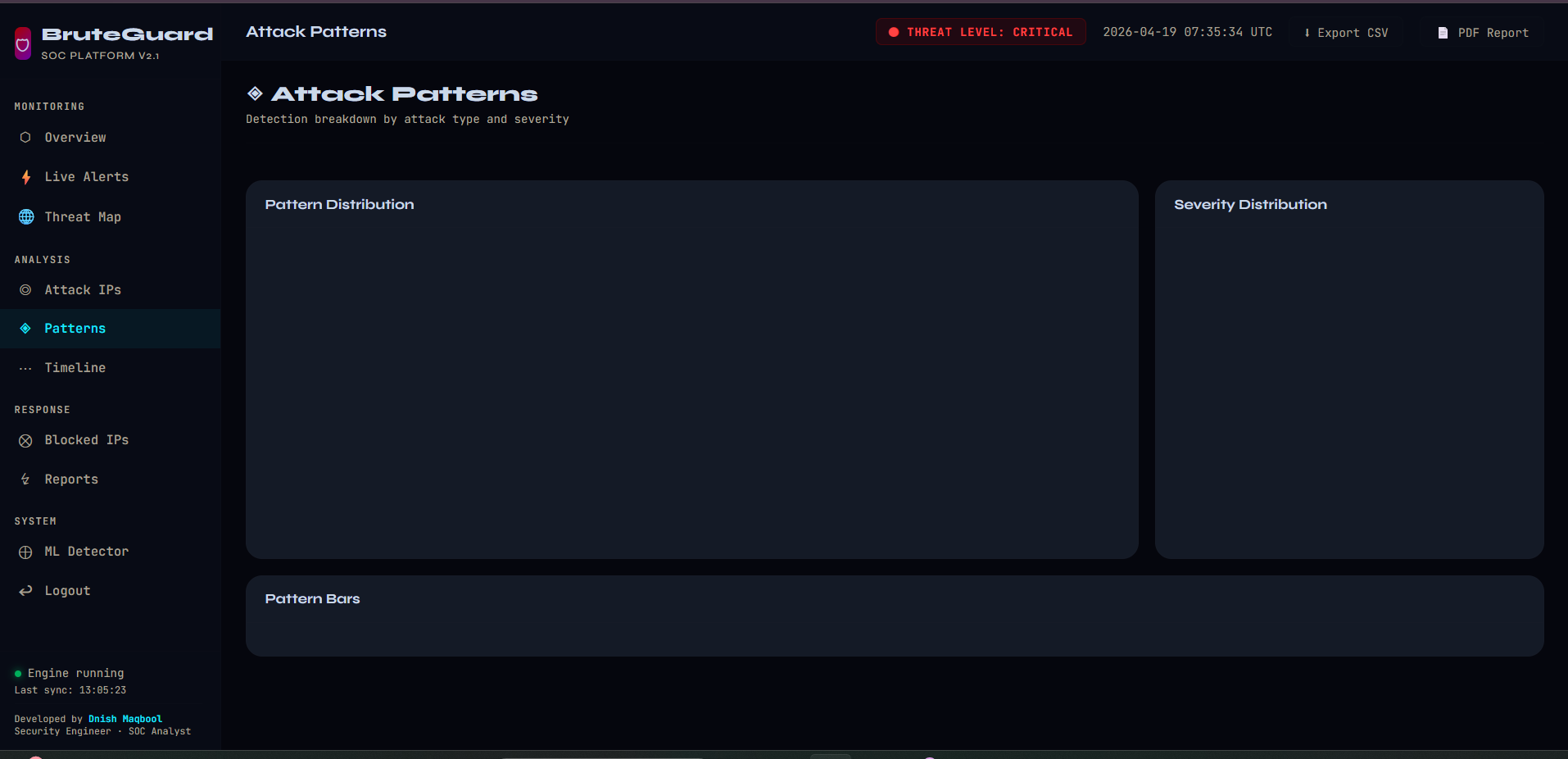
| **攻击模式** | 检测类型分布的饼图 |
| **严重性饼图** | 危急/高/中/低的分解 |
| **地理来源** | 基于 GeoIP 增强的国家柱状图 |
| **每小时热力图** | 24 小时攻击强度模式(7 天滚动汇总) |
## 🔌 REST API
所有端点均需身份验证(会话 Cookie 或 JSON 登录):
```
GET /api/v1/summary Dashboard KPIs
GET /api/v1/events/timeseries Time-bucketed event counts
GET /api/v1/events/top-ips Top attacking IPs with TI data
GET /api/v1/events/geo Geographic attack distribution
GET /api/v1/alerts Alert list (filterable)
POST /api/v1/alerts/{id}/acknowledge Acknowledge an alert
GET /api/v1/alerts/export/csv CSV export
GET /api/v1/threat-intel/{ip} On-demand IP enrichment
GET /api/v1/blocked-ips Active firewall blocks
POST /api/v1/blocked-ips/{id}/unblock Remove a block (admin)
GET /api/v1/ml/status ML model status
POST /api/v1/ml/retrain Trigger model retraining (admin)
POST /api/v1/reports/generate Generate PDF/CSV report
```
## 🧪 运行测试
```
# 运行所有测试(带覆盖率)
pytest tests/ -v --cov=src --cov-report=term-missing
# 运行特定测试类
pytest tests/test_detection.py::TestThresholdDetector -v
# 快速冒烟测试
pytest tests/ -x -q
```
## 📦 部署说明
### 生产检查清单
- [ ] 在 `config/config.yaml` 中更改默认密码
- [ ] 设置强 `app.secret_key`
- [ ] 配置真实的 `abuseipdb.api_key`
- [ ] 设置 `collection.mode: live`(仅 Windows)或 `file`
- [ ] 启用邮件/Slack 告警
- [ ] 为高可用部署设置 `database.type: postgresql`
- [ ] 通过 Nginx 反向代理运行(`docker compose --profile production up`)
- [ ] 设置 `app.debug: false`
### Windows 实时模式
在具备管理员权限的 Windows 上:
```
collection:
mode: live
remote_hosts: [] # Add remote hostnames for network monitoring
```
需要:`pip install pywin32` 并以管理员身份运行。
## 🤖 模拟模式
```
# 7天高强度演示数据
python scripts/simulate_attacks.py --days 7 --intensity high
# 仅喷洒攻击,1000个事件
python scripts/simulate_attacks.py --pattern spray --count 1000
# 实时流(Ctrl+C 停止)
python scripts/simulate_attacks.py --live
# 干运行(不写入数据库)
python scripts/simulate_attacks.py --days 3 --dry-run
```
## 📋 检测如何工作——技术细节
### 滑动窗口机制
阈值检测器为每个 IP 和每个用户名维护 `SlidingWindow` 对象(Python 的 `(timestamp, value)` 元组列表)。每次调用 `.count(now)` 时,会以 O(n) 时间淘汰过期条目(早于 `window_seconds`)。生产环境中大规模部署时可替换为 Redis 有序集合。
### 孤立森林
孤立森林通过随机划分特征空间来隔离异常点。异常点需要更少的分裂即可被隔离(平均路径长度更短)。`score_samples()` 方法返回负值;越接近 0 表示越异常。`contamination=0.05` 参数假设训练数据中 5% 为恶意样本。
### 告警去重
`_alert_cooldowns` 字典将 `(pattern, ip)` 映射到 `last_alert_time`。120 秒内的后续触发将被抑制。这可在持续攻击期间防止告警风暴,同时仍将持续活动记录在事件表中。
*作为一个展示企业安全工程的项目构建。供教育和演示用途。*
## 📐 架构
这是该项目的架构
```
brute_force_detection/
├── config/
│ └── config.yaml # Master configuration (all tunables)
├── src/
│ ├── collectors/
│ │ ├── windows_log_collector.py # Live/EVTX/Simulation collector
│ │ └── simulation.py # Realistic attack event generator
│ ├── detectors/
│ │ ├── threshold_detector.py # Rule-based detection engine
│ │ ├── ml_detector.py # Isolation Forest anomaly detector
│ │ └── pipeline.py # Multi-threaded orchestrator
│ ├── enrichment/
│ │ └── ip_reputation.py # AbuseIPDB + GeoIP enrichment
│ ├── response/
│ │ └── alert_manager.py # Alert lifecycle + notifications
│ ├── database/
│ │ ├── models.py # SQLAlchemy ORM models
│ │ └── db_manager.py # Session management + queries
│ ├── api/
│ │ ├── app.py # Flask + SocketIO factory
│ │ └── routes/
│ │ ├── auth.py # Login/logout endpoints
│ │ ├── dashboard.py # HTML page routes
│ │ └── api.py # REST API endpoints
│ ├── reporting/
│ │ └── report_generator.py # PDF/CSV/JSON report generation
│ └── utils/
│ ├── config_loader.py # YAML + env var config
│ └── logger.py # Structured logging (loguru)
├── dashboard/
│ └── templates/
│ ├── dashboard.html # SOC dashboard (Chart.js + SocketIO)
│ └── login.html # Authentication page
├── scripts/
│ └── simulate_attacks.py # Standalone data generator
├── tests/
│ └── test_detection.py # 25+ unit & integration tests
├── docker/
│ └── nginx.conf # Nginx reverse proxy config
├── main.py # Application entry point
├── Dockerfile
├── docker-compose.yml
└── requirements.txt
```
## ⚡ 快速开始
### 选项 1:本地 Python
```
# 克隆/解压项目
cd brute_force_detection
# 创建虚拟环境
python -m venv venv
source venv/bin/activate # Linux/macOS
venv\Scripts\activate # Windows
# 安装依赖
pip install -r requirements.txt
# 使用7天模拟数据初始化并启动
python main.py --seed
# Dashboard → http://localhost:8000
# 登录: admin / admin_changeme_2024!
```
### 选项 2:Docker(推荐用于演示)
```
# 构建并启动所有服务
docker compose up --build
# Dashboard → http://localhost:8000
```
### 选项 3:仅种子(无 Web 服务器)
```
# 仅生成7天历史数据
python scripts/simulate_attacks.py --days 7 --intensity high
# 然后启动服务器
python main.py --no-pipeline # Web server only, no live detection
```
## 🔑 默认凭据
| 用户名 | 密码 | 角色 |
|--------|------|------|
| admin | `admin_changeme_2024!` | admin |
| analyst | `analyst_changeme_2024!` | analyst |
## 🔧 配置
所有可调参数位于 `config/config.yaml`。关键部分:
```
collection:
mode: simulation
poll_interval_seconds: 5
detection:
threshold:
failed_attempts_per_ip: 5 # Brute force trigger
time_window_seconds: 300 # Detection window
threat_intelligence:
abuseipdb:
api_key: "YOUR_KEY_HERE" # Get free key at abuseipdb.com
alerting:
slack:
enabled: true
webhook_url: "https://hooks.slack.com/..."
email:
enabled: true
smtp_host: "smtp.gmail.com"
```
### 环境变量覆盖
任何配置值均可通过 `BG__` 前缀的环境变量覆盖:
```
export BG_COLLECTION__MODE=live
export BG_DETECTION__THRESHOLD__FAILED_ATTEMPTS_PER_IP=10
export BG_THREAT_INTELLIGENCE__ABUSEIPDB__API_KEY=your_key
```
## 🎯 检测逻辑
### 1. 阈值检测器(`threshold_detector.py`)
| 模式 | 触发条件 | 默认严重性 |
|------|----------|-----------|
| **暴力破解** | 5 次失败来自同一 IP,5 分钟内 | HIGH |
| **用户暴力破解** | 同一账户在 5 分钟内失败 ≥10 次 | MEDIUM |
| **密码喷洒** | 1 个 IP 针对 ≥5 个不同用户名在 5 分钟内 | HIGH |
| **凭证填充** | 所有 IP 在 60 秒内失败 ≥20 次 | CRITICAL |
| **账户锁定** | 任意事件 ID 4740 | HIGH |
所有窗口使用 **内存中的滑动窗口**(无数据库往返),实现微秒级延迟检测。告警 **冷却机制** 会在相同(模式,IP)对在 2 分钟内重复触发时抑制重复告警。
### 2. 机器学习异常检测(`ml_detector.py`)
使用 **孤立森林** 模型,基于每个 IP 的滚动 5 分钟窗口提取的 8 个工程化特征进行训练:
| 特征 | 描述 |
|------|------|
| `fail_count` | 窗口内总失败次数 |
| `fail_rate_per_min` | 每分钟失败次数(速度) |
| `username_entropy` | 目标用户名的香农熵(喷洒) |
| `mean_iat_sec` | 平均到达间隔(低值表示快速攻击) |
| `std_iat_sec` | IAT 标准差(爆发性) |
| `unique_users` | 不同目标账户数量 |
| `hour_deviation` | 偏离小时基线 |
| `burstiness` | IAT 变化的系数 |
模型在启动时若无保存模型,则自动使用 7 天历史数据进行训练,并保存至 `data/models/isolation_forest.pkl` 以供后续使用。
### 3. 威胁情报(`ip_reputation.py`)
- **AbuseIPDB**:滥用置信度评分(0–100)、类别标签、TOR 检测
- **ip-api.com**:国家、城市、ISP、ASN、纬度/经度(免费,45 请求/分钟)
- **SQLite 缓存**:24 小时 TTL 防止重复 API 调用
## 📊 仪表板功能
| 面板 | 描述 |
|------|------|
| **KPI 行** | 实时事件计数、攻击 IP、打开的告警 |
| **登录时间线** | 6 小时 / 24 小时 / 72 小时失败与成功的时间序列 |
| **实时告警流** | WebSocket 推送告警,支持一键确认 |
| **Top 攻击 IP** | 按失败次数排名,并附带 AbuseIPDB 评分 |
| **攻击模式** | 检测类型分布的饼图 |
| **严重性饼图** | 危急/高/中/低的分解 |
| **地理来源** | 基于 GeoIP 增强的国家柱状图 |
| **每小时热力图** | 24 小时攻击强度模式(7 天滚动汇总) |
## 🔌 REST API
所有端点均需身份验证(会话 Cookie 或 JSON 登录):
```
GET /api/v1/summary Dashboard KPIs
GET /api/v1/events/timeseries Time-bucketed event counts
GET /api/v1/events/top-ips Top attacking IPs with TI data
GET /api/v1/events/geo Geographic attack distribution
GET /api/v1/alerts Alert list (filterable)
POST /api/v1/alerts/{id}/acknowledge Acknowledge an alert
GET /api/v1/alerts/export/csv CSV export
GET /api/v1/threat-intel/{ip} On-demand IP enrichment
GET /api/v1/blocked-ips Active firewall blocks
POST /api/v1/blocked-ips/{id}/unblock Remove a block (admin)
GET /api/v1/ml/status ML model status
POST /api/v1/ml/retrain Trigger model retraining (admin)
POST /api/v1/reports/generate Generate PDF/CSV report
```
## 🧪 运行测试
```
# 运行所有测试(带覆盖率)
pytest tests/ -v --cov=src --cov-report=term-missing
# 运行特定测试类
pytest tests/test_detection.py::TestThresholdDetector -v
# 快速冒烟测试
pytest tests/ -x -q
```
## 📦 部署说明
### 生产检查清单
- [ ] 在 `config/config.yaml` 中更改默认密码
- [ ] 设置强 `app.secret_key`
- [ ] 配置真实的 `abuseipdb.api_key`
- [ ] 设置 `collection.mode: live`(仅 Windows)或 `file`
- [ ] 启用邮件/Slack 告警
- [ ] 为高可用部署设置 `database.type: postgresql`
- [ ] 通过 Nginx 反向代理运行(`docker compose --profile production up`)
- [ ] 设置 `app.debug: false`
### Windows 实时模式
在具备管理员权限的 Windows 上:
```
collection:
mode: live
remote_hosts: [] # Add remote hostnames for network monitoring
```
需要:`pip install pywin32` 并以管理员身份运行。
## 🤖 模拟模式
```
# 7天高强度演示数据
python scripts/simulate_attacks.py --days 7 --intensity high
# 仅喷洒攻击,1000个事件
python scripts/simulate_attacks.py --pattern spray --count 1000
# 实时流(Ctrl+C 停止)
python scripts/simulate_attacks.py --live
# 干运行(不写入数据库)
python scripts/simulate_attacks.py --days 3 --dry-run
```
## 📋 检测如何工作——技术细节
### 滑动窗口机制
阈值检测器为每个 IP 和每个用户名维护 `SlidingWindow` 对象(Python 的 `(timestamp, value)` 元组列表)。每次调用 `.count(now)` 时,会以 O(n) 时间淘汰过期条目(早于 `window_seconds`)。生产环境中大规模部署时可替换为 Redis 有序集合。
### 孤立森林
孤立森林通过随机划分特征空间来隔离异常点。异常点需要更少的分裂即可被隔离(平均路径长度更短)。`score_samples()` 方法返回负值;越接近 0 表示越异常。`contamination=0.05` 参数假设训练数据中 5% 为恶意样本。
### 告警去重
`_alert_cooldowns` 字典将 `(pattern, ip)` 映射到 `last_alert_time`。120 秒内的后续触发将被抑制。这可在持续攻击期间防止告警风暴,同时仍将持续活动记录在事件表中。
*作为一个展示企业安全工程的项目构建。供教育和演示用途。*
## 📐 架构
这是该项目的架构
```
brute_force_detection/
├── config/
│ └── config.yaml # Master configuration (all tunables)
├── src/
│ ├── collectors/
│ │ ├── windows_log_collector.py # Live/EVTX/Simulation collector
│ │ └── simulation.py # Realistic attack event generator
│ ├── detectors/
│ │ ├── threshold_detector.py # Rule-based detection engine
│ │ ├── ml_detector.py # Isolation Forest anomaly detector
│ │ └── pipeline.py # Multi-threaded orchestrator
│ ├── enrichment/
│ │ └── ip_reputation.py # AbuseIPDB + GeoIP enrichment
│ ├── response/
│ │ └── alert_manager.py # Alert lifecycle + notifications
│ ├── database/
│ │ ├── models.py # SQLAlchemy ORM models
│ │ └── db_manager.py # Session management + queries
│ ├── api/
│ │ ├── app.py # Flask + SocketIO factory
│ │ └── routes/
│ │ ├── auth.py # Login/logout endpoints
│ │ ├── dashboard.py # HTML page routes
│ │ └── api.py # REST API endpoints
│ ├── reporting/
│ │ └── report_generator.py # PDF/CSV/JSON report generation
│ └── utils/
│ ├── config_loader.py # YAML + env var config
│ └── logger.py # Structured logging (loguru)
├── dashboard/
│ └── templates/
│ ├── dashboard.html # SOC dashboard (Chart.js + SocketIO)
│ └── login.html # Authentication page
├── scripts/
│ └── simulate_attacks.py # Standalone data generator
├── tests/
│ └── test_detection.py # 25+ unit & integration tests
├── docker/
│ └── nginx.conf # Nginx reverse proxy config
├── main.py # Application entry point
├── Dockerfile
├── docker-compose.yml
└── requirements.txt
```
## ⚡ 快速开始
### 选项 1:本地 Python
```
# 克隆/解压项目
cd brute_force_detection
# 创建虚拟环境
python -m venv venv
source venv/bin/activate # Linux/macOS
venv\Scripts\activate # Windows
# 安装依赖
pip install -r requirements.txt
# 使用7天模拟数据初始化并启动
python main.py --seed
# Dashboard → http://localhost:8000
# 登录: admin / admin_changeme_2024!
```
### 选项 2:Docker(推荐用于演示)
```
# 构建并启动所有服务
docker compose up --build
# Dashboard → http://localhost:8000
```
### 选项 3:仅种子(无 Web 服务器)
```
# 仅生成7天历史数据
python scripts/simulate_attacks.py --days 7 --intensity high
# 然后启动服务器
python main.py --no-pipeline # Web server only, no live detection
```
## 🔑 默认凭据
| 用户名 | 密码 | 角色 |
|--------|------|------|
| admin | `admin_changeme_2024!` | admin |
| analyst | `analyst_changeme_2024!` | analyst |
## 🔧 配置
所有可调参数位于 `config/config.yaml`。关键部分:
```
collection:
mode: simulation
poll_interval_seconds: 5
detection:
threshold:
failed_attempts_per_ip: 5 # Brute force trigger
time_window_seconds: 300 # Detection window
threat_intelligence:
abuseipdb:
api_key: "YOUR_KEY_HERE" # Get free key at abuseipdb.com
alerting:
slack:
enabled: true
webhook_url: "https://hooks.slack.com/..."
email:
enabled: true
smtp_host: "smtp.gmail.com"
```
### 环境变量覆盖
任何配置值均可通过 `BG__` 前缀的环境变量覆盖:
```
export BG_COLLECTION__MODE=live
export BG_DETECTION__THRESHOLD__FAILED_ATTEMPTS_PER_IP=10
export BG_THREAT_INTELLIGENCE__ABUSEIPDB__API_KEY=your_key
```
## 🎯 检测逻辑
### 1. 阈值检测器(`threshold_detector.py`)
| 模式 | 触发条件 | 默认严重性 |
|------|----------|-----------|
| **暴力破解** | 5 次失败来自同一 IP,5 分钟内 | HIGH |
| **用户暴力破解** | 同一账户在 5 分钟内失败 ≥10 次 | MEDIUM |
| **密码喷洒** | 1 个 IP 针对 ≥5 个不同用户名在 5 分钟内 | HIGH |
| **凭证填充** | 所有 IP 在 60 秒内失败 ≥20 次 | CRITICAL |
| **账户锁定** | 任意事件 ID 4740 | HIGH |
所有窗口使用 **内存中的滑动窗口**(无数据库往返),实现微秒级延迟检测。告警 **冷却机制** 会在相同(模式,IP)对在 2 分钟内重复触发时抑制重复告警。
### 2. 机器学习异常检测(`ml_detector.py`)
使用 **孤立森林** 模型,基于每个 IP 的滚动 5 分钟窗口提取的 8 个工程化特征进行训练:
| 特征 | 描述 |
|------|------|
| `fail_count` | 窗口内总失败次数 |
| `fail_rate_per_min` | 每分钟失败次数(速度) |
| `username_entropy` | 目标用户名的香农熵(喷洒) |
| `mean_iat_sec` | 平均到达间隔(低值表示快速攻击) |
| `std_iat_sec` | IAT 标准差(爆发性) |
| `unique_users` | 不同目标账户数量 |
| `hour_deviation` | 偏离小时基线 |
| `burstiness` | IAT 变化的系数 |
模型在启动时若无保存模型,则自动使用 7 天历史数据进行训练,并保存至 `data/models/isolation_forest.pkl` 以供后续使用。
### 3. 威胁情报(`ip_reputation.py`)
- **AbuseIPDB**:滥用置信度评分(0–100)、类别标签、TOR 检测
- **ip-api.com**:国家、城市、ISP、ASN、纬度/经度(免费,45 请求/分钟)
- **SQLite 缓存**:24 小时 TTL 防止重复 API 调用
## 📊 仪表板功能
| 面板 | 描述 |
|------|------|
| **KPI 行** | 实时事件计数、攻击 IP、打开的告警 |
| **登录时间线** | 6 小时 / 24 小时 / 72 小时失败与成功的时间序列 |
| **实时告警流** | WebSocket 推送告警,支持一键确认 |
| **Top 攻击 IP** | 按失败次数排名,并附带 AbuseIPDB 评分 |
| **攻击模式** | 检测类型分布的饼图 |
| **严重性饼图** | 危急/高/中/低的分解 |
| **地理来源** | 基于 GeoIP 增强的国家柱状图 |
| **每小时热力图** | 24 小时攻击强度模式(7 天滚动汇总) |
## 🔌 REST API
所有端点均需身份验证(会话 Cookie 或 JSON 登录):
```
GET /api/v1/summary Dashboard KPIs
GET /api/v1/events/timeseries Time-bucketed event counts
GET /api/v1/events/top-ips Top attacking IPs with TI data
GET /api/v1/events/geo Geographic attack distribution
GET /api/v1/alerts Alert list (filterable)
POST /api/v1/alerts/{id}/acknowledge Acknowledge an alert
GET /api/v1/alerts/export/csv CSV export
GET /api/v1/threat-intel/{ip} On-demand IP enrichment
GET /api/v1/blocked-ips Active firewall blocks
POST /api/v1/blocked-ips/{id}/unblock Remove a block (admin)
GET /api/v1/ml/status ML model status
POST /api/v1/ml/retrain Trigger model retraining (admin)
POST /api/v1/reports/generate Generate PDF/CSV report
```
## 🧪 运行测试
```
# 运行所有测试(带覆盖率)
pytest tests/ -v --cov=src --cov-report=term-missing
# 运行特定测试类
pytest tests/test_detection.py::TestThresholdDetector -v
# 快速冒烟测试
pytest tests/ -x -q
```
## 📦 部署说明
### 生产检查清单
- [ ] 在 `config/config.yaml` 中更改默认密码
- [ ] 设置强 `app.secret_key`
- [ ] 配置真实的 `abuseipdb.api_key`
- [ ] 设置 `collection.mode: live`(仅 Windows)或 `file`
- [ ] 启用邮件/Slack 告警
- [ ] 为高可用部署设置 `database.type: postgresql`
- [ ] 通过 Nginx 反向代理运行(`docker compose --profile production up`)
- [ ] 设置 `app.debug: false`
### Windows 实时模式
在具备管理员权限的 Windows 上:
```
collection:
mode: live
remote_hosts: [] # Add remote hostnames for network monitoring
```
需要:`pip install pywin32` 并以管理员身份运行。
## 🤖 模拟模式
```
# 7天高强度演示数据
python scripts/simulate_attacks.py --days 7 --intensity high
# 仅喷洒攻击,1000个事件
python scripts/simulate_attacks.py --pattern spray --count 1000
# 实时流(Ctrl+C 停止)
python scripts/simulate_attacks.py --live
# 干运行(不写入数据库)
python scripts/simulate_attacks.py --days 3 --dry-run
```
## 📋 检测如何工作——技术细节
### 滑动窗口机制
阈值检测器为每个 IP 和每个用户名维护 `SlidingWindow` 对象(Python 的 `(timestamp, value)` 元组列表)。每次调用 `.count(now)` 时,会以 O(n) 时间淘汰过期条目(早于 `window_seconds`)。生产环境中大规模部署时可替换为 Redis 有序集合。
### 孤立森林
孤立森林通过随机划分特征空间来隔离异常点。异常点需要更少的分裂即可被隔离(平均路径长度更短)。`score_samples()` 方法返回负值;越接近 0 表示越异常。`contamination=0.05` 参数假设训练数据中 5% 为恶意样本。
### 告警去重
`_alert_cooldowns` 字典将 `(pattern, ip)` 映射到 `last_alert_time`。120 秒内的后续触发将被抑制。这可在持续攻击期间防止告警风暴,同时仍将持续活动记录在事件表中。
*作为一个展示企业安全工程的项目构建。供教育和演示用途。*标签:AMSI绕过, Apex, DNS通配符暴力破解, EVTX, Flask, IP信誉, PoC, Python, Socket.IO, SOC平台, SQLAlchemy, Windows安全日志, 专业SOC仪表盘, 事件溯源, 云计算, 企业级安全, 凭证填充, 告警管理, 地理定位, 威胁情报, 威胁检测, 安全信息与事件管理, 密码喷洒, 密码攻击检测, 开发者工具, 异常检测, 搜索引擎爬取, 无后门, 日志采集, 暴力破解, 机器学习, 模拟攻击生成器, 网络流量分析, 网络测绘, 规则引擎, 请求拦截, 逆向工具, 隔离森林