synacktiv/pike-agent
GitHub: synacktiv/pike-agent
基于 strace 和 LLM 的 Linux 程序行为追踪分析工具,将系统调用索引到数据库后支持通过自然语言对话进行智能诊断。
Stars: 20 | Forks: 1
# Pike Agent
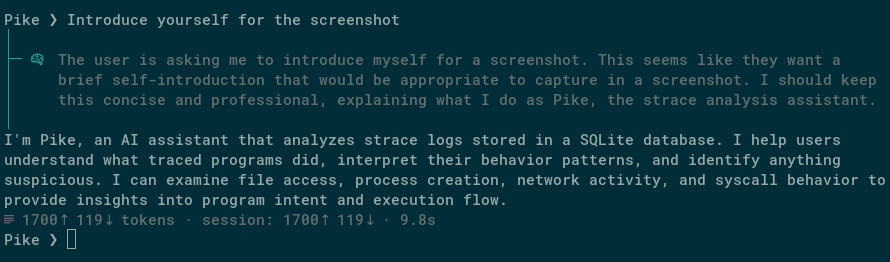
`pike-agent` 记录并分析程序在 Linux 上的行为。它会追踪程序的活动,将其索引到数据库中,并允许你通过 TUI 与 LLM agent 讨论这些行为。
提示词示例:
- 崩溃诊断:`This program crashed with a bus error. What happened?`
- 竞态条件检测:`Are there any race conditions in how this program creates temporary files?`
- 恶意软件分类:`I found this process running on a production server. Should I be worried?`
有关介绍,请参阅 [Say hi to Pike!](https://www.synacktiv.com/en/publications/say-hi-to-pike)。
## 工作原理
`pike-agent` 使用 `strace` 记录程序发出的每一个系统调用,然后通过全文搜索将它们索引到 SQLite 数据库中。LLM agent 会通过工具调用查询该数据库,以回答你关于程序行为的问题。
- 支持本地推理和外部 API (Claude、Gemini 等)
- 对 syscall 参数进行全文搜索
- Man page 查找 syscall 文档
## 安装
```
uv pip install -e .
```
需要 Python 3.13+ 且系统中已安装 `strace`。
## 用法
首次运行时,会在 `~/.config/pike-agent/config.toml` 创建一个默认配置文件。编辑该文件以配置你的推理提供商和模型。默认情况下,它指向本地的 llama.cpp 服务器。
Pike-agent 最适合擅长工具调用的模型,例如:Gemini 3 Pro、Qwen 3.5、Claude 4.6 Sonnet...
### 录制追踪记录
追踪命令:
```
pike-agent run -- ./my-program --flag
```
附加到正在运行的进程:
```
pike-agent attach 1234
```
以上两种方式都会生成一个包含索引追踪记录的 `.db` 文件。
### 与 agent 对话
基于已录制的追踪记录启动聊天会话:
```
pike-agent chat trace.db
```
## 许可证
[GPLv3](LICENSE)。
标签:Agent, API接口, API集成, Claude, CVE检测, DAST, DLL 劫持, DNS 解析, Gemini, GPLv3, Hpfeeds, llama.cpp, LLM, Python, Python 3.9+, SQLite, strace, TUI, Unmanaged PE, 云资产清单, 代理, 全文搜索, 可观测性, 可配置连接, 大语言模型, 子域名生成, 崩溃诊断, 恶意软件分析, 故障排查, 无后门, 无文件攻击, 本地推理, 程序分析, 竞态条件检测, 系统调用, 终端用户界面, 自动化分析, 跨站脚本, 逆向工具, 逆向工程