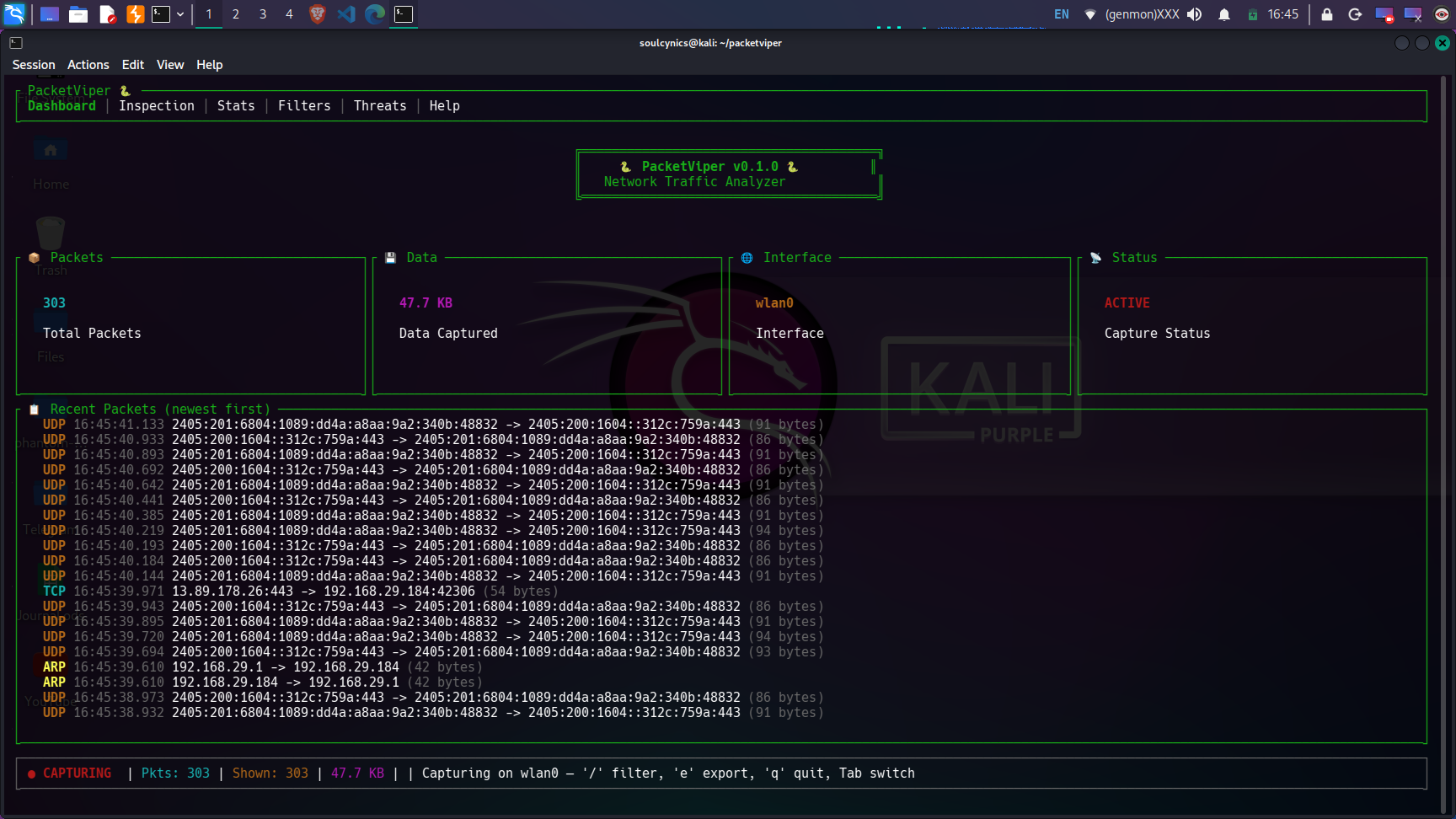
## 📸 仪表板预览
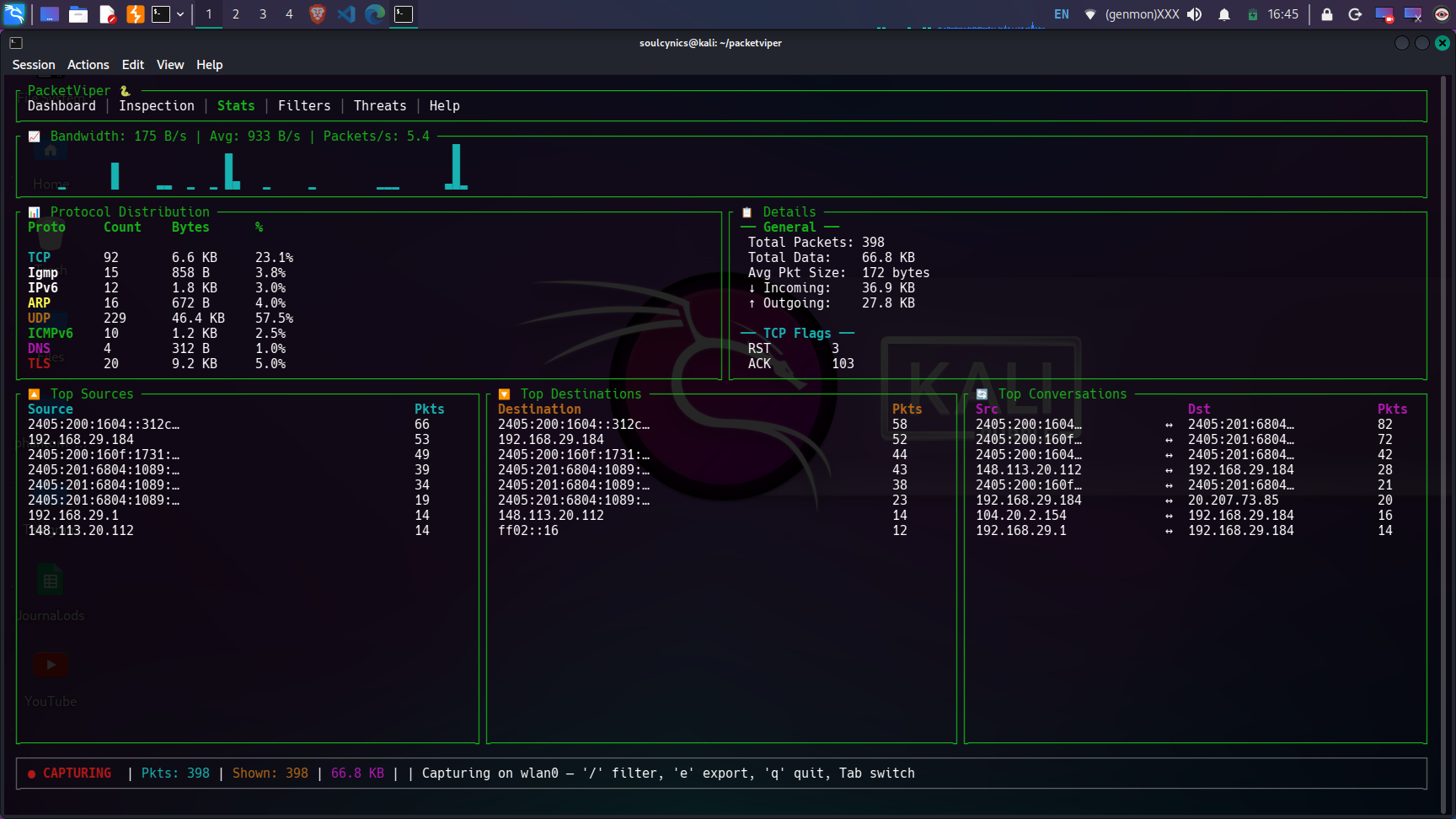
📊 统计视图 — 实时带宽、协议分布、活跃主机(点击展开)
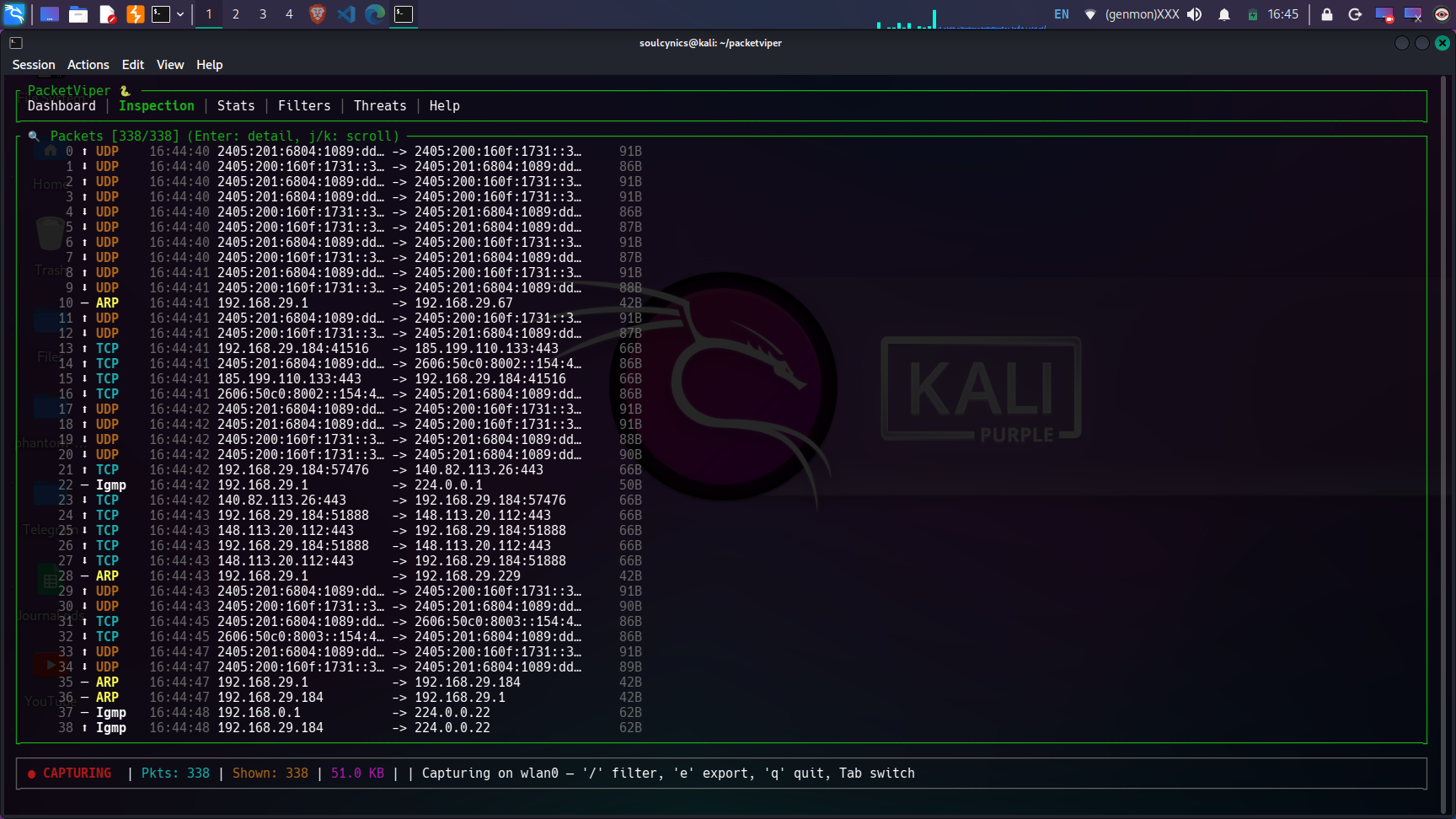
🔍 检查视图 — 深度数据包检查与十六进制转储(点击展开)
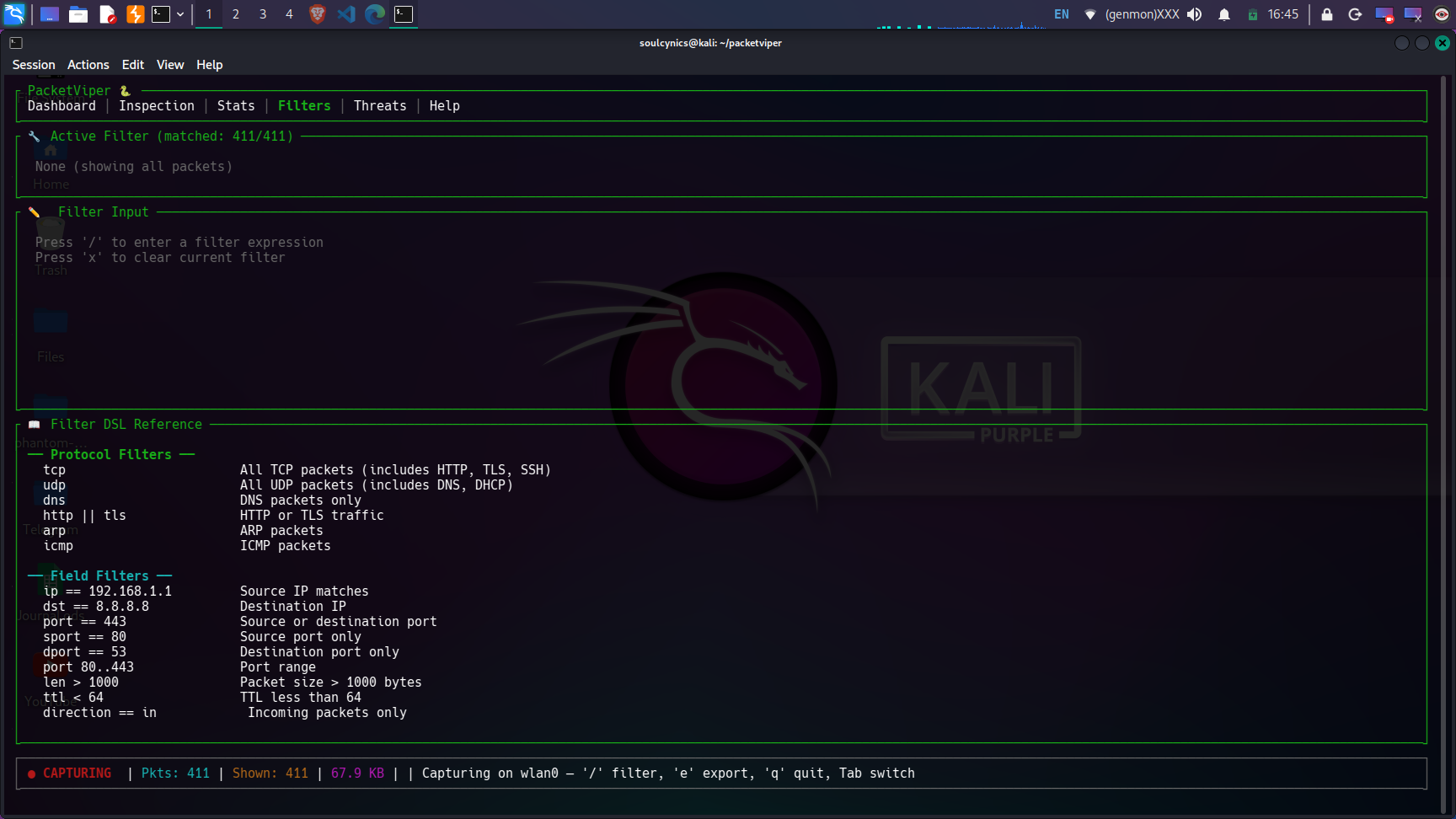
🔧 过滤视图 — 包含协议、IP、端口和复合过滤器的自定义 DSL(点击展开)
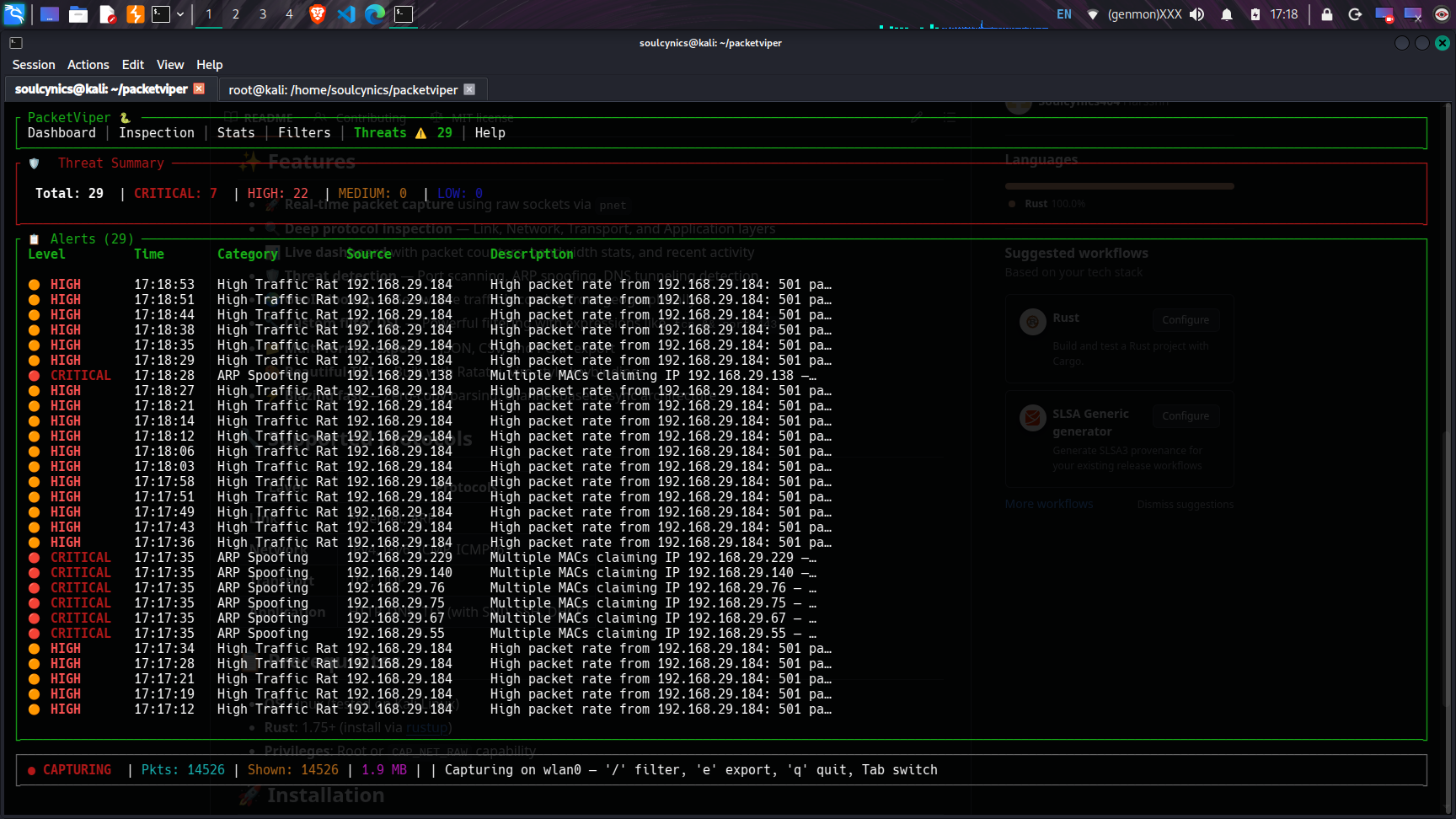
🛡️ 威胁检测 — ARP 欺骗、端口扫描、DNS 隧道检测(点击展开)
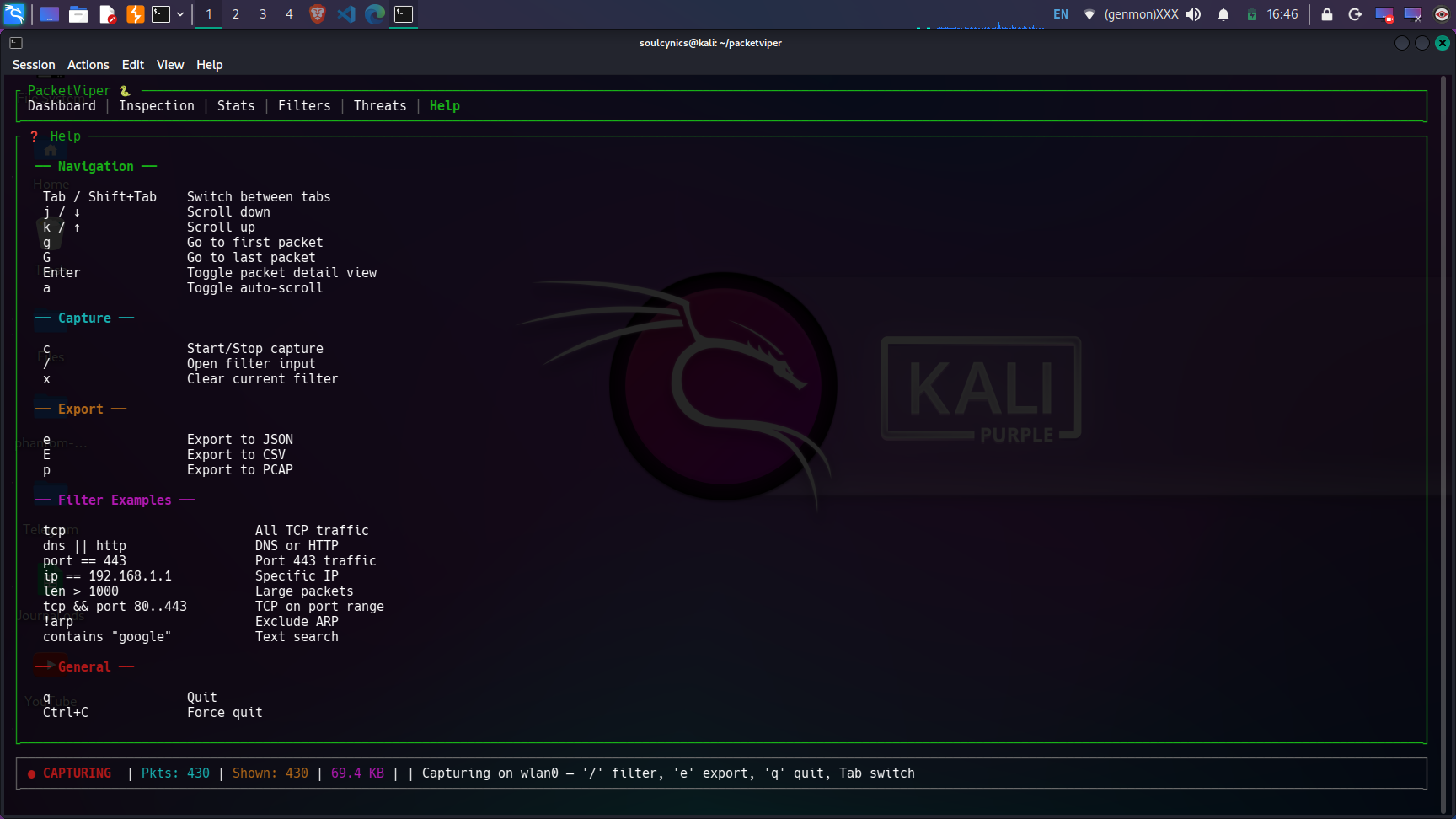
❓ 帮助视图 — 完整的快捷键参考(点击展开)
## 🎯 适用人群?
| 目标受众 | 使用场景 |
|----------|----------|
| 🔐 **网络安全学生** | 学习数据包分析,理解协议头部,研究网络攻击 |
| 🕵️ **渗透测试人员** | 实时监控攻击流量,验证 ARP 欺骗 / 扫描工具 |
| 🌐 **网络管理员** | 诊断网络问题,监控带宽,识别流氓流量 |
| 🧑💻 **开发者** | 调试来自应用程序的 HTTP/DNS/TLS 流量 |
| 📚 **研究人员** | 捕获并导出流量数据集以供分析 |
| 🏠 **家庭实验室爱好者** | 监控家庭网络的可疑活动 |
## ✨ 功能
### 🚀 核心能力
- **实时数据包捕获**:通过 `pnet` 使用 raw sockets —— 无需依赖 `libpcap`
- **混杂模式** —— 捕获网络段上的所有流量
- **多线程架构** —— 抓包线程 + UI 线程,采用无锁 channel
- **零拷贝解析** —— 高效拆解数据包,无需不必要的内存分配
### 🔬 深度协议检测(OSI 层 2–7)
| OSI 层 | 协议 | 详情 |
|-----------|-----------|---------|
| **数据链路层 (L2)** | Ethernet, ARP | MAC 地址,EtherType,ARP 请求/回复解析 |
| **网络层 (L3)** | IPv4, IPv6, ICMP, ICMPv6 | IP 地址,TTL/Hop Limit,标志,DSCP,标识符 |
| **传输层 (L4)** | TCP, UDP | 端口,序列号/确认号,所有 TCP 标志 (SYN/ACK/FIN/RST/PSH/URG/ECE/CWR),窗口大小 |
| **应用层 (L7)** | HTTP, DNS, TLS, SSH, DHCP, FTP, SMTP, MQTT | HTTP 方法/状态,DNS 查询/响应,TLS 版本 + SNI 提取,SSH 版本检测 |
### 🛡️ 威胁检测引擎
| 威胁 | 检测方法 | 严重程度 |
|--------|-----------------|----------|
| **端口扫描** | 60 秒内来自单一源的 >15 个唯一目标端口 | 🟠 高危 |
| **ARP 欺骗** | 多个 MAC 地址通过 ARP Reply 声明拥有相同的 IP | 🔴 严重 |
| **DNS 隧道** | DNS 查询标签 >40 个字符或总查询 >100 个字符 | 🟡 中危 |
| **可疑端口** | 流量流向已知的恶意软件端口 (4444, 31337, 6667 等) | 🔵 低危 |
| **DDoS 指标** | 10 秒内来自单一源的 >500 个数据包 | 🟠 高危 |
### 🔧 自定义过滤器 DSL
一种用于过滤流量的强大领域特定语言:
#### 协议过滤器
| 过滤器 | 描述 |
|--------|-------------|
| `tcp` | 所有 TCP 数据包(包括 HTTP, TLS, SSH) |
| `udp` | 所有 UDP 数据包(包括 DNS, DHCP) |
| `dns` | 仅 DNS 流量 |
| `http \|\| tls` | HTTP 或 TLS |
| `arp` | ARP 数据包 |
| `!icmp` | 除 ICMP 外的所有内容 |
#### 字段过滤器
| 过滤器 | 描述 |
|--------|-------------|
| `ip == 192.168.1.1` | 匹配源 IP |
| `dst == 8.8.8.8` | 目标 IP |
| `port == 443` | 源或目标端口 |
| `sport == 80` | 仅源端口 |
| `dport == 53` | 仅目标端口 |
| `port 80..443` | 端口范围 |
| `len > 1000` | 数据包大小 > 1000 字节 |
| `ttl < 64` | TTL 小于 64 |
| `direction == in` | 仅传入数据包 |
#### 复合过滤器
使用 `&&` (AND) 和 `||` (OR) 组合多个条件:
```
tcp && port == 443 # TCP on port 443
(http || dns) && direction == out # Outbound HTTP or DNS
tcp && len > 500 && dst == 10.0.0.1 # Large TCP to specific IP
contains "google" # Text search in packet summary
```
### 📊 实时统计仪表板
- **带宽火花线图** —— 实时字节/秒可视化
- **协议分布表** —— 每个协议的数据包计数、字节数和百分比
- **TCP 标志分析** —— SYN, ACK, FIN, RST, PSH 分解
- **热门来源 / 目标 / 会话** —— 按数据包计数排序
- **方向性流量** —— 传入与传出字节计数器
- **性能指标** —— 数据包/秒,字节/秒,平均数据包大小
### 📁 多格式导出
- **JSON** —— 包含所有已解析层数据的完整数据包详情(`e` 键)
- **CSV** —— 用于电子表格分析的汇总表(`E` 键)
- **PCAP** —— 行业标准格式,与 Wireshark 兼容(`p` 键)
### 🎨 终端 UI (TUI)
- **6 个交互式选项卡**:仪表板、检查、统计、过滤器、威胁、帮助
- **Vim 风格的导航** —— `j/k` 滚动,`g/G` 跳转,`/` 搜索
- **数据包详情面板**,带十六进制转储视图
- **按协议着色的数据包列表** —— 每个协议都有独特的颜色
- **自动滚动**,可随时切换
- **实时状态栏** —— 捕获状态、数据包计数、数据量、活动过滤器
## 📋 前置条件
| 要求 | 详情 |
|-------------|---------|
| **操作系统** | Linux(已在 Kali Linux 2024.x 上测试) |
| **Rust** | 1.75 或更新版本 [通过 rustup 安装](https://rustup.rs/) |
| **系统库** | `build-essential`, `libpcap-dev`, `pkg-config` |
| **权限** | Root (`sudo`) 或 `CAP_NET_RAW` + `CAP_NET_ADMIN` capabilities |
| **终端** | 任何支持 Unicode 的现代终端模拟器 |
## 🚀 安装说明
### 安装依赖 (Debian/Ubuntu/Kali)
```
sudo apt update
sudo apt install -y build-essential libpcap-dev pkg-config
## 安装 Rust(如果尚未安装)
curl --proto '=https' --tlsv1.2 -sSf https://sh.rustup.rs | sh
source ~/.cargo/env
```
## 从源码构建
```
git clone https://github.com/Soulcynics404/packetviper.git
cd packetviper
cargo build --release
```
## 运行
### 列出可用的网络接口
```
sudo ./target/release/packetviper
```
### 在特定接口上捕获
```
sudo ./target/release/packetviper wlan0 # WiFi
```
```
sudo ./target/release/packetviper eth0 # Ethernet
```
### 替代方案:设置 capabilities 以避免使用 sudo
```
sudo setcap cap_net_raw,cap_net_admin=eip ./target/release/packetviper
./target/release/packetviper wlan0
```
### 数据流
```
┌──────────────────────────────────────────────────┐
│ Terminal UI (Ratatui) │
│ ┌──────────┐ ┌──────┐ ┌───────┐ ┌──────────┐ │
│ │Dashboard │ │Stats │ │Filter │ │ Threats │ │
│ └─────┬────┘ └──┬───┘ └──┬────┘ └────┬─────┘ │
│ └─────────┼────────┼────────────┘ │
│ ┌───────────────▼──────────────────────────┐ │
│ │ Main Loop: Drain → Filter → Stats → │ │
│ │ Threats → Render (50ms tick) │ │
│ └───────────────┬──────────────────────────┘ │
└──────────────────┼───────────────────────────────┘
│ crossbeam-channel (lock-free)
┌──────────────────▼───────────────────────────────┐
│ Capture Thread (pnet raw socket, promiscuous) │
│ Parse: Ethernet → IP → TCP/UDP → App Layer │
└──────────────────┬───────────────────────────────┘
┌───────▼────────┐
│ Linux Kernel │
└────────────────┘
```
### 📦 依赖项
- **Crate Version Purpose**
- **pnet 0.35 Raw packet capture and protocol parsing**
- **pnet_datalink 0.35 Network interface enumeration**
- **ratatui 0.28 Terminal UI framework**
- **crossterm 0.28 Terminal manipulation (raw mode, events)**
- **crossbeam-channel 0.5 Lock-free multi-producer channels**
- **tokio 1.0 Async runtime**
- **chrono 0.4 Timestamp handling**
- **serde / serde_json 1.0 Serialization for JSON export**
- **csv 1.3 CSV export**
- **thiserror 1.0 Error handling**
- **log / env_logger 0.4 / 0.11 Logging framework**
- **maxminddb 0.24 GeoIP database reader (planned)**
- **dns-lookup 2.0 DNS resolution utilities**
## 🗺️ 路线图
- [x] 第一阶段:核心捕获引擎 + 基础 TUI
- [x] 第二阶段:全部 6 个 UI 选项卡,过滤器 DSL,统计,威胁检测,导出
- [x] 第三阶段:GitHub 部署 + 文档
- [x] 第四阶段:GeoIP 集成
- [x] 第五阶段:数据包书签 + 会话保存/恢复
- [x] 第六阶段:颜色主题 + UI 自定义
- [x] 第七阶段:用于自定义协议解析器的插件系统
- [x] 第八阶段:TCP 流重组
- [x] 第九阶段:更多协议(FTP, SMTP, MQTT, gRPC)
- [x] 第十阶段:最终打磨 + 文档
## 🧪 测试
PacketViper 已在以下场景中进行了测试:
| 测试 | 使用的工具 | 结果 |
|------|-----------|--------|
| ARP 欺骗检测 | `bettercap` | ✅ 触发严重警报 |
| 正常流量捕获 | 网页浏览 | ✅ 捕获 HTTP, DNS, TLS, TCP |
| 高流量速率 | `bettercap` 泛洪 | ✅ 触发高危警报 |
| DNS 隧道检测 | 长 DNS 查询 | ✅ 触发中危警报 |
| 过滤器 DSL | 各种表达式 | ✅ 协议、IP、端口、复合过滤器工作正常 |
| 导出 JSON/CSV/PCAP | 内置导出功能 | ✅ 文件生成正确 |
## 📄 文档
| 文档 | 描述 |
|----------|-------------|
| [ARCHITECTURE.md](docs/ARCHITECTURE.md) | 系统设计、数据流、线程模型 |
| [FEATURES.md](docs/FEATURES.md) | 包含详情的完整功能列表 |
| [PROJECT_REPORT.md](docs/PROJECT_REPORT.md) | 学术报告:威胁、局限性、受众、依赖项 |
| [CONTRIBUTING.md](docs/CONTRIBUTING.md) | 如何贡献 |
## 📝 许可证
本项目基于 MIT 许可证授权 —— 请参阅 [LICENSE](LICENSE) 文件。
## 👤 作者
**Harsshh** — [@Soulcynics404](https://github.com/Soulcynics404)
*用 ❤️ 和 Rust 为网络安全社区构建*
**如果您觉得它有用,请给这个仓库点个 ⭐ !**



 *实时数据包捕获、深度协议检测、威胁检测和流量分析 —— 尽在您的终端之中。*
**PacketViper** 是一款基于终端的网络流量分析器,专为网络安全专业人员、渗透测试人员、网络管理员和学生设计。它可以捕获实时的网络数据包,解析所有 OSI 层(L2–L7)的协议,检测诸如 ARP 欺骗和端口扫描等活跃威胁,并提供一个包含实时统计信息的丰富仪表板 —— 所有这些都不需要您离开终端。
*实时数据包捕获、深度协议检测、威胁检测和流量分析 —— 尽在您的终端之中。*
**PacketViper** 是一款基于终端的网络流量分析器,专为网络安全专业人员、渗透测试人员、网络管理员和学生设计。它可以捕获实时的网络数据包,解析所有 OSI 层(L2–L7)的协议,检测诸如 ARP 欺骗和端口扫描等活跃威胁,并提供一个包含实时统计信息的丰富仪表板 —— 所有这些都不需要您离开终端。