mario-hernandez/mail-mcp
GitHub: mario-hernandez/mail-mcp
一个面向AI助手的隐私优先IMAP/SMTP MCP服务器,解决凭证本地化存储与提示注入风险。
Stars: 0 | Forks: 0
# mail-mcp
**隐私优先的 IMAP/SMTP MCP 服务器,专为 Claude Desktop、Claude Code 和 Codex CLI 设计。**
赋予你的 AI 助手真正的邮箱访问权限——读取、搜索、草拟、整理——而无需将任何凭证发送到他人的服务器。
[](LICENSE)
[](https://www.python.org/downloads/)
[](https://modelcontextprotocol.io/)
[](#security)
## 为什么会有这个项目
我希望我的 Claude Code(以及 Codex)会话能理解我的收件箱:找到客户的最后一封邮件、提取他们发送的 PDF、草拟回复、批量归档通讯邮件。在审计了九个现有的邮件 MCP 实现后,我不断发现同样的模式——凭证以纯文本形式写入磁盘、绕过 TLS 验证、在二进制文件中硬编码 OAuth 密钥。`mail-mcp` 就是我希望它们其中之一能成为的样子。审计笔记保存在 [`SYNTHESIS.md`](SYNTHESIS.md) 中,供任何想检查其设计逻辑的人查看。
自 v0.3 起,代码库经历了多轮对抗性审查——每次发布都修复了发现的问题,并将回归测试固定下来。181 个单元测试加上一个 GreenMail 集成套件覆盖了安全边界,而不仅仅是常规的顺利流程。
## 亮点
- 🔐 **你的密码绝不触碰文件。** 它保存在 OS keyring 中——macOS Keychain、Linux Secret Service、Windows Credential Manager——通过 [`keyring`](https://pypi.org/project/keyring/) 访问。配置文件仅存储 host/port/user/alias。
- 🛡️ **强制使用 TLS。** IMAP 使用 implicit TLS(端口 993)。SMTP 使用 STARTTLS(587)或 SMTPS(465)。没有任何开关可以禁用证书验证。
- 🧱 **针对 Prompt 注入加固。** 邮件正文被包裹在带有明确警告的 `
` 信封中;闭合标签突破和零宽注入字符在模型看到之前就会被中和。
- 🚪 **破坏性工具默认被门控。** 文件夹操作和批量修改*甚至不会被注册*,除非设置 `MAIL_MCP_WRITE_ENABLED=true`。发送工具始终可见,但在两个环境变量都设置前会拒绝传输;LLM 会收到包含确切启用配方的 `SEND_NOT_ENABLED` 类型错误,而不是去猜测缺少什么功能。
- 🌍 **开箱即用的本地化邮箱支持。** `save_draft`、`list_drafts` 和 `delete_emails` 会在调用时通过 RFC 6154 SPECIAL-USE 解析实际的服务器文件夹:`Borradores`、`Brouillons`、`Entwürfe`、`Bozze`、`Papelera`、`Elementos eliminados`、`[Gmail]/Drafts` 等都能处理。在 Outlook ES/FR/DE 账号上不会再出现 `[TRYCREATE] folder does not exist` 错误。
- 🧾 **用于监管链的取证附件模式。** 在 `AttachmentSpec` 上设置 `raw_passthrough=true` 会逐字节发送文件内容。SHA-256 值会通过 `save_draft` → IMAP → `download_attachment` 端到端保留。适用于证据保存、eIDAS 签章和 BEC 事件响应。
- 🪶 **小巧、可审计、仅有六个直接依赖。** `mcp`、`imapclient`、`keyring`、`pydantic`、`certifi`、`defusedxml`。没有 Web UI,没有遥测,没有更新检查,没有中继,没有回传。
- 🧰 **干净的工具表面** —— 结构化的 IMAP 搜索(无需拼接)、有界的输出、防止路径遍历的附件保存,以及基于 RFC 4315 UID 范围的 EXPUNGE,拒绝静默删除其他客户端的消息。
- 🤖 **面向 LLM 的错误语义。** 错误返回 `{type, message, code, hint, retryable}`。稳定的错误码(`SEND_NOT_ENABLED`、`SEND_REQUIRES_CONFIRM`、`UIDPLUS_REQUIRED_FOR_SAFE_EXPUNGE`、`RATE_LIMITED`、`AUTH_FAILED`、`TLS_ERROR`、`NOT_FOUND` 等)让代理能够以编程方式分支处理,而无需解析自由文本。
## 架构
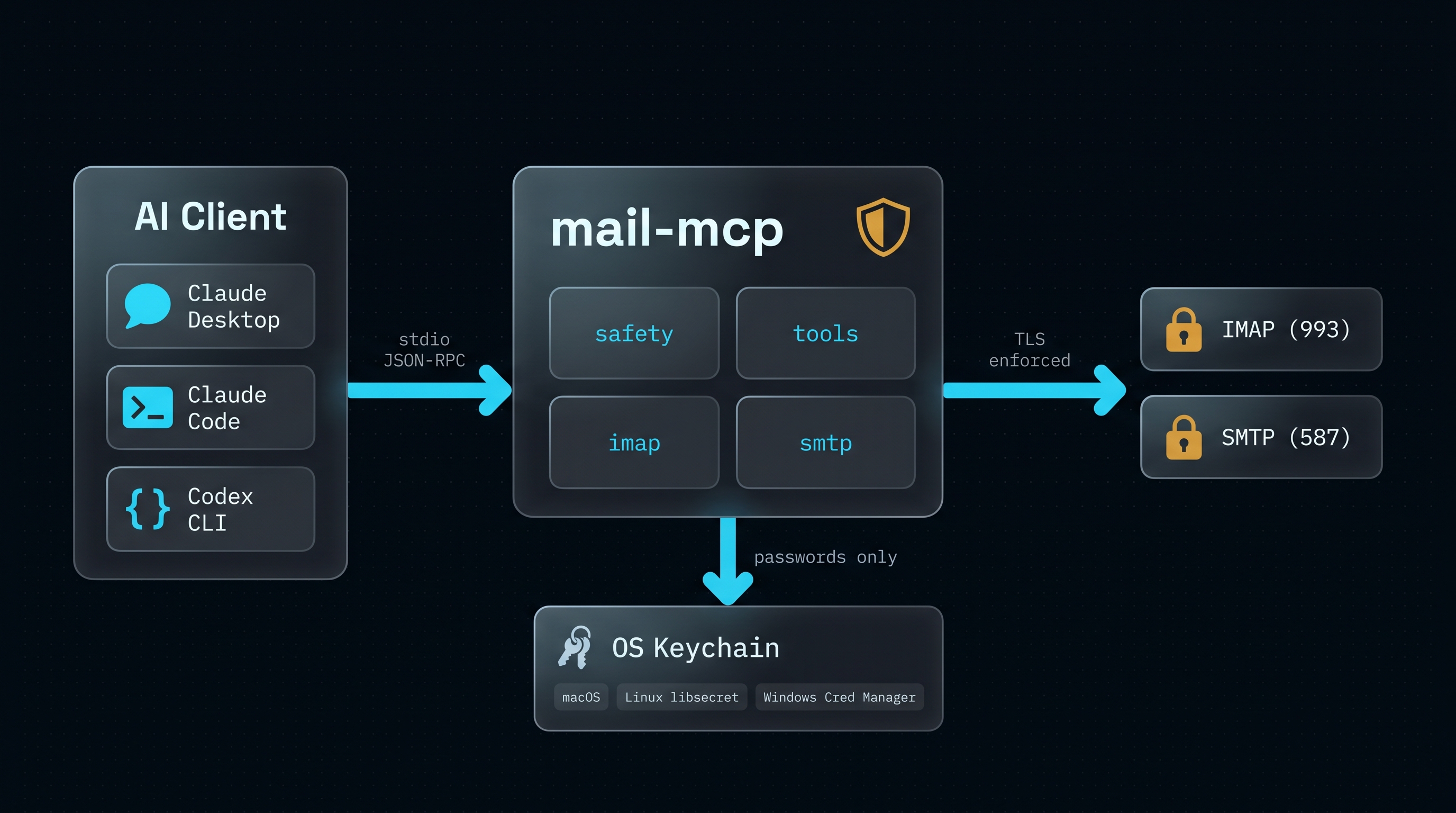
三层结构:你的 AI 客户端通过 stdio 进行 MCP JSON-RPC 通信,`mail-mcp` 强制执行安全规则,而外部世界只能看到与你配置的主机建立的 TLS 加密的 IMAP 或 SMTP 连接。密码只会单向流动:从 OS keyring 进入一个短暂的 IMAP/SMTP 会话。
## 工具
| 工具 | 类型 | 模式 | 功能 |
|------|:----:|------|--------------|
| `list_accounts` | ✅ | default | 枚举已配置的账号及默认账号 |
| `get_account_info` | ✅ | default | 单个账号的连接配置 + 已解析的邮箱 |
| `list_folders` | ✅ | default | 列出账号上的邮箱 |
| `get_special_folders` | ✅ | default | 通过 RFC 6154 解析 Drafts/Trash/Sent/Junk/Archive |
| `get_quota` | ✅ | default | 已用存储 / 限额,如果不可用则为 null |
| `search_emails` | ✅ | default | 结构化 IMAP 搜索 (subject/from/to/since/flags/…) |
| `get_email` | ✅ | default | 获取邮件,正文被包裹在 XPIA 信封中 |
| `get_thread` | ✅ | default | 通过 `THREAD=REFERENCES` 重建会话 |
| `list_attachments` | ✅ | default | 邮件的附件元数据 |
| `download_attachment` | ✅ | default | 将附件保存到 `~/Downloads/mail-mcp//`。转发的 `message/rfc822` 部分会以 `.eml` 格式下载。 |
| `get_email_raw` | ✅ | default | 逃生舱:单封邮件的完整 RFC822 源码(也会作为 `.eml` 保存到磁盘)。在 `get_email` 正文为空或 `list_attachments` 缺少用户邮件客户端中可见的部分时使用。 |
| `list_drafts` | ✅ | default | 列出账号的 Drafts 邮箱,无需猜测其名称 |
| `save_draft` | ✍️ | default | 构建 MIME 草稿(支持磁盘路径附件) |
| `reply_draft` | ✍️ | default | 草拟带有正确 `In-Reply-To` / `References` / `Re: …` 主题的回复 |
| `forward_draft` | ✍️ | default | 草拟转发邮件;原邮件作为 `message/rfc822` 附件 |
| `update_draft` | ✍️ | default | 就地编辑草稿(APPEND 后 DELETE,保留 Message-ID) |
| `copy_email` | ⚠️ | `MAIL_MCP_WRITE_ENABLED=true` | 复制而不移动(文件存在于两个文件夹中) |
| `move_email` | ⚠️ | `MAIL_MCP_WRITE_ENABLED=true` | 在邮箱间移动邮件 |
| `mark_emails` | ⚠️ | `MAIL_MCP_WRITE_ENABLED=true` | 设置/清除 Seen 和 Flagged 标记 |
| `delete_emails` | 🗑️ | `MAIL_MCP_WRITE_ENABLED=true` | 默认移至回收站;永久删除受到双重门控 |
| `create_folder` | ⚠️ | `MAIL_MCP_WRITE_ENABLED=true` | 创建 IMAP 文件夹(幂等) |
| `rename_folder` | ⚠️ | `MAIL_MCP_WRITE_ENABLED=true` | 重命名文件夹,拒绝冲突 |
| `delete_folder` | 🗑️ | `MAIL_MCP_WRITE_ENABLED=true` | 删除文件夹;非空需要 `confirm=true` |
| `send_email` | 🚀 | `MAIL_MCP_WRITE_ENABLED=true` + `MAIL_MCP_SEND_ENABLED=true` + `confirm=true` | 通过 SMTP 发送(按账号限速)。始终可见;在两个环境变量都设置前拒绝传输。 |
| `send_draft` | 🚀 | 同 `send_email` | 发送现有草稿并将其从 Drafts 中移除。 |
特意设计的两种可见性模式:
- **破坏性写入工具**(`copy_email`、`move_email`、`mark_emails`、`delete_emails`、文件夹操作)——*不会被注册*,除非设置 `MAIL_MCP_WRITE_ENABLED=true`。模型甚至无法枚举它们,更不用说调用它们了。影响范围较大的工具理应有最严格的门控。
- **发送工具**(`send_email`、`send_draft`)——*始终可见*,但在运行时受门控。处理器在调用时会检查两个环境变量,如果门控关闭,则返回包含确切环境变量、配置文件路径和重启指令的 `error.code = "SEND_NOT_ENABLED"`。LLM 可以在一轮对话中引导用户启用发送功能,而不是宣告缺少该功能。
在这两种情况下,安全边界是相同的(环境变量决定运行的内容);不同的只是*可见性*。
### LLM 会用对的配方
服务器在握手时会发布一个简洁的 `instructions` 块,以便助手无需猜测就能知道 mail-mcp 提供了什么。下面的配方是那些原生集成容易绊倒的地方——每一个都是 mail-mcp *自动化处理*的,因此 LLM 无需费力去推理它们。
**提取用户刚收到的 PDF。**
`search_emails`(按发件人/主题/日期过滤)→ `get_email`(注意附件的 `index`)→ `download_attachment(index=…, filename="…")`。该工具会写入 `~/Downloads/mail-mcp//` 并返回绝对路径;然后助手使用它自己的文件工具从那里读取。无需 Microsoft Graph,无需 `az login`,无需 OWA 链接,无需浏览器绕道。
**阅读转发的邮件。**
Outlook / Exchange 的“作为附件转发”会将原邮件封装在 `message/rfc822` 部分中——简单的解析器会返回空正文。`get_email` 会将内部正文展开,通过 `--- Forwarded message ---` 分隔符放在外部正文中,并将该 rfc822 暴露为虚拟附件,`download_attachment` 会将其写为 `.eml`。“内联转发”且仅包含 HTML payload(在 Outlook 365 中很常见)过去也会返回空正文——现在 `get_email` 会将 HTML 渲染为纯文本近似值,因此该字段绝不会静默为空。
**从多个账号中指定一个。**
每个工具都接受 `account=""`。省略它则会使用 `~/.config/mail-mcp/config.json` 中的默认设置。
**跨非英语邮件搜索。**
根据 RFC 3501,IMAP SEARCH 是纯 ASCII 的。使用 `"nomina"`,而不是 `"nómina"`。你的语言中的文件夹名称(`Borradores`、`Papelera`、`Elementos eliminados`、`Brouillons`、`Entwürfe` 等)会在设置时被检测,并在每次调用时解析;LLM 完全不需要知道本地化的字符串。
**发送具有哈希完整性的证据(取证)。**
在 `AttachmentSpec` 中传入 `raw_passthrough: true`。字节会逐字节上线,经过 base64 编码但绝不重新规范化。收件人可以验证 `SHA-256(received) == SHA-256(source-on-disk)`。权衡:无论扩展名是什么,文件都会作为 `application/octet-stream` 到达,因此如果收件人希望他们的邮件客户端将其自动渲染为 `.eml`,则需要先保存并重命名。
**当 MIME 比较特殊时的逃生舱。**
`get_email_raw(uid=N, max_bytes=…)` 返回完整的 RFC822 源码(有上限),包裹在 `` 中,并同时写入 `~/Downloads/mail-mcp//raw-uid-.eml`。当 `get_email` 返回空正文或 `list_attachments` 缺少你在用户邮件客户端中能看到的部分时,请使用它。
**不会带走其他人邮件的永久删除。**
`delete_emails(permanent=true)` 在底层使用 RFC 4315 `UID EXPUNGE` (UIDPLUS),限定于你要求删除的 UID。在没有 UIDPLUS 的服务器上,调用会以 `error.code = "UIDPLUS_REQUIRED_FOR_SAFE_EXPUNGE"` 拒绝并且*不进行任何修改*——替代方案(纯粹的 `EXPUNGE`)会删除该邮箱中任何客户端标记为 `\Deleted` 的所有邮件,而 mail-mcp 绝不会这样做。
## 安装
```
# 在 PyPI 发布之前——直接从 repo 安装:
pip install "git+https://github.com/mario-hernandez/mail-mcp.git@main"
```
需要 Python ≥ 3.11。在 Linux 上确保已安装 `libsecret`(大多数桌面环境都已自带);在 Windows 和 macOS 上,OS 自带了 keyring 后端。
完整的分步集成指南(包括 Claude Desktop / Claude Code / Codex CLI置片段以及服务商主机信息)位于 [`docs/INTEGRATION.md`](docs/INTEGRATION.md)。
## 设置
### 捷径 —— 交互式向导
```
pip install "mail-mcp[cli] @ git+https://github.com/mario-hernandez/mail-mcp.git@main"
mail-mcp init
```
`mail-mcp init` 会询问你的电子邮件地址,自动检测你的服务商(Gmail, iCloud, Outlook.com, Fastmail, Yahoo, IONOS, GMX, Zoho, mailbox.org, Yandex,托管在 Google Workspace / Microsoft 365 上的自定义域名等)的 IMAP 和 SMTP 端点,提示输入密码,在两台服务器上进行实时登录测试,并将账号保存到 OS keyring 中。无需记住任何标志。
### 脚本化路径
```
mail-mcp add-account personal m@example.com \
--imap-host imap.example.com --imap-port 993 \
--smtp-host smtp.example.com --smtp-port 587
mail-mcp check --alias personal
mail-mcp serve
```
### Claude Desktop
添加到 `~/Library/Application Support/Claude/claude_desktop_config.json`:
```
{
"mcpServers": {
"mail-mcp": {
"command": "mail-mcp",
"args": ["serve"]
}
}
}
```
要启用写入工具,请添加一个 `env` 块:
```
{
"mcpServers": {
"mail-mcp": {
"command": "mail-mcp",
"args": ["serve"],
"env": {
"MAIL_MCP_WRITE_ENABLED": "true"
}
}
}
}
```
### Claude Code
```
claude mcp add mail-mcp mail-mcp serve
```
要启用写入:
```
claude mcp add --env MAIL_MCP_WRITE_ENABLED=true mail-mcp mail-mcp serve
```
### Codex CLI
`~/.codex/config.toml`:
```
[mcp_servers.mail-mcp]
command = "mail-mcp"
args = ["serve"]
[mcp_servers.mail-mcp.env]
MAIL_MCP_WRITE_ENABLED = "true" # optional
```
## 服务商支持
| 服务商 | 兼容 `mail-mcp init` | 备注 |
|----------|---------------------------|-------|
| IONOS, Fastmail, mailbox.org, GMX, Web.de, Zoho, Yandex | ✅ | 原生密码或应用专用密码 |
| Gmail | ✅ 需使用应用专用密码 | 启用 2FA,然后在 [myaccount.google.com/apppasswords](https://myaccount.google.com/apppasswords) 生成 |
| iCloud | ✅ 需使用应用专用密码 | 必须使用;在 appleid.apple.com 生成 |
| Outlook.com 个人版 | ✅ 需使用应用专用密码 | 在 account.live.com 生成 |
| Microsoft 365(租户托管) | ✅ 需使用 OAuth2(浏览器登录) | 安装 `mail-mcp[oauth-microsoft]`,在 Azure AD 中注册公共客户端应用,遵循 [`docs/OAUTH_MICROSOFT.md`](docs/OAUTH_MICROSOFT.md) 指南。自 2022 年底起,M365 默认关闭了基本认证。 |
| Proton Mail | ✅ 通过 Bridge | 运行 Proton Bridge;`mail-mcp init` 会检测到 `proton.me` 域名并指向 `127.0.0.1:1143` |
| 上述任意服务商的自定义域名 | ✅ | 自动配置通过 MX / SRV / `autoconfig.` 解析 |
请参阅 [`docs/TROUBLESHOOTING.md`](docs/TROUBLESHOOTING.md) 了解常见故障及其修复方法。
## 环境变量
| 变量 | 默认值 | 用途 |
|----------|---------|---------|
| `MAIL_MCP_WRITE_ENABLED` | `false` | 注册破坏性写入工具(`copy_email`、`move_email`、`mark_emails`、`delete_emails`、文件夹 CRUD)。未设置时*不会注册*——LLM 无法枚举它们。 |
| `MAIL_MCP_SEND_ENABLED` | `false` | 允许 `send_email` / `send_draft` 实际进行传输。无论是否设置,工具始终可见;如果没有此标志,它们会返回带有启用配方的 `error.code = "SEND_NOT_ENABLED"`。同时也需要 `MAIL_MCP_WRITE_ENABLED=true`。 |
| `MAIL_MCP_ALLOW_PERMANENT_DELETE` | `false` | 允许在 `delete_emails` 上使用 `permanent=true`。永久删除使用 UID 范围限定的 `EXPUNGE`(RFC 4315 UIDPLUS)——绝不使用纯粹的 `EXPUNGE`。 |
| `MAIL_MCP_SEND_HOURLY_LIMIT` | `10` | 每个账号每小时允许的最大 `send_email` / `send_draft` 调用次数。超出会提示 `RATE_LIMITED` 并附带当前时间窗口的重置提示。 |
| `MAIL_MCP_ATTACHMENT_DIR` | _未设置_ | 除默认目录(`~/Downloads`、`~/Documents/mail-mcp-outbox`、`$TMPDIR`)之外,作为附件源接受的附加目录。 |
| `MAIL_MCP_LOG_LEVEL` | `WARNING` | stderr 上的服务器日志级别(`DEBUG` / `INFO` / `WARNING` / `ERROR`)。日志已脱敏——bearer token、`XOAUTH2`/`AUTH PLAIN`/`AUTH LOGIN` 数据块,以及 `password=…` / `secret=…` / `token=…` 键值对在写入前均会被清除。 |
| `MAIL_MCP_IMAP_CONNECT_TIMEOUT` | `15` | IMAP TCP + TLS 握手超时时间,秒。 |
| `MAIL_MCP_IMAP_READ_TIMEOUT` | `30` | IMAP socket 读取超时时间,秒。 |
## 示例提示词
连接成功后,用自然语言与你的 AI 助手交谈即可。代理会自行选择正确的工具序列;你只需保持在对话中。
- *"找到 Imma 发来的最后一封邮件,并为我总结一下。"*
- *"从本周主题包含 'contract' 的邮件中提取所有 PDF,并将它们放入 `~/Documents/contracts`。"*
- *"草拟一封对 UID 为 4231 的邮件的回复,感谢他们并确认周四的会议。"*
- *"将这份钓鱼报告转发给 abuse@gmail.com——作为附带的 `.eml` 发送,以保持标头完整。"*
- *"这封 Outlook 邮件在你的抓取结果中看起来是空的。你能读取原始的 RFC822 源码吗?"* (代理会尝试调用 `get_email_raw`)
- *"向 CERT-Bund 发送一个证据包:这三个 `.eml` 文件加上一段简短的附言。我需要每个附件的 SHA-256 与磁盘上的一致。"* (代理会使用 `raw_passthrough: true`)
- *"将所有超过 30 天的 'GitHub notifications' 移至我的归档文件夹。"* (需要 `MAIL_MCP_WRITE_ENABLED=true`)
- *"将这四张发票逐一发送到 expenses@revolut.com。"* (需要 `MAIL_MCP_SEND_ENABLED=true`;如果未设置,代理会提示确切的环境变量配置方式,而不是放弃)
## 安全性
详细的威胁模型请参阅 [SECURITY.md](SECURITY.md) 和 [docs/THREAT_MODEL.md](docs/THREAT_MODEL.md)。简短版本:
- 没有明文凭证存储——一切都在 OS keyring 中。
- 除了你的 IMAP/SMTP 主机外,没有任何外部网络请求。没有遥测,没有更新检查,没有中继。
- 结构化的 IMAP SEARCH(没有字符串拼接,没有注入)。
- 在每个绑定标头的字符串中防御 CRLF 注入。
- 在返回给 LLM 的每个邮件正文上使用 XPIA 包装器,中和闭合标签突破和零宽不可见字符。
- 通过 `defusedxml` 解析服务商自动配置 XML——无论正文大小限制如何,均拒绝 billion-laughs 和 XXE 攻击。
- 破坏性工具需要显式的开启标志,*并且*需要逐次调用进行参数确认。
- 永久删除仅使用基于 RFC 4315 UID 范围限定的 `EXPUNGE`——纯粹的 `EXPUNGE`(会清除其他客户端标记为 `\Deleted` 的邮件)会被拒绝并返回明确的类型错误。
- 发送给 LLM 的错误信息会脱敏 bearer token、SASL XOAUTH2 / AUTH PLAIN / AUTH LOGIN payload、IMAP `LOGIN "user" "pass"` 跟踪信息,以及邮件和主机名。
- 六个直接依赖,可复现的构建,没有 postinstall 钩子。
代码库通过多次对抗性审查进行了强化——每次发布都修复了发现的问题,并固定了回归测试。
如需报告漏洞:请发送电子邮件至 `developer@supera.dev`,主题前缀为 `[mail-mcp]`。请勿针对安全报告打开公开的 GitHub issue。
## 开发
```
git clone https://github.com/mario-hernandez/mail-mcp
cd mail-mcp
python3 -m venv .venv && . .venv/bin/activate
pip install -e ".[dev]"
pytest # 314 tests covering the safety boundaries
ruff check src tests
```
## 非目标
- 用于 Gmail 的树内 OAuth2(请使用自带云项目或 `email-oauth2-proxy`)。自 v0.3 起 **支持** Microsoft 365 OAuth——请参阅 [`docs/OAUTH_MICROSOFT.md`](docs/OAUTH_MICROSOFT.md)。
- HTTP/SSE 传输。
- Web UI。
- 日历集成。
保持极小的应用界面是一个特性,而不是缺点。
## 许可证
[MIT](LICENSE)。随心所欲使用——如果注明出处我们将不胜感激,欢迎提交 pull request。
## 致谢
本设计得益于对九个现有邮件 MCP 服务器的同步审计。在 [`codefuturist/email-mcp`](https://github.com/codefuturist/email-mcp)、[`thegreystone/mcp-email`](https://github.com/thegreystone/mcp-email) 和 [`bradsjm/mail-imap-mcp-rs`](https://github.com/bradsjm/mail-imap-mcp-rs) 中表现出色的模式——结构化的 SEARCH、XPIA 信封、写入门控、具备提示注入感知的工具描述——在这里得到了改编(仅为灵感启发,未复制代码)。来自该审计的笔记(包括促使非目标列表诞生的内容)都保存在 [`SYNTHESIS.md`](SYNTHESIS.md) 中。
v0.3.x 中相当一部分强化工作来自于外部的 bug 报告——Outlook 365 的作为附件转发 / 内联转发 / 本地化邮箱上的 `[TRYCREATE]` 错误 / BEC 监管链附件——以及来自于 Codex 对抗性审查回合,它们捕获了真正的静默崩溃(纯粹的 `EXPUNGE`、双重编码的 XOAUTH2、`update_draft` 邮箱绕过)。每一个发现都已关闭并固定到了回归测试中。
如果你基于 `mail-mcp` 构建了东西,我很乐意听听关于它的分享。标签:AI工具, Claude, CVE检测, IMAP, MCP服务器, Python, SMTP, 无后门, 邮件协议