Geniusprabhat/Mobile-App-Security-Testing
GitHub: Geniusprabhat/Mobile-App-Security-Testing
一个集成静态与动态分析的 Android 移动应用安全测试框架,解决 APK 深度检测与自动化审计问题。
Stars: 0 | Forks: 0
# 移动安全框架(MobSF)
版本: v3.9 beta

Mobile Security Framework (MobSF) 是一个用于 Android、iOS 和 Windows Mobile 移动应用程序的安全研究平台。MobSF 可用于多种用途,例如移动应用程序安全、渗透测试、恶意软件分析和隐私分析。静态分析器支持流行的移动应用二进制文件,如 APK、IPA、APPX 和源代码。与此同时,动态分析器支持 Android 和 iOS 应用程序,并提供交互式仪器测试、运行时数据和网络流量分析的平台。MobSF 无缝集成到您的 DevSecOps 或 CI/CD 管道中,借助 REST API 和 CLI 工具,以简便的方式增强您的安全工作流程。
用  诞生于印度
**此分支:** [Mobile-App-Security-Testing](https://github.com/Geniusprabhat/Mobile-App-Security-Testing) — 移动应用程序安全测试(静态/动态分析、JADX、权限、API),基于 [MobSF](https://github.com/MobSF/Mobile-Security-Framework-MobSF)。
## 从零开始安装
### 所需条件(所有平台)
| 要求 | 说明 |
|------|------|
| **Python 3.10 或 3.11** | 包含的 `setup.bat` / `setup.sh` 会强制使用该版本范围。如果使用其他版本,请在修复脚本检查后手动运行 `poetry install`。 |
| **Java JDK**(推荐 17+) | 用于 Android APK 分析(jadx 及相关工具)。 |
| **Git** | 用于克隆本仓库。 |
**克隆仓库(任意操作系统):**
```
git clone https://github.com/Geniusprabhat/Mobile-App-Security-Testing.git
cd Mobile-App-Security-Testing
```
### Windows(原生)
1. 安装 **[Python 3.10 或 3.11](https://www.python.org/downloads/windows/)**(64 位)。安装过程中启用 **将 Python 添加到 PATH**。
2. 安装 **[OpenSSL (Win64, full / non-light)](https://slproweb.com/products/Win32OpenSSL.html)**。打包的 `setup.bat` 会查找:
`C:\Program Files\OpenSSL-Win64\bin\openssl.exe`
3. 安装 **[Microsoft C++ Build Tools](https://visualstudio.microsoft.com/visual-cpp-build-tools/)**(桌面开发 C++,或 MSVC v14)。`setup.bat` 会检查 `C:\Program Files (x86)\Microsoft Visual Studio` 下的 Visual Studio。
4. 安装 **Java JDK**(例如 [Eclipse Temurin](https://adoptium.net/)),并确保 `java` 在您的 `PATH` 中。
5. 在 **命令提示符** 或 **PowerShell** 中,进入项目文件夹后执行:
setup.bat
6. **可选 — PDF 报告:** 安装 [wkhtmltopdf for Windows](https://wkhtmltopdf.org/downloads.html) 并将其添加到 `PATH`。
7. **启动服务:**
run.bat
在浏览器中打开 **http://127.0.0.1:8000**。
(`run.bat` 在 Windows 上使用 **Waitress**。)
### Linux(原生)
以 **Debian/Ubuntu** 为例;Fedora/Arch 请调整软件包名称。
1. 安装系统依赖:
sudo apt update
sudo apt install -y build-essential git python3 python3-dev python3-pip python3-venv \
libssl-dev libffi-dev libxml2-dev libxslt1-dev libjpeg-dev zlib1g-dev \
default-jdk-headless wkhtmltopdf
2. 确保使用的 **Python 3.10 或 3.11** 是 setup 所用的版本(若需要,可在 Ubuntu 上使用 distro 软件包或 [deadsnakes](https://launchpad.net/~deadsnakes/+archive/ubuntu/ppa))。
3. 在项目目录中执行:
chmod +x setup.sh run.sh scripts/*.sh
./setup.sh
./run.sh
若仅监听 IPv4 的 8000 端口:
./run.sh 127.0.0.1:8000
(`run.sh` 在 Linux 上使用 **Gunicorn**。)
4. 打开 **http://127.0.0.1:8000**(或您选择的主机/端口)。
### Linux — Docker(推荐,若 Docker 可用)
在仓库根目录下执行:
```
docker build -t mobile-app-security-testing .
docker run -it --rm -p 8000:8000 mobile-app-security-testing
```
然后打开 **http://127.0.0.1:8000**。
可选的 **PostgreSQL** 栈:
```
docker compose up --build
```
`docker-compose.yml` 中的卷使用 `$HOME/MobSF/` 作为数据路径;如需其他路径请自行调整。
### Termux(Android,实验性)
**MobSF 在 Termux 上不受官方支持。** 在设备上构建 Python 包(如 `lief` 和 `lxml`)速度缓慢且可能在低内存手机上失败。
**推荐在 **Windows** 或 **Linux**(或 VPS)上运行 MobSF。** 在同一 Wi-Fi 下,在手机浏览器中打开 `http://:8000`,或从 Termux 使用 SSH 端口转发:
```
ssh -L 8000:127.0.0.1:8000 user@your-linux-server
```
然后在手机上打开 **http://127.0.0.1:8000**。
**进阶(可能失败):** 从 **F-Droid** 安装 [Termux](https://github.com/termux/termux-app),然后使用 `proot-distro` 在 Termux 中运行 **Debian/Ubuntu**,并在其中遵循 **Linux(原生)** 步骤。预期编译时间较长,且可能出现错误。
### 安装后
- 配置和 API 密钥位于 **`~/.MobSF/`**(Windows 上为 **`%USERPROFILE%\.MobSF`**)。
- 最新功能与 API 文档:[MobSF 文档](https://mobsf.github.io/docs/)。
[](https://www.python.org/downloads/)
[](https://badge.fury.io/py/mobsf)
[](https://github.com/MobSF/Mobile-Security-Framework-MobSF/)
[](https://www.gnu.org/licenses/gpl-3.0.html)
[](https://hub.docker.com/r/opensecurity/mobile-security-framework-mobsf/)
[](https://github.com/MobSF/Mobile-Security-Framework-MobSF/actions)
[](https://sonarcloud.io/dashboard?id=MobSF_Mobile-Security-Framework-MobSF)

[](https://bestpractices.coreinfrastructure.org/projects/6392)
[](http://www.toolswatch.org/2017/02/2016-top-security-tools-as-voted-by-toolswatch.org-readers/)
[](http://www.toolswatch.org/2018/01/black-hat-arsenal-top-10-security-tools/)
[](https://www.blackhat.com/asia-15/arsenal.html#yso-mobile-security-framework)
[](https://www.blackhat.com/asia-18/arsenal.html#mobile-security-framework-mobsf)
[](https://www.blackhat.com/eu-23arsenal/schedule/index.html#mobile-security-framework---mobsf-35327)
MobSF 也与 [Android Tamer](https://tamerplatform.com)、[BlackArch](https://blackarch.org/mobile.html) 和 [Pentoo](https://www.pentoo.ch/) 捆绑提供。
## 文档
快速设置
```
docker pull opensecurity/mobile-security-framework-mobsf:latest
docker run -it --rm -p 8000:8000 opensecurity/mobile-security-framework-mobsf:latest
```
[](https://mobsf.github.io/docs)
[](https://mobsf.github.io/docs/#/zh-cn/)
[](https://mobsf.github.io/docs/#/ja-jp/)
[](https://mobsf.github.io/docs/#/es/)
* 尝试 MobSF 静态分析器在线版:[mobsf.live](https://mobsf.live)
* MobSF 在 CI/CD 中的使用:[mobsfscan](https://github.com/MobSF/mobsfscan)
* 会议演示文稿:[Slides & Videos](https://mobsf.github.io/Mobile-Security-Framework-MobSF/presentations.html)
* MobSF 在线课程:[OpSecX MAS](https://opsecx.com/index.php/product/automated-mobile-application-security-assessment-with-mobsf/)
* 最新动态:[查看更新日志](https://mobsf.github.io/Mobile-Security-Framework-MobSF/changelog.html)
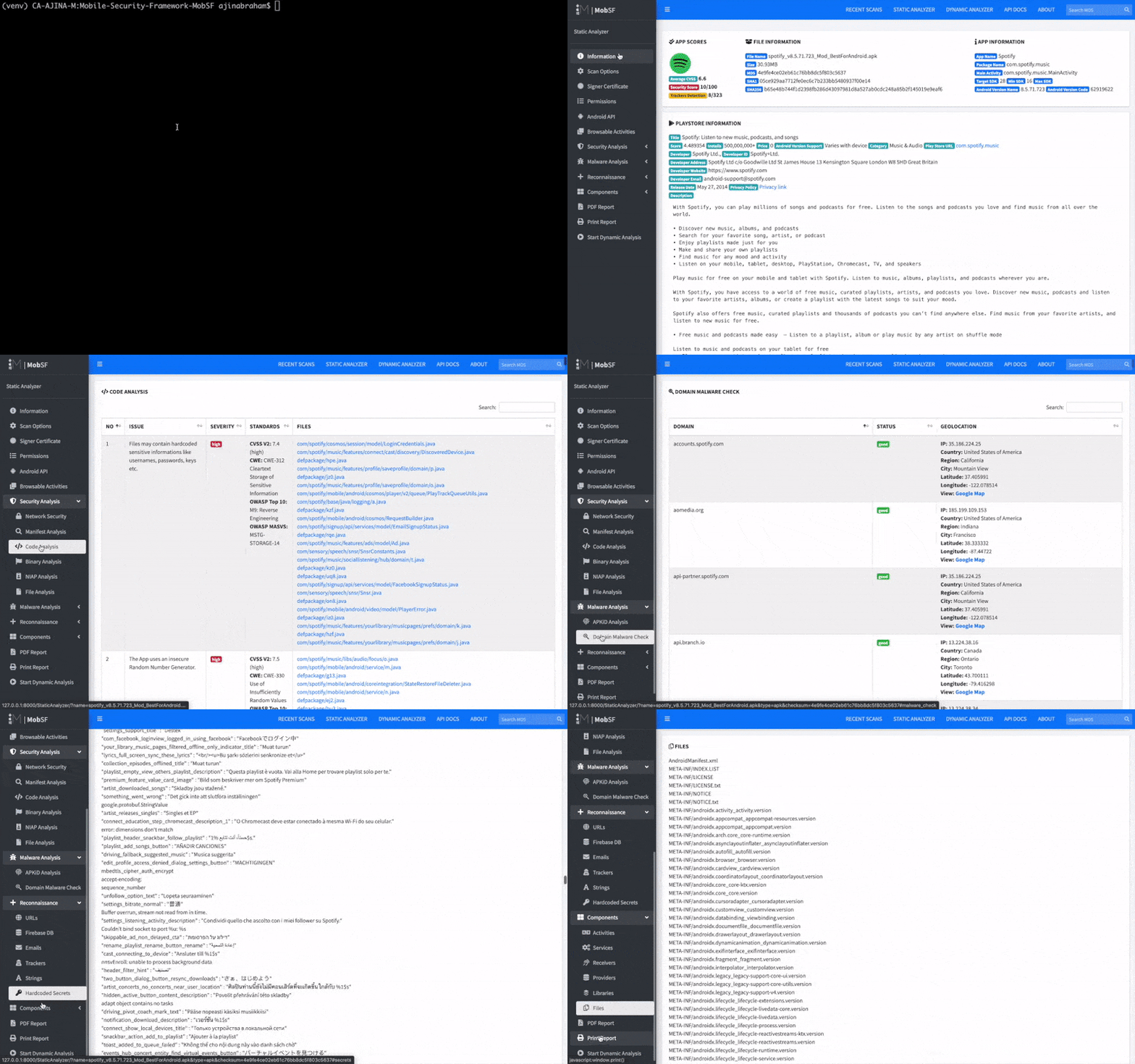
### 静态分析 - Android
### 静态分析 - iOS

### 动态分析 - Android APK

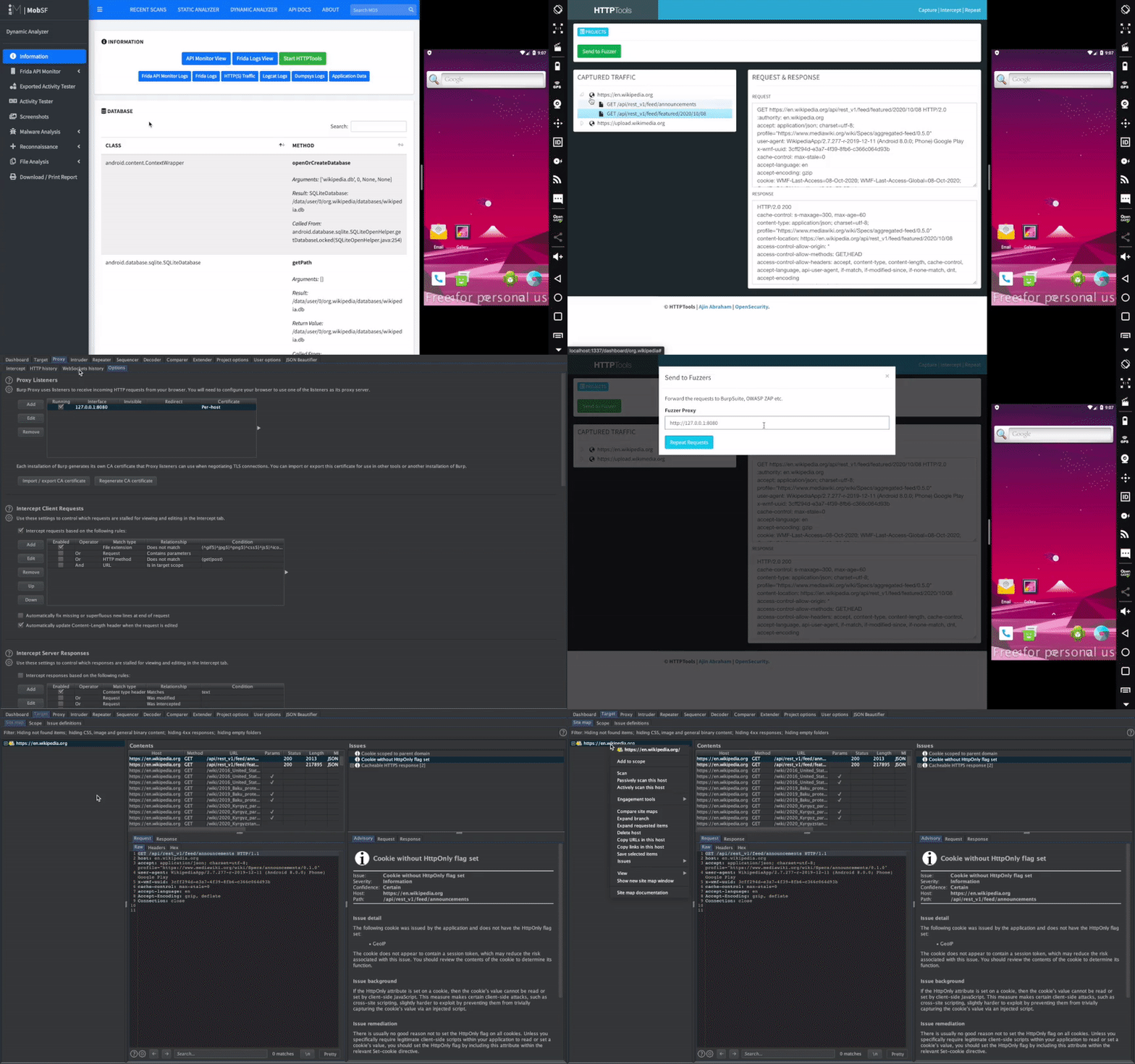
### Web API 查看器
### 动态分析 - iOS IPA

## 荣誉贡献者
* Amrutha VC — 为新的 MobSF Logo 作出贡献
* Dominik Schlecht — 为向 MobSF 添加 Windows Phone 应用静态分析功能作出贡献
* Esteban — 改进 Android Manifest 分析和静态分析功能
* Matan Dobrushin — 为向 MobSF 添加 Android ARM 模拟器支持作出贡献 — 特别感谢 cuckoo-droid
* Shuxin — Android 二进制分析
* Abhinav Saxena (@xandfury) — 为 Travis CI 和日志集成作出贡献
*  [Netguru](https://www.netguru.com/) (@karolpiateknet, @mtbrzeski) — 为 Swift 支持、规则贡献和 SAST 重构作出贡献。
* Maxime Fawe (@Arenash13) — 为匹配策略实现 SAST 模式匹配算法作出贡献。
## 鸣谢
* Abhinav Sejpal (@Abhinav_Sejpal) — 报告错误、功能请求和 UI/UX 建议
* Anant Srivastava (@anantshri) — 提供 Activity Tester 思路
* Anto Joseph (@antojoseph) — 协助处理 SuperSU
* Bharadwaj Machiraju (@tunnelshade) — 从头编写 pyWebProxy
* Rahul (@c0dist) — Kali 支持
* MindMac — 编写 Android Blue Pill
* Oscar Alfonso Diaz (@OscarAkaElvis) — 提供 Dockerfile 贡献
* Thomas Abraham — JS 界面改进
* Tim Brown (@timb_machine) — iOS 二进制分析规则集
* Shanil Prasad (@Rajuraju14) — 改进 iOS ATS 分析
* Jovan Petrovic (@JovanPetrovic) — 赞助服务器以托管 mobsf.live
标签:Android 安全, API 检测, APK 分析, APPX, CI/CD 集成, DAST, DevSecOps, IPA, JADX, Java RMI, JS文件枚举, Mobile Security Framework, MobSF, REST API, Windows Mobile, 上游代理, 云安全监控, 云资产清单, 合规性检查, 安全研究平台, 应用加固, 恶意软件分析, 权限分析, 目录枚举, 移动安全, 移动应用安全测试, 网络流量分析, 自定义脚本, 请求拦截, 运行时分析, 逆向工具, 逆向工程, 隐私分析, 静态分析