zaevlad/vulnflow-audit
GitHub: zaevlad/vulnflow-audit
VulnFlow 是一个可视化的智能合约审计工作流构建器,允许用户在画布上编排 AI agent、规则检查和外部工具来完成可复用的 Solidity 审计流水线。
Stars: 14 | Forks: 3
# VulnFlow
**VulnFlow 是一个可视化的智能合约审计构建器。**
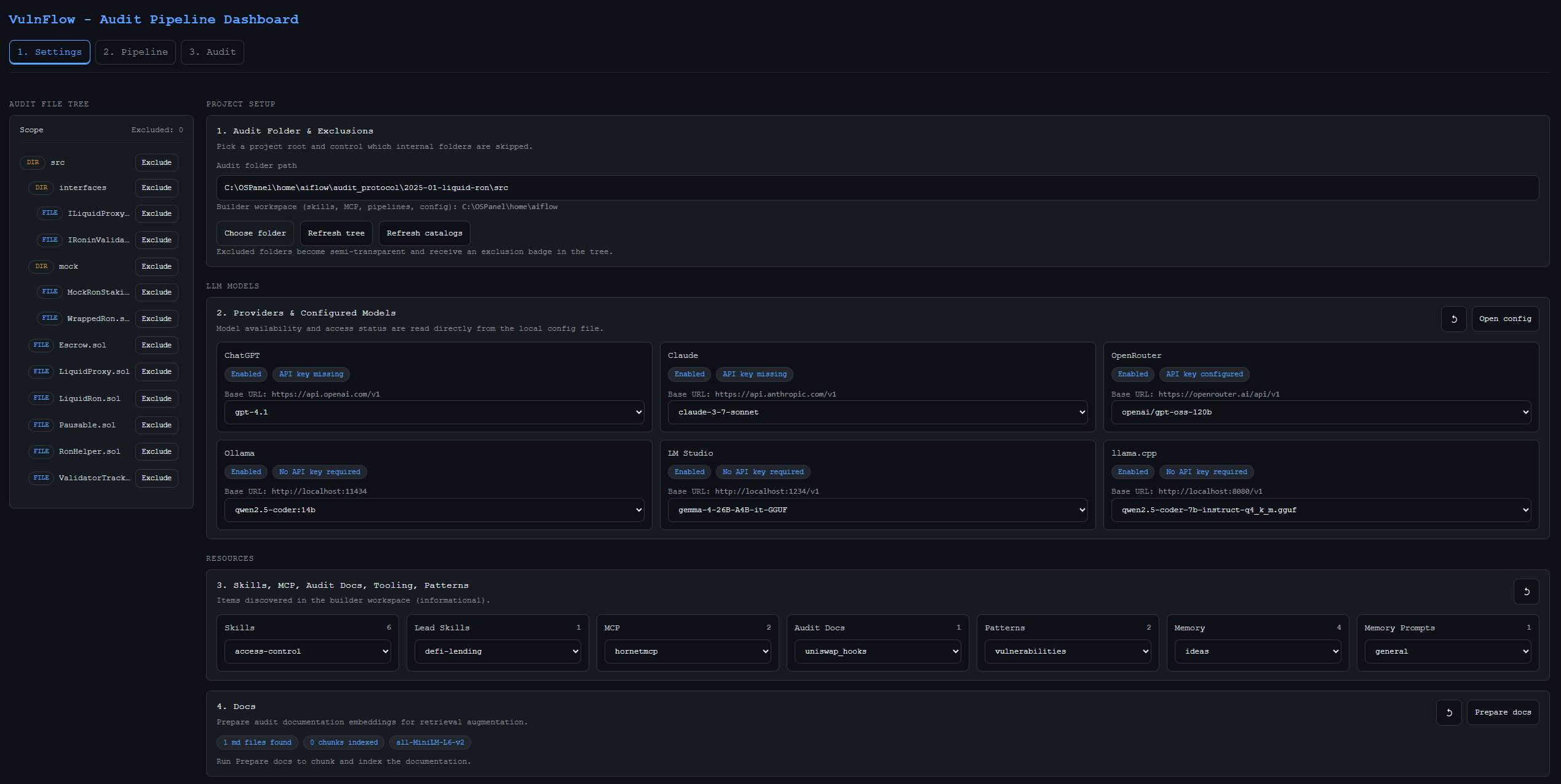
它可以帮助你在一个界面中,结合 AI agent、模式检查、记忆、Python 逻辑和外部工具来设置审计流水线。你只需选择一个 Solidity 项目,在画布上构建工作流,运行它,然后将流水线以 JSON 格式保存到 `pipelines/` 中。
## 目录
- [VulnFlow](#vulnflow)
- [目录](#table-of-contents)
- [什么是 VulnFlow](#what-is-vulnflow)
- [为什么选择 VulnFlow](#why-vulnflow)
- [2026 年 5 月更新](#may-2026-update)
- [截图](#screenshots)
- [快速开始](#quick-start)
- [如何设置审计项目](#how-to-set-up-a-project-for-audit)
- [环境要求](#what-you-need)
- [项目结构](#project-structure)
- [配置](#configuration)
- [使用 UI](#using-the-ui)
- [外部工具](#external-tools)
- [故障排除](#troubleshooting)
- [更多文档](#more-documentation)
- [CLI](#cli)
- [联系方式](#contact)
## 什么是 VulnFlow
VulnFlow 是一个用于构建和运行智能合约审计工作流的本地工具。
你可以使用它来:
- 在一条流水线中连接多个审计 agent
- 运行基于规则的模式检查
- 将中间笔记存储到记忆文件中
- 在步骤之间添加 Python 逻辑
- 附加外部 REST 工具
- 保存并重用审计场景
当你希望拥有一个可重复的审计流程,而不是手动执行每一个步骤时,它会非常有用。
## 为什么选择 VulnFlow
- **支持本地模型**
你不需要为每一个审计步骤配备昂贵的高端模型。VulnFlow 支持使用本地和兼容 OpenAI 的模型来进行准备、分析、记忆和报告。
- **由你决定使用多少个 agent**
运行一个简单的单 agent 流程,或者构建一个更大的多步审计流水线。保存流水线以便日后重复使用。
- **基于 YAML 的自定义漏洞检查**
根据你自己的 YAML 规则运行结构化检查。你可以创建新的模式文件或扩展现有文件。
- **灵活的记忆与上下文控制**
保存中间结果,在后续步骤中重用它们,并控制传递给每次模型调用的数据量。
- **通过基于 embedding 的文档搜索提供额外的协议上下文**
将协议文档添加到 `audit_docs/` 中,让 VulnFlow 在主要审计步骤之前找到相关的片段。
- **用于强化审计的安全研究工具**
VulnFlow 支持连接诸如 `Solodit` 和 `HornetMCP` 等工具,允许模型查找类似的 bug 和外部安全上下文。用户使用自己的 API key 连接这些工具。
- **完全可定制的流水线**
由你决定流水线的运作方式、结果的合并方式,以及哪些内容会进入最终报告。
- **可重用的可视化工作流**
以可视化方式构建审计流程,将其保存为 JSON,然后在相同或不同的协议上再次运行。
- **集结构化分析与开放性分析于一体**
在同一个工作流中结合 agent、模式检查、记忆、代码块和外部工具。
- **专为漫长且复杂的审计而设计**
对于较大的协议,可使用合约级审查、基于集群的审查、已保存的记忆和可重用的流水线。
## 2026 年 5 月更新
本次发布添加了应用内置的**代码编辑器**和持久化的 **AI 聊天面板**,让你无需离开仪表板即可检查合约、提出问题并更改流水线。
### 内置编辑器(标签页 4)
- 从文件树浏览并打开工作区文件(技能、流水线、审计目标、配置等)。
- 在 **Monaco** 编辑器中编辑代码,支持 VS Code Dark Plus 主题、Solidity 及其他常用语言的语法高亮,以及小地图。
- **保存**、**重载**以及未保存更改警告可确保你的编辑安全地保留在工作区边界内。
- 点击聊天回答中的 `path:line` 引用,可直接跳转到编辑器中对应的文件和行。
### AI 聊天面板
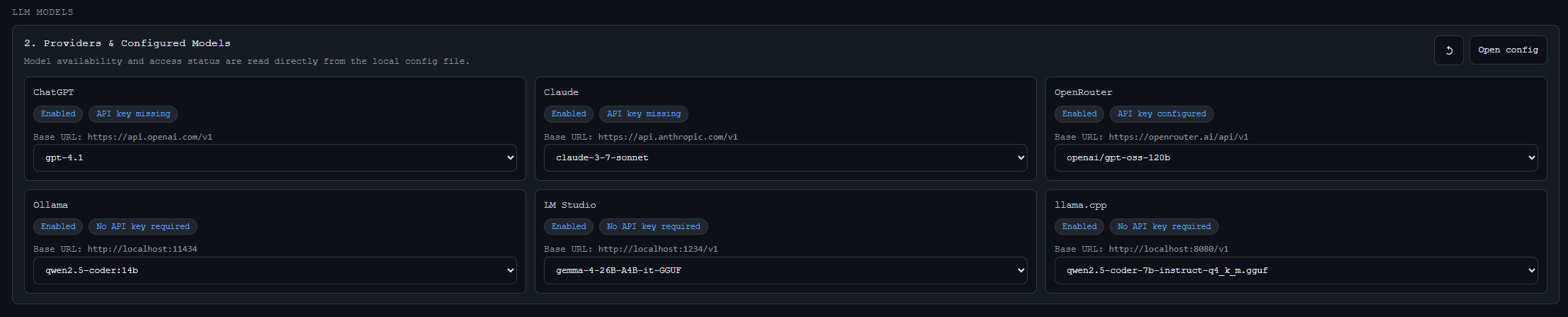
聊天面板在**流水线**、**审计**和**编辑器**标签页(在设置页隐藏)上保持打开状态。它以流式传输方式提供 `conf.yaml` 中配置的模型(OpenRouter、LM Studio、Ollama 等)的回答。
**对话**
- 基于 SQLite 的会话,支持重命名、删除、搜索和导出为 Markdown。
- 将会话固定到某个标签页(流水线、审计、编辑器)或让其在所有地方都可用。
- 面板宽度可调整;模型选择在重载后会被记住。
**Agent 能力**
每条消息都会将当前的 **UI 上下文**发送到后端(活动标签页、流水线节点和边、目录、文档索引状态、审计路径等)。Agent 利用该快照及工作区工具,确保始终立足于你的项目。
| 领域 | Agent 可以做什么 |
|------|------------------------|
| **代码和文档** | 读取工作区文件,列出目录,搜索 `audit_docs/` RAG 索引 |
| **资源** | 检查在工作区中发现的技能、MCP 配置、模式和其他目录 |
| **可视化** | 规划并在沙盒化的 iframe 中渲染交互式 HTML/SVI 小部件 |
| **流水线** | 仅在 **流水线** 标签页上 — 创建、编辑和删除画布节点和边 |
| **外部 API** | 调用 `conf.yaml` 中的 REST 工具(例如 HornetMCP 和 Solodit) |
| **附件** | 在使用支持视觉的模型时,接收来自输入框的图片和 PDF |
在**审计**、**编辑器**和其他非流水线标签页上,聊天以**只读**模式运行:agent 可以解释画布和代码库,但不能修改流水线。
**响应格式**
助手回复以**信封部件**的形式进行流式传输,并在聊天中渐进式渲染:
| 部件 | 你看到的内容 |
|------|----------------|
| **文本** | Markdown 回答,包含语法高亮的代码块和可点击的 `path:line` 引用 |
| **计划** | 在可视化工作之前显示的计划卡片(方法、技术、关键要素) |
| **工具状态** | 每次工具调用(读取文件、搜索文档、外部 API 等)的实时状态 |
| **小部件** | 带有交互式 HTML/SVG 的沙盒化 iframe;小部件可以将后续 prompt 发送回聊天 |
| **画布操作** | 显示流水线修改是已应用、已拒绝还是已跳过的徽章 |
| **错误** | 内联显示工具或 agent 错误,而不会中断当前轮次的其余部分 |
可视化响应遵循固定的流程:确认 → **计划** → **小部件** → 简短叙述。
**典型场景**
1. **流水线标签页** — *“在审计步骤之后添加一个验证 agent。”* Agent 通过流式画布操作实时更新画布。
2. **编辑器标签页** — *“查找 `Contract.sol` 中的重入问题。”* Agent 读取文件,以 `Contract.sol:142` 风格的引用进行回答;点击引用会在编辑器中打开该行。
3. **任何标签页** — *“显示 `harvest()` 的调用流程图。”* Agent 读取相关的 `.sol` 文件,调用 `plan_visualization`,然后在小部件中渲染一个泳道图(见下方截图)。
4. **研究** — *“查找与此模式类似的漏洞。”* Agent 通过你配置的外部工具查询 HornetMCP 或 Solodit,并总结匹配结果。
**操作者用户体验**
- 实时 SSE 流式传输,支持停止、排队的后续 prompt,以及显示 token 使用量和历史记录压缩的上下文胶囊。
- 针对手动编辑和 agent 驱动更改的画布**审计日志**和**撤销**功能。
关于编辑器、聊天工具流程以及审计会话期间生成的调用流程图示例,请查看下方的新截图(`screen_6`–`screen_8`)。
## 截图
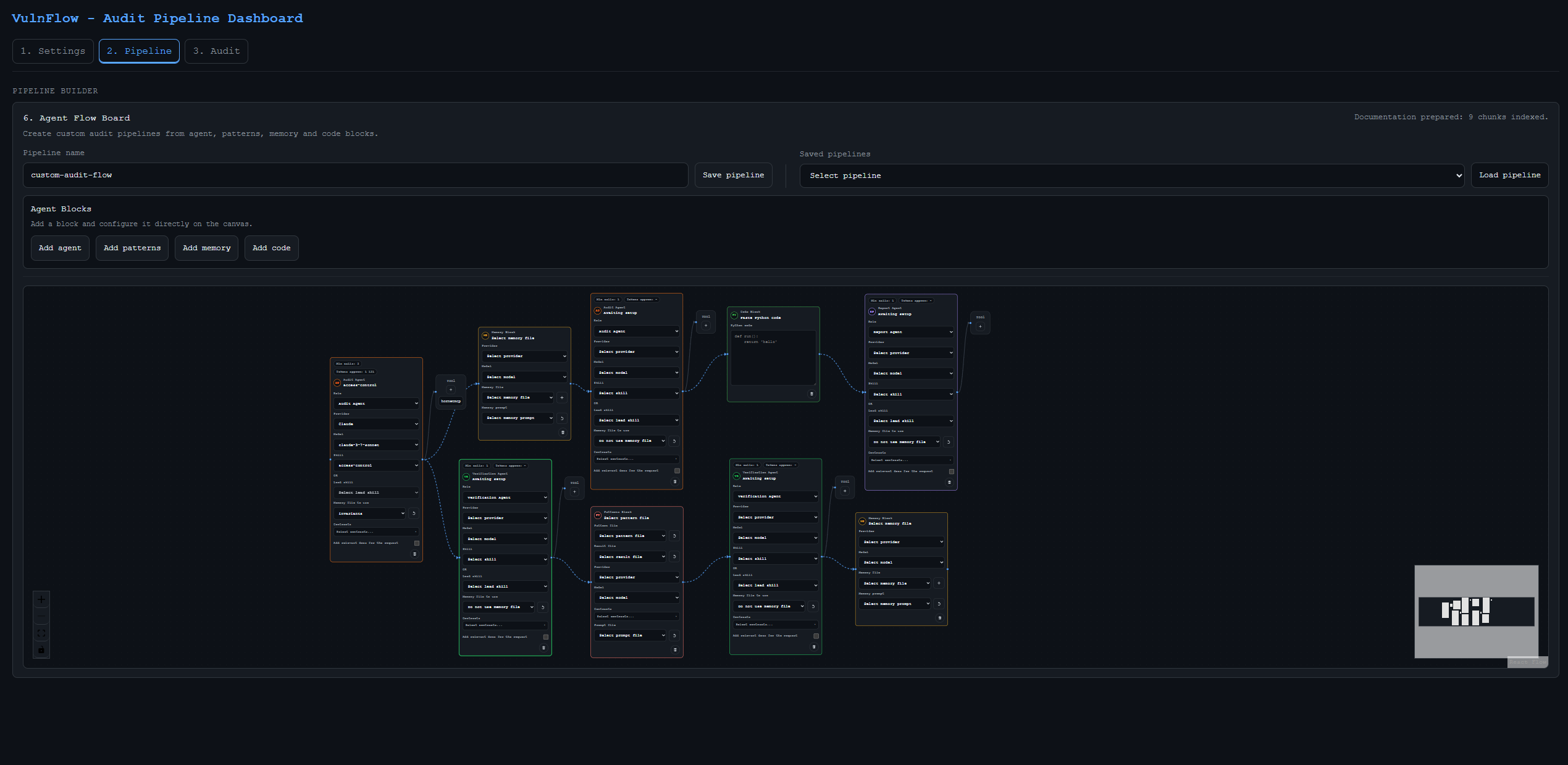
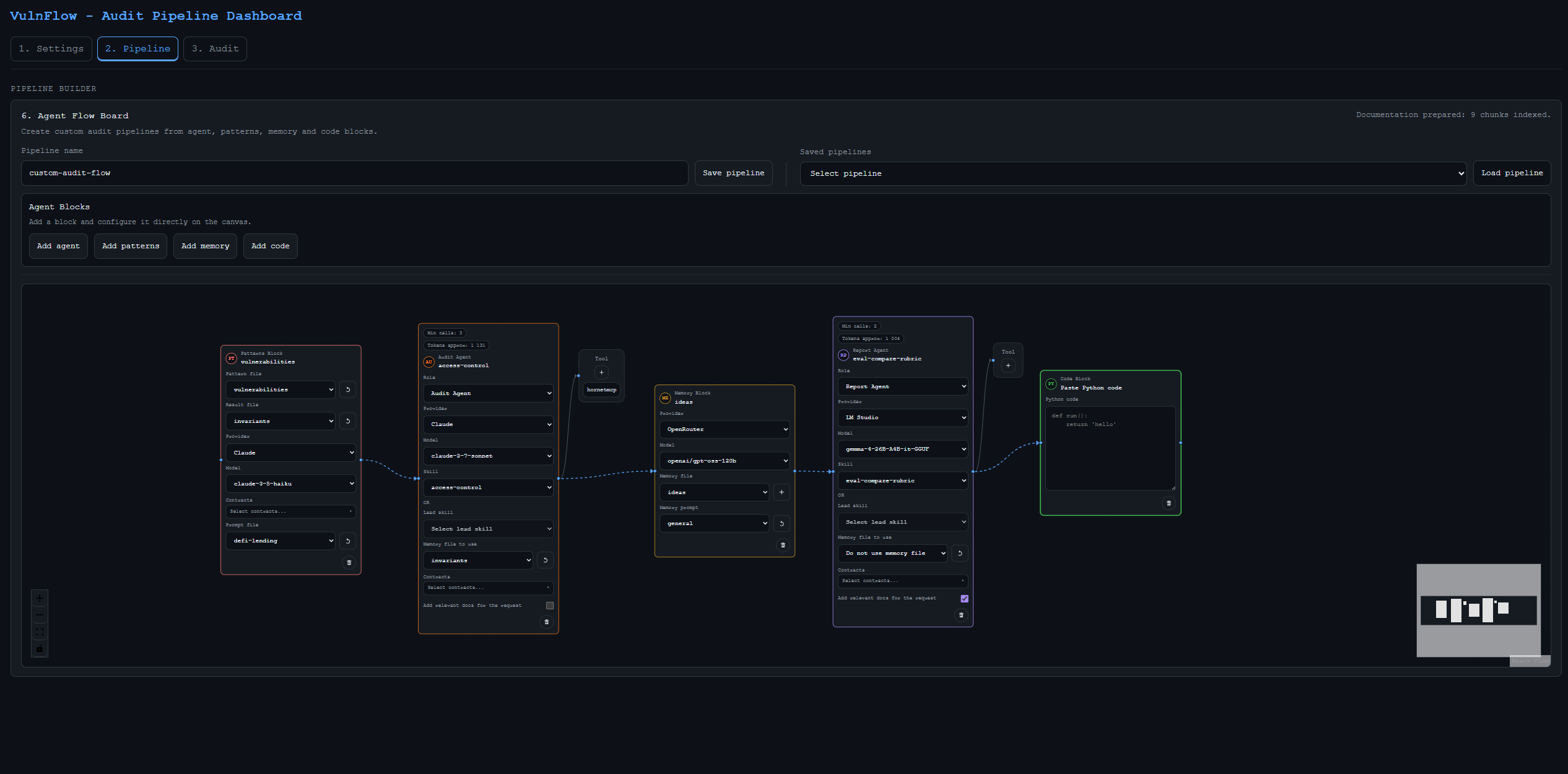
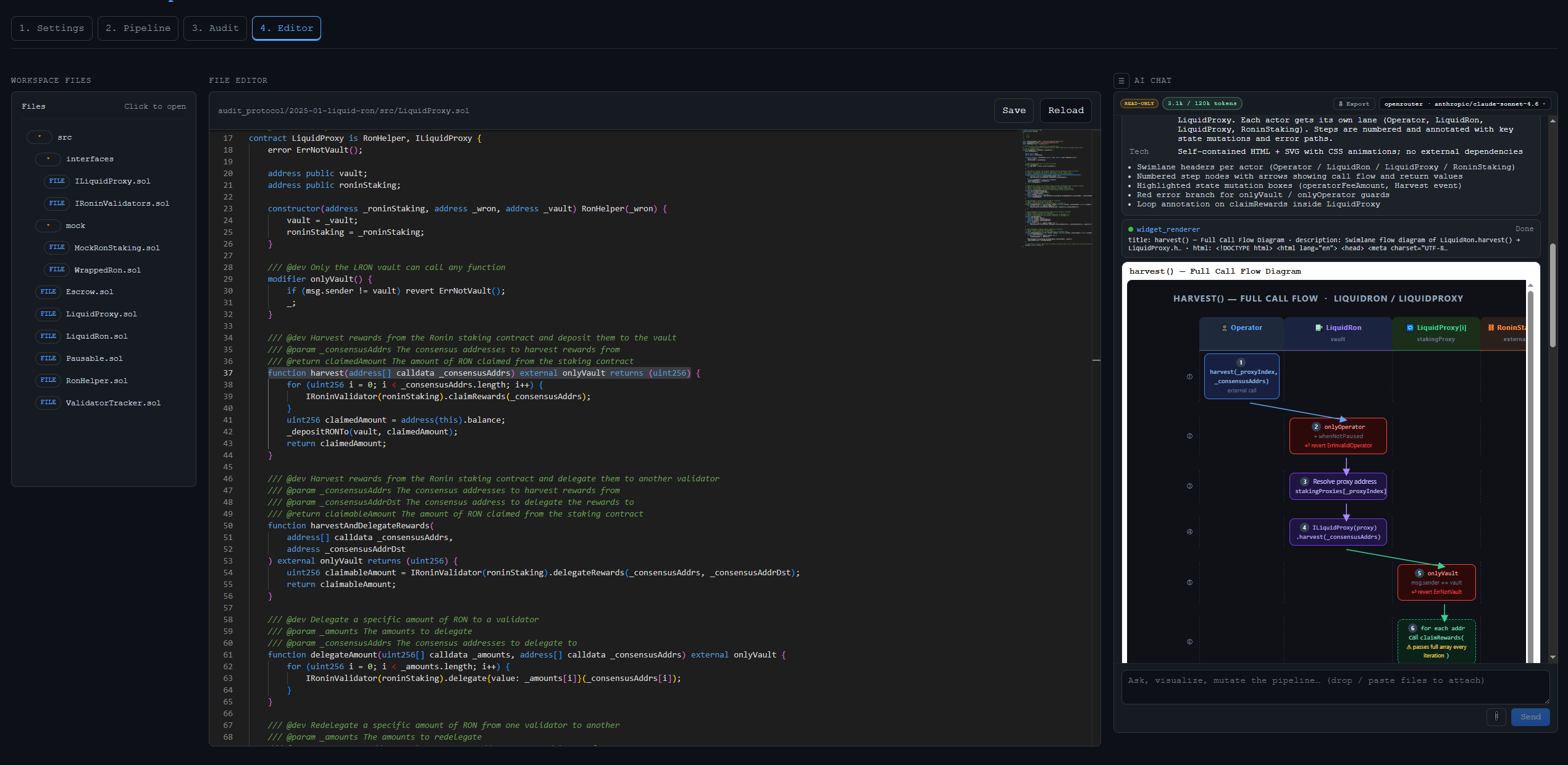
2026 年 5 月 — 带有工作区文件树的编辑器标签页、Monaco 编辑器,以及显示交互式调用流程图的 AI 聊天。
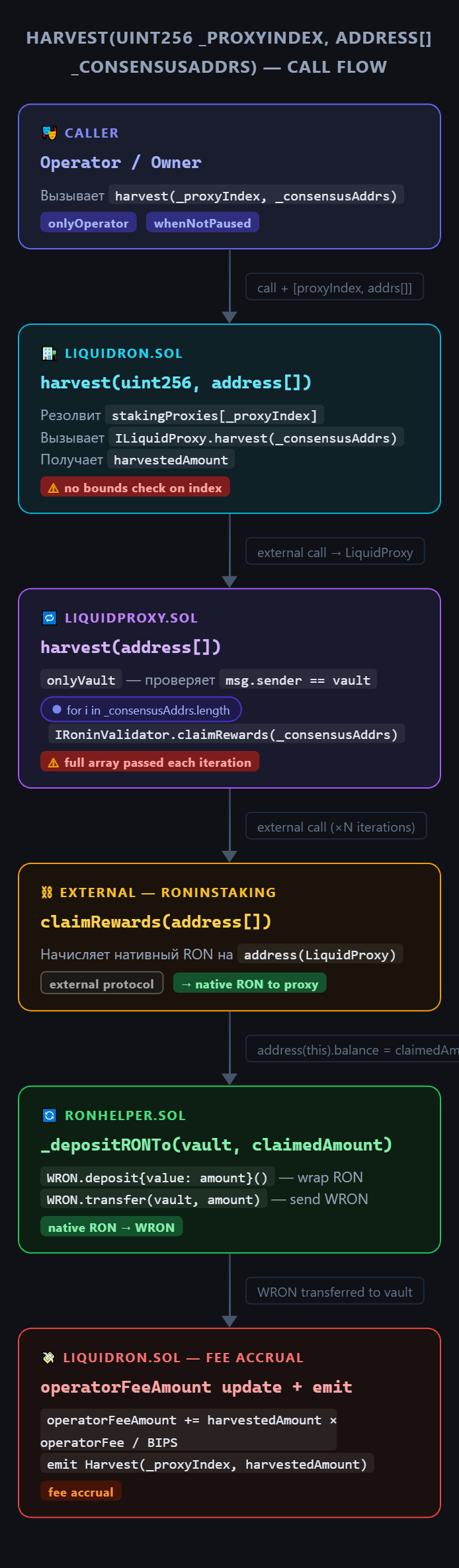
2026 年 5 月 — AI 生成的泳道图,追踪跨合约的 Solidity 函数,并附带漏洞说明。
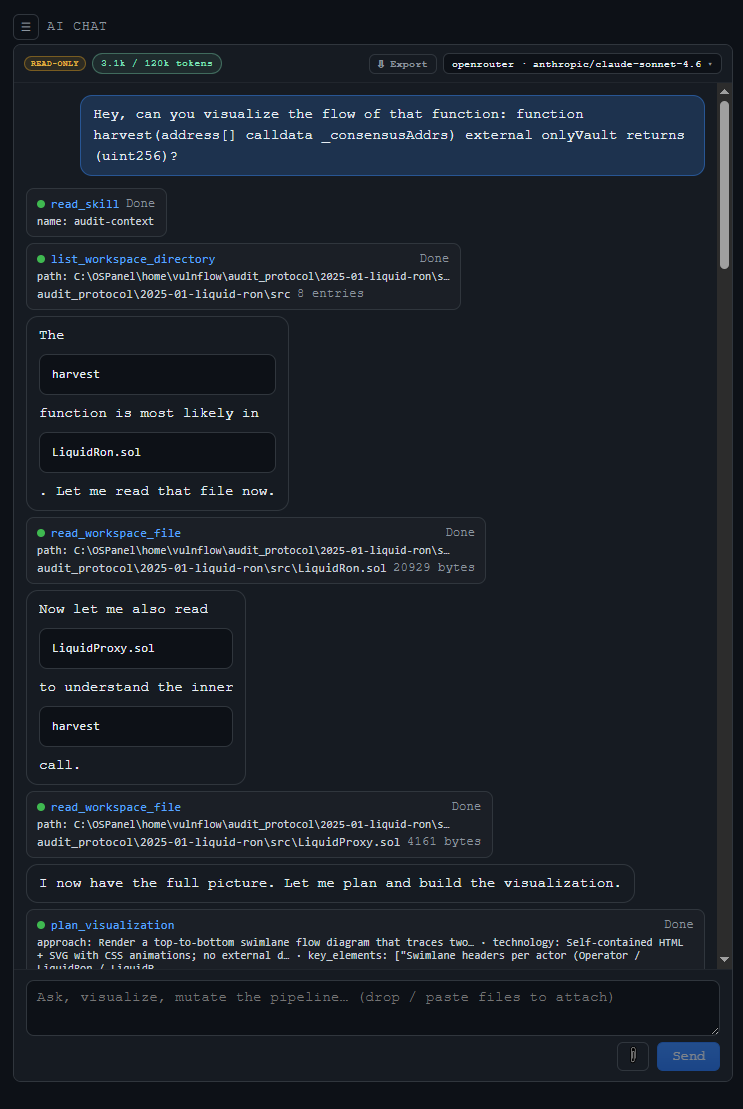
2026 年 5 月 — AI 聊天在构建图表之前使用工作区工具(读取文件、列出目录、规划可视化)。
## 快速开始
在**仓库根目录**(包含 `vulnflow.py` 的文件夹)下运行所有命令。
### 一次性设置
1. **创建 Python 环境**
选择与你的终端匹配的命令:
| 终端 | 命令 |
|----------|---------|
| **Linux / macOS (bash)** | `./vulnflow prepare` |
| **Windows PowerShell** | `.\vulnflow.ps1 prepare` |
| **Windows Command Prompt** | `vulnflow.cmd prepare` |
| **任何平台 (直接使用 Python)** | `python vulnflow.py prepare` |
在 Linux 或 macOS 上,如果 `./vulnflow` 尚不可执行,请运行一次 `chmod +x vulnflow`。
`prepare` 步骤会创建 `.venv/` 并从 `requirements.txt` 安装依赖。
2. **构建 UI**(首次运行,或在 UI 更改后):
cd dashboard/ui
npm install
npm run build
cd ../..
3. **配置模型** — 编辑 `conf.yaml` 并在 `models` 下至少启用一个提供商。
### 启动构建器
启动脚本(`./vulnflow`、`vulnflow.cmd`、`vulnflow.ps1`)会自动使用项目 `.venv` 调用 `vulnflow.py`。当你使用它们时,**你不需要先激活虚拟环境**。
为你的终端选择**一个**启动命令:
| 终端 | 命令 |
|----------|---------|
| **Linux / macOS (bash)** | `./vulnflow start` |
| **Windows PowerShell** | `.\vulnflow.ps1 start` |
| **Windows Command Prompt** | `vulnflow.cmd start` |
**备选方案 — 激活 `.venv` 并直接使用 Python**
如果你更喜欢经典的工作流程,请先激活环境,然后运行 `start`:
| 终端 | 激活 | 启动 |
|----------|----------|-------|
| **Windows PowerShell** | `.venv\Scripts\Activate.ps1` | `python vulnflow.py start` |
| **Linux / macOS (bash)** | `source .venv/bin/activate` | `python vulnflow.py start` |
| **Windows Command Prompt** | `.venv\Scripts\activate.bat` | `python vulnflow.py start` |
以上所有命令的作用都是相同的:启动本地仪表板并打印一个 URL,例如 `http://127.0.0.1:7337`。如果浏览器没有自动打开,请在浏览器中访问该地址。
在终端中按 `Ctrl+C` 停止服务器。
### 启动选项
默认情况下,VulnFlow 会绑定到 `127.0.0.1` 并首先尝试端口 `7337`。在上述任何启动命令后追加标志,例如:
```
./vulnflow start --port 8080 --no-open
```
```
.\vulnflow.ps1 start --port 8080 --no-open
```
| 标志 | 含义 |
|------|---------|
| `--port
` | 首选端口(如果被占用则向上扫描) |
| `--no-open` | 不自动打开浏览器标签页 |
| `--keep-db` | 启动时保留 `vulnflow.db`(向量索引) |
## 如何设置审计项目
这是在 VulnFlow 中开始新审计的最简单的推荐流程。
1. 安装并准备 VulnFlow。
运行 `python vulnflow.py prepare`,激活虚拟环境,并在尚未构建 UI 的情况下构建它。
2. 在 `conf.yaml` 中配置你的模型。
在 `models` 部分添加至少一个已启用的提供商。没有这一步,agent 将无法运行。
3. 将目标协议放入 `audit_protocol/`。
将你要审计的智能合约仓库放入 `audit_protocol/` 中。这样可以使目标代码位于可预测的位置。
4. 如果需要,将额外的文档添加到 `audit_docs/`。
如果你希望 agent 将规范、白皮书、笔记或协议文档作为加上下文使用,请将它们放在那里。
5. 启动构建器。
从项目根目录运行 `python vulnflow.py start` 并打开本地 UI。
6. 在 UI 中选择审计项目文件夹。
选择协议文件夹,并排除你不想处理的文件或目录。
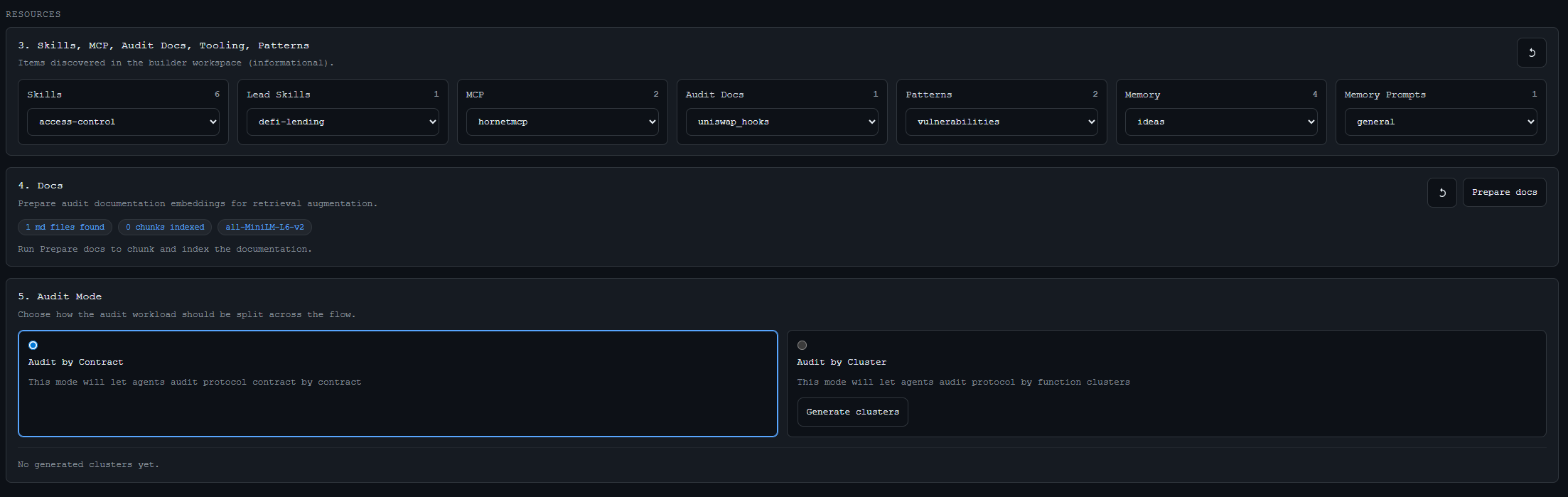
7. 选择审计模式。
如果你想直接审计特定的 `.sol` 文件,请使用 `Contract` 模式。如果你希望 VulnFlow 首先对相关合约进行分组,请使用 `Cluster` 模式。
8. 在画布上构建流水线。
添加你所需的模块,例如 `Agent`、`Patterns`、`Memory`、`Code` 和 `Tool`。
9. 保存流水线。
保存的场景会作为 JSON 文件存储在 `pipelines/` 中,因此你可以稍后重用它们。
10. 运行审计。
从 UI 启动流水线,监控日志,并查看生成的输出。
## 环境要求
| 组件 | 需要的原因 |
|-----------|------------------|
| Python 3 | 后端和 CLI |
| Node.js + npm | 在 `dashboard/ui` 中构建 UI |
| LLM 访问权限 | 通过 `conf.yaml` 执行 agent |
| 磁盘空间 | embedding、索引和本地运行时数据 |
诸如 `forge` 和 `medusa` 等可选工具也可以在你的系统 PATH 中使用,但它们并不是打开和使用仪表板的必需条件。
## 项目结构
| 路径 | 用途 |
|------|---------|
| `vulnflow.py` | 主要 CLI 入口点 |
| `dashboard/server.py` | FastAPI 服务器 |
| `dashboard/pipeline/` | 流水线引擎、agent、工具、路由 |
| `dashboard/cluster_logic/` | Solidity 解析与集群生成 |
| `dashboard/ui/` | React UI 源码 |
| `dashboard/dist/` | 由后端提供服务的已构建 UI |
| `pipelines/` | 已保存的流水线 JSON 文件 |
| `audit_protocol/` | 审计的目标仓库 |
| `audit_docs/` | 用于 RAG 和上下文的附加文档 |
| `memory/` | 长期保留的笔记和输出 |
| `patterns/` | 模式检查定义 |
主要的运行时文件和文件夹还包括 `skills/`、`lead_skills/`、`memory_promts/`、`conf.yaml` 和 `vulnflow.db`。
## 配置
主要的配置文件是 `conf.yaml`。
你至少需要:
- 在 `models` 下拥有一个已启用的提供商
- 该提供商中至少有一个模型名称
- API key 或环境变量引用
最小示例:
```
models:
openrouter:
enabled: true
api_key_env: OPENROUTER_API_KEY
supports_response_format: true
models:
- openai/gpt-4o-mini
tools: []
```
支持的提供商 ID:
- `chatgpt`
- `claude`
- `openrouter`
- `ollama`
- `lmstudio`
- `llama_cpp`
注意事项:
- 对于真实的 API key,请使用环境变量。
- 如果本地模型不能很好地支持严格的 JSON 输出,请设置 `supports_response_format: false`。
- 兼容 OpenAI 的提供商也可以使用 `base_url` 或 `base_url_env`。
有关完整详细信息,请参阅 [`docs/configuration.md`](docs/configuration.md)。
## 使用 UI
UI 是围绕可视化画布构建的。
基本流程:
1. 选择要审计的项目文件夹。
2. 选择 `Contract` 或 `Cluster` 模式。
3. 在画布上添加并连接模块。
4. 保存流水线。
5. 运行并查看结果。
主要模块类型:
| 模块 | 功能 |
|-------|---------------|
| `Agent` | 运行选定的审计角色 |
| `Patterns` | 根据基于 YAML 的模式规则检查合约 |
| `Tool` | 从 `conf.yaml` 调用外部 REST 工具 |
| `Memory` | 将摘要和笔记写入 `memory/*.md` |
| `Code` | 运行 Python 逻辑并将数据传递给下一步 |
如果你希望 agent 使用额外的协议文档,请准备 `audit_docs/` 并根据需要在相应位置启用文档使用功能。
## 外部工具
`conf.yaml` 中的 `tools` 部分用于描述外部 REST API。
每个配置的工具都可以公开端点,供模型通过 `Tool` 节点调用。当你希望 agent 获取额外数据或触发受控的外部工作流时,这会非常有用。
## 故障排除
| 问题 | 检查内容 |
|---------|---------------|
| UI 未构建 | 在 `dashboard/ui` 中运行 `npm install` 和 `npm run build` |
| 虚拟环境问题 | 确保 `prepare` 后已激活 `.venv` |
| UI 中没有提供商 | 检查 `enabled: true`、模型列表和 API key 设置 |
| 本地模型返回错误的 JSON | 尝试 `supports_response_format: false` |
| RAG 没有有用的上下文 | 检查 `audit_docs/` 中的文件和你的索引流程 |
| SQLite 或 `sqlite-vec` 问题 | 确保正确安装了所需的 Python 软件包 |
## 更多文档
额外的项目指南:
- [`docs/README.md`](docs/README.md)
- [`docs/configuration.md`](docs/configuration.md)
- [`docs/memory-in-the-project.md`](docs/memory-in-the-project.md)
- [`docs/additional-documentation-rag.md`](docs/additional-documentation-rag.md)
- [`docs/pattern-checking.md`](docs/pattern-checking.md)
- [`docs/agent-preparation.md`](docs/agent-preparation.md)
- [`docs/agent-audit.md`](docs/agent-audit.md)
- [`docs/agent-verification.md`](docs/agent-verification.md)
- [`docs/agents-report-and-test.md`](docs/agents-report-and-test.md)
- [`docs/skills-and-lead-skills.md`](docs/skills-and-lead-skills.md)
- [`docs/pipeline-save-and-load.md`](docs/pipeline-save-and-load.md)
- [`vulnflow_project.md`](vulnflow_project.md)
## CLI
```
python vulnflow.py --help
python vulnflow.py start --help
```
## 联系方式
如有问题、想法和建议:
- X / Twitter: [@RightNowIn](https://x.com/RightNowIn) 标签:AI智能体, AI风险缓解, MITM代理, Petitpotam, Web3安全, 可视化工具, 智能合约审计, 逆向工具