Lucas18062025/Sentinel
GitHub: Lucas18062025/Sentinel
一款原生 PowerShell 编写的 Windows 11 维护与安全审计引擎,将临时文件智能清理与防火墙状态审计整合于单一脚本中,并提供完整的取证日志。
Stars: 3 | Forks: 0
# 🛡️ Sentinel V5 "Apex" ⚡
[](https://docs.microsoft.com/en-us/powershell/)
[](https://www.microsoft.com/windows)
[](LICENSE)
[](CHANGELOG.md)
[](README.md)
[](https://github.com/Lucas18062025)
[](https://github.com/Lucas18062025/Sentinel/graphs/contributors)
## 📋 目录
- [Sentinel 的功能?](#-qué-hace-sentinel)
- [技术特性](#-características-técnicas)
- [系统要求](#-requisitos)
- [安装与使用](#-instalación-y-uso)
- [参数](#-parámetros)
- [输出与证据](#-salida-y-evidencia)
- [脚本架构](#-arquitectura-del-script)
- [路线图](#-roadmap)
- [作者](#-autor)
## 🔍 Sentinel 的功能?
Sentinel 是一个生产级 PowerShell 脚本,将**智能清理临时文件**与**主动安全审计**结合在一个统一的引擎中。专为稳定性和可追溯性是绝对优先事项的 Windows 11 环境而设计。
**解决的问题:**
Windows 系统会累积临时文件和冗余日志,从而降低性能。同时,防火墙状态可能会在没有可见警报的情况下发生变化。Sentinel 在一次执行中针对这两个问题源头进行攻击,并为每个操作提供取证证据。
## ⚙️ 技术特性
| 特性 | 详情 |
|---|---|
| **流式处理引擎** | 2 阶段 Pipeline,无 RAM 负载 |
| **优化的进度** | 每 100 个文件更新一次 UI(节省 CPU) |
| **智能排除** | 统一的 Regex 保护 `.log`, `.etl`, `.evtx`, `.dat`, `.tmp`, `.cache`, `.bak` 以及正在使用的文件 (`-lock-`) |
| **时间过滤器** | 仅删除生成时间超过 N 分钟的文件(可配置) |
| **防火墙审计** | 实时验证 3 个配置文件(Domain、Private、Public)的状态 |
| **取证日志** | 每次执行都会在 `C:\Logs\Sentinel\` 生成一个 `Sentinel_YYYYMMDD_HHmmss.log` 文件 |
| **磁盘指标** | 通过比较之前/之后的状态计算恢复的 MB 数 |
| **支持 -WhatIf** | 通过 `SupportsShouldProcess` 实现原生模拟模式 |
| **权限验证** | 如果没有管理员权限,脚本将停止运行 |
## 📦 系统要求
- Windows 10 / Windows 11
- PowerShell 5.1 或更高版本
- **管理员**权限(必需)
- 可用的 `NetSecurity` 模块(在 Windows 10/11 中默认包含)
## 🚀 安装与使用
### 1. 克隆仓库
```
git clone https://github.com/Lucas18062025/Sentinel.git
cd Sentinel
```
### 2. 启用脚本执行(如果需要)
```
# 仅用于本次会话,不修改全局策略
Set-ExecutionPolicy -ExecutionPolicy Bypass -Scope Process
```
### 3. 运行 Sentinel
```
# 标准执行(需要以管理员身份运行 PowerShell)
.\sentinel.ps1
# 模拟模式 — 不删除任何内容,仅显示将要执行的操作
.\sentinel.ps1 -WhatIf
# 静默模式,无需确认
.\sentinel.ps1 -Force
# 记录每个已处理文件的详细日志
.\sentinel.ps1 -DetailedLog
# 更改文件的最短存在时间(默认:15分钟)
.\sentinel.ps1 -MinFileAgeMinutes 60
```
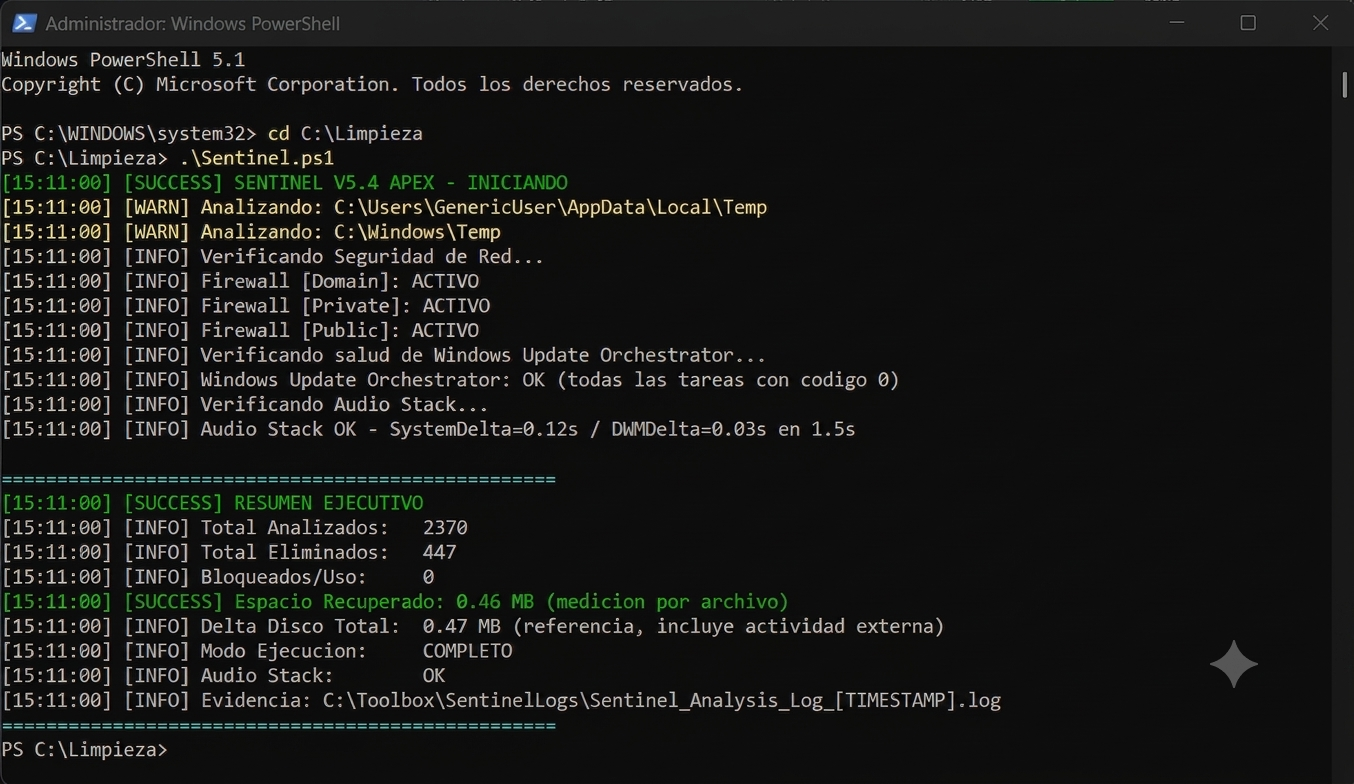
## 🎬 实时执行
## 
## 🎛️ 参数
| 参数 | 类型 | 默认值 | 描述 |
|---|---|---|---|
| `-MinFileAgeMinutes` | `int` | `15` | 认为文件可删除的最小存在时间(分钟) |
| `-DetailedLog` | `switch` | `false` | 启用对每个已删除文件的单独记录 |
| `-Force` | `switch` | `false` | 抑制交互式确认(自动模式 / CI) |
| `-WhatIf` | `switch` | `false` | 模拟模式:显示操作但不执行它们 |
## 📁 输出与证据
每次执行会自动生成:
```
C:\Logs\Sentinel\
└── Sentinel_20260327_150929.log
```
**日志内容:**
```
[15:09:29] [SUCCESS] SENTINEL V5 APEX - INICIANDO
[15:09:30] [WARN] Analizando: C:\Users\...\AppData\Local\Temp
[15:09:31] [INFO] Firewall [Domain]: ACTIVO
[15:09:31] [INFO] Firewall [Private]: ACTIVO
[15:09:31] [ERROR] Firewall [Public]: VULNERABLE (OFF)
[15:09:31] [SUCCESS] RESUMEN EJECUTIVO
[15:09:31] [INFO] Total Analizados: 1247
[15:09:31] [INFO] Total Eliminados: 389
[15:09:31] [INFO] Bloqueados/Uso: 12
[15:09:31] [SUCCESS] Espacio Recuperado: 142.5 MB
```
## 🏗️ 脚本架构
```
sentinel.ps1
│
├── [1] Configuración de Entorno
│ Timestamps, rutas de log, targets, regex de exclusión
│
├── [2] Logger de Alto Rendimiento (Write-SentinelLog)
│ Escritura directa sin validaciones redundantes
│ Output coloreado por nivel (ERROR/WARN/SUCCESS/INFO)
│
├── [3] Validación de Privilegios
│ Detiene ejecución si no hay permisos de Administrador
│
├── [4] Motor de Limpieza — Streaming de 2 Etapas
│ Stage 1: Get-ChildItem con atributos filtrados
│ Stage 2: ForEach con lógica interna (sin pipe extra)
│ Progreso visual cada 100 archivos
│
├── [5] Auditoría de Seguridad
│ Get-NetFirewallProfile → estado de los 3 perfiles
│ Log diferenciado: INFO (activo) vs ERROR (vulnerable)
│
└── [6] Métricas y Resumen Final
Comparación de disco Before/After
Resumen ejecutivo en consola + log
```
## 🗺️ 路线图
- [ ] **V6** — 审计处于异常状态的服务
- [ ] **V6** — 与 Event Viewer 集成(过去 24 小时的严重错误)
- [ ] **V7** — 可疑网络连接检测模块(`Get-NetTCPConnection`)
- [ ] **V7** — 以 HTML 格式导出摘要用于报告
- [ ] **V8** — 与 Telegram Bot 集成以实现远程警报
## 👤 作者
**Lucas Villagra**
Cybersecurity Analyst | Ethical Hacker | SOC Analyst
📍 San Miguel de Tucumán, Argentina
[](https://linkedin.com/in/lucas-villagra-cybersecurity)
[](https://github.com/Lucas18062025)
[](https://lucas18062025.github.io/Portafolio/)
## 📄 许可证
本项目基于 **MIT** 许可证。您可以自由使用、修改和分发它,但需注明出处。
查看 [LICENSE](LICENSE) 文件了解更多详情。
标签:AI合规, IPv6, Libemu, OpenCanary, PowerShell, Windows 11, 系统清理, 系统运维